key INFINITI G35 2006 Workshop Manual
[x] Cancel search | Manufacturer: INFINITI, Model Year: 2006, Model line: G35, Model: INFINITI G35 2006Pages: 344, PDF Size: 6.81 MB
Page 167 of 344

*: Refer to the separate Navigation
System Owner's Manual.
HOW TO USE ªSETTINGº BUTTON The ª Settings º screen will appear when
the ªSETTINGº button is pushed.
Display settings The following menu will appear when
pushing the ªSETTINGº button, selecting
the ª Display º key and pushing the
ªENTERº button.
Display:
To turn off the screen, select the ª Dis-
play º key and push the ªENTERº button to
turn off the ª ON º indicator. When any
mode button is pushed with the screen
off, the screen turns on for further opera-
tion. The screen will turn off automatically 5 seconds after the operation is finished
on the map display.
To turn on the screen, select the ª Dis-
play º key and turn on the ª ON º indicator.
Brightness/Contrast/Background Color:
To adjust the brightness and contrast of
the screen, select the ª Brightness ºor
ª Contrast º key and push the ªENTERº
button. Then you can adjust the bright-
ness to darker or brighter and the con-
trast to lower or higher using the joystick.
For information on the ª Background
Color º key, refer to the separate Naviga-
tion System Owner's Manual.SAA1293 SAA1294
Display screen, heater, air conditioner and audio systems
4-7
w 06.1.4/V35-D/V5.0
X
Page 168 of 344

Clock settings The following display will appear when
pushing the ªSETTINGº button, selecting
the ª Clock º key and pushing the ªENTERº
button.
On-screen Clock:
When this item is turned to ON, a clock is
always displayed in the upper right corner
of the screen.
This clock will indicate the time almost
exactly because it is always adjusted by
the GPS system. Clock Format:
Choose either the 12-hour clock display or
the 24-hour clock display.
Offset Adjust:
Adjust the time by increasing or de-
creasing per minute.
Daylight Saving Time:
Turn this item to ON for daylight saving
time application.
Time Zone:
Choose the time zone from the following
O Pacific
O Mountain
O Central
O Eastern
O Atlantic
O Newfoundland
Language/Units settings The Language/Units setting screen will
appear when selecting the ª Language/
Units º key and pushing the ªENTERº
button.SAA1091 SAA1295
4-8 Display screen, heater, air conditioner and audio systems
w 06.1.4/V35-D/V5.0
X
Page 169 of 344
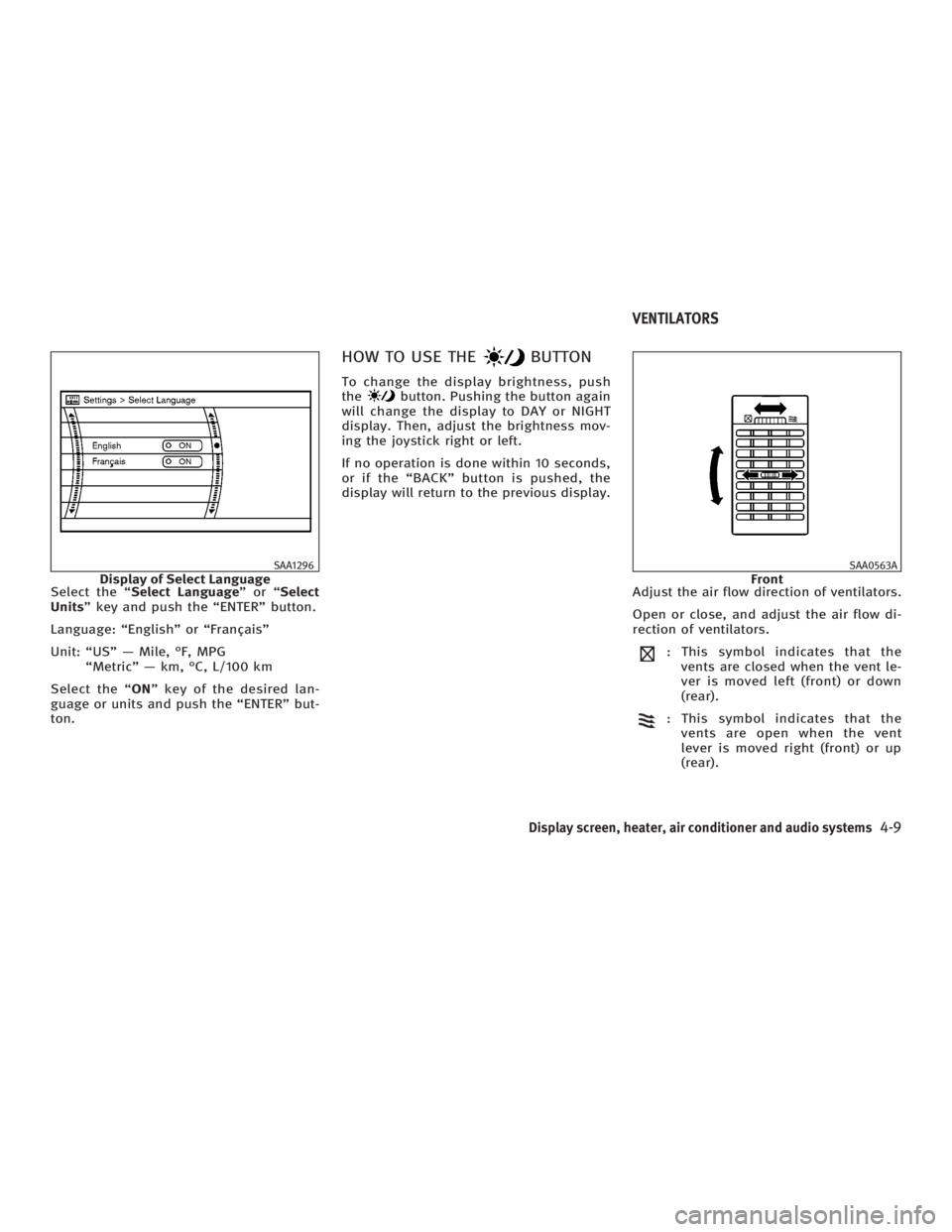
Select the ª Select Language ºorª Select
Units º key and push the ªENTERº button.
Language: ªEnglishº or ªFranÕaisº
Unit: ªUSº Ð Mile, ÉF, MPG
ªMetricº Ð km, ÉC, L/100 km
Select the ª ON º key of the desired lan-
guage or units and push the ªENTERº but-
ton. HOW TO USE THE BUTTONTo change the display brightness, push
the button. Pushing the button again
will change the display to DAY or NIGHT
display. Then, adjust the brightness mov-
ing the joystick right or left.
If no operation is done within 10 seconds,
or if the ªBACKº button is pushed, the
display will return to the previous display.
Adjust the air flow direction of ventilators.
Open or close, and adjust the air flow di-
rection of ventilators.
: This symbol indicates that the
vents are closed when the vent le-
ver is moved left (front) or down
(rear).
: This symbol indicates that the
vents are open when the vent
lever is moved right (front) or up
(rear).SAA1296
Display of Select Language SAA0563A
FrontVENTILATORS
Display screen, heater, air conditioner and audio systems
4-9
w 06.1.4/V35-D/V5.0
X
Page 174 of 344
The air conditioning system in your
INFINITI vehicle is charged with a refriger-
ant designed with the environment in
mind. This refrigerant will not harm the
earth's ozone layer. However, special
charging equipment and lubricant are re-
quired when servicing your INFINITI air
conditioner. Using improper refrigerants
or lubricants will cause severe damage to
your air conditioning system. See ªCa-
pacities and recommended fuel/
lubricantsº in the ª9. Technical and con-
sumer informationº section for air condi-
tioning system refrigerant and lubricant
recommendations.
An INFINITI dealer will be able to service
your environmentally friendly air condi-
tioning system.
WARNINGThe air conditioner system contains refriger-
ant under high pressure. To avoid personal
injury, any air conditioner service should be
done only by an experienced technician with
proper equipment. Turn the ignition switch to the ACC or ON
position and push the POWER or RADIO
button to turn on the radio. If you listen to
the radio with the engine not running, the
key should be turned to the ACC position.
Radio reception is affected by station sig-
nal strength, distance from radio trans-
mitter, buildings, bridges, mountains and
other external influences. Intermittent
changes in reception quality normally are
caused by these external influences.
Using a cellular phone in or near the ve-
hicle may influence radio reception
quality.
Radio reception Your radio system is equipped with state-
of-the-art electronic circuits to enhance
radio reception. These circuits are de-
signed to extend reception range, and to
enhance the quality of that reception.
However there are some general charac-
teristics of FM, AM and satellite radio sig-
nals that can affect radio reception
quality in a moving vehicle, even when
the finest equipment is used. These char-
acteristics are completely normal in a
given reception area, and do not indicate
any malfunction in your radio system. Remember that a moving vehicle is not
the ideal place to listen to a radio. Be-
cause of the movement, reception condi-
tions will constantly change. Buildings,
terrain, signal distance and interference
from other vehicles can work against
ideal reception. Described below are
some of the factors that can affect your
radio reception.
SERVICING AIR CONDITIONER AUDIO SYSTEM
4-14 Display screen, heater, air conditioner and audio systems
w 06.1.4/V35-D/V5.0
X
Page 197 of 344
rectionº anytime the system is waiting for
a response.
When you get used to the menus in the
system, you can talk ahead by saying
more than one command at a time. For
example, say, ªCall five five five one two
one twoº or ªMemo pad record.º
Also, when you get used to the system re-
sponses, you can skip ahead to the tone
by pressing the button on the steer-
ing wheel. However, if you press the
button when the system is waiting
for a response from you it will end the VR
session.
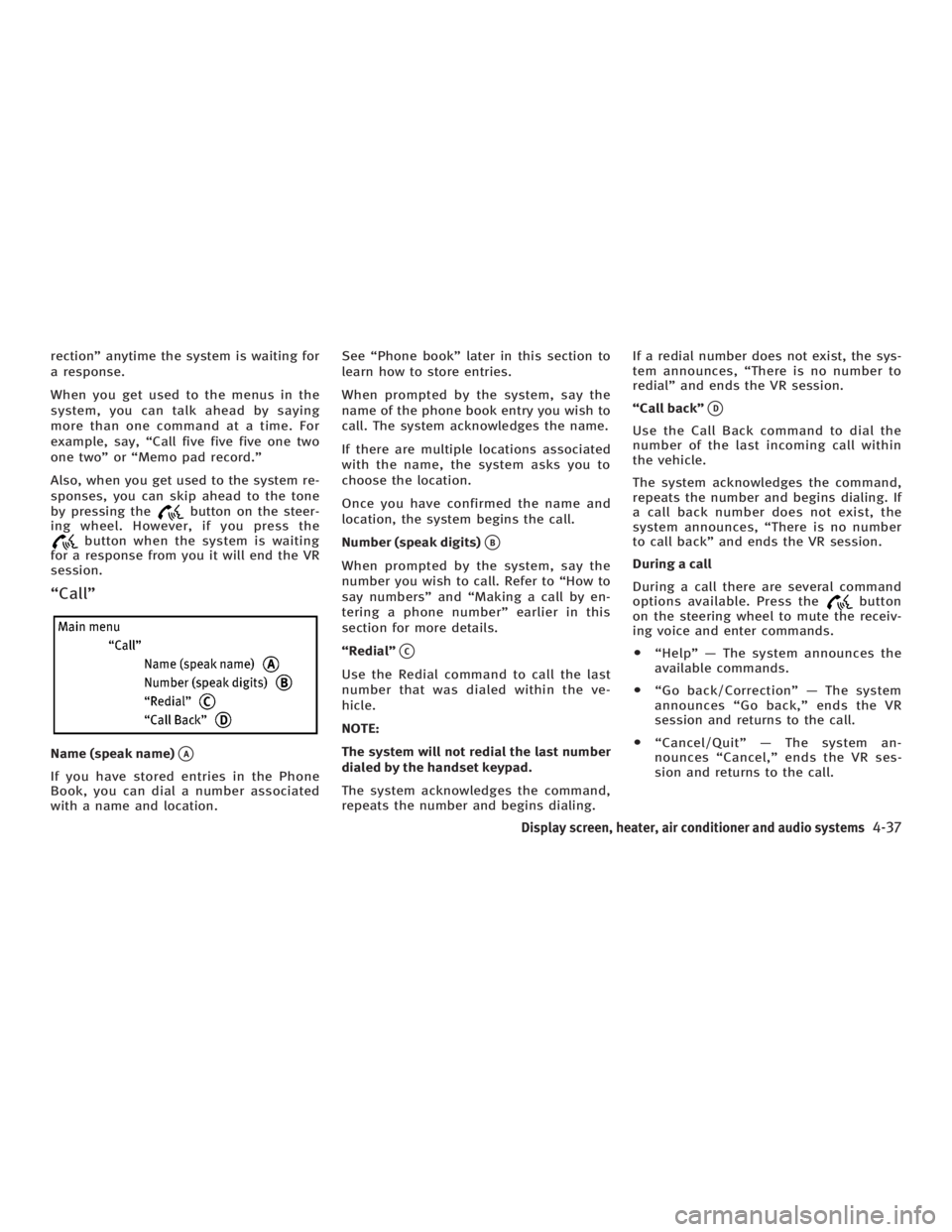
ªCallº
Name (speak name)
q A
If you have stored entries in the Phone
Book, you can dial a number associated
with a name and location. See ªPhone bookº later in this section to
learn how to store entries.
When prompted by the system, say the
name of the phone book entry you wish to
call. The system acknowledges the name.
If there are multiple locations associated
with the name, the system asks you to
choose the location.
Once you have confirmed the name and
location, the system begins the call.
Number (speak digits)
q B
When prompted by the system, say the
number you wish to call. Refer to ªHow to
say numbersº and ªMaking a call by en-
tering a phone numberº earlier in this
section for more details.
ªRedialº
q C
Use the Redial command to call the last
number that was dialed within the ve-
hicle.
NOTE:
The system will not redial the last number
dialed by the handset keypad.
The system acknowledges the command,
repeats the number and begins dialing. If a redial number does not exist, the sys-
tem announces, ªThere is no number to
redialº and ends the VR session.
ªCall backº
q D
Use the Call Back command to dial the
number of the last incoming call within
the vehicle.
The system acknowledges the command,
repeats the number and begins dialing. If
a call back number does not exist, the
system announces, ªThere is no number
to call backº and ends the VR session.
During a call
During a call there are several command
options available. Press the button
on the steering wheel to mute the receiv-
ing voice and enter commands.
O ªHelpº Ð The system announces the
available commands.
O ªGo back/Correctionº Ð The system
announces ªGo back,º ends the VR
session and returns to the call.
O ªCancel/Quitº Ð The system an-
nounces ªCancel,º ends the VR ses-
sion and returns to the call.
Display screen, heater, air conditioner and audio systems
4-37
w 06.1.4/V35-D/V5.0
X
Page 205 of 344
5 Starting and driving Precautions when starting and driving .............. 5-2
Exhaust gas (Carbon monoxide) .................. 5-2
Three way catalyst....................................... 5-3
Tire pressure monitoring system (TPMS) ..... 5-3
Avoiding collision and rollover..................... 5-5
Drinking alcohol/drugs and driving ............. 5-5
All-wheel drive (AWD) driving safety
precautions (for AWD models) .................... 5-6
Ignition switch (except Intelligent Key
system)............................................................. 5-6
Automatic transmission ............................... 5-6
Manual transmission .................................. 5-7
Key positions .............................................. 5-8
INFINITI Vehicle Immobilizer System ............ 5-8
Ignition switch (models with the Intelligent
Key system) ...................................................... 5-9
Ignition switch positions ............................. 5-9
INFINITI Vehicle Immobilizer System .......... 5-10
Before starting the engine............................... 5-10
Starting the engine .......................................... 5-11
Driving the vehicle .......................................... 5-12
Automatic transmission.............................. 5-12
Manual transmission ................................ 5-16
Parking brake .................................................. 5-19 Cruise control ................................................. 5-20
Precautions on cruise control .................... 5-20
Cruise control operations .......................... 5-20
Break-in schedule ........................................... 5-22
Increasing fuel economy ................................. 5-22
All-wheel drive (AWD) (if so equipped) ............ 5-23
All-wheel drive (AWD) warning light ........... 5-23
Parking/parking on hills ................................. 5-24
Power steering ................................................ 5-25
Brake system .................................................. 5-26
Braking precautions .................................. 5-26
Anti-lock brake system (ABS)..................... 5-26
Vehicle Dynamic Control (VDC) system .......... 5-28
Rear active steer (RAS) system (if so
equipped) ....................................................... 5-29
Cold weather driving....................................... 5-30
Freeing a frozen door lock ......................... 5-30
Anti-freeze ................................................. 5-30
Battery ...................................................... 5-30
Draining of coolant water .......................... 5-30
Tire equipment .......................................... 5-30
Special winter equipment........................... 5-31
Driving on snow or ice ............................... 5-31
Engine block heater (if so equipped) ......... 5-32
w 06.1.13/V35-D/V5.0
X
Page 206 of 344
WARNINGO Do not leave children, impaired adults, or
pets alone in your vehicle. They could ac-
cidentally injure themselves or others
through inadvertent operation of the ve-
hicle. Also, on hot, sunny days, tempera-
tures in a closed vehicle could quickly be-
come high enough to cause severe or pos-
sibly fatal injuries to people or animals.
O Closely supervise children when they are
around cars to prevent them from
playing and becoming locked in the
trunk where they could be seriously in-
jured. Keep the car locked, with the rear
seatback and trunk lid securely latched
when not in use, and prevent children's
access to car keys.
EXHAUST GAS (Carbon monoxide)
WARNINGDo not breathe exhaust gases; they contain
colorless and odorless carbon monoxide. Carbon monoxide is dangerous. It can cause
unconsciousness or death.
O If you suspect that exhaust fumes are
entering the vehicle, drive with all win-
dows fully open, and have the vehicle in-
spected immediately.
O Do not run the engine in closed spaces
such as a garage.
O Do not park the vehicle with the engine
running for any extended length of time.
O Keep the trunk lid closed while driving,
otherwise exhaust gases could be drawn
into the passenger compartment. If you
must drive with the trunk lid open, follow
these precautions:
Ð Open all the windows.
Ð Set the air recirculation switch OFF
and the fan control at high to circu-
late the air.
O If electrical wiring or other cable connec-
tions must pass to a trailer through the
seal on the trunk lid or the body, follow
the manufacturer's recommendation to prevent carbon monoxide entry into
the vehicle.
O If a special body, camper, or other equip-
ment is added for recreational or other
usage, follow the manufacturer's recom-
mendation to prevent carbon monoxide
entry into the vehicle. (Some recre-
ational vehicle appliances such as
stoves, refrigerators, heaters, etc. may
also generate carbon monoxide.)
O The exhaust system and body should be
inspected by a qualified mechanic when-
ever:
Ð Your vehicle is raised while being ser-
viced.
Ð You suspect that exhaust fumes are
entering into the passenger compart-
ment.
Ð You notice a change in the sound of
the exhaust system.
Ð You have had an accident involving
damage to the exhaust system, un-
derbody, or rear of the vehicle.PRECAUTIONS WHEN STARTING AND
DRIVING
5-2 Starting and driving
w 06.1.4/V35-D/V5.0
X
Page 210 of 344
Remember, drinking and driving don't
mix!
And that's true for drugs too (over the
counter, prescription, and illegal drugs).
Don't drive if your ability to operate your
vehicle is impaired by alcohol, drugs, or
some other physical condition.
ALL-WHEEL DRIVE (AWD) DRIVING
SAFETY PRECAUTIONS (for AWD
models)
WARNINGO Do not drive beyond the performance ca-
pability of the tires, even with AWD en-
gaged. Accelerating quickly, sharp
steering maneuvers or sudden braking
may cause loss of control.
O Always use tires of the same type, size,
brand, construction (bias, bias-belted or
radial), and tread pattern on all four
wheels. Install tire chains on the rear
wheels when driving on slippery roads
and drive carefully. O This vehicle is not designed for off-road
(rough road) use. Do not drive on sandy
or muddy roads that tires may get stuck
in.
O Do not place an AWD equipped vehicle
on a two wheel dynamometer or raise
two wheels off the ground and shift the
transmission to any D (drive) or R (re-
verse) position. Doing so may result in
transmission damage or unexpected ve-
hicle movement which could result in se-
rious vehicle damage or personal injury.
O Never operate the accelerator pedal with
any wheels raised and the other wheels
on the ground while jacking up or with
any wheels on a roller and the other
wheels on the ground. Otherwise, the
vehicle could lurch forward or backward.
O When a wheel is off the ground due to an
unlevel surface, do not spin the wheel
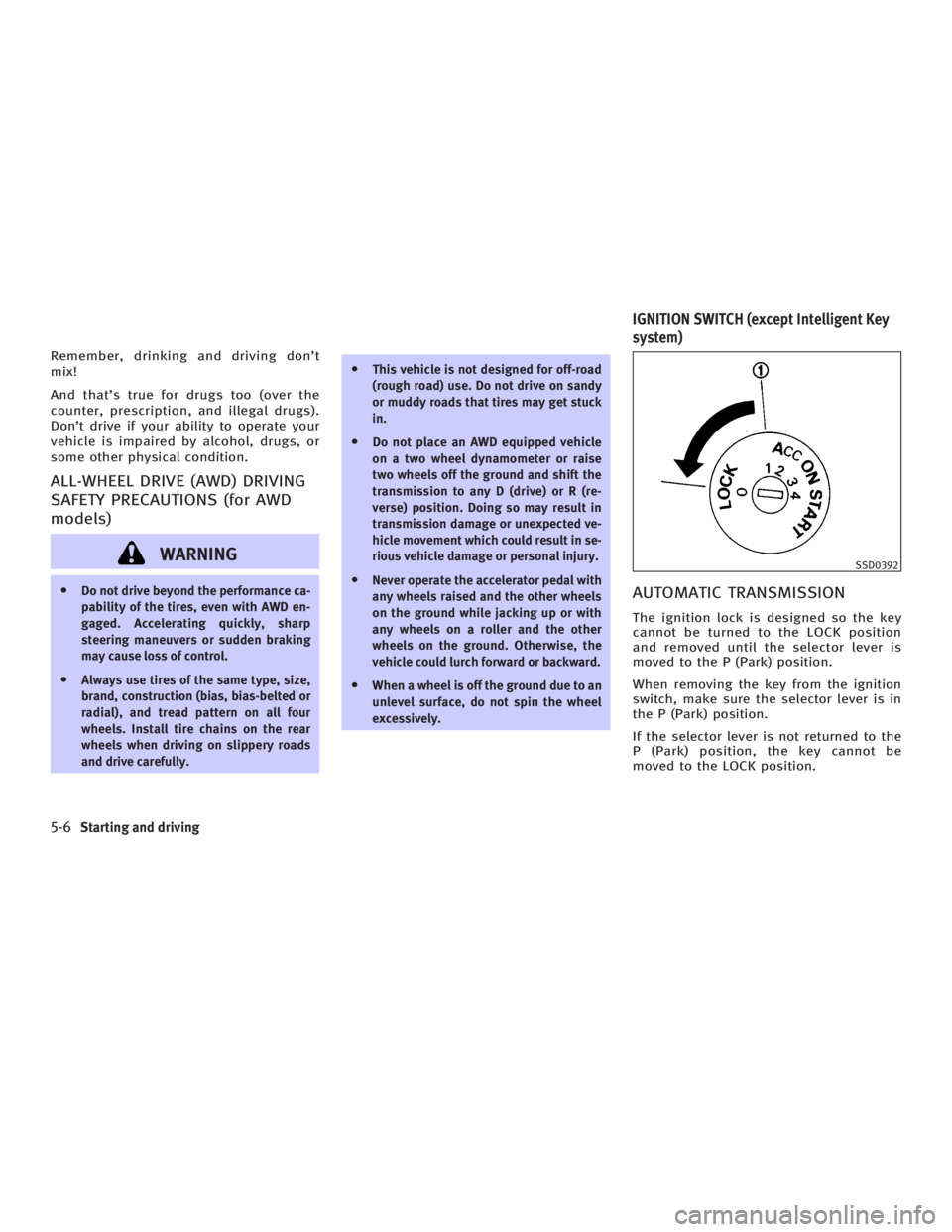
excessively. AUTOMATIC TRANSMISSION The ignition lock is designed so the key
cannot be turned to the LOCK position
and removed until the selector lever is
moved to the P (Park) position.
When removing the key from the ignition
switch, make sure the selector lever is in
the P (Park) position.
If the selector lever is not returned to the
P (Park) position, the key cannot be
moved to the LOCK position. SSD0392
IGNITION SWITCH (except Intelligent Key
system)
5-6 Starting and driving
w 06.1.4/V35-D/V5.0
X
Page 211 of 344
When the key cannot be turned toward
the LOCK position, proceed as follows to
remove the key:
1. Move the selector lever into the P po-
sition.
2. Turn the ignition key slightly toward
the ON direction.
3. Turn the key to the LOCK position.
4. Remove the key.
If the key is removed from the ignition
switch, the selector lever cannot be
moved from the P position. The selector
lever can be moved if the ignition switch is
in the ON position and the foot brake pedal
is depressed.
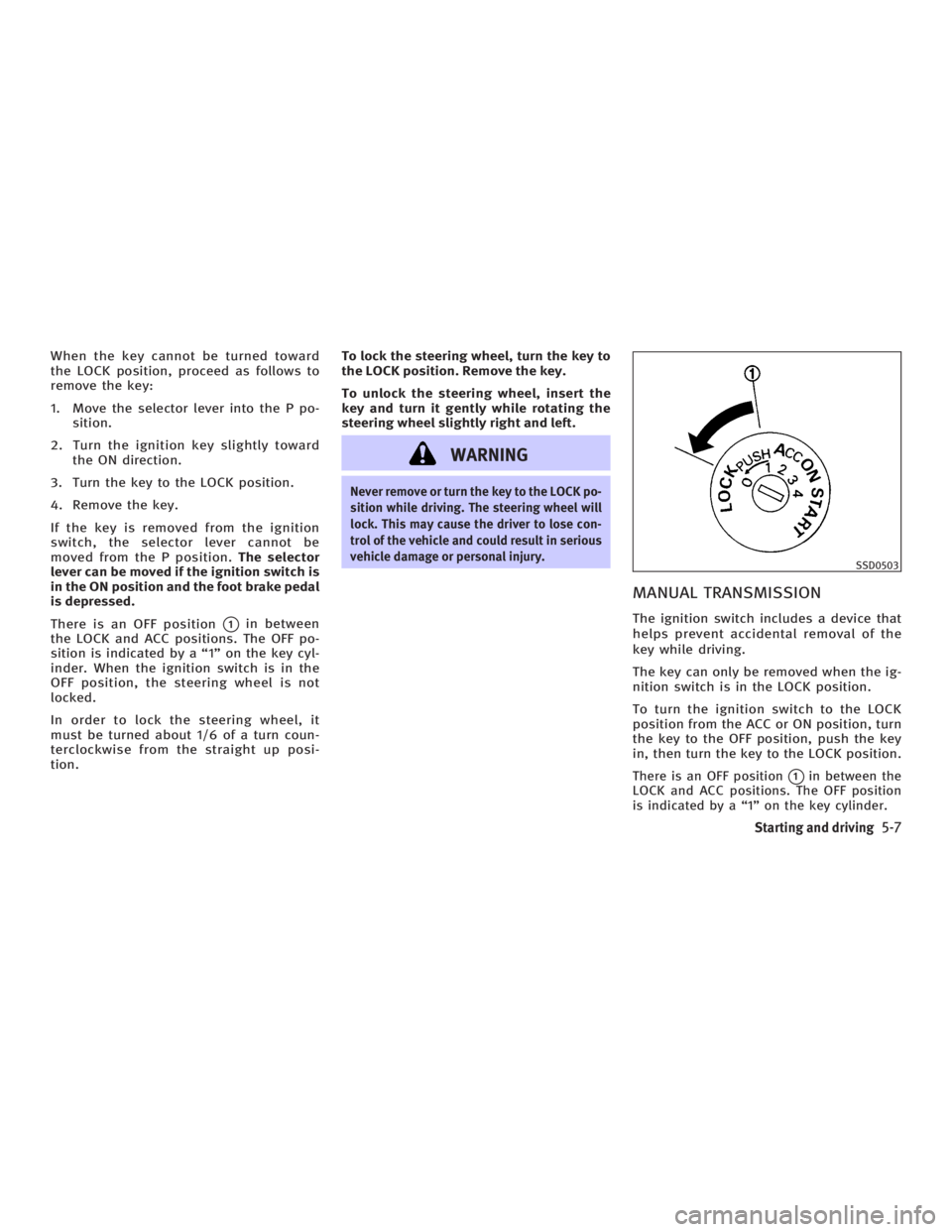
There is an OFF position
q 1
in between
the LOCK and ACC positions. The OFF po-
sition is indicated by a ª1º on the key cyl-
inder. When the ignition switch is in the
OFF position, the steering wheel is not
locked.
In order to lock the steering wheel, it
must be turned about 1/6 of a turn coun-
terclockwise from the straight up posi-
tion. To lock the steering wheel, turn the key to
the LOCK position. Remove the key.
To unlock the steering wheel, insert the
key and turn it gently while rotating the
steering wheel slightly right and left.
WARNING Never remove or turn the key to the LOCK po-
sition while driving. The steering wheel will
lock. This may cause the driver to lose con-
trol of the vehicle and could result in serious
vehicle damage or personal injury.
MANUAL TRANSMISSION The ignition switch includes a device that
helps prevent accidental removal of the
key while driving.
The key can only be removed when the ig-
nition switch is in the LOCK position.
To turn the ignition switch to the LOCK
position from the ACC or ON position, turn
the key to the OFF position, push the key
in, then turn the key to the LOCK position.
There is an OFF position
q 1
in between the
LOCK and ACC positions. The OFF position
is indicated by a ª1º on the key cylinder. SSD0503
Starting and driving
5-7
w 06.1.4/V35-D/V5.0
X
Page 212 of 344
In order for the steering wheel to be
locked, it must be turned about 1/6 of a
turn clockwise from the straight up posi-
tion.
To lock the steering wheel, turn the key to
the LOCK position. Remove the key.
To unlock the steering wheel, insert the
key and turn it gently while rotating the
steering wheel slightly right and left.
WARNINGNever remove or turn the key to the LOCK po-
sition while driving. The steering wheel will
lock. This may cause the driver to lose con-
trol of the vehicle and could result in serious
vehicle damage and/or personal injury.
KEY POSITIONS The ignition switch includes an anti-theft
steering lock device.
LOCK (Normal parking position) (0)
The ignition key can only be removed
when the ignition switch is in this posi-
tion. OFF (1)
The engine can be turned off without
locking the steering wheel.
The ignition lock is designed so that the
key cannot be turned to the LOCK position
and removed until the selector lever is
moved to the P position (for automatic
transmission) or the key is pushed in
while turning the key between the ACC
and LOCK positions.
ACC (Accessories) (2)
This position activates electrical accesso-
ries when the engine is not running.
ON (Normal operating position) (3)
This position activates ignition system in
addition to electrical accessories.
START (4)
This position activates the starter motor,
starting the engine.
INFINITI VEHICLE IMMOBILIZER
SYSTEM The INFINITI Vehicle Immobilizer System
will not allow the engine to start without
the use of the registered key. If the engine fails to start using a regis-
tered key (for example, when interference
is caused by another registered key, an
automated toll road device or automated
payment device on the key ring), restart
the engine using the following proce-
dures:
1. Leave the ignition switch in the ON po-
sition for approximately 5 seconds.
2. Turn the ignition switch to the OFF or
LOCK position and wait approximately
10 seconds.
3. Repeat steps 1 and 2.
4. Restart the engine while holding the
device (which may have caused the in-
terference) away from the registered
key.
If this procedure allows the engine to
start, INFINITI recommends placing the
registered key on a separate key ring to
avoid interference from other devices.
5-8 Starting and driving
w 06.1.4/V35-D/V5.0
X