key INFINITI G35 2006 Service Manual
[x] Cancel search | Manufacturer: INFINITI, Model Year: 2006, Model line: G35, Model: INFINITI G35 2006Pages: 344, PDF Size: 6.81 MB
Page 147 of 344
WARNINGO Do not drive with the trunk lid open. This
could allow dangerous exhaust gases to
be drawn into the vehicle. See ªPrecau-
tions when starting and drivingº in the
ª5. Starting and drivingº section for ex-
haust gas.
O Closely supervise children when they are
around cars to prevent them from
playing and becoming locked in the
trunk where they could be seriously in-
jured. Keep the car locked, with the rear
seatback and trunk lid securely latched
when not in use, and prevent children's
access to car keys.
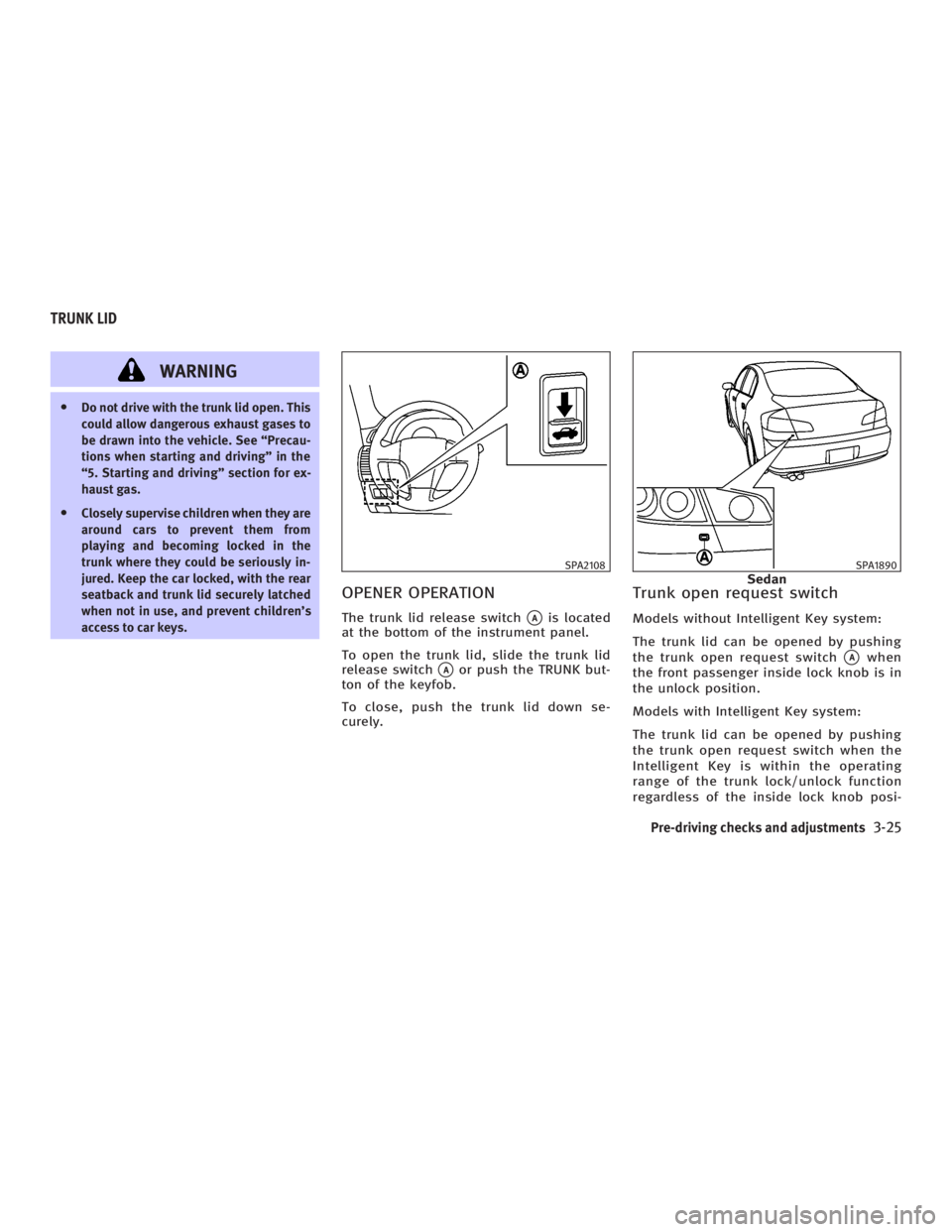
OPENER OPERATION The trunk lid release switch
q A
is located
at the bottom of the instrument panel.
To open the trunk lid, slide the trunk lid
release switch
q A
or push the TRUNK but-
ton of the keyfob.
To close, push the trunk lid down se-
curely. Trunk open request switch Models without Intelligent Key system:
The trunk lid can be opened by pushing
the trunk open request switch
q A
when
the front passenger inside lock knob is in
the unlock position.
Models with Intelligent Key system:
The trunk lid can be opened by pushing
the trunk open request switch when the
Intelligent Key is within the operating
range of the trunk lock/unlock function
regardless of the inside lock knob posi- SPA2108 SPA1890
SedanTRUNK LID
Pre-driving checks and adjustments
3-25
w 06.1.4/V35-D/V5.0
X
Page 148 of 344
tion. See ªIntelligent Key systemº earlier
in this section.
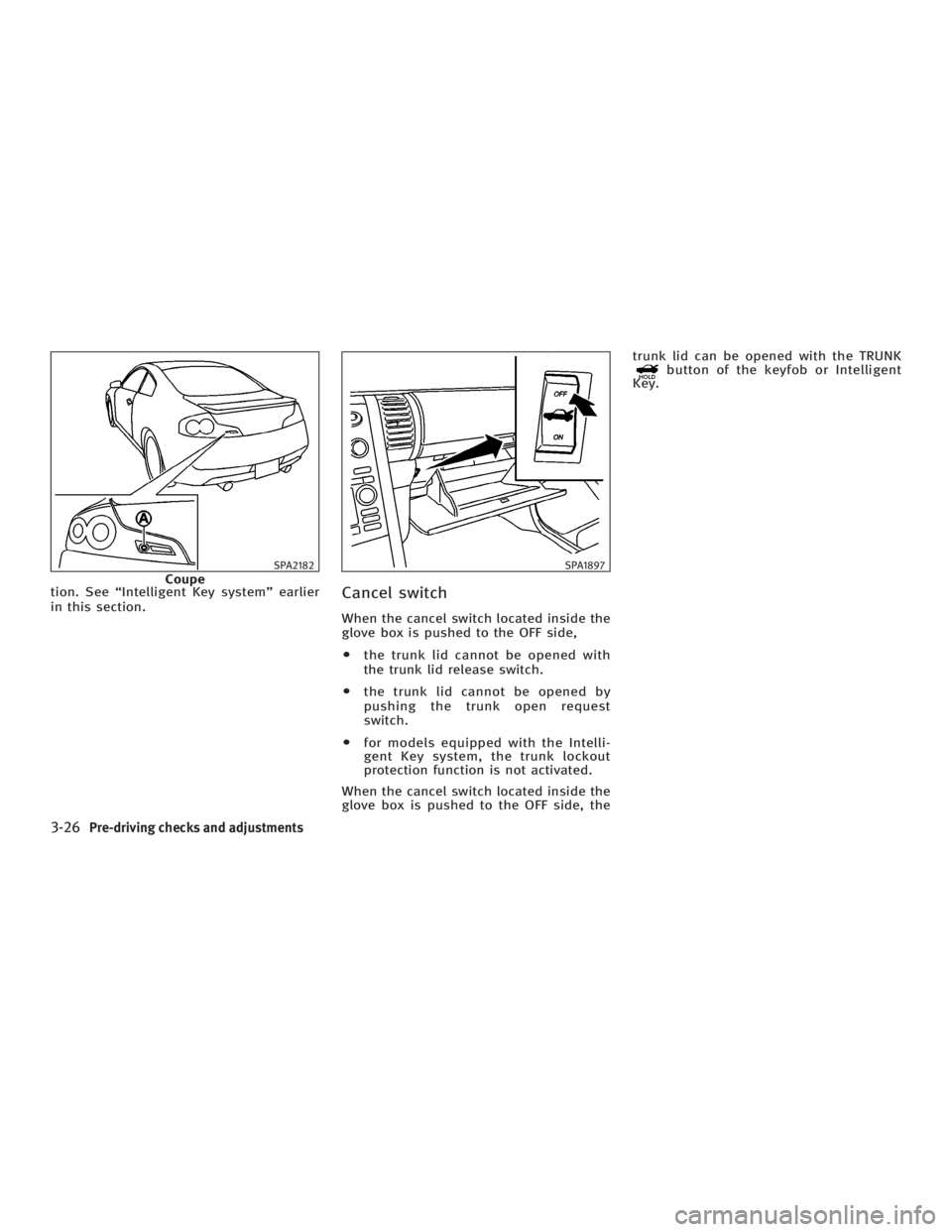
Cancel switch When the cancel switch located inside the
glove box is pushed to the OFF side,
O the trunk lid cannot be opened with
the trunk lid release switch.
O the trunk lid cannot be opened by
pushing the trunk open request
switch.
O for models equipped with the Intelli-
gent Key system, the trunk lockout
protection function is not activated.
When the cancel switch located inside the
glove box is pushed to the OFF side, the trunk lid can be opened with the TRUNK
button of the keyfob or Intelligent
Key.
SPA2182
Coupe SPA1897
3-26 Pre-driving checks and adjustments
w 06.1.4/V35-D/V5.0
X
Page 150 of 344
To open the trunk lid from the rear seat,
pull the release handle towards front of ve-
hicle until the lock releases.
Return the handle to the original position
by securing the latch. Otherwise, it may
cause water to leak into the trunk.
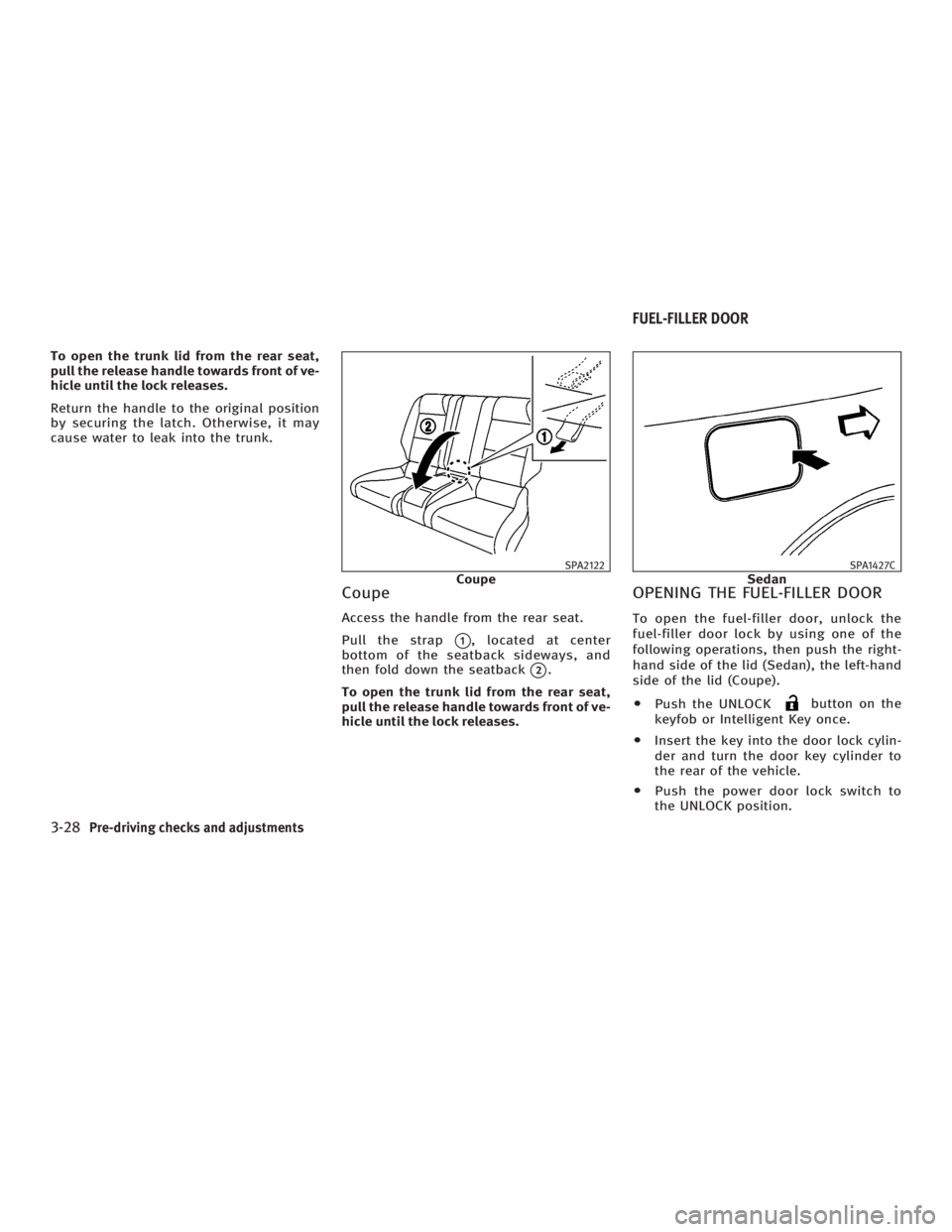
Coupe Access the handle from the rear seat.
Pull the strap
q 1
, located at center
bottom of the seatback sideways, and
then fold down the seatback
q 2
.
To open the trunk lid from the rear seat,
pull the release handle towards front of ve-
hicle until the lock releases. OPENING THE FUEL-FILLER DOOR To open the fuel-filler door, unlock the
fuel-filler door lock by using one of the
following operations, then push the right-
hand side of the lid (Sedan), the left-hand
side of the lid (Coupe).
O Push the UNLOCK button on the
keyfob or Intelligent Key once.
O Insert the key into the door lock cylin-
der and turn the door key cylinder to
the rear of the vehicle.
O Push the power door lock switch to
the UNLOCK position. SPA2122
Coupe SPA1427C
SedanFUEL-FILLER DOOR
3-28 Pre-driving checks and adjustments
w 06.1.4/V35-D/V5.0
X
Page 153 of 344
Push the lock lever up securely to lock
the steering wheel in place.
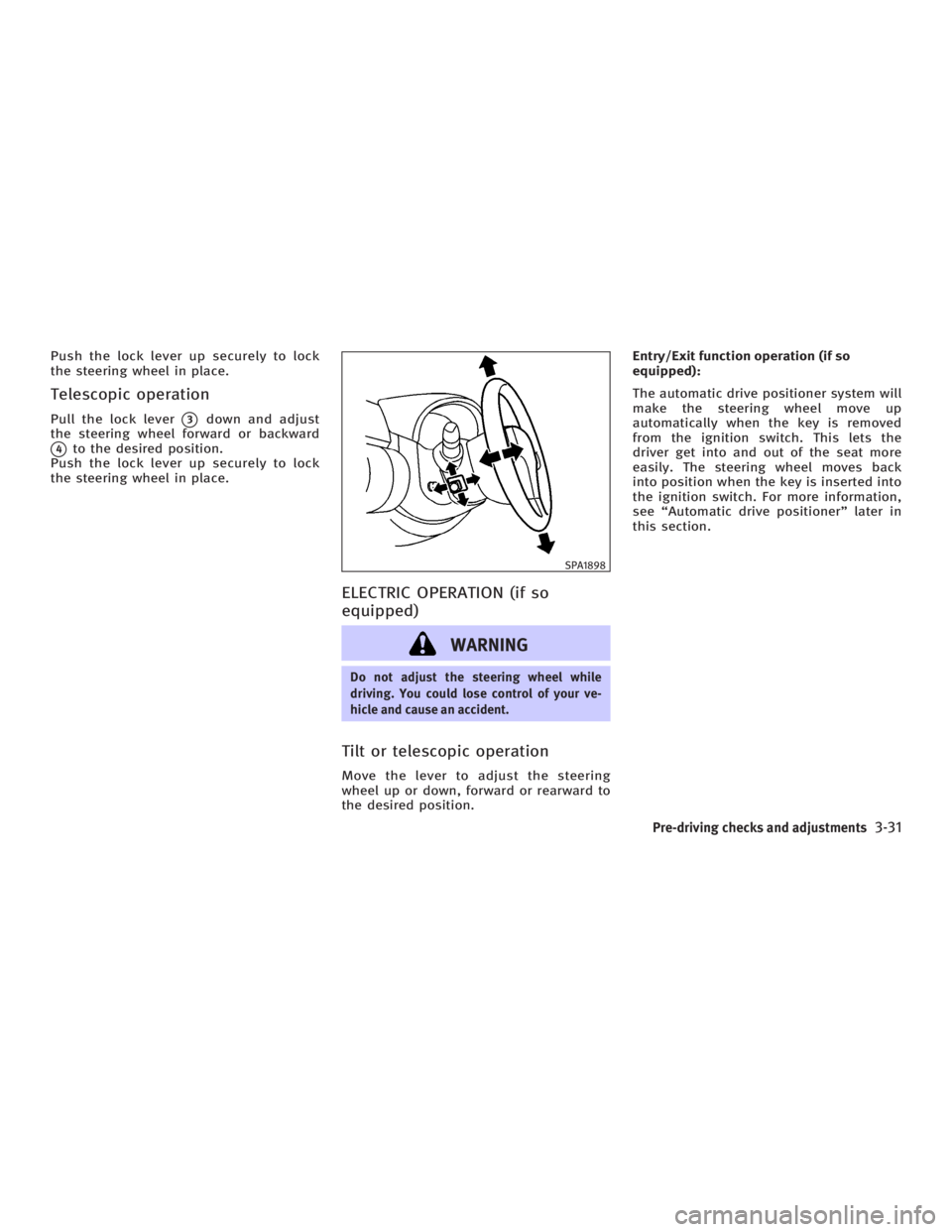
Telescopic operation Pull the lock lever
q 3
down and adjust
the steering wheel forward or backward
q 4
to the desired position.
Push the lock lever up securely to lock
the steering wheel in place.
ELECTRIC OPERATION (if so
equipped)
WARNING Do not adjust the steering wheel while
driving. You could lose control of your ve-
hicle and cause an accident.
Tilt or telescopic operation Move the lever to adjust the steering
wheel up or down, forward or rearward to
the desired position. Entry/Exit function operation (if so
equipped):
The automatic drive positioner system will
make the steering wheel move up
automatically when the key is removed
from the ignition switch. This lets the
driver get into and out of the seat more
easily. The steering wheel moves back
into position when the key is inserted into
the ignition switch. For more information,
see ªAutomatic drive positionerº later in
this section. SPA1898
Pre-driving checks and adjustments
3-31
w 06.1.4/V35-D/V5.0
X
Page 156 of 344
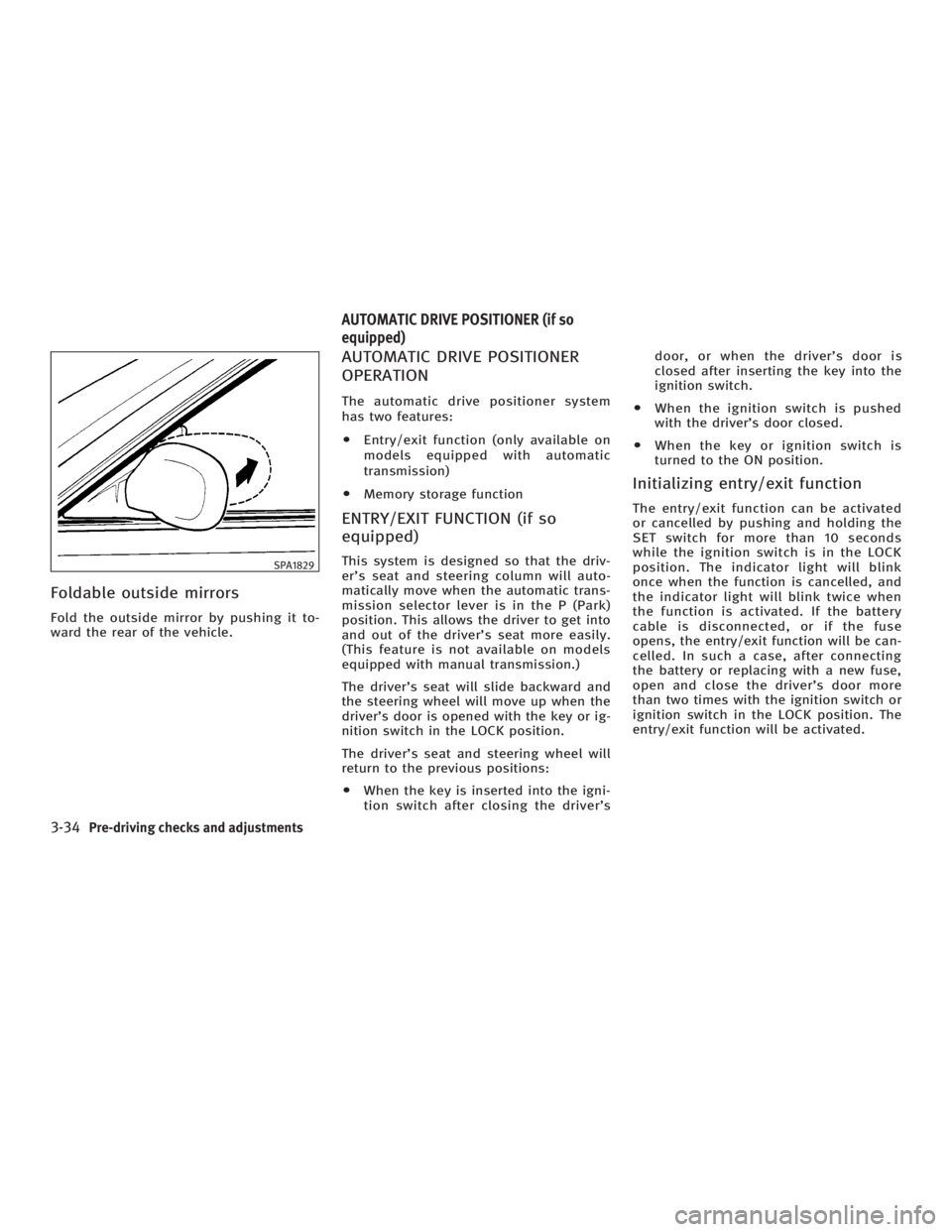
Foldable outside mirrors Fold the outside mirror by pushing it to-
ward the rear of the vehicle. AUTOMATIC DRIVE POSITIONER
OPERATION The automatic drive positioner system
has two features:
O Entry/exit function (only available on
models equipped with automatic
transmission)
O Memory storage function
ENTRY/EXIT FUNCTION (if so
equipped) This system is designed so that the driv-
er's seat and steering column will auto-
matically move when the automatic trans-
mission selector lever is in the P (Park)
position. This allows the driver to get into
and out of the driver's seat more easily.
(This feature is not available on models
equipped with manual transmission.)
The driver's seat will slide backward and
the steering wheel will move up when the
driver's door is opened with the key or ig-
nition switch in the LOCK position.
The driver's seat and steering wheel will
return to the previous positions:
O When the key is inserted into the igni-
tion switch after closing the driver's door, or when the driver's door is
closed after inserting the key into the
ignition switch.
O When the ignition switch is pushed
with the driver's door closed.
O When the key or ignition switch is
turned to the ON position.
Initializing entry/exit function The entry/exit function can be activated
or cancelled by pushing and holding the
SET switch for more than 10 seconds
while the ignition switch is in the LOCK
position. The indicator light will blink
once when the function is cancelled, and
the indicator light will blink twice when
the function is activated. If the battery
cable is disconnected, or if the fuse
opens, the entry/exit function will be can-
celled. In such a case, after connecting
the battery or replacing with a new fuse,
open and close the driver's door more
than two times with the ignition switch or
ignition switch in the LOCK position. The
entry/exit function will be activated.SPA1829
AUTOMATIC DRIVE POSITIONER (if so
equipped)
3-34 Pre-driving checks and adjustments
w 06.1.4/V35-D/V5.0
X
Page 157 of 344
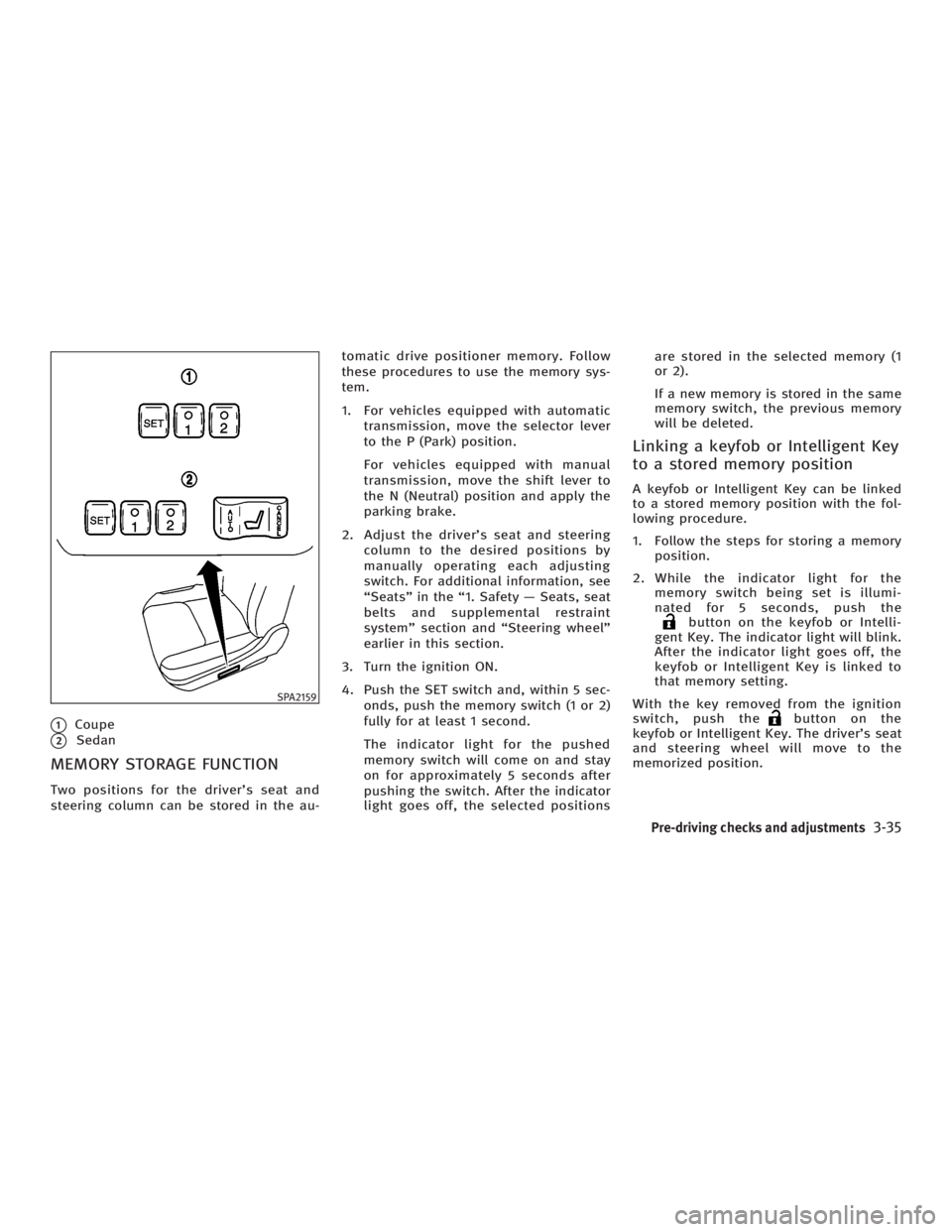
q 1
Coupe
q 2
Sedan
MEMORY STORAGE FUNCTION Two positions for the driver's seat and
steering column can be stored in the au- tomatic drive positioner memory. Follow
these procedures to use the memory sys-
tem.
1. For vehicles equipped with automatic
transmission, move the selector lever
to the P (Park) position.
For vehicles equipped with manual
transmission, move the shift lever to
the N (Neutral) position and apply the
parking brake.
2. Adjust the driver's seat and steering
column to the desired positions by
manually operating each adjusting
switch. For additional information, see
ªSeatsº in the ª1. Safety Ð Seats, seat
belts and supplemental restraint
systemº section and ªSteering wheelº
earlier in this section.
3. Turn the ignition ON.
4. Push the SET switch and, within 5 sec-
onds, push the memory switch (1 or 2)
fully for at least 1 second.
The indicator light for the pushed
memory switch will come on and stay
on for approximately 5 seconds after
pushing the switch. After the indicator
light goes off, the selected positions are stored in the selected memory (1
or 2).
If a new memory is stored in the same
memory switch, the previous memory
will be deleted.
Linking a keyfob or Intelligent Key
to a stored memory position A keyfob or Intelligent Key can be linked
to a stored memory position with the fol-
lowing procedure.
1. Follow the steps for storing a memory
position.
2. While the indicator light for the
memory switch being set is illumi-
nated for 5 seconds, push the
button on the keyfob or Intelli-
gent Key. The indicator light will blink.
After the indicator light goes off, the
keyfob or Intelligent Key is linked to
that memory setting.
With the key removed from the ignition
switch, push the button on the
keyfob or Intelligent Key. The driver's seat
and steering wheel will move to the
memorized position.SPA2159
Pre-driving checks and adjustments
3-35
w 06.1.4/V35-D/V5.0
X
Page 162 of 344

WARNINGO Positioning of the heating or air condi-
tioning controls and display controls
should not be done while driving, in
order that full attention may be given to
driving operation.
O Do not disassemble or modify this
system. If you do, it may result in acci-
dents, fire, or electric shock.
O Do not use this system if you notice any
abnormality, such as a frozen screen or
lack of sound. Continued use of the
system may result in accident, fire or
electric shock.
O In case you notice any foreign object in
the system hardware, spill liquid on it, or
notice smoke or smell coming from it,
stop using the system immediately and
contact an INFINITI dealer. Ignoring such
conditions may lead to accidents, fire, or
electric shock. When you use this system, make sure the
engine is running.
If you use the system with the engine not
running (ignition ON or ACC) for a long
time, it will use up all the battery power,
and the engine will not start.
Reference symbols:
ªENTERº button Ð This is a button on the
control panel.
ª Display º key Ð This is a select key on
the screen. By selecting this key you can
proceed to the next function. NAMES OF THE COMPONENTS 1., 2., 5., 6., 9., 10. and 11.
For Navigation control buttons: refer to
the separate Navigation Owner's Manual.
3. ªSETTINGº button (P. 4-7)
4. ªINFOº button (P. 4-3)
7. Joystick and ªENTERº button (P. 4-3)
8. brightness control button
(P. 4-9)
12. ªBACKº button (P. 4-3) SAA1301
SAFETY NOTE
CONTROL PANEL BUTTONS Ð WITH
NAVIGATION SYSTEM
4-2 Display screen, heater, air conditioner and audio systems
w 06.1.4/V35-D/V5.0
X
Page 163 of 344

HOW TO USE JOYSTICK AND
ªENTERº BUTTON Choose an item on the display using the
joystick and push the ªENTERº button for
operation.
HOW TO USE ªBACKº BUTTON This button has two functions.
O Go back to the previous display.
When this button is pushed during setup,
setup will be canceled, and the screen
will return to the previous screen.
O Finish setup.
When this button is pushed after setup is
completed, the settings will be renewed
as directed, and the screen will return to
the map.
SETTING UP THE START-UP
SCREEN When you turn the ignition switch to the
ACC or ON position, the SYSTEM
START-UP warning is displayed on the
screen. Read the warning and select the
ª OK º key then push the ªENTERº button. If you do not push the ªENTERº button,
the Navigation system will not proceed to
the next step display.
To proceed to the next step, refer to the
separate Navigation System Owner's
Manual.
HOW TO USE ªINFOº BUTTON The ª Vehicle Information º screen will ap-
pear when the ªINFOº button is pushed.
Choose an item using the joystick and
push the ªENTERº button.
After viewing or adjusting the information
on the following screens, push the
ªBACKº button to return to the VEHICLE
INFORMATION menu. SAA1304
Display screen, heater, air conditioner and audio systems
4-3
w 06.1.4/V35-D/V5.0
X
Page 164 of 344
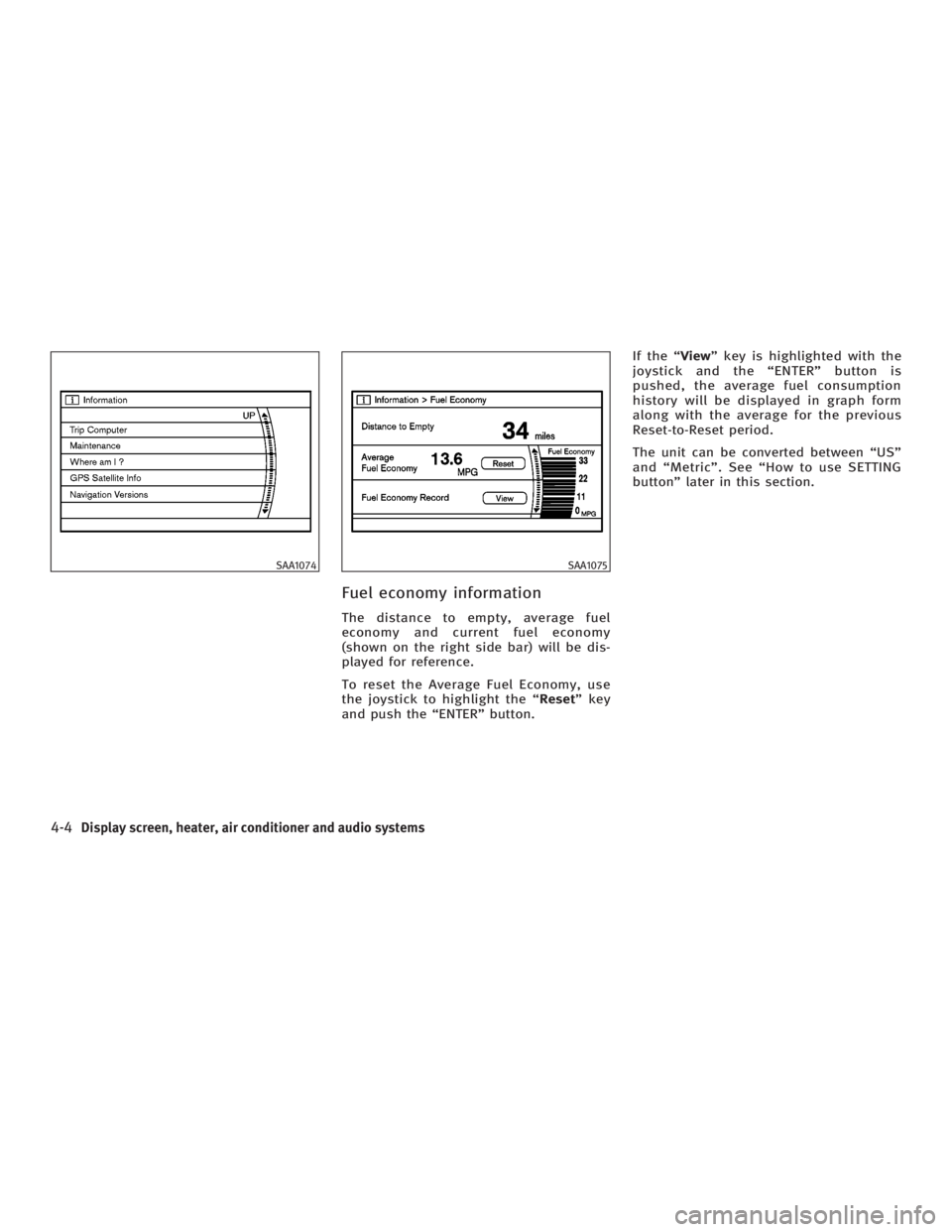
Fuel economy information The distance to empty, average fuel
economy and current fuel economy
(shown on the right side bar) will be dis-
played for reference.
To reset the Average Fuel Economy, use
the joystick to highlight the ª Reset º key
and push the ªENTERº button. If the ª View º key is highlighted with the
joystick and the ªENTERº button is
pushed, the average fuel consumption
history will be displayed in graph form
along with the average for the previous
Reset-to-Reset period.
The unit can be converted between ªUSº
and ªMetricº. See ªHow to use SETTING
buttonº later in this section.SAA1074 SAA1075
4-4 Display screen, heater, air conditioner and audio systems
w 06.1.4/V35-D/V5.0
X
Page 165 of 344
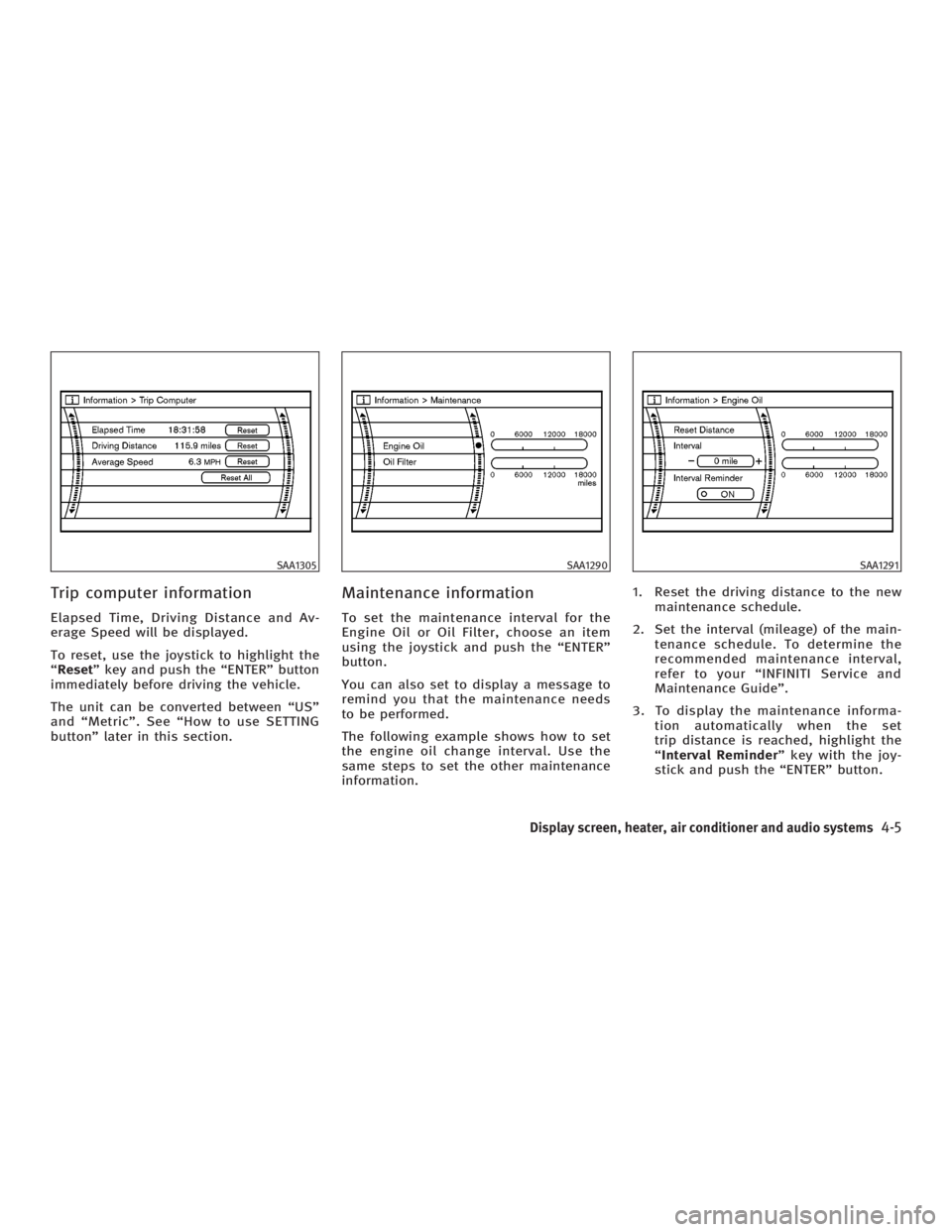
Trip computer information Elapsed Time, Driving Distance and Av-
erage Speed will be displayed.
To reset, use the joystick to highlight the
ª Reset º key and push the ªENTERº button
immediately before driving the vehicle.
The unit can be converted between ªUSº
and ªMetricº. See ªHow to use SETTING
buttonº later in this section. Maintenance information To set the maintenance interval for the
Engine Oil or Oil Filter, choose an item
using the joystick and push the ªENTERº
button.
You can also set to display a message to
remind you that the maintenance needs
to be performed.
The following example shows how to set
the engine oil change interval. Use the
same steps to set the other maintenance
information. 1. Reset the driving distance to the new
maintenance schedule.
2. Set the interval (mileage) of the main-
tenance schedule. To determine the
recommended maintenance interval,
refer to your ªINFINITI Service and
Maintenance Guideº.
3. To display the maintenance informa-
tion automatically when the set
trip distance is reached, highlight the
ª Interval Reminder º key with the joy-
stick and push the ªENTERº button.SAA1305 SAA1290 SAA1291
Display screen, heater, air conditioner and audio systems
4-5
w 06.1.4/V35-D/V5.0
X