reset INFINITI G35 2006 User Guide
[x] Cancel search | Manufacturer: INFINITI, Model Year: 2006, Model line: G35, Model: INFINITI G35 2006Pages: 344, PDF Size: 6.81 MB
Page 181 of 344
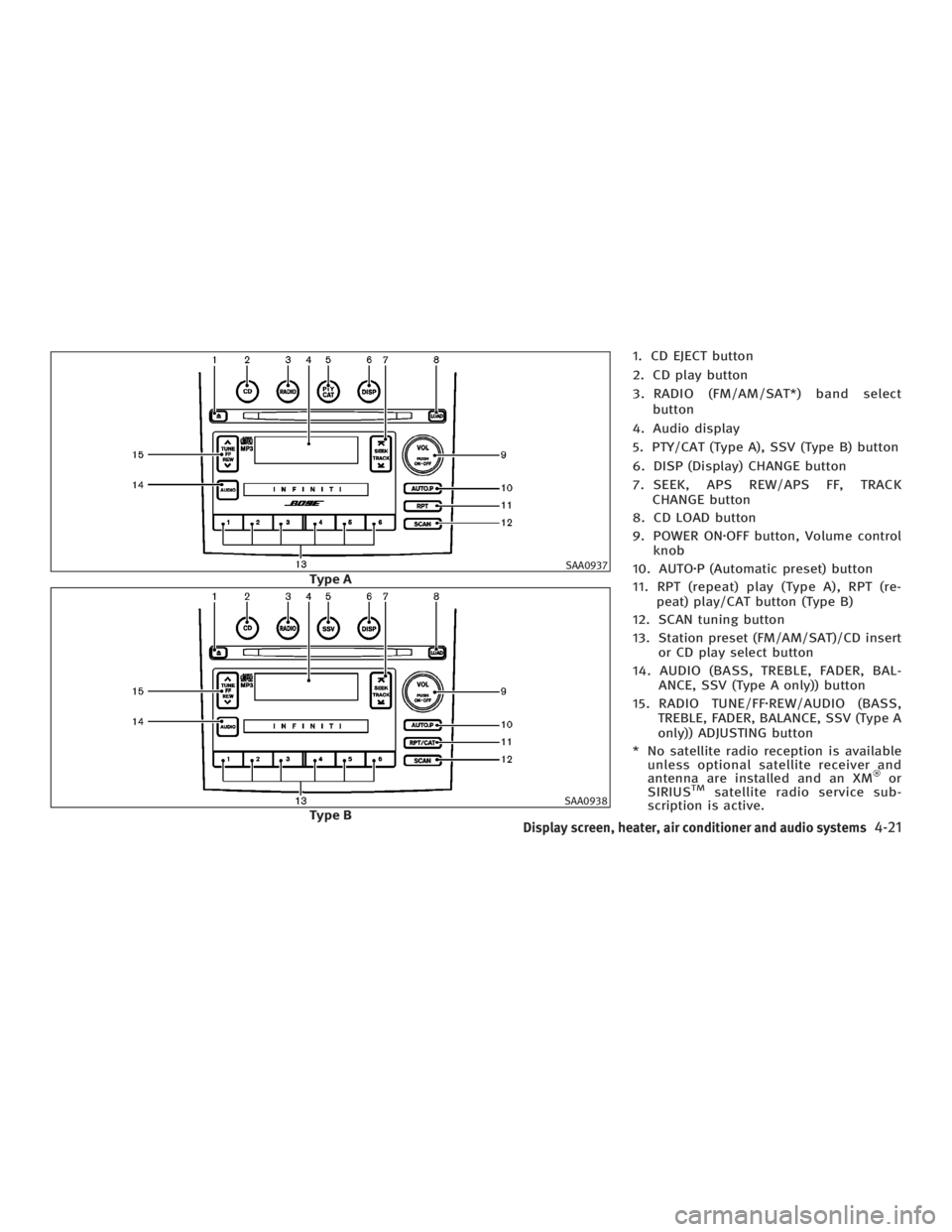
1. CD EJECT button
2. CD play button
3. RADIO (FM/AM/SAT*) band select
button
4. Audio display
5. PTY/CAT (Type A), SSV (Type B) button
6. DISP (Display) CHANGE button
7. SEEK, APS REW/APS FF, TRACK
CHANGE button
8. CD LOAD button
9. POWER ON z OFF button, Volume control
knob
10. AUTO z P (Automatic preset) button
11. RPT (repeat) play (Type A), RPT (re-
peat) play/CAT button (Type B)
12. SCAN tuning button
13. Station preset (FM/AM/SAT)/CD insert
or CD play select button
14. AUDIO (BASS, TREBLE, FADER, BAL-
ANCE, SSV (Type A only)) button
15. RADIO TUNE/FF z REW/AUDIO (BASS,
TREBLE, FADER, BALANCE, SSV (Type A
only)) ADJUSTING button
* No satellite radio reception is available
unless optional satellite receiver and
antenna are installed and an XM or
SIRIUS TM
satellite radio service sub-
scription is active. SAA0937
Type A
SAA0938
Type B
Display screen, heater, air conditioner and audio systems
4-21
w 06.1.4/V35-D/V5.0
X
Page 184 of 344
Station memory operations:
Twelve stations/channels can be set for
the FM band (six for FM1, six for FM2),
twelve for satellite radio (six for SAT1, six
for SAT2) and six stations can be set for
the AM band.
1. Tune to the desired station using the
SEEK, SCAN or TUNE button.
2. Select the desired station/channel
and keep pushing any of the desired
station preset buttons (1 to 6) until a
beep sound is heard. (The radio mutes
when the select button is pushed.)
3. The channel indicator will then come
on and the sound will resume. Memo-
rizing is now complete.
4. Other buttons can be set in the same
manner.
If the battery cable is disconnected, or if
the fuse blows, the preset station memory
will be erased. In that case, reset the de-
sired stations.
Automatic preset:
To select the preset FM, AM, SAT or PTY
station/channel, push the AUTO.P button
for less than 1.5 seconds. To preset the FM, AM, SAT or PTY
station/channel, push the AUTO.P button
for more than 1.5 seconds.
Program type/category (Type A)
Repeat/category (Type B):
When the PTY button is pushed for more
than 1.5 seconds during FM mode, the PTY
name of the current tuned station is dis-
played (Type A only). During this time if
the PTY data code is zero, or the data is
unreadable; the display will show NONE.
When the PTY (CAT) Ð type A, or RPT (CAT)
Ð Type B, button is pushed for more than
1.5 seconds during the satellite radio
mode, the category name of the current
channel is displayed.
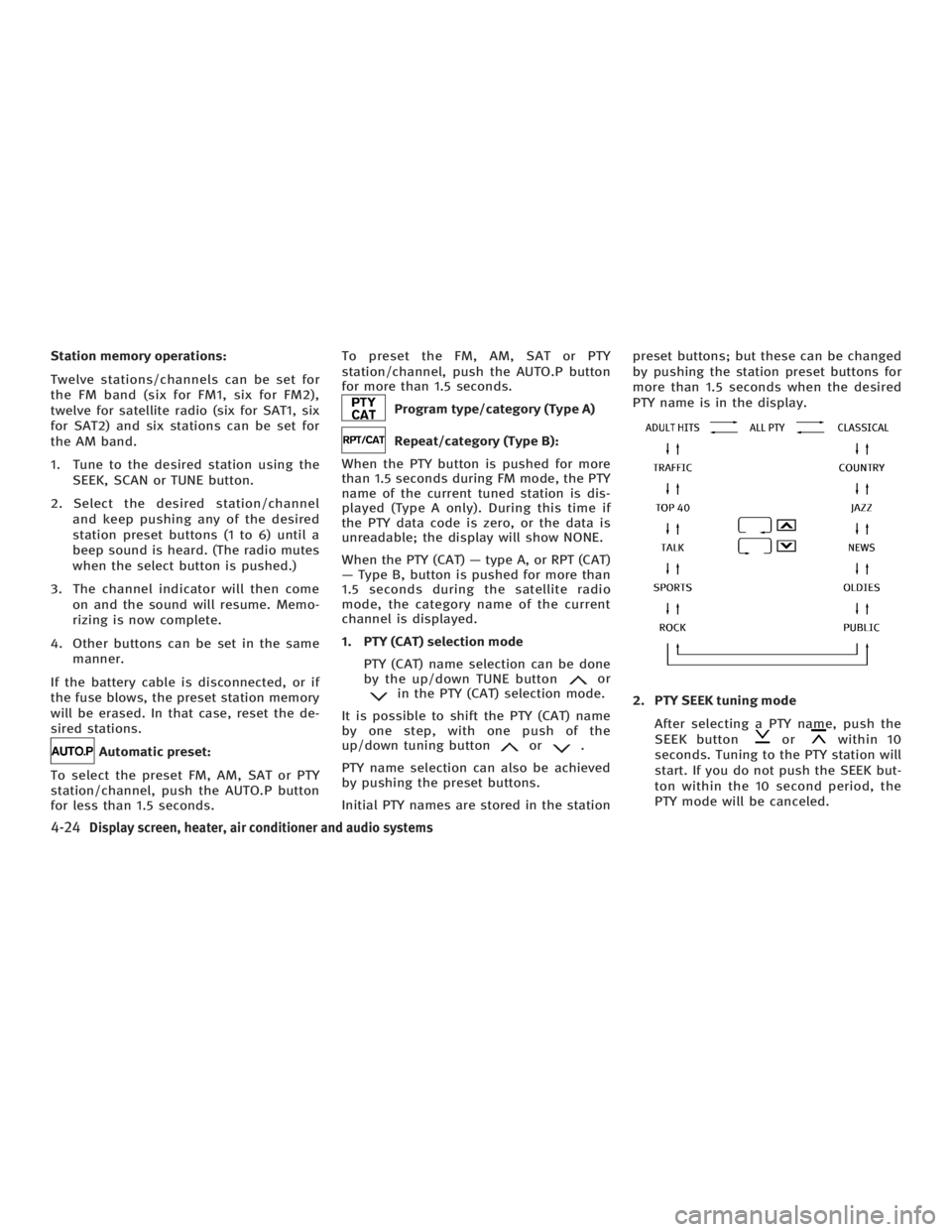
1. PTY (CAT) selection mode
PTY (CAT) name selection can be done
by the up/down TUNE button or
in the PTY (CAT) selection mode.
It is possible to shift the PTY (CAT) name
by one step, with one push of the
up/down tuning button or .
PTY name selection can also be achieved
by pushing the preset buttons.
Initial PTY names are stored in the station preset buttons; but these can be changed
by pushing the station preset buttons for
more than 1.5 seconds when the desired
PTY name is in the display.
2. PTY SEEK tuning mode
After selecting a PTY name, push the
SEEK button or within 10
seconds. Tuning to the PTY station will
start. If you do not push the SEEK but-
ton within the 10 second period, the
PTY mode will be canceled.
4-24 Display screen, heater, air conditioner and audio systems
w 06.1.4/V35-D/V5.0
X
Page 198 of 344
O ªSend/Enter/Call/Dialº Ð Use the
Send command to enter numbers dur-
ing a call. For example, if you were di-
rected to dial an extension by an auto-
mated system:
Say: ªSend one two three four.º
The system acknowledges the com-
mand and sends the tones associated
with the numbers. The system then
ends the VR session and returns to
the call.
O ªTransfer callº Ð Use the Transfer Call
command to transfer the call from the
Bluetooth Hands-Free Phone System
to the cellular phone when privacy is
desired.
The system announces, ªTransfer call.
Call transferred to privacy mode.º The
system then ends the VR session.
You can also issue the Transfer Call
command again to return to a hands-
free call through the vehicle.
O ªMuteº Ð Use the Mute command to
mute your voice so the other party
cannot hear it. Use the mute command
again to unmute your voice. NOTE:
If the other party ends the call or the cellu-
lar phone network connection is lost while
the Mute feature is on, the Mute feature
may need to be reset to ªoff.º
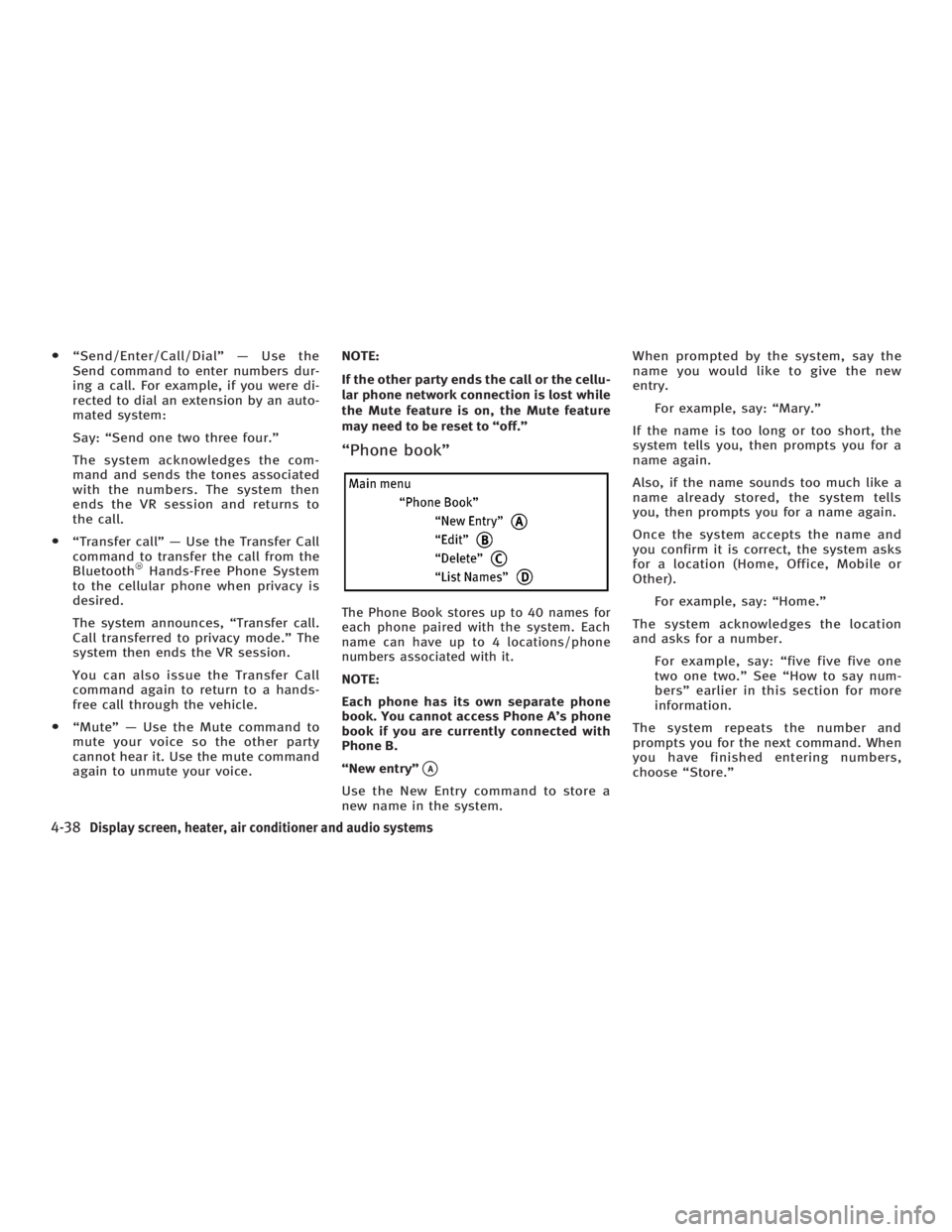
ªPhone bookº
The Phone Book stores up to 40 names for
each phone paired with the system. Each
name can have up to 4 locations/phone
numbers associated with it.
NOTE:
Each phone has its own separate phone
book. You cannot access Phone A's phone
book if you are currently connected with
Phone B.
ªNew entryº
q A
Use the New Entry command to store a
new name in the system. When prompted by the system, say the
name you would like to give the new
entry.
For example, say: ªMary.º
If the name is too long or too short, the
system tells you, then prompts you for a
name again.
Also, if the name sounds too much like a
name already stored, the system tells
you, then prompts you for a name again.
Once the system accepts the name and
you confirm it is correct, the system asks
for a location (Home, Office, Mobile or
Other).
For example, say: ªHome.º
The system acknowledges the location
and asks for a number.
For example, say: ªfive five five one
two one two.º See ªHow to say num-
bersº earlier in this section for more
information.
The system repeats the number and
prompts you for the next command. When
you have finished entering numbers,
choose ªStore.º
4-38 Display screen, heater, air conditioner and audio systems
w 06.1.4/V35-D/V5.0
X
Page 208 of 344

Your vehicle has also been equipped with a
TPMS malfunction indicator to indicate
when the system is not operating properly.
The TPMS malfunction indicator is com-
bined with the low tire pressure telltale.
When the system detects a malfunction, the
telltale will flash for approximately one
minute and then remain continuously illu-
minated. This sequence will continue upon
subsequent vehicle start-ups as long as the
malfunction exists. When the malfunction
indicator is illuminated, the system may not
be able to detect or signal low tire pressure
as intended. TPMS malfunctions may occur
for a variety of reasons, including the in-
stallation of replacement or alternate tires
or wheels on the vehicle that prevent the
TPMS from functioning properly. Always
check the TPMS malfunction telltale after
replacing one or more tires or wheels on
your vehicle to ensure that the replacement
or alternate tires and wheels allow the
TPMS to continue to function properly.
Additional information
O The TPMS does not monitor the tire
pressure of the spare tire.
O The TPMS will activate only when the ve-
hicle is driven at speeds above 16 MPH
(25 km/h). Also, this system may not de- tect a sudden drop in tire pressure (for
example a flat tire while driving).
O Tire pressure rises and falls de-
pending on the heat caused by the ve-
hicle's operation and the outside tem-
perature. Low outside temperature can
lower the temperature of the air inside
the tire which can cause a lower tire
inflation pressure. This may cause the
low tire pressure warning light to illu-
minate. If the warning light illuminates
in low ambient temperature, check the
tire pressure for all four tires.
For additional information, see ªLow tire
pressure warning lightº in the ª2. Instru-
ments and controlsº section and ªTire
pressure monitoring system (TPMS)º in
the ª6. In case of emergencyº section.
WARNING O If the low tire pressure warning light illumi-
nates while driving, avoid sudden steering
maneuvers or abrupt braking, reduce ve-
hicle speed, pull off the road to a safe loca-
tion and stop the vehicle as soon as pos-
sible. Serious vehicle damage could occur and may lead to an accident and could re-
sult in serious personal injury. Check the
tire pressure for all four tires. Adjust the
tire pressure to the recommended COLD
tire pressure shown on the Tire and
Loading Information label to turn the low
tire pressure warning light OFF. If you have
a flat tire, replace it with a spare tire as
soon as possible. (See ªFlat tireº in the ª6.
In case of emergencyº section for changing
a flat tire.)
O When a spare tire is mounted or a wheel
is replaced, tire pressure will not be indi-
cated, the TPMS will not function and the
low tire pressure warning light will flash.
Contact your INFINITI dealer as soon as
possible for tire replacement and/or sys-
tem resetting.
O Replacing tires with those not originally
specified by INFINITI could affect the
proper operation of the TPMS.
O Do not inject any tire liquid or aerosol
tire sealant into the tires, as this may
cause a malfunction of the tire pressure
sensors.
5-4 Starting and driving
w 06.1.5/V35-D/V5.0
X
Page 221 of 344
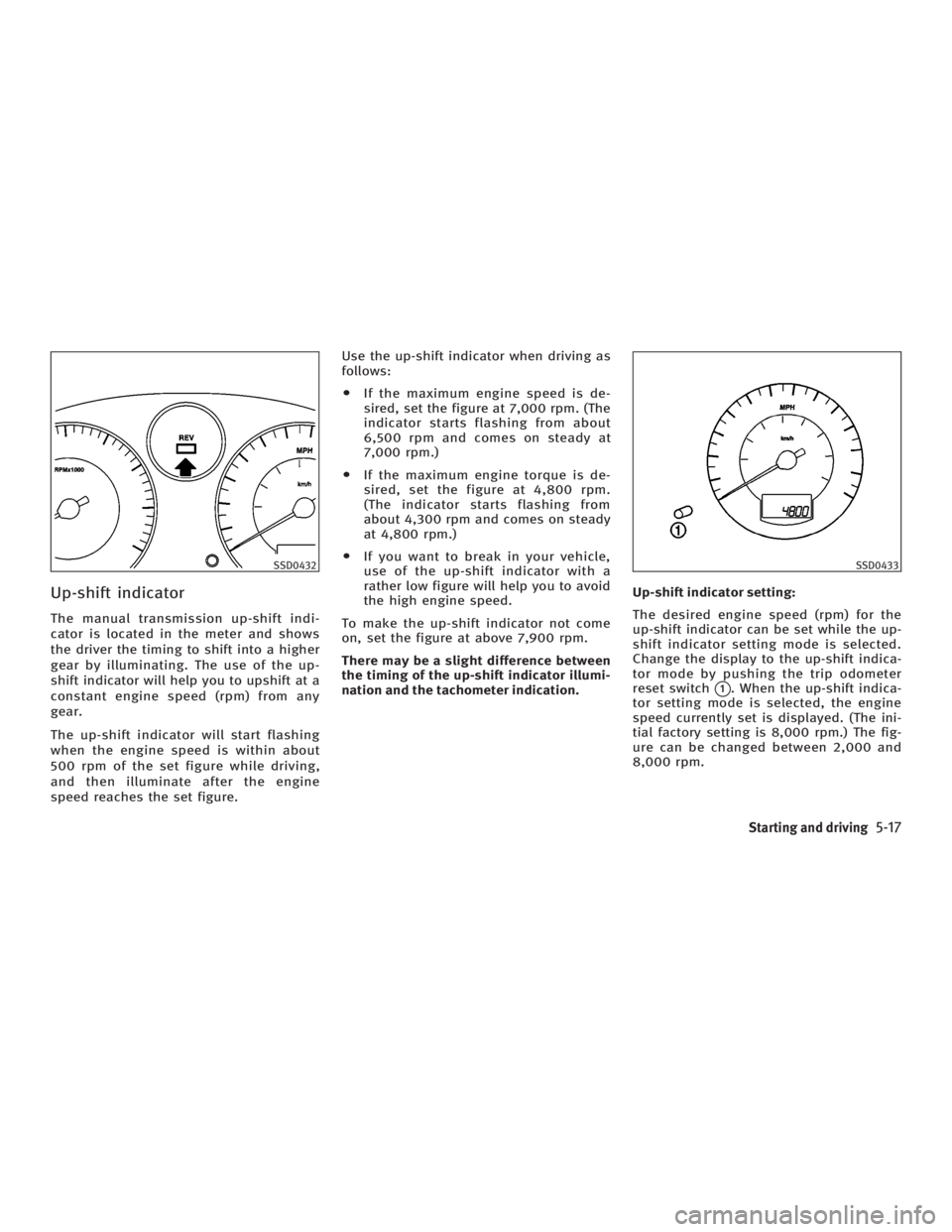
Up-shift indicator The manual transmission up-shift indi-
cator is located in the meter and shows
the driver the timing to shift into a higher
gear by illuminating. The use of the up-
shift indicator will help you to upshift at a
constant engine speed (rpm) from any
gear.
The up-shift indicator will start flashing
when the engine speed is within about
500 rpm of the set figure while driving,
and then illuminate after the engine
speed reaches the set figure. Use the up-shift indicator when driving as
follows:
O If the maximum engine speed is de-
sired, set the figure at 7,000 rpm. (The
indicator starts flashing from about
6,500 rpm and comes on steady at
7,000 rpm.)
O If the maximum engine torque is de-
sired, set the figure at 4,800 rpm.
(The indicator starts flashing from
about 4,300 rpm and comes on steady
at 4,800 rpm.)
O If you want to break in your vehicle,
use of the up-shift indicator with a
rather low figure will help you to avoid
the high engine speed.
To make the up-shift indicator not come
on, set the figure at above 7,900 rpm.
There may be a slight difference between
the timing of the up-shift indicator illumi-
nation and the tachometer indication. Up-shift indicator setting:
The desired engine speed (rpm) for the
up-shift indicator can be set while the up-
shift indicator setting mode is selected.
Change the display to the up-shift indica-
tor mode by pushing the trip odometer
reset switch
q 1
. When the up-shift indica-
tor setting mode is selected, the engine
speed currently set is displayed. (The ini-
tial factory setting is 8,000 rpm.) The fig-
ure can be changed between 2,000 and
8,000 rpm.SSD0432 SSD0433
Starting and driving
5-17
w 06.1.4/V35-D/V5.0
X
Page 222 of 344

Push the trip odometer reset switch more
than approximately 2 seconds and then
the figure in the display will start
blinking.
Pushing the trip odometer reset switch for
less than approximately 1 second while
the figure is blinking will add the figure
by 100 rpm. If pushing for more than ap-
proximately 1 second, the figure will in-
crease by 500 rpm.
If you have not operated the trip odom-
eter reset switch for 5 seconds, the set-
ting mode will end. The display will illumi-
nate instead of blink.
If the battery cable is disconnected, the
set engine speed will be returned to the
initial figure (8,000 rpm).
Suggested up-shift speeds Shown below are suggested vehicle
speeds for shifting into a higher gear.
These suggestions relate to fuel economy
and vehicle performance. Actual up-shift
speeds will vary according to road condi-
tions, the weather and individual driving
habits. For normal acceleration in low altitude ar-
eas [less than 4,000 ft (1,219 m)]:
Gear change MPH (km/h)
1st to 2nd 8 (13)
2nd to 3rd 16 (25)
3rd to 4th 25 (40)
4th to 5th 30 (50)
5th to 6th 33 (53)
For quick acceleration in low altitude
areas or in high altitude areas [over 4,000
ft (1,219 m)]:
Gear change MPH (km/h)
1st to 2nd 15 (24)
2nd to 3rd 25 (40)
3rd to 4th 40 (64)
4th to 5th 45 (72)
5th to 6th 50 (80)
Suggested maximum speed in
each gear Downshift to a lower gear if the engine is
not running smoothly, or if you need to
accelerate.
Do not exceed the maximum suggested
speed (shown below) in any gear. For
level road driving, use the highest gear
suggested for that speed. Always observe posted speed limits, and drive according
to the road conditions, which will ensure
safe operation. Do not over-rev the engine
when shifting to a lower gear as it may
cause engine damage or loss of vehicle
control.
Gear MPH (km/h)
1st 35 (56)
2nd 60 (96)
3rd 90 (144)
4th Ð
5th Ð
6th Ð
5-18 Starting and driving
w 06.1.4/V35-D/V5.0
X
Page 225 of 344
To set at cruising speed, accelerate your
vehicle to the desired speed, push the
SET/COAST switch and release it. (The
SET indicator light will come on.) Take
your foot off the accelerator pedal. Your
vehicle will maintain the set speed.
O To pass another vehicle, depress the
accelerator pedal. When you release
the pedal, the vehicle will return to
the previously set speed.
O The vehicle may not maintain the set
speed when going up or down steep
hills. If this happens, drive without the
cruise control.
To cancel the preset speed, follow either of
these three methods:
a) Push the CANCEL switch. The SET indi-
cator light will go out.
b) Tap the brake pedal. The SET indicator
light will go out.
c) Turn the MAIN switch off. Both the
CRUISE indicator and SET indicator
lights will go out.
O If you depress the brake pedal while
pushing the RESUME/ACCELERATE
switch and reset at the cruising speed,
turn the MAIN switch off once and
then turn it on again. O The cruise control will automatically
be cancelled if the vehicle slows down
below approximately 8 MPH (13 km/h).
O If you depress the clutch pedal
(manual transmission), or move the
selector lever to the N (Neutral) posi-
tion (automatic transmission), the
cruise control will be canceled.
To reset at a faster cruising speed, use one
of the following methods:
a) Depress the accelerator pedal. When
the vehicle reaches the desired speed,
push and release the SET/COAST
switch.
b) Push and hold the RESUME/
ACCELERATE switch. When the vehicle
reaches the speed you desire, release
the switch.
c) Push, then quickly release the
RESUME/ACCELERATE set switch. This
will increase the vehicle speed by
about 1 MPH (1.6 km/h). To reset at a slower cruising speed, use
one of the following methods:
a) Lightly tap the brake pedal. When the
vehicle reaches the desired speed,
push the SET/COAST switch and re-
lease it.
b) Push and hold the SET/COAST switch.
Release the switch when the vehicle
slows down to the desired speed.
c) Push, then quickly release the SET/
COAST switch. This will decrease the
vehicle speed by about 1 MPH (1.6
km/h).
To resume the preset speed, push and re-
lease the RESUME/ACCELERATE switch.
The vehicle will resume the last set cruis-
ing speed when the vehicle speed is over
25 MPH (40 km/h).
Starting and driving
5-21
w 06.1.4/V35-D/V5.0
X
Page 238 of 344
Every new INFINITI comes with a 4 year,
unlimited mileage Roadside Assistance
plan. In the event of a roadside
emergency, Roadside Assistance Service
is available to you. Please refer to your
Warranty Booklet (U.S.) or Warranty &
Roadside assistance information booklet
(Canada) for details. Both the Warranty
Booklet and Roadside Assistance Calling
Card in your Owner's Literature Portfolio
provide the Toll-Free Number to call for
assistance. Roadside Assistance is
provided 24 hours a day, 365 days a year,
for 4 years from the date sold to give
emergency roadside help, in the event of
mechanical or nonmechanical trouble(s)
such as flat tires, out-of-gas, dead battery,
lost keys, mechanical breakdown,
accident, etc. TIRE PRESSURE MONITORING
SYSTEM (TPMS) This vehicle is equipped with the tire pres-
sure monitoring system (TPMS). It monitors
tire pressure of all tires except the spare.
When the low tire pressure warning light is
lit, or flashing continuously one or more of
your tires is significantly under-inflated. If
the vehicle is being driven with low tire
pressure, the TPMS will activate and warn
you of it by the low tire pressure warning
light. This system will activate only when
the vehicle is driven at speeds above 16
MPH (25 km/h). For more details, refer to
ªWarning/indicator lights and audible re-
mindersº in the ª2. Instruments and con-
trolsº section and ªTire pressure moni-
toring system (TPMS)º in the ª5. Starting
and drivingº section.
WARNING O If the low tire pressure warning light illu-
minates while driving, avoid sudden
steering maneuvers or abrupt braking,
reduce vehicle speed, pull off the road to
a safe location and stop the vehicle as
soon as possible. Serious vehicle damage could occur and may lead to an
accident and could result in serious per-
sonal injury. Check the tire pressure for all
four tires. Adjust the tire pressure to the
recommended COLD tire pressure shown
on the Tire and Loading Information label
to turn the low tire pressure warning light
OFF. If you have a flat tire, replace it with a
spare tire as soon as possible.
O When a spare tire is mounted or a wheel is
replaced, tire pressure will not be indi-
cated, the TPMS will not function and the
low tire pressure warning light will flash.
Contact your INFINITI dealer as soon as
possible for tire replacement and/or
system resetting.
O Replacing tires with those not originally
specified by INFINITI could affect the
proper operation of the TPMS.
O
Do not inject any tire liquid or aerosol tire
sealant into the tires, as this may cause a
malfunction of the tire pressure sensors.
CHANGING A FLAT TIRE If you have a flat tire, follow the instruc-
tions below.ROADSIDE ASSISTANCE PROGRAM FLAT TIRE
6-2 In case of emergency
w 06.1.13/V35-D/V5.0
X
Page 305 of 344
tionsº in the ª9. Technical and consumer
informationº section for recommended
types and sizes of tires and wheels.
WARNINGO The use of tires other than those recom-
mended or the mixed use of tires of dif-
ferent brands, construction (bias, bias-
belted or radial), or tread patterns can ad-
versely affect the ride, braking, handling,
ground clearance, body-to-tire clearance,
tire chain clearance, speedometer calibra-
tion, headlight aim and bumper height.
Some of these effects may lead to accidents
and could result in serious personal injury.
O If the wheels are changed for any reason,
always replace with wheels which have
the same off-set dimension. Wheels of a
different off-set could cause premature
tire wear, degrade vehicle handling char-
acteristics and/or interference with the
brake discs. Such interference can lead
to decreased braking efficiency and/or
early brake pad wear.
O When a spare tire is mounted or a wheel
is replaced, tire pressure will not be indi-
cated, the TPMS will not function and the low tire pressure warning light will flash.
Contact your INFINITI dealer as soon as
possible for tire replacement and/or sys-
tem resetting.
O Replacing tires with those not originally
specified by INFINITI could affect the
proper operation of the TPMS.
O Do not install a deformed wheel or tire
even if it has been repaired. Such wheels
or tires could have structural damage
and could malfunction without warning.
O The use of retread tires is not recom-
mended.
O For additional information regarding tires,
refer to ªImportant Tire Safety Informationº
(US) or ªTire Safety Informationº (Canada)
in the Warranty Information Booklet.
CAUTION Always use tires of the same type, size,
brand, construction (bias, bias-belted or ra-
dial), and tread pattern on all four wheels.
Failure to do so may result in a circumference difference between tires on the front and
rear axles which will cause excessive tire
wear and may damage the transmission,
transfer case and differential gears (AWD
models).
Wheel balance Unbalanced wheels may affect vehicle han-
dling and tire life. Even with regular use,
wheels can get out of balance. Therefore,
they should be balanced as required.
Wheel balance service should be per-
formed with the wheels off the vehicle.
Spin balancing the wheels on the vehicle
could lead to transmission damage.
For additional information regarding tires,
refer to ªImportant Tire Safety Informa-
tionº (US) or ªTire Safety Informationº
(Canada) in the INFINITI Warranty Informa-
tion Booklet.
Care of wheels O Wash the wheels when washing the
vehicle to maintain their appearance.
O Clean the inner side of the wheels
when the wheel is changed or the un-
derside of the vehicle is washed.
Maintenance and do-it-yourself
8-47
w 06.1.5/V35-D/V5.0
X
Page 331 of 344
A vehicle equipped with All-Wheel Drive
(AWD) should never be tested using a two
wheel dynamometer (such as the dyna-
mometers used by some states for emis-
sions testing), or similar equipment. Make
sure you inform test facility personnel
that your vehicle is equipped with AWD
before it is placed on a dynamometer. Us-
ing the wrong test equipment may result
in transmission damage or unexpected
vehicle movement which could result in
serious vehicle damage or personal in-
jury.
Due to legal requirements in some states/
areas, your vehicle may be required to be
in what is called the ªready conditionº for
an Inspection/Maintenance (I/M) test of
the emission control system.
The vehicle is set to the ªready conditionº
when it is driven through certain driving
patterns. Usually, the ªready conditionº
can be obtained by ordinary usage of the
vehicle.
If a powertrain system component is re-
paired or the battery is disconnected, the
vehicle may be reset to a not ªready con-
ditionº. Before taking the I/M test, check
the vehicle's inspection/maintenance test
readiness condition. Turn the ignition switch ON without starting the engine. If
the Malfunction Indicator Lamp (MIL)
comes on steady for 20 seconds and then
blinks for 10 seconds, the I/M test condi-
tion is ªnot readyº. If the MIL does not
blink after 20 seconds, the I/M test condi-
tion is ªreadyº. If the MIL indicates the
vehicle is in a ªnot readyº condition, drive
the vehicle through the following pattern
to set the vehicle to the ready condition.
If you cannot or do not want to perform
the driving pattern, an INFINITI dealer can
conduct it for you.
WARNING Always drive the vehicle in a safe and pru-
dent manner according to traffic conditions
and obey all traffic laws.
1. Start the engine. Allow the engine to
idle until the engine coolant tempera-
ture gauge needle points between the
C and H (normal operating tempera-
ture).
2. Accelerate the vehicle to 55 MPH (88
km/h), then quickly release the accel-
erator pedal completely and keep it re-
leased for at least 10 seconds. 3. Quickly depress the accelerator pedal
for a moment, then drive the vehicle at
a speed of 53 to 60 MPH (86 to 96
km/h) for at least 9 minutes.
4. Stop the vehicle. Leave the engine
running.
5. Accelerate the vehicle to 35 MPH (55
km/h) and maintain the speed for 20
seconds.
6. Repeat steps 4 and 5 at least 10 times.
7. Accelerate the vehicle to 55 MPH (88
km/h) and maintain the speed for at
least 3 minutes.
8. Stop the vehicle. Place the automatic
transmission selector lever in the ªPº
or ªNº position or the manual trans-
mission shift lever in the ªNº position.
9. Turn the engine off.
10. Repeat steps 1 through 8 at least one
more time.
If step 1 through 7 is interrupted, repeat
the preceding step. Any safe driving mode
is acceptable between steps. Do not stop
the engine until step 7 is completed.READINESS FOR INSPECTION/
MAINTENANCE (I/M) TEST (US only)
Technical and consumer information
9-25
w 06.1.4/V35-D/V5.0
X