reset INFINITI G35 2006 Owners Manual
[x] Cancel search | Manufacturer: INFINITI, Model Year: 2006, Model line: G35, Model: INFINITI G35 2006Pages: 344, PDF Size: 6.81 MB
Page 17 of 344
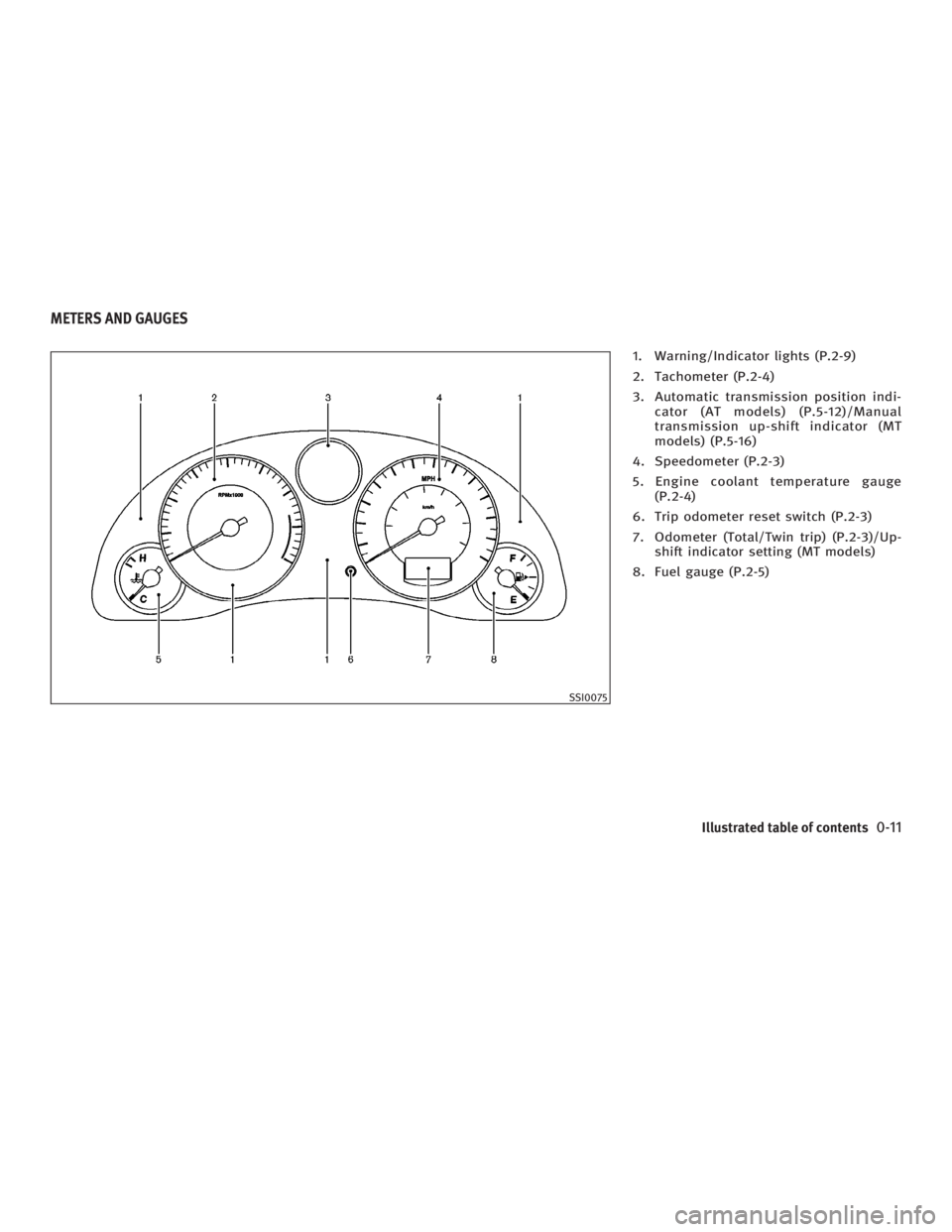
1. Warning/Indicator lights (P.2-9)
2. Tachometer (P.2-4)
3. Automatic transmission position indi-
cator (AT models) (P.5-12)/Manual
transmission up-shift indicator (MT
models) (P.5-16)
4. Speedometer (P.2-3)
5. Engine coolant temperature gauge
(P.2-4)
6. Trip odometer reset switch (P.2-3)
7. Odometer (Total/Twin trip) (P.2-3)/Up-
shift indicator setting (MT models)
8. Fuel gauge (P.2-5)
SSI0075METERS AND GAUGES
Illustrated table of contents
0-11
w 06.1.4/V35-D/V5.0
X
Page 20 of 344

WARNINGO Do not ride in a moving vehicle when the
seatback is reclined. This can be danger-
ous. The shoulder belt will not be
against your body. In an accident, you
could be thrown into it and receive neck
or other serious injuries. You could also
slide under the lap belt and receive se-
rious internal injuries. O For the most effective protection when
the vehicle is in motion, the seat should
be upright. Always sit well back in the
seat and adjust the seat belt properly.
See ªPrecautions on seat belt usageº
later in this section. FRONT POWER SEAT ADJUSTMENT
WARNING O Do not adjust the driver's seat while
driving so full attention may be given to
vehicle operation.
O Do not leave children unattended inside
the vehicle. They could unknowingly ac-
tivate switches or controls. Unattended
children could become involved in se-
rious accidents.
Operating tips O The seat motor has an auto-reset over-
load protection circuit. If the motor
stops during operation, wait 30 sec-
onds, then reactivate the switch.
O Do not operate the power seat for a
long period of time when the engine is
off. This will discharge the battery.
See ªAutomatic drive positionerº in the
ª3. Pre-driving checks and adjustmentsº
for automatic seat positioner operation (if
so equipped). SSS0133B
SEATS
1-2 Safety Ð Seats, seat belts and supplemental restraint system
w 06.1.4/V35-D/V5.0
X
Page 75 of 344
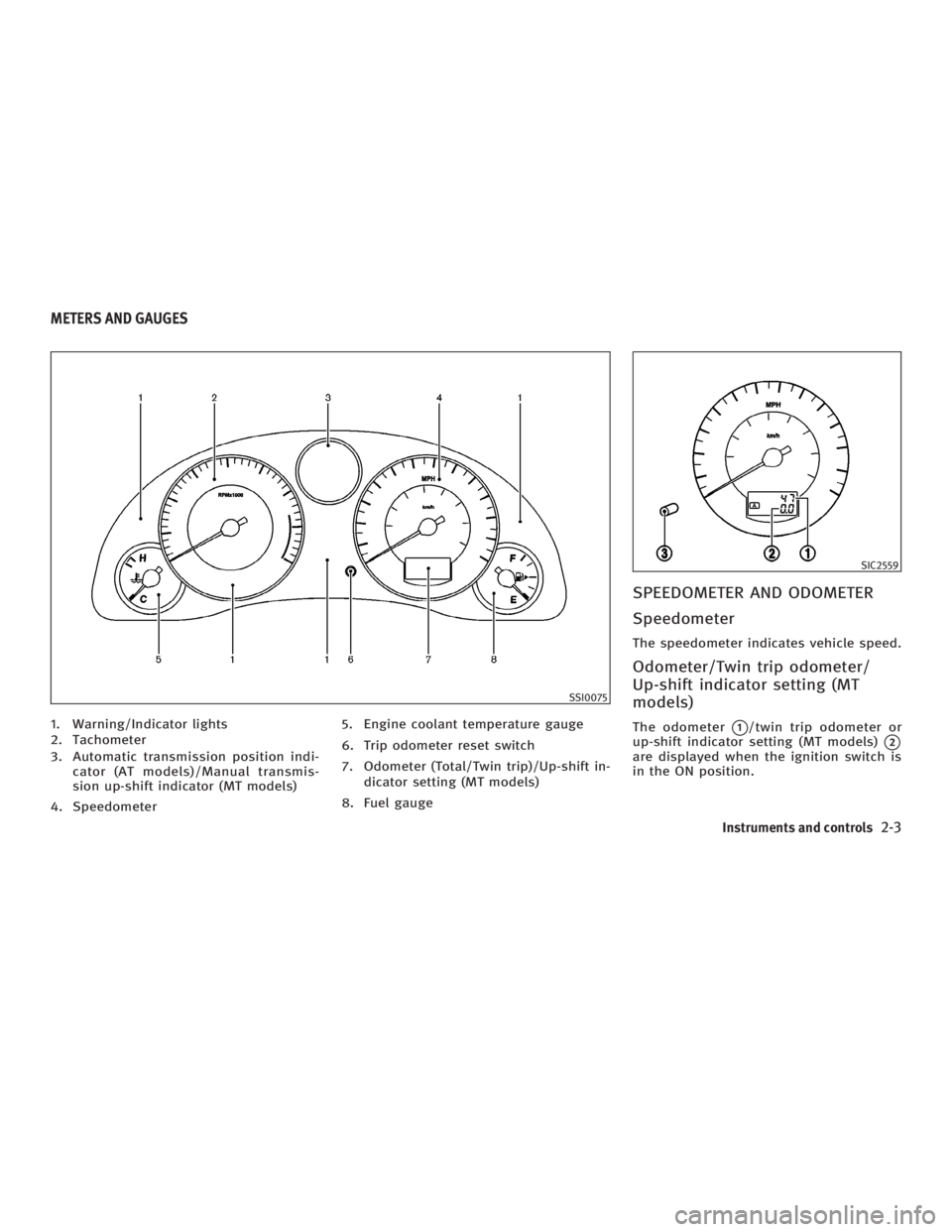
1. Warning/Indicator lights
2. Tachometer
3. Automatic transmission position indi-
cator (AT models)/Manual transmis-
sion up-shift indicator (MT models)
4. Speedometer 5. Engine coolant temperature gauge
6. Trip odometer reset switch
7. Odometer (Total/Twin trip)/Up-shift in-
dicator setting (MT models)
8. Fuel gauge SPEEDOMETER AND ODOMETER
Speedometer The speedometer indicates vehicle speed.
Odometer/Twin trip odometer/
Up-shift indicator setting (MT
models) The odometer
q 1
/twin trip odometer or
up-shift indicator setting (MT models)
q 2
are displayed when the ignition switch is
in the ON position. SSI0075 SIC2559
METERS AND GAUGES
Instruments and controls
2-3
w 06.1.4/V35-D/V5.0
X
Page 76 of 344

The odometer records the total distance
the vehicle has been driven.
The twin trip odometer records the dis-
tance of individual trips.
Changing the display:
Pushing the trip odometer reset switch
q 3
changes the display as follows.
AT models:
TRIP A ! TRIP B ! TRIP A
MT models:
TRIP A ! TRIP B ! Up-shift indicator set-
ting mode ! TRIP A
See ªDriving the vehicleº in the ª5. Start-
ing and drivingº section for the use of the
up-shift indicator.
Resetting the trip odometer:
Pushing the trip odometer reset switch for
more than 1 second resets the trip odom-
eter to zero.
TACHOMETER The tachometer indicates engine speed in
revolutions per minute (rpm). Do not rev
the engine into the red zone
q A
.
CAUTION When engine speed approaches the red
zone, shift to a higher gear. Operating the
engine in the red zone may cause serious en-
gine damage. ENGINE COOLANT TEMPERATURE
GAUGE The gauge indicates the engine coolant
temperature.
The engine coolant temperature is within
the normal range
q A
when the gauge
needle points within the zone shown in
the illustration.
The engine coolant temperature will vary
with the outside air temperature and driv-
ing conditions. SIC2560 SIC2561
2-4 Instruments and controls
w 06.1.4/V35-D/V5.0
X
Page 85 of 344

O If the light illuminates while driving,
avoid sudden steering maneuvers or
abrupt braking, reduce vehicle speed,
pull off the road to a safe location and
stop the vehicle as soon as possible. Se-
rious vehicle damage could occur and
may lead to an accident and could result
in serious personal injury. Check the tire
pressure for all four tires. Adjust the tire
pressure to the recommended COLD tire
pressure shown on the Tire and Loading
Information label to turn the low tire
pressure warning light OFF. If the light
still comes on while driving after ad-
justing the tire pressure, a tire may be
flat. If you have a flat tire, replace it with
a spare tire as soon as possible.
O
When a spare tire is mounted or a wheel is
replaced, tire pressure will not be indicated,
the TPMS will not function and the low tire
pressure warning light will flash. Contact
your INFINITI dealer as soon as possible for
tire replacement and/or system resetting.
O Replacing tires with those not originally
specified by INFINITI could affect the
proper operation of the TPMS. CAUTION O The TPMS is not a substitute for the
regular tire pressure check. Be sure to
check the tire pressure regularly.
O If the vehicle is being driven at speeds of
less than 16 MPH (25 km/h), the TPMS
may not operate correctly.
O Be sure to install the specified size of
tires to the four wheels correctly.
Low washer fluid warning
light This light comes on when the washer tank
fluid is at a low level. Add washer fluid as
necessary. See ªWindow washer fluidº in
the ª8. Maintenance and do-it-yourselfº
section.
P position selecting warning
light (for Intelligent Key
system) The light blinks in red when the selector
lever is not in the P (Park) position and
you are outside the vehicle with the Intel-
ligent Key. When the warning light blinks, move the
selector lever to P position and return the
ignition switch to the LOCK position.
Rear Active Steer (RAS)
warning light (if so
equipped) If the light comes on while the engine is
running, it may indicate that there is a
malfunction with the Rear Active Steer
(RAS) portion of the steering system. Have
the system checked by an INFINITI dealer.
For further information about the RAS sys-
tem, see ªRear Active Steer (RAS) systemº
in the ª5. Starting and drivingº section.
If a malfunction occurs in the system, the
RAS function will cease but driving can be
continued.
If the light comes on while you are driving,
contact an INFINITI dealer for repair.
Seat belt warning light and
chime The light and chime remind you to fasten
the driver's seat belt. The light illuminates
whenever the ignition switch is pushed to
the ON position, and will remain illumi-
nated until the driver's seat belt is fas-
Instruments and controls
2-13
w 06.1.4/V35-D/V5.0
X
Page 146 of 344
3. Turn the ignition switch to the START
position and start the engine.
4. After starting the engine, release the
switch.
When the engine is off, the steering wheel
lock cannot be unlocked.
For important safety information, see the
ª5. Starting and drivingº section.
Windows open/close with the
mechanical key See ªOpening and closing windowsº on
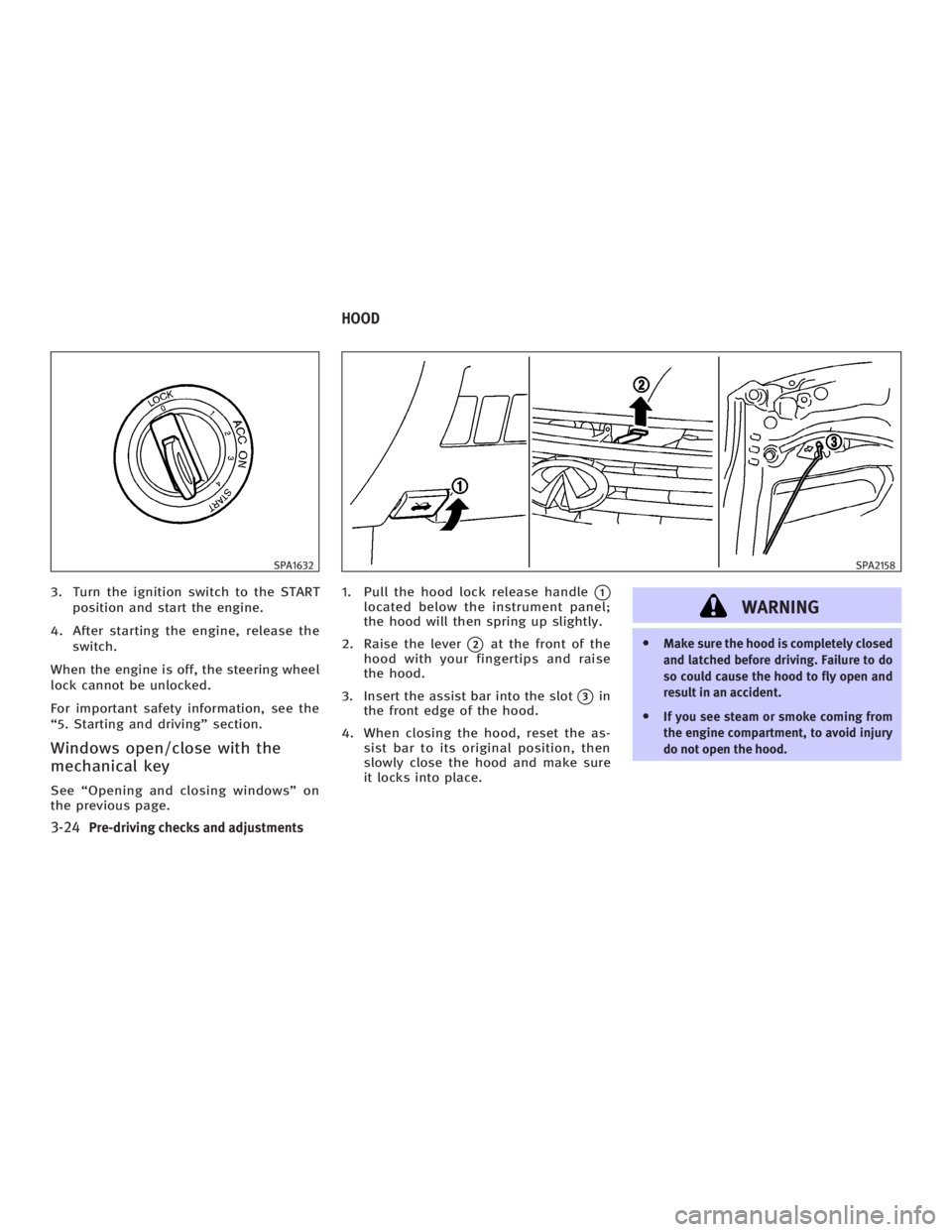
the previous page. 1. Pull the hood lock release handle
q 1
located below the instrument panel;
the hood will then spring up slightly.
2. Raise the lever
q 2
at the front of the
hood with your fingertips and raise
the hood.
3. Insert the assist bar into the slot
q 3
in
the front edge of the hood.
4. When closing the hood, reset the as-
sist bar to its original position, then
slowly close the hood and make sure
it locks into place.
WARNING O Make sure the hood is completely closed
and latched before driving. Failure to do
so could cause the hood to fly open and
result in an accident.
O If you see steam or smoke coming from
the engine compartment, to avoid injury
do not open the hood.SPA1632 SPA2158
HOOD
3-24 Pre-driving checks and adjustments
w 06.1.4/V35-D/V5.0
X
Page 158 of 344
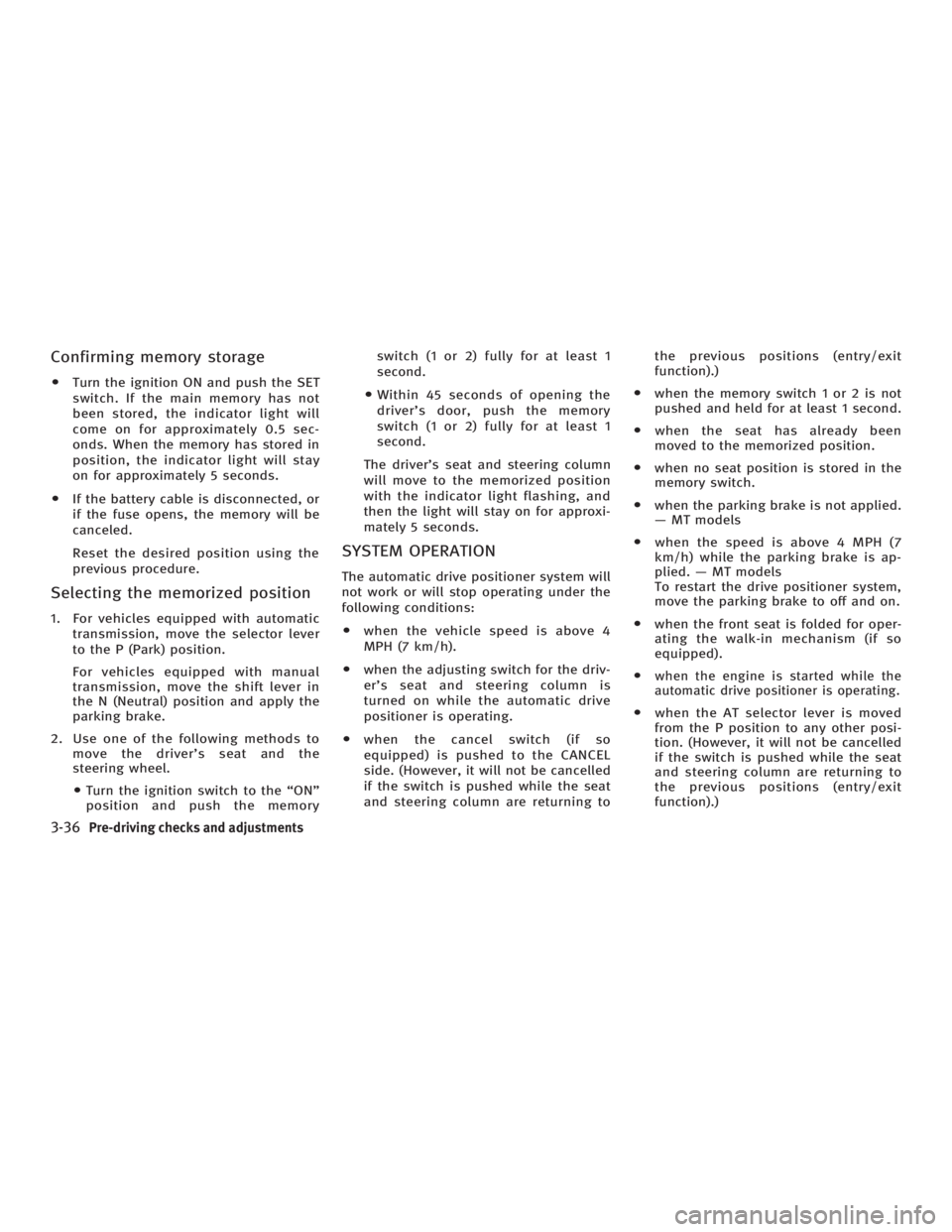
Confirming memory storage O Turn the ignition ON and push the SET
switch. If the main memory has not
been stored, the indicator light will
come on for approximately 0.5 sec-
onds. When the memory has stored in
position, the indicator light will stay
on for approximately 5 seconds.
O If the battery cable is disconnected, or
if the fuse opens, the memory will be
canceled.
Reset the desired position using the
previous procedure.
Selecting the memorized position 1. For vehicles equipped with automatic
transmission, move the selector lever
to the P (Park) position.
For vehicles equipped with manual
transmission, move the shift lever in
the N (Neutral) position and apply the
parking brake.
2. Use one of the following methods to
move the driver's seat and the
steering wheel.
O Turn the ignition switch to the ªONº
position and push the memory switch (1 or 2) fully for at least 1
second.
O Within 45 seconds of opening the
driver's door, push the memory
switch (1 or 2) fully for at least 1
second.
The driver's seat and steering column
will move to the memorized position
with the indicator light flashing, and
then the light will stay on for approxi-
mately 5 seconds.
SYSTEM OPERATION The automatic drive positioner system will
not work or will stop operating under the
following conditions:
O when the vehicle speed is above 4
MPH (7 km/h).
O when the adjusting switch for the driv-
er's seat and steering column is
turned on while the automatic drive
positioner is operating.
O when the cancel switch (if so
equipped) is pushed to the CANCEL
side. (However, it will not be cancelled
if the switch is pushed while the seat
and steering column are returning to the previous positions (entry/exit
function).)
O when the memory switch 1 or 2 is not
pushed and held for at least 1 second.
O when the seat has already been
moved to the memorized position.
O when no seat position is stored in the
memory switch.
O when the parking brake is not applied.
Ð MT models
O when the speed is above 4 MPH (7
km/h) while the parking brake is ap-
plied. Ð MT models
To restart the drive positioner system,
move the parking brake to off and on.
O when the front seat is folded for oper-
ating the walk-in mechanism (if so
equipped).
O when the engine is started while the
automatic drive positioner is operating.
O when the AT selector lever is moved
from the P position to any other posi-
tion. (However, it will not be cancelled
if the switch is pushed while the seat
and steering column are returning to
the previous positions (entry/exit
function).)
3-36 Pre-driving checks and adjustments
w 06.1.4/V35-D/V5.0
X
Page 164 of 344
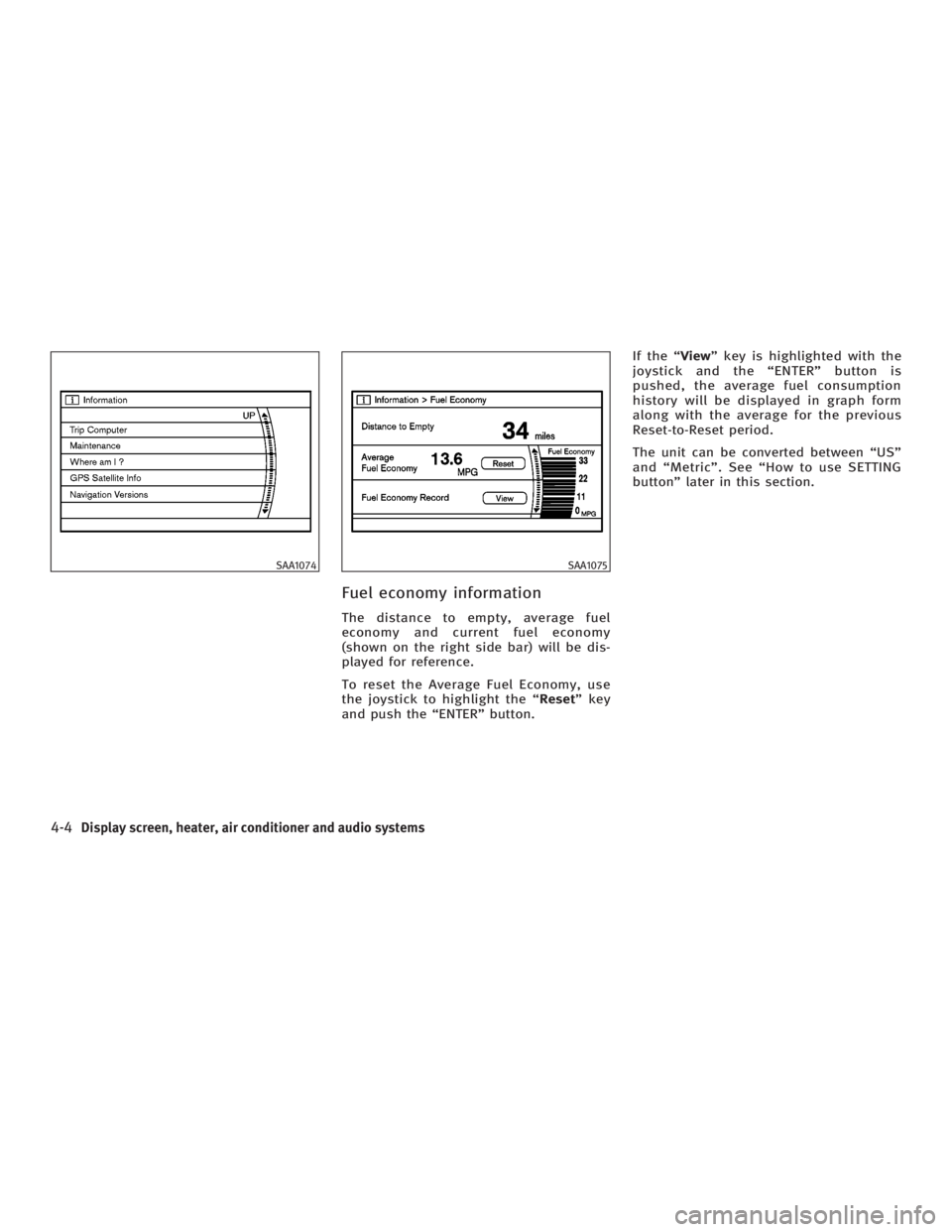
Fuel economy information The distance to empty, average fuel
economy and current fuel economy
(shown on the right side bar) will be dis-
played for reference.
To reset the Average Fuel Economy, use
the joystick to highlight the ª Reset º key
and push the ªENTERº button. If the ª View º key is highlighted with the
joystick and the ªENTERº button is
pushed, the average fuel consumption
history will be displayed in graph form
along with the average for the previous
Reset-to-Reset period.
The unit can be converted between ªUSº
and ªMetricº. See ªHow to use SETTING
buttonº later in this section.SAA1074 SAA1075
4-4 Display screen, heater, air conditioner and audio systems
w 06.1.4/V35-D/V5.0
X
Page 165 of 344

Trip computer information Elapsed Time, Driving Distance and Av-
erage Speed will be displayed.
To reset, use the joystick to highlight the
ª Reset º key and push the ªENTERº button
immediately before driving the vehicle.
The unit can be converted between ªUSº
and ªMetricº. See ªHow to use SETTING
buttonº later in this section. Maintenance information To set the maintenance interval for the
Engine Oil or Oil Filter, choose an item
using the joystick and push the ªENTERº
button.
You can also set to display a message to
remind you that the maintenance needs
to be performed.
The following example shows how to set
the engine oil change interval. Use the
same steps to set the other maintenance
information. 1. Reset the driving distance to the new
maintenance schedule.
2. Set the interval (mileage) of the main-
tenance schedule. To determine the
recommended maintenance interval,
refer to your ªINFINITI Service and
Maintenance Guideº.
3. To display the maintenance informa-
tion automatically when the set
trip distance is reached, highlight the
ª Interval Reminder º key with the joy-
stick and push the ªENTERº button.SAA1305 SAA1290 SAA1291
Display screen, heater, air conditioner and audio systems
4-5
w 06.1.4/V35-D/V5.0
X
Page 166 of 344
4. To return the display to the ª Mainte-
nance º screen, push the ªBACKº
button.
ªMaintenanceº display cannot be oper-
ated when the vehicle is moving. Stop the
vehicle in a safe place to see the informa-
tion.
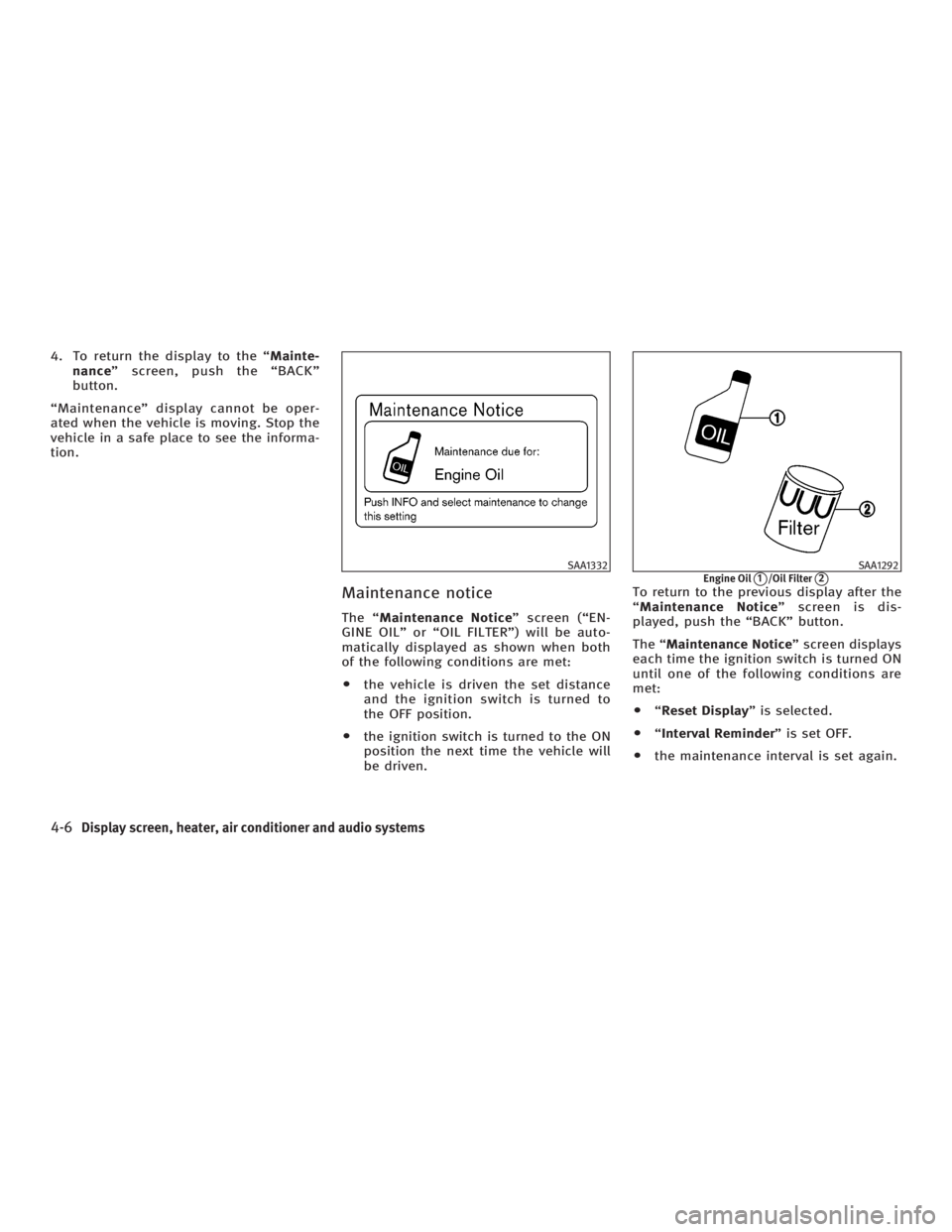
Maintenance notice The ª Maintenance Notice º screen (ªEN-
GINE OILº or ªOIL FILTERº) will be auto-
matically displayed as shown when both
of the following conditions are met:
O the vehicle is driven the set distance
and the ignition switch is turned to
the OFF position.
O the ignition switch is turned to the ON
position the next time the vehicle will
be driven. To return to the previous display after the
ª Maintenance Notice º screen is dis-
played, push the ªBACKº button.
The ª Maintenance Notice º screen displays
each time the ignition switch is turned ON
until one of the following conditions are
met:
O ª Reset Display º is selected.
O ª Interval Reminder º is set OFF.
O the maintenance interval is set again. SAA1332 SAA1292
Engine Oil
q 1
/Oil Filter
q 2
4-6 Display screen, heater, air conditioner and audio systems
w 06.1.4/V35-D/V5.0
X