fuel INFINITI G35 2006 Owner's Manual
[x] Cancel search | Manufacturer: INFINITI, Model Year: 2006, Model line: G35, Model: INFINITI G35 2006Pages: 344, PDF Size: 6.81 MB
Page 150 of 344
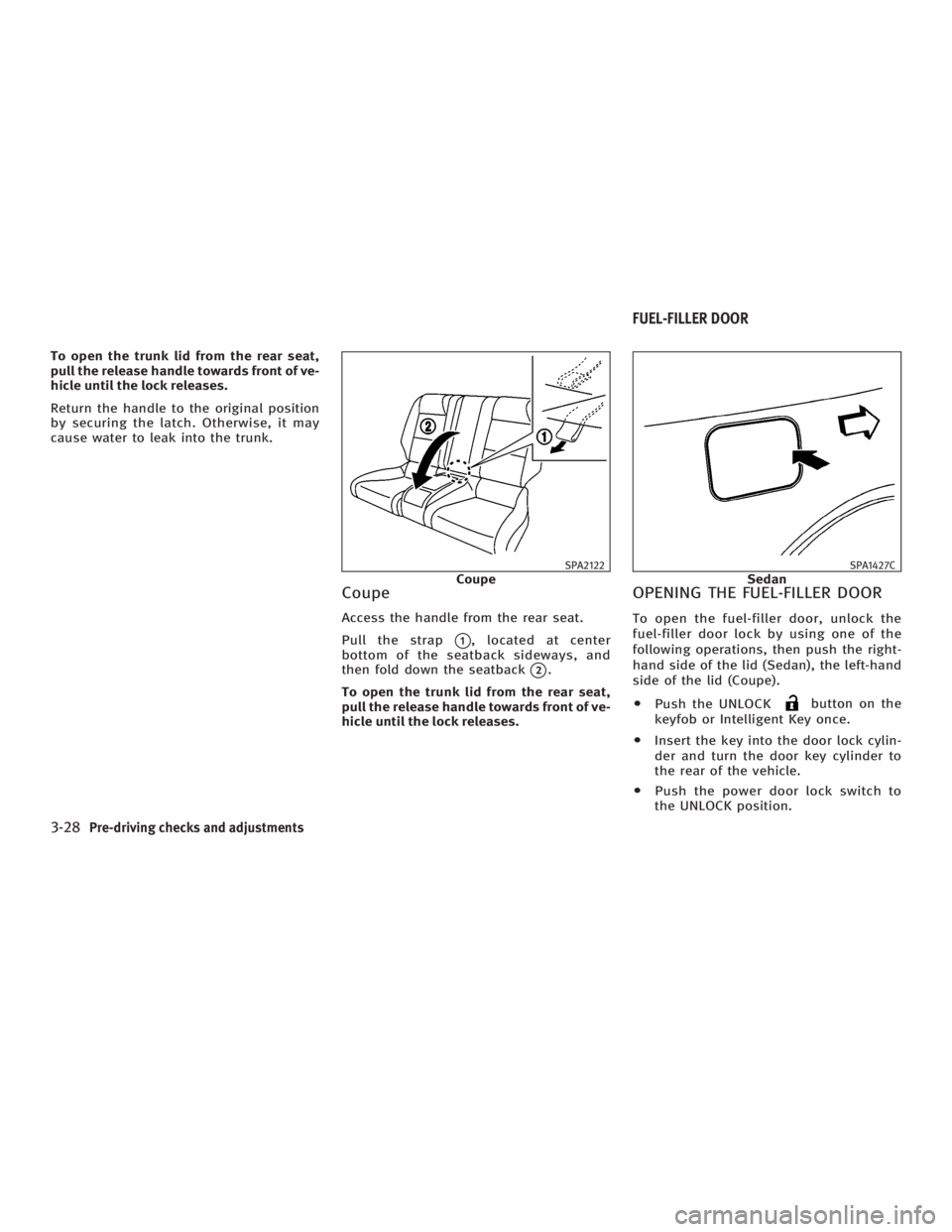
To open the trunk lid from the rear seat,
pull the release handle towards front of ve-
hicle until the lock releases.
Return the handle to the original position
by securing the latch. Otherwise, it may
cause water to leak into the trunk.
Coupe Access the handle from the rear seat.
Pull the strap
q 1
, located at center
bottom of the seatback sideways, and
then fold down the seatback
q 2
.
To open the trunk lid from the rear seat,
pull the release handle towards front of ve-
hicle until the lock releases. OPENING THE FUEL-FILLER DOOR To open the fuel-filler door, unlock the
fuel-filler door lock by using one of the
following operations, then push the right-
hand side of the lid (Sedan), the left-hand
side of the lid (Coupe).
O Push the UNLOCK button on the
keyfob or Intelligent Key once.
O Insert the key into the door lock cylin-
der and turn the door key cylinder to
the rear of the vehicle.
O Push the power door lock switch to
the UNLOCK position. SPA2122
Coupe SPA1427C
SedanFUEL-FILLER DOOR
3-28 Pre-driving checks and adjustments
w 06.1.4/V35-D/V5.0
X
Page 151 of 344
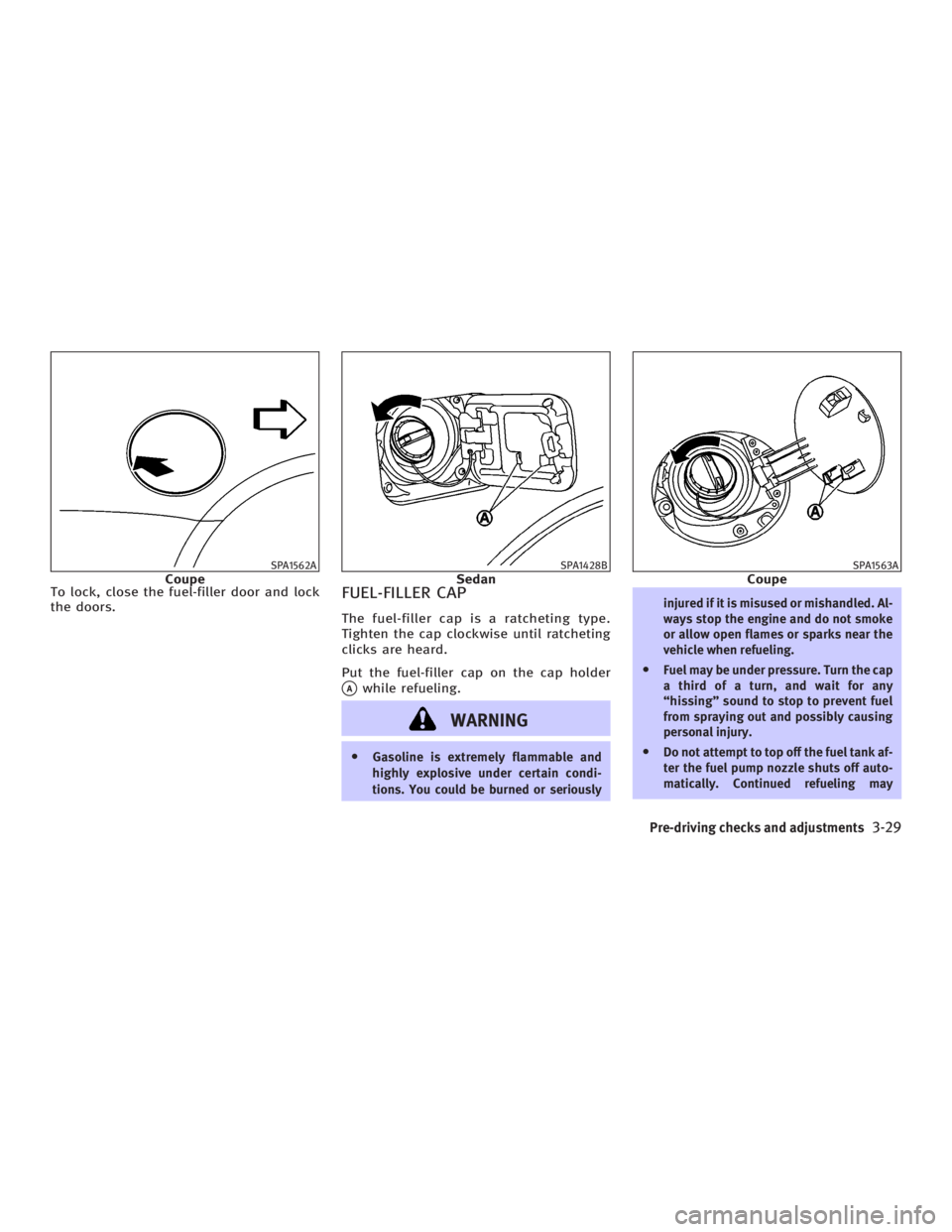
To lock, close the fuel-filler door and lock
the doors.
FUEL-FILLER CAP The fuel-filler cap is a ratcheting type.
Tighten the cap clockwise until ratcheting
clicks are heard.
Put the fuel-filler cap on the cap holder
q A
while refueling.
WARNING O Gasoline is extremely flammable and
highly explosive under certain condi-
tions. You could be burned or seriously injured if it is misused or mishandled. Al-
ways stop the engine and do not smoke
or allow open flames or sparks near the
vehicle when refueling.
O Fuel may be under pressure. Turn the cap
a third of a turn, and wait for any
ªhissingº sound to stop to prevent fuel
from spraying out and possibly causing
personal injury.
O Do not attempt to top off the fuel tank af-
ter the fuel pump nozzle shuts off auto-
matically. Continued refueling maySPA1562A
Coupe SPA1428B
Sedan SPA1563A
Coupe
Pre-driving checks and adjustments
3-29
w 06.1.4/V35-D/V5.0
X
Page 152 of 344
cause fuel overflow, resulting in fuel-
spray and possibly a fire.
O Use only an original equipment type
fuel-filler cap as a replacement. It has a
built-in safety valve needed for proper
operation of the fuel system and emis-
sion control system. An incorrect cap can
result in a serious malfunction and pos-
sible injury. An incorrect cap could also
cause the
malfunction indicator
lamp to illuminate.
O Do not fill a portable fuel container in the
vehicle or trailer. Static electricity can
cause an explosion of flammable liquid,
vapor or gas in any vehicle or trailer. To
reduce the risk of serious injury or death
when filling portable fuel containers:
Ð Always place the container on the
ground when filling.
Ð Do not use electronic devices when
filling.
Ð Keep the pump nozzle in contact with
the container while you are filling it.
Ð Use only approved portable fuel con-
tainers for flammable liquid.
O Never pour fuel into the throttle body to
attempt to start your vehicle. CAUTION O If fuel is spilled on the vehicle body,
flush it away with water to avoid paint
damage.
O Tighten until the fuel-filler cap clicks.
Failure to tighten the fuel-filler cap prop-
erly may cause the
malfunction in-
dicator lamp (MIL) to illuminate. If the
lamp illuminates because the fuel-
filler cap is loose or missing, tighten or
install the cap and continue to drive the
vehicle. The
lamp should turn off
after a few driving trips. If the
lamp
does not turn off after a few driving trips,
have the vehicle inspected by an INFINITI
dealer.
O For additional information, see the ªMal-
function indicator lamp (MIL)º in the ª2.
Instruments and controlsº section.
MANUAL OPERATION
WARNING Do not adjust the steering wheel while
driving. You could lose control of your ve-
hicle and cause an accident.
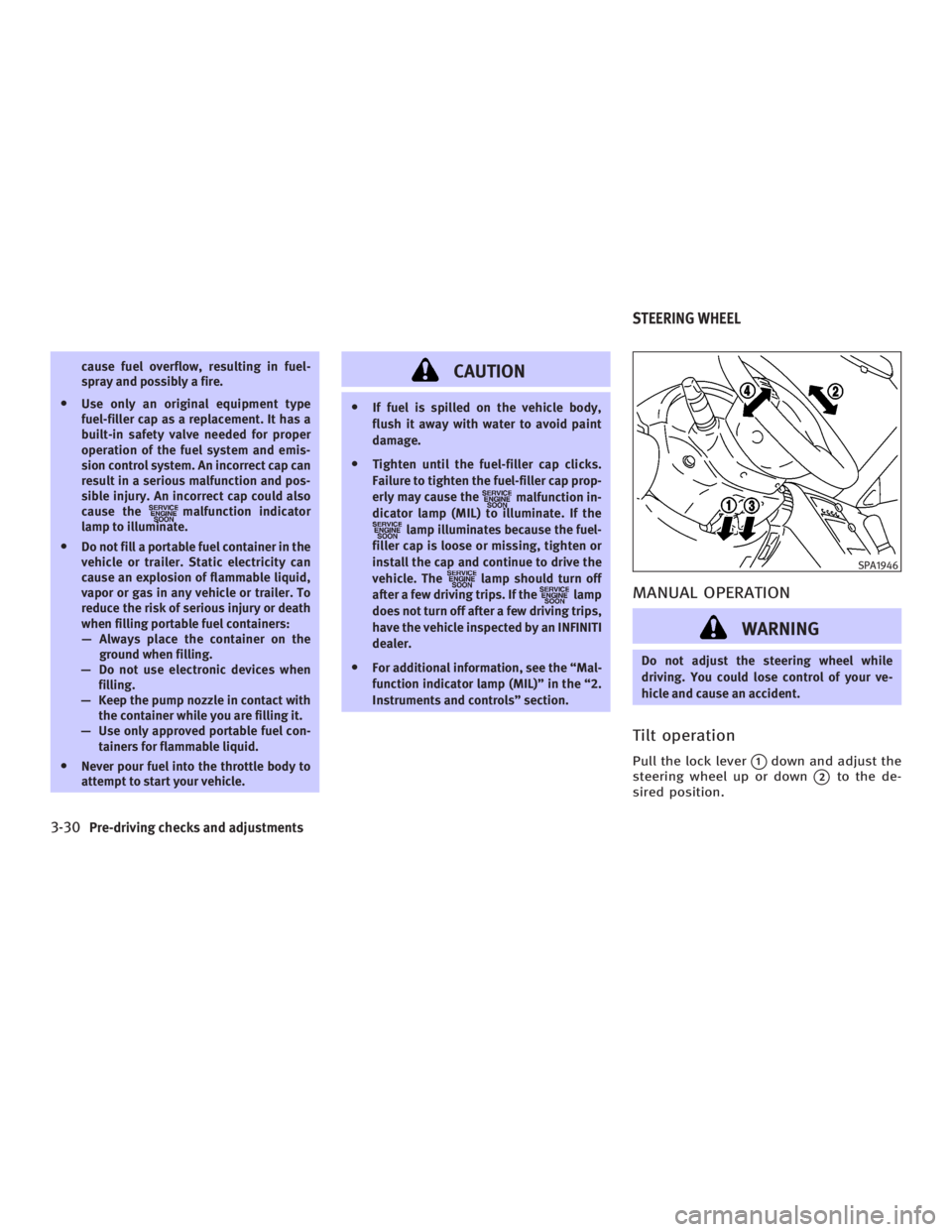
Tilt operation Pull the lock lever
q 1
down and adjust the
steering wheel up or down
q 2
to the de-
sired position. SPA1946
STEERING WHEEL
3-30 Pre-driving checks and adjustments
w 06.1.4/V35-D/V5.0
X
Page 164 of 344
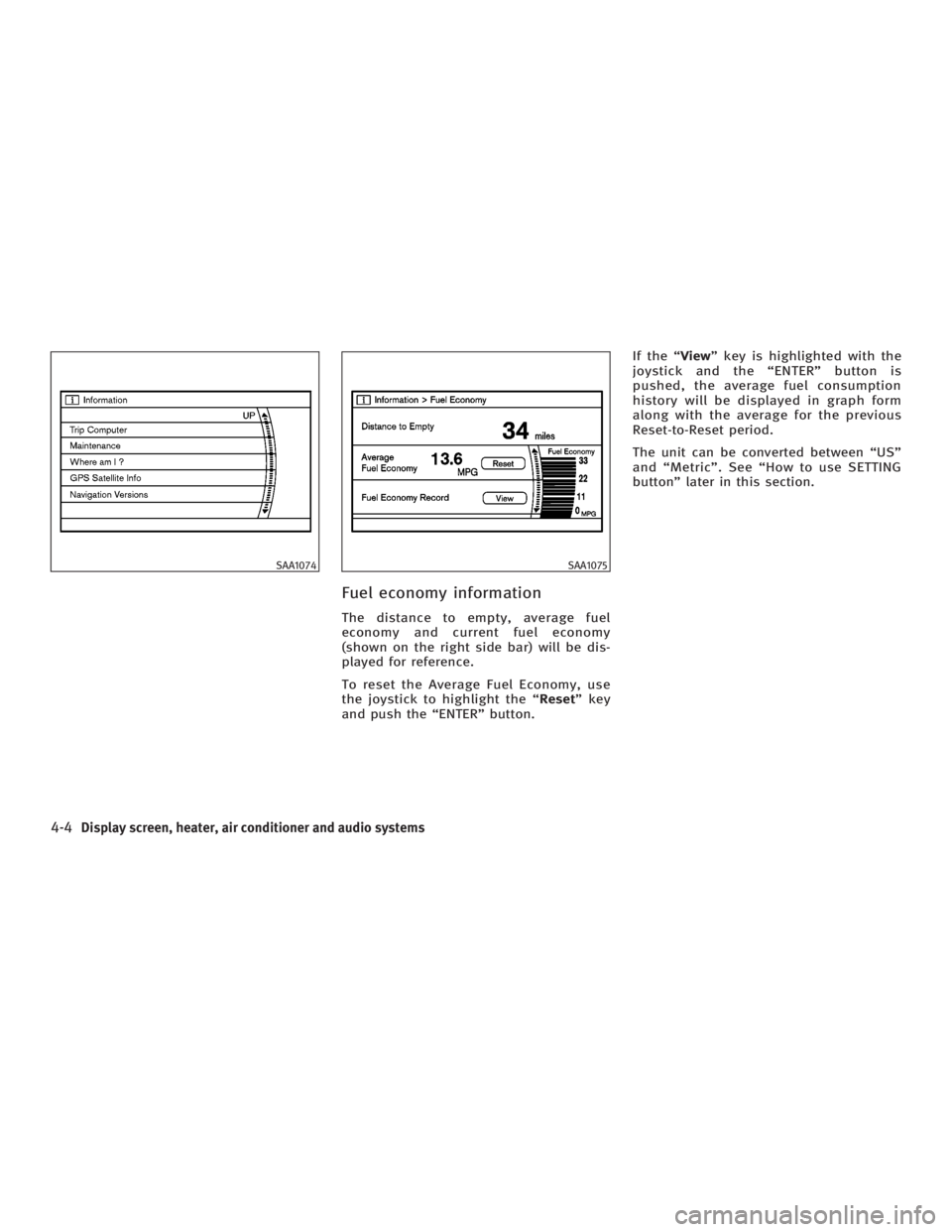
Fuel economy information The distance to empty, average fuel
economy and current fuel economy
(shown on the right side bar) will be dis-
played for reference.
To reset the Average Fuel Economy, use
the joystick to highlight the ª Reset º key
and push the ªENTERº button. If the ª View º key is highlighted with the
joystick and the ªENTERº button is
pushed, the average fuel consumption
history will be displayed in graph form
along with the average for the previous
Reset-to-Reset period.
The unit can be converted between ªUSº
and ªMetricº. See ªHow to use SETTING
buttonº later in this section.SAA1074 SAA1075
4-4 Display screen, heater, air conditioner and audio systems
w 06.1.4/V35-D/V5.0
X
Page 171 of 344
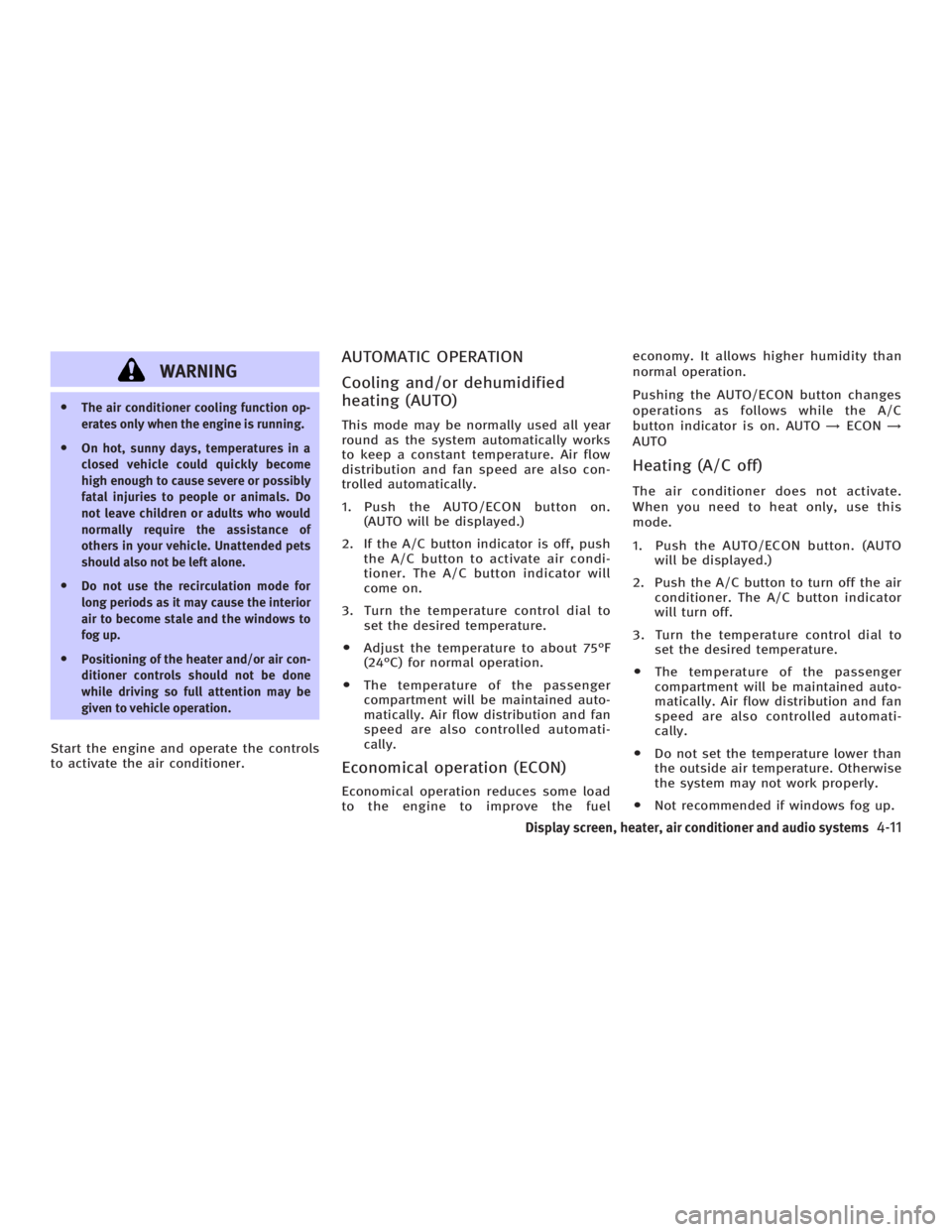
WARNINGO The air conditioner cooling function op-
erates only when the engine is running.
O On hot, sunny days, temperatures in a
closed vehicle could quickly become
high enough to cause severe or possibly
fatal injuries to people or animals. Do
not leave children or adults who would
normally require the assistance of
others in your vehicle. Unattended pets
should also not be left alone.
O Do not use the recirculation mode for
long periods as it may cause the interior
air to become stale and the windows to
fog up.
O Positioning of the heater and/or air con-
ditioner controls should not be done
while driving so full attention may be
given to vehicle operation.
Start the engine and operate the controls
to activate the air conditioner. AUTOMATIC OPERATION
Cooling and/or dehumidified
heating (AUTO) This mode may be normally used all year
round as the system automatically works
to keep a constant temperature. Air flow
distribution and fan speed are also con-
trolled automatically.
1. Push the AUTO/ECON button on.
(AUTO will be displayed.)
2. If the A/C button indicator is off, push
the A/C button to activate air condi-
tioner. The A/C button indicator will
come on.
3. Turn the temperature control dial to
set the desired temperature.
O Adjust the temperature to about 75ÉF
(24ÉC) for normal operation.
O The temperature of the passenger
compartment will be maintained auto-
matically. Air flow distribution and fan
speed are also controlled automati-
cally.
Economical operation (ECON) Economical operation reduces some load
to the engine to improve the fuel economy. It allows higher humidity than
normal operation.
Pushing the AUTO/ECON button changes
operations as follows while the A/C
button indicator is on. AUTO ! ECON !
AUTO
Heating (A/C off) The air conditioner does not activate.
When you need to heat only, use this
mode.
1. Push the AUTO/ECON button. (AUTO
will be displayed.)
2. Push the A/C button to turn off the air
conditioner. The A/C button indicator
will turn off.
3. Turn the temperature control dial to
set the desired temperature.
O The temperature of the passenger
compartment will be maintained auto-
matically. Air flow distribution and fan
speed are also controlled automati-
cally.
O Do not set the temperature lower than
the outside air temperature. Otherwise
the system may not work properly.
O Not recommended if windows fog up.
Display screen, heater, air conditioner and audio systems
4-11
w 06.1.4/V35-D/V5.0
X
Page 174 of 344
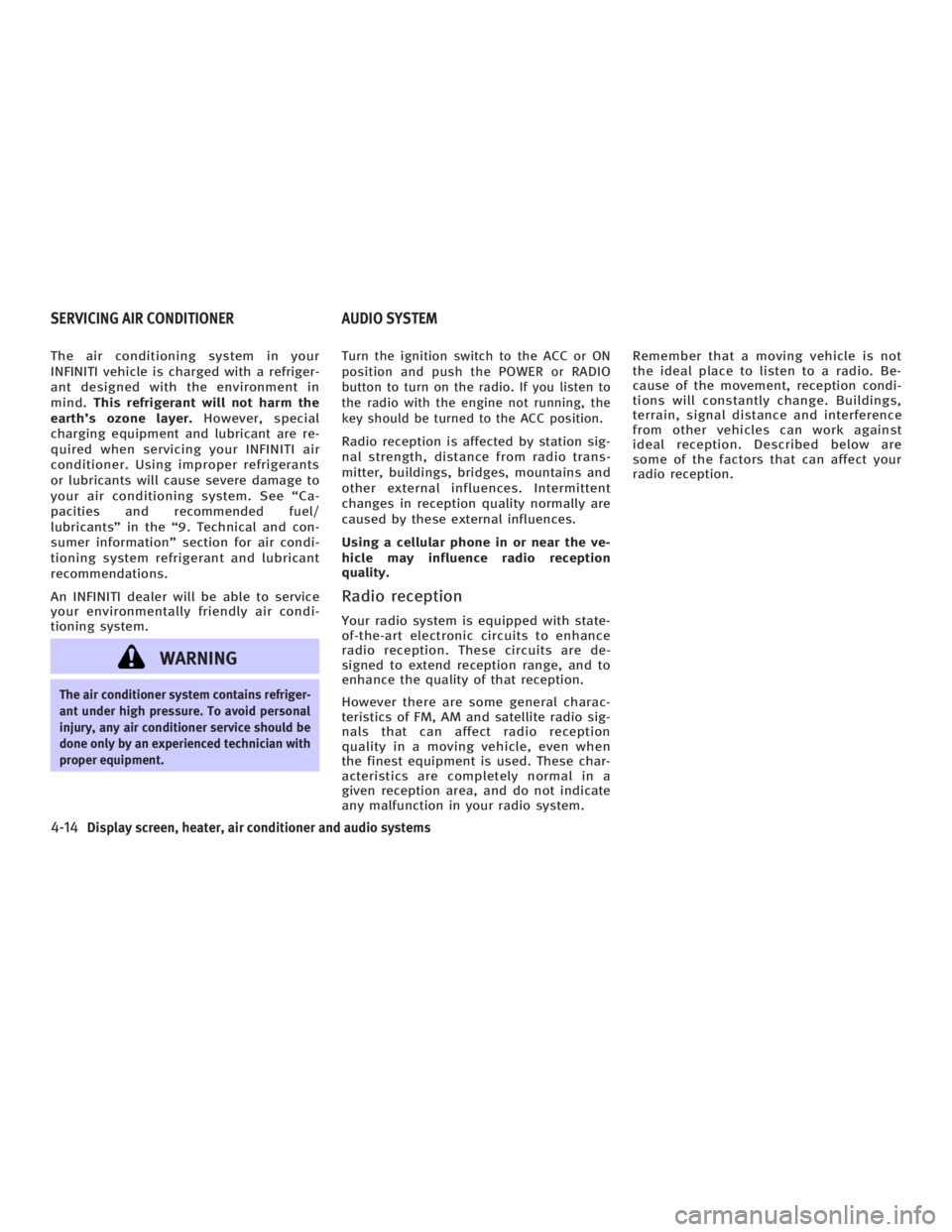
The air conditioning system in your
INFINITI vehicle is charged with a refriger-
ant designed with the environment in
mind. This refrigerant will not harm the
earth's ozone layer. However, special
charging equipment and lubricant are re-
quired when servicing your INFINITI air
conditioner. Using improper refrigerants
or lubricants will cause severe damage to
your air conditioning system. See ªCa-
pacities and recommended fuel/
lubricantsº in the ª9. Technical and con-
sumer informationº section for air condi-
tioning system refrigerant and lubricant
recommendations.
An INFINITI dealer will be able to service
your environmentally friendly air condi-
tioning system.
WARNINGThe air conditioner system contains refriger-
ant under high pressure. To avoid personal
injury, any air conditioner service should be
done only by an experienced technician with
proper equipment. Turn the ignition switch to the ACC or ON
position and push the POWER or RADIO
button to turn on the radio. If you listen to
the radio with the engine not running, the
key should be turned to the ACC position.
Radio reception is affected by station sig-
nal strength, distance from radio trans-
mitter, buildings, bridges, mountains and
other external influences. Intermittent
changes in reception quality normally are
caused by these external influences.
Using a cellular phone in or near the ve-
hicle may influence radio reception
quality.
Radio reception Your radio system is equipped with state-
of-the-art electronic circuits to enhance
radio reception. These circuits are de-
signed to extend reception range, and to
enhance the quality of that reception.
However there are some general charac-
teristics of FM, AM and satellite radio sig-
nals that can affect radio reception
quality in a moving vehicle, even when
the finest equipment is used. These char-
acteristics are completely normal in a
given reception area, and do not indicate
any malfunction in your radio system. Remember that a moving vehicle is not
the ideal place to listen to a radio. Be-
cause of the movement, reception condi-
tions will constantly change. Buildings,
terrain, signal distance and interference
from other vehicles can work against
ideal reception. Described below are
some of the factors that can affect your
radio reception.
SERVICING AIR CONDITIONER AUDIO SYSTEM
4-14 Display screen, heater, air conditioner and audio systems
w 06.1.4/V35-D/V5.0
X
Page 205 of 344
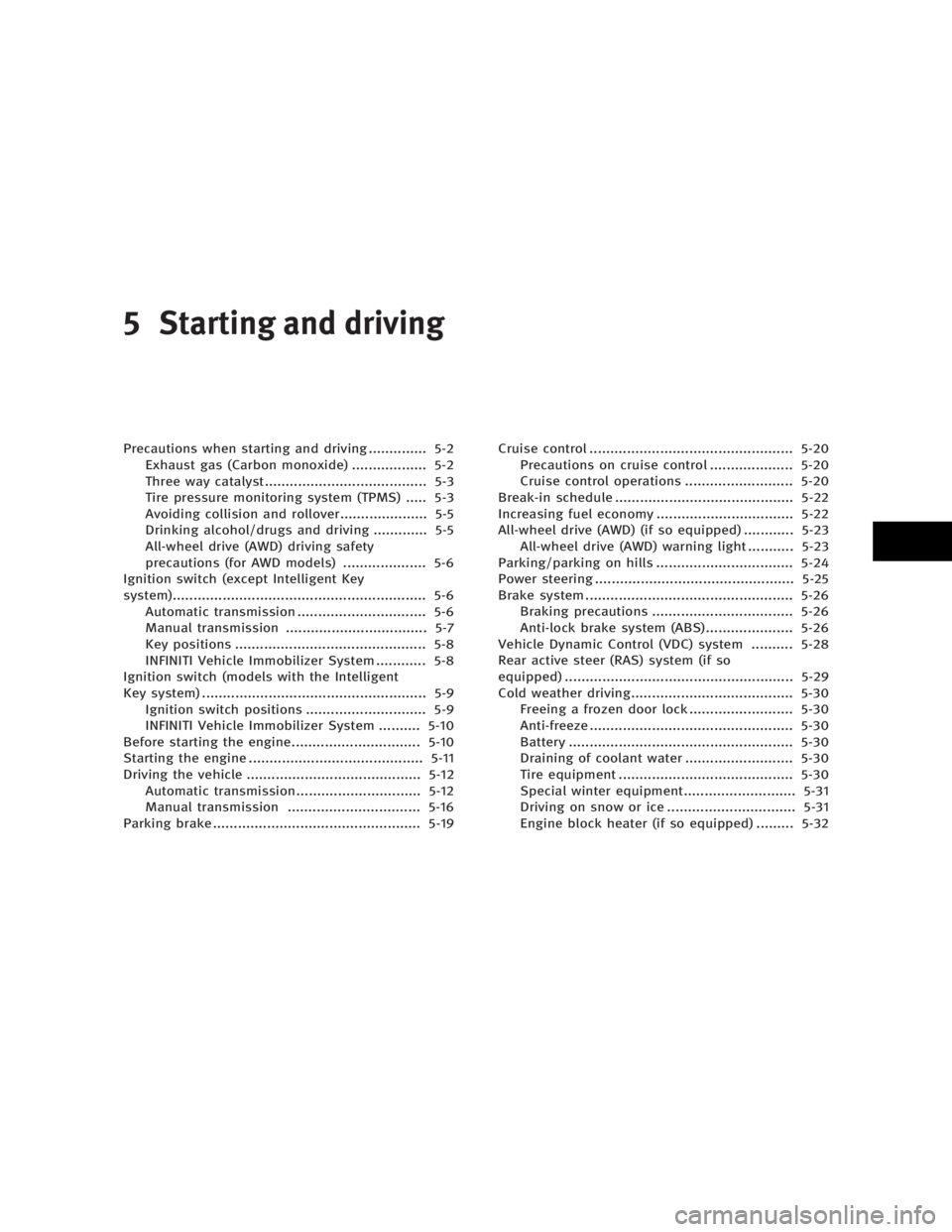
5 Starting and driving Precautions when starting and driving .............. 5-2
Exhaust gas (Carbon monoxide) .................. 5-2
Three way catalyst....................................... 5-3
Tire pressure monitoring system (TPMS) ..... 5-3
Avoiding collision and rollover..................... 5-5
Drinking alcohol/drugs and driving ............. 5-5
All-wheel drive (AWD) driving safety
precautions (for AWD models) .................... 5-6
Ignition switch (except Intelligent Key
system)............................................................. 5-6
Automatic transmission ............................... 5-6
Manual transmission .................................. 5-7
Key positions .............................................. 5-8
INFINITI Vehicle Immobilizer System ............ 5-8
Ignition switch (models with the Intelligent
Key system) ...................................................... 5-9
Ignition switch positions ............................. 5-9
INFINITI Vehicle Immobilizer System .......... 5-10
Before starting the engine............................... 5-10
Starting the engine .......................................... 5-11
Driving the vehicle .......................................... 5-12
Automatic transmission.............................. 5-12
Manual transmission ................................ 5-16
Parking brake .................................................. 5-19 Cruise control ................................................. 5-20
Precautions on cruise control .................... 5-20
Cruise control operations .......................... 5-20
Break-in schedule ........................................... 5-22
Increasing fuel economy ................................. 5-22
All-wheel drive (AWD) (if so equipped) ............ 5-23
All-wheel drive (AWD) warning light ........... 5-23
Parking/parking on hills ................................. 5-24
Power steering ................................................ 5-25
Brake system .................................................. 5-26
Braking precautions .................................. 5-26
Anti-lock brake system (ABS)..................... 5-26
Vehicle Dynamic Control (VDC) system .......... 5-28
Rear active steer (RAS) system (if so
equipped) ....................................................... 5-29
Cold weather driving....................................... 5-30
Freeing a frozen door lock ......................... 5-30
Anti-freeze ................................................. 5-30
Battery ...................................................... 5-30
Draining of coolant water .......................... 5-30
Tire equipment .......................................... 5-30
Special winter equipment........................... 5-31
Driving on snow or ice ............................... 5-31
Engine block heater (if so equipped) ......... 5-32
w 06.1.13/V35-D/V5.0
X
Page 207 of 344

THREE WAY CATALYST The three way catalyst is an emission con-
trol device installed in the exhaust
system. Exhaust gas in the converter is
burned at high temperatures to help re-
duce pollutants.
WARNINGO The exhaust gas and the exhaust system
are very hot. Keep people, animals or
flammable materials away from the ex-
haust system components.
O Do not stop or park the vehicle over flam-
mable materials such as dry grass,
waste paper or rags. They may ignite and
cause a fire.
CAUTIONO Do not use leaded gasoline. Deposits
from leaded gasoline will seriously re- duce the three-way catalyst's ability to
help reduce exhaust pollutants.
O Keep your engine tuned up. Malfunc-
tions in the ignition, fuel injection, or
electrical systems can cause overrich
fuel flow into the three-way catalyst,
causing it to overheat. Do not keep
driving if the engine misfires, or if no-
ticeable loss of performance or other un-
usual operating conditions are detected.
Have the vehicle inspected promptly by
an INFINITI dealer.
O Avoid driving with an extremely low fuel
level. Running out of fuel could cause the
engine to misfire, damaging the
three-way catalyst.
O Do not race the engine while warming it
up.
O Do not push or tow your vehicle to start
the engine.
TIRE PRESSURE MONITORING
SYSTEM (TPMS) Each tire, including the spare (if provided),
should be checked monthly when cold and inflated to the inflation pressure recom-
mended by the vehicle manufacturer on the
vehicle placard or tire inflation pressure la-
bel. (If your vehicle has tires of a different
size than the size indicated on the vehicle
placard or tire inflation pressure label, you
should determine the proper tire inflation
pressure for those tires.)
As an added safety feature, your vehicle
has been equipped with a tire pressure
monitoring system (TPMS) that illumi-
nates a low tire pressure telltale when
one or more of your tires is significantly
under-inflated. Accordingly, when the low
tire pressure telltale illuminates, you
should stop and check your tires as soon
as possible, and inflate them to the
proper pressure. Driving on a significantly
under-inflated tire causes the tire to over-
heat and can lead to tire failure. Under-
inflation also reduces fuel efficiency and
tire tread life, and may affect the vehicle's
handling and stopping ability.
Please note that the TPMS is not a substi-
tute for proper tire maintenance, and it is
the driver's responsibility to maintain cor-
rect tire pressure, even if under-inflation
has not reached the level to trigger illumi-
nation of the TPMS low tire pressure tell-
tale.
Starting and driving
5-3
w 06.1.4/V35-D/V5.0
X
Page 222 of 344
Push the trip odometer reset switch more
than approximately 2 seconds and then
the figure in the display will start
blinking.
Pushing the trip odometer reset switch for
less than approximately 1 second while
the figure is blinking will add the figure
by 100 rpm. If pushing for more than ap-
proximately 1 second, the figure will in-
crease by 500 rpm.
If you have not operated the trip odom-
eter reset switch for 5 seconds, the set-
ting mode will end. The display will illumi-
nate instead of blink.
If the battery cable is disconnected, the
set engine speed will be returned to the
initial figure (8,000 rpm).
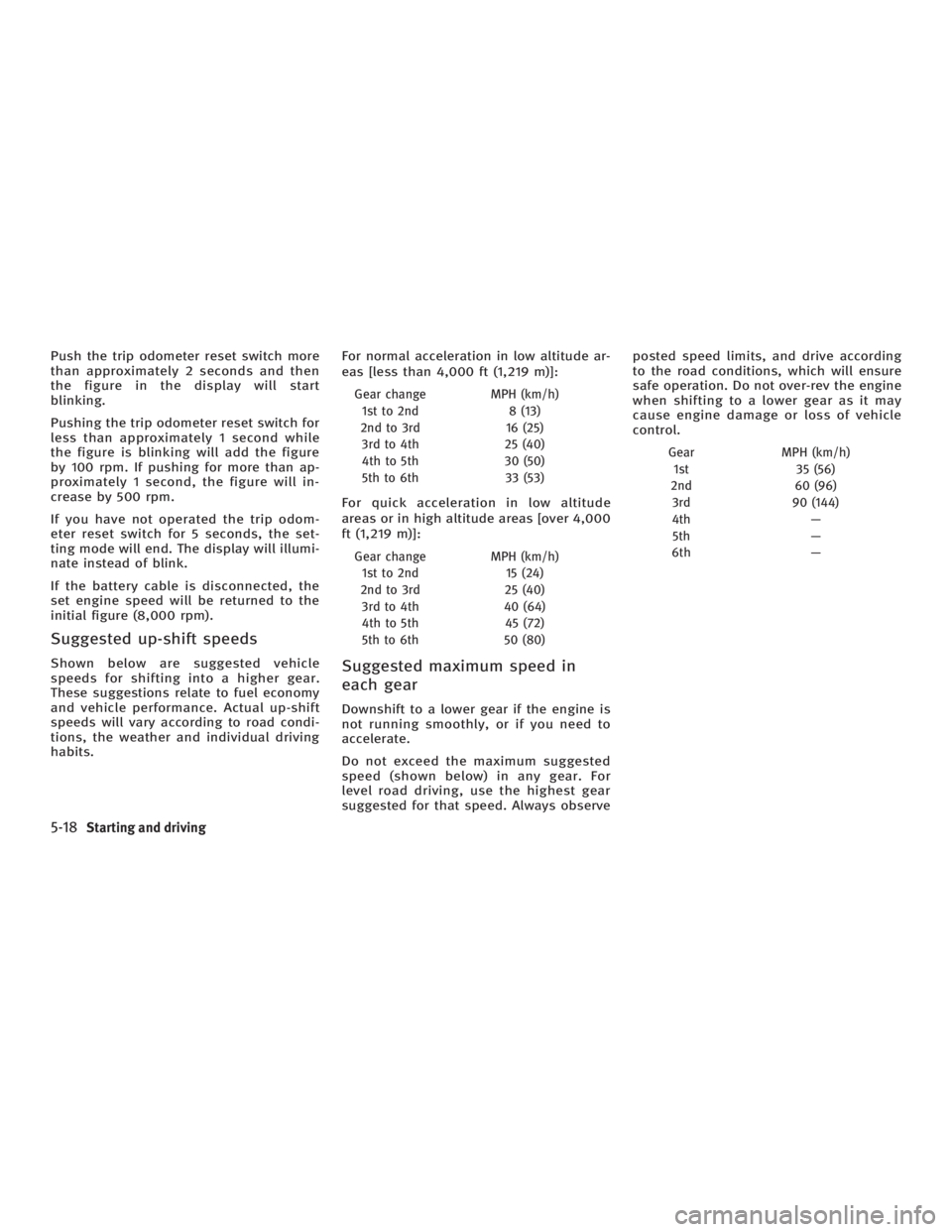
Suggested up-shift speeds Shown below are suggested vehicle
speeds for shifting into a higher gear.
These suggestions relate to fuel economy
and vehicle performance. Actual up-shift
speeds will vary according to road condi-
tions, the weather and individual driving
habits. For normal acceleration in low altitude ar-
eas [less than 4,000 ft (1,219 m)]:
Gear change MPH (km/h)
1st to 2nd 8 (13)
2nd to 3rd 16 (25)
3rd to 4th 25 (40)
4th to 5th 30 (50)
5th to 6th 33 (53)
For quick acceleration in low altitude
areas or in high altitude areas [over 4,000
ft (1,219 m)]:
Gear change MPH (km/h)
1st to 2nd 15 (24)
2nd to 3rd 25 (40)
3rd to 4th 40 (64)
4th to 5th 45 (72)
5th to 6th 50 (80)
Suggested maximum speed in
each gear Downshift to a lower gear if the engine is
not running smoothly, or if you need to
accelerate.
Do not exceed the maximum suggested
speed (shown below) in any gear. For
level road driving, use the highest gear
suggested for that speed. Always observe posted speed limits, and drive according
to the road conditions, which will ensure
safe operation. Do not over-rev the engine
when shifting to a lower gear as it may
cause engine damage or loss of vehicle
control.
Gear MPH (km/h)
1st 35 (56)
2nd 60 (96)
3rd 90 (144)
4th Ð
5th Ð
6th Ð
5-18 Starting and driving
w 06.1.4/V35-D/V5.0
X
Page 226 of 344
CAUTIONDuring the first 1,200 miles (2,000 km),
follow these recommendations to obtain
maximum engine performance and ensure
the future reliability and economy of your
new vehicle. Failure to follow these recom-
mendations may result in shortened engine
life and reduced engine performance.
O Avoid driving for long periods at con-
stant speed, either fast or slow. Do
not run the engine over 4,000 rpm.
O Do not accelerate at full throttle in any
gear.
O Avoid quick starts.
O Avoid hard braking as much as pos-
sible.
O Do not tow a trailer or haul a heavy
load for the first 500 miles (800 km). O Accelerate slowly and smoothly. Main-
tain cruising speeds with a constant
accelerator position.
O Drive at moderate speeds on the high-
way. Driving at high speed will lower
fuel economy.
O Avoid unnecessary stopping and brak-
ing. Maintain a safe distance behind
other vehicles.
O Use a proper gear range which suits
road conditions. On level roads, shift
into high gear as soon as possible.
O Avoid unnecessary engine idling.
O Keep your engine tuned up.
O Follow the recommended periodic
maintenance schedule.
O Keep the tires inflated at the correct
pressure. Low pressure will increase
tire wear and waste fuel.
O Keep the front wheels in correct align-
ment. Improper alignment will cause
not only tire wear but also lower fuel
economy.
O Air conditioner operation lowers fuel
economy. Use the air conditioner only
when necessary. O When cruising at highway speeds, it is
more economical to use the air condi-
tioner and leave the windows closed
to reduce drag.
BREAK-IN SCHEDULE INCREASING FUEL ECONOMY
5-22 Starting and driving
w 06.1.4/V35-D/V5.0
X