lights INFINITI G35 2006 Owner's Manual
[x] Cancel search | Manufacturer: INFINITI, Model Year: 2006, Model line: G35, Model: INFINITI G35 2006Pages: 344, PDF Size: 6.81 MB
Page 143 of 344
3. Push the LOCK button on the In-
telligent Key.
4. All doors and fuel-filler door will lock.
All of the doors will lock when the LOCK
button on the Intelligent Key is
pushed even though the ignition switch is
in the ON position.
5. The hazard indicator flashes twice and
the horn chirps once.
O When the LOCK button is pushed
with all doors locked, the hazard indi-
cator flashes twice and the horn
chirps once as a reminder that the
doors are already locked.
*1: Doors lock with the Intelligent Key
while the mechanical key or the valet
key is in the ignition switch or the ig-
nition switch is pushed in.
*2: Doors do not lock with the Intelligent
Key while any door is open.
Unlocking doors and fuel-filler door:
1. Push the UNLOCK button on the
Intelligent Key once.
O The driver's door and fuel-filler door
unlock O The hazard indicator flashes once if all
doors are completely closed with the
ignition switch in any position except
the ON position.
O The interior light turns on and the
light timer activates for 30 seconds
when the switch is in the DOOR posi-
tion with the ignition switch in any po-
sition except the ON position.
2. Push the UNLOCK button on the
Intelligent Key again within 5 seconds.
O All doors unlock.
O The hazard indicator flashes once if all
doors are completely closed.
All doors will be locked automatically un-
less one of the following operations is
performed within 1 minute of pushing the
UNLOCK button.
O opening any door
O the ignition switch is pushed
O the mechanical key or the valet key is
inserted into the ignition switch
The interior light can be turned off without
waiting for 30 seconds by turning the igni-
tion switch to the ON position or by locking
the doors with the Intelligent Key. Opening the windows:
See ªOpening and closing windowsº on
the previous page.
Releasing the trunk lid:
1. Push and hold the TRUNK button
on the Intelligent Key for longer than
0.5 second when the ignition switch is
in any position except the ON posi-
tion.
2. The trunk lid opens.
The trunk lid cannot be opened by operat-
ing the Intelligent Key when the ignition
switch is in the ON position.
Using the panic alarm:
If you are near your vehicle and feel
threatened, you may activate the alarm to
call attention as follows:
1. Push the PANIC button on the In-
telligent Key for longer than 0.5 second
with the metal key removed from the
ignition switch or the ignition switch
not pushed in.
2. The theft warning alarm and head-
lights will stay on for 25 seconds.
Pre-driving checks and adjustments
3-21
w 06.1.4/V35-D/V5.0
X
Page 154 of 344
CAUTION O Do not store the main sun visor before
storing the extension sun visor.
O Do not pull the extension sun visor forc-
edly downward.
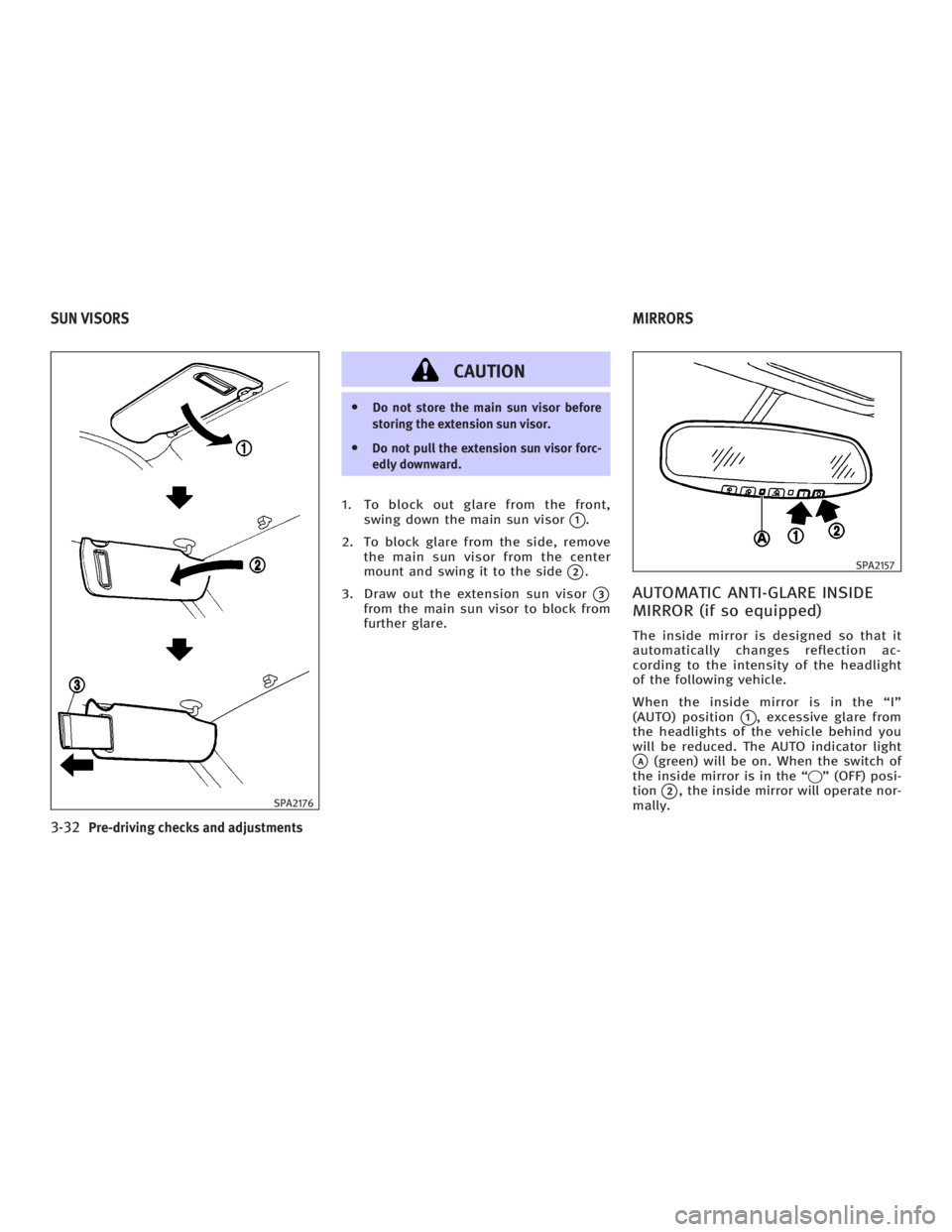
1. To block out glare from the front,
swing down the main sun visor
q 1
.
2. To block glare from the side, remove
the main sun visor from the center
mount and swing it to the side
q 2
.
3. Draw out the extension sun visor
q 3
from the main sun visor to block from
further glare.
AUTOMATIC ANTI-GLARE INSIDE
MIRROR (if so equipped) The inside mirror is designed so that it
automatically changes reflection ac-
cording to the intensity of the headlight
of the following vehicle.
When the inside mirror is in the ªIº
(AUTO) position
q 1
, excessive glare from
the headlights of the vehicle behind you
will be reduced. The AUTO indicator light
q A
(green) will be on. When the switch of
the inside mirror is in the ª q º (OFF) posi-
tion
q 2
, the inside mirror will operate nor-
mally.SPA2176 SPA2157
SUN VISORS MIRRORS
3-32 Pre-driving checks and adjustments
w 06.1.4/V35-D/V5.0
X
Page 175 of 344
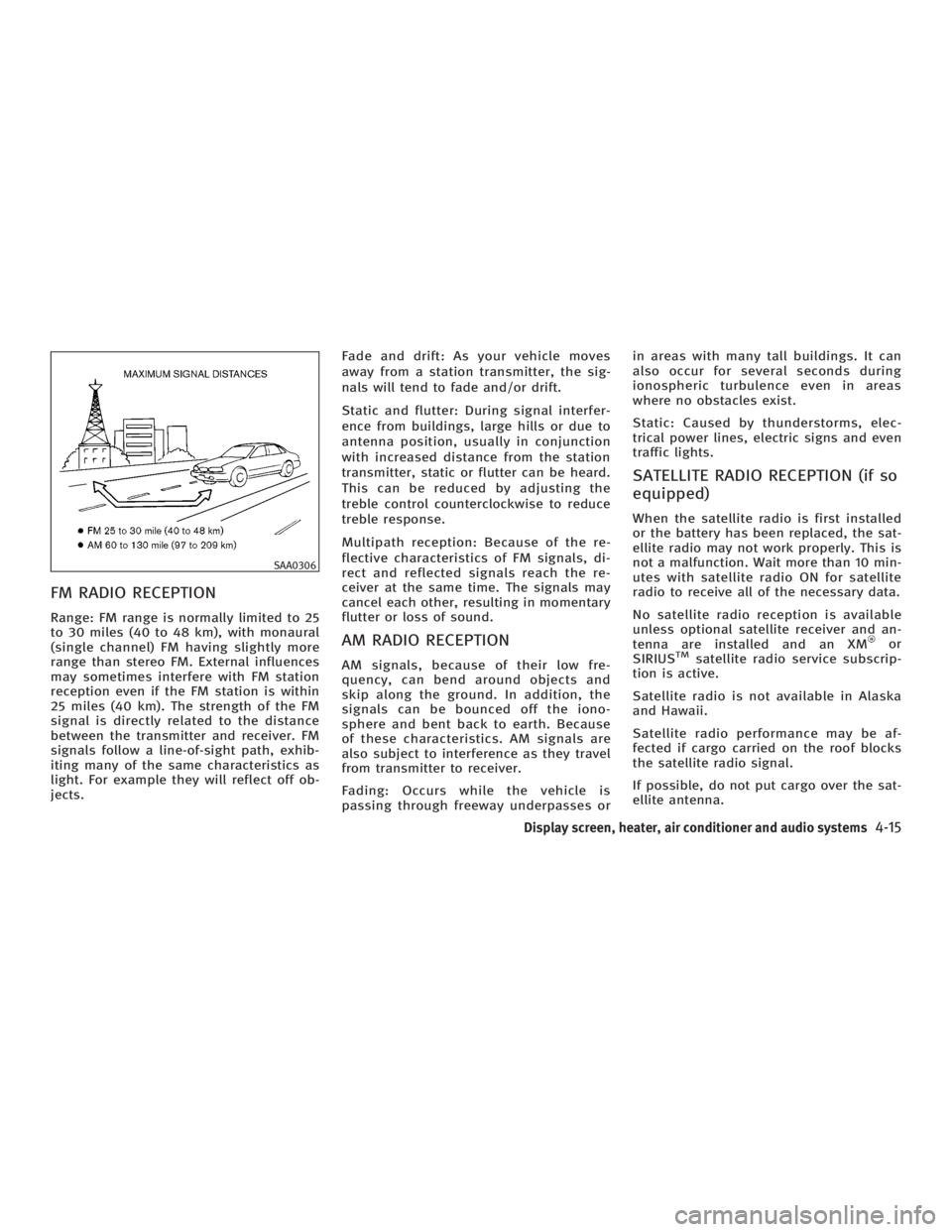
FM RADIO RECEPTION Range: FM range is normally limited to 25
to 30 miles (40 to 48 km), with monaural
(single channel) FM having slightly more
range than stereo FM. External influences
may sometimes interfere with FM station
reception even if the FM station is within
25 miles (40 km). The strength of the FM
signal is directly related to the distance
between the transmitter and receiver. FM
signals follow a line-of-sight path, exhib-
iting many of the same characteristics as
light. For example they will reflect off ob-
jects. Fade and drift: As your vehicle moves
away from a station transmitter, the sig-
nals will tend to fade and/or drift.
Static and flutter: During signal interfer-
ence from buildings, large hills or due to
antenna position, usually in conjunction
with increased distance from the station
transmitter, static or flutter can be heard.
This can be reduced by adjusting the
treble control counterclockwise to reduce
treble response.
Multipath reception: Because of the re-
flective characteristics of FM signals, di-
rect and reflected signals reach the re-
ceiver at the same time. The signals may
cancel each other, resulting in momentary
flutter or loss of sound.
AM RADIO RECEPTION AM signals, because of their low fre-
quency, can bend around objects and
skip along the ground. In addition, the
signals can be bounced off the iono-
sphere and bent back to earth. Because
of these characteristics. AM signals are
also subject to interference as they travel
from transmitter to receiver.
Fading: Occurs while the vehicle is
passing through freeway underpasses or in areas with many tall buildings. It can
also occur for several seconds during
ionospheric turbulence even in areas
where no obstacles exist.
Static: Caused by thunderstorms, elec-
trical power lines, electric signs and even
traffic lights.
SATELLITE RADIO RECEPTION (if so
equipped) When the satellite radio is first installed
or the battery has been replaced, the sat-
ellite radio may not work properly. This is
not a malfunction. Wait more than 10 min-
utes with satellite radio ON for satellite
radio to receive all of the necessary data.
No satellite radio reception is available
unless optional satellite receiver and an-
tenna are installed and an XM or
SIRIUS TM
satellite radio service subscrip-
tion is active.
Satellite radio is not available in Alaska
and Hawaii.
Satellite radio performance may be af-
fected if cargo carried on the roof blocks
the satellite radio signal.
If possible, do not put cargo over the sat-
ellite antenna.SAA0306
Display screen, heater, air conditioner and audio systems
4-15
w 06.1.4/V35-D/V5.0
X
Page 214 of 344
ON (Normal operating position)
q E
:
This position turns on the ignition system
and electrical accessories.
START
q F
:
This position starts the engine. As soon
as the engine has started, release the
switch immediately. It will automatically
return to the ON position.
For important safety information, see ªIg-
nition switchº in the ª5. Starting and driv-
ingº section.
The ignition switch cannot be turned back
to the LOCK position unless the shift lever
is in P position. (It can be turned to only
q C
.)
CAUTIONDo not leave the vehicle with the ignition
switch in ACC or ON position when the en-
gine is not running for an extended period.
This can discharge the battery. INFINITI VEHICLE IMMOBILIZER
SYSTEM The INFINITI Vehicle Immobilizer System
will not allow the engine to start without
the use of the registered key.
If the engine does not start using a regis-
tered key (for example, when interference
is caused by another registered key, an
automated toll road device or an auto-
mated payment device on the key ring),
restart the engine using the following pro-
cedures:
1. Leave the ignition switch in the ON po-
sition for approximately 5 seconds.
2. Turn the ignition switch to the OFF or
LOCK position and wait approximately
10 seconds.
3. Repeat steps 1 and 2.
4. Restart the engine while holding the
device (which may have caused the in-
terference) separate from the regis-
tered key.
If this procedure allows the engine to
start, INFINITI recommends placing the
registered key on a separate key ring to
avoid interference from other devices. O Make sure the area around the vehicle
is clear.
O Maintenance items should be checked
periodically, for example, each time
you check engine oil.
O Check that all windows and lights are
clean.
O Visually inspect tires for their appear-
ance and condition. Also check tires
for proper inflation.
O Lock all doors.
O Position seat and adjust head re-
straints.
O Adjust inside and outside mirrors.
O Fasten seat belts and ask all passen-
gers to do likewise.
O Check the operation of warning lights
when the ignition key is turned to the
ON position. See ªWarning/indicator
lights and audible remindersº in the
ª2. Instruments and controlsº section.BEFORE STARTING THE ENGINE
5-10 Starting and driving
w 06.1.4/V35-D/V5.0
X
Page 225 of 344
To set at cruising speed, accelerate your
vehicle to the desired speed, push the
SET/COAST switch and release it. (The
SET indicator light will come on.) Take
your foot off the accelerator pedal. Your
vehicle will maintain the set speed.
O To pass another vehicle, depress the
accelerator pedal. When you release
the pedal, the vehicle will return to
the previously set speed.
O The vehicle may not maintain the set
speed when going up or down steep
hills. If this happens, drive without the
cruise control.
To cancel the preset speed, follow either of
these three methods:
a) Push the CANCEL switch. The SET indi-
cator light will go out.
b) Tap the brake pedal. The SET indicator
light will go out.
c) Turn the MAIN switch off. Both the
CRUISE indicator and SET indicator
lights will go out.
O If you depress the brake pedal while
pushing the RESUME/ACCELERATE
switch and reset at the cruising speed,
turn the MAIN switch off once and
then turn it on again. O The cruise control will automatically
be cancelled if the vehicle slows down
below approximately 8 MPH (13 km/h).
O If you depress the clutch pedal
(manual transmission), or move the
selector lever to the N (Neutral) posi-
tion (automatic transmission), the
cruise control will be canceled.
To reset at a faster cruising speed, use one
of the following methods:
a) Depress the accelerator pedal. When
the vehicle reaches the desired speed,
push and release the SET/COAST
switch.
b) Push and hold the RESUME/
ACCELERATE switch. When the vehicle
reaches the speed you desire, release
the switch.
c) Push, then quickly release the
RESUME/ACCELERATE set switch. This
will increase the vehicle speed by
about 1 MPH (1.6 km/h). To reset at a slower cruising speed, use
one of the following methods:
a) Lightly tap the brake pedal. When the
vehicle reaches the desired speed,
push the SET/COAST switch and re-
lease it.
b) Push and hold the SET/COAST switch.
Release the switch when the vehicle
slows down to the desired speed.
c) Push, then quickly release the SET/
COAST switch. This will decrease the
vehicle speed by about 1 MPH (1.6
km/h).
To resume the preset speed, push and re-
lease the RESUME/ACCELERATE switch.
The vehicle will resume the last set cruis-
ing speed when the vehicle speed is over
25 MPH (40 km/h).
Starting and driving
5-21
w 06.1.4/V35-D/V5.0
X
Page 232 of 344
When accelerating or driving on a slippery
surface, the tires may spin or slide. With
the Vehicle Dynamic Control (VDC)
system, sensors detect these movements
and control the braking and engine
output to help improve vehicle stability.
O When the VDC system is operating,
the ªSLIPº indicator in the instrument
panel blinks.
O When only the Traction Control System
(TCS) portion of the VDC system is op-
erating, the ªSLIPº indicator in the in-
strument panel blinks.
O If the ªSLIPº indicator blinks, the road
conditions are slippery. Be sure to ad-
just your speed and driving to these
conditions. Be sure to drive carefully.
See ªSlip indicator lightº, and ªVe-
hicle Dynamic Control (VDC) off indica-
tor lightº in the ª2. Instruments and
controlsº section.
O Indicator light
If a malfunction occurs in the system,
the ªSLIPº and ªVDC OFFº indicator
lights illuminate in the instrument
panel. As long as these indicators are
illuminated, the VDC system function
is canceled. The VDC system uses an Active Brake Lim-
ited Slip (ABLS) system to improve vehicle
traction. The ABLS system works when
one of the driving wheels is spinning on a
slippery surface. The ABLS system brakes
the spinning wheel which distributes the
driving power to the other driving wheel.
If the vehicle is operated with the VDC
system turned off, all VDC system func-
tions and TCS functions will be turned off.
The ABLS system and ABS will still op-
erate with the VDC system off. When the
ABLS system is activated, the ªSLIPº indi-
cator light will blink and you may hear a
clunk noise and/or feel a pulsation in the
brake pedal. This is normal and is not an
indication of a malfunction.
While the VDC system is operating, you
may feel a pulsation in the brake pedal and
hear a noise or feel a vibration from under
the hood. This is normal and indicates that
the VDC system is working properly.
The VDC system computer has a built in
diagnostic feature that tests the system
each time you start the engine and move
the vehicle forward or backward. When
the self-test occurs, you may hear a clunk
noise and/or feel a pulsation in the brake
pedal. This is normal and is not an indica-
tion of a malfunction. WARNING O The VDC system is designed to help im-
prove driving stability but does not pre-
vent accidents due to abrupt steering op-
eration at high speeds or due to careless
or dangerous driving. Reduce vehicle
speed and be especially careful when
driving and cornering on slippery sur-
faces and always drive carefully.
O If engine related parts such as muffler
are not standard equipment or are ex-
tremely deteriorated, the ªVDC OFFº in-
dicator or ªSLIPº indicator or both indi-
cator lights may illuminate.
O Do not modify the vehicle's suspension.
If suspension parts such as shock ab-
sorbers, struts, springs, stabilizer bars
and bushings are not INFINITI-approved
or are extremely deteriorated, the VDC
system may not operate properly. This
could adversely affect vehicle handling
performance, and the ªVDC OFFº indi-
cator or ªSLIPº indicator or both indi
cator lights may illuminate.VEHICLE DYNAMIC CONTROL (VDC)
SYSTEM
5-28 Starting and driving
w 06.1.4/V35-D/V5.0
X
Page 233 of 344
O If brake related parts such as brake
pads, rotors and calipers are not stan-
dard equipment or are extremely dete-
riorated, the ªVDC OFFº indicator or
ªSLIPº indicator or both indicator lights
may illuminate.
O When driving on extremely inclined sur-
faces such as higher banked corners, the
Vehicle Dynamic Control system may not
operate properly and the ªVDC OFFº indi-
cator or ªSLIPº indicator or both indi-
cator lights may illuminate. Do not drive
on these types of roads.
O When driving on an unstable surface
such as a turntable, ferry, elevator or
ramp, the ªVDC OFFº indicator or ªSLIPº
indicator or both indicator lights may il-
luminate. This is not a malfunction. Re-
start the engine after driving onto a
stable surface.
O If wheels or tires other than those rec-
ommended are used, the VDC system
may not operate properly and the ªVDC
OFFº indicator or ªSLIPº indicator or
both indicator lights may illuminate. O The VDC system is not a substitute for
winter tires or tire chains on a snow cov-
ered road. The Rear Active Steer (RAS) system is an
electronically controlled four-wheel
steering system.
The angle of the rear wheels are adjusted
by the RAS system, depending on the ve-
hicle speed and steering angle. The rear
wheels are designed to turn momentarily
in the opposite direction and then change
to the same direction as the front wheels.
At low speeds, the rear wheels will not
turn and the system functions as a two-
wheel steering system.
If a malfunction occurs in the system, the
RAS function will stop but the ordinary
two-wheel steering system will operate
normally. The ªRASº warning light will il-
luminate.
If the light illuminates while you are driv-
ing, contact an INFINITI dealer for repair.REAR ACTIVE STEER (RAS) SYSTEM (if so
equipped)
Starting and driving
5-29
w 06.1.4/V35-D/V5.0
X
Page 238 of 344
Every new INFINITI comes with a 4 year,
unlimited mileage Roadside Assistance
plan. In the event of a roadside
emergency, Roadside Assistance Service
is available to you. Please refer to your
Warranty Booklet (U.S.) or Warranty &
Roadside assistance information booklet
(Canada) for details. Both the Warranty
Booklet and Roadside Assistance Calling
Card in your Owner's Literature Portfolio
provide the Toll-Free Number to call for
assistance. Roadside Assistance is
provided 24 hours a day, 365 days a year,
for 4 years from the date sold to give
emergency roadside help, in the event of
mechanical or nonmechanical trouble(s)
such as flat tires, out-of-gas, dead battery,
lost keys, mechanical breakdown,
accident, etc. TIRE PRESSURE MONITORING
SYSTEM (TPMS) This vehicle is equipped with the tire pres-
sure monitoring system (TPMS). It monitors
tire pressure of all tires except the spare.
When the low tire pressure warning light is
lit, or flashing continuously one or more of
your tires is significantly under-inflated. If
the vehicle is being driven with low tire
pressure, the TPMS will activate and warn
you of it by the low tire pressure warning
light. This system will activate only when
the vehicle is driven at speeds above 16
MPH (25 km/h). For more details, refer to
ªWarning/indicator lights and audible re-
mindersº in the ª2. Instruments and con-
trolsº section and ªTire pressure moni-
toring system (TPMS)º in the ª5. Starting
and drivingº section.
WARNING O If the low tire pressure warning light illu-
minates while driving, avoid sudden
steering maneuvers or abrupt braking,
reduce vehicle speed, pull off the road to
a safe location and stop the vehicle as
soon as possible. Serious vehicle damage could occur and may lead to an
accident and could result in serious per-
sonal injury. Check the tire pressure for all
four tires. Adjust the tire pressure to the
recommended COLD tire pressure shown
on the Tire and Loading Information label
to turn the low tire pressure warning light
OFF. If you have a flat tire, replace it with a
spare tire as soon as possible.
O When a spare tire is mounted or a wheel is
replaced, tire pressure will not be indi-
cated, the TPMS will not function and the
low tire pressure warning light will flash.
Contact your INFINITI dealer as soon as
possible for tire replacement and/or
system resetting.
O Replacing tires with those not originally
specified by INFINITI could affect the
proper operation of the TPMS.
O
Do not inject any tire liquid or aerosol tire
sealant into the tires, as this may cause a
malfunction of the tire pressure sensors.
CHANGING A FLAT TIRE If you have a flat tire, follow the instruc-
tions below.ROADSIDE ASSISTANCE PROGRAM FLAT TIRE
6-2 In case of emergency
w 06.1.13/V35-D/V5.0
X
Page 259 of 344
8 Maintenance and do-it-yourself Maintenance requirements ............................... 8-2
General maintenance........................................ 8-2
Explanation of general maintenance
items .......................................................... 8-3
Maintenance precautions .................................. 8-5
Engine compartment check locations................ 8-7
Engine cooling system ..................................... 8-8
Checking engine coolant level..................... 8-8
Changing engine coolant............................. 8-9
Engine oil ....................................................... 8-10
Checking engine oil level........................... 8-10
Changing engine oil and filter ................... 8-11
Automatic transmission fluid........................... 8-13
Power steering fluid ........................................ 8-13
Brake and clutch fluid..................................... 8-14
Brake fluid................................................. 8-14
Clutch fluid ............................................... 8-15
Window washer fluid ....................................... 8-15
Battery ............................................................ 8-16
Jump starting ............................................. 8-18
Drive belts ...................................................... 8-19
Spark plugs .................................................... 8-19
Replacing spark plugs ............................... 8-20 Air cleaner...................................................... 8-20
Windshield wiper blades ................................. 8-21
Cleaning .................................................... 8-21
Replacing .................................................. 8-22
Parking brake and brake pedal....................... 8-23
Checking parking brake............................. 8-23
Checking brake pedal................................ 8-23
Brake booster ........................................... 8-24
Fuses .............................................................. 8-25
Engine compartment.................................. 8-25
Passenger compartment ............................ 8-27
Keyfob battery replacement ............................ 8-28
Keyfob (except Intelligent Key) .................. 8-28
Intelligent Key ........................................... 8-29
Lights.............................................................. 8-31
Headlights................................................. 8-33
Exterior and interior lights......................... 8-33
Wheels and tires ............................................ 8-37
Tire pressure ............................................. 8-37
Tire labeling .............................................. 8-41
Types of tires ............................................ 8-43
Tire chains ................................................ 8-44
Changing wheels and tires ........................ 8-45
w 06.1.4/V35-D/V5.0
X
Page 261 of 344
EXPLANATION OF GENERAL
MAINTENANCE ITEMS Additional information on the following
items with ª*º is found later in this sec-
tion.
Outside the vehicle The maintenance items listed here should
be performed from time to time, unless
otherwise specified.
Doors and engine hood: Check that all
doors and the engine hood operate prop-
erly. Also ensure that all latches lock se-
curely. Lubricate hinges and latches if
necessary. Make sure that the secondary
latch keeps the hood from opening when
the primary latch is released.
When driving in areas using road salt or
other corrosive materials, check lubrica-
tion frequently.
Lights*: Clean the headlights on a regular
basis. Make sure that the headlights,
stop lights, tail lights, turn signal lights,
and other lights are all operating properly
and installed securely. Also check head-
light aim.
Road wheel nuts (lug nuts): When
checking the tires, make sure no wheel nuts are missing, and check for any loose
wheel nuts. Tighten if necessary.
Tires*: Check the pressure with a gauge
often and always prior to long distance
trips. If necessary, adjust the pressure in
all tires, including the spare, to the speci-
fied pressure. Check carefully for damage,
cuts or excessive wear.
Tire rotation*:
Sedan: The tires should be rotated every
7,500 miles (12,000 km) to minimize tire
wear variation.
Coupe: The tires cannot be rotated.
Tire, wheel alignment and balance: If the
vehicle should pull to either side while
driving on a straight and level road, or if
you detect uneven or abnormal tire wear,
there may be a need for wheel alignment.
If the steering wheel or seat vibrates at
normal highway speeds, wheel balancing
may be needed.
O For additional information regarding
tires, refer to ªImportant Tire Safety
Informationº (US) or ªTire Safety Infor-
mationº (Canada) in the Warranty In-
formation Booklet. Windshield: Clean the windshield on a
regular basis. Check the windshield at
least every six months for cracks or other
damage. Have a damaged windshield re-
paired by a qualified repair facility.
Windshield wiper blades*: Check for
cracks or wear if they do not wipe prop-
erly.
Maintenance and do-it-yourself
8-3
w 06.1.4/V35-D/V5.0
X