heater INFINITI G35 2006 Owners Manual
[x] Cancel search | Manufacturer: INFINITI, Model Year: 2006, Model line: G35, Model: INFINITI G35 2006Pages: 344, PDF Size: 6.81 MB
Page 5 of 344
Table of
Contents Illustrated table of contents 0
Safety Ð Seats, seat belts and supplemental restraint system 1
Instruments and controls 2
Pre-driving checks and adjustments 3
Display screen, heater, air conditioner and audio systems 4
Starting and driving 5
In case of emergency 6
Appearance and care 7
Maintenance and do-it-yourself 8
Technical and consumer information 9
Index 10
w 06.1.4/V35-D/V5.0
X
Page 15 of 344

1. Headlight, fog light and turn signal
switch (P.2-21)
2. Security indicator light (P.2-19)
3. Steering wheel switch for audio control
(P.4-28) or steering wheel switch for
Bluetooth Hands-Free Phone System
(if so equipped) (P.4-30) 4. Driver's supplemental front air bag
(P.1-36)/Horn (P.2-26)
5. Meters/gauges (P.2-3)
6. Cruise control main/set switch (P.5-20)
7. Windshield wiper/washer switch
(P.2-19)
8. Center ventilator (P.4-9) 9. Center display - Compass, Air condi-
tioner, Ambient temperature, Front
passenger air bag status light (P.1-44)
10. Rear window and outside mirror de-
fogger switch (P.2-20)
11. Heater/air conditioner control (P.4-10)
12. Clock (P.2-29)
13. Navigation system* (if so equipped)
(P.4-2)
14. Passenger's supplemental front air
bag (P.1-36)
15. Upper glove box (except for Naviga-
tion system equipped models)
(P.2-35)
16. Side ventilator (P.4-9)
17. Hood lock release handle (P.3-24)
18. Trunk lid release switch (P.3-25)
19. Vehicle Dynamic Control (VDC) off
switch (P.2-28)
20. Instrument brightness control
(P.2-24)
21. Outside mirror remote control switch
(P.3-33)
22. Fuse box (P.8-27)
23. Electric steering column control (if so
equipped) (P.3-31)
24. Manual steering column control
(P.3-30)
25. Ignition switch/steering lock (P.5-6)
26. SNOW mode switch (if so equipped)
(P.2-27)
27. Audio system (P.4-14)
28. Ashtray/Cigarette lighter (P.2-30)
29. Heated seat switch (P.2-26) SSI0159INSTRUMENT PANEL
Illustrated table of contents
0-9
w 06.1.4/V35-D/V5.0
X
Page 74 of 344

1. Headlight, fog light and turn signal
switch
2. Security indicator light
3. Steering wheel switch for audio control
or steering wheel switch for Bluetooth Hands-Free Phone System
(if so equipped)
4. Driver supplemental air bag/Horn
5. Meters/gauges
6. Cruise control main/set switch
7. Windshield wiper/washer switch 8. Center ventilator
9. Center display - Compass, Air condi-
tioner, Ambient temperature, Front
passenger air bag status light
10. Rear window and outside mirror de-
fogger switch
11. Heater/air conditioner control
12. Clock
13. Navigation system* (if so equipped)
14. Passenger supplemental air bag
15. Upper glove box (except for Naviga-
tion system equipped models)
16. Side ventilator
17. Hood lock release handle
18. Trunk lid release switch
19. Vehicle Dynamic Control (VDC) off
switch
20. Instrument brightness control
21. Outside mirror remote control switch
22. Fuse box
23. Electric steering column control (if so
equipped)
24. Manual steering column control
25. Ignition switch/steering lock
26. Snow mode switch (if so equipped)
27. Audio system
28. Ashtray/Cigarette lighter
29. Heated seat switch
30. Hazard warning flasher switch
31. Glove box
*: Refer to the separate Navigation System
Owner's Manual. SSI0159INSTRUMENT PANEL
2-2 Instruments and controls
w 06.1.4/V35-D/V5.0
X
Page 98 of 344

To sound the horn, push on or near the
horn marks of the steering wheel.
WARNINGDo not disassemble the horn. Doing so could
affect proper operation of the supplemental
front air bag system. Tampering with the
supplemental front air bag system may re-
sult in serious personal injury. The front seats are warmed by built-in
heaters. The switches located on the cen-
ter console can be operated indepen-
dently (driver side seat
q A
and front pas-
senger seat
q B
) of each other.
1. Start the engine.
2. Select heat range.
q 1
For low heat, push the (Low)
side of the switch.
q 2
For high heat, push the
(High) side of the switch.
q 3
For no heat, the switch has a cen- ter OFF position between low and
high.
The indicator light in the switch
q C
will
illuminate when low or high is se-
lected.
The heater is controlled by a thermo-
stat, automatically turning the heater
on and off. The indicator light will re-
main on as long as the switch is on.
3. When the vehicle's interior is warmed,
or before you leave the vehicle, be
sure to turn the switch to the off posi-
tion (center)
q 3
.SIC1838 SIC2793
AT models SIC2672
MT modelsHORN HEATED SEATS
2-26 Instruments and controls
w 06.1.4/V35-D/V5.0
X
Page 99 of 344

CAUTIONO The battery could run down if the seat
heater is operated while the engine is
not running.
O Do not use the seat heater for extended
periods or when no one is using the seat.
O Do not put anything on the seat which in-
sulates heat, such as a blanket, cushion,
seat cover, etc. Otherwise, the seat may
become overheated.
O Do not place anything hard or heavy on
the seat or pierce it with a pin or similar
object. This may result in damage to the
heater.
O Any liquid spilled on the heated seat
should be removed immediately with a
dry cloth.
O When cleaning the seat, never use gaso-
line, benzine, thinner, or any similar
materials. O If any abnormalities are found or the
heated seat does not operate, turn the
switch off and have the system checked
by an INFINITI dealer.
For driving or starting the vehicle on
snowy roads or slippery areas, push the
SNOW mode switch to the ON position
and then the indicator light in the switch
and the SNOW indicator light in the in-
strument panel will illuminate.
When the SNOW mode is activated, en-
gine output is controlled to reduce wheel
spin. SIC2660
SNOW MODE SWITCH (if so equipped)
Instruments and controls
2-27
w 06.1.4/V35-D/V5.0
X
Page 161 of 344

4 Display screen, heater, air conditioner and
audio systems Safety note ....................................................... 4-2
Control panel buttons Ð with navigation
system ............................................................. 4-2
Names of the components .......................... 4-2
How to use joystick and ªENTERº button ..... 4-3
How to use ªBACKº button .......................... 4-3
Setting up the start-up screen..................... 4-3
How to use ªINFOº button ........................... 4-3
How to use ªSETTINGº button ..................... 4-7
How to use the
button ........................ 4-9
Ventilators........................................................ 4-9
Heater and air conditioner (Automatic)............ 4-10
Automatic operation ................................... 4-11
Manual operation....................................... 4-12
Dual button (if so equipped) ...................... 4-12
Ambient temperature ................................. 4-13
Operating tips............................................ 4-13
In-cabin microfilter..................................... 4-13
Servicing air conditioner ................................. 4-14 Audio system .................................................. 4-14
FM radio reception ..................................... 4-15
AM radio reception .................................... 4-15
Satellite radio reception (if so equipped) ... 4-15
Audio operation precautions ...................... 4-16
FM-AM-satellite radio with compact disc
(CD) changer ............................................. 4-22
CD care and cleaning ................................ 4-27
Steering wheel switch for audio control .... 4-28
Antenna .................................................... 4-29
Car phone or CB radio ................................... 4-29
Bluetooth
Hands-Free Phone System with
INFINITI Voice Recognition .............................. 4-30
Using the system ...................................... 4-32
Control buttons ......................................... 4-34
Getting started .......................................... 4-34
List of voice commands............................. 4-36
Speaker adaptation (SA) mode .................. 4-42
Troubleshooting guide .............................. 4-44
w 06.1.13/V35-D/V5.0
X
Page 162 of 344

WARNINGO Positioning of the heating or air condi-
tioning controls and display controls
should not be done while driving, in
order that full attention may be given to
driving operation.
O Do not disassemble or modify this
system. If you do, it may result in acci-
dents, fire, or electric shock.
O Do not use this system if you notice any
abnormality, such as a frozen screen or
lack of sound. Continued use of the
system may result in accident, fire or
electric shock.
O In case you notice any foreign object in
the system hardware, spill liquid on it, or
notice smoke or smell coming from it,
stop using the system immediately and
contact an INFINITI dealer. Ignoring such
conditions may lead to accidents, fire, or
electric shock. When you use this system, make sure the
engine is running.
If you use the system with the engine not
running (ignition ON or ACC) for a long
time, it will use up all the battery power,
and the engine will not start.
Reference symbols:
ªENTERº button Ð This is a button on the
control panel.
ª Display º key Ð This is a select key on
the screen. By selecting this key you can
proceed to the next function. NAMES OF THE COMPONENTS 1., 2., 5., 6., 9., 10. and 11.
For Navigation control buttons: refer to
the separate Navigation Owner's Manual.
3. ªSETTINGº button (P. 4-7)
4. ªINFOº button (P. 4-3)
7. Joystick and ªENTERº button (P. 4-3)
8. brightness control button
(P. 4-9)
12. ªBACKº button (P. 4-3) SAA1301
SAFETY NOTE
CONTROL PANEL BUTTONS Ð WITH
NAVIGATION SYSTEM
4-2 Display screen, heater, air conditioner and audio systems
w 06.1.4/V35-D/V5.0
X
Page 163 of 344

HOW TO USE JOYSTICK AND
ªENTERº BUTTON Choose an item on the display using the
joystick and push the ªENTERº button for
operation.
HOW TO USE ªBACKº BUTTON This button has two functions.
O Go back to the previous display.
When this button is pushed during setup,
setup will be canceled, and the screen
will return to the previous screen.
O Finish setup.
When this button is pushed after setup is
completed, the settings will be renewed
as directed, and the screen will return to
the map.
SETTING UP THE START-UP
SCREEN When you turn the ignition switch to the
ACC or ON position, the SYSTEM
START-UP warning is displayed on the
screen. Read the warning and select the
ª OK º key then push the ªENTERº button. If you do not push the ªENTERº button,
the Navigation system will not proceed to
the next step display.
To proceed to the next step, refer to the
separate Navigation System Owner's
Manual.
HOW TO USE ªINFOº BUTTON The ª Vehicle Information º screen will ap-
pear when the ªINFOº button is pushed.
Choose an item using the joystick and
push the ªENTERº button.
After viewing or adjusting the information
on the following screens, push the
ªBACKº button to return to the VEHICLE
INFORMATION menu. SAA1304
Display screen, heater, air conditioner and audio systems
4-3
w 06.1.4/V35-D/V5.0
X
Page 164 of 344
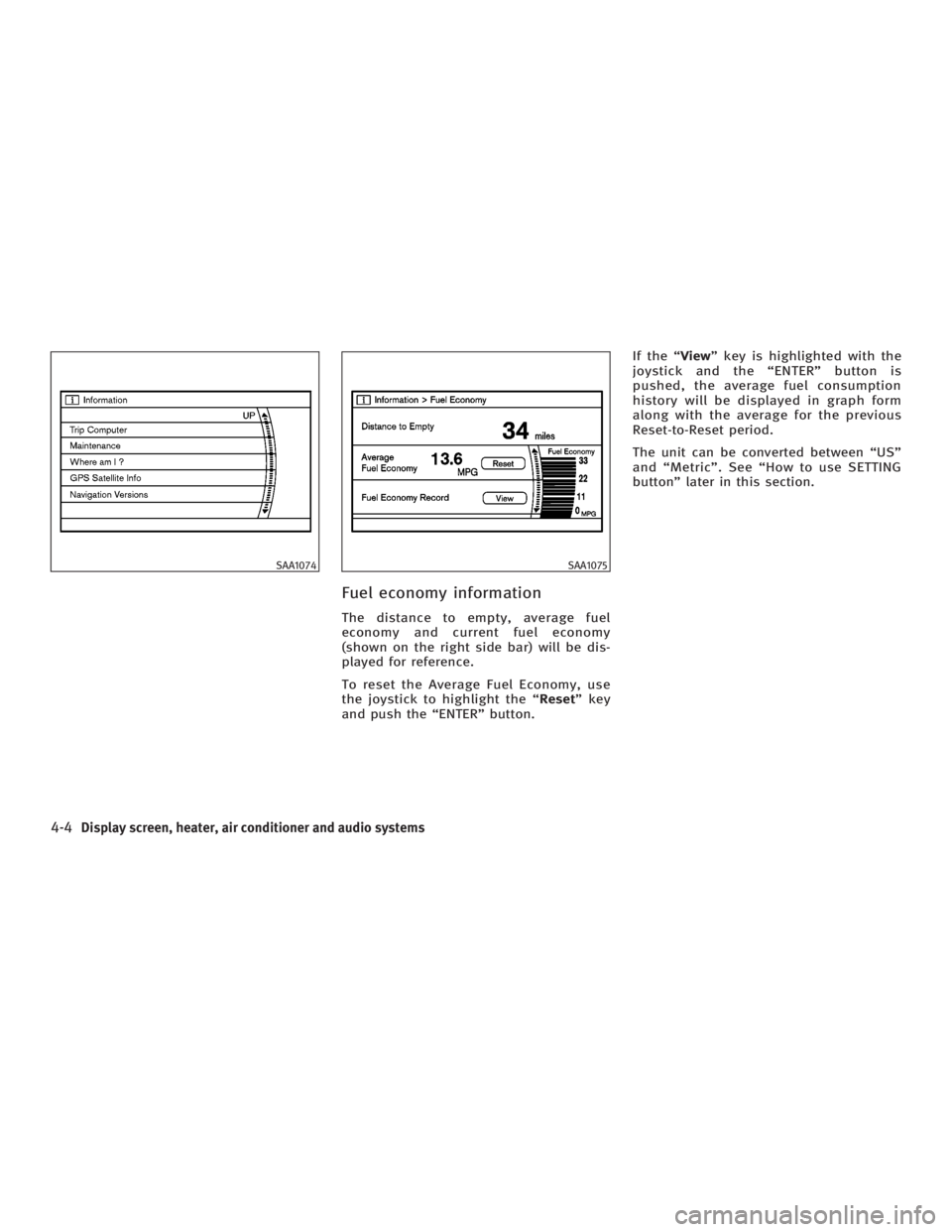
Fuel economy information The distance to empty, average fuel
economy and current fuel economy
(shown on the right side bar) will be dis-
played for reference.
To reset the Average Fuel Economy, use
the joystick to highlight the ª Reset º key
and push the ªENTERº button. If the ª View º key is highlighted with the
joystick and the ªENTERº button is
pushed, the average fuel consumption
history will be displayed in graph form
along with the average for the previous
Reset-to-Reset period.
The unit can be converted between ªUSº
and ªMetricº. See ªHow to use SETTING
buttonº later in this section.SAA1074 SAA1075
4-4 Display screen, heater, air conditioner and audio systems
w 06.1.4/V35-D/V5.0
X
Page 165 of 344
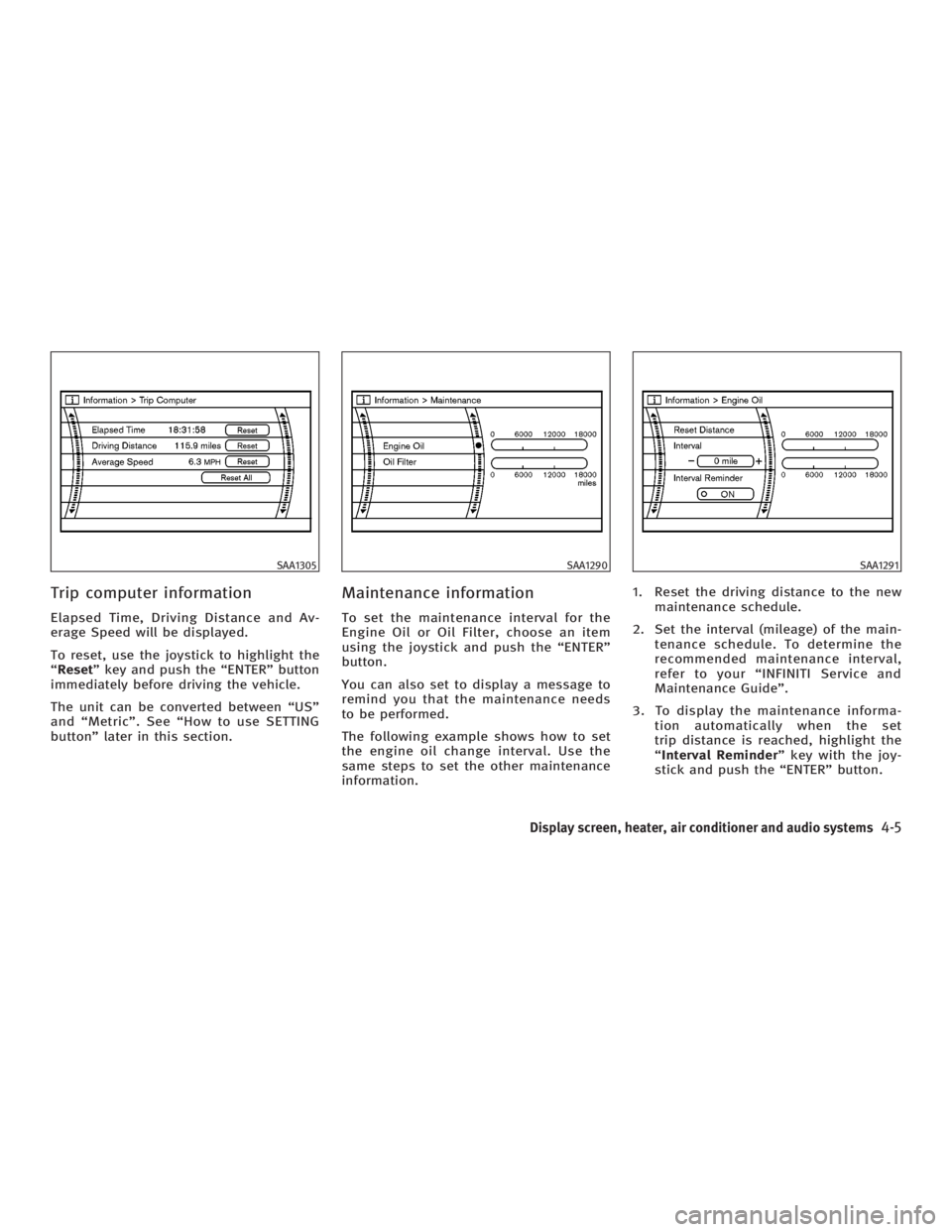
Trip computer information Elapsed Time, Driving Distance and Av-
erage Speed will be displayed.
To reset, use the joystick to highlight the
ª Reset º key and push the ªENTERº button
immediately before driving the vehicle.
The unit can be converted between ªUSº
and ªMetricº. See ªHow to use SETTING
buttonº later in this section. Maintenance information To set the maintenance interval for the
Engine Oil or Oil Filter, choose an item
using the joystick and push the ªENTERº
button.
You can also set to display a message to
remind you that the maintenance needs
to be performed.
The following example shows how to set
the engine oil change interval. Use the
same steps to set the other maintenance
information. 1. Reset the driving distance to the new
maintenance schedule.
2. Set the interval (mileage) of the main-
tenance schedule. To determine the
recommended maintenance interval,
refer to your ªINFINITI Service and
Maintenance Guideº.
3. To display the maintenance informa-
tion automatically when the set
trip distance is reached, highlight the
ª Interval Reminder º key with the joy-
stick and push the ªENTERº button.SAA1305 SAA1290 SAA1291
Display screen, heater, air conditioner and audio systems
4-5
w 06.1.4/V35-D/V5.0
X