battery INFINITI G35 2006 Service Manual
[x] Cancel search | Manufacturer: INFINITI, Model Year: 2006, Model line: G35, Model: INFINITI G35 2006Pages: 344, PDF Size: 6.81 MB
Page 265 of 344
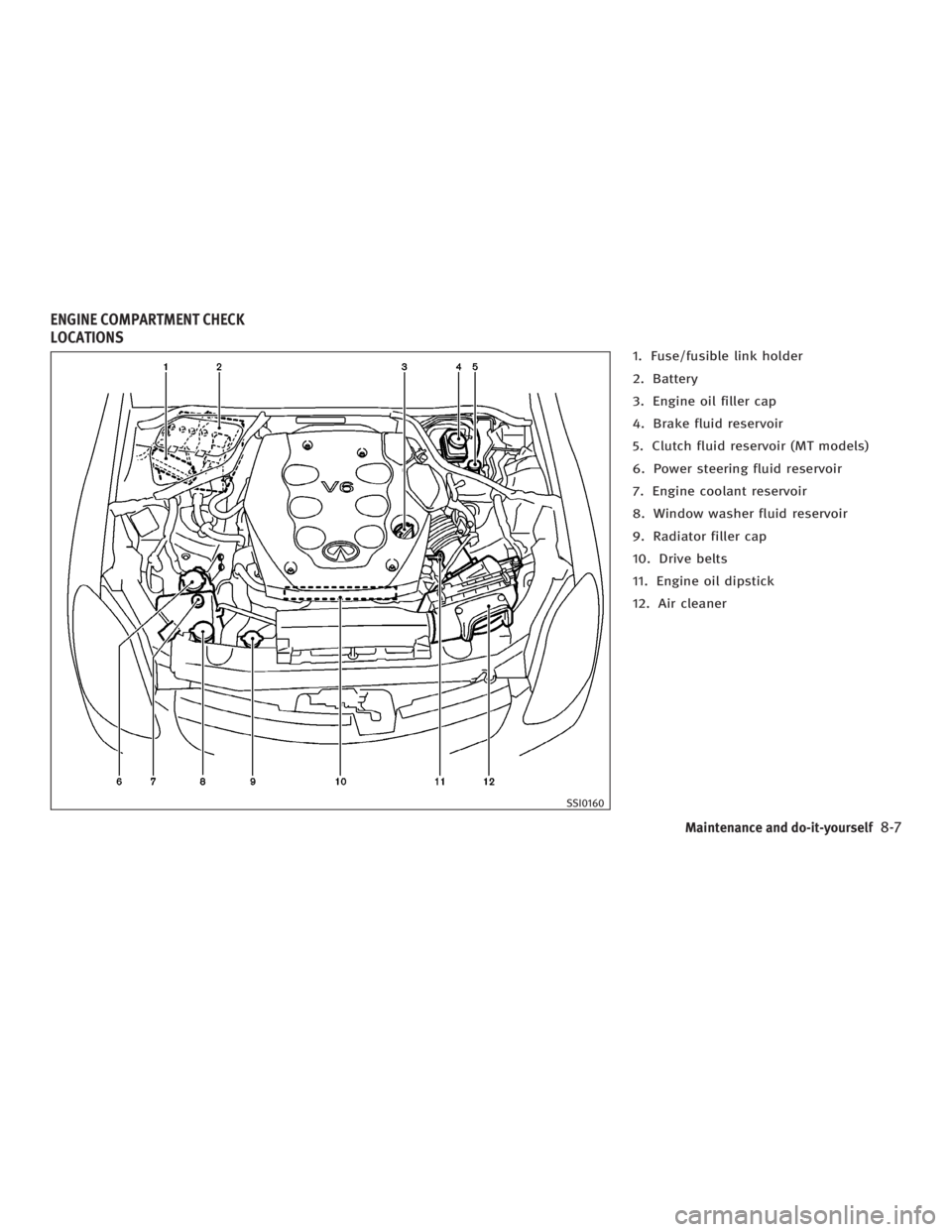
1. Fuse/fusible link holder
2. Battery
3. Engine oil filler cap
4. Brake fluid reservoir
5. Clutch fluid reservoir (MT models)
6. Power steering fluid reservoir
7. Engine coolant reservoir
8. Window washer fluid reservoir
9. Radiator filler cap
10. Drive belts
11. Engine oil dipstick
12. Air cleaner
SSI0160ENGINE COMPARTMENT CHECK
LOCATIONS
Maintenance and do-it-yourself
8-7
w 06.1.4/V35-D/V5.0
X
Page 274 of 344
WARNINGAntifreeze is poisonous and should be
stored carefully in marked containers out of
the reach of children.
CAUTIONDo not substitute engine anti-freeze coolant
for window washer solution. This may result
in damage to the paint.
O Do not fill the window washer reservoir
tank with washer fluid concentrates at
full strength. Some methyl alcohol
based washer fluid concentrates may
permanently stain the grille if spilled
while filling the window washer reser-
voir tank.
O Pre-mix washer fluid concentrates with
water to the manufacturer's recom-
mended levels before pouring the fluid
into the window washer reservoir tank. Do not use the window washer reservoir
tank to mix the washer fluid concen-
trateand water. O Keep the battery surface clean and
dry. Any corrosion should be washed
off with a solution of baking soda and
water.
O Make certain the terminal connections
are clean and securely tightened.
O If the vehicle is not to be used for 30
days or longer, disconnect the (þ)
negative battery terminal cable to pre-
vent discharging it.
Coupe
CAUTION When the battery cable is removed from the
battery terminal, do not close either of front
doors. The automatic window adjusting func-
tion will not work, and the side roof panel
may be damaged.
To disconnect the negative (þ) battery ter-
minal, perform the procedure in the follow-
ing order. Otherwise, the window and the
side roof panel may contact and be dam-
aged.
1. Close the windows.BATTERY
8-16 Maintenance and do-it-yourself
w 06.1.4/V35-D/V5.0
X
Page 275 of 344
2. Open the hood.
3. Close and lock all the doors.
4. Disconnect the negative (þ) battery ter-
minal.
5. Securely close the hood.
To connect the negative (þ) battery ter-
minal, perform the procedure in the follow-
ing order. Otherwise, the window and the
side roof panel may contact and be dam-
aged.
1. Unlock and open the driver side door.
Do not close the door.
2. Open the hood.
3. Connect the negative (þ) battery ter-
minal. Then close the hood.
4. Fully open the driver side door window.
5. Close the driver side door and the
window. Sedan and coupe
WARNING O Do not expose the battery to flames or
electrical sparks. Hydrogen gas, gener-
ated by battery fluid, is explosive. Do not
allow battery fluid to contact your skin,
eyes, fabrics, or painted surfaces. After
touching a battery or battery cap, do not
touch or rub your eyes. Thoroughly wash
your hands. If the acid contacts your
eyes, skin or clothing, immediately flush
with water for at least 15 minutes and
seek medical attention.
O Do not operate the vehicle if the fluid in
the battery is low. Low battery fluid can
cause a higher load on the battery which
can generate heat, reduce battery life,
and in some cases lead to an explosion.
O When working on or near a battery, al-
ways wear suitable eye protection and
remove all jewelry.
O Battery posts, terminals and related ac-
cessories contain lead and lead com-
pounds. Wash hands after handling. O Keep the battery out of the reach of chil-
dren.
Maintenance and do-it-yourself
8-17
w 06.1.4/V35-D/V5.0
X
Page 276 of 344

Check the fluid level in each cell. It
should be between the UPPER LEVEL
q 1
and LOWER LEVEL
q 2
lines.
If it is necessary to add fluid, add only
distilled water to bring the level to the in-
dicator in each filler opening. Do not over-
fill.
1. Remove the cell plugs
q A
.
2. Add distilled water up to the UPPER
LEVEL
q 1
. If the side of the battery is not visible,
the electrolyte level can be checked
through each filler opening as illus-
trated.
3. Tighten cell plugs
q A
.
Vehicles operated in high temperatures or
under severe conditions require frequent
checks of the battery fluid level. JUMP STARTING If jump starting is necessary, see ªJump
startingº in the ª6. In case of emergencyº
section. If the engine does not start by
jump starting, the battery may have to be
replaced. Contact an INFINITI dealer.DI0137MA SDI1480
8-18 Maintenance and do-it-yourself
w 06.1.4/V35-D/V5.0
X
Page 284 of 344
2. Open the engine hood and remove the
cover on the battery and the
fuse/fusible link holder.
3. Remove the fuse/fusible link holder
cover.
4. Remove the fuse with the fuse puller.
The fuse puller is located in the pas-
senger compartment fuse box.
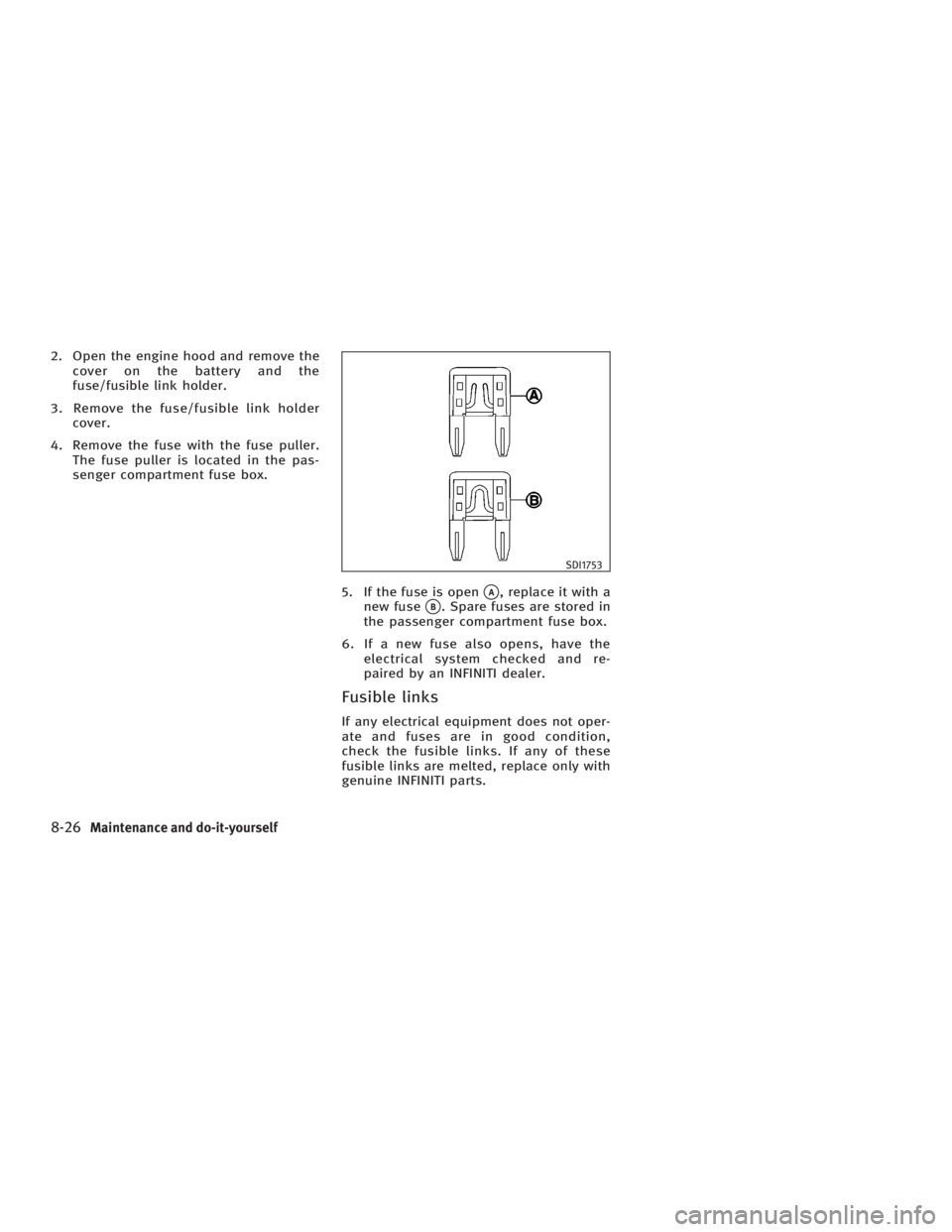
5. If the fuse is open
q A
, replace it with a
new fuse
q B
. Spare fuses are stored in
the passenger compartment fuse box.
6. If a new fuse also opens, have the
electrical system checked and re-
paired by an INFINITI dealer.
Fusible links If any electrical equipment does not oper-
ate and fuses are in good condition,
check the fusible links. If any of these
fusible links are melted, replace only with
genuine INFINITI parts. SDI1753
8-26 Maintenance and do-it-yourself
w 06.1.4/V35-D/V5.0
X
Page 286 of 344
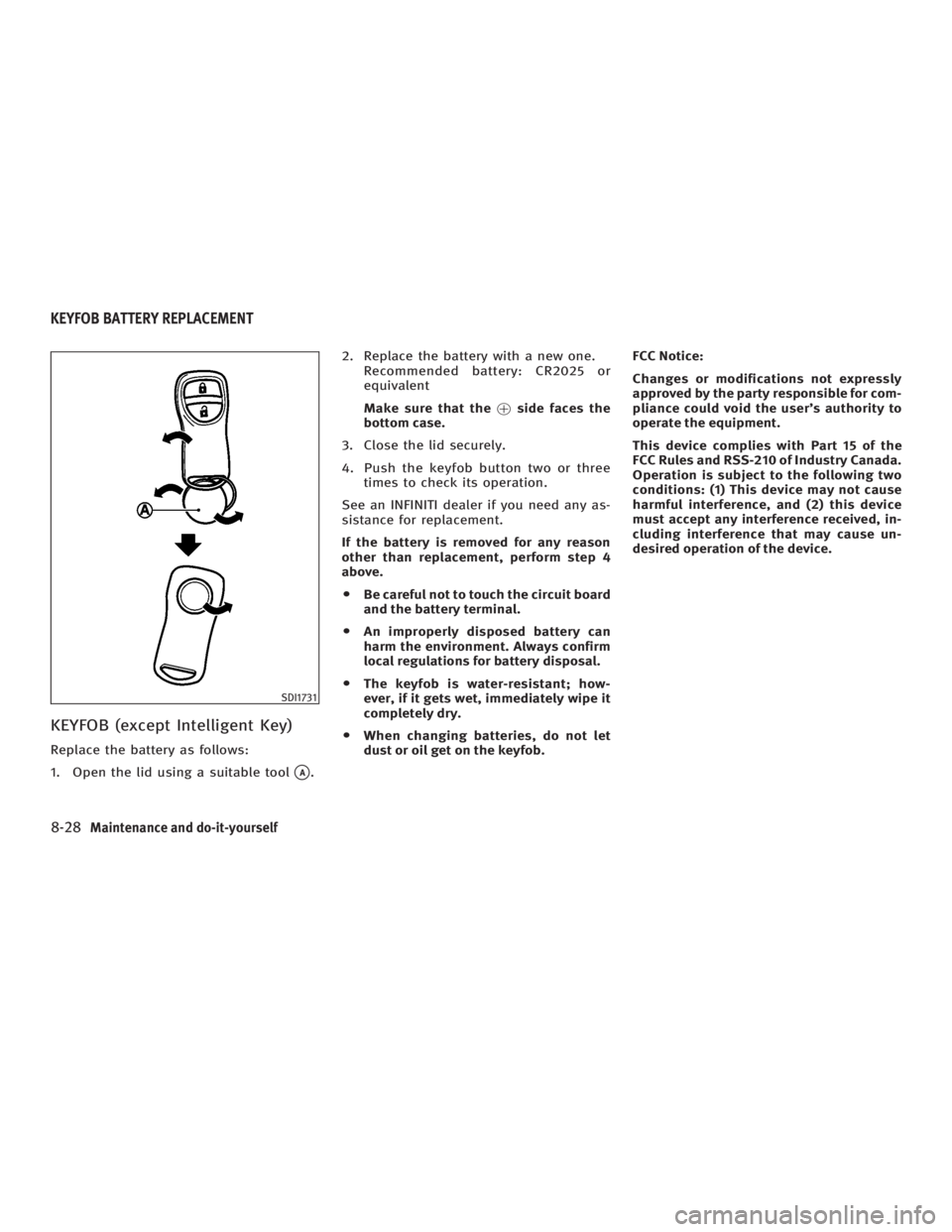
KEYFOB (except Intelligent Key) Replace the battery as follows:
1. Open the lid using a suitable tool
q A
. 2. Replace the battery with a new one.
Recommended battery: CR2025 or
equivalent
Make sure that the ! side faces the
bottom case.
3. Close the lid securely.
4. Push the keyfob button two or three
times to check its operation.
See an INFINITI dealer if you need any as-
sistance for replacement.
If the battery is removed for any reason
other than replacement, perform step 4
above.
O Be careful not to touch the circuit board
and the battery terminal.
O An improperly disposed battery can
harm the environment. Always confirm
local regulations for battery disposal.
O The keyfob is water-resistant; how-
ever, if it gets wet, immediately wipe it
completely dry.
O When changing batteries, do not let
dust or oil get on the keyfob. FCC Notice:
Changes or modifications not expressly
approved by the party responsible for com-
pliance could void the user's authority to
operate the equipment.
This device complies with Part 15 of the
FCC Rules and RSS-210 of Industry Canada.
Operation is subject to the following two
conditions: (1) This device may not cause
harmful interference, and (2) this device
must accept any interference received, in-
cluding interference that may cause un-
desired operation of the device.
SDI1731KEYFOB BATTERY REPLACEMENT
8-28 Maintenance and do-it-yourself
w 06.1.4/V35-D/V5.0
X
Page 287 of 344
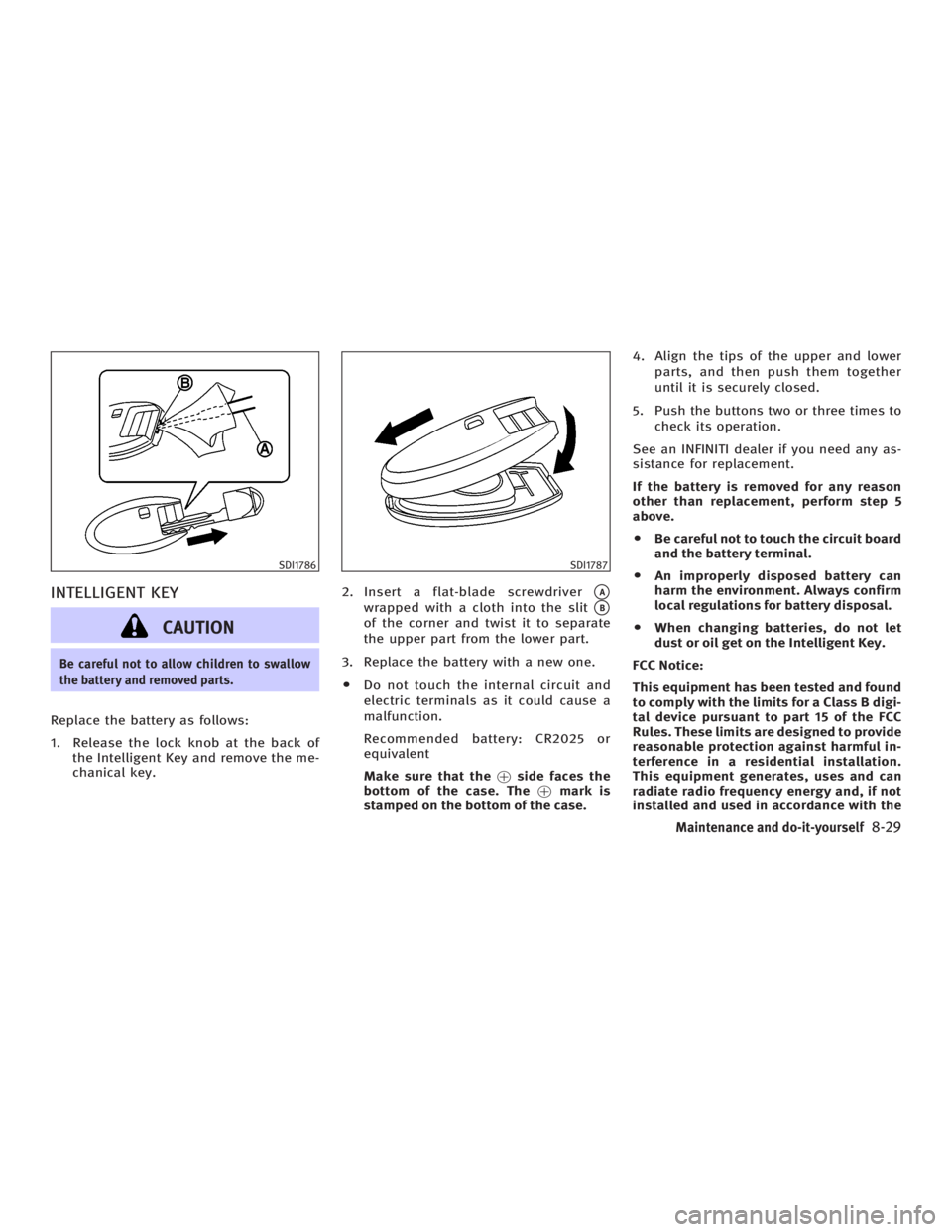
INTELLIGENT KEY
CAUTIONBe careful not to allow children to swallow
the battery and removed parts.
Replace the battery as follows:
1. Release the lock knob at the back of
the Intelligent Key and remove the me-
chanical key. 2. Insert a flat-blade screwdriver
q A
wrapped with a cloth into the slit
q B
of the corner and twist it to separate
the upper part from the lower part.
3. Replace the battery with a new one.
O Do not touch the internal circuit and
electric terminals as it could cause a
malfunction.
Recommended battery: CR2025 or
equivalent
Make sure that the ! side faces the
bottom of the case. The ! mark is
stamped on the bottom of the case. 4. Align the tips of the upper and lower
parts, and then push them together
until it is securely closed.
5. Push the buttons two or three times to
check its operation.
See an INFINITI dealer if you need any as-
sistance for replacement.
If the battery is removed for any reason
other than replacement, perform step 5
above.
O Be careful not to touch the circuit board
and the battery terminal.
O An improperly disposed battery can
harm the environment. Always confirm
local regulations for battery disposal.
O When changing batteries, do not let
dust or oil get on the Intelligent Key.
FCC Notice:
This equipment has been tested and found
to comply with the limits for a Class B digi-
tal device pursuant to part 15 of the FCC
Rules. These limits are designed to provide
reasonable protection against harmful in-
terference in a residential installation.
This equipment generates, uses and can
radiate radio frequency energy and, if not
installed and used in accordance with theSDI1786 SDI1787
Maintenance and do-it-yourself
8-29
w 06.1.4/V35-D/V5.0
X
Page 326 of 344
CAUTIONO Do not use axle-mounted hitches.
O The hitch should not be attached to or af-
fect the operation of the impact-
absorbing bumper.
O Do not modify the vehicle exhaust
system, brake system, etc. to install a
trailer hitch.
O To reduce the possibility of additional
damage if your vehicle is struck from the
rear, where practical, remove the hitch
and/or receiver when not in use.
O After the hitch is removed, seal the bolt
holes to prevent exhaust fumes, water or
dust from entering the passenger com-
partment.
O Regularly check that all trailer hitch
mounting bolts are securely mounted. Tire pressures
O When towing a trailer, inflate the ve-
hicle tires to the recommended cold
tire pressure indicated on the Tire
and Loading Information label.
O Trailer tire condition, size, load
rating and proper inflation pressure
should be in accordance with the
trailer and tire manufacturers' speci-
fications.
Safety chains Always use a suitable chains between
your vehicle and the trailer. The safety
chains should be crossed and should be
attached to the hitch, not to the vehicle
bumper or axle. Be sure to leave enough
slack in the chains to permit turning cor-
ners.
Trailer lights
CAUTION When splicing into the vehicle electrical sys-
tem, a commercially available power-type module/converter must be used to provide
power for all trailer lighting. This unit uses
the vehicle battery as a direct power source
for all trailer lights while using the vehicle
tail light, stoplight and turn signal circuits
as a signal source. The module/converter
must draw no more than 15 milliamps from
the stop and tail lamp circuits. Using a
module/converter that exceeds these power
requirements may damage the vehicle's
electrical system. See a reputable trailer
dealer to obtain the proper equipment and to
have it installed.
Trailer lights should comply with federal
and/or local regulations. For assistance in
hooking up trailer lights, contact an
INFINITI dealer or reputable trailer dealer.
Trailer brakes If your trailer is equipped with a braking
system, make sure it conforms to federal
and/or local regulations and that it is
properly installed.
9-20 Technical and consumer information
w 06.1.4/V35-D/V5.0
X
Page 331 of 344
A vehicle equipped with All-Wheel Drive
(AWD) should never be tested using a two
wheel dynamometer (such as the dyna-
mometers used by some states for emis-
sions testing), or similar equipment. Make
sure you inform test facility personnel
that your vehicle is equipped with AWD
before it is placed on a dynamometer. Us-
ing the wrong test equipment may result
in transmission damage or unexpected
vehicle movement which could result in
serious vehicle damage or personal in-
jury.
Due to legal requirements in some states/
areas, your vehicle may be required to be
in what is called the ªready conditionº for
an Inspection/Maintenance (I/M) test of
the emission control system.
The vehicle is set to the ªready conditionº
when it is driven through certain driving
patterns. Usually, the ªready conditionº
can be obtained by ordinary usage of the
vehicle.
If a powertrain system component is re-
paired or the battery is disconnected, the
vehicle may be reset to a not ªready con-
ditionº. Before taking the I/M test, check
the vehicle's inspection/maintenance test
readiness condition. Turn the ignition switch ON without starting the engine. If
the Malfunction Indicator Lamp (MIL)
comes on steady for 20 seconds and then
blinks for 10 seconds, the I/M test condi-
tion is ªnot readyº. If the MIL does not
blink after 20 seconds, the I/M test condi-
tion is ªreadyº. If the MIL indicates the
vehicle is in a ªnot readyº condition, drive
the vehicle through the following pattern
to set the vehicle to the ready condition.
If you cannot or do not want to perform
the driving pattern, an INFINITI dealer can
conduct it for you.
WARNING Always drive the vehicle in a safe and pru-
dent manner according to traffic conditions
and obey all traffic laws.
1. Start the engine. Allow the engine to
idle until the engine coolant tempera-
ture gauge needle points between the
C and H (normal operating tempera-
ture).
2. Accelerate the vehicle to 55 MPH (88
km/h), then quickly release the accel-
erator pedal completely and keep it re-
leased for at least 10 seconds. 3. Quickly depress the accelerator pedal
for a moment, then drive the vehicle at
a speed of 53 to 60 MPH (86 to 96
km/h) for at least 9 minutes.
4. Stop the vehicle. Leave the engine
running.
5. Accelerate the vehicle to 35 MPH (55
km/h) and maintain the speed for 20
seconds.
6. Repeat steps 4 and 5 at least 10 times.
7. Accelerate the vehicle to 55 MPH (88
km/h) and maintain the speed for at
least 3 minutes.
8. Stop the vehicle. Place the automatic
transmission selector lever in the ªPº
or ªNº position or the manual trans-
mission shift lever in the ªNº position.
9. Turn the engine off.
10. Repeat steps 1 through 8 at least one
more time.
If step 1 through 7 is interrupted, repeat
the preceding step. Any safe driving mode
is acceptable between steps. Do not stop
the engine until step 7 is completed.READINESS FOR INSPECTION/
MAINTENANCE (I/M) TEST (US only)
Technical and consumer information
9-25
w 06.1.4/V35-D/V5.0
X
Page 335 of 344
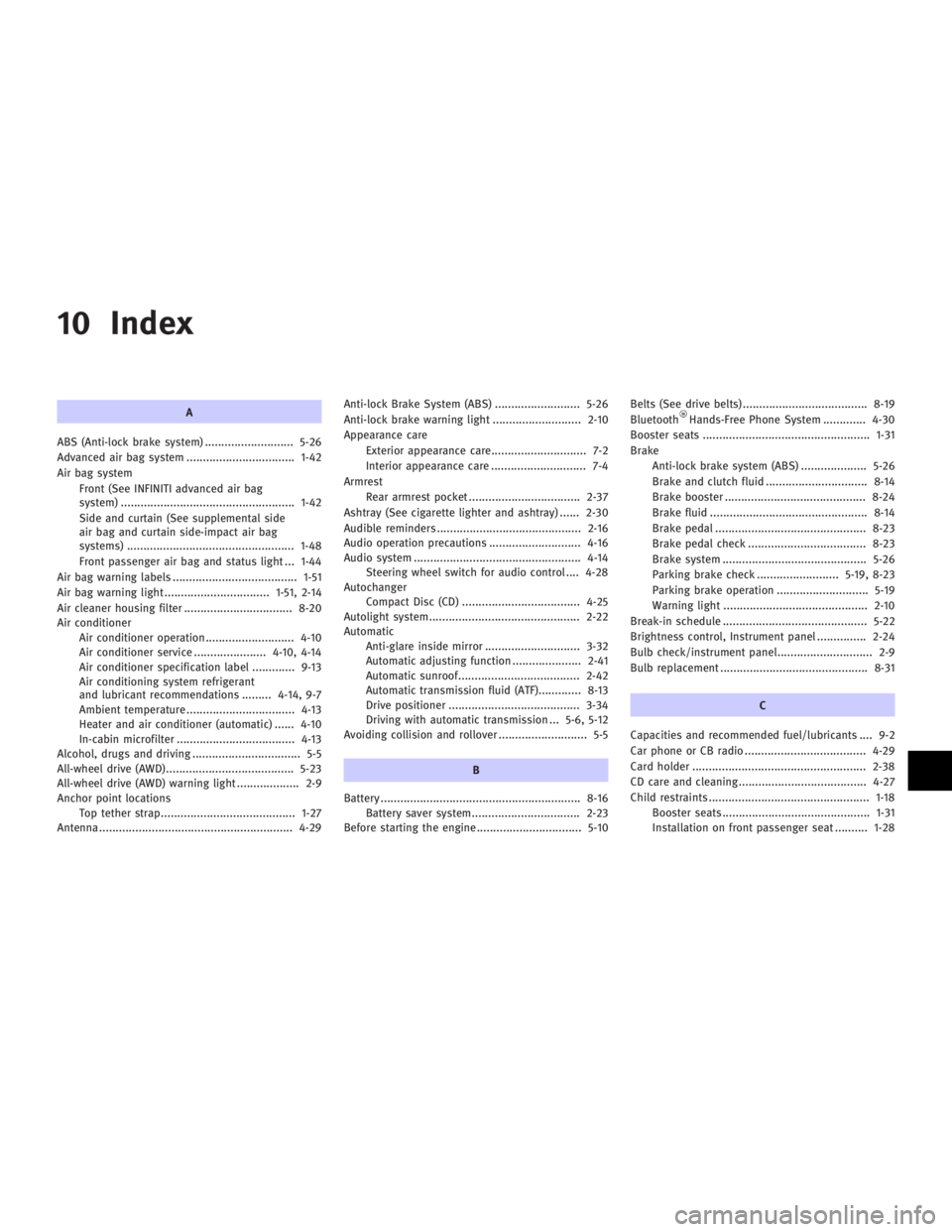
10 Index A
ABS (Anti-lock brake system) ........................... 5-26
Advanced air bag system ................................. 1-42
Air bag system
Front (See INFINITI advanced air bag
system) ..................................................... 1-42
Side and curtain (See supplemental side
air bag and curtain side-impact air bag
systems) ................................................... 1-48
Front passenger air bag and status light ... 1-44
Air bag warning labels ...................................... 1-51
Air bag warning light ................................ 1-51, 2-14
Air cleaner housing filter ................................. 8-20
Air conditioner
Air conditioner operation........................... 4-10
Air conditioner service ...................... 4-10, 4-14
Air conditioner specification label ............. 9-13
Air conditioning system refrigerant
and lubricant recommendations ......... 4-14, 9-7
Ambient temperature ................................. 4-13
Heater and air conditioner (automatic) ...... 4-10
In-cabin microfilter .................................... 4-13
Alcohol, drugs and driving ................................. 5-5
All-wheel drive (AWD)....................................... 5-23
All-wheel drive (AWD) warning light ................... 2-9
Anchor point locations
Top tether strap......................................... 1-27
Antenna ........................................................... 4-29 Anti-lock Brake System (ABS) .......................... 5-26
Anti-lock brake warning light ........................... 2-10
Appearance care
Exterior appearance care............................. 7-2
Interior appearance care ............................. 7-4
Armrest
Rear armrest pocket .................................. 2-37
Ashtray (See cigarette lighter and ashtray) ...... 2-30
Audible reminders ............................................ 2-16
Audio operation precautions ............................ 4-16
Audio system ................................................... 4-14
Steering wheel switch for audio control .... 4-28
Autochanger
Compact Disc (CD) .................................... 4-25
Autolight system.............................................. 2-22
Automatic
Anti-glare inside mirror ............................. 3-32
Automatic adjusting function ..................... 2-41
Automatic sunroof..................................... 2-42
Automatic transmission fluid (ATF)............. 8-13
Drive positioner ........................................ 3-34
Driving with automatic transmission ... 5-6, 5-12
Avoiding collision and rollover ........................... 5-5
B
Battery ............................................................. 8-16
Battery saver system................................. 2-23
Before starting the engine................................ 5-10 Belts (See drive belts) ...................................... 8-19
Bluetooth Hands-Free Phone System ............. 4-30
Booster seats ................................................... 1-31
Brake
Anti-lock brake system (ABS) .................... 5-26
Brake and clutch fluid ............................... 8-14
Brake booster ........................................... 8-24
Brake fluid ................................................ 8-14
Brake pedal .............................................. 8-23
Brake pedal check .................................... 8-23
Brake system ............................................ 5-26
Parking brake check ......................... 5-19, 8-23
Parking brake operation ............................ 5-19
Warning light ............................................ 2-10
Break-in schedule ............................................ 5-22
Brightness control, Instrument panel ............... 2-24
Bulb check/instrument panel............................. 2-9
Bulb replacement ............................................. 8-31
C
Capacities and recommended fuel/lubricants .... 9-2
Car phone or CB radio ..................................... 4-29
Card holder ..................................................... 2-38
CD care and cleaning ....................................... 4-27
Child restraints ................................................. 1-18
Booster seats ............................................. 1-31
Installation on front passenger seat .......... 1-28
w 06.1.5/V35-D/V5.0
X