format INFINITI G35 2006 Service Manual
[x] Cancel search | Manufacturer: INFINITI, Model Year: 2006, Model line: G35, Model: INFINITI G35 2006Pages: 344, PDF Size: 6.81 MB
Page 176 of 344
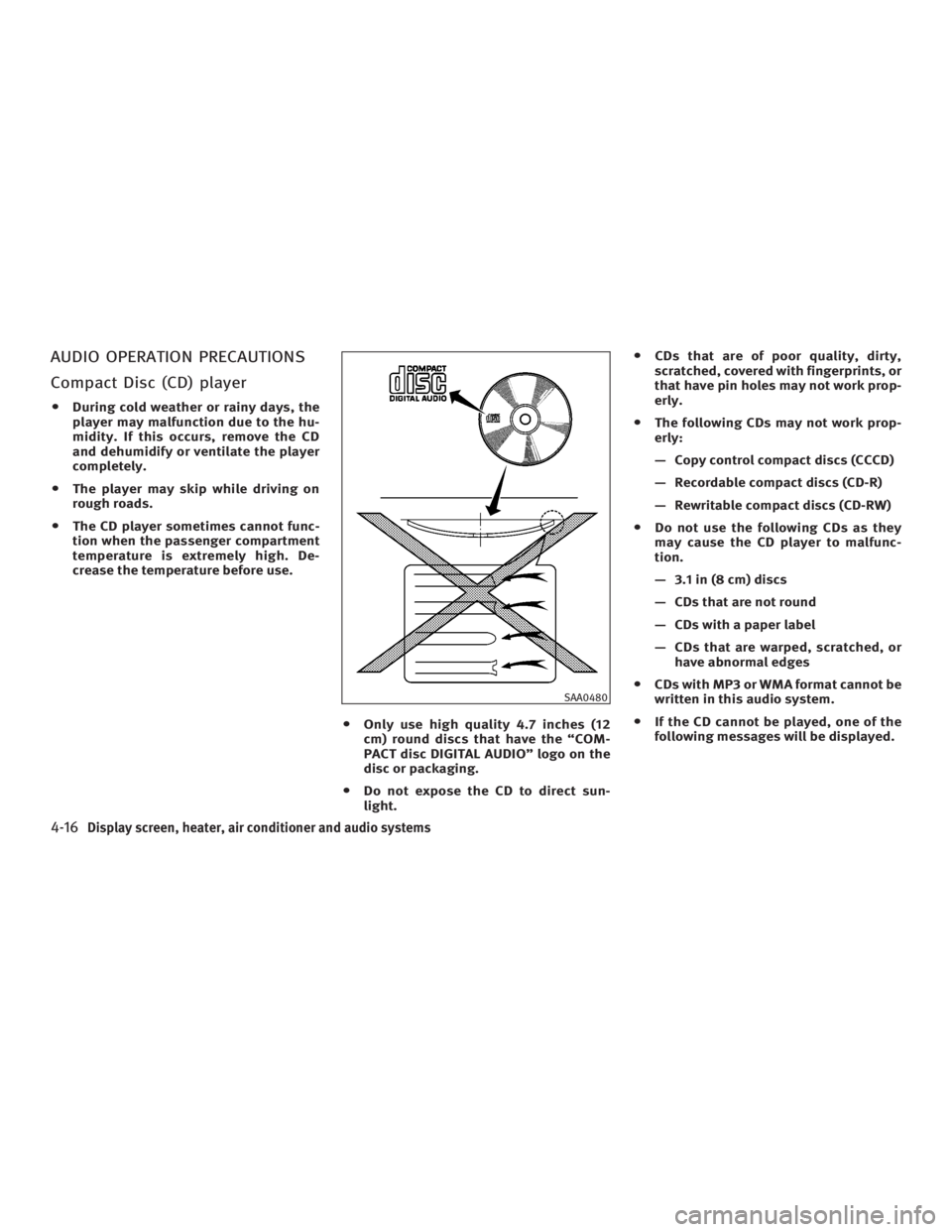
AUDIO OPERATION PRECAUTIONS
Compact Disc (CD) player O During cold weather or rainy days, the
player may malfunction due to the hu-
midity. If this occurs, remove the CD
and dehumidify or ventilate the player
completely.
O The player may skip while driving on
rough roads.
O The CD player sometimes cannot func-
tion when the passenger compartment
temperature is extremely high. De-
crease the temperature before use.
O Only use high quality 4.7 inches (12
cm) round discs that have the ªCOM-
PACT disc DIGITAL AUDIOº logo on the
disc or packaging.
O Do not expose the CD to direct sun-
light. O CDs that are of poor quality, dirty,
scratched, covered with fingerprints, or
that have pin holes may not work prop-
erly.
O The following CDs may not work prop-
erly:
Ð Copy control compact discs (CCCD)
Ð Recordable compact discs (CD-R)
Ð Rewritable compact discs (CD-RW)
O Do not use the following CDs as they
may cause the CD player to malfunc-
tion.
Ð 3.1 in (8 cm) discs
Ð CDs that are not round
Ð CDs with a paper label
Ð CDs that are warped, scratched, or
have abnormal edges
O CDs with MP3 or WMA format cannot be
written in this audio system.
O If the CD cannot be played, one of the
following messages will be displayed. SAA0480
4-16 Display screen, heater, air conditioner and audio systems
w 06.1.4/V35-D/V5.0
X
Page 177 of 344

CHECK DISC:
· Confirm that the CD is inserted cor-
rectly (the label side is facing up,
etc.).
· Confirm that the CD is not bent or
warped and it is free of scratches.
PUSH EJECT:
This is a malfunction due to excessive
temperature inside the player. Remove
the CD by pushing the EJECT button. Af-
ter a short time, reinsert the CD. The CD
can be played when the temperature of
the player returns to normal.
UNPLAYABLE:
The file is unplayable in this audio sys-
tem (only MP3 or WMA CD). Compact Disc (CD) with MP3 or
WMA Explanation of terms:
O MP3 Ð MP3 is short for Moving Pic-
tures Experts Group Audio Layer 3.
MP3 is the most well-known com-
pressed digital audio file format. This
format allows for near ªCD qualityº
sound, but at a fraction of the size of
normal audio files. MP3 conversion of
an audio track from CD-ROM can re-
duce the file size by approximately
10:1 ratio with virtually no perceptible
loss in quality. MP3 compression re-
moves the redundant and irrelevant
parts of a sound signal that the
human ear doesn't hear.
O WMA Ð Windows Media Audio (WMA)
is a compressed audio format created
by Microsoft as an alternative to MP3.
The WMA codec offers greater file
compression than the MP3 codec, en-
abling storage of more digital audio
tracks in the same amount of space
when compared to MP3s at the same
level of quality.
O Bit rate Ð Bit rate denotes the number
of bits per second used by a digital
music file. The size and quality of a compressed digital audio file is deter-
mined by the bit rate used when en-
coding the file.
O Sampling frequency Ð Sampling fre-
quency is the rate at which the
samples of a signal are converted
from analog to digital (A/D conversion)
per second.
O Multisession Ð Multisession is one of
the methods for writing data to media.
Writing data once to the media is
called a single session, and writing
more than once is called a multises-
sion.
O ID3/WMA Tag Ð The ID3 tag is the
part of the encoded MP3 or WMA file
that contains information about the
digital music file such as song title,
artist, album title, encoding bit rate,
track time duration, etc. ID3 tag infor-
mation is displayed on the
Album/Artist/Track title line on the
display.
* Windows and Windows Media are
either registered trademarks or trade-
marks of Microsoft Corporation in the
United States and/or other countries.
Display screen, heater, air conditioner and audio systems
4-17
w 06.1.4/V35-D/V5.0
X
Page 179 of 344
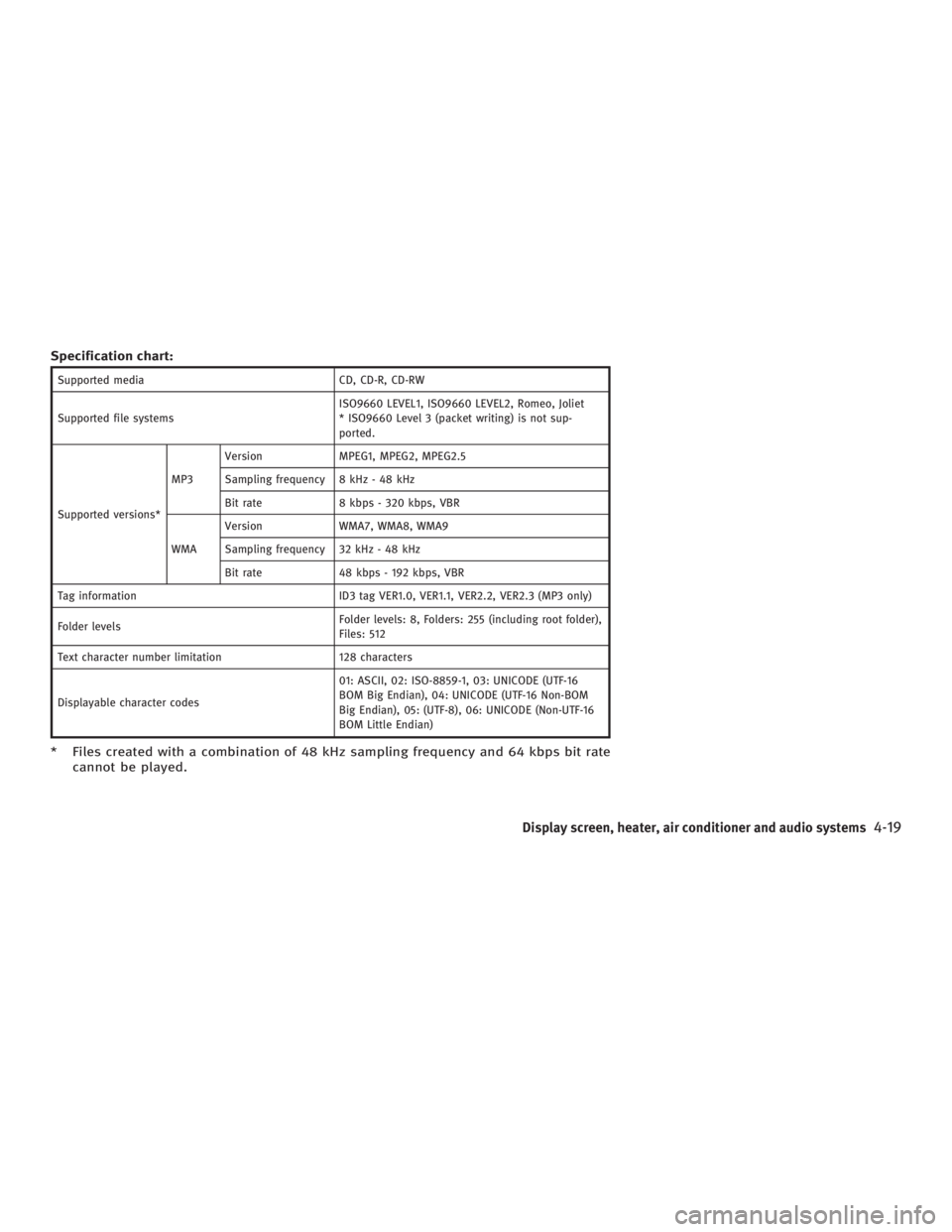
Specification chart: Supported media CD, CD-R, CD-RW
Supported file systems ISO9660 LEVEL1, ISO9660 LEVEL2, Romeo, Joliet
* ISO9660 Level 3 (packet writing) is not sup-
ported.
Supported versions* MP3 Version MPEG1, MPEG2, MPEG2.5
Sampling frequency 8 kHz - 48 kHz
Bit rate 8 kbps - 320 kbps, VBR
WMA Version WMA7, WMA8, WMA9
Sampling frequency 32 kHz - 48 kHz
Bit rate 48 kbps - 192 kbps, VBR
Tag information ID3 tag VER1.0, VER1.1, VER2.2, VER2.3 (MP3 only)
Folder levels Folder levels: 8, Folders: 255 (including root folder),
Files: 512
Text character number limitation 128 characters
Displayable character codes 01: ASCII, 02: ISO-8859-1, 03: UNICODE (UTF-16
BOM Big Endian), 04: UNICODE (UTF-16 Non-BOM
Big Endian), 05: (UTF-8), 06: UNICODE (Non-UTF-16
BOM Little Endian)
* Files created with a combination of 48 kHz sampling frequency and 64 kbps bit rate
cannot be played.
Display screen, heater, air conditioner and audio systems
4-19
w 06.1.4/V35-D/V5.0
X
Page 183 of 344

(With satellite radio)
AM ! FM1 ! FM2 ! SAT1 ! SAT2 ! AM
No satellite radio reception is available
unless optional satellite receiver and an-
tenna are installed and an XM or SIRI-
US TM
satellite radio service subscription
is active.
Satellite radio is not available in Alaska
and Hawaii.
When the RADIO band select button is
pushed while the ignition switch is in the
ACC or ON position, the radio will come
on at the station last played.
The last station/channel played will also
come on when the ON z OFF/VOL control
knob is pushed to ON.
If another audio source is playing when
the RADIO button is turned to ON, the
other audio source will automatically be
turned off and the last radio station
played will come on.
The FM stereo indicator ST will glow
during FM stereo reception. When the ste-
reo broadcast signal is weak, the radio
will automatically change from stereo to
monaural reception. TUNE (Tuning):
WARNING The radio should not be tuned while driving
so full attention may be given to vehicle op-
eration.
Push these buttons for manual tuning. To
move quickly through the channels, push
and hold either of the TUNE buttons down
for more than 0.5 second.
SEEK tuning:
For AM and FM radio:
Push the SEEK button or ,to
tune from high to low or low to high fre-
quencies and stops at the next broadcast-
ing station.
For satellite radio:
Push the SEEK button or to
seek channels of the next or previous cat-
egory. SCAN tuning:
Push the SCAN tuning button to tune from
low to high frequencies and stops at each
broadcasting station for 5 seconds. Push-
ing the button again during this 5 sec-
onds period will stop SCAN tuning and
the radio will remain tuned to that sta-
tion.
If the SCAN tuning button is not pushed
within 5 seconds, SCAN tuning moves to
the next station.
DISPLAY:
O By pushing the DISP button for more
than 1.5 seconds while receiving FM
radio waves, ªPS NAMEº switches be-
tween ON and OFF (Type A only).
O Pushing the DISP button will display
additional information about the satel-
lite radio broadcast (for example:
Artist name, Title).
Keep pushing the DISP button, and it
will change the information of the sat-
ellite radio broadcast to be displayed
as follows:
CH Number ! CH Name ! Artist
Name ! Song Title ! CH Number
Display screen, heater, air conditioner and audio systems
4-23
w 06.1.4/V35-D/V5.0
X
Page 185 of 344

3. PTY SCAN tuning mode
Push the SCAN tuning button to tune
the PTY name station, and stop at
each broadcasting station for 5 sec-
onds. Pushing the button again during
this 5 second period will stop SCAN
tuning and the radio will remain tuned
to that station. If the SCAN tuning but-
ton is not pushed within 5 seconds,
SCAN tuning moves to the next sta-
tion.
Compact disc (CD) changer
operation Turn the ignition switch to the ACC or ON
position, push the LOAD button and insert
the compact disc into the slot with the la-
bel side facing up. The CD will be guided
automatically into the slot and start play-
ing.
After loading the disc, the number of
tracks on the disc and the play time will
appear on the display.
If the radio is already operating, it will au-
tomatically turn off and the CD will play. CAUTION O Do not force the compact disc into the
slot. This could damage the player.
O Do not use 3.1 in (8 cm) discs.
If the system has been turned off while
the CD was playing, pushing the
ON z OFF/VOL control button will start the
compact disc.
CD LOAD:
To insert a CD in the CD changer, push
the LOAD button for less than 1.5 sec-
onds. Select the loading slot by pushing
the CD insert select button (1 to 6), then
insert the CD.
To insert 6 CDs to the CD changer in suc-
cession, push the LOAD button for more
than 1.5 seconds.
The inserted slot numbers will illuminate
on the display.
PLAY:
When the CD button is pushed with the
system off and the compact disc loaded,
the system will turn on and the compact
disc will start to play. When the CD button is pushed with the
CD loaded with the radio playing, the
radio will automatically be turned off and
the compact disc will start to play.
DISPLAY:
When the display button is pushed for
more than 1.5 seconds while the CD is be-
ing played, the music information dis-
played can be changed in the following
order.
CD:
CD with MP3 or WMA:
FF (Fast Forward), REW
(Rewind):
CD:
When the (fast forward) or (re-
wind) button is pushed while the compact
disc is being played, the CD will play
while fast forwarding or rewinding. When
Display screen, heater, air conditioner and audio systems
4-25
w 06.1.4/V35-D/V5.0
X
Page 194 of 344
NOTE:
For best results, say phone numbers as
single digits.
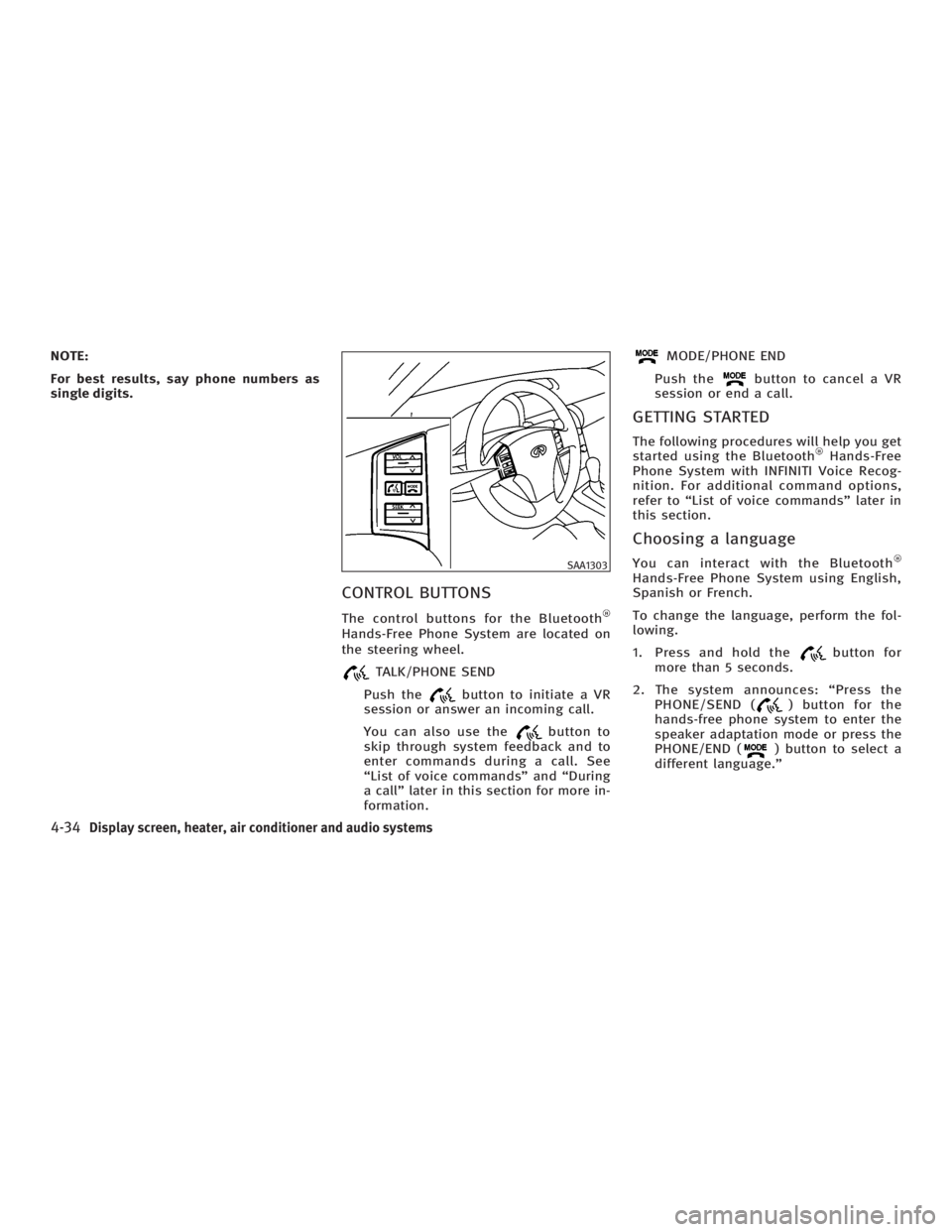
CONTROL BUTTONS The control buttons for the Bluetooth
Hands-Free Phone System are located on
the steering wheel.
TALK/PHONE SEND
Push the button to initiate a VR
session or answer an incoming call.
You can also use the button to
skip through system feedback and to
enter commands during a call. See
ªList of voice commandsº and ªDuring
a callº later in this section for more in-
formation. MODE/PHONE END
Push the button to cancel a VR
session or end a call.
GETTING STARTED The following procedures will help you get
started using the Bluetooth Hands-Free
Phone System with INFINITI Voice Recog-
nition. For additional command options,
refer to ªList of voice commandsº later in
this section.
Choosing a language You can interact with the Bluetooth
Hands-Free Phone System using English,
Spanish or French.
To change the language, perform the fol-
lowing.
1. Press and hold the button for
more than 5 seconds.
2. The system announces: ªPress the
PHONE/SEND ( ) button for the
hands-free phone system to enter the
speaker adaptation mode or press the
PHONE/END ( ) button to select a
different language.º SAA1303
4-34 Display screen, heater, air conditioner and audio systems
w 06.1.4/V35-D/V5.0
X
Page 195 of 344
3. Press the button.
For information on speaker adapta-
tion, see ªSpeaker adaptation (SA)
modeº later in this section.
4. The system announces the current lan-
guage and gives you the option to
change the language to Spanish (in
Spanish) or French (in French). Use the
following chart to select the language.
NOTE:
Note: You must press the button or
the button within 5 seconds to
change the language. Current
language Press
(TALK/PHONE
SEND)
to select Press
(MODE/PHONE
END)
to select
English Spanish French
Spanish English French
French English Spanish
5. If you decide not to change the lan-
guage, do not press either button.
After 5 seconds, the VR session will
end, and the language will not be
changed. Pairing procedure
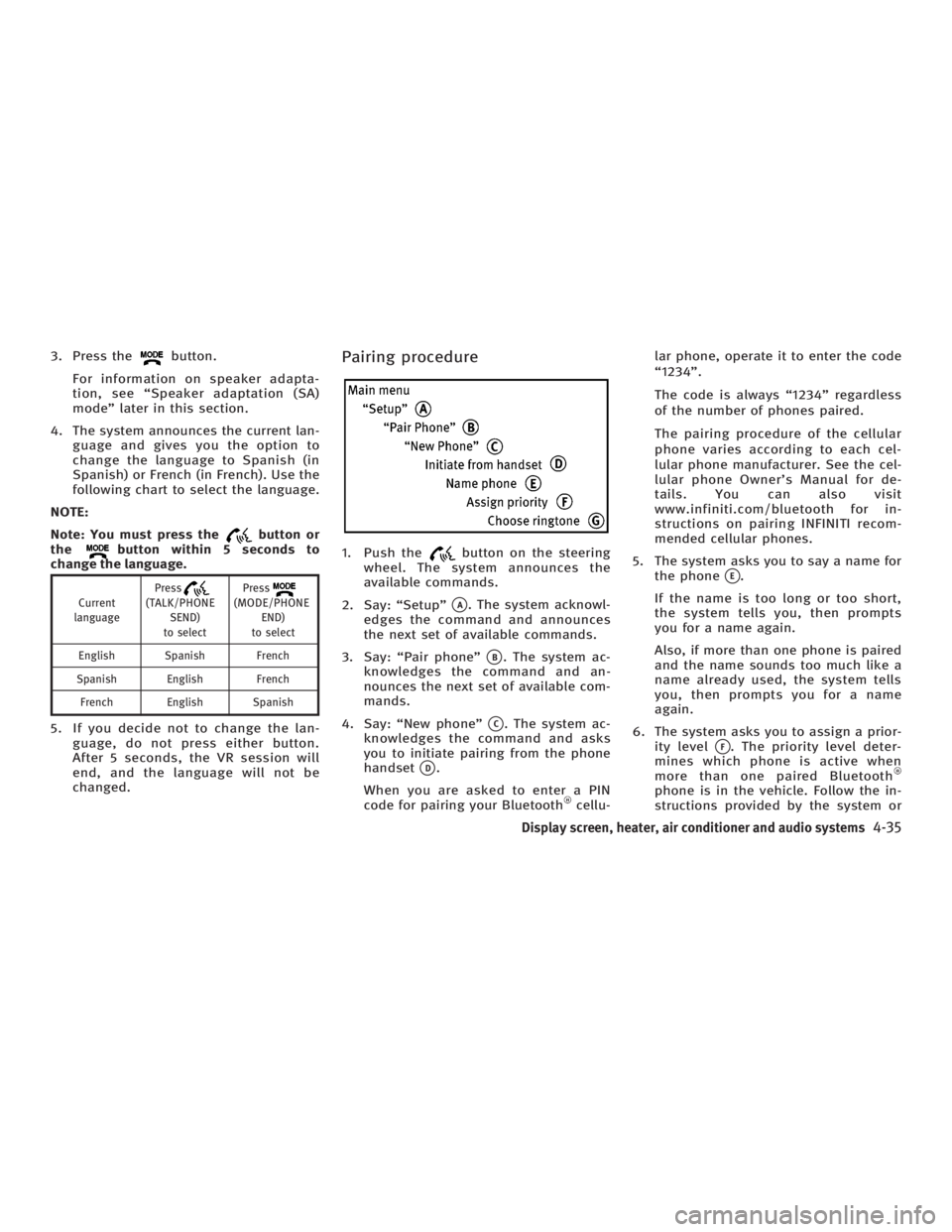
1. Push the button on the steering
wheel. The system announces the
available commands.
2. Say: ªSetupº
q A
. The system acknowl-
edges the command and announces
the next set of available commands.
3. Say: ªPair phoneº
q B
. The system ac-
knowledges the command and an-
nounces the next set of available com-
mands.
4. Say: ªNew phoneº
q C
. The system ac-
knowledges the command and asks
you to initiate pairing from the phone
handset
q D
.
When you are asked to enter a PIN
code for pairing your Bluetooth cellu- lar phone, operate it to enter the code
ª1234º.
The code is always ª1234º regardless
of the number of phones paired.
The pairing procedure of the cellular
phone varies according to each cel-
lular phone manufacturer. See the cel-
lular phone Owner's Manual for de-
tails. You can also visit
www.infiniti.com/bluetooth for in-
structions on pairing INFINITI recom-
mended cellular phones.
5. The system asks you to say a name for
the phone
q E
.
If the name is too long or too short,
the system tells you, then prompts
you for a name again.
Also, if more than one phone is paired
and the name sounds too much like a
name already used, the system tells
you, then prompts you for a name
again.
6. The system asks you to assign a prior-
ity level
q F
. The priority level deter-
mines which phone is active when
more than one paired Bluetooth
phone is in the vehicle. Follow the in-
structions provided by the system or
Display screen, heater, air conditioner and audio systems
4-35
w 06.1.5/V35-D/V5.0
X
Page 196 of 344
refer to ªSetupº later in this section
for more information on changing pri-
orities.
7. The system will ask if you would like
to select a custom ring tone
q G
. Follow
the instructions provided by the
system or refer to ªSetupº later in this
section for more information on se-
lecting ringtones.
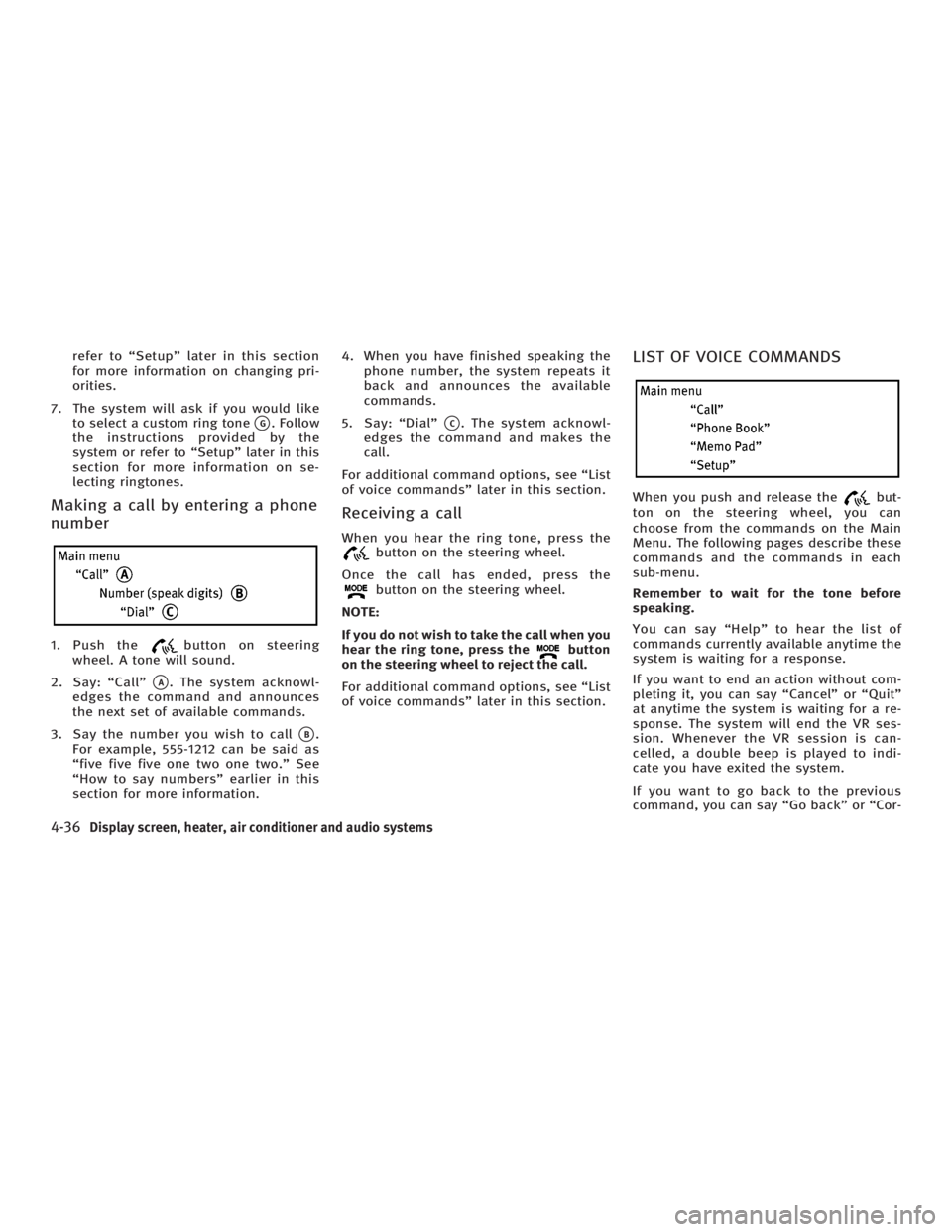
Making a call by entering a phone
number 1. Push the button on steering
wheel. A tone will sound.
2. Say: ªCallº
q A
. The system acknowl-
edges the command and announces
the next set of available commands.
3. Say the number you wish to call
q B
.
For example, 555-1212 can be said as
ªfive five five one two one two.º See
ªHow to say numbersº earlier in this
section for more information. 4. When you have finished speaking the
phone number, the system repeats it
back and announces the available
commands.
5. Say: ªDialº
q C
. The system acknowl-
edges the command and makes the
call.
For additional command options, see ªList
of voice commandsº later in this section.
Receiving a call When you hear the ring tone, press the
button on the steering wheel.
Once the call has ended, press the
button on the steering wheel.
NOTE:
If you do not wish to take the call when you
hear the ring tone, press the button
on the steering wheel to reject the call.
For additional command options, see ªList
of voice commandsº later in this section. LIST OF VOICE COMMANDS When you push and release the but-
ton on the steering wheel, you can
choose from the commands on the Main
Menu. The following pages describe these
commands and the commands in each
sub-menu.
Remember to wait for the tone before
speaking.
You can say ªHelpº to hear the list of
commands currently available anytime the
system is waiting for a response.
If you want to end an action without com-
pleting it, you can say ªCancelº or ªQuitº
at anytime the system is waiting for a re-
sponse. The system will end the VR ses-
sion. Whenever the VR session is can-
celled, a double beep is played to indi-
cate you have exited the system.
If you want to go back to the previous
command, you can say ªGo backº or ªCor-
4-36 Display screen, heater, air conditioner and audio systems
w 06.1.4/V35-D/V5.0
X
Page 198 of 344
O ªSend/Enter/Call/Dialº Ð Use the
Send command to enter numbers dur-
ing a call. For example, if you were di-
rected to dial an extension by an auto-
mated system:
Say: ªSend one two three four.º
The system acknowledges the com-
mand and sends the tones associated
with the numbers. The system then
ends the VR session and returns to
the call.
O ªTransfer callº Ð Use the Transfer Call
command to transfer the call from the
Bluetooth Hands-Free Phone System
to the cellular phone when privacy is
desired.
The system announces, ªTransfer call.
Call transferred to privacy mode.º The
system then ends the VR session.
You can also issue the Transfer Call
command again to return to a hands-
free call through the vehicle.
O ªMuteº Ð Use the Mute command to
mute your voice so the other party
cannot hear it. Use the mute command
again to unmute your voice. NOTE:
If the other party ends the call or the cellu-
lar phone network connection is lost while
the Mute feature is on, the Mute feature
may need to be reset to ªoff.º
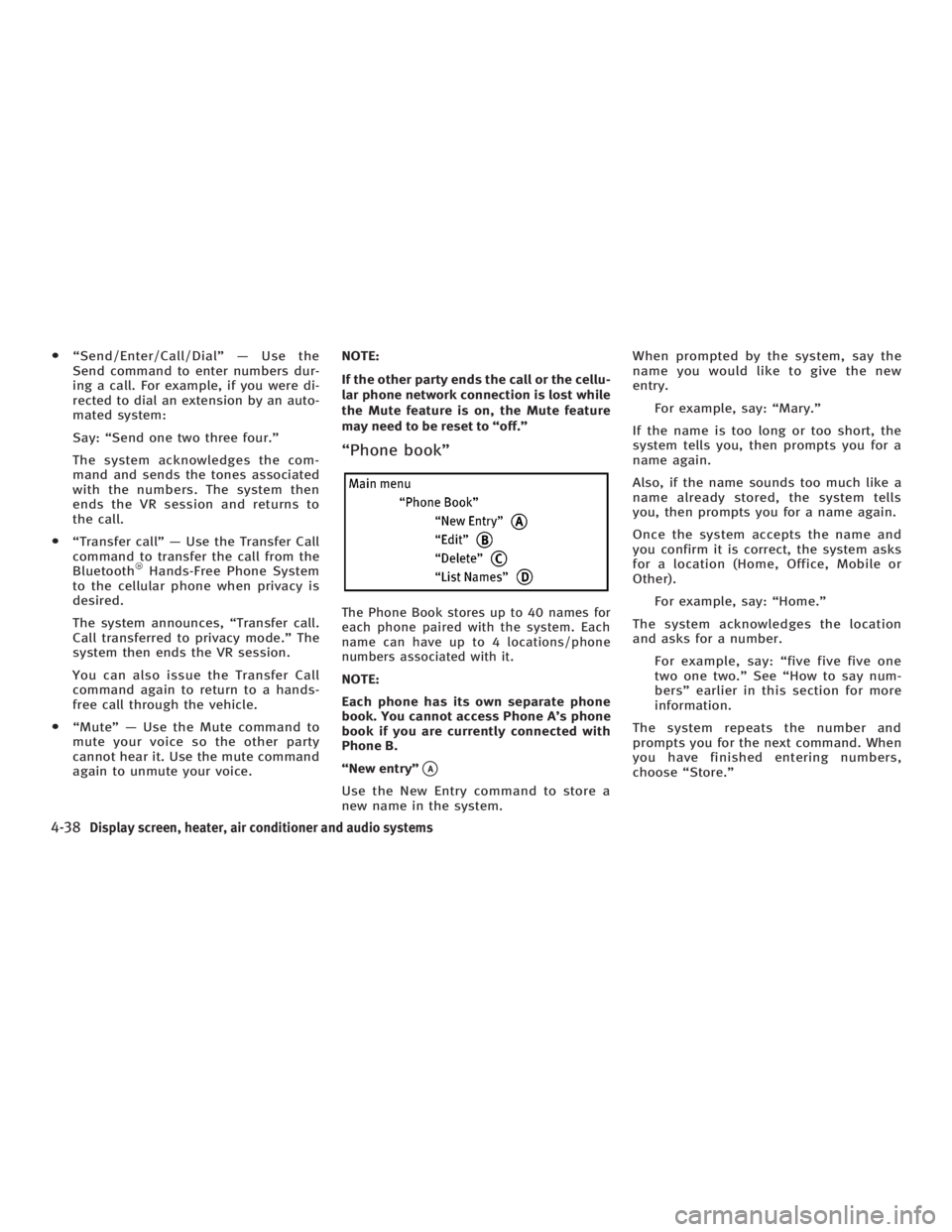
ªPhone bookº
The Phone Book stores up to 40 names for
each phone paired with the system. Each
name can have up to 4 locations/phone
numbers associated with it.
NOTE:
Each phone has its own separate phone
book. You cannot access Phone A's phone
book if you are currently connected with
Phone B.
ªNew entryº
q A
Use the New Entry command to store a
new name in the system. When prompted by the system, say the
name you would like to give the new
entry.
For example, say: ªMary.º
If the name is too long or too short, the
system tells you, then prompts you for a
name again.
Also, if the name sounds too much like a
name already stored, the system tells
you, then prompts you for a name again.
Once the system accepts the name and
you confirm it is correct, the system asks
for a location (Home, Office, Mobile or
Other).
For example, say: ªHome.º
The system acknowledges the location
and asks for a number.
For example, say: ªfive five five one
two one two.º See ªHow to say num-
bersº earlier in this section for more
information.
The system repeats the number and
prompts you for the next command. When
you have finished entering numbers,
choose ªStore.º
4-38 Display screen, heater, air conditioner and audio systems
w 06.1.4/V35-D/V5.0
X
Page 199 of 344
The system confirms the name, location
and number. The system then asks if you
would like to store another location for
the same name. If you do not wish to
store another location, the system ends
the VR session.
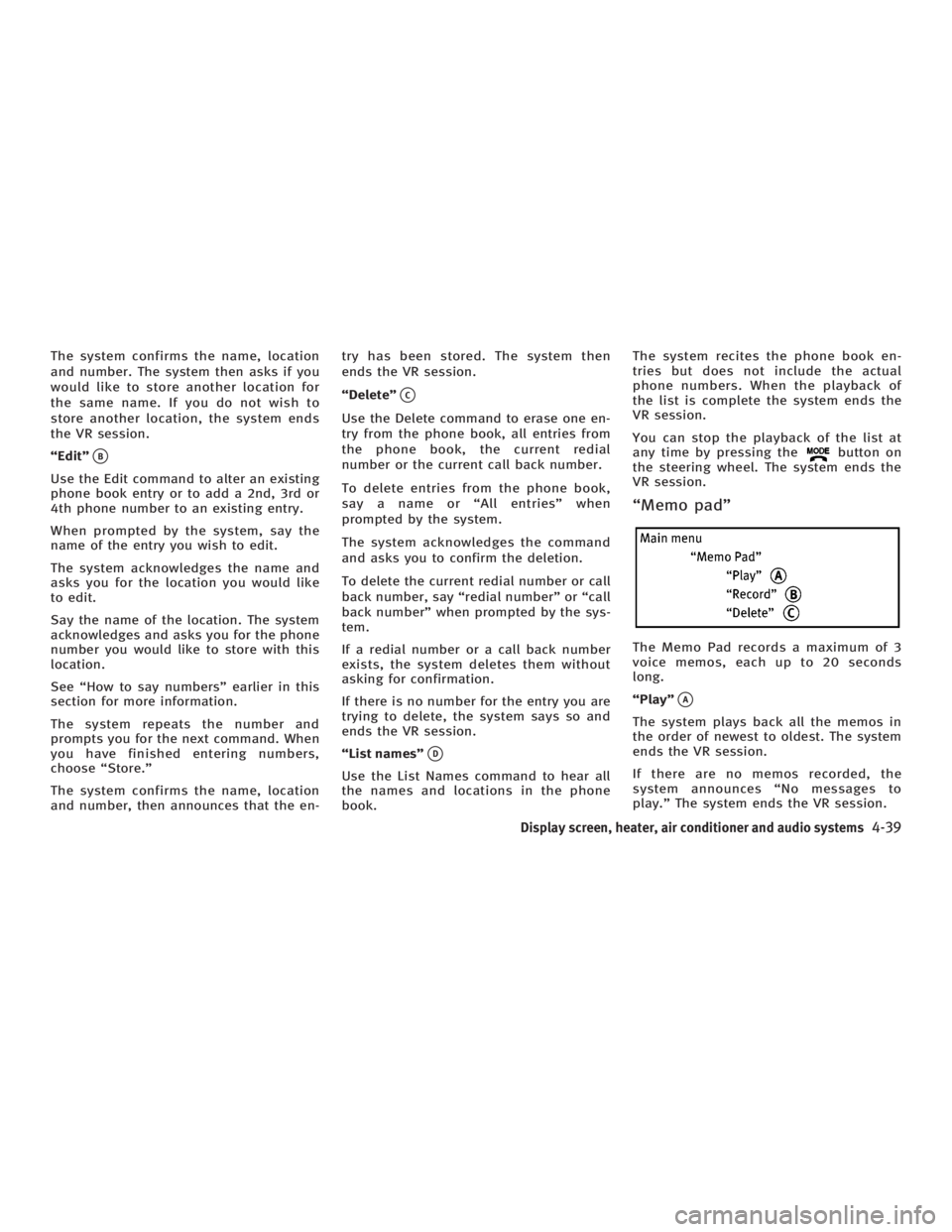
ªEditº
q B
Use the Edit command to alter an existing
phone book entry or to add a 2nd, 3rd or
4th phone number to an existing entry.
When prompted by the system, say the
name of the entry you wish to edit.
The system acknowledges the name and
asks you for the location you would like
to edit.
Say the name of the location. The system
acknowledges and asks you for the phone
number you would like to store with this
location.
See ªHow to say numbersº earlier in this
section for more information.
The system repeats the number and
prompts you for the next command. When
you have finished entering numbers,
choose ªStore.º
The system confirms the name, location
and number, then announces that the en- try has been stored. The system then
ends the VR session.
ªDeleteº
q C
Use the Delete command to erase one en-
try from the phone book, all entries from
the phone book, the current redial
number or the current call back number.
To delete entries from the phone book,
say a name or ªAll entriesº when
prompted by the system.
The system acknowledges the command
and asks you to confirm the deletion.
To delete the current redial number or call
back number, say ªredial numberº or ªcall
back numberº when prompted by the sys-
tem.
If a redial number or a call back number
exists, the system deletes them without
asking for confirmation.
If there is no number for the entry you are
trying to delete, the system says so and
ends the VR session.
ªList namesº
q D
Use the List Names command to hear all
the names and locations in the phone
book. The system recites the phone book en-
tries but does not include the actual
phone numbers. When the playback of
the list is complete the system ends the
VR session.
You can stop the playback of the list at
any time by pressing the button on
the steering wheel. The system ends the
VR session.
ªMemo padº
The Memo Pad records a maximum of 3
voice memos, each up to 20 seconds
long.
ªPlayº
q A
The system plays back all the memos in
the order of newest to oldest. The system
ends the VR session.
If there are no memos recorded, the
system announces ªNo messages to
play.º The system ends the VR session.
Display screen, heater, air conditioner and audio systems
4-39
w 06.1.4/V35-D/V5.0
X