format INFINITI G35 2006 Workshop Manual
[x] Cancel search | Manufacturer: INFINITI, Model Year: 2006, Model line: G35, Model: INFINITI G35 2006Pages: 344, PDF Size: 6.81 MB
Page 200 of 344
ªRecordº
q B
The system announces ªRecordingº and a
tone sounds signaling you to begin.
Speak the information you wish to record
clearly. When you are done, press the
or button on the steering
wheel.
A tone sounds and the system announces
ªMemo recorded.º Another tone sounds
to end the VR session.
If the memo pad is full, the system asks if
you wish to record over the oldest memo.
ªDeleteº
q C
The Delete command erases all memos.
The system asks you to confirm this ac-
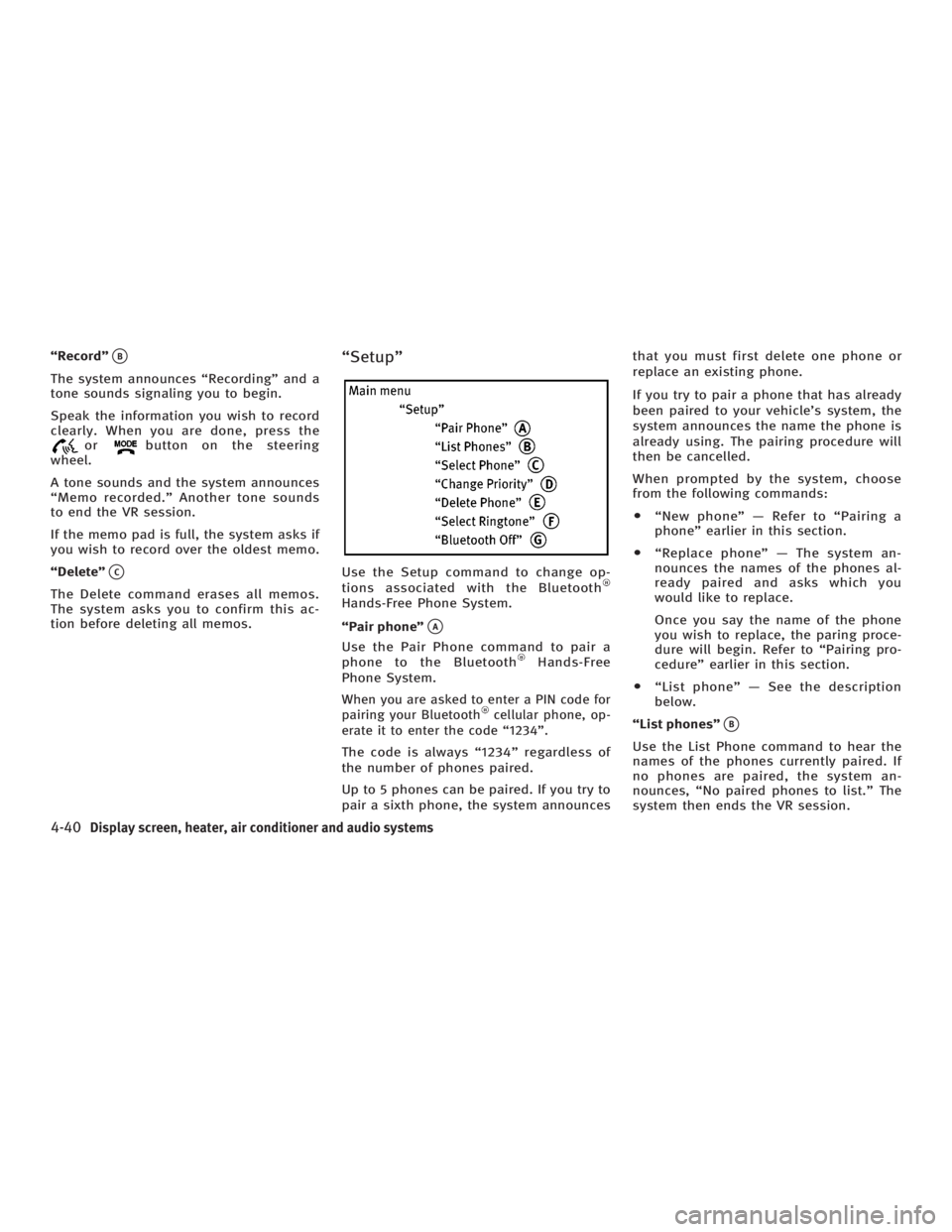
tion before deleting all memos. ªSetupº
Use the Setup command to change op-
tions associated with the Bluetooth
Hands-Free Phone System.
ªPair phoneº
q A
Use the Pair Phone command to pair a
phone to the Bluetooth Hands-Free
Phone System.
When you are asked to enter a PIN code for
pairing your Bluetooth cellular phone, op-
erate it to enter the code ª1234º.
The code is always ª1234º regardless of
the number of phones paired.
Up to 5 phones can be paired. If you try to
pair a sixth phone, the system announces that you must first delete one phone or
replace an existing phone.
If you try to pair a phone that has already
been paired to your vehicle's system, the
system announces the name the phone is
already using. The pairing procedure will
then be cancelled.
When prompted by the system, choose
from the following commands:
O ªNew phoneº Ð Refer to ªPairing a
phoneº earlier in this section.
O ªReplace phoneº Ð The system an-
nounces the names of the phones al-
ready paired and asks which you
would like to replace.
Once you say the name of the phone
you wish to replace, the paring proce-
dure will begin. Refer to ªPairing pro-
cedureº earlier in this section.
O ªList phoneº Ð See the description
below.
ªList phonesº
q B
Use the List Phone command to hear the
names of the phones currently paired. If
no phones are paired, the system an-
nounces, ªNo paired phones to list.º The
system then ends the VR session.
4-40 Display screen, heater, air conditioner and audio systems
w 06.1.4/V35-D/V5.0
X
Page 202 of 344
You can still use the Memo Pad and ac-
cess Setup.
To turn on the system again, choose the
Bluetooth On command from the Setup
command.
SPEAKER ADAPTATION (SA) MODE Speaker Adaptation allows up to two out-of
dialect users to train the system to improve
recognition accuracy. By repeating a
number of commands, the users can create
a voice model of their own voice that is
stored in the system. The system is ca-
pable of storing a different speaker adapta-
tion model for memory A and memory B.
If memory A is available, the system will
use memory A to store the model. If
memory A is in use and memory B is
available, the system will use memory B
to store the model. If both of the memory
locations are in use, the system will ask
the user to select which memory location
should be overwritten.
Training procedure The procedure for training a voice is as
follows.
1. Position the vehicle in a reasonably
quiet outdoor location. 2. Sit in the driver's seat with the engine
running, the parking brake on, and the
transmission in Park.
3. Press and hold the button for
more than 5 seconds.
4. The system announces: ªPress the
PHONE/SEND ( ) button for the
hands-free phone system to enter the
speaker adaptation mode or press the
PHONE/END ( ) button to select a
different language.º
5. Press the button.
For information on selecting a dif-
ferent language, see ªChoosing a lan-
guageº earlier in this section.
6. Voice memory A or memory B is se-
lected automatically. If both memory
locations are already in use, the
system will prompt you to overwrite
one. Follow the instructions provided
by the system.
7. When preparation is complete and you
are ready to begin, the press the
button.
8. The SA mode will be explained. Follow
the instructions provided by the
system. 9. When training is finished, the system
will tell you an adequate number of
phrases have been recorded.
10. The system will ask you to say your
name. Follow the instructions to regis-
ter your name.
11. The system will announce that
speaker adaptation has been com-
pleted and the system is ready.
The SA mode will stop if:
O The button is pressed for more
than 5 seconds in SA mode.
O The vehicle is driven during SA mode.
O The ignition switch is turned to the
OFF or LOCK position.
Training phrases During the SA mode, the system instructs
you to say the following phrases.
(The system will prompt you for each
phrase.)
O phone book new entry
O dial three oh four two nine
O delete call back number
O setup pair phone
4-42 Display screen, heater, air conditioner and audio systems
w 06.1.13/V35-D/V5.0
X
Page 208 of 344

Your vehicle has also been equipped with a
TPMS malfunction indicator to indicate
when the system is not operating properly.
The TPMS malfunction indicator is com-
bined with the low tire pressure telltale.
When the system detects a malfunction, the
telltale will flash for approximately one
minute and then remain continuously illu-
minated. This sequence will continue upon
subsequent vehicle start-ups as long as the
malfunction exists. When the malfunction
indicator is illuminated, the system may not
be able to detect or signal low tire pressure
as intended. TPMS malfunctions may occur
for a variety of reasons, including the in-
stallation of replacement or alternate tires
or wheels on the vehicle that prevent the
TPMS from functioning properly. Always
check the TPMS malfunction telltale after
replacing one or more tires or wheels on
your vehicle to ensure that the replacement
or alternate tires and wheels allow the
TPMS to continue to function properly.
Additional information
O The TPMS does not monitor the tire
pressure of the spare tire.
O The TPMS will activate only when the ve-
hicle is driven at speeds above 16 MPH
(25 km/h). Also, this system may not de- tect a sudden drop in tire pressure (for
example a flat tire while driving).
O Tire pressure rises and falls de-
pending on the heat caused by the ve-
hicle's operation and the outside tem-
perature. Low outside temperature can
lower the temperature of the air inside
the tire which can cause a lower tire
inflation pressure. This may cause the
low tire pressure warning light to illu-
minate. If the warning light illuminates
in low ambient temperature, check the
tire pressure for all four tires.
For additional information, see ªLow tire
pressure warning lightº in the ª2. Instru-
ments and controlsº section and ªTire
pressure monitoring system (TPMS)º in
the ª6. In case of emergencyº section.
WARNING O If the low tire pressure warning light illumi-
nates while driving, avoid sudden steering
maneuvers or abrupt braking, reduce ve-
hicle speed, pull off the road to a safe loca-
tion and stop the vehicle as soon as pos-
sible. Serious vehicle damage could occur and may lead to an accident and could re-
sult in serious personal injury. Check the
tire pressure for all four tires. Adjust the
tire pressure to the recommended COLD
tire pressure shown on the Tire and
Loading Information label to turn the low
tire pressure warning light OFF. If you have
a flat tire, replace it with a spare tire as
soon as possible. (See ªFlat tireº in the ª6.
In case of emergencyº section for changing
a flat tire.)
O When a spare tire is mounted or a wheel
is replaced, tire pressure will not be indi-
cated, the TPMS will not function and the
low tire pressure warning light will flash.
Contact your INFINITI dealer as soon as
possible for tire replacement and/or sys-
tem resetting.
O Replacing tires with those not originally
specified by INFINITI could affect the
proper operation of the TPMS.
O Do not inject any tire liquid or aerosol
tire sealant into the tires, as this may
cause a malfunction of the tire pressure
sensors.
5-4 Starting and driving
w 06.1.5/V35-D/V5.0
X
Page 214 of 344
ON (Normal operating position)
q E
:
This position turns on the ignition system
and electrical accessories.
START
q F
:
This position starts the engine. As soon
as the engine has started, release the
switch immediately. It will automatically
return to the ON position.
For important safety information, see ªIg-
nition switchº in the ª5. Starting and driv-
ingº section.
The ignition switch cannot be turned back
to the LOCK position unless the shift lever
is in P position. (It can be turned to only
q C
.)
CAUTIONDo not leave the vehicle with the ignition
switch in ACC or ON position when the en-
gine is not running for an extended period.
This can discharge the battery. INFINITI VEHICLE IMMOBILIZER
SYSTEM The INFINITI Vehicle Immobilizer System
will not allow the engine to start without
the use of the registered key.
If the engine does not start using a regis-
tered key (for example, when interference
is caused by another registered key, an
automated toll road device or an auto-
mated payment device on the key ring),
restart the engine using the following pro-
cedures:
1. Leave the ignition switch in the ON po-
sition for approximately 5 seconds.
2. Turn the ignition switch to the OFF or
LOCK position and wait approximately
10 seconds.
3. Repeat steps 1 and 2.
4. Restart the engine while holding the
device (which may have caused the in-
terference) separate from the regis-
tered key.
If this procedure allows the engine to
start, INFINITI recommends placing the
registered key on a separate key ring to
avoid interference from other devices. O Make sure the area around the vehicle
is clear.
O Maintenance items should be checked
periodically, for example, each time
you check engine oil.
O Check that all windows and lights are
clean.
O Visually inspect tires for their appear-
ance and condition. Also check tires
for proper inflation.
O Lock all doors.
O Position seat and adjust head re-
straints.
O Adjust inside and outside mirrors.
O Fasten seat belts and ask all passen-
gers to do likewise.
O Check the operation of warning lights
when the ignition key is turned to the
ON position. See ªWarning/indicator
lights and audible remindersº in the
ª2. Instruments and controlsº section.BEFORE STARTING THE ENGINE
5-10 Starting and driving
w 06.1.4/V35-D/V5.0
X
Page 231 of 344

WARNINGDo not pump the brake pedal. Doing so may
result in increased stopping distances.
Normal operation The ABS will not operate at speeds below
3 to 6 MPH (5 to 10 km/h) to stop the ve-
hicle. (The speeds will vary according to
road conditions.) When the anti-lock
system senses that one or more wheels
are close to locking up, the actuator
(under the hood) rapidly applies and re-
leases hydraulic pressure (like pumping
the brakes very quickly). While the actua-
tor is working, you may feel a pulsation in
the brake pedal and hear a noise or vibra-
tion from the actuator under the hood.
This is normal and indicates that the ABS
is working properly. However, the ABS op-
eration may indicate that road conditions
are hazardous and extra care is required
while driving.
Self-test feature The anti-lock brake system consists of
electronic sensors, electric pumps, and
hydraulic solenoids controlled by a com- puter. The computer has a built-in diag-
nostic feature that tests the system each
time you start the engine and move the
vehicle at a low speed in forward or re-
verse. When the self-test occurs, you may
hear a clunk noise and/or feel a pulsation
in the brake pedal. This is normal and is
not an indication of any malfunction. If
the computer senses any malfunction, it
switches the ABS off and turns on the
ABS warning light in the instrument
panel. The brake system operates nor-
mally, but without anti-lock assistance.
If the light comes on during the self-test
or while driving, take the vehicle to an
INFINITI dealer for repair.
WARNING The anti-lock brake system is a sophisticated
device, but it cannot prevent accidents re-
sulting from careless or dangerous driving
techniques. It can help maintain vehicle con-
trol during braking on slippery surfaces, but
remember that the stopping distance on slip-
pery surfaces will be longer than on normal
surfaces even with the anti-lock brake system. Stopping distances may also be
longer on rough, gravel or snow covered
roads, or if you are using tire chains. Always
maintain a safe distance from the vehicle in
front of you. Ultimately, the responsibility
for safety of self and others rests in the
hands of the driver.
Tire type and condition of tires may also af-
fect braking effectiveness.
O When replacing tires, install the speci-
fied size of tires to the front and rear.
O When installing a spare tire, make sure it
is the proper size and type as specified
on the Tire and Loading Information
label. See ªVehicle identificationº in the
ª9. Technical and consumer informa-
tionº section for the Tire and Loading In-
formation label location.
Starting and driving
5-27
w 06.1.4/V35-D/V5.0
X
Page 234 of 344
WARNINGThe RAS system, although a sophisticated
device, cannot prevent accidents resulting
from careless or dangerous driving tech-
niques. Ultimately the responsibility for
safety of self and others rests in the hands of
the driver. Therefore only through attentive
and careful driving methods can the RAS
system be fully appreciated and safety as-
sured. FREEING A FROZEN DOOR LOCK To prevent a door lock from freezing, apply
de-icer or glycerin to it through the key
hole. If the lock becomes frozen, heat the
key before inserting it into the key hole.
ANTI-FREEZE In the winter when it is anticipated that the
temperature will drop below 32ÉF (0ÉC),
check antifreeze to assure proper winter
protection. For additional information, see
ªEngine cooling systemº in the ª8. Mainte-
nance and do-it-yourselfº section.
BATTERY If the battery is not fully charged during
extremely cold weather conditions, the
battery fluid may freeze and damage the
battery. To maintain maximum efficiency,
the battery should be checked regularly.
For additional information, see ªBatteryº
in the ª8. Maintenance and do-it-yourselfº
section.
DRAINING OF COOLANT WATER If the vehicle is to be left outside without
antifreeze, drain the cooling system by
opening the drain plug located under the
radiator. Refill before operating the ve-
hicle. See ªEngine cooling systemº in the ª8. Maintenance and do-it-yourselfº sec-
tion for changing engine coolant.
TIRE EQUIPMENT 1. SUMMER tires are of a tread design to
provide superior performance on dry
pavement. However, the performance
of these tires will be substantially re-
duced in snowy and icy conditions. If
you operate your vehicle on snowy or
icy roads, INFINITI recommends the
use of MUD & SNOW or ALL SEASON
tires on all four wheels. Please consult
an INFINITI dealer for the tire type,
size, speed rating and availability in-
formation.
2. For additional traction on icy roads,
studded tires may be used. However,
some provinces and states prohibit
their use. Check local, state and pro-
vincial laws before installing studded
tires.
Skid and traction capabilities of
studded snow tires, on wet or dry sur-
faces, may be poorer than that of non-
studded snow tires.
3. Tire chains may be used if desired.
Make sure they are of proper size for
the tires on your vehicle and are in-COLD WEATHER DRIVING
5-30 Starting and driving
w 06.1.4/V35-D/V5.0
X
Page 238 of 344
Every new INFINITI comes with a 4 year,
unlimited mileage Roadside Assistance
plan. In the event of a roadside
emergency, Roadside Assistance Service
is available to you. Please refer to your
Warranty Booklet (U.S.) or Warranty &
Roadside assistance information booklet
(Canada) for details. Both the Warranty
Booklet and Roadside Assistance Calling
Card in your Owner's Literature Portfolio
provide the Toll-Free Number to call for
assistance. Roadside Assistance is
provided 24 hours a day, 365 days a year,
for 4 years from the date sold to give
emergency roadside help, in the event of
mechanical or nonmechanical trouble(s)
such as flat tires, out-of-gas, dead battery,
lost keys, mechanical breakdown,
accident, etc. TIRE PRESSURE MONITORING
SYSTEM (TPMS) This vehicle is equipped with the tire pres-
sure monitoring system (TPMS). It monitors
tire pressure of all tires except the spare.
When the low tire pressure warning light is
lit, or flashing continuously one or more of
your tires is significantly under-inflated. If
the vehicle is being driven with low tire
pressure, the TPMS will activate and warn
you of it by the low tire pressure warning
light. This system will activate only when
the vehicle is driven at speeds above 16
MPH (25 km/h). For more details, refer to
ªWarning/indicator lights and audible re-
mindersº in the ª2. Instruments and con-
trolsº section and ªTire pressure moni-
toring system (TPMS)º in the ª5. Starting
and drivingº section.
WARNING O If the low tire pressure warning light illu-
minates while driving, avoid sudden
steering maneuvers or abrupt braking,
reduce vehicle speed, pull off the road to
a safe location and stop the vehicle as
soon as possible. Serious vehicle damage could occur and may lead to an
accident and could result in serious per-
sonal injury. Check the tire pressure for all
four tires. Adjust the tire pressure to the
recommended COLD tire pressure shown
on the Tire and Loading Information label
to turn the low tire pressure warning light
OFF. If you have a flat tire, replace it with a
spare tire as soon as possible.
O When a spare tire is mounted or a wheel is
replaced, tire pressure will not be indi-
cated, the TPMS will not function and the
low tire pressure warning light will flash.
Contact your INFINITI dealer as soon as
possible for tire replacement and/or
system resetting.
O Replacing tires with those not originally
specified by INFINITI could affect the
proper operation of the TPMS.
O
Do not inject any tire liquid or aerosol tire
sealant into the tires, as this may cause a
malfunction of the tire pressure sensors.
CHANGING A FLAT TIRE If you have a flat tire, follow the instruc-
tions below.ROADSIDE ASSISTANCE PROGRAM FLAT TIRE
6-2 In case of emergency
w 06.1.13/V35-D/V5.0
X
Page 243 of 344
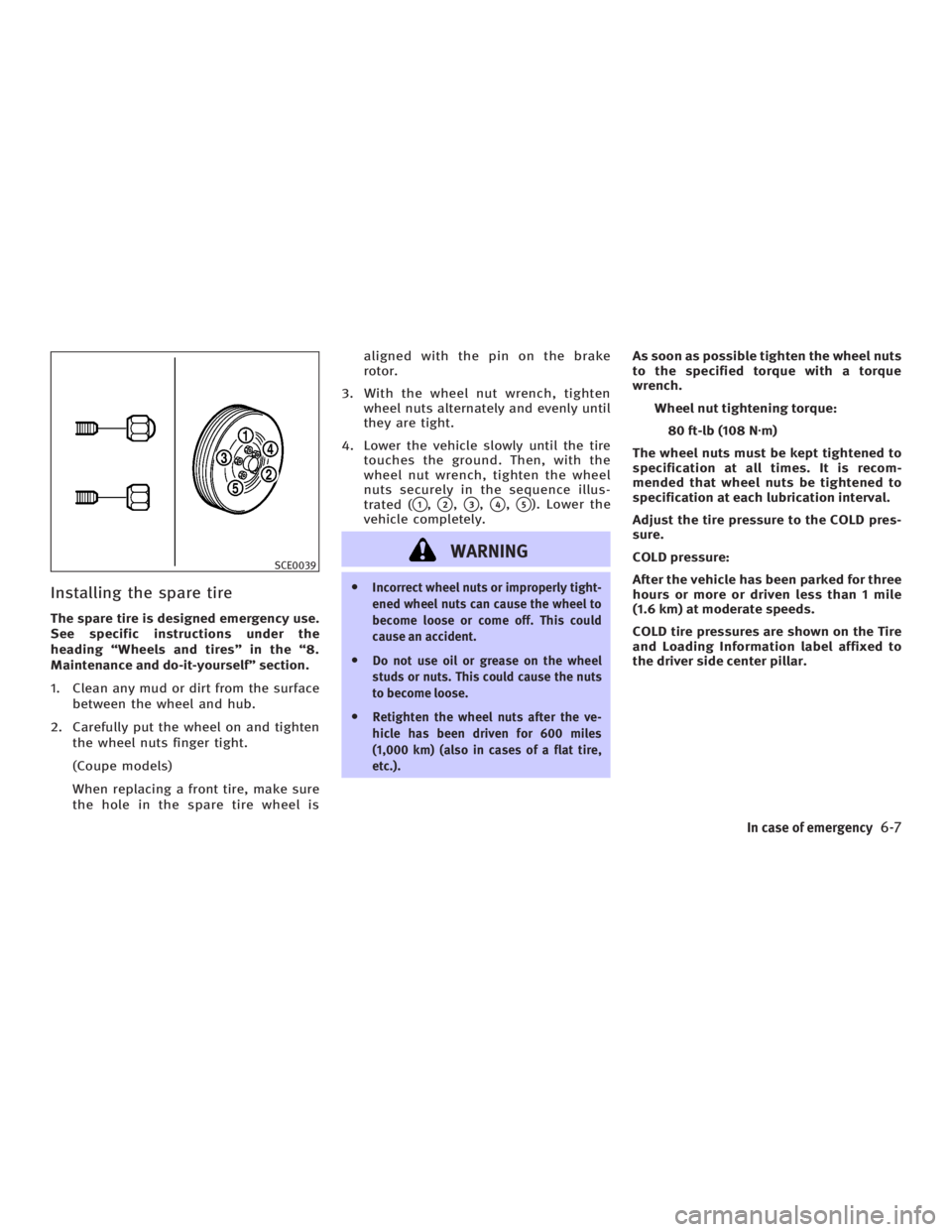
Installing the spare tire The spare tire is designed emergency use.
See specific instructions under the
heading ªWheels and tiresº in the ª8.
Maintenance and do-it-yourselfº section.
1. Clean any mud or dirt from the surface
between the wheel and hub.
2. Carefully put the wheel on and tighten
the wheel nuts finger tight.
(Coupe models)
When replacing a front tire, make sure
the hole in the spare tire wheel is aligned with the pin on the brake
rotor.
3. With the wheel nut wrench, tighten
wheel nuts alternately and evenly until
they are tight.
4. Lower the vehicle slowly until the tire
touches the ground. Then, with the
wheel nut wrench, tighten the wheel
nuts securely in the sequence illus-
trated (
q 1
,
q 2
,
q 3
,
q 4
,
q 5
). Lower the
vehicle completely.
WARNING O Incorrect wheel nuts or improperly tight-
ened wheel nuts can cause the wheel to
become loose or come off. This could
cause an accident.
O Do not use oil or grease on the wheel
studs or nuts. This could cause the nuts
to become loose.
O Retighten the wheel nuts after the ve-
hicle has been driven for 600 miles
(1,000 km) (also in cases of a flat tire,
etc.). As soon as possible tighten the wheel nuts
to the specified torque with a torque
wrench.
Wheel nut tightening torque:
80 ft-lb (108 N z m)
The wheel nuts must be kept tightened to
specification at all times. It is recom-
mended that wheel nuts be tightened to
specification at each lubrication interval.
Adjust the tire pressure to the COLD pres-
sure.
COLD pressure:
After the vehicle has been parked for three
hours or more or driven less than 1 mile
(1.6 km) at moderate speeds.
COLD tire pressures are shown on the Tire
and Loading Information label affixed to
the driver side center pillar.SCE0039
In case of emergency
6-7
w 06.1.4/V35-D/V5.0
X
Page 244 of 344

5. Securely store the flat tire and jacking
equipment in the vehicle.
6. Place the spare tire cover and the
trunk floor carpeting over the dam-
aged tire.
7. Close the trunk.
WARNINGO Always make sure that the spare tire and
jacking equipment are properly secured
after use. Such items can become dangerous projectiles in an accident or
sudden stop.
O The T-type spare tire and small size
spare tire are designed for emergency
use. See ªWheels and tiresº in the ª8.
Maintenance and do-it-yourselfº sec-
tion.
If needed, Roadside Assistance is avail-
able. Please see your Warranty Information
Booklet or Roadside Assistance I.D. Card
for the toll-free number to call (U.S.) or War-
ranty Information Booklet (Canada). To start your engine with a booster bat-
tery, the instructions and precautions
below must be followed.
WARNING O If done incorrectly, jump starting can
lead to a battery explosion, resulting in
severe injury or death. It could also dam-
age your vehicle.
O Explosive hydrogen gas is always
present in the vicinity of the battery.
Keep all sparks and flames away from
the battery.
O Do not allow battery fluid to come into
contact with eyes, skin, clothing or
painted surfaces. Battery fluid is a corro-
sive sulfuric acid solution which can
cause severe burns. If the fluid should
come into contact with anything, imme-
diately flush the contacted area with wa-
ter.
O Keep battery out of the reach of children.SCE0384B
Sedan SCE0425A
Coupe JUMP STARTING
6-8 In case of emergency
w 06.1.4/V35-D/V5.0
X
Page 245 of 344

O The booster battery must be rated at 12
volts. Use of an improperly rated battery
can damage your vehicle.
O Whenever working on or near a battery,
always wear suitable eye protectors (for
example, goggles or industrial safety
spectacles) and remove rings, metal
bands, or any other jewelry. Do not lean
over the battery when jump starting.
O Do not attempt to jump start a frozen
battery. It could explode and cause se-
rious injury.
If needed Roadside Assistance is available.
Please see your Warranty Information
Booklet or Roadside Assistance I.D. Card
for the toll-free number to call (U.S.) or War-
ranty Information Booklet (Canada).
WARNING Always follow the instructions below. Failure
to do so could result in damage to the charg-
ing system and cause personal injury.
1. If the booster battery is in another ve-
hicle
q B
, position the two vehicles
q A
and
q B
to bring their batteries into
close proximity to each other.
Do not allow the two vehicles to touch. 2. Apply parking brake. Move the shift
lever to the N (Neutral) position (On
automatic transmission models, move
the selector lever to the P (Park) posi-
tion). Switch off all unnecessary elec-
trical systems (light, heater, air condi-
tioner, etc.).
3. Remove vent caps on the battery (if so
equipped). Cover the battery with an
old cloth to reduce explosion hazard.
4. Connect jumper cables in the se-
quence as illustrated. SCE0539A
In case of emergency
6-9
w 06.1.4/V35-D/V5.0
X