format INFINITI G35 2006 Owner's Manual
[x] Cancel search | Manufacturer: INFINITI, Model Year: 2006, Model line: G35, Model: INFINITI G35 2006Pages: 344, PDF Size: 6.81 MB
Page 121 of 344
tinue to push and hold the HomeLink
button (note steps 2 through 4 under
ªProgramming HomeLink º) while you
push and re-push (ªcycleº) your hand-
held transmitter every 2 seconds until the
indicator light flashes rapidly (indicating
successful programming).
NOTE:
If programming a garage door opener, etc.,
it is advised to unplug the device during
the ªcyclingº process to prevent possible
damage to the garage door opener compo-
nents.
OPERATING THE HomeLink
UNIVERSAL TRANSCEIVER The HomeLink Universal Transceiver
(once programmed) may now be used to
activate the garage door, etc. To operate,
simply push the appropriate programmed
HomeLink Universal Transceiver button.
The red indicator light will illuminate
while the signal is being transmitted.
PROGRAMMING
TROUBLE-DIAGNOSIS If the HomeLink does not quickly learn
the hand-held transmitter information:
O replace the hand-held transmitter bat-
teries with new batteries. O position the hand-held transmitter
with its battery area facing away from
the HomeLink surface.
O push and hold both the HomeLink
and hand-held transmitter buttons
without interruption.
O position the hand-held transmitter 2
to 5 inches (50 to 127 mm) away from
the HomeLink surface. Hold the
transmitter in that position for up to 15
seconds. If HomeLink is not pro-
grammed within that time, try holding
the transmitter in another position -
keeping the indicator light in view at
all times.
If you continue to have programming diffi-
culties, please contact the INFINITI Con-
sumer Affairs Department. The phone
numbers are located in the Foreword of
this Owner's Manual.
CLEARING THE PROGRAMMED
INFORMATION Individual buttons cannot be cleared,
however to clear all programming, push
and hold the two outside buttons and re-
lease when the indicator light begins to
flash (approximately 20 seconds). REPROGRAMMING A SINGLE
HomeLink
BUTTON To reprogram a HomeLink Universal
Transceiver button, complete the fol-
lowing.
1. Push and hold the desired HomeLink
button. Do not release the button until
step 4 has been completed.
2. When the indicator light begins to
flash slowly (after 20 seconds), posi-
tion the hand-held transmitter 2 to 5
inches (50 to 127 mm) away from the
HomeLink surface.
3. Push and hold the hand-held trans-
mitter button.
4. The HomeLink indicator light will
flash, first slowly and then rapidly.
When the indicator light begins to
flash rapidly, release both buttons.
The HomeLink Universal Transceiver but-
ton has now been reprogrammed. The
new device can be activated by pushing
the HomeLink button that was just pro-
grammed. This procedure will not affect
any other programmed HomeLink but-
tons.
Instruments and controls
2-49
w 06.1.4/V35-D/V5.0
X
Page 122 of 344

IF YOUR VEHICLE IS STOLEN If your vehicle is stolen, you should change
the codes of any non-rolling code device
that has been programmed into HomeLink .
Consult the Owner's Manual of each device
or call the manufacturer or dealer of those
devices for additional information.
When your vehicle is recovered, you will
need to reprogram the HomeLink Uni-
versal Transceiver with your new transmit-
ter information.
FCC Notice:
This device complies with FCC rules part
15. Operation is subject to the following
two conditions: (1) This device may not
cause harmful interference and (2) This de-
vice must accept any interference that may
be received, including interference that
may cause undesired operation.
The transmitter has been tested and com-
plies with FCC and DOC/MDC rules.
Changes or modifications not expressly
approved by the party responsible for com-
pliance could void the user's authority to
operate the device.
DOC: ISTC 1763K1313
FCC I.D.: CB2V67690
2-50 Instruments and controls
w 06.1.4/V35-D/V5.0
X
Page 127 of 344
Lockout protection When the power door lock switch (driver
or front passenger) is moved to the LOCK
position with the key in the ignition and
any door open, all doors will lock and un-
lock automatically. This helps to prevent
the keys from being accidentally locked
inside the vehicle.
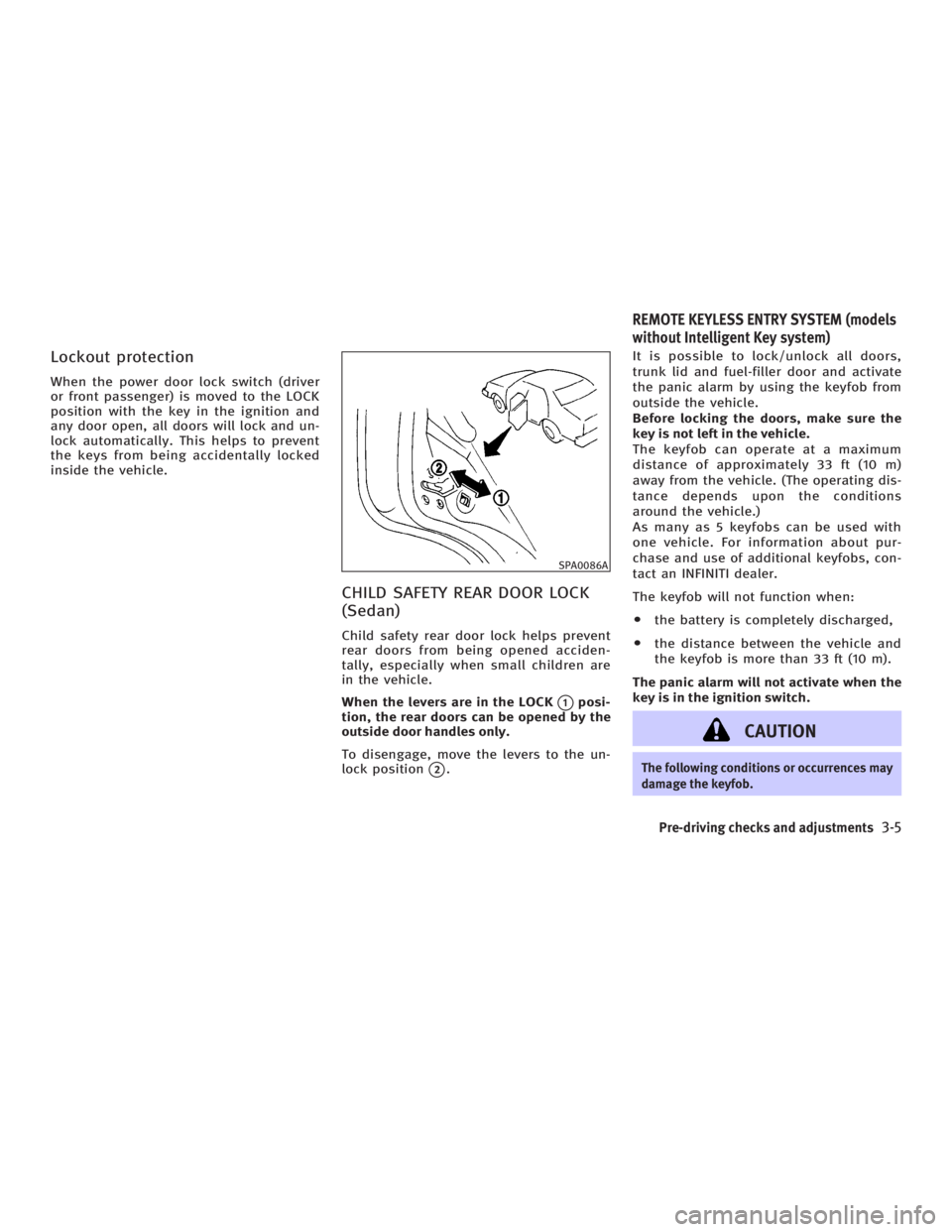
CHILD SAFETY REAR DOOR LOCK
(Sedan) Child safety rear door lock helps prevent
rear doors from being opened acciden-
tally, especially when small children are
in the vehicle.
When the levers are in the LOCK
q 1
posi-
tion, the rear doors can be opened by the
outside door handles only.
To disengage, move the levers to the un-
lock position
q 2
. It is possible to lock/unlock all doors,
trunk lid and fuel-filler door and activate
the panic alarm by using the keyfob from
outside the vehicle.
Before locking the doors, make sure the
key is not left in the vehicle.
The keyfob can operate at a maximum
distance of approximately 33 ft (10 m)
away from the vehicle. (The operating dis-
tance depends upon the conditions
around the vehicle.)
As many as 5 keyfobs can be used with
one vehicle. For information about pur-
chase and use of additional keyfobs, con-
tact an INFINITI dealer.
The keyfob will not function when:
O the battery is completely discharged,
O the distance between the vehicle and
the keyfob is more than 33 ft (10 m).
The panic alarm will not activate when the
key is in the ignition switch.
CAUTION The following conditions or occurrences may
damage the keyfob. SPA0086A
REMOTE KEYLESS ENTRY SYSTEM (models
without Intelligent Key system)
Pre-driving checks and adjustments
3-5
w 06.1.4/V35-D/V5.0
X
Page 128 of 344
O Do not allow the keyfob to become wet.
O Do not drop the keyfob.
O Do not strike the keyfob sharply against
another object.
O Do not place the keyfob for an extended
period in an area where temperatures ex-
ceed 140ÉF (60ÉC).
If a keyfob is lost or stolen, INFINITI recom-
mends erasing the ID code of that keyfob.
This will prevent the keyfob from unautho-
rized use to unlock the vehicle. For informa-
tion regarding the erasing procedure, please
contact an INFINITI dealer.
For information regarding the replacement
of a battery, see ªKeyfob battery replace-
mentº in the ª8. Maintenance and do-it-
yourselfº section.
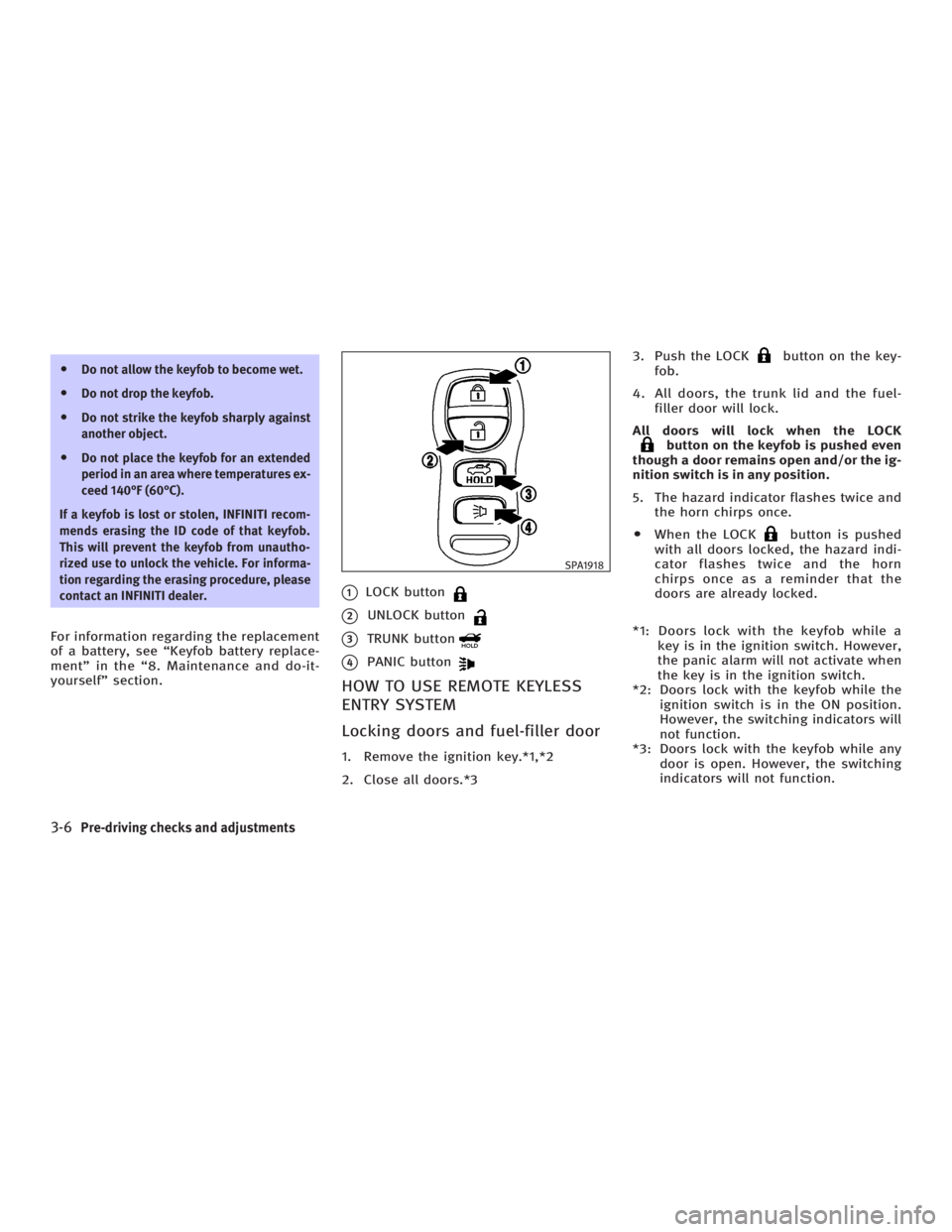
q 1
LOCK button
q 2
UNLOCK button
q 3
TRUNK button
q 4
PANIC button
HOW TO USE REMOTE KEYLESS
ENTRY SYSTEM
Locking doors and fuel-filler door 1. Remove the ignition key.*1,*2
2. Close all doors.*3 3. Push the LOCK button on the key-
fob.
4. All doors, the trunk lid and the fuel-
filler door will lock.
All doors will lock when the LOCK
button on the keyfob is pushed even
though a door remains open and/or the ig-
nition switch is in any position.
5. The hazard indicator flashes twice and
the horn chirps once.
O When the LOCK button is pushed
with all doors locked, the hazard indi-
cator flashes twice and the horn
chirps once as a reminder that the
doors are already locked.
*1: Doors lock with the keyfob while a
key is in the ignition switch. However,
the panic alarm will not activate when
the key is in the ignition switch.
*2: Doors lock with the keyfob while the
ignition switch is in the ON position.
However, the switching indicators will
not function.
*3: Doors lock with the keyfob while any
door is open. However, the switching
indicators will not function. SPA1918
3-6 Pre-driving checks and adjustments
w 06.1.4/V35-D/V5.0
X
Page 131 of 344

The Intelligent Key uses coded radio sig-
nals to communicate with the vehicle.
When the Intelligent Key is near the ve-
hicle, such as in your pocket or purse, it
allows the vehicle to be locked, unlocked,
or started without inserting the ignition
key. It is also possible to use the remote
control entry function.
CAUTIONO Be sure to carry the Intelligent Key with
you.
O Do not leave the vehicle with the Intelli-
gent Key inside.
O The Intelligent Key may not function
correctly depending on the environ-
ment or operating conditions. It could
also malfunction if you do not use it
correctly.
O The Intelligent Key transmits faint
radio waves.
In the following situations, the Intelli-
gent Key and remote control entry func-
tions may not operate correctly, and
you may have to use the metal key (me-
chanical key, valet key or wallet key): Ð when there are strong signals
coming from a television tower,
power station or broadcasting sta-
tion.
Ð when you have wireless equipment
or a cellular phone with you.
Ð when the Intelligent Key is in con-
tact with or covered by a metallic
material.
Ð when radio wave-type remote con-
trol entry is used nearby.
Ð when the Intelligent Key is placed
near an electric appliance such as a
personal computer.
O The Intelligent Key continually con-
sumes battery power as the key re-
ceives a signal to communicate with
the vehicle. Battery life is about 2
years, although it varies depending on
the operating conditions. When the
battery of the Intelligent Key is low, the
green blinking key warning light goes
out about 30 seconds after the ignition
switch is turned to the ON position. If
the battery runs down, replace it with a
new one.
O If the Intelligent Key receives strong
signal over an extended period of time, the battery could quickly run down. Do
not place the Intelligent Key near an
electric appliance such as a television
set or personal computer.
O Because the ignition switch is elec-
tronically controlled, if the battery is
completely discharged when the igni-
tion switch is in the LOCK position, the
steering lock cannot be released and
the ignition switch cannot be turned
(including the mechanical key). Be
careful not to completely discharge the
battery.
O In case the battery is completely dis-
charged, make sure to recharge the
battery immediately.
For information regarding the replacement
of a battery, see ªKeyfob battery replace-
mentº in the ª8. Maintenance and do-it-
yourselfº section.INTELLIGENT KEY SYSTEM (if so equipped)
Pre-driving checks and adjustments
3-9
w 06.1.4/V35-D/V5.0
X
Page 132 of 344
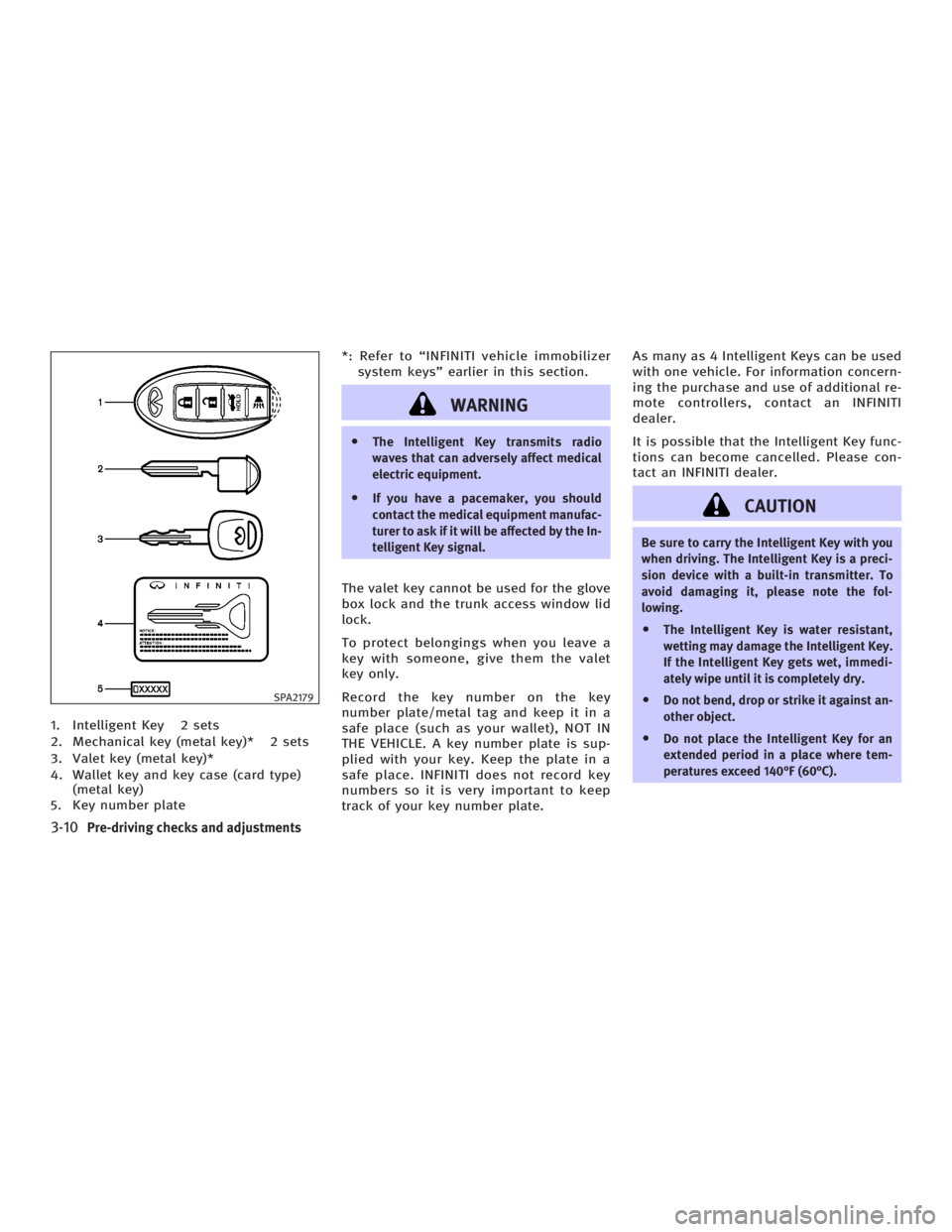
1. Intelligent Key 2 sets
2. Mechanical key (metal key)* 2 sets
3. Valet key (metal key)*
4. Wallet key and key case (card type)
(metal key)
5. Key number plate *: Refer to ªINFINITI vehicle immobilizer
system keysº earlier in this section.
WARNING O The Intelligent Key transmits radio
waves that can adversely affect medical
electric equipment.
O If you have a pacemaker, you should
contact the medical equipment manufac-
turer to ask if it will be affected by the In-
telligent Key signal.
The valet key cannot be used for the glove
box lock and the trunk access window lid
lock.
To protect belongings when you leave a
key with someone, give them the valet
key only.
Record the key number on the key
number plate/metal tag and keep it in a
safe place (such as your wallet), NOT IN
THE VEHICLE. A key number plate is sup-
plied with your key. Keep the plate in a
safe place. INFINITI does not record key
numbers so it is very important to keep
track of your key number plate. As many as 4 Intelligent Keys can be used
with one vehicle. For information concern-
ing the purchase and use of additional re-
mote controllers, contact an INFINITI
dealer.
It is possible that the Intelligent Key func-
tions can become cancelled. Please con-
tact an INFINITI dealer.
CAUTION Be sure to carry the Intelligent Key with you
when driving. The Intelligent Key is a preci-
sion device with a built-in transmitter. To
avoid damaging it, please note the fol-
lowing.
O The Intelligent Key is water resistant,
wetting may damage the Intelligent Key.
If the Intelligent Key gets wet, immedi-
ately wipe until it is completely dry.
O Do not bend, drop or strike it against an-
other object.
O Do not place the Intelligent Key for an
extended period in a place where tem-
peratures exceed 140ÉF (60ÉC).SPA2179
3-10 Pre-driving checks and adjustments
w 06.1.4/V35-D/V5.0
X
Page 133 of 344
O Do not change or modify the Intelligent
Key.
O Do not use a magnet key holder.
O Do not place the Intelligent Key near an
electric appliance such as a television
set or personal computer.
O Do not place the Intelligent Key in a stor-
age area (for example, a door pocket or
glove box). It could be damaged or acti-
vated unexpectedly.
O Do not allow the Intelligent Key to come
into contact with water or salt water, and
do not wash it in a washing machine.
This could affect the system function.
If an Intelligent Key is lost or stolen, INFINITI
recommends erasing the ID code of that In-
telligent Key. This will prevent the Intelli-
gent Key from unauthorized use to unlock
the vehicle. For information regarding the
erasing procedure, please contact an
INFINITI dealer. DOOR LOCKS/UNLOCKS
PRECAUTION O After locking with the door handle re-
quest switch, make sure the doors are
securely locked.
O To prevent the Intelligent Key from be-
ing left inside the vehicle, make sure
you carry the key with you and then
lock the doors.
O To prevent the Intelligent Key from be-
ing left inside the trunk, make sure
you carry the key with you and then
close the trunk.
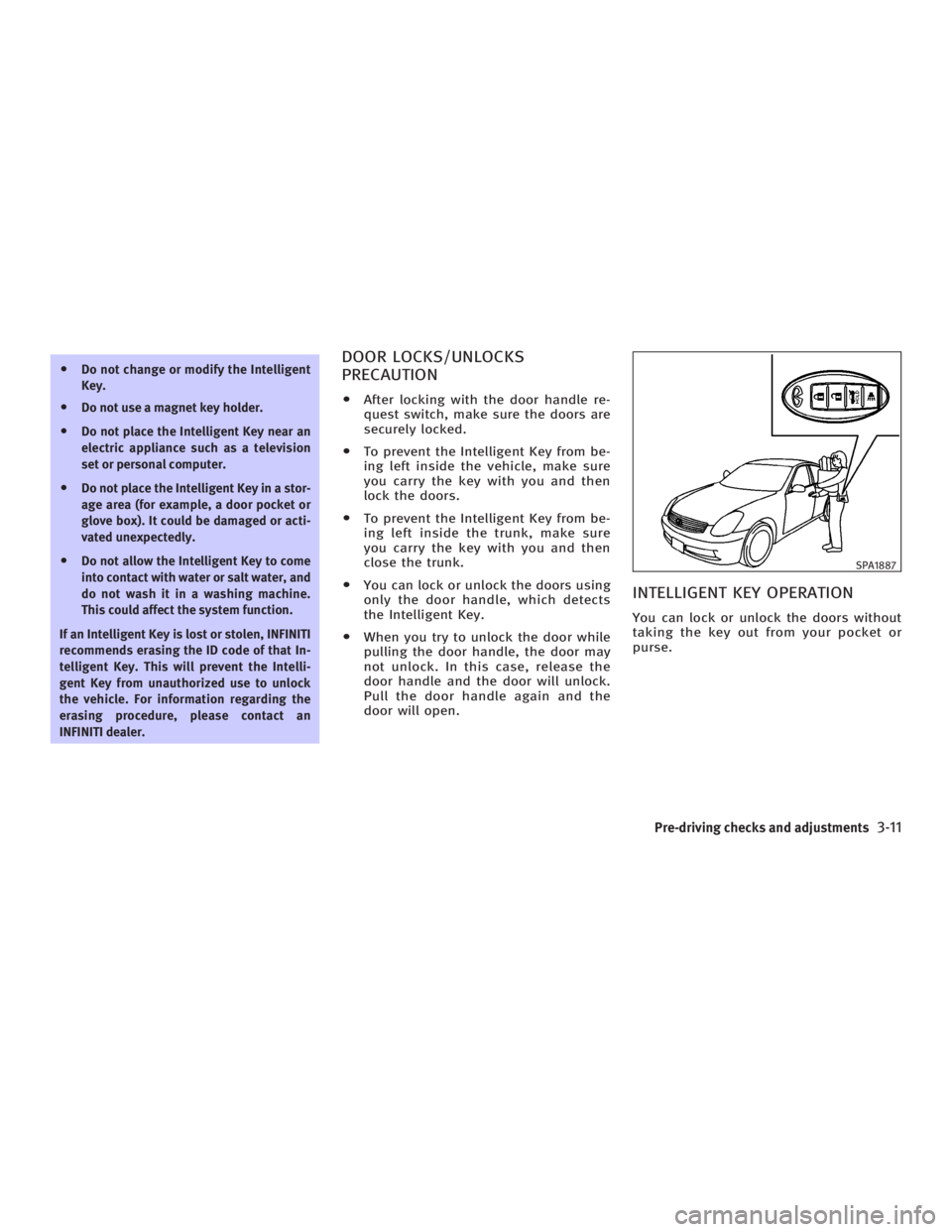
O You can lock or unlock the doors using
only the door handle, which detects
the Intelligent Key.
O When you try to unlock the door while
pulling the door handle, the door may
not unlock. In this case, release the
door handle and the door will unlock.
Pull the door handle again and the
door will open.
INTELLIGENT KEY OPERATION You can lock or unlock the doors without
taking the key out from your pocket or
purse. SPA1887
Pre-driving checks and adjustments
3-11
w 06.1.4/V35-D/V5.0
X
Page 136 of 344

When the trunk lid is closed with the In-
telligent Key inside the trunk, the outside
buzzer will sound and the trunk will open.
OPENING AND CLOSING WINDOWS O To open the windows, push the UN-
LOCK button on the Intelligent
Key for about 3 seconds or turn the
door key cylinder with the metal key
to the rear of the vehicle for about 2
seconds after the door is unlocked.
To stop opening, release the UNLOCK
button or turn the key to the neu-
tral position.
O To close the windows, turn the door
key cylinder to the front of the vehicle
for about 2 seconds after the door is
locked.
To stop closing, turn the key to the
neutral position.
The door windows will open or close
while turning the metal key. See ªDoorsº
earlier in this section. OPERATING THE ENGINE
Ignition switch positions Push in the ignition switch in the
q B
range when you turn it.
LOCK (Normal parking position)
q A
:
The ignition switch can only be locked in
the
q A
position.
The ignition switch will be unlocked when
it is pushed in, and turned to the ACC po-
sition
q D
while carrying the Intelligent
Key. ACC (Accessories)
q D
:
This position activates electrical accesso-
ries such as the radio, when the engine is
not running.
ON (Normal operating position)
q E
:
This position turns on the ignition system
and electrical accessories.
START
q F
:
This position starts the engine. As soon
as the engine has started, release the
switch immediately. It will automatically
return to the ON position.
For important safety information, see ªIg-
nition switchº in the ª5. Starting and driv-
ingº section.
The ignition switch cannot be turned back
to the LOCK position unless the shift lever
is in P position. (It can be turned to only
q C
.) SPA1628
3-14 Pre-driving checks and adjustments
w 06.1.4/V35-D/V5.0
X
Page 137 of 344
CAUTIONDo not leave the vehicle with the ignition
switch in ACC or ON position when the en-
gine is not running for an extended period.
This can discharge the battery.
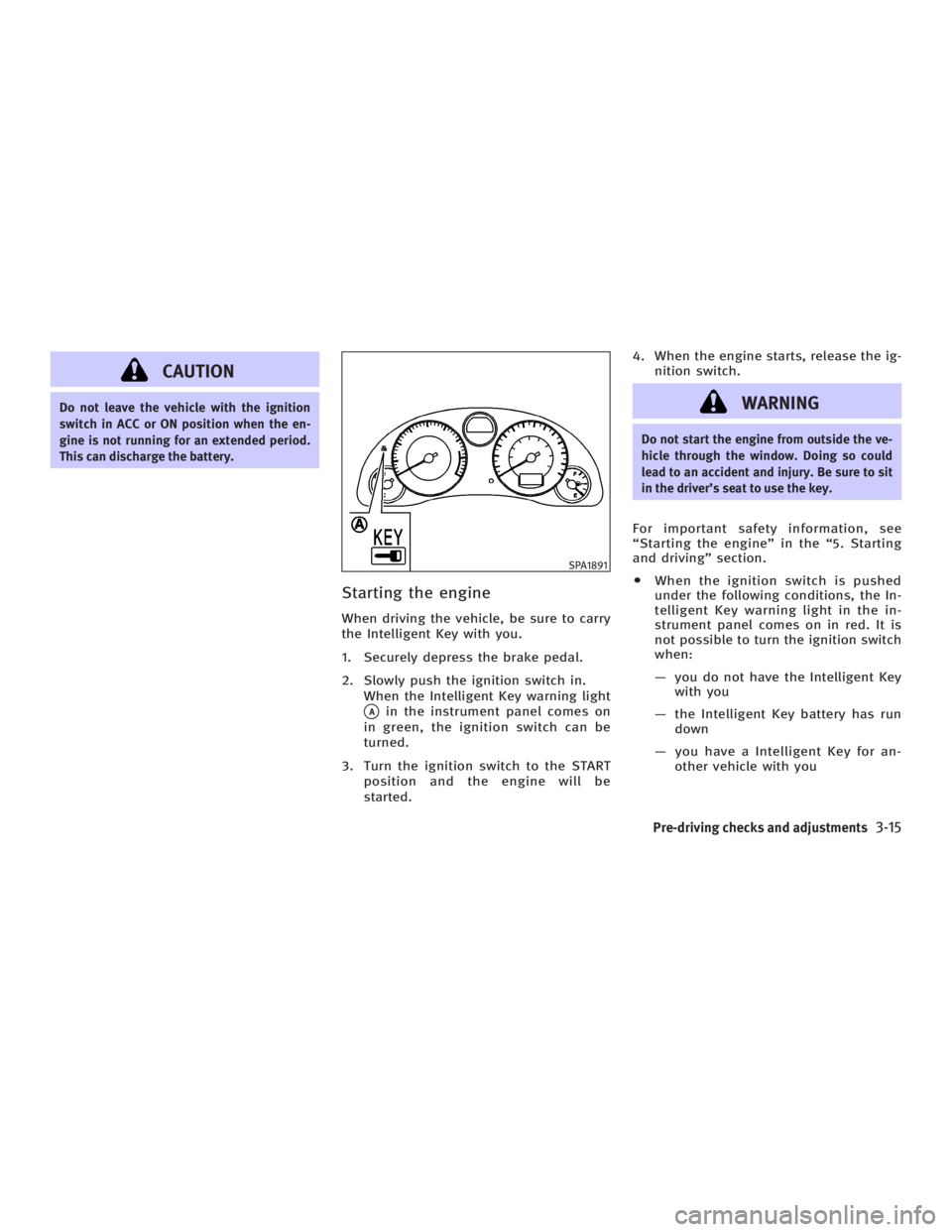
Starting the engine When driving the vehicle, be sure to carry
the Intelligent Key with you.
1. Securely depress the brake pedal.
2. Slowly push the ignition switch in.
When the Intelligent Key warning light
q A
in the instrument panel comes on
in green, the ignition switch can be
turned.
3. Turn the ignition switch to the START
position and the engine will be
started. 4. When the engine starts, release the ig-
nition switch.
WARNING Do not start the engine from outside the ve-
hicle through the window. Doing so could
lead to an accident and injury. Be sure to sit
in the driver's seat to use the key.
For important safety information, see
ªStarting the engineº in the ª5. Starting
and drivingº section.
O When the ignition switch is pushed
under the following conditions, the In-
telligent Key warning light in the in-
strument panel comes on in red. It is
not possible to turn the ignition switch
when:
Ð you do not have the Intelligent Key
with you
Ð the Intelligent Key battery has run
down
Ð you have a Intelligent Key for an-
other vehicle with you SPA1891
Pre-driving checks and adjustments
3-15
w 06.1.4/V35-D/V5.0
X
Page 142 of 344
Troubleshooting examples When it is difficult to turn the ignition
switch
O Push the ignition switch and turn it to
the left and then to the right.
O While gently turning the steering
wheel to the left or right, turn the igni-
tion switch.
OPERATION WITH INTELLIGENT
REMOTE KEYLESS ENTRY SYSTEM It is possible to lock/unlock all doors,
fuel-filler door, activate the panic alarm
and open the windows by pushing the
buttons on the Intelligent Key from out-
side the vehicle.
Before locking the doors, make sure the
key is not left in the vehicle.
The LOCK /UNLOCK button on
the Intelligent Key can operate at a dis-
tance of approximately 33 ft (10 m) from
the vehicle. (The effective distance de-
pends upon the conditions around the ve-
hicle.)
As many as 4 Intelligent Keys can be used
with one vehicle. For information concern-
ing the purchase and use of additional In-
telligent Key, contact an INFINITI dealer. The lock and unlock buttons on the Intel-
ligent Key will not operate when:
O the Intelligent Key is too far away from
the vehicle
O the Intelligent Key battery runs down
After locking with the Intelligent remote
keyless entry function, pull the door
handle to make sure the doors are se-
curely locked.
The operating range varies depending on
the environment. To securely operate the
lock and unlock buttons, approach the ve-
hicle to about 3 ft (1 m) from the door.
The panic alarm will not activate when the
mechanical key or the valet key is in the ig-
nition switch.
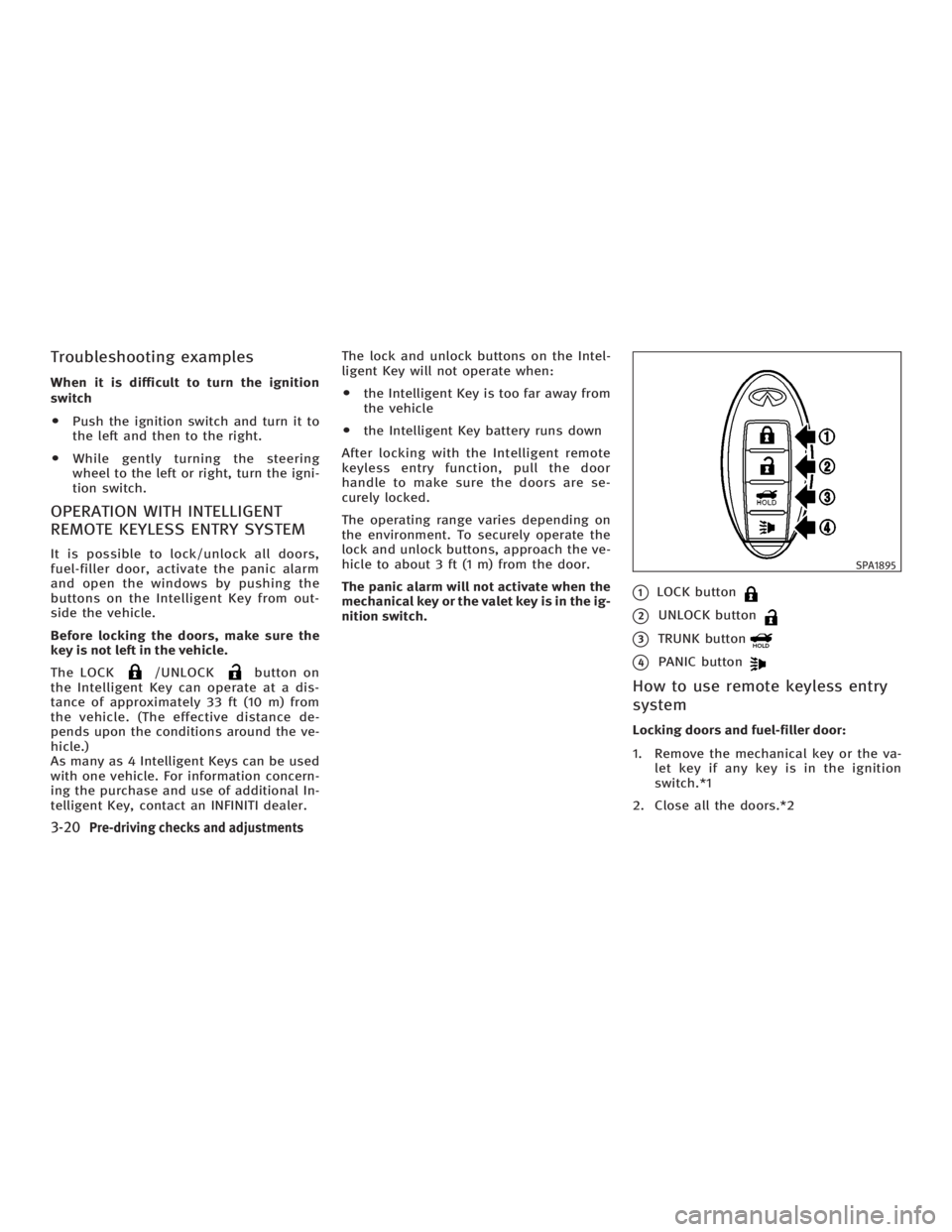
q 1
LOCK button
q 2
UNLOCK button
q 3
TRUNK button
q 4
PANIC button
How to use remote keyless entry
system Locking doors and fuel-filler door:
1. Remove the mechanical key or the va-
let key if any key is in the ignition
switch.*1
2. Close all the doors.*2 SPA1895
3-20 Pre-driving checks and adjustments
w 06.1.4/V35-D/V5.0
X