warning light INFINITI G35 2006 Service Manual
[x] Cancel search | Manufacturer: INFINITI, Model Year: 2006, Model line: G35, Model: INFINITI G35 2006Pages: 344, PDF Size: 6.81 MB
Page 139 of 344
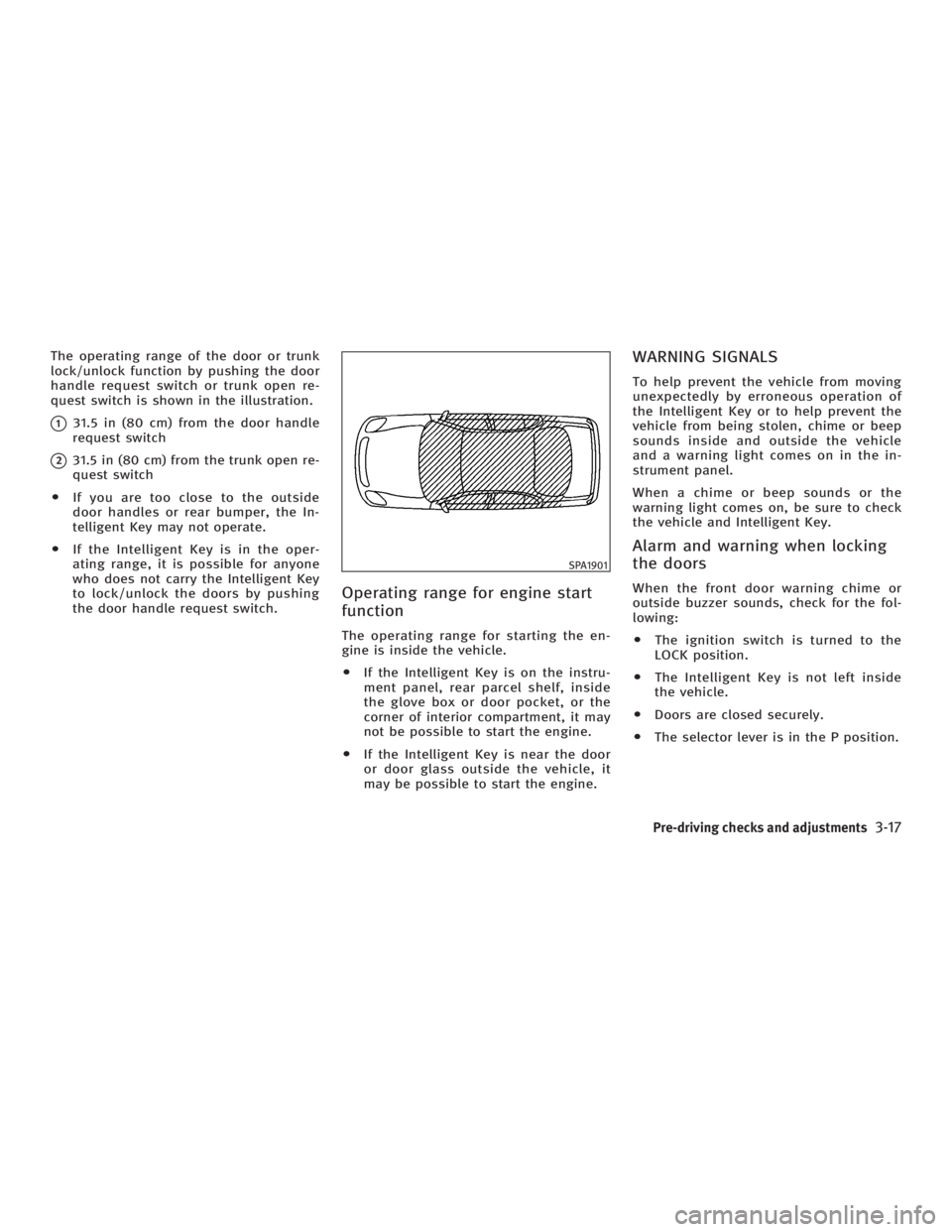
The operating range of the door or trunk
lock/unlock function by pushing the door
handle request switch or trunk open re-
quest switch is shown in the illustration.
q 1
31.5 in (80 cm) from the door handle
request switch
q 2
31.5 in (80 cm) from the trunk open re-
quest switch
O If you are too close to the outside
door handles or rear bumper, the In-
telligent Key may not operate.
O If the Intelligent Key is in the oper-
ating range, it is possible for anyone
who does not carry the Intelligent Key
to lock/unlock the doors by pushing
the door handle request switch.
Operating range for engine start
function The operating range for starting the en-
gine is inside the vehicle.
O If the Intelligent Key is on the instru-
ment panel, rear parcel shelf, inside
the glove box or door pocket, or the
corner of interior compartment, it may
not be possible to start the engine.
O If the Intelligent Key is near the door
or door glass outside the vehicle, it
may be possible to start the engine. WARNING SIGNALS To help prevent the vehicle from moving
unexpectedly by erroneous operation of
the Intelligent Key or to help prevent the
vehicle from being stolen, chime or beep
sounds inside and outside the vehicle
and a warning light comes on in the in-
strument panel.
When a chime or beep sounds or the
warning light comes on, be sure to check
the vehicle and Intelligent Key.
Alarm and warning when locking
the doors When the front door warning chime or
outside buzzer sounds, check for the fol-
lowing:
O The ignition switch is turned to the
LOCK position.
O The Intelligent Key is not left inside
the vehicle.
O Doors are closed securely.
O The selector lever is in the P position. SPA1901
Pre-driving checks and adjustments
3-17
w 06.1.4/V35-D/V5.0
X
Page 140 of 344
Alarm and warning when the
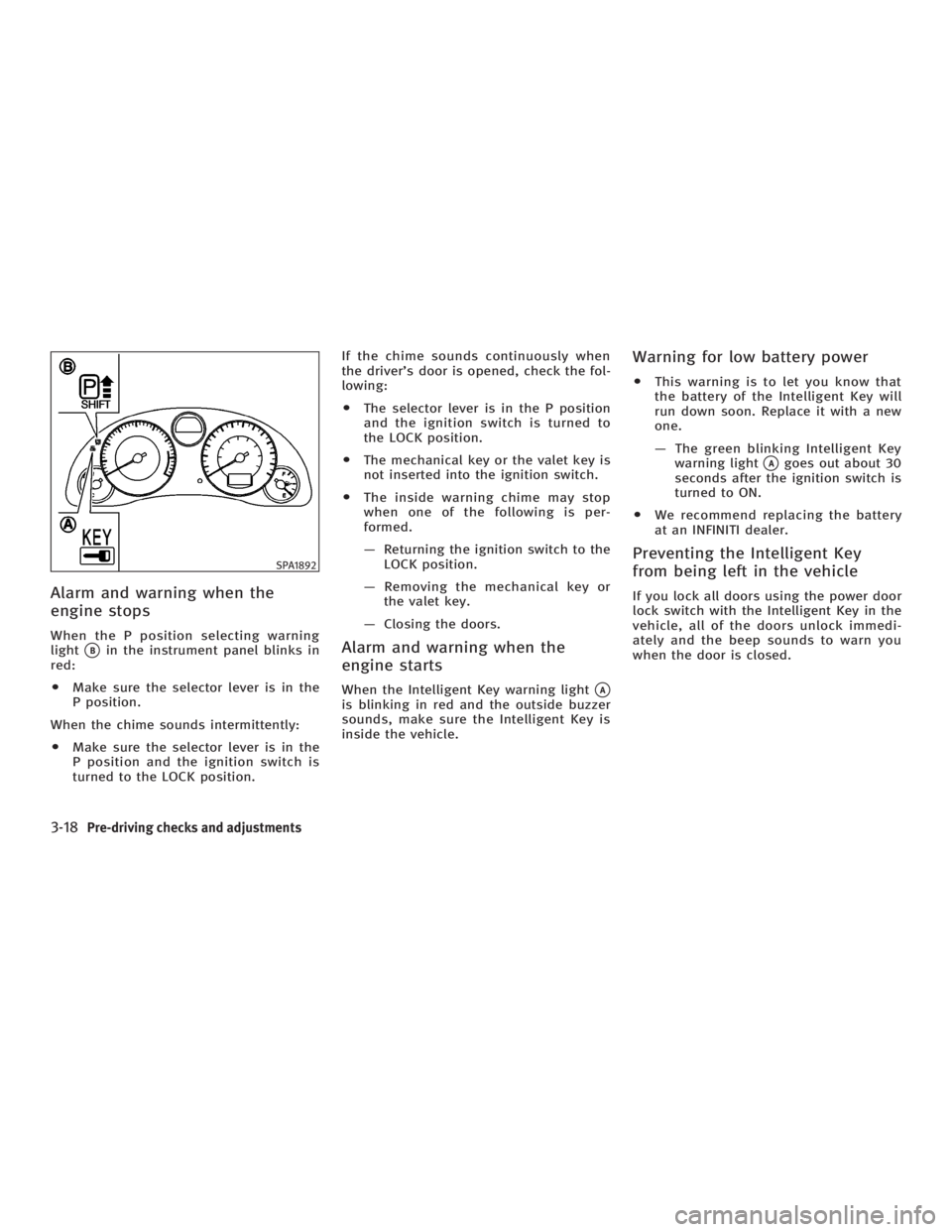
engine stops When the P position selecting warning
light
q B
in the instrument panel blinks in
red:
O Make sure the selector lever is in the
P position.
When the chime sounds intermittently:
O Make sure the selector lever is in the
P position and the ignition switch is
turned to the LOCK position. If the chime sounds continuously when
the driver's door is opened, check the fol-
lowing:
O The selector lever is in the P position
and the ignition switch is turned to
the LOCK position.
O The mechanical key or the valet key is
not inserted into the ignition switch.
O The inside warning chime may stop
when one of the following is per-
formed.
Ð Returning the ignition switch to the
LOCK position.
Ð Removing the mechanical key or
the valet key.
Ð Closing the doors.
Alarm and warning when the
engine starts When the Intelligent Key warning light
q A
is blinking in red and the outside buzzer
sounds, make sure the Intelligent Key is
inside the vehicle. Warning for low battery power O This warning is to let you know that
the battery of the Intelligent Key will
run down soon. Replace it with a new
one.
Ð The green blinking Intelligent Key
warning light
q A
goes out about 30
seconds after the ignition switch is
turned to ON.
O We recommend replacing the battery
at an INFINITI dealer.
Preventing the Intelligent Key
from being left in the vehicle If you lock all doors using the power door
lock switch with the Intelligent Key in the
vehicle, all of the doors unlock immedi-
ately and the beep sounds to warn you
when the door is closed.SPA1892
3-18 Pre-driving checks and adjustments
w 06.1.4/V35-D/V5.0
X
Page 141 of 344
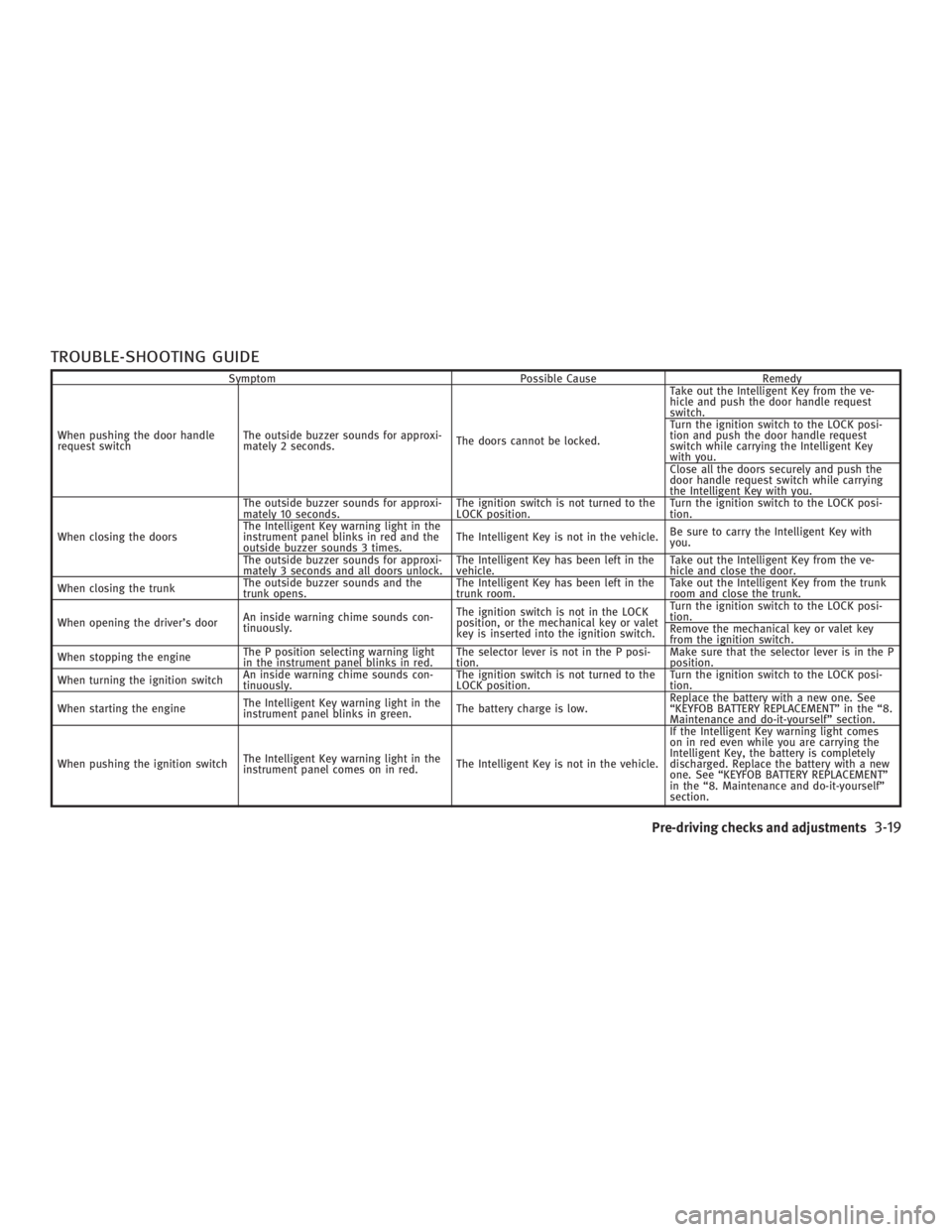
TROUBLE-SHOOTING GUIDE Symptom Possible Cause Remedy
When pushing the door handle
request switch The outside buzzer sounds for approxi-
mately 2 seconds. The doors cannot be locked. Take out the Intelligent Key from the ve-
hicle and push the door handle request
switch.
Turn the ignition switch to the LOCK posi-
tion and push the door handle request
switch while carrying the Intelligent Key
with you.
Close all the doors securely and push the
door handle request switch while carrying
the Intelligent Key with you.
When closing the doors The outside buzzer sounds for approxi-
mately 10 seconds. The ignition switch is not turned to the
LOCK position. Turn the ignition switch to the LOCK posi-
tion.
The Intelligent Key warning light in the
instrument panel blinks in red and the
outside buzzer sounds 3 times. The Intelligent Key is not in the vehicle. Be sure to carry the Intelligent Key with
you.
The outside buzzer sounds for approxi-
mately 3 seconds and all doors unlock. The Intelligent Key has been left in the
vehicle. Take out the Intelligent Key from the ve-
hicle and close the door.
When closing the trunk The outside buzzer sounds and the
trunk opens. The Intelligent Key has been left in the
trunk room. Take out the Intelligent Key from the trunk
room and close the trunk.
When opening the driver's door An inside warning chime sounds con-
tinuously. The ignition switch is not in the LOCK
position, or the mechanical key or valet
key is inserted into the ignition switch. Turn the ignition switch to the LOCK posi-
tion.
Remove the mechanical key or valet key
from the ignition switch.
When stopping the engine The P position selecting warning light
in the instrument panel blinks in red. The selector lever is not in the P posi-
tion. Make sure that the selector lever is in the P
position.
When turning the ignition switch An inside warning chime sounds con-
tinuously. The ignition switch is not turned to the
LOCK position. Turn the ignition switch to the LOCK posi-
tion.
When starting the engine The Intelligent Key warning light in the
instrument panel blinks in green. The battery charge is low. Replace the battery with a new one. See
ªKEYFOB BATTERY REPLACEMENTº in the ª8.
Maintenance and do-it-yourselfº section.
When pushing the ignition switch The Intelligent Key warning light in the
instrument panel comes on in red. The Intelligent Key is not in the vehicle. If the Intelligent Key warning light comes
on in red even while you are carrying the
Intelligent Key, the battery is completely
discharged. Replace the battery with a new
one. See ªKEYFOB BATTERY REPLACEMENTº
in the ª8. Maintenance and do-it-yourselfº
section.
Pre-driving checks and adjustments
3-19
w 06.1.4/V35-D/V5.0
X
Page 143 of 344
3. Push the LOCK button on the In-
telligent Key.
4. All doors and fuel-filler door will lock.
All of the doors will lock when the LOCK
button on the Intelligent Key is
pushed even though the ignition switch is
in the ON position.
5. The hazard indicator flashes twice and
the horn chirps once.
O When the LOCK button is pushed
with all doors locked, the hazard indi-
cator flashes twice and the horn
chirps once as a reminder that the
doors are already locked.
*1: Doors lock with the Intelligent Key
while the mechanical key or the valet
key is in the ignition switch or the ig-
nition switch is pushed in.
*2: Doors do not lock with the Intelligent
Key while any door is open.
Unlocking doors and fuel-filler door:
1. Push the UNLOCK button on the
Intelligent Key once.
O The driver's door and fuel-filler door
unlock O The hazard indicator flashes once if all
doors are completely closed with the
ignition switch in any position except
the ON position.
O The interior light turns on and the
light timer activates for 30 seconds
when the switch is in the DOOR posi-
tion with the ignition switch in any po-
sition except the ON position.
2. Push the UNLOCK button on the
Intelligent Key again within 5 seconds.
O All doors unlock.
O The hazard indicator flashes once if all
doors are completely closed.
All doors will be locked automatically un-
less one of the following operations is
performed within 1 minute of pushing the
UNLOCK button.
O opening any door
O the ignition switch is pushed
O the mechanical key or the valet key is
inserted into the ignition switch
The interior light can be turned off without
waiting for 30 seconds by turning the igni-
tion switch to the ON position or by locking
the doors with the Intelligent Key. Opening the windows:
See ªOpening and closing windowsº on
the previous page.
Releasing the trunk lid:
1. Push and hold the TRUNK button
on the Intelligent Key for longer than
0.5 second when the ignition switch is
in any position except the ON posi-
tion.
2. The trunk lid opens.
The trunk lid cannot be opened by operat-
ing the Intelligent Key when the ignition
switch is in the ON position.
Using the panic alarm:
If you are near your vehicle and feel
threatened, you may activate the alarm to
call attention as follows:
1. Push the PANIC button on the In-
telligent Key for longer than 0.5 second
with the metal key removed from the
ignition switch or the ignition switch
not pushed in.
2. The theft warning alarm and head-
lights will stay on for 25 seconds.
Pre-driving checks and adjustments
3-21
w 06.1.4/V35-D/V5.0
X
Page 146 of 344
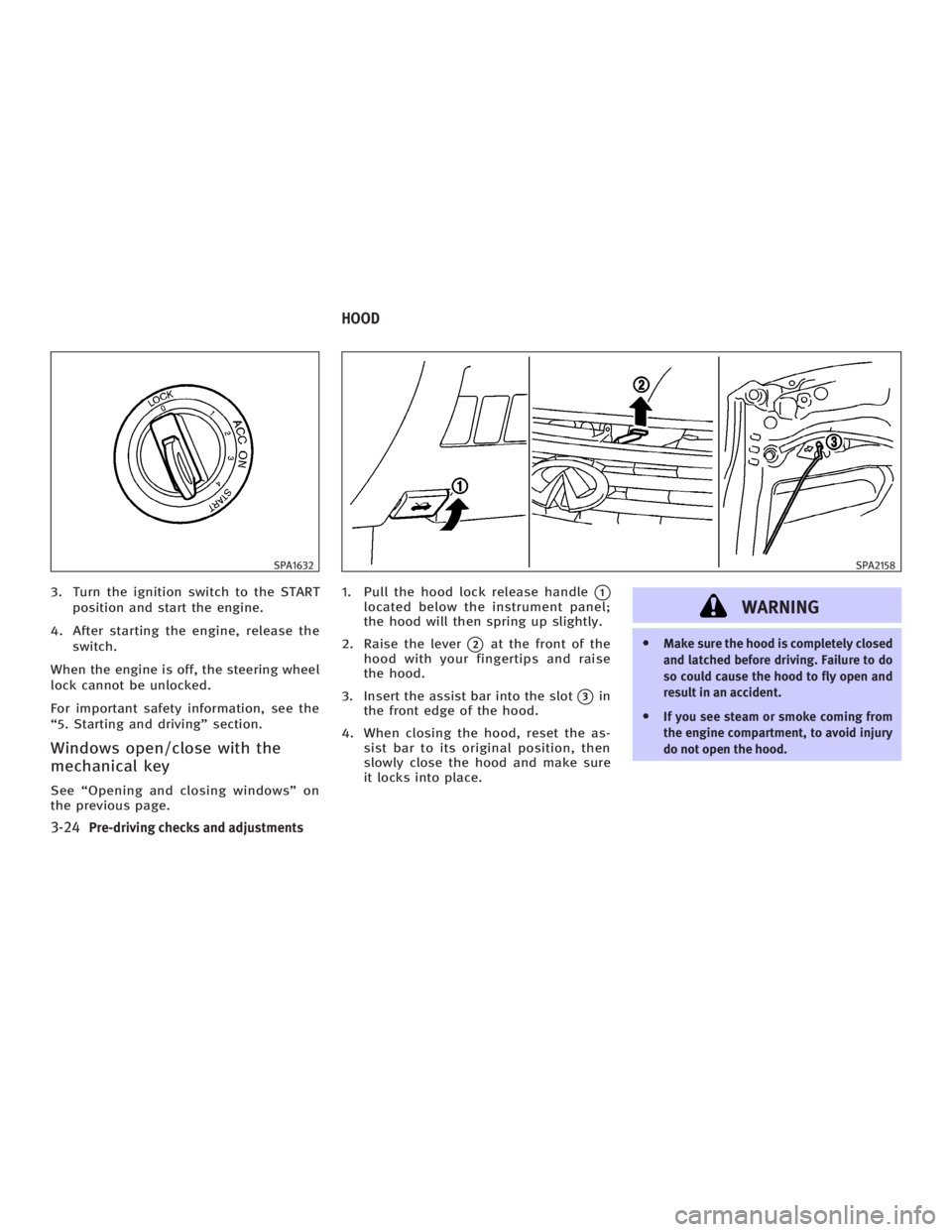
3. Turn the ignition switch to the START
position and start the engine.
4. After starting the engine, release the
switch.
When the engine is off, the steering wheel
lock cannot be unlocked.
For important safety information, see the
ª5. Starting and drivingº section.
Windows open/close with the
mechanical key See ªOpening and closing windowsº on
the previous page. 1. Pull the hood lock release handle
q 1
located below the instrument panel;
the hood will then spring up slightly.
2. Raise the lever
q 2
at the front of the
hood with your fingertips and raise
the hood.
3. Insert the assist bar into the slot
q 3
in
the front edge of the hood.
4. When closing the hood, reset the as-
sist bar to its original position, then
slowly close the hood and make sure
it locks into place.
WARNING O Make sure the hood is completely closed
and latched before driving. Failure to do
so could cause the hood to fly open and
result in an accident.
O If you see steam or smoke coming from
the engine compartment, to avoid injury
do not open the hood.SPA1632 SPA2158
HOOD
3-24 Pre-driving checks and adjustments
w 06.1.4/V35-D/V5.0
X
Page 189 of 344
This system searches for the blank inter-
vals between selections. If there is a
blank interval within one program or there
is no interval between programs, the sys-
tem may not stop in the desired or ex-
pected location.
FOLDER change (CD with MP3/WMA):
Push up/down the tuning switch or
for more than 1.5 seconds to change
the folders (if it has folders).
Push up/down the tuning switch or
for less than 1.5 seconds to return to
the beginning of the present program or
skip to the next program.
DISC change (CD without MP3/WMA):
Push up/down the tuning switch or
for more than 1.5 seconds to change
the playing disc up or down.
ANTENNA
Window antenna The antenna pattern is printed inside the
rear window. CAUTION O Do not place metalized film near the rear
window glass or attach any metal parts
to it. This may cause poor reception or
noise.
O When cleaning the inside of the rear win-
dow, be careful not to scratch or damage
the rear window antenna. Lightly wipe
along the antenna with a dampened soft
cloth. When installing a CB, ham radio or car
phone in your INFINITI, be sure to observe
the following cautions, otherwise the new
equipment may adversely affect the En-
gine control system and other electronic
parts.
WARNING O A cellular telephone should not be used
while driving so full attention may be
given to vehicle operation. Some juris-
dictions prohibit the use of cellular tele-
phones while driving.
O If you must make a call while your ve-
hicle is in motion, the hands free cellular
phone operational mode (if so equipped)
is highly recommended. Exercise ex-
treme caution at all times so full atten-
tion may be given to vehicle operation.
O If a conversation in a moving vehicle re-
quires you to take notes, pull off the road
to a safe location and stop your vehicle
before doing so.CAR PHONE OR CB RADIO
Display screen, heater, air conditioner and audio systems
4-29
w 06.1.4/V35-D/V5.0
X
Page 205 of 344
5 Starting and driving Precautions when starting and driving .............. 5-2
Exhaust gas (Carbon monoxide) .................. 5-2
Three way catalyst....................................... 5-3
Tire pressure monitoring system (TPMS) ..... 5-3
Avoiding collision and rollover..................... 5-5
Drinking alcohol/drugs and driving ............. 5-5
All-wheel drive (AWD) driving safety
precautions (for AWD models) .................... 5-6
Ignition switch (except Intelligent Key
system)............................................................. 5-6
Automatic transmission ............................... 5-6
Manual transmission .................................. 5-7
Key positions .............................................. 5-8
INFINITI Vehicle Immobilizer System ............ 5-8
Ignition switch (models with the Intelligent
Key system) ...................................................... 5-9
Ignition switch positions ............................. 5-9
INFINITI Vehicle Immobilizer System .......... 5-10
Before starting the engine............................... 5-10
Starting the engine .......................................... 5-11
Driving the vehicle .......................................... 5-12
Automatic transmission.............................. 5-12
Manual transmission ................................ 5-16
Parking brake .................................................. 5-19 Cruise control ................................................. 5-20
Precautions on cruise control .................... 5-20
Cruise control operations .......................... 5-20
Break-in schedule ........................................... 5-22
Increasing fuel economy ................................. 5-22
All-wheel drive (AWD) (if so equipped) ............ 5-23
All-wheel drive (AWD) warning light ........... 5-23
Parking/parking on hills ................................. 5-24
Power steering ................................................ 5-25
Brake system .................................................. 5-26
Braking precautions .................................. 5-26
Anti-lock brake system (ABS)..................... 5-26
Vehicle Dynamic Control (VDC) system .......... 5-28
Rear active steer (RAS) system (if so
equipped) ....................................................... 5-29
Cold weather driving....................................... 5-30
Freeing a frozen door lock ......................... 5-30
Anti-freeze ................................................. 5-30
Battery ...................................................... 5-30
Draining of coolant water .......................... 5-30
Tire equipment .......................................... 5-30
Special winter equipment........................... 5-31
Driving on snow or ice ............................... 5-31
Engine block heater (if so equipped) ......... 5-32
w 06.1.13/V35-D/V5.0
X
Page 208 of 344

Your vehicle has also been equipped with a
TPMS malfunction indicator to indicate
when the system is not operating properly.
The TPMS malfunction indicator is com-
bined with the low tire pressure telltale.
When the system detects a malfunction, the
telltale will flash for approximately one
minute and then remain continuously illu-
minated. This sequence will continue upon
subsequent vehicle start-ups as long as the
malfunction exists. When the malfunction
indicator is illuminated, the system may not
be able to detect or signal low tire pressure
as intended. TPMS malfunctions may occur
for a variety of reasons, including the in-
stallation of replacement or alternate tires
or wheels on the vehicle that prevent the
TPMS from functioning properly. Always
check the TPMS malfunction telltale after
replacing one or more tires or wheels on
your vehicle to ensure that the replacement
or alternate tires and wheels allow the
TPMS to continue to function properly.
Additional information
O The TPMS does not monitor the tire
pressure of the spare tire.
O The TPMS will activate only when the ve-
hicle is driven at speeds above 16 MPH
(25 km/h). Also, this system may not de- tect a sudden drop in tire pressure (for
example a flat tire while driving).
O Tire pressure rises and falls de-
pending on the heat caused by the ve-
hicle's operation and the outside tem-
perature. Low outside temperature can
lower the temperature of the air inside
the tire which can cause a lower tire
inflation pressure. This may cause the
low tire pressure warning light to illu-
minate. If the warning light illuminates
in low ambient temperature, check the
tire pressure for all four tires.
For additional information, see ªLow tire
pressure warning lightº in the ª2. Instru-
ments and controlsº section and ªTire
pressure monitoring system (TPMS)º in
the ª6. In case of emergencyº section.
WARNING O If the low tire pressure warning light illumi-
nates while driving, avoid sudden steering
maneuvers or abrupt braking, reduce ve-
hicle speed, pull off the road to a safe loca-
tion and stop the vehicle as soon as pos-
sible. Serious vehicle damage could occur and may lead to an accident and could re-
sult in serious personal injury. Check the
tire pressure for all four tires. Adjust the
tire pressure to the recommended COLD
tire pressure shown on the Tire and
Loading Information label to turn the low
tire pressure warning light OFF. If you have
a flat tire, replace it with a spare tire as
soon as possible. (See ªFlat tireº in the ª6.
In case of emergencyº section for changing
a flat tire.)
O When a spare tire is mounted or a wheel
is replaced, tire pressure will not be indi-
cated, the TPMS will not function and the
low tire pressure warning light will flash.
Contact your INFINITI dealer as soon as
possible for tire replacement and/or sys-
tem resetting.
O Replacing tires with those not originally
specified by INFINITI could affect the
proper operation of the TPMS.
O Do not inject any tire liquid or aerosol
tire sealant into the tires, as this may
cause a malfunction of the tire pressure
sensors.
5-4 Starting and driving
w 06.1.5/V35-D/V5.0
X
Page 211 of 344
When the key cannot be turned toward
the LOCK position, proceed as follows to
remove the key:
1. Move the selector lever into the P po-
sition.
2. Turn the ignition key slightly toward
the ON direction.
3. Turn the key to the LOCK position.
4. Remove the key.
If the key is removed from the ignition
switch, the selector lever cannot be
moved from the P position. The selector
lever can be moved if the ignition switch is
in the ON position and the foot brake pedal
is depressed.
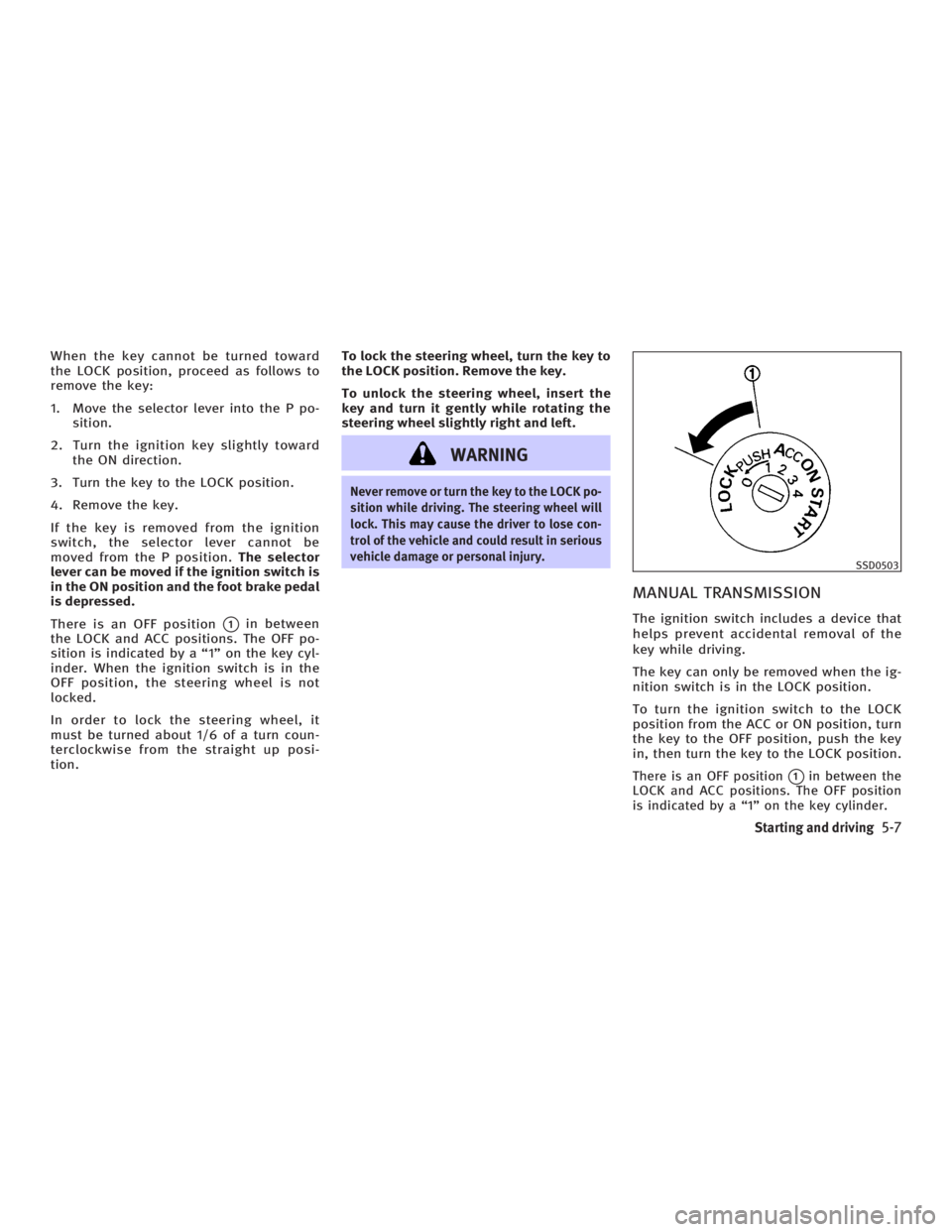
There is an OFF position
q 1
in between
the LOCK and ACC positions. The OFF po-
sition is indicated by a ª1º on the key cyl-
inder. When the ignition switch is in the
OFF position, the steering wheel is not
locked.
In order to lock the steering wheel, it
must be turned about 1/6 of a turn coun-
terclockwise from the straight up posi-
tion. To lock the steering wheel, turn the key to
the LOCK position. Remove the key.
To unlock the steering wheel, insert the
key and turn it gently while rotating the
steering wheel slightly right and left.
WARNING Never remove or turn the key to the LOCK po-
sition while driving. The steering wheel will
lock. This may cause the driver to lose con-
trol of the vehicle and could result in serious
vehicle damage or personal injury.
MANUAL TRANSMISSION The ignition switch includes a device that
helps prevent accidental removal of the
key while driving.
The key can only be removed when the ig-
nition switch is in the LOCK position.
To turn the ignition switch to the LOCK
position from the ACC or ON position, turn
the key to the OFF position, push the key
in, then turn the key to the LOCK position.
There is an OFF position
q 1
in between the
LOCK and ACC positions. The OFF position
is indicated by a ª1º on the key cylinder. SSD0503
Starting and driving
5-7
w 06.1.4/V35-D/V5.0
X
Page 212 of 344
In order for the steering wheel to be
locked, it must be turned about 1/6 of a
turn clockwise from the straight up posi-
tion.
To lock the steering wheel, turn the key to
the LOCK position. Remove the key.
To unlock the steering wheel, insert the
key and turn it gently while rotating the
steering wheel slightly right and left.
WARNINGNever remove or turn the key to the LOCK po-
sition while driving. The steering wheel will
lock. This may cause the driver to lose con-
trol of the vehicle and could result in serious
vehicle damage and/or personal injury.
KEY POSITIONS The ignition switch includes an anti-theft
steering lock device.
LOCK (Normal parking position) (0)
The ignition key can only be removed
when the ignition switch is in this posi-
tion. OFF (1)
The engine can be turned off without
locking the steering wheel.
The ignition lock is designed so that the
key cannot be turned to the LOCK position
and removed until the selector lever is
moved to the P position (for automatic
transmission) or the key is pushed in
while turning the key between the ACC
and LOCK positions.
ACC (Accessories) (2)
This position activates electrical accesso-
ries when the engine is not running.
ON (Normal operating position) (3)
This position activates ignition system in
addition to electrical accessories.
START (4)
This position activates the starter motor,
starting the engine.
INFINITI VEHICLE IMMOBILIZER
SYSTEM The INFINITI Vehicle Immobilizer System
will not allow the engine to start without
the use of the registered key. If the engine fails to start using a regis-
tered key (for example, when interference
is caused by another registered key, an
automated toll road device or automated
payment device on the key ring), restart
the engine using the following proce-
dures:
1. Leave the ignition switch in the ON po-
sition for approximately 5 seconds.
2. Turn the ignition switch to the OFF or
LOCK position and wait approximately
10 seconds.
3. Repeat steps 1 and 2.
4. Restart the engine while holding the
device (which may have caused the in-
terference) away from the registered
key.
If this procedure allows the engine to
start, INFINITI recommends placing the
registered key on a separate key ring to
avoid interference from other devices.
5-8 Starting and driving
w 06.1.4/V35-D/V5.0
X