battery INFINITI M 2010 Owner's Manual
[x] Cancel search | Manufacturer: INFINITI, Model Year: 2010, Model line: M, Model: INFINITI M 2010Pages: 445, PDF Size: 6.15 MB
Page 159 of 445
position, the outside mirror will move with
the initial tilt-down angle, if the reverse
tilt-down position is stored.
Linking Intelligent Key to a stored
memory position
The Intelligent Key can be linked to a stored
memory position with the following procedure.
1. Follow the steps for storing a memoryposition.
2. While the indicator light for the memory switch being set is illuminated for 5 sec-
onds, push the
button on the Intel-
ligent Key. If the indicator light blinks, the
Intelligent Key is linked to that memory
setting.
Push the ignition switch to the LOCK position,
and push the
button on the Intelligent
Key. The driver's seat, steering wheel and out-
side mirrors will move to the memorized posi-
tion.
Confirming memory storage
c Push the ignition switch to the ON position
and push the SET switch. If the main memory
has not been stored, the indicator light will
come on for approximately 0.5 second.
When the memory has stored in position, the
indicator light will stay on for approximately
5 seconds.
c If the battery cable is disconnected, or if the
fuse opens, the memory will be canceled. In
this case, reset the desired position using
the previous procedure.
c If optional Intelligent Keys are added to your
vehicle, perform the memory storage proce-
dure to switch (1 or 2) and linking Intelligent
Key procedure to a stored memory position
again for each Intelligent Key. For additional
Intelligent Key information, see ªKEYSº ear-
lier in this section.
Selecting the memorized position
1. Move the selector lever to the P (Park)
position.
2. Use one of the following methods to move the driver's seat, steering column and
outside mirrors.
cPush the ignition switch to the ON posi-
tion and push the memory switch (1 or 2)
fully for at least 1 second.
c Within 45 seconds after opening the driv-
er's door, push the memory switch (1 or 2)
fully for at least 1 second.
The driver's seat, steering column and
outside mirrors will move to the memo-
rized position with the indicator light
flashing, and then the light will stay on for
approximately 5 seconds.
3-28Pre-driving checks and adjustments
wÐ
Ð
05/14/09Ðpattie
X
Page 166 of 445
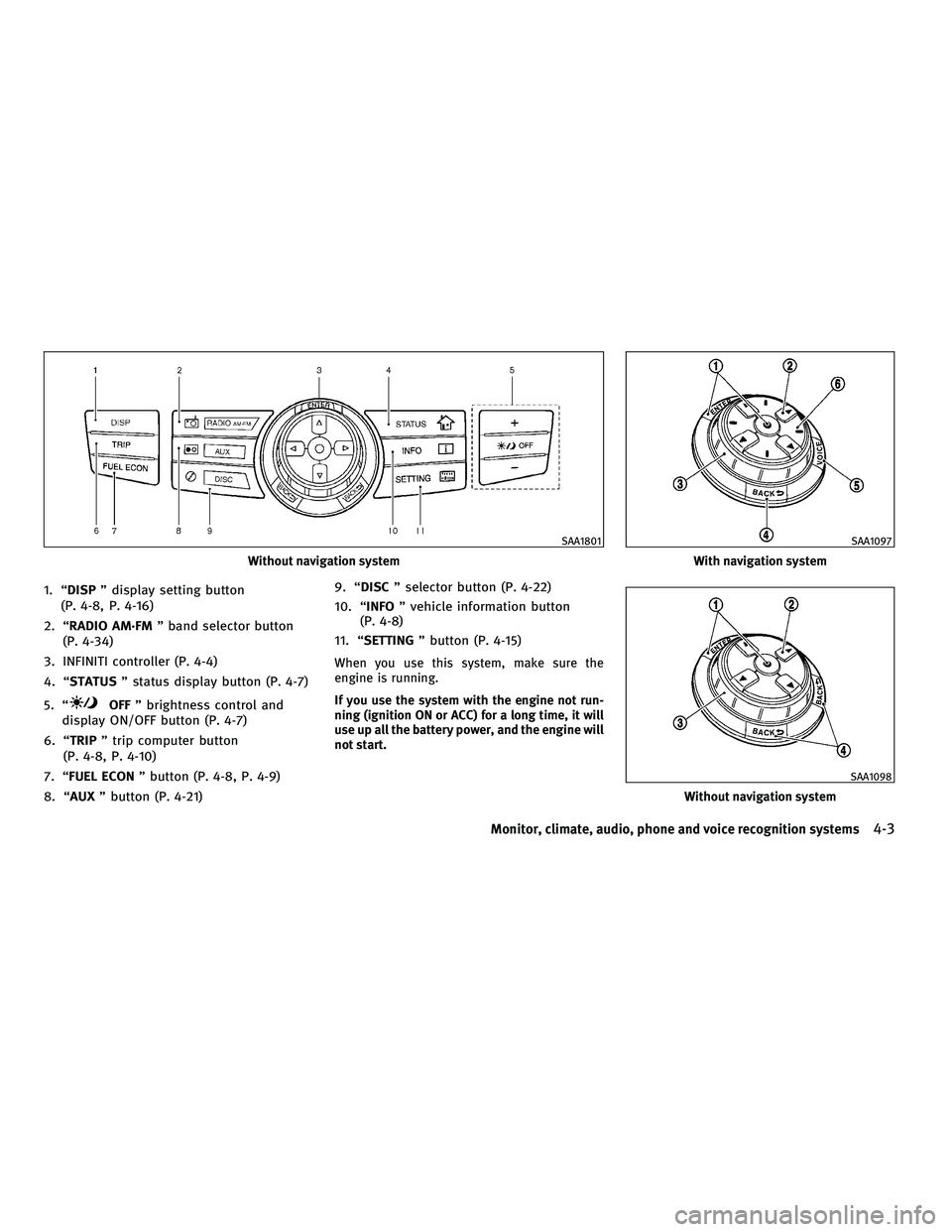
1. ªDISPº display setting button
(P. 4-8, P. 4-16)
2. ªRADIO AM´FM º band selector button
(P. 4-34)
3. INFINITI controller (P. 4-4)
4. ªSTATUS º status display button (P. 4-7)
5. ª
OFF º brightness control and
display ON/OFF button (P. 4-7)
6. ªTRIP º trip computer button
(P. 4-8, P. 4-10)
7. ªFUEL ECON º button (P. 4-8, P. 4-9)
8. ªAUX º button (P. 4-21) 9. ªDISC
º selector button (P. 4-22)
10. ª INFO º vehicle information button
(P. 4-8)
11. ª SETTING º button (P. 4-15)
When you use this system, make sure the
engine is running.
If you use the system with the engine not run-
ning (ignition ON or ACC) for a long time, it will
use up all the battery power, and the engine will
not start.
Without navigation system
SAA1801
With navigation system
SAA1097
Without navigation system
SAA1098
Monitor, climate, audio, phone and voice recognition systems4-3
wÐ
Ð
05/14/09Ðpattie
X
Page 186 of 445
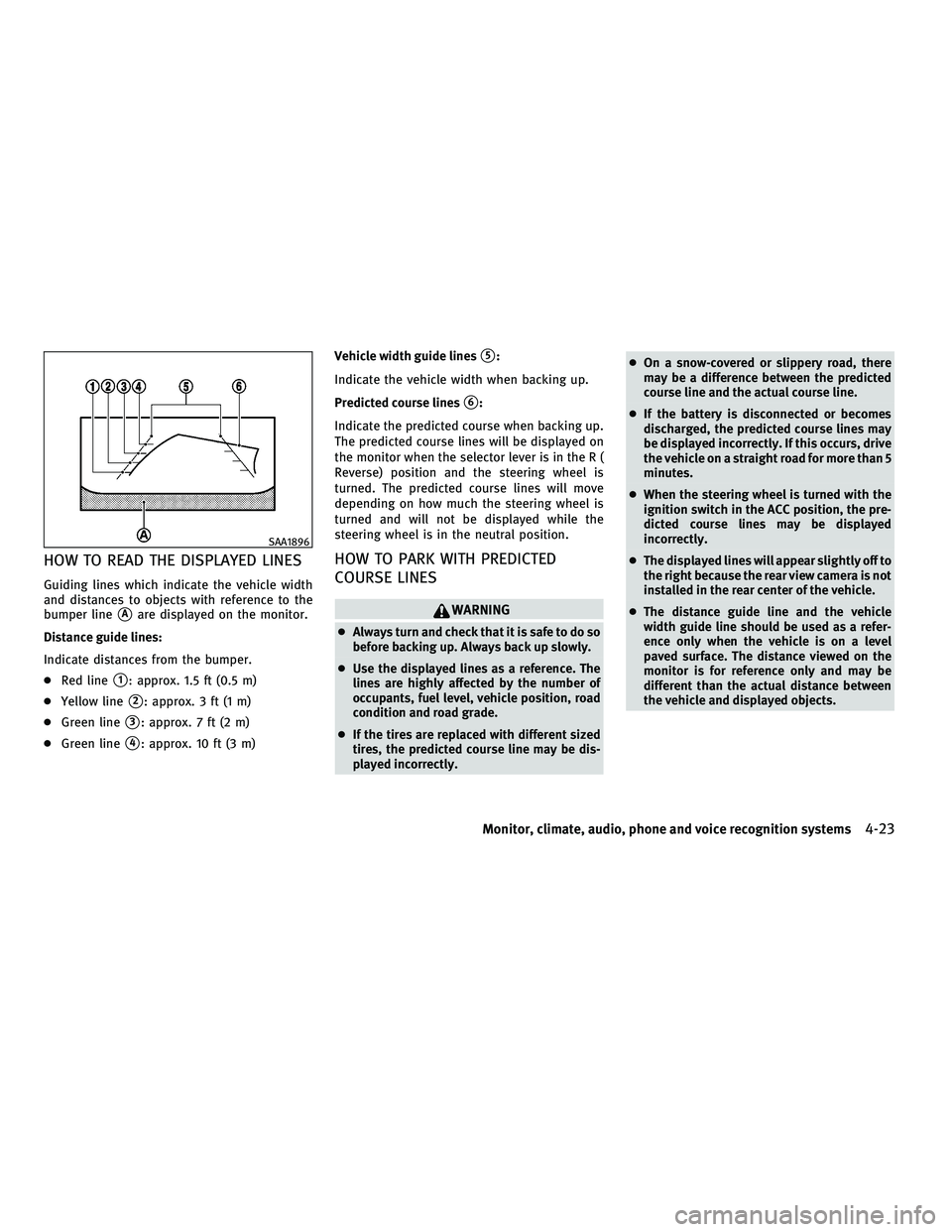
HOW TO READ THE DISPLAYED LINES
Guiding lines which indicate the vehicle width
and distances to objects with reference to the
bumper line
sAare displayed on the monitor.
Distance guide lines:
Indicate distances from the bumper.
c Red line
s1: approx. 1.5 ft (0.5 m)
c Yellow line
s2: approx. 3 ft (1 m)
c Green line
s3: approx. 7 ft (2 m)
c Green line
s4: approx. 10 ft (3 m) Vehicle width guide lines
s5:
Indicate the vehicle width when backing up.
Predicted course lines
s6:
Indicate the predicted course when backing up.
The predicted course lines will be displayed on
the monitor when the selector lever is in the R (
Reverse) position and the steering wheel is
turned. The predicted course lines will move
depending on how much the steering wheel is
turned and will not be displayed while the
steering wheel is in the neutral position.
HOW TO PARK WITH PREDICTED
COURSE LINES
WARNING
c Always turn and check that it is safe to do so
before backing up. Always back up slowly.
c Use the displayed lines as a reference. The
lines are highly affected by the number of
occupants, fuel level, vehicle position, road
condition and road grade.
c If the tires are replaced with different sized
tires, the predicted course line may be dis-
played incorrectly. c
On a snow-covered or slippery road, there
may be a difference between the predicted
course line and the actual course line.
c If the battery is disconnected or becomes
discharged, the predicted course lines may
be displayed incorrectly. If this occurs, drive
the vehicle on a straight road for more than 5
minutes.
c When the steering wheel is turned with the
ignition switch in the ACC position, the pre-
dicted course lines may be displayed
incorrectly.
c The displayed lines will appear slightly off to
the right because the rear view camera is not
installed in the rear center of the vehicle.
c The distance guide line and the vehicle
width guide line should be used as a refer-
ence only when the vehicle is on a level
paved surface. The distance viewed on the
monitor is for reference only and may be
different than the actual distance between
the vehicle and displayed objects.
SAA1896
Monitor, climate, audio, phone and voice recognition systems4-23
wÐ
Ð
05/14/09Ðpattie
X
Page 198 of 445

Static and flutter: During signal interference
from buildings, large hills or due to antenna
position, usually in conjunction with increased
distance from the station transmitter, static or
flutter can be heard. This can be reduced by
lowering the treble setting to reduce the treble
response.
Multipath reception: Because of the reflective
characteristics of FM signals, direct and re-
flected signals reach the receiver at the same
time. The signals may cancel each other, result-
ing in momentary flutter or loss of sound.
AM radio reception :
AM signals, because of their low frequency, can
bend around objects and skip along the ground.
In addition, the signals can be bounced off the
ionosphere and bent back to earth. Because of
these characteristics. AM signals are also sub-
ject to interference as they travel from transmit-
ter to receiver.
Fading: Occurs while the vehicle is passing
through freeway underpasses or in areas with
many tall buildings. It can also occur for several
seconds during ionospheric turbulence even in
areas where no obstacles exist.
Static: Caused by thunderstorms, electrical
power lines, electric signs and even traffic
lights.Satellite radio reception :
When the satellite radio (if so equipped) is first
installed or the battery has been replaced, the
satellite radio may not work properly. This is not
a malfunction. Wait more than 10 minutes with
satellite radio ON and the vehicle outside of any
metal or large building for satellite radio to
receive all of the necessary data.
The satellite radio mode will be skipped unless
an optional satellite receiver and antenna are
installed and an XMT
satellite radio service
subscription is active. Satellite radio is not
available in Alaska, Hawaii and Guam.
Satellite radio performance may be affected if
cargo carried on the roof blocks the satellite
radio signal.
If possible, do not put cargo near the satellite
antenna.
A build up of ice on the satellite radio antenna
can affect satellite radio performance. Remove
the ice to restore satellite radio reception.
Compact Disc (CD) player
c Do not force a compact disc into the CD insert
slot. This could damage the CD and/or CD
changer/player.
c Trying to load a CD with the CD door closed
could damage the CD and/or CD changer.
SAA0480
Monitor, climate, audio, phone and voice recognition systems4-35
wÐ
Ð
05/14/09Ðpattie
X
Page 208 of 445

SCAN tuning :
Push the SCAN tuning button to tune from low
to high frequencies and stop at each broadcast-
ing station for 5 seconds. Pushing the button
again during this 5-second period will stop
SCAN tuning and the radio will remain tuned to
that station.
If the SCAN tuning button is not pushed within
5 seconds, SCAN tuning moves to the next
station.
PRESET select :
Push the PRESET select button to go to the next
PRESET. After choosing from the PRESET A, B or
C, you can select the desired station using the
INFINITI controller or pushing the station preset
buttons
to.
toStation memory operations :
6 stations can be set for PRESET A, B and C. The
PRESET A, B and C function allows you to store
a combination of FM, AM and SAT stations for
easy access.
1. Choose preset station A, B or C using the preset select button.
2. Tune to the desired station using the SEEK, SCAN or TUNE button. 3. Select the desired station and push and
hold the desired station preset button
tountil a beep sound is
heard. (The radio mutes when the select
button is pushed.)
4. The station indicator will then come on and the sound will resume. Memorizing is
now complete.
5. Other buttons can be set in the same manner.
If the battery cable is disconnected, or if the
fuse opens, the radio memory will be erased. In
that case, reset the desired stations.
Text :
When the ªText º key is selected with the
INFINITI controller on the display and then the
ENTER button is pushed while the satellite radio
is being played, the text information will be
displayed on the screen.
c CH Name
c Category
c Name
c Title
c Other
If your vehicle is equipped with the AUDIO TEXT
ª
º button on the center multi-function control panel, push this button while the satel-
lite programming is selected to show the text
information.
Compact Disc (CD) player/changer
operation
Push the ignition switch to the ACC or ON
position, push the LOAD button (if so equipped)
and insert the Compact Disc (CD) into the slot
with the label side facing up. The CD will be
guided automatically into the slot and start
playing.
After loading the CD, the number of tracks on
the CD and the play time will appear on the
display.
If the radio is already operating, it will automati-
cally turn off and the CD will play.
If the system has been turned off while the CD
was playing, pushing the ON´OFF/VOL control
knob will start the CD.
Do not use 3.1 in (8 cm) discs.
CD LOAD (if so equipped) :
To insert a CD in the CD changer, push the LOAD
button for less than 1.5 seconds. Select the
Monitor, climate, audio, phone and voice recognition systems4-45
wÐ
Ð
05/14/09Ðpattie
X
Page 211 of 445

onds while the CompactFlash (CF) card is being
played, the CF card will play while fast forward-
ing or rewinding. When the button is released,
the CF card will return to the normal play speed.
When the
orbutton is pushed for
less than 1.5 seconds while the CF card is being
played, the next track or the beginning of the
current track on the CF will be played.
The INFINITI controller can also be used to
select tracks when the CF card is being played.
Folder selection :
To change to another folder in the CF card, turn
the MP3/WMA folder selector or choose a folder
displayed on the screen using the INFINITI
controller.
REPEAT (RPT) :
When the RPT button is pushed while the CF
card is played, the play pattern can be changed
as follows:
CF EJECT :
When the knob next to the CF slot is pushed
with the CF card inserted, the CF card will be
ejected. Messages :
The following messages will be displayed under
certain conditions.
c
Reading Compact Flash (The system is read-
ing the CF card inserted in the slot.)
c No Compact Flash card (A CF card is not
inserted in the slot.)
c Compact Flash read error (The system can-
not read a CF card.)
c Unplayable file (The system cannot play a
music file.)
c No audio file (The CF card inserted in the slot
or its folder does not contain any music
files.)
Compatibility with other media :
If a commercially available CF adapter is in-
serted into the slot, your memory media can
also be used.
IPODT PLAYER OPERATION (if so
equipped)
Connecting iPodT
Open the console lid and connect the cables1
as illustrated, and then connect the other end of
the cable to your iPod T
s2. Your vehicle is
equipped with the specialized cable for con-
necting the iPod Tto your vehicle audio unit.
The battery of your iPod Tis charged while it is
connected to the vehicle if the iPodT supports
charging via a FireWireT connection.
The display on the iPod Tshows an INFINITI
screen when the connection is completed.
SAA1823
4-48Monitor, climate, audio, phone and voice recognition systems
wÐ
Ð
05/14/09Ðpattie
X
Page 225 of 445
This vehicle is equipped with the mobile enter-
tainment system, which enables you to play a
Digital Versatile Disc (DVD), providing the im-
ages and sounds both in the front and rear
display screens.
WARNING
cThe driver must not attempt to operate or
view the Mobile Entertainment System
(MES) while the vehicle is in motion so that
full attention may be given to vehicle
operation.
c Do not attempt to modify the system to dis-
play a movie on the front screen while the
vehicle is being driven. Doing so may dis-
tract the driver and may cause a collision and
serious personal injury or death.
CAUTION
cThe glass screen on the liquid crystal display
may break if hit with a hard or sharp object. If
the glass breaks, do not touch the liquid
crystalline material, which contains a small
amount of mercury. In case of contact with
skin, wash immediately with soap and
water. c
Use a damp, soft cloth when cleaning the
Mobile Entertainment System components.
Do not use solvents or cleaning solutions.
c Do not attempt to use the system in extreme
temperature conditions [below 24ÉF
(220ÉC) or above 158ÉF (70ÉC)].
c To avoid discharging the vehicle battery, do
not operate the system more than 15 min-
utes without starting the engine.
Movies will not be shown on the front display
while the vehicle is in any drive position to
reduce driver distraction. Audio is available
when a movie is played. To view movies in the
front display, stop the vehicle in a safe location,
move the selector lever to the P (Park) position
and apply the parking brake.
DIGITAL VERSATILE DISC (DVD)
SYSTEM COMPONENTS
DVD drive
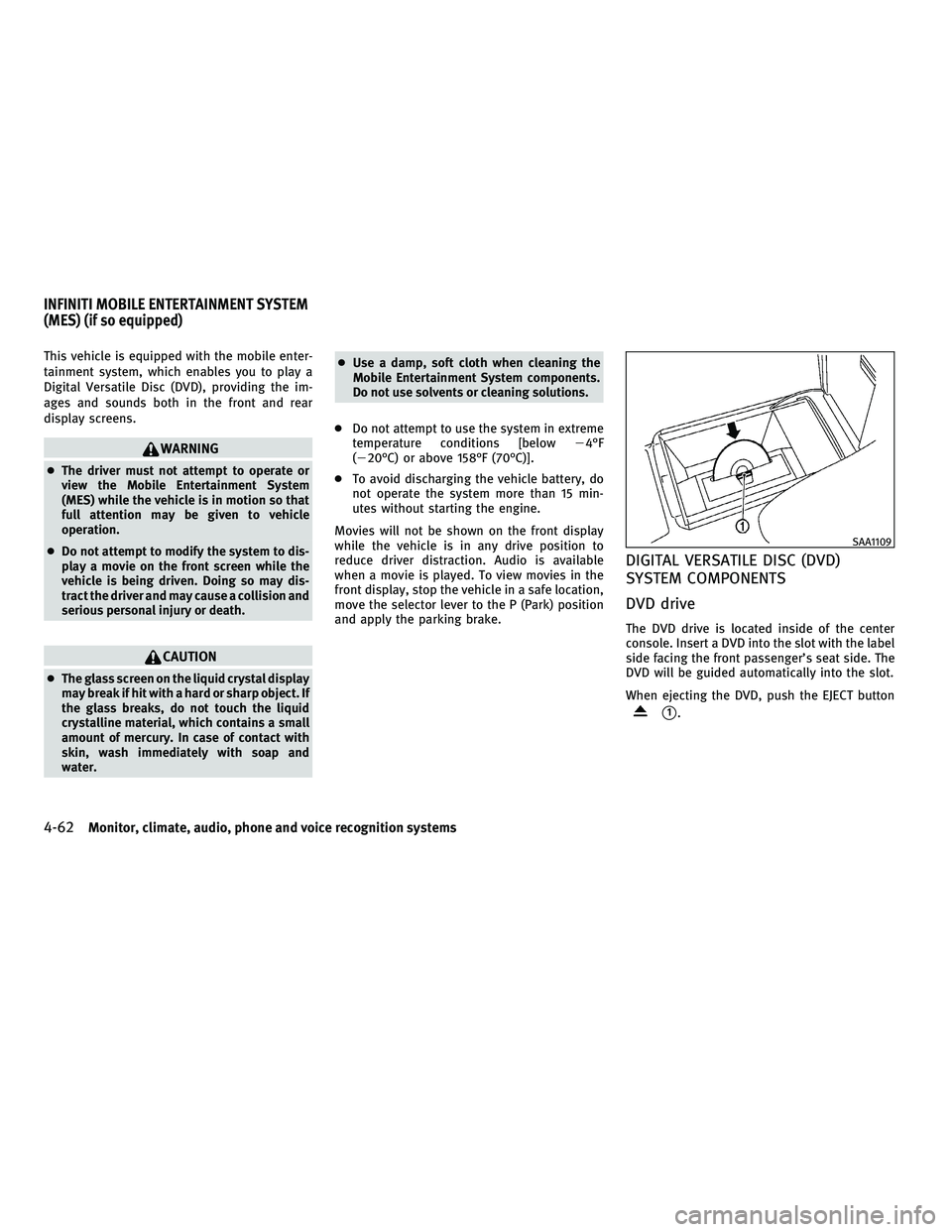
The DVD drive is located inside of the center
console. Insert a DVD into the slot with the label
side facing the front passenger's seat side. The
DVD will be guided automatically into the slot.
When ejecting the DVD, push the EJECT button
s1.
SAA1109
INFINITI MOBILE ENTERTAINMENT SYSTEM
(MES) (if so equipped)
4-62Monitor, climate, audio, phone and voice recognition systems
wÐ
Ð
05/14/09Ðpattie
X
Page 227 of 445
Headphones
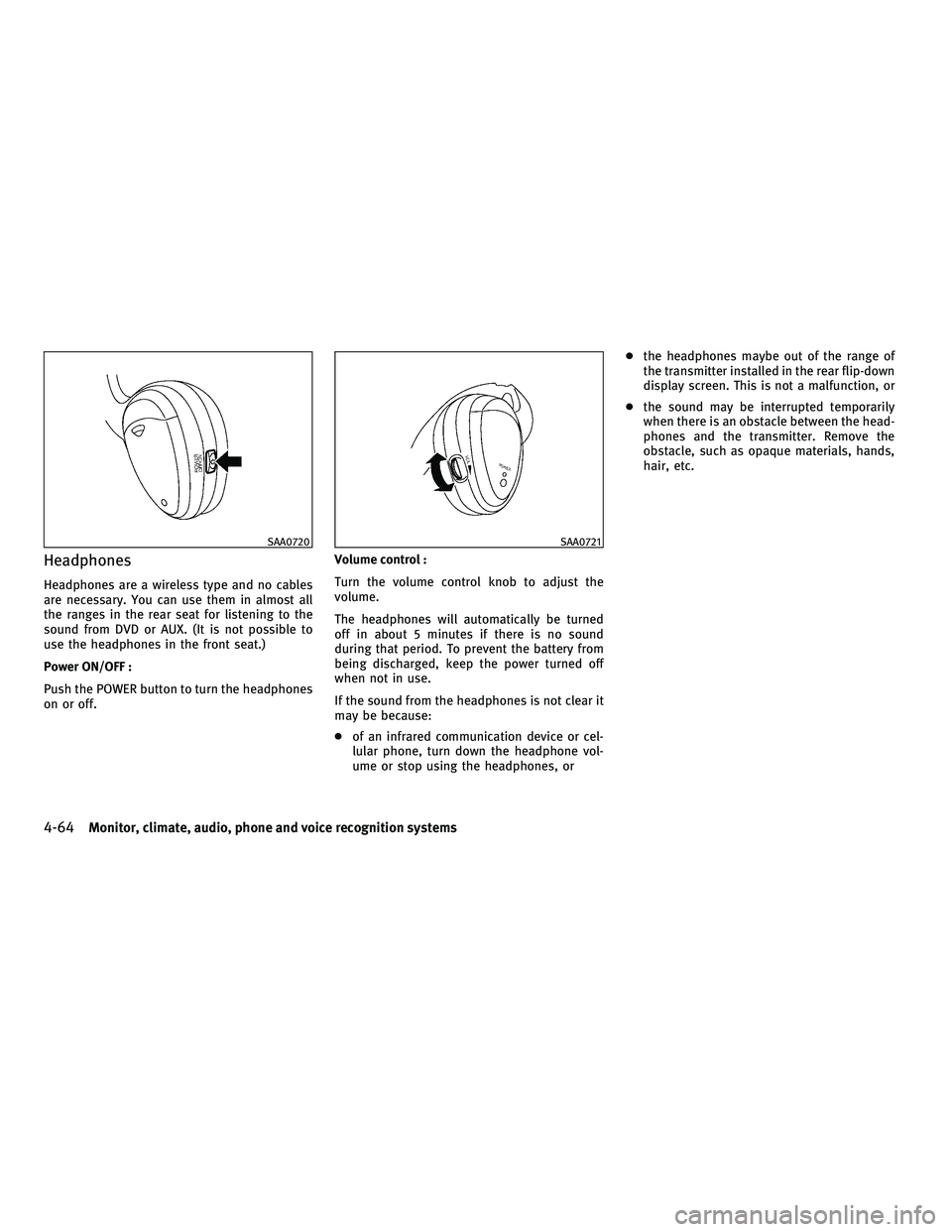
Headphones are a wireless type and no cables
are necessary. You can use them in almost all
the ranges in the rear seat for listening to the
sound from DVD or AUX. (It is not possible to
use the headphones in the front seat.)
Power ON/OFF :
Push the POWER button to turn the headphones
on or off.Volume control :
Turn the volume control knob to adjust the
volume.
The headphones will automatically be turned
off in about 5 minutes if there is no sound
during that period. To prevent the battery from
being discharged, keep the power turned off
when not in use.
If the sound from the headphones is not clear it
may be because:
c
of an infrared communication device or cel-
lular phone, turn down the headphone vol-
ume or stop using the headphones, or c
the headphones maybe out of the range of
the transmitter installed in the rear flip-down
display screen. This is not a malfunction, or
c the sound may be interrupted temporarily
when there is an obstacle between the head-
phones and the transmitter. Remove the
obstacle, such as opaque materials, hands,
hair, etc.
SAA0720SAA0721
4-64Monitor, climate, audio, phone and voice recognition systems
wÐ
Ð
05/14/09Ðpattie
X
Page 229 of 445
Remote controller and headphones
battery replacement
Replace the battery as follows:
1. Open the lid.
2. Replace both batteries with new ones.
cSize AA (remote control)
c Size AAA (headphones)
c Make sure that the %and @ends on the
batteries match the markings inside the
compartment.
3. Close the lid securely.
If the battery is removed for any reason other
than replacement, close the lid securely.
c If you will not be using the remote control
for long periods of time, remove the bat-
teries.
c Replacement of the batteries is needed
when the remote control only functions at
extremely close distances to the MES or
not at all.
c Be careful not to touch the battery termi-
nal.
c An improperly disposed battery can harm
the environment. Always confirm local
regulations for battery disposal. c
When changing batteries, do not let dust
or oil get on the remote control and
headphones.
FCC Notice :
Changes or modifications not expressly ap-
proved by the party responsible for compliance
could void the user's authority to operate the
equipment.
This device complies with Part 15 of the FCC
Rules and RSS-210 of Industry Canada. Opera-
tion is subject to the following two conditions:
(1) This device may not cause harmful interfer-
ence, and (2) this device must accept any inter-
ference received, including interference that
may cause undesired operation of the device.
BEFORE OPERATING THE DVD MOBILE
ENTERTAINMENT SYSTEM
Precautions
Start the engine when using the DVD entertain-
ment system.
WARNING
The driver must not attempt to operate the DVD
system or wear the headphones while the ve-
hicle is in motion so that full attention may be
given to vehicle operation.
CAUTION
c Only operate the DVD while the vehicle en-
gine is running. Operating the DVD for ex-
tended periods of time with the engine OFF
can discharge the vehicle battery.
c Do not allow the system to get wet. Exces-
sive moisture such as spilled liquids may
cause the system to malfunction.
c While playing VIDEO-CD media, this DVD
player does not guarantee complete func-
tionality of all VIDEO-CD formats.
Copyright and trademark
c The technology protected by the U.S. patent
and other intellectual property rights owned
by Macrovision Corporation and other right
holders is adopted for this system.
c This copyright protected technology cannot
be used without a permit from Macrovision
Corporation. It is limited to be personal use,
etc., as long as the permit from Macrovision
Corporation is not issued.
c Modifying or disassembling is prohibited.
c Dolby digital is manufactured under license
from Dolby Laboratories, Inc.
4-66Monitor, climate, audio, phone and voice recognition systems
wÐ
Ð
05/15/09Ðpattie
X
Page 237 of 445
cKeep the antenna wire more than 8 in (20 cm)
away from the electronic control system har-
ness. Do not route the antenna wire next to
any harness.
c Adjust the antenna standing-wave ratio as
recommended by the manufacturer.
c Connect the ground wire from the CB radio
chassis to the body.
c For details, consult an INFINITI retailer.WARNING
cUse a phone after stopping your vehicle in a
safe location. If you have to use a phone
while driving, exercise extreme caution at all
times so full attention may be given to ve-
hicle operation.
c If you find yourself unable to devote full at-
tention to vehicle operation while talking on
the phone, pull off the road to a safe location
and stop your vehicle before doing so.
CAUTION
To avoid draining the vehicle battery, use a
phone after starting the engine.
Your INFINITI is equipped with Bluetooth T
Hands-Free Phone System. If you are an owner
of a compatible Bluetooth Tenabled cellular
phone, you can set up the wireless connection
between your cellular phone and the in-vehicle
phone module. With BluetoothT wireless tech-
nology, you can make or receive a telephone
call with your cellular phone in your pocket.
Once your cellular phone is paired to the in-
vehicle phone module, no phone connecting
procedure is required anymore. Your phone is
automatically connected with the in-vehicle phone module when the ignition switch is
pushed to the ON position with the registered
cellular phone turned on and carried in the
vehicle.
You can register up to 5 different BluetoothT
cellular phones in the in-vehicle phone module.
However, you can talk on only one cellular
phone at a time.
The INFINITI Voice Recognition system supports
the phone commands, so dialing a phone num-
ber using your voice is possible. For more
details, see ªINFINITI VOICE RECOGNITION SYS-
TEM (models with navigation system)º later in
this section; page 4-98.
Before using the Bluetooth
THands-Free Phone
System, refer to the following notes.
c Set up the wireless connection between a
compatible cellular phone and the in-vehicle
phone module before using the BluetoothT
Hands-Free Phone System.
c Some Bluetooth Tenabled cellular phones
may not be recognized by the in-vehicle
phone module. Please visit
www.InfinitiUSA.com/bluetooth for a recom-
mended phone list.
BLUETOOTHT HANDS-FREE PHONE SYSTEM
WITH NAVIGATION SYSTEM
4-74Monitor, climate, audio, phone and voice recognition systems
wÐ
Ð
05/19/09Ðtbrooks
X