maintenance INFINITI M 2010 Owner's Manual
[x] Cancel search | Manufacturer: INFINITI, Model Year: 2010, Model line: M, Model: INFINITI M 2010Pages: 445, PDF Size: 6.15 MB
Page 276 of 445

cSatellite
COMMAND ACTION
Satellite Radio Turns the SAT radio on, selecting the station and band last played.
cCD
COMMAND ACTION
CD Starts to play a CD.
cAudio
COMMAND ACTION
Audio OFF Turns the audio system off.
ciPodT
COMMAND ACTION
iPodT Turns the iPodTsystem on.
Vehicle Information Commands:
COMMAND ACTION
Traffic Info. Turns the traffic information system ON and OFF.
Fuel Economy Displays the Fuel Economy screen.
Trip Computer Displays the Trip Computer screen.
Maintenance Displays the Maintenance screen.
Tire Pressure Displays the Tire Pressure screen.
Monitor, climate, audio, phone and voice recognition systems4-113
wÐ
Ð
05/15/09Ðpattie
X
Page 285 of 445

5 Starting and driving
Precautions when starting and driving.............. 5-2
Exhaust gas (carbon monoxide) .................. 5-2
Three-way catalyst ............................. 5-2
Tire Pressure Monitoring System (TPMS) ......... 5-3
Avoiding collision and rollover ................... 5-5
Off-road recovery ............................... 5-5
Rapid air pressure loss ......................... 5-6
Drinking alcohol/drugs and driving .............. 5-7
All-Wheel Drive (AWD) driving safety
precautions (for AWD models) ................... 5-7
Push-button ignition switch ........................ 5-8
Operating range for engine start function......... 5-8
Push-button ignition switch positions ............ 5-9
Intelligent Key battery discharge ................. 5-9
Before starting the engine ........................5-10
Starting the engine ................................ 5-11
Driving the vehicle ................................ 5-11
Automatic transmission ......................... 5-11
Parking brake .................................... 5-16
Lane Departure Warning (LDW) system/Lane
Departure Prevention (LDP) system
(if so equipped) .................................. 5-16
Lane Departure Warning (LDW) system ...........5-17 Lane Departure Prevention (LDP) system
..........5-19
Lane camera unit maintenance .................5-23
Cruise control .................................... 5-23
Precautions on cruise control ...................5-23
Cruise control operations ......................5-24
Intelligent Cruise Control (ICC) system
(if so equipped) .................................. 5-25
Selecting the vehicle-to-vehicle distance
control mode ................................. 5-26
Vehicle-to-vehicle distance control mode ........5-27
Precautions on vehicle-to-vehicle distance
control mode ................................. 5-27
Vehicle-to-vehicle distance control mode
operation ..................................... 5-29
Conventional (FIXED SPEED) cruise control
mode ........................................ 5-42
Preview function (for Intelligent Cruise
Control system equipped models) ..............5-45
Break-in schedule ................................ 5-46
Increasing fuel economy .......................... 5-46
All-Wheel Drive (AWD) (if so equipped) .............5-47
Parking/parking on hills .......................... 5-48
Power steering ................................... 5-49
wÐ
Ð
05/19/09Ðtbrooks
X
Page 288 of 445

cKeep your engine tuned up. Malfunctions in
the ignition, fuel injection, or electrical sys-
tems can cause overrich fuel flow into the
three-way catalyst, causing it to overheat.
Do not keep driving if the engine misfires, or
if noticeable loss of performance or other
unusual operating conditions are detected.
Have the vehicle inspected promptly by an
INFINITI retailer.
c Avoid driving with an extremely low fuel
level. Running out of fuel could cause the
engine to misfire, damaging the three-way
catalyst.
c Do not race the engine while warming it up.
c Do not push or tow your vehicle to start the
engine.TIRE PRESSURE MONITORING SYSTEM
(TPMS)
Each tire, including the spare (if provided),
should be checked monthly when cold and
inflated to the inflation pressure recommended
by the vehicle manufacturer on the vehicle
placard or tire inflation pressure label. (If your
vehicle has tires of a different size than the size
indicated on the vehicle placard or tire inflation
pressure label, you should determine the
proper tire inflation pressure for those tires.)
As an added safety feature, your vehicle has
been equipped with a Tire Pressure Monitoring
System (TPMS) that illuminates a low tire pres-
sure telltale when one or more of your tires is
significantly under-inflated. Accordingly, when
the low tire pressure telltale illuminates, you
should stop and check your tires as soon as
possible, and inflate them to the proper pres-
sure. Driving on a significantly under-inflated
tire causes the tire to overheat and can lead to
tire failure. Under-inflation also reduces fuel
efficiency and tire tread life, and may affect the
vehicle's handling and stopping ability.
Please note that the TPMS is not a substitute for
proper tire maintenance, and it is the driver's
responsibility to maintain correct tire pressure, even if under-inflation has not reached the level
to trigger illumination of the TPMS low tire
pressure telltale.
Your vehicle has also been equipped with a
TPMS malfunction indicator to indicate when
the system is not operating properly. The TPMS
malfunction indicator is combined with the low
tire pressure telltale. When the system detects
a malfunction, the telltale will flash for approxi-
mately one minute and then remain continu-
ously illuminated. This sequence will continue
upon subsequent vehicle start-ups as long as
the malfunction exists. When the malfunction
indicator is illuminated, the system may not be
able to detect or signal low tire pressure as
intended. TPMS malfunctions may occur for a
variety of reasons, including the installation of
replacement or alternate tires or wheels on the
vehicle that prevent the TPMS from functioning
properly. Always check the TPMS malfunction
telltale after replacing one or more tires or
wheels on your vehicle to ensure that the
replacement or alternate tires and wheels allow
the TPMS to continue to function properly.
Starting and driving5-3
wÐ
Ð
05/15/09Ðpattie
X
Page 291 of 445

3. Maintain a firm grip on the steering wheelwith both hands and try to hold a straight
course.
4. When appropriate, slowly release the ac- celerator pedal to gradually slow the ve-
hicle.
5. If there is nothing in the way, steer the vehicle to follow the road while the ve-
hicle speed is reduced. Do not attempt to
drive the vehicle back onto the road sur-
face until vehicle speed is reduced.
6. When it is safe to do so, gradually turn the steering wheel until both tires return
to the road surface. When all tires are on
the road surface, steer the vehicle to stay
in the appropriate driving lane.
cIf you decide that it is not safe to return the
vehicle to the road surface based on vehicle,
road or traffic conditions, gradually slow the
vehicle to a stop in a safe place off the road.
RAPID AIR PRESSURE LOSS
Rapid air pressure loss or a ªblow-outº can
occur if the tire is punctured or is damaged due
to hitting a curb or pothole. Rapid air pressure
loss can also be caused by driving on under-
inflated tires.
Rapid air pressure loss can affect the handling
and stability of the vehicle, especially at high-
way speeds.
Help prevent rapid air pressure loss by main-
taining the correct air pressure and visually
inspect the tires for wear and damage. See
ªWHEELS AND TIRESº in the ª8. Maintenance
and do-it-yourselfº section of this manual.
If a tire rapidly loses air pressure or ªblows-outº
while driving maintain control of the vehicle by
following the procedure below. Please note that
this procedure is only a general guide. The
vehicle must be driven as appropriate based on
the conditions of the vehicle, road and traffic.
WARNING
The following actions can increase the chance
of losing control of the vehicle if there is a
sudden loss of tire air pressure. Losing control
of the vehicle may cause a collision and result
in personal injury. c
The vehicle generally moves or pulls in the
direction of the flat tire.
c Do not rapidly apply the brakes.
c Do not rapidly release the accelerator pedal.
c Do not rapidly turn the steering wheel.
1. Remain calm and do not overreact.
2. Maintain a firm grip on the steering wheel
with both hands and try to hold a straight
course.
3. When appropriate, slowly release the ac- celerator pedal to gradually slow the ve-
hicle.
4. Gradually steer the vehicle to a safe loca- tion off the road and away from traffic if
possible.
5. Lightly apply the brake pedal to gradually stop the vehicle.
6. Turn on the hazard warning flashers and either contact a roadside emergency ser-
vice to change the tire or see ªCHANGING
A FLAT TIREº in the ª6. In case of emer-
gencyº section of this Owner's Manual.
5-6Starting and driving
wÐ
Ð
05/15/09Ðpattie
X
Page 308 of 445
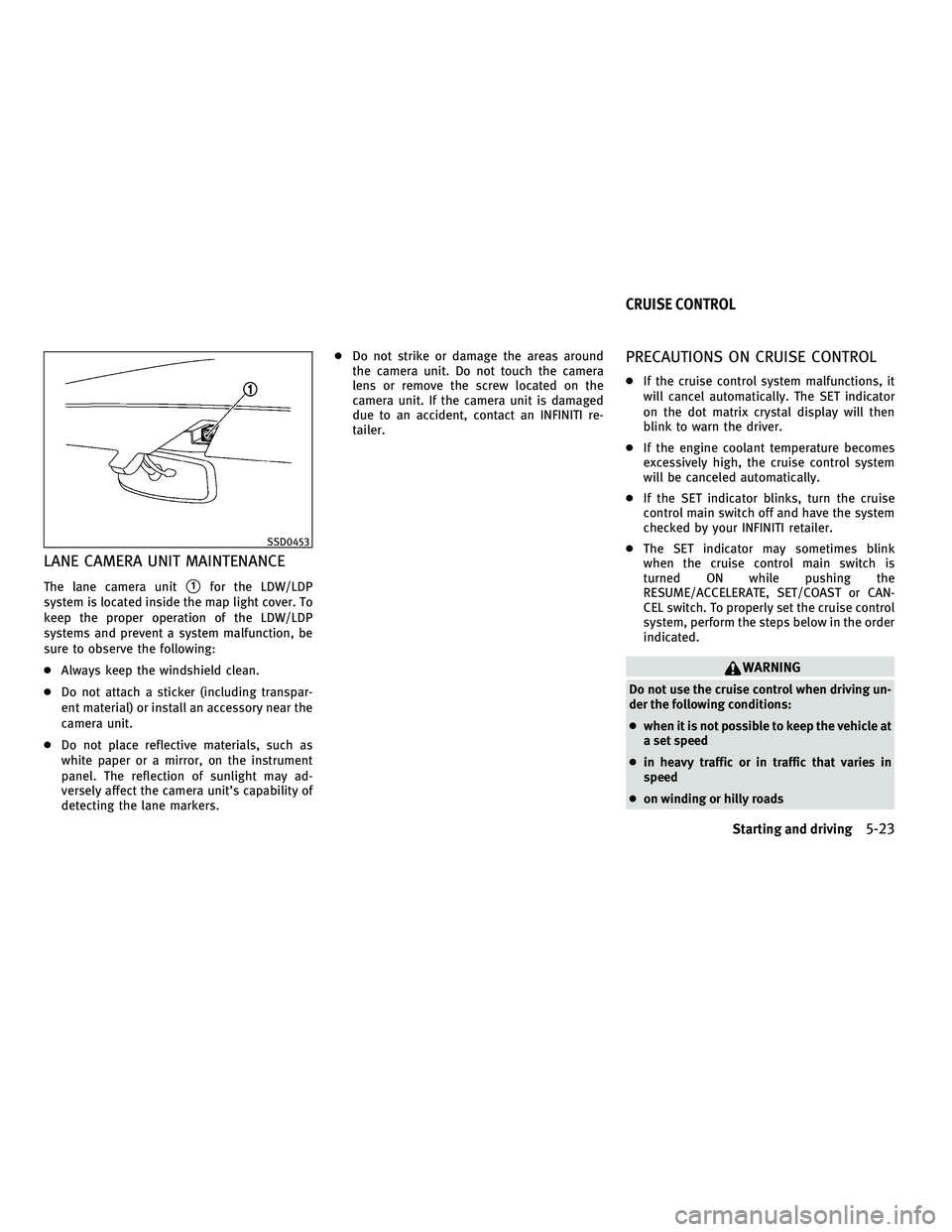
LANE CAMERA UNIT MAINTENANCE
The lane camera units1for the LDW/LDP
system is located inside the map light cover. To
keep the proper operation of the LDW/LDP
systems and prevent a system malfunction, be
sure to observe the following:
c Always keep the windshield clean.
c Do not attach a sticker (including transpar-
ent material) or install an accessory near the
camera unit.
c Do not place reflective materials, such as
white paper or a mirror, on the instrument
panel. The reflection of sunlight may ad-
versely affect the camera unit's capability of
detecting the lane markers. c
Do not strike or damage the areas around
the camera unit. Do not touch the camera
lens or remove the screw located on the
camera unit. If the camera unit is damaged
due to an accident, contact an INFINITI re-
tailer.
PRECAUTIONS ON CRUISE CONTROL
cIf the cruise control system malfunctions, it
will cancel automatically. The SET indicator
on the dot matrix crystal display will then
blink to warn the driver.
c If the engine coolant temperature becomes
excessively high, the cruise control system
will be canceled automatically.
c If the SET indicator blinks, turn the cruise
control main switch off and have the system
checked by your INFINITI retailer.
c The SET indicator may sometimes blink
when the cruise control main switch is
turned ON while pushing the
RESUME/ACCELERATE, SET/COAST or CAN-
CEL switch. To properly set the cruise control
system, perform the steps below in the order
indicated.
WARNING
Do not use the cruise control when driving un-
der the following conditions:
cwhen it is not possible to keep the vehicle at
a set speed
c in heavy traffic or in traffic that varies in
speed
c on winding or hilly roads
SSD0453
CRUISE CONTROL
Starting and driving5-23
wÐ
Ð
05/15/09Ðpattie
X
Page 327 of 445

Sensor maintenance
The sensor for the ICC systemsAis located
below the front bumper.
To keep the ICC system operating properly, be
sure to observe the following:
c Always keep the sensor clean. Wipe with a
soft cloth carefully so as not to damage the
sensor.
c Do not strike or damage the areas around
the sensor. Do not touch or remove the
screw located on the sensor. Doing so could
cause failure or malfunction. If the sensor is
damaged due to an accident, contact an
INFINITI retailer.
c Do not attach a sticker (including transpar-
ent material) or install an accessory near the
sensor. This could cause failure or malfunc-
tion.
CONVENTIONAL (FIXED SPEED) CRUISE
CONTROL MODE
This mode allows driving at a speed between 25
to 89 MPH (40 to 144 km/h) without keeping
your foot on the accelerator pedal.
WARNING
cIn the conventional (fixed speed) cruise con-
trol mode, a warning chime does not sound
to warn you if you are too close to the vehicle
ahead, as neither the presence of the vehicle
ahead nor the vehicle-to-vehicle distance is
detected.
c Pay special attention to the distance be-
tween your vehicle and the vehicle ahead of
you or a collision could occur.
c Always confirm the setting in the Intelligent
Cruise Control system display.
c Do not use the conventional (fixed speed)
cruise control mode when driving under the
following conditions:
± when it is not possible to keep the vehicle at a set speed
± in heavy traffic or in traffic that varies in speed
± on winding or hilly roads
± on slippery roads (rain, snow, ice, etc.)
± in very windy areas
c Doing so could cause a loss of vehicle control
and result in an accident.
Type A
SSD0676
Type B
SSD0695
5-42Starting and driving
wÐ
Ð
05/15/09Ðpattie
X
Page 338 of 445

ANTI-LOCK BRAKING SYSTEM (ABS)
WARNING
cThe Anti-lock Braking System (ABS) is a so-
phisticated device, but it cannot prevent ac-
cidents resulting from careless or dangerous
driving techniques. It can help maintain ve-
hicle control during braking on slippery sur-
faces. Remember that stopping distances on
slippery surfaces will be longer than on nor-
mal surfaces even with ABS. Stopping dis-
tances may also be longer on rough, gravel
or snow covered roads, or if you are using
tire chains. Always maintain a safe distance
from the vehicle in front of you. Ultimately,
the driver is responsible for safety.
c Tire type and condition may also affect brak-
ing effectiveness.
± When replacing tires, install the specified size of tires on all four wheels.
± When installing a spare tire, make sure that it is the proper size and type as speci-
fied on the Tire and Loading Information
label. See ªTIRE AND LOADING INFORMA-
TION LABELº in the ª9. Technical and con-
sumer informationº section of this
manual. ± For detailed information, see ªWHEELS
AND TIRESº in the ª8. Maintenance and
do-it-yourselfº section of this manual.
The Anti-lock Braking System (ABS) controls the
brakes so the wheels do not lock during hard
braking or when braking on slippery surfaces.
The system detects the rotation speed at each
wheel and varies the brake fluid pressure to
prevent each wheel from locking and sliding. By
preventing each wheel from locking, the system
helps the driver maintain steering control and
helps to minimize swerving and spinning on
slippery surfaces.
Using the system
Depress the brake pedal and hold it down.
Depress the brake pedal with firm steady pres-
sure, but do not pump the brakes. The ABS will
operate to prevent the wheels from locking up.
Steer the vehicle to avoid obstacles.
WARNING
Do not pump the brake pedal. Doing so may
result in increased stopping distances.
Self-test feature
The ABS includes electronic sensors, electric
pumps, hydraulic solenoids and a computer.
The computer has a built-in diagnostic feature
that tests the system each time you start the
engine and move the vehicle at a low speed in
forward or reverse. When the self-test occurs,
you may hear a ªclunkº noise and/or feel a
pulsation in the brake pedal. This is normal and
does not indicate a malfunction. If the computer
senses a malfunction, it switches the ABS off
and illuminates the ABS warning light on the
instrument panel. The brake system then oper-
ates normally, but without anti-lock assistance.
If the ABS warning light illuminates during the
self-test or while driving, have the vehicle
checked by an INFINITI retailer.
Starting and driving5-53
wÐ
Ð
05/15/09Ðpattie
X
Page 341 of 445

FREEING A FROZEN DOOR LOCK
To prevent a door lock from freezing, apply
deicer through the key hole. If the lock becomes
frozen, heat the key before inserting it into the
key hole or use the Intelligent Key system.
ANTI-FREEZE
In the winter when it is anticipated that the
outside temperature will drop below 32ÉF (0ÉC),
check antifreeze to assure proper winter protec-
tion. For additional information, see ªENGINE
COOLING SYSTEMº in the ª8. Maintenance and
do-it-yourselfº section.
BATTERY
If the battery is not fully charged during ex-
tremely cold weather conditions, the battery
fluid may freeze and damage the battery. To
maintain maximum efficiency, the battery
should be checked regularly. For additional
information, see ªBATTERYº in the ª8. Mainte-
nance and do-it-yourselfº section.
DRAINING OF COOLANT WATER
If the vehicle is to be left outside without
antifreeze, drain the cooling system, including
the engine block. Refill before operating the
vehicle. For details, see ªENGINE COOLING SYS-
TEMº in the ª8. Maintenance and do-it-yourselfº
section.
TIRE EQUIPMENT
SUMMER tires have a tread designed to provide
superior performance on dry pavement. How-
ever, the performance of these tires will be
substantially reduced in snowy and icy condi-
tions. If you operate your vehicle on snowy or
icy roads, INFINITI recommends the use of MUD
& SNOW or ALL SEASON tires on all four wheels.
Consult an INFINITI retailer for the tire type,
size, speed rating and availability information.
For additional traction on icy roads, studded
tires may be used. However, some U.S. states
and Canadian provinces prohibit their use.
Check local, state and provincial laws before
installing studded tires.
Skid and traction capabilities of studded snow
tires, on wet or dry surfaces, may be poorer than
that of non-studded snow tires.
Tire chains may be used. For details, see ªTIRE
CHAINSº in the ª8. Maintenance and do-it-
yourselfº section of this manual.
All-Wheel Drive (AWD) model
If you install snow tires, they must also be the
same size, brand, construction and tread pat-
tern on all four wheels.
SPECIAL WINTER EQUIPMENT
It is recommended that the following items be
carried in the vehicle during winter:
cA scraper and stiff-bristled brush to remove
ice and snow from the windows and wiper
blades.
c A sturdy, flat board to be placed under the
jack to give it firm support.
c A shovel to dig the vehicle out of snowdrifts.
c Extra window washer fluid to refill the reser-
voir tank.
DRIVING ON SNOW OR ICE
WARNING
cWet ice (32ÉF, 0ÉC and freezing rain), very
cold snow or ice can be slick and very hard to
drive on. The vehicle will have much less
traction or ªgripº under these conditions.
Try to avoid driving on wet ice until the road
is salted or sanded.
c Whatever the condition, drive with caution.
Accelerate and slow down with care. If accel-
erating or downshifting too fast, the drive
wheels will lose even more traction.
COLD WEATHER DRIVING
5-56Starting and driving
wÐ
Ð
05/15/09Ðpattie
X
Page 349 of 445

Installing the spare tire
The spare tire is designed for emergency use.
(See specific instructions under the heading
ªWHEELS AND TIRESº in the ª8. Maintenance
and do-it-yourselfº section.)
1. Clean any mud or dirt from the surfacebetween the wheel and hub.
2. Carefully put the spare tire on and tighten the wheel nuts finger tight. Check that all
the wheel nuts contact the wheel surface
horizontally.
3. With the wheel nut wrench, tighten wheel nuts alternately and evenly in the se-
quence as illustrated (
s1,s2,s3,s4,s5),
more than 2 times, until they are tight. 4. Lower the vehicle slowly until the tire
touches the ground. Then, with the wheel
nut wrench, tighten the wheel nuts se-
curely in the sequence as illustrated.
Lower the vehicle completely.
WARNING
cIncorrect wheel nuts or improperly tightened
wheel nuts can cause the wheel to become
loose or come off. This could cause an
accident.
c Do not use oil or grease on the wheel studs or
nuts. This could cause the nuts to become
loose.
c Retighten the wheel nuts when the vehicle
has been driven for 600 miles (1,000 km)
(also in cases of a flat tire, etc.). c
As soon as possible, tighten the wheel nuts
to the specified torque with a torque wrench.
Wheel nut tightening torque: 80 ft-lb (108 N´m)
The wheel nuts must be kept tightened to speci-
fication at all times. It is recommended that
wheel nuts be tightened to specifications at
each lubrication interval.
c Adjust tire pressure to the COLD pressure.
COLD pressure:
After the vehicle has been parked for three
hours or more or driven less than 1 mile
(1.6 km).
COLD tire pressures are shown on the Tire
and Loading Information label affixed to the
driver side center pillar.
After adjusting tire pressure to the COLD tire
pressure, the display of the tire pressure infor-
mation may show higher pressure than the
COLD tire pressure after the vehicle has been
driven more than 1 mile (1.6 km). This is be-
cause the tire pressurizes as the tire tempera-
ture rises. This does not indicate a system
malfunction.
SCE0039
6-6In case of emergency
wÐ
Ð
05/15/09Ðpattie
X
Page 350 of 445

5. Securely store the flat tire and jackingequipment in the vehicle.
6. Place the spare tire cover and the trunk floor carpeting over the damaged tire.
7. Close the trunk.
WARNING
c Always make sure that the spare tire and
jacking equipment are properly secured af-
ter use. Such items can become dangerous
projectiles in an accident or sudden stop. c
The T-type spare tire and small size spare
tire are designed for emergency use. See
specific instructions under the heading
ªWHEELS AND TIRESº in the ª8. Maintenance
and do-it-yourselfº section.
If needed, Roadside Assistance is available.
Please see your Warranty Information Booklet
or Roadside Assistance I.D. Card for the toll-free
number to call (U.S.) or Warranty Information
Booklet (Canada). To start your engine with a booster battery, the
instructions and precautions below must be
followed.
WARNING
c
If done incorrectly, jump starting can lead to
a battery explosion, resulting in severe in-
jury or death. It could also damage your
vehicle.
c Explosive hydrogen gas is always present in
the vicinity of the battery. Keep all sparks
and flames away from the battery.
c Do not allow battery fluid to come into con-
tact with eyes, skin, clothing or painted sur-
faces. Battery fluid is a corrosive sulfuric
acid solution which can cause severe burns.
If the fluid should come into contact with
anything, immediately flush the contacted
area with water.
c Keep the battery out of the reach of children.
c The booster battery must be rated at 12
volts. Use of an improperly rated battery can
damage your vehicle.
SCE0505
JUMP STARTING
In case of emergency6-7
wÐ
Ð
05/15/09Ðpattie
X