steering INFINITI M 2010 Workshop Manual
[x] Cancel search | Manufacturer: INFINITI, Model Year: 2010, Model line: M, Model: INFINITI M 2010Pages: 445, PDF Size: 6.15 MB
Page 291 of 445

3. Maintain a firm grip on the steering wheelwith both hands and try to hold a straight
course.
4. When appropriate, slowly release the ac- celerator pedal to gradually slow the ve-
hicle.
5. If there is nothing in the way, steer the vehicle to follow the road while the ve-
hicle speed is reduced. Do not attempt to
drive the vehicle back onto the road sur-
face until vehicle speed is reduced.
6. When it is safe to do so, gradually turn the steering wheel until both tires return
to the road surface. When all tires are on
the road surface, steer the vehicle to stay
in the appropriate driving lane.
cIf you decide that it is not safe to return the
vehicle to the road surface based on vehicle,
road or traffic conditions, gradually slow the
vehicle to a stop in a safe place off the road.
RAPID AIR PRESSURE LOSS
Rapid air pressure loss or a ªblow-outº can
occur if the tire is punctured or is damaged due
to hitting a curb or pothole. Rapid air pressure
loss can also be caused by driving on under-
inflated tires.
Rapid air pressure loss can affect the handling
and stability of the vehicle, especially at high-
way speeds.
Help prevent rapid air pressure loss by main-
taining the correct air pressure and visually
inspect the tires for wear and damage. See
ªWHEELS AND TIRESº in the ª8. Maintenance
and do-it-yourselfº section of this manual.
If a tire rapidly loses air pressure or ªblows-outº
while driving maintain control of the vehicle by
following the procedure below. Please note that
this procedure is only a general guide. The
vehicle must be driven as appropriate based on
the conditions of the vehicle, road and traffic.
WARNING
The following actions can increase the chance
of losing control of the vehicle if there is a
sudden loss of tire air pressure. Losing control
of the vehicle may cause a collision and result
in personal injury. c
The vehicle generally moves or pulls in the
direction of the flat tire.
c Do not rapidly apply the brakes.
c Do not rapidly release the accelerator pedal.
c Do not rapidly turn the steering wheel.
1. Remain calm and do not overreact.
2. Maintain a firm grip on the steering wheel
with both hands and try to hold a straight
course.
3. When appropriate, slowly release the ac- celerator pedal to gradually slow the ve-
hicle.
4. Gradually steer the vehicle to a safe loca- tion off the road and away from traffic if
possible.
5. Lightly apply the brake pedal to gradually stop the vehicle.
6. Turn on the hazard warning flashers and either contact a roadside emergency ser-
vice to change the tire or see ªCHANGING
A FLAT TIREº in the ª6. In case of emer-
gencyº section of this Owner's Manual.
5-6Starting and driving
wÐ
Ð
05/15/09Ðpattie
X
Page 292 of 445

DRINKING ALCOHOL/DRUGS AND
DRIVING
WARNING
Never drive under the influence of alcohol or
drugs. Alcohol in the bloodstream reduces co-
ordination, delays reaction time and impairs
judgement. Driving after drinking alcohol in-
creases the likelihood of being involved in an
accident injuring yourself and others. Addition-
ally, if you are injured in an accident, alcohol
can increase the severity of the injury.
INFINITI is committed to safe driving. However,
you must choose not to drive under the influ-
ence of alcohol. Every year thousands of people
are injured or killed in alcohol-related acci-
dents. Although the local laws vary on what is
considered to be legally intoxicated, the fact is
that alcohol affects all people differently and
most people underestimate the effects of alco-
hol.
Remember, drinking and driving don't mix! And
that is true for drugs, too (over-the-counter,
prescription, and illegal drugs). Don't drive if
your ability to operate your vehicle is impaired
by alcohol, drugs, or some other physical con-
dition.
ALL-WHEEL DRIVE (AWD) DRIVING
SAFETY PRECAUTIONS (for AWD
models)
Observe the following precautions when you
drive an All-Wheel Drive (AWD) vehicle.
WARNING
c This vehicle is not designed for off-road
(rough road) use. Do not drive on sandy or
muddy roads that tires may get stuck in.
c Do not drive beyond the performance capa-
bility of the tires, even with AWD engaged.
c For AWD equipped vehicles, do not attempt
to raise two wheels off the ground and shift
the transmission to any drive or reverse po-
sition with the engine running. Doing so may
result in drivetrain damage or unexpected
vehicle movement which could result in seri-
ous vehicle damage or personal injury. c
Do not attempt to test an AWD equipped ve-
hicle on a 2-wheel dynamometer, (such as
the dynamometers used by some states for
emissions testing), or similar equipment
even if the other two wheels are raised off
the ground. Make sure you inform test facil-
ity personnel that your vehicle is equipped
with AWD before it is placed on a dynamom-
eter. Using the wrong test equipment may
result in drivetrain damage or unexpected
vehicle movement which could result in seri-
ous vehicle damage or personal injury.
c When a wheel is off the ground due to an
unlevel surface, do not spin the wheel
excessively.
c Accelerating quickly, sharp steering maneu-
vers or sudden braking may cause loss of
control.
c Always use tires of the same type, size,
brand, construction (bias, bias-belted or ra-
dial), and tread pattern on all four wheels.
Install tire chains on the rear wheels when
driving on slippery roads and drive carefully.
Starting and driving5-7
wÐ
Ð
05/15/09Ðpattie
X
Page 293 of 445

WARNING
Do not operate the push-button ignition switch
while driving the vehicle except in an emer-
gency. (The engine will stop when the ignition
switch is pushed 3 consecutive times or the
ignition switch is pushed and held for more
than 2 seconds.) If the engine stops while the
vehicle is being driven, this could lead to a
crash and serious injury.
Before operating the push-button ignition
switch, be sure to move the selector lever to the
P (Park) position.
OPERATING RANGE FOR ENGINE
START FUNCTION
The operating range for starting the engine
inside the vehicle
s1is shown in the illustra-
tion.
c The trunk area is not included in the operat-
ing range of the engine start function.
c If the Intelligent Key is on the instrument
panel, rear parcel shelf, inside the glove box
or door pocket, it may not be possible to
start the engine.
c If the Intelligent Key is near the door or door
glass outside the vehicle, it may be possible
to start the engine. When the ignition switch is pushed without
depressing the brake pedal, the ignition switch
position will change as follows:
c
Push the center once to change to ACC.
c Push the center two times to change to ON.
c Push the center three times to return to
LOCK.
The ignition switch is equipped with an anti-
theft steering lock device.
The ignition lock is designed so that the ignition
switch position cannot be switched to LOCK
until the selector lever is moved to the P (Park)
position.
SSD0659SSD0684
PUSH-BUTTON IGNITION SWITCH
5-8Starting and driving
wÐ
Ð
05/15/09Ðpattie
X
Page 294 of 445

When the ignition switch cannot be pushed
toward the LOCK position, proceed as follows:
1. Move the selector lever into the P (Park)position.
2. Push the ignition switch. The ignition switch position will change to the ON
position.
3. Push the ignition switch again to the LOCK position.
The selector lever can be moved from the P (Park)
position if the ignition switch is in the ON posi-
tion and the brake pedal is depressed.
In order for the steering wheel to be locked, it
must be turned about 1/8 of a right or left turn
from the straight up position.
To lock the steering wheel, push the ignition
switch to the LOCK position. To unlock the steer-
ing wheel, push the push-button ignition switch
again while lightly turning the steering wheel
right and left.
If the battery of the vehicle is discharged, the
push-button ignition switch cannot be turned
from the LOCK position.
Some indicators and warnings for operation are
displayed on the dot matrix liquid crystal dis-
play in the tachometer. (See ªDOT MATRIX LIQUID CRYSTAL DISPLAYº in the ª2. Instru-
ments and controlsº section.)
PUSH-BUTTON IGNITION SWITCH
POSITIONS
LOCK (Normal parking position)
The ignition switch can only be locked in this
position.
The ignition switch will be unlocked when it is
pushed to the ACC position while carrying the
Intelligent Key or with the Intelligent Key in-
serted in the port.
ACC (Accessories)
This position activates electrical accessories
such as the radio, when the engine is not
running.
ON (Normal operating position)
This position turns on the ignition system and
electrical accessories.
CAUTION
Do not leave the vehicle with the push-button
ignition switch in ACC or ON positions when the
engine is not running for an extended period.
This can discharge the battery.
INTELLIGENT KEY BATTERY DISCHARGE
If the battery of the Intelligent Key is almost
discharged, the guide light
sBof the Intelligent
Key port
sAblinks and the indicator appears on
the dot matrix liquid crystal display. (See ªDOT
MATRIX LIQUID CRYSTAL DISPLAYº in the ª2.
Instruments and controlsº section.)
In this case, inserting the Intelligent Key into
the port
s1allows you to start the engine. Make
sure that the key ring side faces backward as
illustrated. Insert the Intelligent Key in the port
until it is latched and secured.
SSD0512
Starting and driving5-9
wÐ
Ð
05/15/09Ðpattie
X
Page 300 of 445

circuits are functioning properly. In this case,
push the switch to the LOCK position and wait
for 3 seconds. Then push the ignition switch
back to the ON position. The vehicle should re-
turn to its normal operating condition. If it does
not return to its normal operating condition,
have an INFINITI retailer check the transmission
and repair if necessary.
Shift lock release
If the battery charge is low or discharged, the
selector lever may not be moved from the P
(Park) position even with the brake pedal de-
pressed and the selector lever button pushed.
To move the selector lever, release the shift
lock. The selector lever can be moved to the N
(Neutral) position. However, the steering wheel
will be locked unless the ignition switch is
turned to the ON position. This allows the
vehicle to be moved if the battery is discharged.To release the shift lock, perform the following
procedure:
1. Push the ignition switch to the LOCK po-
sition.
2. Apply the parking brake.
3. Remove the shift lock release cover
sA
using a suitable tool.
4. Push down the shift lock release
sBas
illustrated.
5. Push the selector lever button
sCand
move the selector lever to N (Neutral)
position
sDwhile holding down the shift
lock release.
Push the ignition switch to the ON position to
unlock the steering wheel. The vehicle may be
moved to the desired location.
Replace the removed shift lock release cover
after the operation is finished.
If the battery is discharged completely, the
steering wheel cannot be unlocked. Do not
move the vehicle with the steering wheel
locked.
If the selector lever cannot be moved out of P
(Park), have an INFINITI retailer check the AT
system as soon as possible.
SSD0450
Starting and driving5-15
wÐ
Ð
05/15/09Ðpattie
X
Page 304 of 445

LDW system operation
The LDW system provides a lane departure
warning function when the vehicle is driven at
speeds of approximately 45 MPH (72 km/h) and
above. When the vehicle approaches either the
left or the right side of the traveling lane, a
warning chime will sound and the lane depar-
ture warning light (orange) on the instrument
panel will blink to alert the driver.
The warning function will stop when the vehicle
returns inside of the lane markers.
When you operate the lane change signal and
change traveling lanes in the direction of the
signal, the LDW system temporarily suspends
operation. It will become operable again ap-
proximately 2 seconds after the lane change
signal is turned off.
When the vehicle speed lowers to less than
approximately 45 MPH (72 km/h), the LDW
system will not provide a warning.
The LDW system has an automatic setting mode
and a manual setting mode. The setting mode
can be changed. In the automatic setting mode,
the LDW system is automatically turned on
when the ignition switch is pushed to the ON
position. When the LDW system is on, the LDW
ON indicator
s1on the LDW switch illuminates.
To cancel the LDW system, push the LDW switch. The LDW ON indicator will turn off. To
turn on the system, push the LDW switch again.
In the manual setting mode, you need to push
the LDW switch to turn on the system after the
ignition switch is pushed to the ON position.
The setting mode can be changed using the
LDW switch. To change the setting mode, push
and hold the LDW switch for more than 4
seconds when the LDW ON indicator is off.
When the mode is changed, a chime sounds
and the LDW ON indicator flashes.
Temporary disabled status at high
temperature
If the vehicle is parked in direct sunlight under
high temperature conditions (over approxi-
mately 104ÉF (40ÉC) and then started, the LDW
system may be deactivated automatically. The
LDW ON indicator on the switch will flash.
When the interior temperature is reduced, the
LDW system will resume operating automati-
cally and the LDW ON indicator will stop flash-
ing.
LANE DEPARTURE PREVENTION (LDP)
SYSTEM
Precautions on LDP system
WARNING
c
The LDP system will not steer the vehicle or
prevent loss of control. It is the driver's re-
sponsibility to stay alert, drive safely, keep
the vehicle in the traveling lane, and be in
control of vehicle at all times.
c The LDP system is primarily intended for use
on well-developed freeways or highways. It
may not detect the lane markers in certain
roads, weather or driving conditions.
c Using the LDP system under some condi-
tions of road, lane marker or weather, or
when you change lanes without using the
lane change signal could lead to an unex-
pected system operation. In such condi-
tions, you need to correct the vehicle's direc-
tion with your steering operation to avoid
accidents.
c When the LDP system is operating, avoid
excessive or sudden steering maneuvers.
Otherwise, you could lose control of the
vehicle.
Starting and driving5-19
wÐ
Ð
05/15/09Ðpattie
X
Page 306 of 445

LDP system operation
The LDP system provides a lane departure warn-
ing and brake control assistance when the
vehicle is driven at speeds of approximately 45
MPH (72 km/h) and above. When the vehicle
approaches either the left or the right side of
the traveling lane, a warning chime will sound
and the lane departure warning light (orange)
on the instrument panel will blink to alert the
driver. Then, the LDP system will automatically
apply the brakes for a short period of time to
help assist the driver to return the vehicle to the
center of the traveling lane.The warning and assist functions will stop when
the vehicle returns to a position inside of the
lane marker.
To turn on the LDP system, push the LDP switch
on the steering wheel after starting the engine.
The LDP ON indicator light (green) on the instru-
ment panel will illuminate. Push the LDP switch
again to turn off the LDP system. The LDP ON
indicator light will turn off.
LDP ON indicator light (green)/ Warning light (orange)
SSD0672
LDP switch
SSD0673
Starting and driving5-21
wÐ
Ð
05/15/09Ðpattie
X
Page 307 of 445

Automatic deactivation
Condition A :
The warning and assist functions of the LDP
system are not designed to work under the
following conditions:
cWhen you operate the lane change signal
and change the traveling lanes in the direc-
tion of the signal. (The LDP system will be
deactivated for approximately 2 seconds af-
ter the lane change signal is turned off.)
c When the vehicle speed lowers to less than
approximately 45 MPH (72 km/h).
After the above conditions have finished and
the necessary operating conditions are satis-
fied, the warning and assist functions will re-
sume.
Condition B :
The assist function of the LDP system is not
designed to work under the following condi-
tions (warning is still functional):
c When the brake pedal is depressed.
c When the steering wheel is turned as far as
necessary for the vehicle to change lanes.
c When the accelerator pedal is depressed
while the brake control assist is provided. c
When the Intelligent Cruise Control (ICC)
approach warning occurs.
c When the hazard warning flashers are oper-
ated.
c When driving on a curve at high speed.
After the above conditions have finished and
the necessary operating conditions are satis-
fied, the LDP brake control assist function will
resume.
Condition C :
Under the following conditions, a beep will
sound and the LDP system will be canceled
automatically. The LDP ON indicator light will
blink in green, and the LDP system cannot be
activated:
c When the VDC system (except TCS function)
or ABS operates.
c When the VDC system is turned off.
c When the SNOW mode switch is turned on.
Action to take:
When the above conditions no longer exist, turn
off the LDP system by pushing the LDP switch.
Push the LDP switch again to turn the LDP
system back on. Temporary disabled status at high temperature :
If the vehicle is parked in direct sunlight under
high temperature conditions (over approxi-
mately 104ÉF (40ÉC)) and then the LDP system is
turned on, the LDP system may be deactivated
automatically. The LDP ON indicator (green) will
blink.
When the interior temperature is reduced, the
system will resume operating automatically and
the LDP ON indicator will stop blinking.
5-22Starting and driving
wÐ
Ð
05/15/09Ðpattie
X
Page 317 of 445

When driving on some roads, such as winding,
hilly, curved, narrow roads, or roads which are
under construction, the ICC sensor may detect
vehicles in a different lane, or may temporarily
not detect a vehicle traveling ahead. This may
cause the ICC system to decelerate or acceler-
ate the vehicle.The detection of vehicles may also be affected
by vehicle operation (steering maneuver or trav-
eling position in the lane, etc.) or vehicle con-
dition.
If this occurs, the ICC system may warn
you by blinking the system indicator and sound-
ing the chime unexpectedly. You will have to
manually control the proper distance away from
the vehicle traveling ahead. When driving on the freeway at a set speed and
approaching a slower traveling vehicle ahead,
the ICC system will adjust the speed to maintain
the distance, selected by the driver, from the
vehicle ahead. If the vehicle ahead changes
lanes or exits the freeway, the ICC system will
accelerate and maintain the speed up to the set
speed. Pay attention to the driving operation to
maintain control of the vehicle as it accelerates
to the set speed.
The vehicle may not maintain the set speed on
winding or hilly roads. If this occurs, you will
have to manually control the vehicle speed.
SSD0253SSD0254
5-32Starting and driving
wÐ
Ð
05/15/09Ðpattie
X
Page 325 of 445
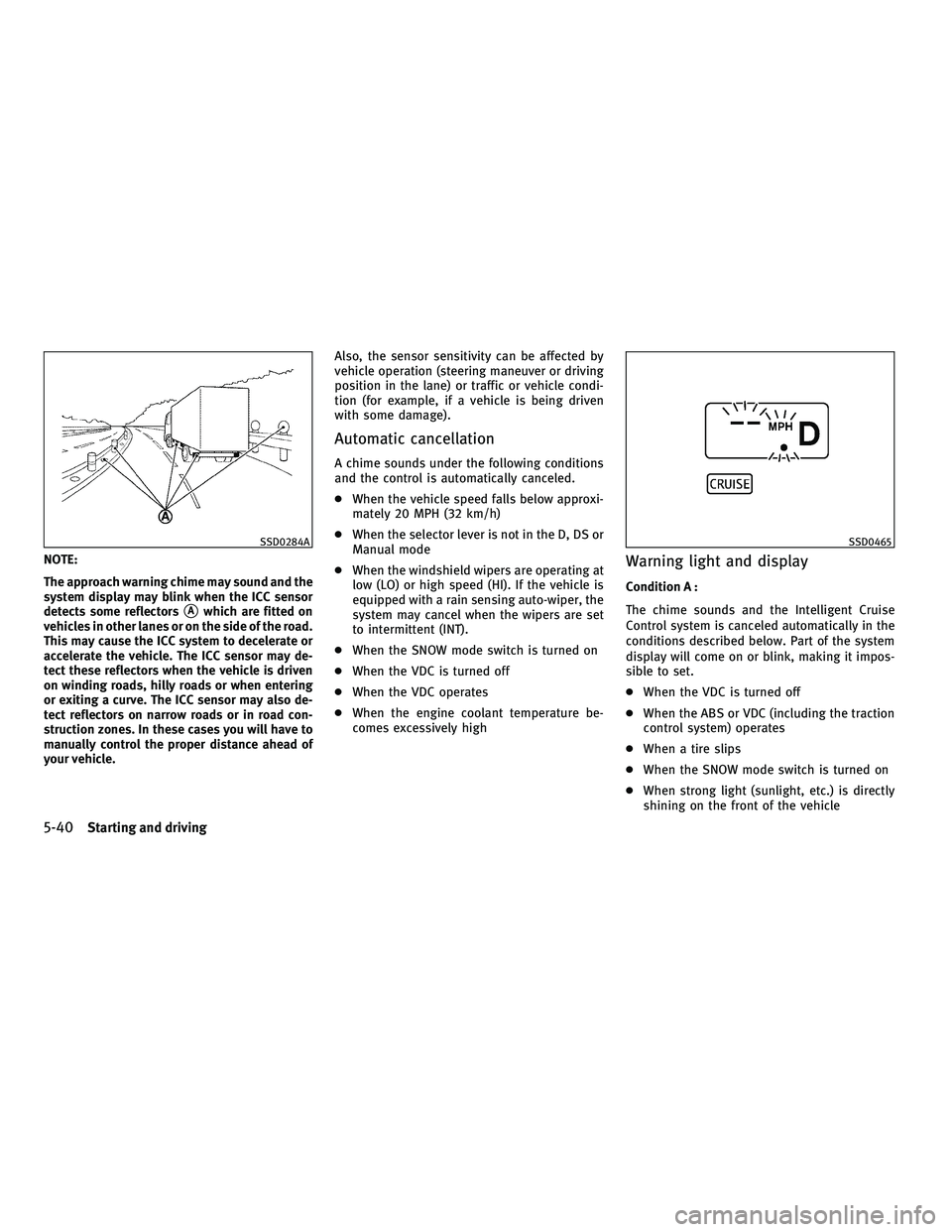
NOTE:
The approach warning chime may sound and the
system display may blink when the ICC sensor
detects some reflectors
sAwhich are fitted on
vehicles in other lanes or on the side of the road.
This may cause the ICC system to decelerate or
accelerate the vehicle. The ICC sensor may de-
tect these reflectors when the vehicle is driven
on winding roads, hilly roads or when entering
or exiting a curve. The ICC sensor may also de-
tect reflectors on narrow roads or in road con-
struction zones. In these cases you will have to
manually control the proper distance ahead of
your vehicle. Also, the sensor sensitivity can be affected by
vehicle operation (steering maneuver or driving
position in the lane) or traffic or vehicle condi-
tion (for example, if a vehicle is being driven
with some damage).
Automatic cancellation
A chime sounds under the following conditions
and the control is automatically canceled.
c
When the vehicle speed falls below approxi-
mately 20 MPH (32 km/h)
c When the selector lever is not in the D, DS or
Manual mode
c When the windshield wipers are operating at
low (LO) or high speed (HI). If the vehicle is
equipped with a rain sensing auto-wiper, the
system may cancel when the wipers are set
to intermittent (INT).
c When the SNOW mode switch is turned on
c When the VDC is turned off
c When the VDC operates
c When the engine coolant temperature be-
comes excessively high
Warning light and display
Condition A :
The chime sounds and the Intelligent Cruise
Control system is canceled automatically in the
conditions described below. Part of the system
display will come on or blink, making it impos-
sible to set.
cWhen the VDC is turned off
c When the ABS or VDC (including the traction
control system) operates
c When a tire slips
c When the SNOW mode switch is turned on
c When strong light (sunlight, etc.) is directly
shining on the front of the vehicle
SSD0284ASSD0465
5-40Starting and driving
wÐ
Ð
05/19/09Ðtbrooks
X