ignition INFINITI M 2010 Manual PDF
[x] Cancel search | Manufacturer: INFINITI, Model Year: 2010, Model line: M, Model: INFINITI M 2010Pages: 445, PDF Size: 6.15 MB
Page 224 of 445
cPushing DOWN (rear) ªº/UP (front)
ª
º longer
Next group/title or the beginning of the
current group/title
iPodT (if so equipped) :
c Pushing DOWN (rear) ª
º/UP (front)
ª
º shorter
Previous or next track (Start/Pause or Menu
can be selected when the ENTER button is
pushed.)
c Pushing DOWN (rear) ª
º/UP (front)
ª
º longer
Rewind or fast forward search
ªMusic Boxº hard-disk drive audio system (if so
equipped) :
c Pushing DOWN (rear) ª
º/UP (front)
ª
º shorter
Next track or the beginning of the current
track
c Pushing DOWN (rear) ª
º/UP (front)
ª
º longer
Playlist change (When the last playlist is
playing, the next playlist will be selected.)
ªON/OFFº switch
With the ignition switch pushed to the ACC or
ON position, push the ª ON/OFFº switch to turn
the audio system ON or OFF.
Source select switch
Push the ªSRC º select switch to change the
audio mode.
ANTENNA
Window antenna
The antenna pattern is printed inside the rear
window.
CAUTION
c Do not place metalized film near the rear
window glass or attach any metal parts to it.
This may cause poor reception or noise.
c When cleaning the inside of the rear window,
be careful not to scratch or damage the rear
window antenna. Lightly wipe along the an-
tenna with a dampened soft cloth.
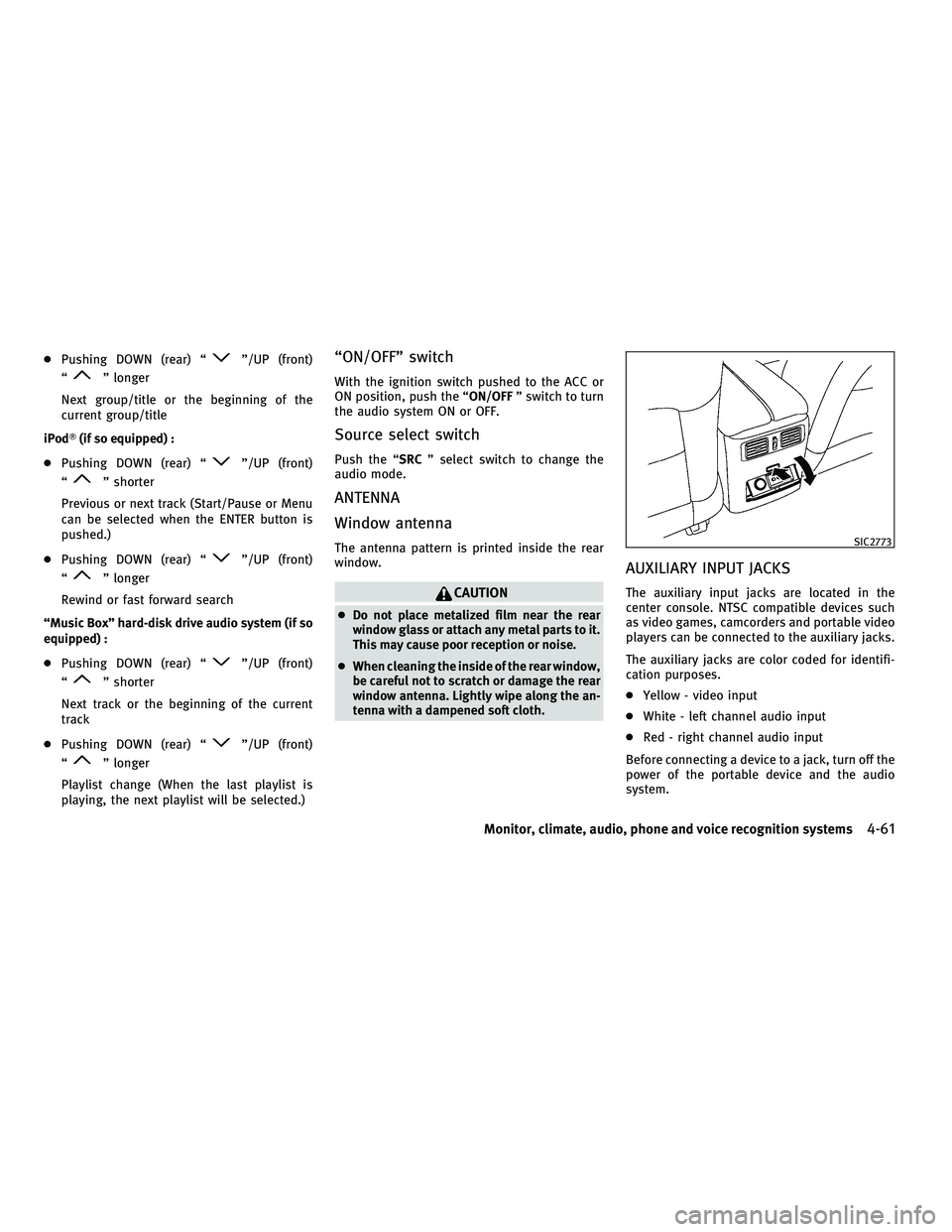
AUXILIARY INPUT JACKS
The auxiliary input jacks are located in the
center console. NTSC compatible devices such
as video games, camcorders and portable video
players can be connected to the auxiliary jacks.
The auxiliary jacks are color coded for identifi-
cation purposes.
c Yellow - video input
c White - left channel audio input
c Red - right channel audio input
Before connecting a device to a jack, turn off the
power of the portable device and the audio
system.
SIC2773
Monitor, climate, audio, phone and voice recognition systems4-61
wÐ
Ð
05/14/09Ðpattie
X
Page 237 of 445
cKeep the antenna wire more than 8 in (20 cm)
away from the electronic control system har-
ness. Do not route the antenna wire next to
any harness.
c Adjust the antenna standing-wave ratio as
recommended by the manufacturer.
c Connect the ground wire from the CB radio
chassis to the body.
c For details, consult an INFINITI retailer.WARNING
cUse a phone after stopping your vehicle in a
safe location. If you have to use a phone
while driving, exercise extreme caution at all
times so full attention may be given to ve-
hicle operation.
c If you find yourself unable to devote full at-
tention to vehicle operation while talking on
the phone, pull off the road to a safe location
and stop your vehicle before doing so.
CAUTION
To avoid draining the vehicle battery, use a
phone after starting the engine.
Your INFINITI is equipped with Bluetooth T
Hands-Free Phone System. If you are an owner
of a compatible Bluetooth Tenabled cellular
phone, you can set up the wireless connection
between your cellular phone and the in-vehicle
phone module. With BluetoothT wireless tech-
nology, you can make or receive a telephone
call with your cellular phone in your pocket.
Once your cellular phone is paired to the in-
vehicle phone module, no phone connecting
procedure is required anymore. Your phone is
automatically connected with the in-vehicle phone module when the ignition switch is
pushed to the ON position with the registered
cellular phone turned on and carried in the
vehicle.
You can register up to 5 different BluetoothT
cellular phones in the in-vehicle phone module.
However, you can talk on only one cellular
phone at a time.
The INFINITI Voice Recognition system supports
the phone commands, so dialing a phone num-
ber using your voice is possible. For more
details, see ªINFINITI VOICE RECOGNITION SYS-
TEM (models with navigation system)º later in
this section; page 4-98.
Before using the Bluetooth
THands-Free Phone
System, refer to the following notes.
c Set up the wireless connection between a
compatible cellular phone and the in-vehicle
phone module before using the BluetoothT
Hands-Free Phone System.
c Some Bluetooth Tenabled cellular phones
may not be recognized by the in-vehicle
phone module. Please visit
www.InfinitiUSA.com/bluetooth for a recom-
mended phone list.
BLUETOOTHT HANDS-FREE PHONE SYSTEM
WITH NAVIGATION SYSTEM
4-74Monitor, climate, audio, phone and voice recognition systems
wÐ
Ð
05/19/09Ðtbrooks
X
Page 238 of 445
cYou will not be able to use a hands-free
phone under the following conditions:
± Your vehicle is outside of the telephone service area.
± Your vehicle is in an area where it is difficult to receive radio waves; such as in
a tunnel, in an underground parking ga-
rage, behind a tall building or in a moun-
tainous area.
± Your cellular phone is locked in order not to be dialed.
c
When the radio wave condition is not ideal or
ambient sound is too loud, it may be difficult
to hear the other person's voice during a call.
cImmediately after the ignition switch is pushed
to the ON position, it may be impossible to
receive a call for a short period of time.
c Do not place the cellular phone in an area
surrounded by metal or far away from the
in-vehicle phone module to prevent tone
quality degradation and wireless connection
disruption.
c While a cellular phone is connected through
the BluetoothT wireless connection, the bat-
tery power of the cellular phone may dis-
charge quicker than usual.
c If the Bluetooth THands-Free Phone System
seems to be malfunctioning, please visit www.InfinitiUSA.com/bluetooth for trouble-
shooting help.
c Some cellular phones or other devices may
cause interference or a buzzing noise to
come from the audio system speakers. Stor-
ing the device in a different location may
reduce or eliminate the noise.
c Refer to the cellular phone Owner's Manual
regarding the telephone pairing procedure
specific to your phone, battery charging,
cellular phone antenna, etc.
c The antenna display on the monitor will not
coincide with the antenna display of some
cellular phones.
c Keep the interior of the vehicle as quiet as
possible to hear the caller's voice clearly as
well as to minimize its echoes.
c If reception between callers is unclear, ad-
justing the incoming or outgoing call volume
may improve the clarity.
REGULATORY INFORMATION
FCC Regulatory information
± CAUTION: To maintain compliance with FCC's
RF exposure guidelines, use only the sup-
plied antenna. Unauthorized antenna, modi-
fication, or attachments could damage the
transmitter and may violate FCC regulations. ± Operation is subject to the following two
conditions:
1. this device may not cause interference and
2. this device must accept any interference, including interference that may cause
undesired operation of the device
IC Regulatory information
± Operation is subject to the following twoconditions: (1) this device may not cause
interference, and (2) this device must accept
any interference, including interference that
may cause undesired operation of the device.
± This Class B digital apparatus meets all requirements of the Canadian Interference-
Causing Equipment Regulations.
Bluetooth trademark:
BLUETOOTHT is a trade-
mark owned by Bluetooth
SIG, Inc., U.S.A.
Monitor, climate, audio, phone and voice recognition systems4-75
wÐ
Ð
05/19/09Ðtbrooks
X
Page 247 of 445
WARNING
cUse a phone after stopping your vehicle in a
safe location. If you have to use a phone
while driving, exercise extreme caution at all
times so full attention may be given to ve-
hicle operation.
c If you find yourself unable to devote full at-
tention to vehicle operation while talking on
the phone, pull off the road to a safe location
and stop your vehicle before doing so.
CAUTION
To avoid draining the vehicle battery, use a
phone after starting the engine.
Your INFINITI is equipped with Bluetooth T
Hands-Free Phone System. If you are an owner
of a compatible Bluetooth Tenabled cellular
phone, you can set up the wireless connection
between your cellular phone and the in-vehicle
phone module. With BluetoothT wireless tech-
nology, you can make or receive a telephone
call with your cellular phone in your pocket.
Once your cellular phone is paired to the in-
vehicle phone module, no phone connecting
procedure is required anymore. Your phone is
automatically connected with the in-vehicle phone module when the ignition switch is
pushed to the ON position with the registered
cellular phone turned on and carried in the
vehicle.
You can register up to 5 different BluetoothT
cellular phones in the in-vehicle phone module.
However, you can talk on only one cellular
phone at a time.
The INFINITI Voice Recognition system supports
the phone commands, so dialing a phone num-
ber using your voice is possible.
Before using the Bluetooth
THands-Free Phone
System, refer to the following notes.
c Set up the wireless connection between a
compatible cellular phone and the in-vehicle
phone module before using the BluetoothT
Hands-Free Phone System.
c Some Bluetooth Tenabled cellular phones
may not be recognized by the in-vehicle
phone module. Please visit
www.InfinitiUSA.com/bluetooth for a recom-
mended phone list.
c You will not be able to use a hands-free
phone under the following conditions:
± Your vehicle is outside of the telephone service area. ± Your vehicle is in an area where it is
difficult to receive radio waves; such as in
a tunnel, in an underground parking ga-
rage, behind a tall building or in a moun-
tainous area.
± Your cellular phone is locked in order not to be dialed.
c When the radio wave condition is not ideal
or ambient sound is too loud, it may be
difficult to hear the other person's voice
during a call.
c Immediately after the ignition switch is
pushed to the ON position, it may be impos-
sible to receive a call for a short period of
time.
c Do not place the cellular phone in an area
surrounded by metal or far away from the
in-vehicle phone module to prevent tone
quality degradation and wireless connection
disruption.
c While a cellular phone is connected through
the BluetoothT wireless connection, the bat-
tery power of the cellular phone may dis-
charge quicker than usual.
c If the Bluetooth THands-Free Phone System
seems to be malfunctioning, please visit
www.InfinitiUSA.com/bluetooth for trouble-
shooting help.
BLUETOOTHT HANDS-FREE PHONE SYSTEM
WITHOUT NAVIGATION SYSTEM
4-84Monitor, climate, audio, phone and voice recognition systems
wÐ
Ð
05/14/09Ðpattie
X
Page 248 of 445
cSome cellular phones or other devices may
cause interference or a buzzing noise to
come from the audio system speakers. Stor-
ing the device in a different location may
reduce or eliminate the noise.
c Refer to the cellular phone Owner's Manual
regarding the telephone pairing procedure
specific to your phone, battery charging,
cellular phone antenna, etc.
c The antenna display on the monitor will not
coincide with the antenna display of some
cellular phones.
c Keep the interior of the vehicle as quiet as
possible to hear the caller's voice clearly as
well as to minimize its echoes.
c If reception between callers is unclear, ad-
justing the incoming or outgoing call volume
may improve the clarity.
REGULATORY INFORMATION
FCC Regulatory information
± CAUTION: To maintain compliance with FCC's
RF exposure guidelines, use only the sup-
plied antenna. Unauthorized antenna, modi-
fication, or attachments could damage the
transmitter and may violate FCC regulations. ± Operation is subject to the following two
conditions:
1. this device may not cause interference and
2. this device must accept any interference, including interference that may cause
undesired operation of the device
IC Regulatory information
± Operation is subject to the following twoconditions: (1) this device may not cause
interference, and (2) this device must accept
any interference, including interference that
may cause undesired operation of the device.
± This Class B digital apparatus meets all requirements of the Canadian Interference-
Causing Equipment Regulations.
Bluetooth trademark:
BLUETOOTHT is a trade-
mark owned by Bluetooth
SIG, Inc., U.S.A.
INITIALIZATION
When the ignition switch is pushed to the ON
position, INFINITI Voice Recognition is initial-
ized, which takes a few seconds. If the
button is pushed before the initialization com-
pletes, the system will announce ªHands-free
phone system not readyº and will not react to
voice commands.
OPERATING TIPS
To get the best performance out of the INFINITI
Voice Recognition system, observe the follow-
ing:
c Keep the interior of the vehicle as quiet as
possible. Close the windows to eliminate
surrounding noises (traffic noises, vibration
sounds, etc.), which may prevent the system
from recognizing voice commands correctly.
c Wait until the tone sounds before speaking a
command. Otherwise, the command will not
be received properly.
c Start speaking a command within 5 seconds
after the tone sounds.
c Speak in a natural voice without pausing
between words.
Monitor, climate, audio, phone and voice recognition systems4-85
wÐ
Ð
05/19/09Ðtbrooks
X
Page 257 of 445
Up to 5 phones can be paired. If you try to pair
a sixth phone, the system announces that you
must first delete one phone or replace an
existing phone.
If you try to pair a phone that has already been
paired to your vehicle's system, the system
announces the name the phone is already us-
ing. The pairing procedure will then be can-
celed.
When prompted by the system, choose from the
following commands:
cªNew phoneº Ð see ªPAIRING PROCEDUREº
earlier in this section.
c ªReplace phoneº Ð The system announces
the names of the phones already paired and
asks which you would like to replace.
Once you say the name of the phone you
wish to replace, the paring procedure will
begin. (See ªPAIRING PROCEDUREº earlier in
this section.)
c ªList phoneº Ð See the description below.
ªList Phonesº
Use the List Phone command to hear the names
of the phones currently paired. If no phones are
paired, the system announces, ªNo paired
phones to list.º The system then ends the VR
session. ªSelect Phoneº
Use the Select Phone command to select a
phone of lesser priority when two or more
phones paired with Bluetooth
THands-Free
Phone System are in the vehicle at the same
time.
The system asks you to name the phone and
confirm the selection.
Once the selection is confirmed, the selected
phone remains active until the ignition switch is
pushed to the LOCK position or you select a new
phone.
ªChange Priorityº
Use the Change Priority command to change the
priority level of the active phone.
The priority level determines which phone is
active when more than one paired Bluetooth T
phone is in the vehicle.
The system states the priority level of the active
phone and asks for a new priority level (1, 2, 3,
4, 5).
If the new priority level is already being used for
another phone, the two phones will swap prior-
ity levels. For example, if the current priority levels are:
Priority Level 1 = Phone A
Priority Level 2 = Phone B
Priority Level 3 = Phone C
and you change the priority level of Phone C to
Level 1, then: Priority Level 1 = Phone C
Priority Level 2 = Phone B
Priority Level 3 = Phone A
ªDelete Phoneº
Use the Delete Phone command to delete a
specific phone or all phones from the
BluetoothT Hands-Free Phone System.
The system announces the names of the phones
already paired with the system and their priority
level. The system then gives you the option to
delete a specific phone, all phones or listen to
the list again.
Once you chose to delete a phone or all phones,
the system asks you to confirm this action.
NOTE:
When you delete a phone, the associated phone-
book for that phone will also be deleted.
4-94Monitor, climate, audio, phone and voice recognition systems
wÐ
Ð
05/19/09Ðtbrooks
X
Page 258 of 445
SPEAKER ADAPTATION (SA) MODE
Speaker Adaptation allows up to two out-of
dialect users to train the system to improve
recognition accuracy. By repeating a number of
commands, the users can create a voice model
of their own voice that is stored in the system.
The system is capable of storing a different
speaker adaptation model for memory A and
memory B.
If memory A is available, the system will use
memory A to store the model. If memory A is in
use and memory B is available, the system will
use memory B to store the model. If both of the
memory locations are in use, the system will
ask the user to select which memory location
should be overwritten.
Training procedure
The procedure for training a voice is as follows.
1. Position the vehicle in a reasonably quietoutdoor location.
2. Sit in the driver's seat with the engine running, the parking brake on, and the
transmission in Park.
3. Press and hold the
button for more
than 5 seconds. 4. The system announces: ªPress the PHONE
SEND (
) button for the hands-free
phone system to enter the speaker adap-
tation mode.º
5. Press the
button.
6. Voice memory A or memory B is selected automatically. If both memory locations
are already in use, the system will prompt
you to overwrite one. Follow the instruc-
tions provided by the system.
7. When preparation is complete and you are ready to begin, the press the
but-
ton.
8. The SA mode will be explained. Follow the instructions provided by the system.
9. When training is finished, the system will tell you an adequate number of phrases
have been recorded.
10. The system will ask you to say your name. Follow the instructions to register
your name.
11. The system will announce that speaker adaptation has been completed and the
system is ready.
The SA mode will stop if:
cThe
button is pressed for more than 5
seconds in SA mode.
c The vehicle is driven during SA mode.
c The ignition switch is pushed to the LOCK
position.
Training phrases
During the SA mode, the system instructs you to
say the following phrases.
(The system will prompt you for each phrase.)
cphonebook new entry
c dial three oh four two nine
c delete call back number
c setup pair phone
c memo pad play
c eight pause nine three two pause seven
c delete all entries
c call seven two four zero nine
c phonebook delete entry
c memo pad record
c dial star two one seven oh
c Yes
Monitor, climate, audio, phone and voice recognition systems4-95
wÐ
Ð
05/15/09Ðpattie
X
Page 264 of 445

Voice recognition settings
The available settings of the INFINITI Voice
Recognition system are described.
1. Highlight ªVoice Recognition Settingsºand push the ENTERbutton.
2. You can confirm the page by scrolling the screen using the INFINITI controller.
USING THE SYSTEM
Initialization
When the ignition switch is pushed to the ON
position, INFINITI Voice Recognition is initial-
ized, which takes a few seconds. When com-
pleted, the system is ready to accept voice
commands. If the TALK
switch is pushed before the initialization completes, the display
will show the message: ªPhonetic data down-
loaded. Please wait.º or a beep sounds.
Before starting
To get the best recognition performance from
INFINITI Voice Recognition, observe the follow-
ing:
c
The interior of the vehicle should be as quiet
as possible. Close the windows to eliminate
the surrounding noises (traffic noise and
vibration sounds, etc.), which may prevent
the system from correctly recognizing the
voice commands.
c Wait until the tone sounds before speaking a
command.
c Speak in a natural conversational voice with-
out pausing between words.
c If the air conditioner is set to ªAutoº, the fan
speed is automatically lowered so that your
commands can be recognized more easily.
Giving voice commands
1. Push the TALKswitch located on the
steering wheel.
SAA2166SAA1113
Monitor, climate, audio, phone and voice recognition systems4-101
wÐ
Ð
05/14/09Ðpattie
X
Page 279 of 445

cHelp on Speaking
Displays useful tips for how to correctly
speak commands in order for them to be
properly recognized by the system.
c Voice Recognition Settings
Describes the available voice recognition
settings.
c Speaker Adaptation
Tutorial adapting the system to your voice.
USING THE SYSTEM
Initialization
When the ignition switch is pushed to the ON
position, INFINITI Voice Recognition is initial-
ized, which takes a few seconds. When com-
pleted, the system is ready to accept voice
commands. If the TALK
switch is pushed
before the initialization completes the display
will show the message: ªPhonetic data down-
loaded. Please wait.º or a beep sounds.
Before starting
To get the best performance from INFINITI Voice
Recognition, observe the following:
c Keep the interior of the vehicle as quiet as
possible. Close the windows to eliminate the
surrounding noises (traffic noises, vibration
sounds, etc.), which may prevent the system
from recognizing the voice commands cor-
rectly.
c When the climate control is in the AUTO
mode, the fan speed decreases automati-
cally for easy recognition.
c Wait until a tone sounds before speaking a
command.
c Speak in a natural voice without pausing
between words.
Giving voice command
1. Push and release the TALKswitch
located on the steering wheel.
SAA1113
4-116Monitor, climate, audio, phone and voice recognition systems
wÐ
Ð
05/15/09Ðpattie
X
Page 285 of 445

5 Starting and driving
Precautions when starting and driving.............. 5-2
Exhaust gas (carbon monoxide) .................. 5-2
Three-way catalyst ............................. 5-2
Tire Pressure Monitoring System (TPMS) ......... 5-3
Avoiding collision and rollover ................... 5-5
Off-road recovery ............................... 5-5
Rapid air pressure loss ......................... 5-6
Drinking alcohol/drugs and driving .............. 5-7
All-Wheel Drive (AWD) driving safety
precautions (for AWD models) ................... 5-7
Push-button ignition switch ........................ 5-8
Operating range for engine start function......... 5-8
Push-button ignition switch positions ............ 5-9
Intelligent Key battery discharge ................. 5-9
Before starting the engine ........................5-10
Starting the engine ................................ 5-11
Driving the vehicle ................................ 5-11
Automatic transmission ......................... 5-11
Parking brake .................................... 5-16
Lane Departure Warning (LDW) system/Lane
Departure Prevention (LDP) system
(if so equipped) .................................. 5-16
Lane Departure Warning (LDW) system ...........5-17 Lane Departure Prevention (LDP) system
..........5-19
Lane camera unit maintenance .................5-23
Cruise control .................................... 5-23
Precautions on cruise control ...................5-23
Cruise control operations ......................5-24
Intelligent Cruise Control (ICC) system
(if so equipped) .................................. 5-25
Selecting the vehicle-to-vehicle distance
control mode ................................. 5-26
Vehicle-to-vehicle distance control mode ........5-27
Precautions on vehicle-to-vehicle distance
control mode ................................. 5-27
Vehicle-to-vehicle distance control mode
operation ..................................... 5-29
Conventional (FIXED SPEED) cruise control
mode ........................................ 5-42
Preview function (for Intelligent Cruise
Control system equipped models) ..............5-45
Break-in schedule ................................ 5-46
Increasing fuel economy .......................... 5-46
All-Wheel Drive (AWD) (if so equipped) .............5-47
Parking/parking on hills .......................... 5-48
Power steering ................................... 5-49
wÐ
Ð
05/19/09Ðtbrooks
X