warning INFINITI M 2010 Manual Online
[x] Cancel search | Manufacturer: INFINITI, Model Year: 2010, Model line: M, Model: INFINITI M 2010Pages: 445, PDF Size: 6.15 MB
Page 173 of 445
After tire rotation is performed, tire pressure
will not be displayed in the actual tire position.
Drive the vehicle at over 25 MPH (40 km/h) for
approximately 10 minutes to reset the display.
For more details about the Tire Pressure Moni-
toring System (TPMS), see ªTIRE PRESSURE
MONITORING SYSTEM (TPMS)º in the ª5. Start-
ing and drivingº section.
WARNING
cWhen a spare tire is mounted or a wheel is
replaced, tire pressure will not be indicated,
the TPMS will not function and the low tire
pressure warning light will flash for approxi-
mately 1 minute. The light will remain on
after 1 minute. Contact your INFINITI retailer
as soon as possible for tire replacement
and/or system resetting.
c Replacing tires with those not originally
specified by INFINITI could affect the proper
operation of the TPMS.
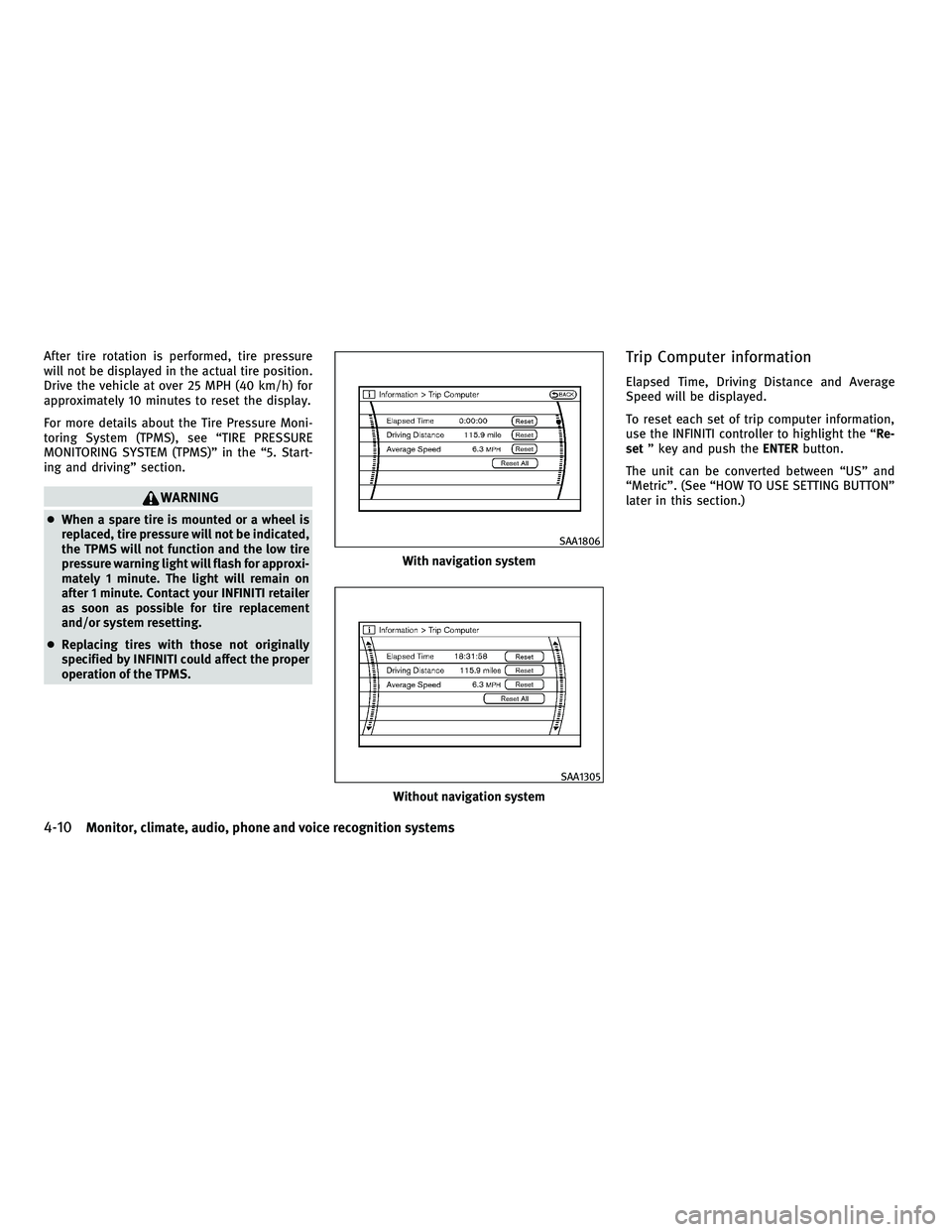
Trip Computer information
Elapsed Time, Driving Distance and Average
Speed will be displayed.
To reset each set of trip computer information,
use the INFINITI controller to highlight the ª Re-
set º key and push the ENTERbutton.
The unit can be converted between ªUSº and
ªMetricº. (See ªHOW TO USE SETTING BUTTONº
later in this section.)
With navigation system
SAA1806
Without navigation system
SAA1305
4-10Monitor, climate, audio, phone and voice recognition systems
wÐ
Ð
05/14/09Ðpattie
X
Page 177 of 445

WARNING DISPLAY
The warning display will appear when one of the
following conditions occurs while driving at a
speed over 3 MPH (5 km/h).
cAny door is not securely closed. (The corre-
sponding door will be indicated on the dis-
play.)
c The trunk lid is not securely closed.
The warning display will turn off when the
vehicle speed slows down under 3 MPH (5
km/h) even if a door or trunk lid is not securely
closed yet.
Make sure to stop the vehicle and close a door
or trunk lid securely.
SAA1187
SAA1188
With navigation system
SAA1804
Without navigation system
SAA1514
4-14Monitor, climate, audio, phone and voice recognition systems
wÐ
Ð
05/14/09Ðpattie
X
Page 185 of 445
HOW TO USE DISC BUTTON (for
models without navigation system)
Push theDISCbutton to play the Compact Disc
(CD). See ªAUDIO SYSTEMº later in this section. When the selector lever is shifted into the R
(Reverse) position, the monitor display shows
the view to the rear of the vehicle.
The system is designed as an aid to the driver in
detecting large stationary objects to help avoid
damaging the vehicle. The system will not de-
tect small objects below the bumper and may
not detect objects close to the bumper or on the
ground.
WARNING
c
The rear view camera is a convenience but it
is not a substitute for proper backing up.
Always turn and check that it is safe to do so
before backing up. Always back up slowly.
c Objects viewed in the RearView Monitor dif-
fer from actual distance because a wide-
angle lens is used. Objects in the RearView
Monitor will appear visually opposite like
ones viewed in the inside and outside
mirrors.
c Make sure that the trunk is securely closed
when backing up.
c Underneath the bumper and the corner areas
of the bumper cannot be viewed on the Rear-
View Monitor because of its monitoring
range limitation. c
Do not put anything on the rear view camera.
The rear view camera is installed above the
license plate.
c When washing the vehicle with high-
pressure water, be sure not to spray it
around the camera. Otherwise, water may
enter the camera unit causing water conden-
sation on the lens, a malfunction, fire or an
electric shock.
c Do not strike the camera. It is a precision
instrument. Otherwise, it may malfunction
or cause damage resulting in a fire or an
electric shock.
CAUTION
There is a plastic cover over the camera. Do not
scratch the cover when cleaning dirt or snow
from the cover.
REARVIEW MONITOR (if so equipped)
4-22Monitor, climate, audio, phone and voice recognition systems
wÐ
Ð
05/14/09Ðpattie
X
Page 186 of 445
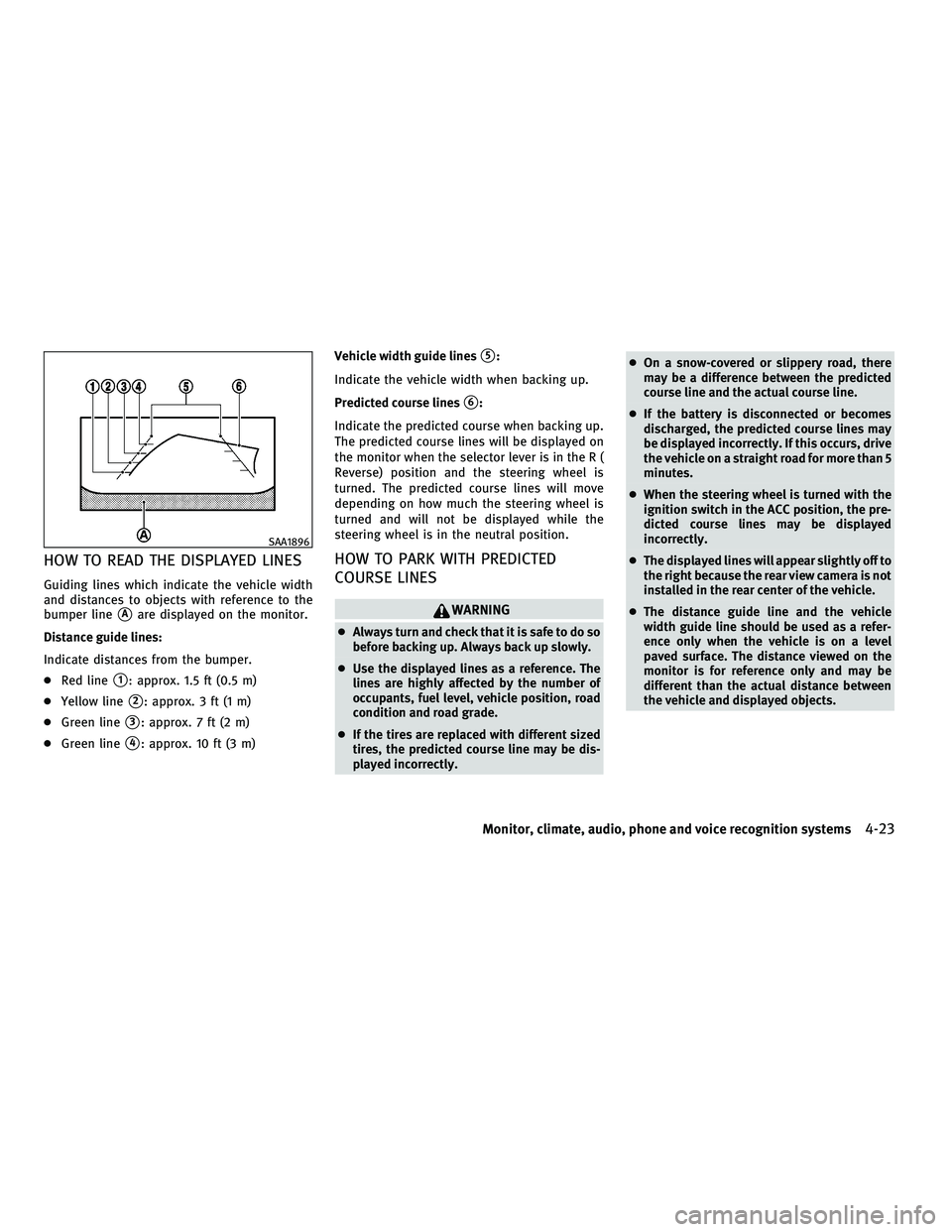
HOW TO READ THE DISPLAYED LINES
Guiding lines which indicate the vehicle width
and distances to objects with reference to the
bumper line
sAare displayed on the monitor.
Distance guide lines:
Indicate distances from the bumper.
c Red line
s1: approx. 1.5 ft (0.5 m)
c Yellow line
s2: approx. 3 ft (1 m)
c Green line
s3: approx. 7 ft (2 m)
c Green line
s4: approx. 10 ft (3 m) Vehicle width guide lines
s5:
Indicate the vehicle width when backing up.
Predicted course lines
s6:
Indicate the predicted course when backing up.
The predicted course lines will be displayed on
the monitor when the selector lever is in the R (
Reverse) position and the steering wheel is
turned. The predicted course lines will move
depending on how much the steering wheel is
turned and will not be displayed while the
steering wheel is in the neutral position.
HOW TO PARK WITH PREDICTED
COURSE LINES
WARNING
c Always turn and check that it is safe to do so
before backing up. Always back up slowly.
c Use the displayed lines as a reference. The
lines are highly affected by the number of
occupants, fuel level, vehicle position, road
condition and road grade.
c If the tires are replaced with different sized
tires, the predicted course line may be dis-
played incorrectly. c
On a snow-covered or slippery road, there
may be a difference between the predicted
course line and the actual course line.
c If the battery is disconnected or becomes
discharged, the predicted course lines may
be displayed incorrectly. If this occurs, drive
the vehicle on a straight road for more than 5
minutes.
c When the steering wheel is turned with the
ignition switch in the ACC position, the pre-
dicted course lines may be displayed
incorrectly.
c The displayed lines will appear slightly off to
the right because the rear view camera is not
installed in the rear center of the vehicle.
c The distance guide line and the vehicle
width guide line should be used as a refer-
ence only when the vehicle is on a level
paved surface. The distance viewed on the
monitor is for reference only and may be
different than the actual distance between
the vehicle and displayed objects.
SAA1896
Monitor, climate, audio, phone and voice recognition systems4-23
wÐ
Ð
05/14/09Ðpattie
X
Page 192 of 445

WARNING
cThe air conditioner cooling function oper-
ates only when the engine is running.
c Do not leave children or adults who would
normally require the support of others alone
in your vehicle. Pets should not be left alone
either. On hot, sunny days, temperatures in
a closed vehicle could quickly become high
enough to cause severe or possibly fatal in-
juries to people or animals.
c Do not use the recirculation mode for long
periods as it may cause the interior air to
become stale and the windows to fog up.
Start the engine and operate the automatic
climate control system.
When the ªSTATUSº button is pushed, the
automatic climate control status screen will
appear. (See ªHOW TO USE STATUS BUTTONº
earlier in this section.) You can individually set the driver and front
passenger side temperature and air flow using
each temperature control button and manual air
flow control button. (DUAL mode)
SAA1817
AUTOMATIC CLIMATE CONTROL
Monitor, climate, audio, phone and voice recognition systems4-29
wÐ
Ð
05/14/09Ðpattie
X
Page 196 of 445
REAR SWITCHES FOR CLIMATE
CONTROL (if so equipped)
The rear seat passengers can adjust the climate
control system using the climate controls in the
rear armrest panel.
ªAUTOº button: automatic climate control
mode on
ª
º button: Fan speed control up (Max fan
speed !return to Low fan speed)
ª
º button: Temperature control up/down
OPERATING TIPS
When the engine coolant temperature and out-
side air temperature are low, the air flow from
the foot outlets may not operate for a maximum
of 150 seconds. This is not a malfunction. After
the coolant temperature warms up, air will flow
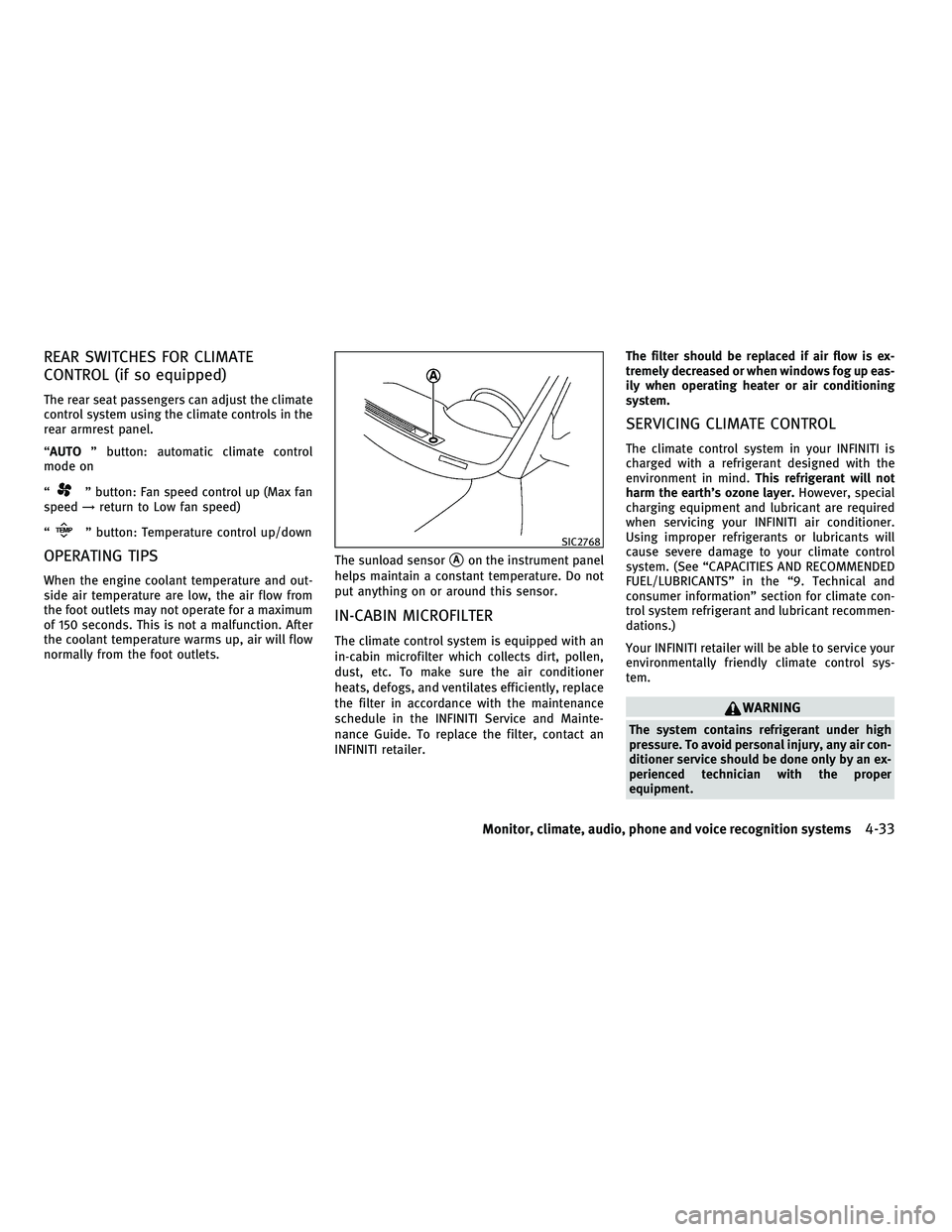
normally from the foot outlets. The sunload sensor
sAon the instrument panel
helps maintain a constant temperature. Do not
put anything on or around this sensor.
IN-CABIN MICROFILTER
The climate control system is equipped with an
in-cabin microfilter which collects dirt, pollen,
dust, etc. To make sure the air conditioner
heats, defogs, and ventilates efficiently, replace
the filter in accordance with the maintenance
schedule in the INFINITI Service and Mainte-
nance Guide. To replace the filter, contact an
INFINITI retailer. The filter should be replaced if air flow is ex-
tremely decreased or when windows fog up eas-
ily when operating heater or air conditioning
system.
SERVICING CLIMATE CONTROL
The climate control system in your INFINITI is
charged with a refrigerant designed with the
environment in mind.
This refrigerant will not
harm the earth's ozone layer. However, special
charging equipment and lubricant are required
when servicing your INFINITI air conditioner.
Using improper refrigerants or lubricants will
cause severe damage to your climate control
system. (See ªCAPACITIES AND RECOMMENDED
FUEL/LUBRICANTSº in the ª9. Technical and
consumer informationº section for climate con-
trol system refrigerant and lubricant recommen-
dations.)
Your INFINITI retailer will be able to service your
environmentally friendly climate control sys-
tem.
WARNING
The system contains refrigerant under high
pressure. To avoid personal injury, any air con-
ditioner service should be done only by an ex-
perienced technician with the proper
equipment.
SIC2768
Monitor, climate, audio, phone and voice recognition systems4-33
wÐ
Ð
05/14/09Ðpattie
X
Page 225 of 445
This vehicle is equipped with the mobile enter-
tainment system, which enables you to play a
Digital Versatile Disc (DVD), providing the im-
ages and sounds both in the front and rear
display screens.
WARNING
cThe driver must not attempt to operate or
view the Mobile Entertainment System
(MES) while the vehicle is in motion so that
full attention may be given to vehicle
operation.
c Do not attempt to modify the system to dis-
play a movie on the front screen while the
vehicle is being driven. Doing so may dis-
tract the driver and may cause a collision and
serious personal injury or death.
CAUTION
cThe glass screen on the liquid crystal display
may break if hit with a hard or sharp object. If
the glass breaks, do not touch the liquid
crystalline material, which contains a small
amount of mercury. In case of contact with
skin, wash immediately with soap and
water. c
Use a damp, soft cloth when cleaning the
Mobile Entertainment System components.
Do not use solvents or cleaning solutions.
c Do not attempt to use the system in extreme
temperature conditions [below 24ÉF
(220ÉC) or above 158ÉF (70ÉC)].
c To avoid discharging the vehicle battery, do
not operate the system more than 15 min-
utes without starting the engine.
Movies will not be shown on the front display
while the vehicle is in any drive position to
reduce driver distraction. Audio is available
when a movie is played. To view movies in the
front display, stop the vehicle in a safe location,
move the selector lever to the P (Park) position
and apply the parking brake.
DIGITAL VERSATILE DISC (DVD)
SYSTEM COMPONENTS
DVD drive
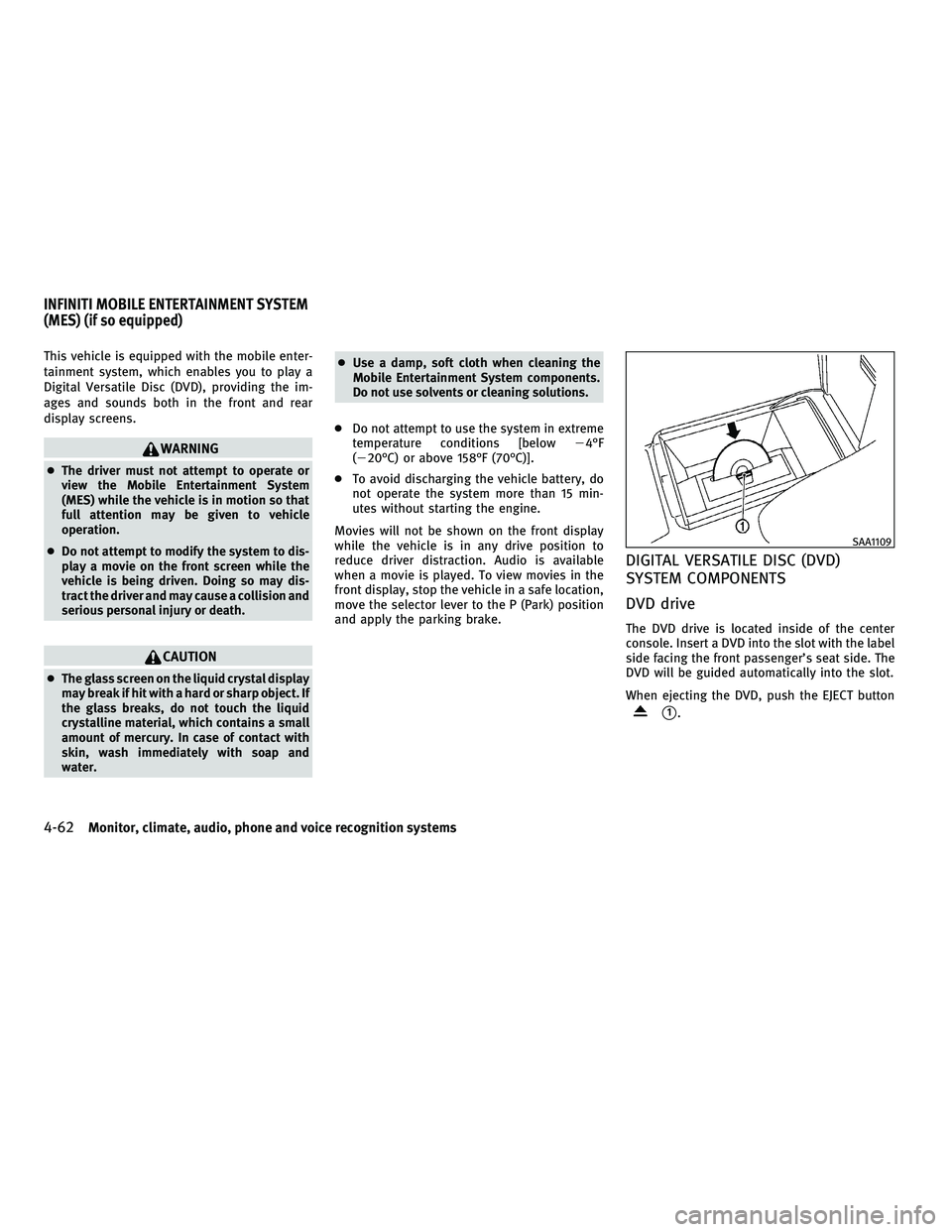
The DVD drive is located inside of the center
console. Insert a DVD into the slot with the label
side facing the front passenger's seat side. The
DVD will be guided automatically into the slot.
When ejecting the DVD, push the EJECT button
s1.
SAA1109
INFINITI MOBILE ENTERTAINMENT SYSTEM
(MES) (if so equipped)
4-62Monitor, climate, audio, phone and voice recognition systems
wÐ
Ð
05/14/09Ðpattie
X
Page 226 of 445
CAUTION
cDo not force a DVD into the slot. This could
cause damage the player.
c Do not use 8 cm (3.1 in) discs.
Displays
WARNING
Park the vehicle in a safe location and apply the
parking brake to view the images on the front
center display screen using the DVD drive or
other devices connected to the auxiliary input
jacks.
CAUTION
cThe glass screen on the liquid crystal display
may break if hit with a hard or sharp object. If
the glass breaks, do not touch the liquid
crystalline material, which contains a small
amount of mercury. In case of contact with
skin, wash immediately with soap and
water.
c Use soft, damp cloth when cleaning the Mo-
bile Entertainment System components. Do
not use solvents or cleaning solutions.
c Be sure to stow the rear display when it is not
used. Use the remote controller to operate the motor-
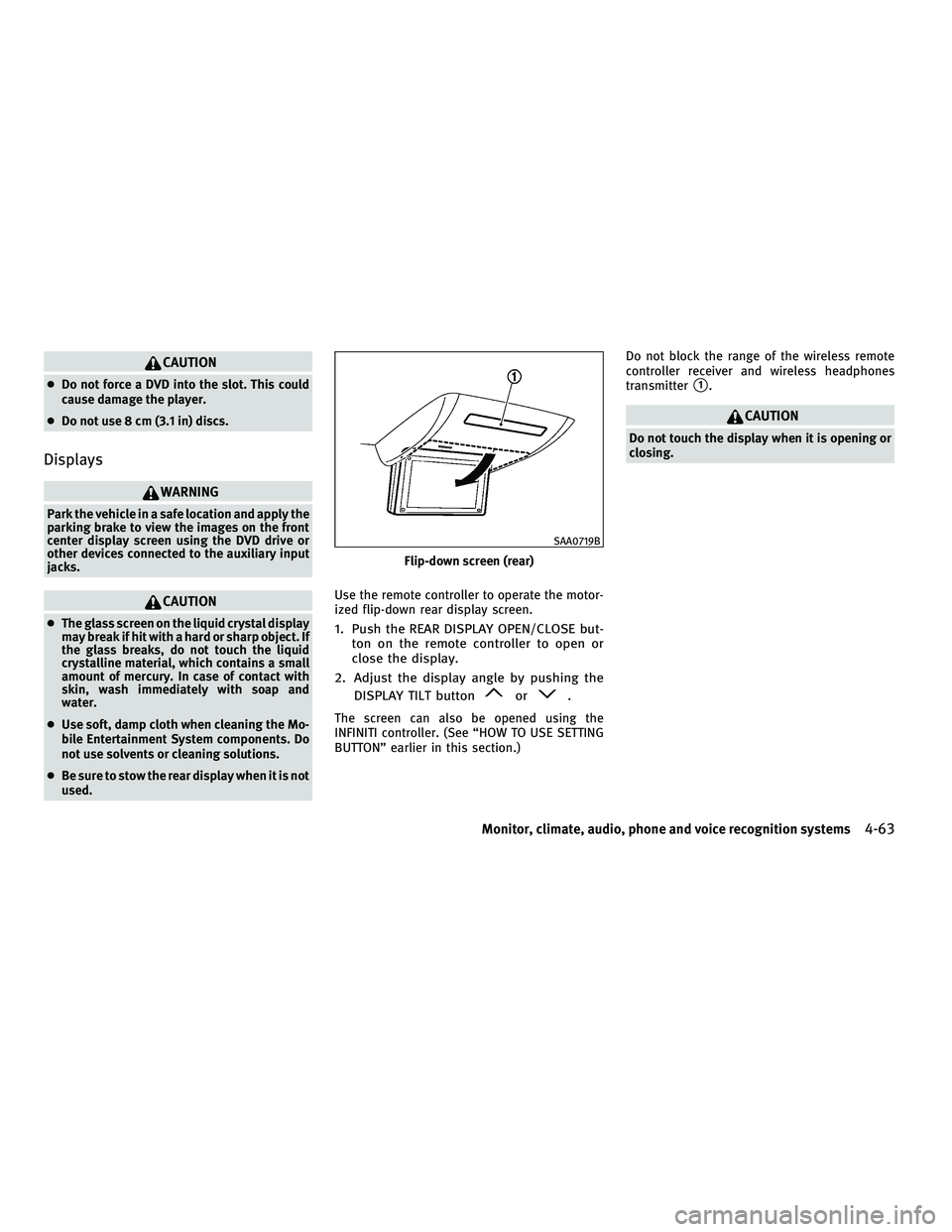
ized flip-down rear display screen.1. Push the REAR DISPLAY OPEN/CLOSE but-
ton on the remote controller to open or
close the display.
2. Adjust the display angle by pushing the DISPLAY TILT button
or.
The screen can also be opened using the
INFINITI controller. (See ªHOW TO USE SETTING
BUTTONº earlier in this section.) Do not block the range of the wireless remote
controller receiver and wireless headphones
transmitter
s1.
CAUTION
Do not touch the display when it is opening or
closing.
Flip-down screen (rear)
SAA0719B
Monitor, climate, audio, phone and voice recognition systems4-63
wÐ
Ð
05/14/09Ðpattie
X
Page 229 of 445
Remote controller and headphones
battery replacement
Replace the battery as follows:
1. Open the lid.
2. Replace both batteries with new ones.
cSize AA (remote control)
c Size AAA (headphones)
c Make sure that the %and @ends on the
batteries match the markings inside the
compartment.
3. Close the lid securely.
If the battery is removed for any reason other
than replacement, close the lid securely.
c If you will not be using the remote control
for long periods of time, remove the bat-
teries.
c Replacement of the batteries is needed
when the remote control only functions at
extremely close distances to the MES or
not at all.
c Be careful not to touch the battery termi-
nal.
c An improperly disposed battery can harm
the environment. Always confirm local
regulations for battery disposal. c
When changing batteries, do not let dust
or oil get on the remote control and
headphones.
FCC Notice :
Changes or modifications not expressly ap-
proved by the party responsible for compliance
could void the user's authority to operate the
equipment.
This device complies with Part 15 of the FCC
Rules and RSS-210 of Industry Canada. Opera-
tion is subject to the following two conditions:
(1) This device may not cause harmful interfer-
ence, and (2) this device must accept any inter-
ference received, including interference that
may cause undesired operation of the device.
BEFORE OPERATING THE DVD MOBILE
ENTERTAINMENT SYSTEM
Precautions
Start the engine when using the DVD entertain-
ment system.
WARNING
The driver must not attempt to operate the DVD
system or wear the headphones while the ve-
hicle is in motion so that full attention may be
given to vehicle operation.
CAUTION
c Only operate the DVD while the vehicle en-
gine is running. Operating the DVD for ex-
tended periods of time with the engine OFF
can discharge the vehicle battery.
c Do not allow the system to get wet. Exces-
sive moisture such as spilled liquids may
cause the system to malfunction.
c While playing VIDEO-CD media, this DVD
player does not guarantee complete func-
tionality of all VIDEO-CD formats.
Copyright and trademark
c The technology protected by the U.S. patent
and other intellectual property rights owned
by Macrovision Corporation and other right
holders is adopted for this system.
c This copyright protected technology cannot
be used without a permit from Macrovision
Corporation. It is limited to be personal use,
etc., as long as the permit from Macrovision
Corporation is not issued.
c Modifying or disassembling is prohibited.
c Dolby digital is manufactured under license
from Dolby Laboratories, Inc.
4-66Monitor, climate, audio, phone and voice recognition systems
wÐ
Ð
05/15/09Ðpattie
X
Page 236 of 445
How to handle the DVD
CAUTION
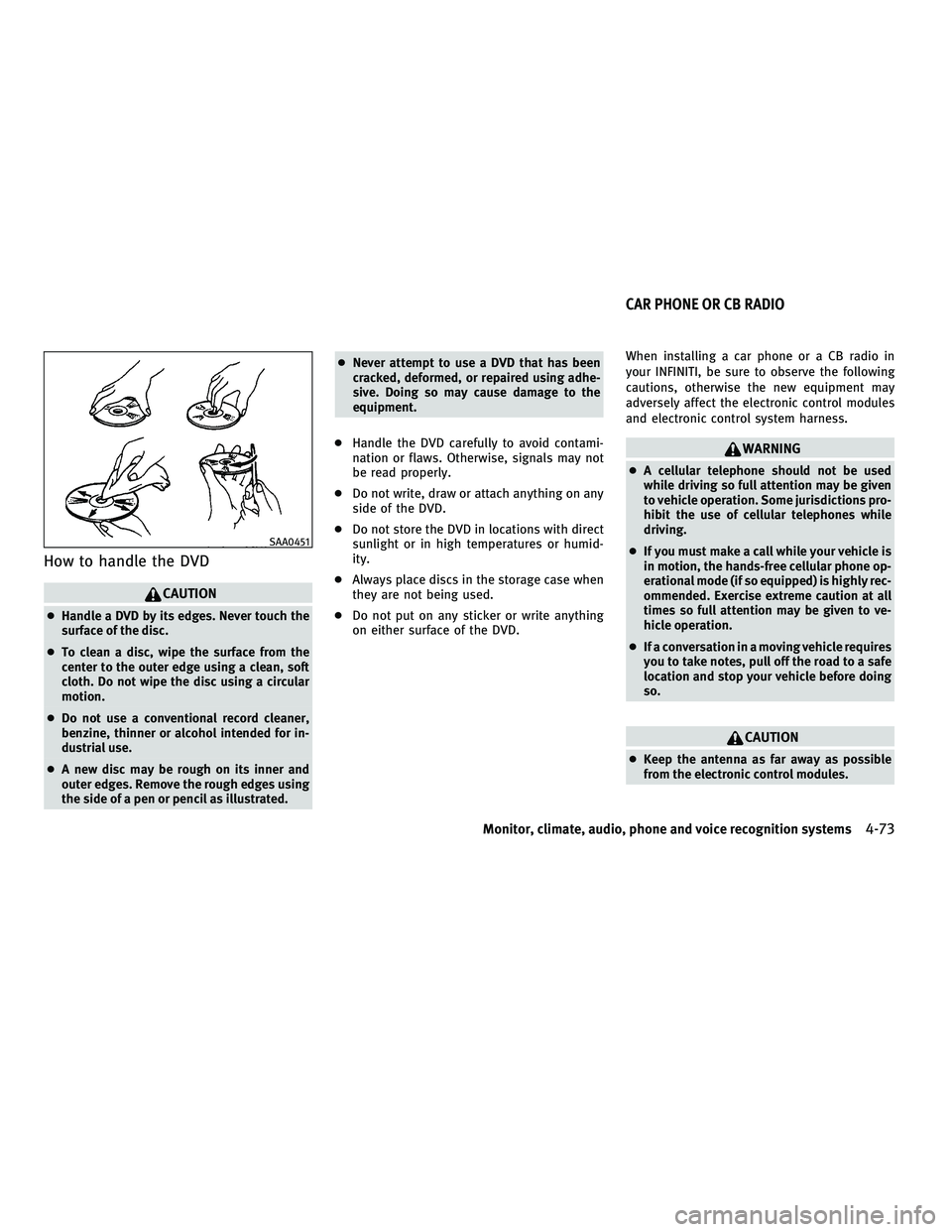
cHandle a DVD by its edges. Never touch the
surface of the disc.
c To clean a disc, wipe the surface from the
center to the outer edge using a clean, soft
cloth. Do not wipe the disc using a circular
motion.
c Do not use a conventional record cleaner,
benzine, thinner or alcohol intended for in-
dustrial use.
c A new disc may be rough on its inner and
outer edges. Remove the rough edges using
the side of a pen or pencil as illustrated. c
Never attempt to use a DVD that has been
cracked, deformed, or repaired using adhe-
sive. Doing so may cause damage to the
equipment.
c Handle the DVD carefully to avoid contami-
nation or flaws. Otherwise, signals may not
be read properly.
c Do not write, draw or attach anything on any
side of the DVD.
c Do not store the DVD in locations with direct
sunlight or in high temperatures or humid-
ity.
c Always place discs in the storage case when
they are not being used.
c Do not put on any sticker or write anything
on either surface of the DVD. When installing a car phone or a CB radio in
your INFINITI, be sure to observe the following
cautions, otherwise the new equipment may
adversely affect the electronic control modules
and electronic control system harness.
WARNING
c
A cellular telephone should not be used
while driving so full attention may be given
to vehicle operation. Some jurisdictions pro-
hibit the use of cellular telephones while
driving.
c If you must make a call while your vehicle is
in motion, the hands-free cellular phone op-
erational mode (if so equipped) is highly rec-
ommended. Exercise extreme caution at all
times so full attention may be given to ve-
hicle operation.
c If a conversation in a moving vehicle requires
you to take notes, pull off the road to a safe
location and stop your vehicle before doing
so.
CAUTION
cKeep the antenna as far away as possible
from the electronic control modules.
SAA0451
CAR PHONE OR CB RADIO
Monitor, climate, audio, phone and voice recognition systems4-73
wÐ
Ð
05/14/09Ðpattie
X