pairing phone INFINITI M 2010 Owners Manual
[x] Cancel search | Manufacturer: INFINITI, Model Year: 2010, Model line: M, Model: INFINITI M 2010Pages: 445, PDF Size: 6.15 MB
Page 163 of 445
FM-AM-SAT radio with Compact Disc (CD)
player/changer................................ 4-43
CompactFlash (CF) player operation
(if so equipped) ............................... 4-47
iPodT player operation (if so equipped) .........4-48
Music box hard-disk drive audio system
(models with navigation system) ................4-50
CD/CF (CompactFlash) care and cleaning ........4-57
Steering-wheel-mounted controls for audio ......4-58
Rear control switches for audio
(if so equipped) ............................... 4-60
Antenna ...................................... 4-61
Auxiliary input jacks ........................... 4-61
INFINITI Mobile Entertainment System (MES)
(if so equipped) .................................. 4-62
Digital Versatile Disc (DVD) system
components .................................. 4-62
Before operating the DVD mobile
entertainment system .......................... 4-66
Playing a DVD ................................. 4-68
Care and maintenance ......................... 4-72
Car phone or CB radio ............................ 4-73BluetoothT
Hands-Free Phone System with
navigation system ................................ 4-74
Regulatory information ......................... 4-75
Voice commands .............................. 4-76
Control buttons ............................... 4-76
Pairing procedure ............................. 4-76
Phonebook registration ........................ 4-77
Making a call ................................. 4-79
Receiving a call ............................... 4-80
During a call .................................. 4-80
Phone setting ................................. 4-81
Troubleshooting guide ......................... 4-83
BluetoothT Hands-Free Phone System without
navigation system ................................ 4-84
Regulatory information ......................... 4-85
Initialization .................................. 4-85
Operating tips ................................ 4-85
Giving voice commands ........................ 4-86
Control buttons ............................... 4-87
Getting started ................................ 4-87
Choosing a language .......................... 4-87
wÐ
Ð
05/19/09Ðtbrooks
X
Page 164 of 445
Pairing procedure............................. 4-87
Making a call by entering a phone number ......4-88
Receiving a call ............................... 4-88
List of voice commands ........................ 4-89
Call .......................................... 4-89
During a call .................................. 4-90
Phonebook ................................... 4-91
Memo pad .................................... 4-93
Setup ........................................ 4-93
Speaker Adaptation (SA) mode .................4-95Troubleshooting guide
......................... 4-97
INFINITI Voice Recognition system
(models with navigation system) ...................4-98
INFINITI Voice Recognition standard mode .......4-98
Using the system ............................. 4-101
INFINITI Voice Recognition alternate
command mode .............................. 4-109
Using the system .............................. 4-116
Troubleshooting guide ........................ 4-120
wÐ
Ð
05/19/09Ðtbrooks
X
Page 238 of 445
cYou will not be able to use a hands-free
phone under the following conditions:
± Your vehicle is outside of the telephone service area.
± Your vehicle is in an area where it is difficult to receive radio waves; such as in
a tunnel, in an underground parking ga-
rage, behind a tall building or in a moun-
tainous area.
± Your cellular phone is locked in order not to be dialed.
c
When the radio wave condition is not ideal or
ambient sound is too loud, it may be difficult
to hear the other person's voice during a call.
cImmediately after the ignition switch is pushed
to the ON position, it may be impossible to
receive a call for a short period of time.
c Do not place the cellular phone in an area
surrounded by metal or far away from the
in-vehicle phone module to prevent tone
quality degradation and wireless connection
disruption.
c While a cellular phone is connected through
the BluetoothT wireless connection, the bat-
tery power of the cellular phone may dis-
charge quicker than usual.
c If the Bluetooth THands-Free Phone System
seems to be malfunctioning, please visit www.InfinitiUSA.com/bluetooth for trouble-
shooting help.
c Some cellular phones or other devices may
cause interference or a buzzing noise to
come from the audio system speakers. Stor-
ing the device in a different location may
reduce or eliminate the noise.
c Refer to the cellular phone Owner's Manual
regarding the telephone pairing procedure
specific to your phone, battery charging,
cellular phone antenna, etc.
c The antenna display on the monitor will not
coincide with the antenna display of some
cellular phones.
c Keep the interior of the vehicle as quiet as
possible to hear the caller's voice clearly as
well as to minimize its echoes.
c If reception between callers is unclear, ad-
justing the incoming or outgoing call volume
may improve the clarity.
REGULATORY INFORMATION
FCC Regulatory information
± CAUTION: To maintain compliance with FCC's
RF exposure guidelines, use only the sup-
plied antenna. Unauthorized antenna, modi-
fication, or attachments could damage the
transmitter and may violate FCC regulations. ± Operation is subject to the following two
conditions:
1. this device may not cause interference and
2. this device must accept any interference, including interference that may cause
undesired operation of the device
IC Regulatory information
± Operation is subject to the following twoconditions: (1) this device may not cause
interference, and (2) this device must accept
any interference, including interference that
may cause undesired operation of the device.
± This Class B digital apparatus meets all requirements of the Canadian Interference-
Causing Equipment Regulations.
Bluetooth trademark:
BLUETOOTHT is a trade-
mark owned by Bluetooth
SIG, Inc., U.S.A.
Monitor, climate, audio, phone and voice recognition systems4-75
wÐ
Ð
05/19/09Ðtbrooks
X
Page 239 of 445
VOICE COMMANDS
You can use voice commands to operate various
BluetoothTHands-Free Phone System features
using the INFINITI Voice Recognition system.
For more details, see ªINFINITI VOICE RECOGNI-
TION SYSTEM (models with navigation system)º
later in this section; page 4-98.
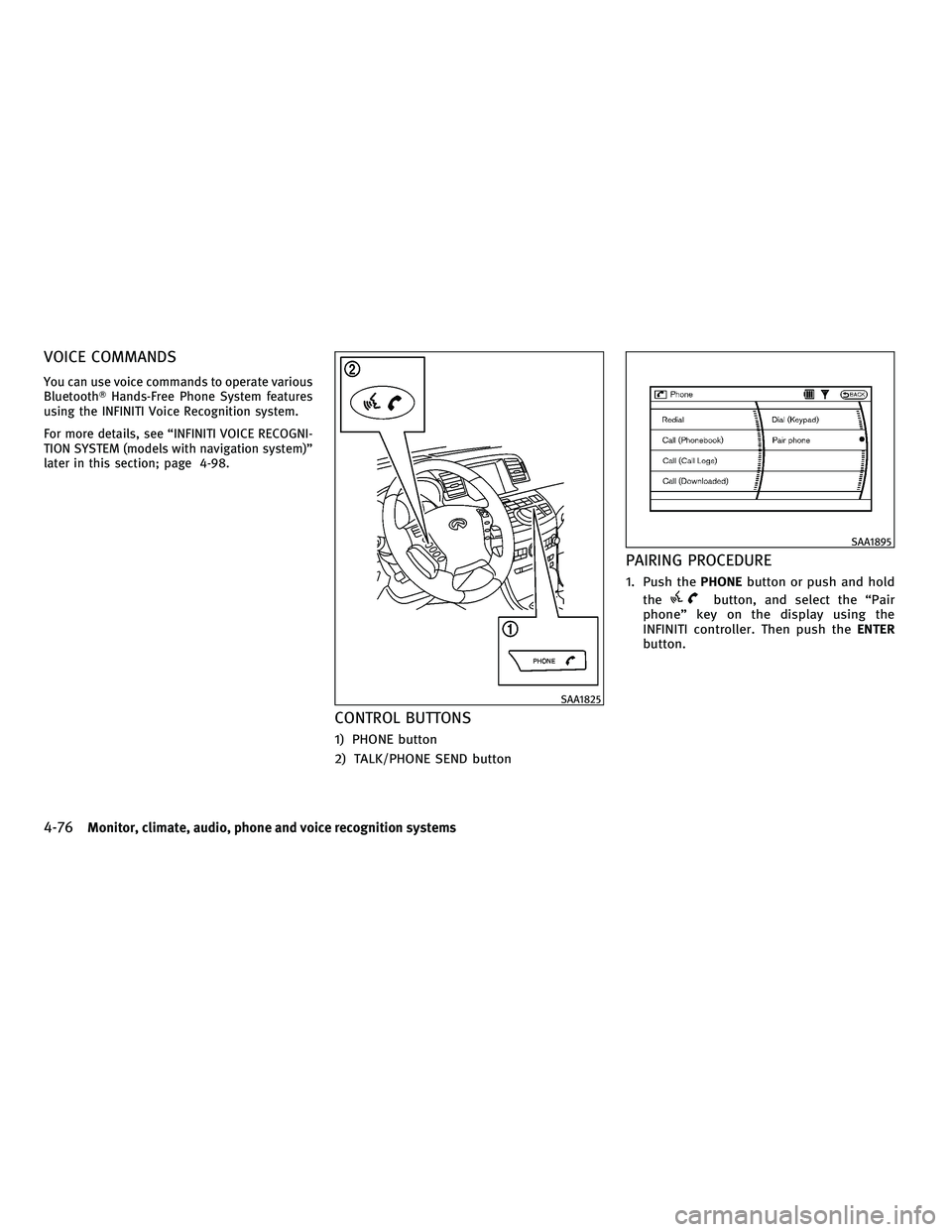
CONTROL BUTTONS
1) PHONE button
2) TALK/PHONE SEND button
PAIRING PROCEDURE
1. Push the PHONEbutton or push and hold
the
button, and select the ªPair
phoneº key on the display using the
INFINITI controller. Then push the ENTER
button.
SAA1825
SAA1895
4-76Monitor, climate, audio, phone and voice recognition systems
wÐ
Ð
05/14/09Ðpattie
X
Page 240 of 445
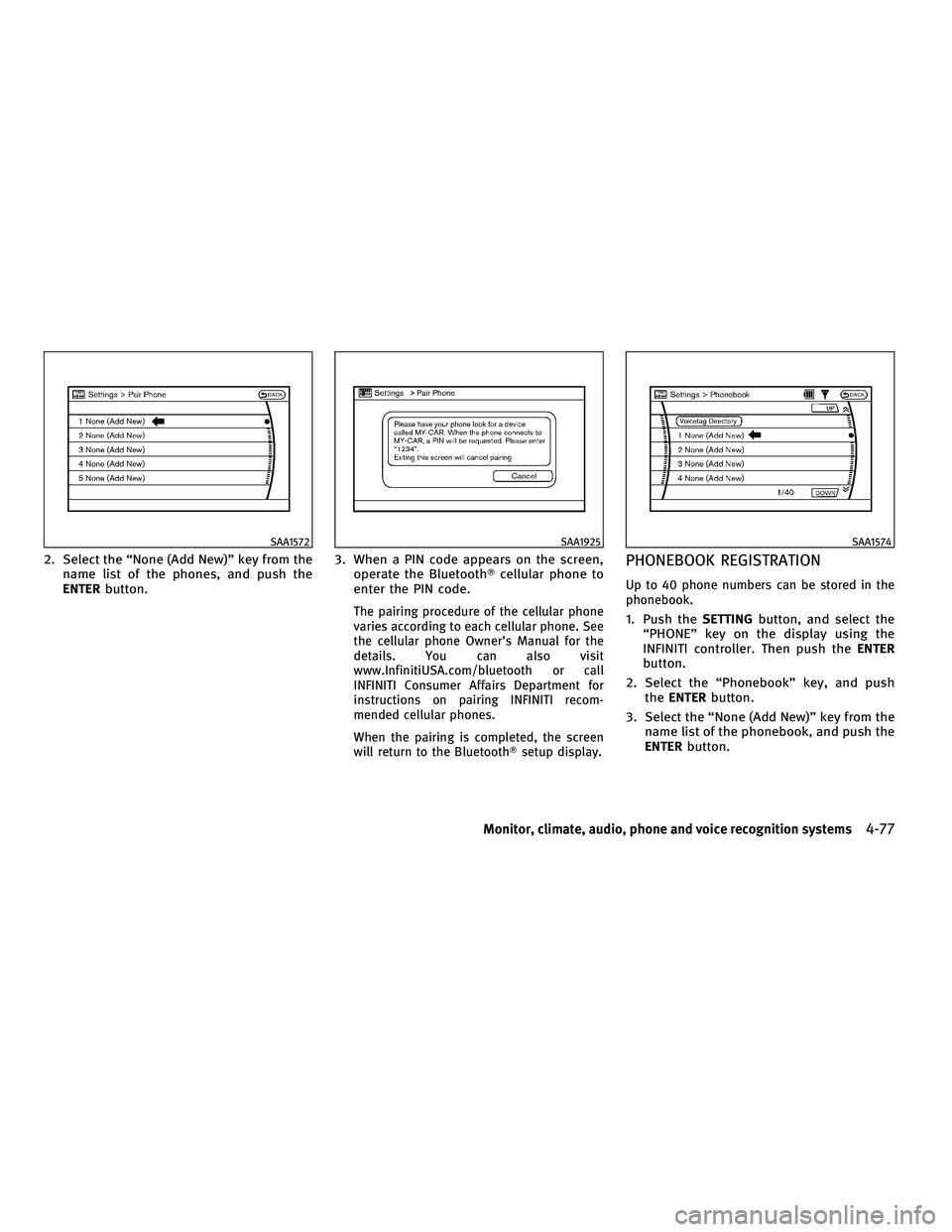
2. Select the ªNone (Add New)º key from thename list of the phones, and push the
ENTER button. 3. When a PIN code appears on the screen,
operate the Bluetooth Tcellular phone to
enter the PIN code.
The pairing procedure of the cellular phone
varies according to each cellular phone. See
the cellular phone Owner's Manual for the
details. You can also visit
www.InfinitiUSA.com/bluetooth or call
INFINITI Consumer Affairs Department for
instructions on pairing INFINITI recom-
mended cellular phones.
When the pairing is completed, the screen
will return to the BluetoothT setup display.
PHONEBOOK REGISTRATION
Up to 40 phone numbers can be stored in the
phonebook.
1. Push theSETTINGbutton, and select the
ªPHONEº key on the display using the
INFINITI controller. Then push the ENTER
button.
2. Select the ªPhonebookº key, and push the ENTER button.
3. Select the ªNone (Add New)º key from the name list of the phonebook, and push the
ENTER button.
SAA1572SAA1925SAA1574
Monitor, climate, audio, phone and voice recognition systems4-77
wÐ
Ð
05/14/09Ðpattie
X
Page 245 of 445
cDelete an Entry of Downloaded Phonebook
Delete an entry from the downloaded phone-
book.
Automatic Hold
If this item is turned on, an incoming call will be
placed on hold automatically after several
rings.
Use Vehicle Ringtone
If this item is turned on, a specific ringtone that
is different from the cellular phone's will sound
when receiving a call.
Delete Call Logs
Delete all of the incoming or outgoing call logs
from the list.
Bluetooth Setup
See the following information for each item.
cBluetooth
If this setting is turned off, the connection
between the cellular phone and the in-
vehicle phone module will be canceled.
c Bluetooth Info
Check information about the device name,
device PIN and connection status. c
Pair Phone
See ªPAIRING PROCEDUREº later in this sec-
tion.
c Priority Change
Use this command to change the priority
level of the active phone.
The priority level determines which phone
will be connected to the system when more
than one paired BluetoothT phone is in the
vehicle.
The system states the priority level of the
active phone and asks for a new priority
level (1, 2, 3, 4, 5).
If the new priority level is already being used
for another phone, the two phones will swap
priority levels.
For example, if the current priority levels are:
Priority Level 1 = Phone A
Priority Level 2 = Phone B
Priority Level 3 = Phone C
and you change the priority level of Phone C
to Level 1, then:
Priority Level 1 = Phone C
Priority Level 2 = Phone B
Priority Level 3 = Phone A c
Remove Paired Phone
Delete a registered cellular phone from the
paired list.
c Paired Phone List
Up to 5 registered cellular phones are shown
on the list. If you select a cellular phone that
is different from the one currently being
connected, the newly selected phone will be
connected to the system.
c Edit Phone Name
Rename the registered cellular phones using
the keypad displayed on the screen. (See
ªHOW TO USE TOUCH SCREEN (models with
navigation system)º earlier in this section.)
4-82Monitor, climate, audio, phone and voice recognition systems
wÐ
Ð
05/14/09Ðpattie
X
Page 248 of 445
cSome cellular phones or other devices may
cause interference or a buzzing noise to
come from the audio system speakers. Stor-
ing the device in a different location may
reduce or eliminate the noise.
c Refer to the cellular phone Owner's Manual
regarding the telephone pairing procedure
specific to your phone, battery charging,
cellular phone antenna, etc.
c The antenna display on the monitor will not
coincide with the antenna display of some
cellular phones.
c Keep the interior of the vehicle as quiet as
possible to hear the caller's voice clearly as
well as to minimize its echoes.
c If reception between callers is unclear, ad-
justing the incoming or outgoing call volume
may improve the clarity.
REGULATORY INFORMATION
FCC Regulatory information
± CAUTION: To maintain compliance with FCC's
RF exposure guidelines, use only the sup-
plied antenna. Unauthorized antenna, modi-
fication, or attachments could damage the
transmitter and may violate FCC regulations. ± Operation is subject to the following two
conditions:
1. this device may not cause interference and
2. this device must accept any interference, including interference that may cause
undesired operation of the device
IC Regulatory information
± Operation is subject to the following twoconditions: (1) this device may not cause
interference, and (2) this device must accept
any interference, including interference that
may cause undesired operation of the device.
± This Class B digital apparatus meets all requirements of the Canadian Interference-
Causing Equipment Regulations.
Bluetooth trademark:
BLUETOOTHT is a trade-
mark owned by Bluetooth
SIG, Inc., U.S.A.
INITIALIZATION
When the ignition switch is pushed to the ON
position, INFINITI Voice Recognition is initial-
ized, which takes a few seconds. If the
button is pushed before the initialization com-
pletes, the system will announce ªHands-free
phone system not readyº and will not react to
voice commands.
OPERATING TIPS
To get the best performance out of the INFINITI
Voice Recognition system, observe the follow-
ing:
c Keep the interior of the vehicle as quiet as
possible. Close the windows to eliminate
surrounding noises (traffic noises, vibration
sounds, etc.), which may prevent the system
from recognizing voice commands correctly.
c Wait until the tone sounds before speaking a
command. Otherwise, the command will not
be received properly.
c Start speaking a command within 5 seconds
after the tone sounds.
c Speak in a natural voice without pausing
between words.
Monitor, climate, audio, phone and voice recognition systems4-85
wÐ
Ð
05/19/09Ðtbrooks
X
Page 250 of 445
CONTROL BUTTONS
The control buttons for the BluetoothTHands-
Free Phone System are located on the steering
wheel.
TALK/PHONE SEND
Push the
button to initiate a VR ses-
sion or answer an incoming call.
You can also use the
button to skip
through system feedback and to enter com-
mands during a call. (See ªLIST OF VOICE
COMMANDSº later in this section and ªDUR-
ING A CALLº later in this section for more
information.)
PHONE END
Push the
button to cancel a VR session
or end a call.
GETTING STARTED
The following procedures will help you get
started using the BluetoothT Hands-Free Phone
System with INFINITI Voice Recognition. For
additional command options, see ªLIST OF
VOICE COMMANDSº later in this section.
CHOOSING A LANGUAGE
You can interact with the Bluetooth THands-
Free Phone System using English, French or
Spanish.
See ªHOW TO USE SETTING BUTTONº earlier in
this section to change the language.
PAIRING PROCEDURE
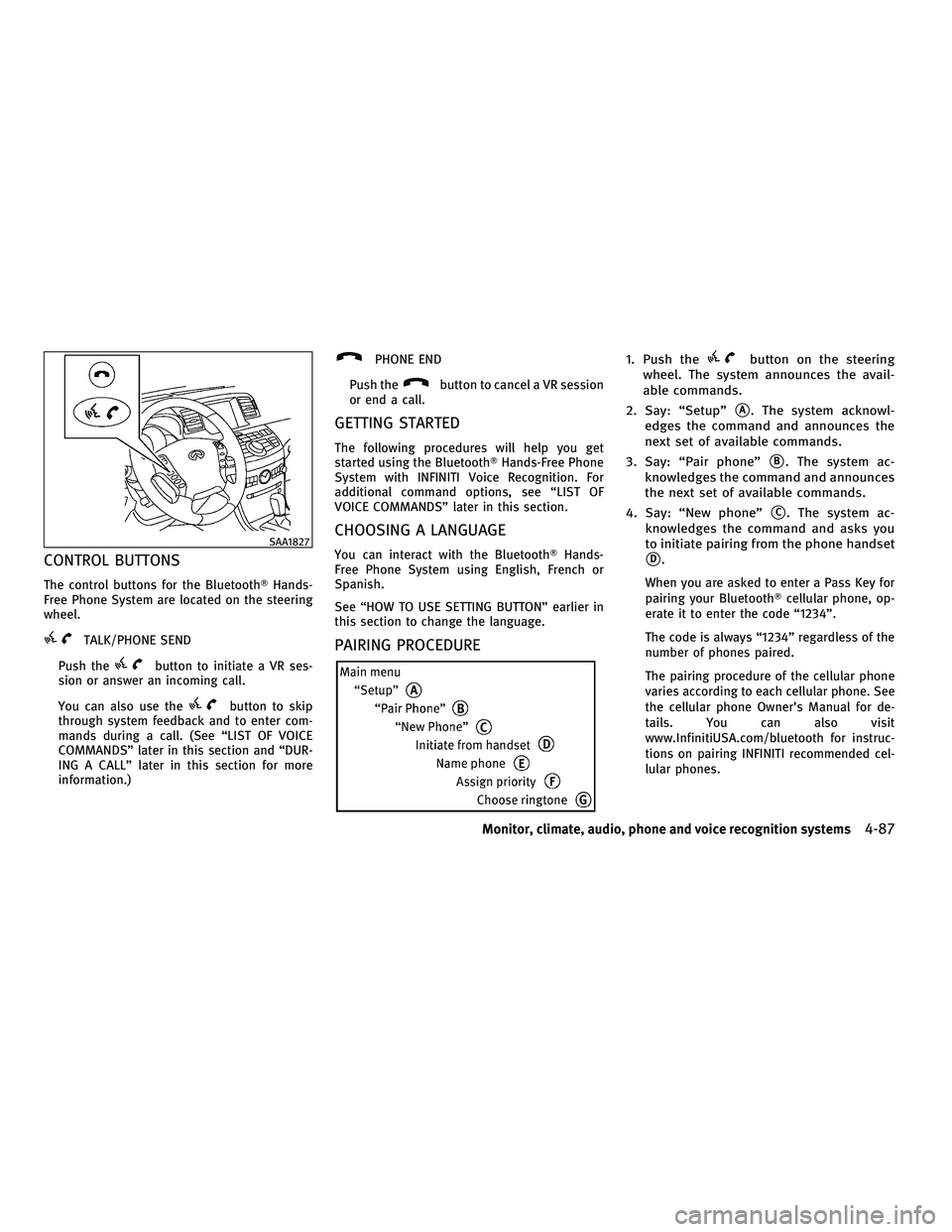
1. Push thebutton on the steering
wheel. The system announces the avail-
able commands.
2. Say: ªSetupº
sA. The system acknowl-
edges the command and announces the
next set of available commands.
3. Say: ªPair phoneº
sB. The system ac-
knowledges the command and announces
the next set of available commands.
4. Say: ªNew phoneº
sC. The system ac-
knowledges the command and asks you
to initiate pairing from the phone handset
sD.
When you are asked to enter a Pass Key for
pairing your Bluetooth Tcellular phone, op-
erate it to enter the code ª1234º.
The code is always ª1234º regardless of the
number of phones paired.
The pairing procedure of the cellular phone
varies according to each cellular phone. See
the cellular phone Owner's Manual for de-
tails. You can also visit
www.InfinitiUSA.com/bluetooth for instruc-
tions on pairing INFINITI recommended cel-
lular phones.
SAA1827
Monitor, climate, audio, phone and voice recognition systems4-87
wÐ
Ð
05/15/09Ðpattie
X
Page 256 of 445
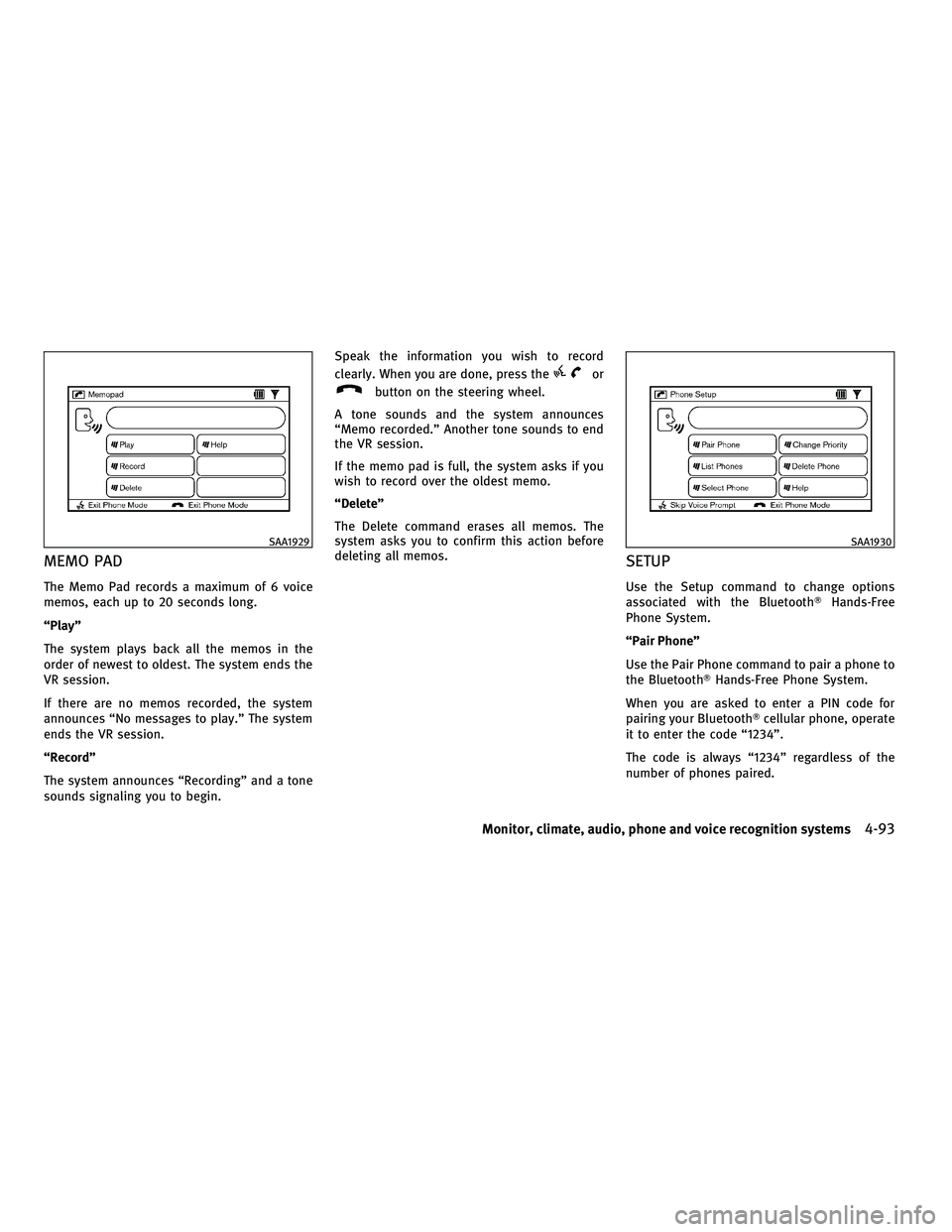
MEMO PAD
The Memo Pad records a maximum of 6 voice
memos, each up to 20 seconds long.
ªPlayº
The system plays back all the memos in the
order of newest to oldest. The system ends the
VR session.
If there are no memos recorded, the system
announces ªNo messages to play.º The system
ends the VR session.
ªRecordº
The system announces ªRecordingº and a tone
sounds signaling you to begin.Speak the information you wish to record
clearly. When you are done, press the
or
button on the steering wheel.
A tone sounds and the system announces
ªMemo recorded.º Another tone sounds to end
the VR session.
If the memo pad is full, the system asks if you
wish to record over the oldest memo.
ªDeleteº
The Delete command erases all memos. The
system asks you to confirm this action before
deleting all memos.
SETUP
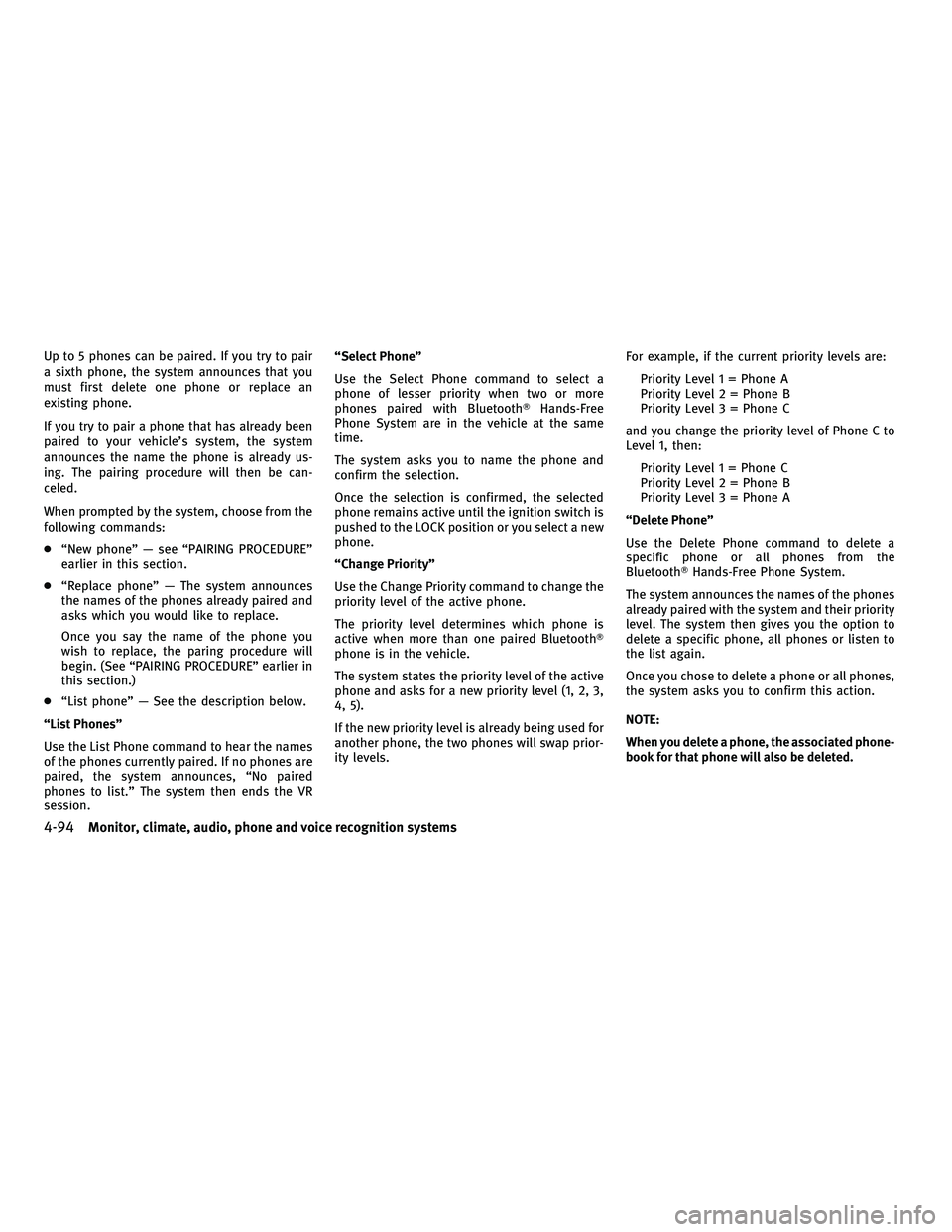
Use the Setup command to change options
associated with the Bluetooth THands-Free
Phone System.
ªPair Phoneº
Use the Pair Phone command to pair a phone to
the BluetoothT Hands-Free Phone System.
When you are asked to enter a PIN code for
pairing your BluetoothT cellular phone, operate
it to enter the code ª1234º.
The code is always ª1234º regardless of the
number of phones paired.
SAA1929SAA1930
Monitor, climate, audio, phone and voice recognition systems4-93
wÐ
Ð
05/14/09Ðpattie
X
Page 257 of 445
Up to 5 phones can be paired. If you try to pair
a sixth phone, the system announces that you
must first delete one phone or replace an
existing phone.
If you try to pair a phone that has already been
paired to your vehicle's system, the system
announces the name the phone is already us-
ing. The pairing procedure will then be can-
celed.
When prompted by the system, choose from the
following commands:
cªNew phoneº Ð see ªPAIRING PROCEDUREº
earlier in this section.
c ªReplace phoneº Ð The system announces
the names of the phones already paired and
asks which you would like to replace.
Once you say the name of the phone you
wish to replace, the paring procedure will
begin. (See ªPAIRING PROCEDUREº earlier in
this section.)
c ªList phoneº Ð See the description below.
ªList Phonesº
Use the List Phone command to hear the names
of the phones currently paired. If no phones are
paired, the system announces, ªNo paired
phones to list.º The system then ends the VR
session. ªSelect Phoneº
Use the Select Phone command to select a
phone of lesser priority when two or more
phones paired with Bluetooth
THands-Free
Phone System are in the vehicle at the same
time.
The system asks you to name the phone and
confirm the selection.
Once the selection is confirmed, the selected
phone remains active until the ignition switch is
pushed to the LOCK position or you select a new
phone.
ªChange Priorityº
Use the Change Priority command to change the
priority level of the active phone.
The priority level determines which phone is
active when more than one paired Bluetooth T
phone is in the vehicle.
The system states the priority level of the active
phone and asks for a new priority level (1, 2, 3,
4, 5).
If the new priority level is already being used for
another phone, the two phones will swap prior-
ity levels. For example, if the current priority levels are:
Priority Level 1 = Phone A
Priority Level 2 = Phone B
Priority Level 3 = Phone C
and you change the priority level of Phone C to
Level 1, then: Priority Level 1 = Phone C
Priority Level 2 = Phone B
Priority Level 3 = Phone A
ªDelete Phoneº
Use the Delete Phone command to delete a
specific phone or all phones from the
BluetoothT Hands-Free Phone System.
The system announces the names of the phones
already paired with the system and their priority
level. The system then gives you the option to
delete a specific phone, all phones or listen to
the list again.
Once you chose to delete a phone or all phones,
the system asks you to confirm this action.
NOTE:
When you delete a phone, the associated phone-
book for that phone will also be deleted.
4-94Monitor, climate, audio, phone and voice recognition systems
wÐ
Ð
05/19/09Ðtbrooks
X