radio antenna INFINITI M 2010 Owners Manual
[x] Cancel search | Manufacturer: INFINITI, Model Year: 2010, Model line: M, Model: INFINITI M 2010Pages: 445, PDF Size: 6.15 MB
Page 11 of 445

1. TrunkÐ Trunk lid (P. 3-17)
Ð Intelligent Key system (P. 3-6)
2. High-mounted stop light Ð Bulb replacement (P. 8-30)
3. Rear window defroster (P. 2-28) 4. Satellite radio antenna (if so equipped)
(P. 4-35)
5. Fuel-filler door Ð Operation (P. 3-20)
Ð Fuel recommendation (P. 9-4) 6. Rear view camera (if so equipped)
(P. 4-22)
7. Back-up lights Ð Bulb replacement (P. 8-30)
8. Rear combination lights Ð Bulb replacement (P. 8-30)
9. Child safety rear door locks (P. 3-6)
SSI0370
EXTERIOR REAR
0-4Illustrated table of contents
wÐ
Ð
05/19/09Ðtbrooks
X
Page 163 of 445
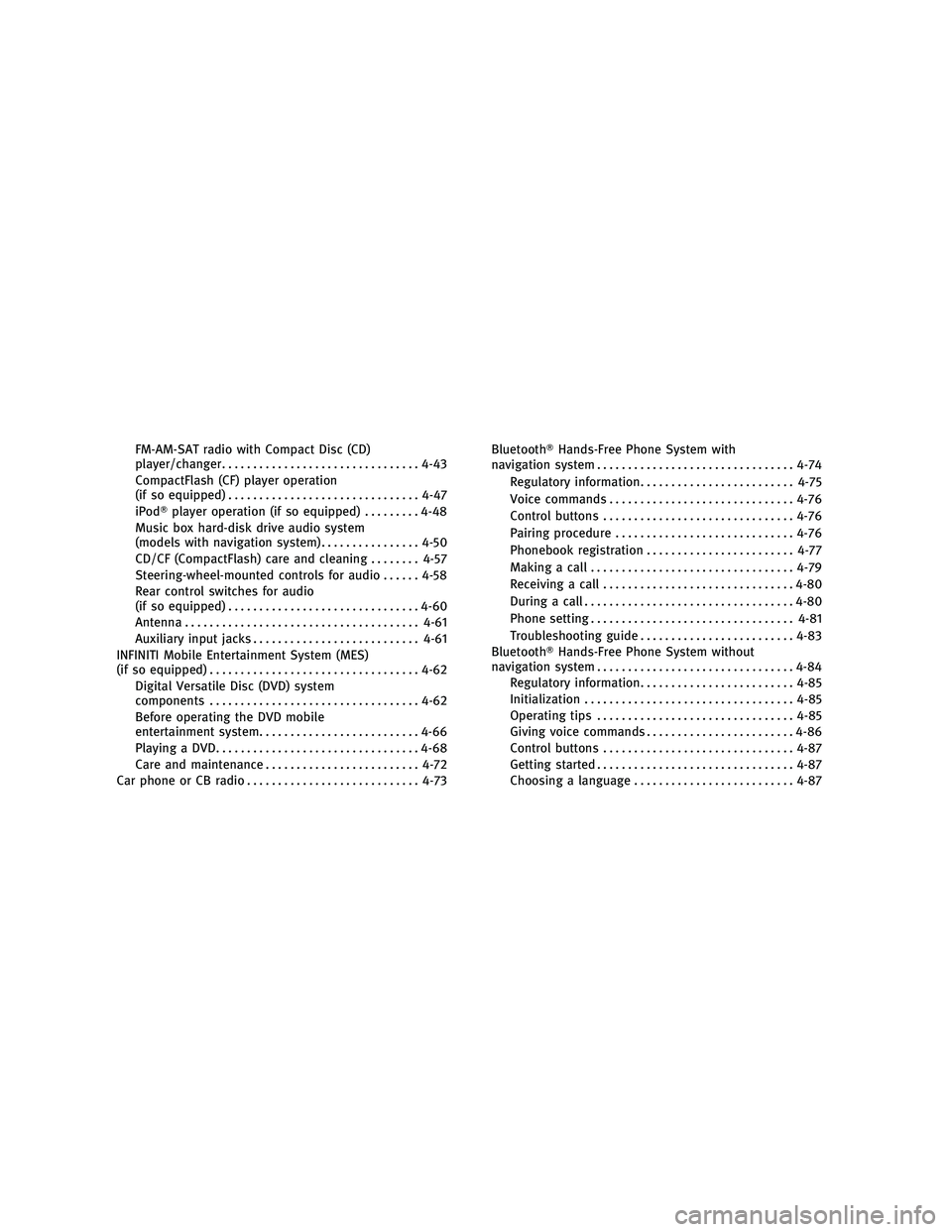
FM-AM-SAT radio with Compact Disc (CD)
player/changer................................ 4-43
CompactFlash (CF) player operation
(if so equipped) ............................... 4-47
iPodT player operation (if so equipped) .........4-48
Music box hard-disk drive audio system
(models with navigation system) ................4-50
CD/CF (CompactFlash) care and cleaning ........4-57
Steering-wheel-mounted controls for audio ......4-58
Rear control switches for audio
(if so equipped) ............................... 4-60
Antenna ...................................... 4-61
Auxiliary input jacks ........................... 4-61
INFINITI Mobile Entertainment System (MES)
(if so equipped) .................................. 4-62
Digital Versatile Disc (DVD) system
components .................................. 4-62
Before operating the DVD mobile
entertainment system .......................... 4-66
Playing a DVD ................................. 4-68
Care and maintenance ......................... 4-72
Car phone or CB radio ............................ 4-73BluetoothT
Hands-Free Phone System with
navigation system ................................ 4-74
Regulatory information ......................... 4-75
Voice commands .............................. 4-76
Control buttons ............................... 4-76
Pairing procedure ............................. 4-76
Phonebook registration ........................ 4-77
Making a call ................................. 4-79
Receiving a call ............................... 4-80
During a call .................................. 4-80
Phone setting ................................. 4-81
Troubleshooting guide ......................... 4-83
BluetoothT Hands-Free Phone System without
navigation system ................................ 4-84
Regulatory information ......................... 4-85
Initialization .................................. 4-85
Operating tips ................................ 4-85
Giving voice commands ........................ 4-86
Control buttons ............................... 4-87
Getting started ................................ 4-87
Choosing a language .......................... 4-87
wÐ
Ð
05/19/09Ðtbrooks
X
Page 198 of 445

Static and flutter: During signal interference
from buildings, large hills or due to antenna
position, usually in conjunction with increased
distance from the station transmitter, static or
flutter can be heard. This can be reduced by
lowering the treble setting to reduce the treble
response.
Multipath reception: Because of the reflective
characteristics of FM signals, direct and re-
flected signals reach the receiver at the same
time. The signals may cancel each other, result-
ing in momentary flutter or loss of sound.
AM radio reception :
AM signals, because of their low frequency, can
bend around objects and skip along the ground.
In addition, the signals can be bounced off the
ionosphere and bent back to earth. Because of
these characteristics. AM signals are also sub-
ject to interference as they travel from transmit-
ter to receiver.
Fading: Occurs while the vehicle is passing
through freeway underpasses or in areas with
many tall buildings. It can also occur for several
seconds during ionospheric turbulence even in
areas where no obstacles exist.
Static: Caused by thunderstorms, electrical
power lines, electric signs and even traffic
lights.Satellite radio reception :
When the satellite radio (if so equipped) is first
installed or the battery has been replaced, the
satellite radio may not work properly. This is not
a malfunction. Wait more than 10 minutes with
satellite radio ON and the vehicle outside of any
metal or large building for satellite radio to
receive all of the necessary data.
The satellite radio mode will be skipped unless
an optional satellite receiver and antenna are
installed and an XMT
satellite radio service
subscription is active. Satellite radio is not
available in Alaska, Hawaii and Guam.
Satellite radio performance may be affected if
cargo carried on the roof blocks the satellite
radio signal.
If possible, do not put cargo near the satellite
antenna.
A build up of ice on the satellite radio antenna
can affect satellite radio performance. Remove
the ice to restore satellite radio reception.
Compact Disc (CD) player
c Do not force a compact disc into the CD insert
slot. This could damage the CD and/or CD
changer/player.
c Trying to load a CD with the CD door closed
could damage the CD and/or CD changer.
SAA0480
Monitor, climate, audio, phone and voice recognition systems4-35
wÐ
Ð
05/14/09Ðpattie
X
Page 206 of 445

1. AM´FM´SAT band select button
2. DISC´AUX button1. RADIO AM´FM band select button
2. AUX button
3. DISC button
FM-AM-SAT RADIO WITH COMPACT
DISC (CD) PLAYER/CHANGER
For all operation precautions, see ªAUDIO OP-
ERATION PRECAUTIONSº earlier in this section.
The satellite radio mode requires an active XM
T
satellite radio service subscription. Satellite
radio is not available in Alaska, Hawaii and
Guam. It may take some time to receive the activation
signal after subscribing to the XM
Tsatellite
radio. After receiving the activation signal, an
available station list will be automatically up-
dated in the radio. Push the ignition switch from
LOCK to ACC to update the station list.
Audio main operation
Head unit :
The radio has an FM diversity reception system,
which employs two antennas printed on the
rear window. This system automatically
switches to the antenna which is receiving less
interference.
The auto loudness circuit enhances the low and
high frequency ranges automatically in both
radio reception and CD playback.
ON´OFF/Volume control :
Push the ignition switch to the ACC or ON
position, and then push the ON´OFF/VOLUME
control knob while the system is off to call up
the audio mode which was playing immediately
before the system was turned off. While the
system is on, pushing the ON´OFF/VOLUME
control knob turns the system off.
Turn the ON´OFF/VOLUME control knob to ad-
just the volume.
With navigation system
SAA1819
Without navigation system
SAA1820
Monitor, climate, audio, phone and voice recognition systems4-43
wÐ
Ð
05/14/09Ðpattie
X
Page 207 of 445

Adjusting tone quality and speaker balance :
To adjust Bass, Treble, Balance and Fade, push
the Audio control knob. When the display
shows the setting you want to change (Bass,
Treble, Balance and Fade), rotate the Audio
control knob to set the desired setting. For the
other setting methods, see ªHOW TO USE SET-
TING BUTTONº earlier in this section.
This vehicle has some sound effect functions as
follows (if so equipped):
cBOSET CenterpointT
c BOSET AudioPilotT
c Precision Phased Audio
c Speed Sensitive Volume
For more details, see ªVEHICLE INFORMATION
AND SETTINGSº earlier in this section.
FM-AM-SAT radio operation
orRadio (FM/AM/SAT) band select :
Pushing the radio band select button will
change the band as follows:
AM !FM !XM !AM When the radio band select button is pushed
while the ignition switch is in the ACC or ON
position, the radio will come on at the station
last played.
The last station played will also come on when
the ON´OFF/VOL control knob is pushed to ON.
The satellite radio mode requires an active XM
T
satellite radio service subscription. Satellite
radio is not available in Alaska, Hawaii and
Guam.
If another audio source is playing when the
radio band select button is turned to ON, the
audio source will automatically be turned off
and the last radio station played will come on.
When the stereo broadcast signal is weak, the
radio will automatically change from stereo to
monaural reception.
TUNE (Tuning) :
c For AM and FM radio
Turn the TUNE/FOLDER knob for manual tun-
ing.
c For satellite radio
Turn the TUNE/FOLDER knob to seek stations
from all of the categories when any CAT is
not selected.
SEEK tuning/CATEGORY
(CAT) :
c For AM and FM radio
Push the SEEK´CAT or TRACK button
orto tune from low to high or high to
low frequencies and to stop at the next
broadcasting station.
c For satellite radio
Push the SEEK´CAT or TRACK button
orto tune to the first station of the
next or previous category.
During satellite radio reception, the following
notices will be displayed under certain condi-
tions.
c NO SIGNAL (No signal is received while the
SAT tuner is connected.)
c OFF AIR (Broadcasting signed off)
c ANTENNA ERROR (Antenna connection error)
c LOADING (When the initial setting is per-
formed)
c UPDATING (When the satellite radio sub-
scription is not active)
c INVALID CH (Invalid station is received.)
4-44Monitor, climate, audio, phone and voice recognition systems
wÐ
Ð
05/14/09Ðpattie
X
Page 236 of 445
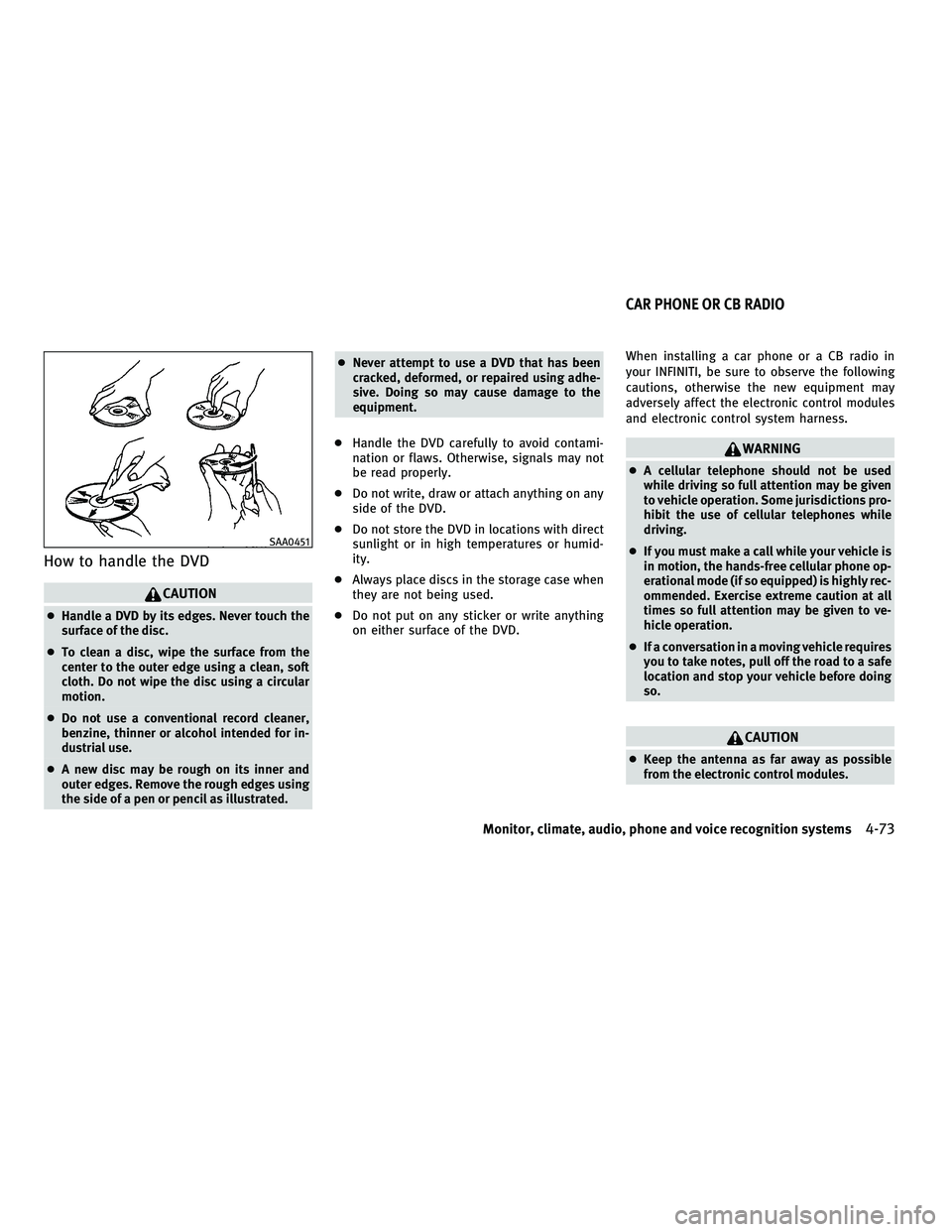
How to handle the DVD
CAUTION
cHandle a DVD by its edges. Never touch the
surface of the disc.
c To clean a disc, wipe the surface from the
center to the outer edge using a clean, soft
cloth. Do not wipe the disc using a circular
motion.
c Do not use a conventional record cleaner,
benzine, thinner or alcohol intended for in-
dustrial use.
c A new disc may be rough on its inner and
outer edges. Remove the rough edges using
the side of a pen or pencil as illustrated. c
Never attempt to use a DVD that has been
cracked, deformed, or repaired using adhe-
sive. Doing so may cause damage to the
equipment.
c Handle the DVD carefully to avoid contami-
nation or flaws. Otherwise, signals may not
be read properly.
c Do not write, draw or attach anything on any
side of the DVD.
c Do not store the DVD in locations with direct
sunlight or in high temperatures or humid-
ity.
c Always place discs in the storage case when
they are not being used.
c Do not put on any sticker or write anything
on either surface of the DVD. When installing a car phone or a CB radio in
your INFINITI, be sure to observe the following
cautions, otherwise the new equipment may
adversely affect the electronic control modules
and electronic control system harness.
WARNING
c
A cellular telephone should not be used
while driving so full attention may be given
to vehicle operation. Some jurisdictions pro-
hibit the use of cellular telephones while
driving.
c If you must make a call while your vehicle is
in motion, the hands-free cellular phone op-
erational mode (if so equipped) is highly rec-
ommended. Exercise extreme caution at all
times so full attention may be given to ve-
hicle operation.
c If a conversation in a moving vehicle requires
you to take notes, pull off the road to a safe
location and stop your vehicle before doing
so.
CAUTION
cKeep the antenna as far away as possible
from the electronic control modules.
SAA0451
CAR PHONE OR CB RADIO
Monitor, climate, audio, phone and voice recognition systems4-73
wÐ
Ð
05/14/09Ðpattie
X
Page 237 of 445
cKeep the antenna wire more than 8 in (20 cm)
away from the electronic control system har-
ness. Do not route the antenna wire next to
any harness.
c Adjust the antenna standing-wave ratio as
recommended by the manufacturer.
c Connect the ground wire from the CB radio
chassis to the body.
c For details, consult an INFINITI retailer.WARNING
cUse a phone after stopping your vehicle in a
safe location. If you have to use a phone
while driving, exercise extreme caution at all
times so full attention may be given to ve-
hicle operation.
c If you find yourself unable to devote full at-
tention to vehicle operation while talking on
the phone, pull off the road to a safe location
and stop your vehicle before doing so.
CAUTION
To avoid draining the vehicle battery, use a
phone after starting the engine.
Your INFINITI is equipped with Bluetooth T
Hands-Free Phone System. If you are an owner
of a compatible Bluetooth Tenabled cellular
phone, you can set up the wireless connection
between your cellular phone and the in-vehicle
phone module. With BluetoothT wireless tech-
nology, you can make or receive a telephone
call with your cellular phone in your pocket.
Once your cellular phone is paired to the in-
vehicle phone module, no phone connecting
procedure is required anymore. Your phone is
automatically connected with the in-vehicle phone module when the ignition switch is
pushed to the ON position with the registered
cellular phone turned on and carried in the
vehicle.
You can register up to 5 different BluetoothT
cellular phones in the in-vehicle phone module.
However, you can talk on only one cellular
phone at a time.
The INFINITI Voice Recognition system supports
the phone commands, so dialing a phone num-
ber using your voice is possible. For more
details, see ªINFINITI VOICE RECOGNITION SYS-
TEM (models with navigation system)º later in
this section; page 4-98.
Before using the Bluetooth
THands-Free Phone
System, refer to the following notes.
c Set up the wireless connection between a
compatible cellular phone and the in-vehicle
phone module before using the BluetoothT
Hands-Free Phone System.
c Some Bluetooth Tenabled cellular phones
may not be recognized by the in-vehicle
phone module. Please visit
www.InfinitiUSA.com/bluetooth for a recom-
mended phone list.
BLUETOOTHT HANDS-FREE PHONE SYSTEM
WITH NAVIGATION SYSTEM
4-74Monitor, climate, audio, phone and voice recognition systems
wÐ
Ð
05/19/09Ðtbrooks
X
Page 238 of 445
cYou will not be able to use a hands-free
phone under the following conditions:
± Your vehicle is outside of the telephone service area.
± Your vehicle is in an area where it is difficult to receive radio waves; such as in
a tunnel, in an underground parking ga-
rage, behind a tall building or in a moun-
tainous area.
± Your cellular phone is locked in order not to be dialed.
c
When the radio wave condition is not ideal or
ambient sound is too loud, it may be difficult
to hear the other person's voice during a call.
cImmediately after the ignition switch is pushed
to the ON position, it may be impossible to
receive a call for a short period of time.
c Do not place the cellular phone in an area
surrounded by metal or far away from the
in-vehicle phone module to prevent tone
quality degradation and wireless connection
disruption.
c While a cellular phone is connected through
the BluetoothT wireless connection, the bat-
tery power of the cellular phone may dis-
charge quicker than usual.
c If the Bluetooth THands-Free Phone System
seems to be malfunctioning, please visit www.InfinitiUSA.com/bluetooth for trouble-
shooting help.
c Some cellular phones or other devices may
cause interference or a buzzing noise to
come from the audio system speakers. Stor-
ing the device in a different location may
reduce or eliminate the noise.
c Refer to the cellular phone Owner's Manual
regarding the telephone pairing procedure
specific to your phone, battery charging,
cellular phone antenna, etc.
c The antenna display on the monitor will not
coincide with the antenna display of some
cellular phones.
c Keep the interior of the vehicle as quiet as
possible to hear the caller's voice clearly as
well as to minimize its echoes.
c If reception between callers is unclear, ad-
justing the incoming or outgoing call volume
may improve the clarity.
REGULATORY INFORMATION
FCC Regulatory information
± CAUTION: To maintain compliance with FCC's
RF exposure guidelines, use only the sup-
plied antenna. Unauthorized antenna, modi-
fication, or attachments could damage the
transmitter and may violate FCC regulations. ± Operation is subject to the following two
conditions:
1. this device may not cause interference and
2. this device must accept any interference, including interference that may cause
undesired operation of the device
IC Regulatory information
± Operation is subject to the following twoconditions: (1) this device may not cause
interference, and (2) this device must accept
any interference, including interference that
may cause undesired operation of the device.
± This Class B digital apparatus meets all requirements of the Canadian Interference-
Causing Equipment Regulations.
Bluetooth trademark:
BLUETOOTHT is a trade-
mark owned by Bluetooth
SIG, Inc., U.S.A.
Monitor, climate, audio, phone and voice recognition systems4-75
wÐ
Ð
05/19/09Ðtbrooks
X
Page 290 of 445

cReplacing tires with those not originally
specified by INFINITI could affect the proper
operation of the TPMS.
c Do not inject any tire liquid or aerosol tire
sealant into the tires, as this may cause a
malfunction of the tire pressure sensors.
CAUTION
cThe TPMS may not function properly when
the wheels are equipped with tire chains or
the wheels are buried in snow.
c Do not place metalized film or any metal
parts (antenna, etc.) on the windows. This
may cause poor reception of the signals from
the tire pressure sensors, and the TPMS will
not function properly.
Some devices and transmitters may temporarily
interfere with the operation of the TPMS and
cause the low tire pressure warning light to
illuminate. Some examples are:
± Facilities or electric devices using similar radio frequencies are near the vehicle.
± If a transmitter set to similar frequencies is being used in or near the vehicle. ± If a computer (or similar equipment) or a
DC/AC converter is being used in or near the
vehicle.
FCC Notice:
Changes or modifications not expressly ap-
proved by the party responsible for compliance
could void the user's authority to operate the
equipment.
This device complies with Part 15 of the FCC
Rules and RSS-210 of Industry Canada.
Operation is subject to the following two condi-
tions: (1) This device may not cause harmful in-
terference, and (2) this device must accept any
interference received, including interference
that may cause undesired operation of the de-
vice.
AVOIDING COLLISION AND ROLLOVER
WARNING
Failure to operate this vehicle in a safe and
prudent manner may result in loss of control or
an accident.
Be alert and drive defensively at all times. Obey
all traffic regulations. Avoid excessive speed,
high speed cornering, or sudden steering ma-
neuvers, because these driving practices could cause you to lose control of your vehicle.
As
with any vehicle, a loss of control could result in
a collision with other vehicles or objects, or
cause the vehicle to rollover, particularly if the
loss of control causes the vehicle to slide side-
ways. Be attentive at all times, and avoid
driving when tired. Never drive when under the
influence of alcohol or drugs (including pre-
scription or over-the-counter drugs which may
cause drowsiness). Always wear your seat belt
as outlined in the ªSEAT BELTSº in the ª1. Safety
Ð Seats, seat belts and supplemental restraint
systemº section of this manual, and also in-
struct your passengers to do so.
Seat belts help reduce the risk of injury in
collisions and rollovers. In a rollover crash, an
unbelted or improperly belted person is signifi-
cantly more likely to be injured or killed than a
person properly wearing a seat belt.
OFF-ROAD RECOVERY
While driving, the right side or left side wheels
may unintentionally leave the road surface. If
this occurs, maintain control of the vehicle by
following the procedure below. Please note that
this procedure is only a general guide. The
vehicle must be driven as appropriate based on
the conditions of the vehicle, road and traffic.
1. Remain calm and do not overreact.
2. Do not apply the brakes.
Starting and driving5-5
wÐ
Ð
05/15/09Ðpattie
X
Page 362 of 445

REMOVING SPOTS
Remove tar and oil spots, industrial dust, in-
sects, and tree sap as quickly as possible from
the paint surface to avoid lasting damage or
staining. Special cleaning products are avail-
able at an INFINITI retailer or any automotive
accessory stores.
UNDERBODY
In areas where road salt is used in winter, the
underbody must be cleaned regularly. This will
prevent dirt and salt from building up and
causing the acceleration of corrosion on the
underbody and suspension. Before the winter
period and again in the spring, the underseal
must be checked and, if necessary, re-treated.
GLASS
Use glass cleaner to remove smoke and dust
film from the glass surfaces. It is normal for
glass to become coated with a film after the
vehicle is parked in the hot sun. Glass cleaner
and a soft cloth will easily remove this film.
CAUTION
When cleaning the inside of the windows, do
not use sharp-edged tools, abrasive cleaners or
chlorine-based disinfectant cleaners. They
could damage the electrical conductors, radio
antenna elements or rear window defroster
elements.
ALUMINUM ALLOY WHEELS
Wash regularly with a sponge dampened in a
mild soap solution, especially during winter
months in areas where road salt is used. Salt
could discolor the wheels if not removed.
CAUTION
Follow the directions below to avoid staining or
discoloring the wheels:
cDo not use a cleaner that uses strong acid or
alkali contents to clean the wheels.
c Do not apply wheel cleaners to the wheels
when they are hot. The wheel temperature
should be the same as ambient temperature.
c Rinse the wheel to completely remove the
cleaner within 15 minutes after the cleaner is
applied.
CHROME PARTS
Clean chrome parts regularly with a non- abra-
sive chrome polish to maintain the finish.
TIRE DRESSING
INFINITI does not recommend the use of tire
dressings. Tire manufacturers apply a coating
to the tires to help reduce discoloration of the
rubber. If a tire dressing is applied to the tires,
it may react with the coating and form a com-
pound. This compound may come off the tire
while driving and stain the vehicle paint.
If you choose to use a tire dressing, take the
following precautions:
c Use a water-based tire dressing. The coating
on the tire dissolves more easily with an
oil-based tire dressing.
c Apply a light coat of tire dressing to help
prevent it from entering the tire
tread/grooves (where it would be difficult to
remove).
c Wipe off excess tire dressing using a dry
towel. Make sure the tire dressing is com-
pletely removed from the tire tread/grooves.
c Allow the tire dressing to dry as recom-
mended by tire dressing manufacturer.
Appearance and care7-3
wÐ
Ð
05/15/09Ðpattie
X