change time INFINITI M 2012 Owner's Manual
[x] Cancel search | Manufacturer: INFINITI, Model Year: 2012, Model line: M, Model: INFINITI M 2012Pages: 522, PDF Size: 3.8 MB
Page 323 of 522

5-10Starting and driving
SSD0659
OPERATING RANGE FOR ENGINE
START FUNCTION
The Intelligent Key can only be used for
starting the engine when the Intelligent
Key is within the specified operating range.
When the Intelligent Key battery is almost
discharged or strong radio waves are
present near the operating location, the
Intelligent Key system’s operating range
becomes narrower and may not function
properly.
If the Intelligent Key is within the operating
range, it is possible for anyone, even
someone who does not carry the Intelligent Key, to push the ignition switch to start the
engine.
.
The trunk area is not included in the
operating range but the Intelligent Key
may function.
. If the Intelligent Key is placed on the
instrument panel, rear parcel shelf,
inside the glove box or door pocket,
the Intelligent Key may not function.
. If the Intelligent Key is placed near the
door or window outside the vehicle, the
Intelligent Key may function.
SSD1021
PUSH-BUTTON IGNITION SWITCH
OPERATION
When the ignition switch is pushed without
depressing the brake pedal, the ignition
switch position will change as follows:
. Push center once to change to ACC.
. Push center two times to change to ON.
. Push center three times to change to
OFF. (No position illuminates.)
. Push center four times to return to ACC.
. Open or close any door to return to
LOCK during the OFF position.
Page 325 of 522
5-12Starting and driving
EMERGENCY ENGINE SHUT OFF
To shut off the engine in an emergency
situation while driving perform the follow-
ing procedure:
.Rapidly push the push-button ignition
switch 3 consecutive times, or
. Push and hold the push-button ignition
switch for more than 2 seconds.
SSD0860
INTELLIGENT KEY BATTERY DIS-
CHARGE
If the battery of the Intelligent Key is
discharged, or environmental conditions
interfere with the Intelligent Key operation,
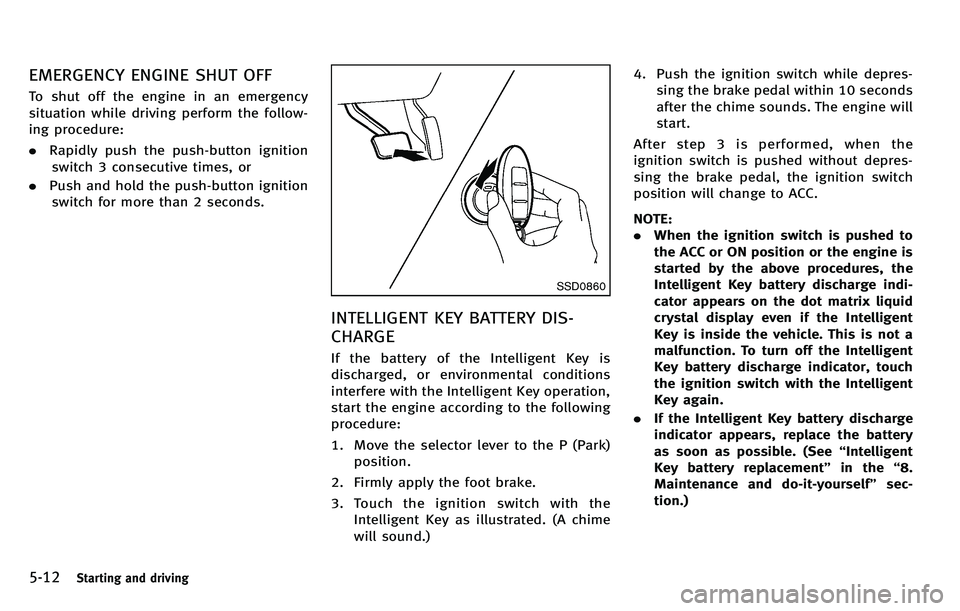
start the engine according to the following
procedure:
1. Move the selector lever to the P (Park)
position.
2. Firmly apply the foot brake.
3. Touch the ignition switch with the Intelligent Key as illustrated. (A chime
will sound.) 4. Push the ignition switch while depres-
sing the brake pedal within 10 seconds
after the chime sounds. The engine will
start.
After step 3 is performed, when the
ignition switch is pushed without depres-
sing the brake pedal, the ignition switch
position will change to ACC.
NOTE:
. When the ignition switch is pushed to
the ACC or ON position or the engine is
started by the above procedures, the
Intelligent Key battery discharge indi-
cator appears on the dot matrix liquid
crystal display even if the Intelligent
Key is inside the vehicle. This is not a
malfunction. To turn off the Intelligent
Key battery discharge indicator, touch
the ignition switch with the Intelligent
Key again.
. If the Intelligent Key battery discharge
indicator appears, replace the battery
as soon as possible. (See “Intelligent
Key battery replacement” in the“8.
Maintenance and do-it-yourself ”sec-
tion.)
Page 336 of 522
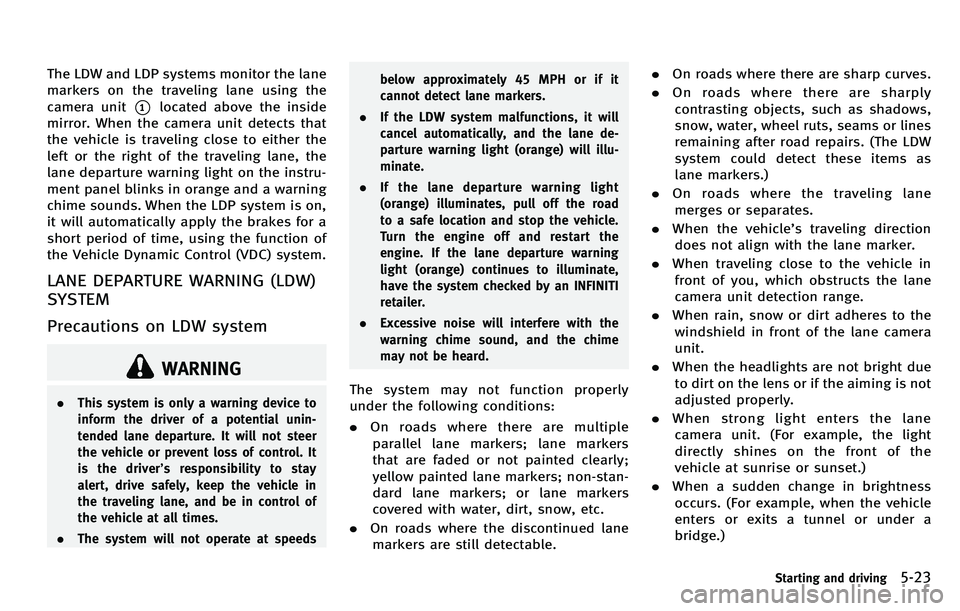
The LDW and LDP systems monitor the lane
markers on the traveling lane using the
camera unit
*1located above the inside
mirror. When the camera unit detects that
the vehicle is traveling close to either the
left or the right of the traveling lane, the
lane departure warning light on the instru-
ment panel blinks in orange and a warning
chime sounds. When the LDP system is on,
it will automatically apply the brakes for a
short period of time, using the function of
the Vehicle Dynamic Control (VDC) system.
LANE DEPARTURE WARNING (LDW)
SYSTEM
Precautions on LDW system
WARNING
. This system is only a warning device to
inform the driver of a potential unin-
tended lane departure. It will not steer
the vehicle or prevent loss of control. It
is the driver ’s responsibility to stay
alert, drive safely, keep the vehicle in
the traveling lane, and be in control of
the vehicle at all times.
. The system will not operate at speeds below approximately 45 MPH or if it
cannot detect lane markers.
. If the LDW system malfunctions, it will
cancel automatically, and the lane de-
parture warning light (orange) will illu-
minate.
. If the lane departure warning light
(orange) illuminates, pull off the road
to a safe location and stop the vehicle.
Turn the engine off and restart the
engine. If the lane departure warning
light (orange) continues to illuminate,
have the system checked by an INFINITI
retailer.
. Excessive noise will interfere with the
warning chime sound, and the chime
may not be heard.The system may not function properly
under the following conditions:
.On roads where there are multiple
parallel lane markers; lane markers
that are faded or not painted clearly;
yellow painted lane markers; non-stan-
dard lane markers; or lane markers
covered with water, dirt, snow, etc.
. On roads where the discontinued lane
markers are still detectable. .
On roads where there are sharp curves.
. On roads where there are sharply
contrasting objects, such as shadows,
snow, water, wheel ruts, seams or lines
remaining after road repairs. (The LDW
system could detect these items as
lane markers.)
. On roads where the traveling lane
merges or separates.
. When the vehicle ’s traveling direction
does not align with the lane marker.
. When traveling close to the vehicle in
front of you, which obstructs the lane
camera unit detection range.
. When rain, snow or dirt adheres to the
windshield in front of the lane camera
unit.
. When the headlights are not bright due
to dirt on the lens or if the aiming is not
adjusted properly.
. When strong light enters the lane
camera unit. (For example, the light
directly shines on the front of the
vehicle at sunrise or sunset.)
. When a sudden change in brightness
occurs. (For example, when the vehicle
enters or exits a tunnel or under a
bridge.)
Starting and driving5-23
Page 339 of 522

5-26Starting and driving
JVS0080X
3. Highlight the“Lane Departure Warning ”
key, select ON (enabled) or OFF (dis-
abled) and push the ENTER
*2button.
Temporary disabled status at high
temperature
If the vehicle is parked in direct sunlight
under high temperature conditions (over
approximately 104 8F(40 8C) and then
started, the LDW system may be deacti-
vated automatically. The lane departure
warning light (orange) will flash.
When the interior temperature is reduced,
the LDW system will resume operating
automatically and the lane departure warning light (orange) will stop flashing.
LANE DEPARTURE PREVENTION
(LDP) SYSTEM
Precautions on LDP system
WARNING
.
The LDP system will not steer the vehicle
or prevent loss of control. It is the
driver ’s responsibility to stay alert, drive
safely, keep the vehicle in the traveling
lane, and be in control of vehicle at all
times.
. The LDP system is primarily intended for
use on well-developed freeways or high-
ways. It may not detect the lane markers
in certain roads, weather or driving
conditions.
. Using the LDP system under some
conditions of road, lane marker or
weather, or when you change lanes
without using the lane change signal
could lead to an unexpected system
operation. In such conditions, you need
to correct the vehicle’ s direction with
your steering operation to avoid acci-
dents. .
When the LDP system is operating, avoid
excessive or sudden steering maneu-
vers. Otherwise, you could lose control
of the vehicle.
. The LDP system will not operate at
speeds below approximately 45 MPH
(70 km/h) or if it cannot detect lane
markers.
. The LDP system may not function
properly under the following conditions,
and do not use the LDP system:
—During bad weather (rain, fog, snow,
wind, etc.).
—When driving on slippery roads,
such as on ice or snow, etc.
—When driving on winding or uneven roads.
—When there is a lane closure due to
road repairs.
—When driving in a makeshift lane.
—When driving on roads where thelane width is too narrow.
—When driving with a tire that is notwithin normal tire conditions (for
example, tire wear, low tire pres-
sure, installation of spare tire, tire
Page 345 of 522
5-32Starting and driving
SSD1027
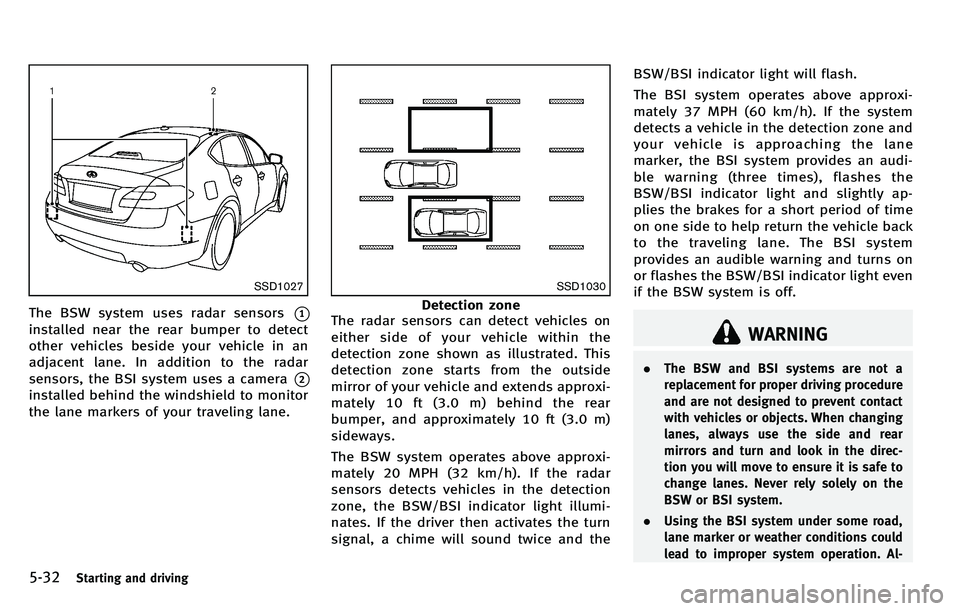
The BSW system uses radar sensors*1
installed near the rear bumper to detect
other vehicles beside your vehicle in an
adjacent lane. In addition to the radar
sensors, the BSI system uses a camera
*2
installed behind the windshield to monitor
the lane markers of your traveling lane.
SSD1030
Detection zone
The radar sensors can detect vehicles on
either side of your vehicle within the
detection zone shown as illustrated. This
detection zone starts from the outside
mirror of your vehicle and extends approxi-
mately 10 ft (3.0 m) behind the rear
bumper, and approximately 10 ft (3.0 m)
sideways.
The BSW system operates above approxi-
mately 20 MPH (32 km/h). If the radar
sensors detects vehicles in the detection
zone, the BSW/BSI indicator light illumi-
nates. If the driver then activates the turn
signal, a chime will sound twice and the BSW/BSI indicator light will flash.
The BSI system operates above approxi-
mately 37 MPH (60 km/h). If the system
detects a vehicle in the detection zone and
your vehicle is approaching the lane
marker, the BSI system provides an audi-
ble warning (three times), flashes the
BSW/BSI indicator light and slightly ap-
plies the brakes for a short period of time
on one side to help return the vehicle back
to the traveling lane. The BSI system
provides an audible warning and turns on
or flashes the BSW/BSI indicator light even
if the BSW system is off.
WARNING
.
The BSW and BSI systems are not a
replacement for proper driving procedure
and are not designed to prevent contact
with vehicles or objects. When changing
lanes, always use the side and rear
mirrors and turn and look in the direc-
tion you will move to ensure it is safe to
change lanes. Never rely solely on the
BSW or BSI system.
. Using the BSI system under some road,
lane marker or weather conditions could
lead to improper system operation. Al-
Page 352 of 522
SSD1026
BSW/BSI DRIVING SITUATIONS
Another vehicle approaching from
behind
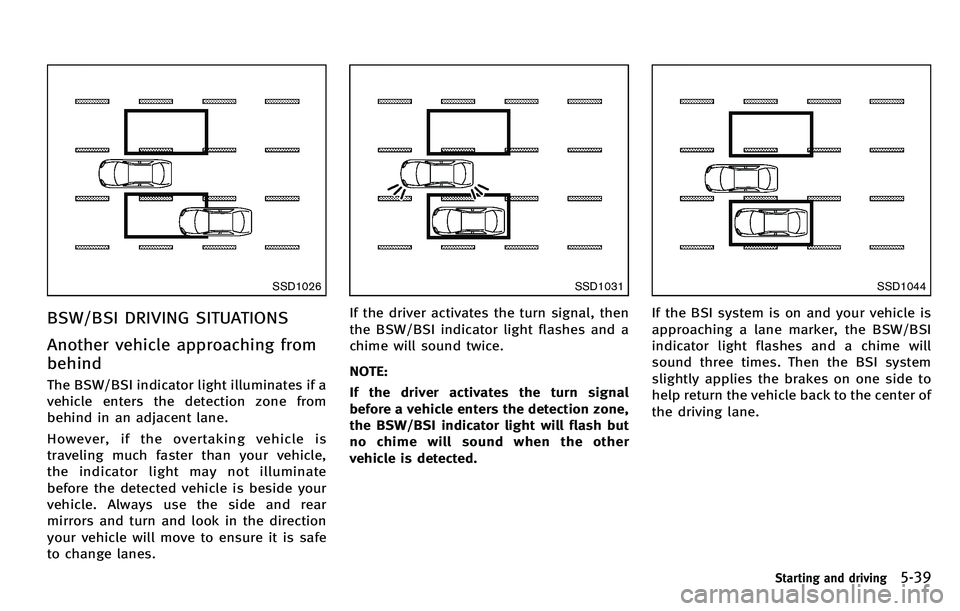
The BSW/BSI indicator light illuminates if a
vehicle enters the detection zone from
behind in an adjacent lane.
However, if the overtaking vehicle is
traveling much faster than your vehicle,
the indicator light may not illuminate
before the detected vehicle is beside your
vehicle. Always use the side and rear
mirrors and turn and look in the direction
your vehicle will move to ensure it is safe
to change lanes.
SSD1031
If the driver activates the turn signal, then
the BSW/BSI indicator light flashes and a
chime will sound twice.
NOTE:
If the driver activates the turn signal
before a vehicle enters the detection zone,
the BSW/BSI indicator light will flash but
no chime will sound when the other
vehicle is detected.
SSD1044
If the BSI system is on and your vehicle is
approaching a lane marker, the BSW/BSI
indicator light flashes and a chime will
sound three times. Then the BSI system
slightly applies the brakes on one side to
help return the vehicle back to the center of
the driving lane.
Starting and driving5-39
Page 371 of 522
5-58Starting and driving
SSD0984
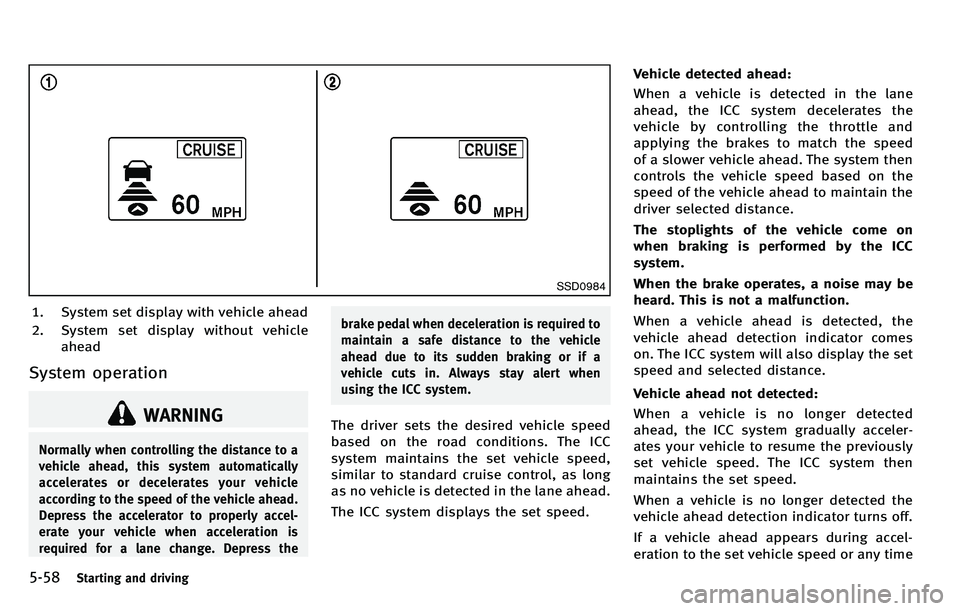
1. System set display with vehicle ahead
2. System set display without vehicleahead
System operation
WARNING
Normally when controlling the distance to a
vehicle ahead, this system automatically
accelerates or decelerates your vehicle
according to the speed of the vehicle ahead.
Depress the accelerator to properly accel-
erate your vehicle when acceleration is
required for a lane change. Depress the brake pedal when deceleration is required to
maintain a safe distance to the vehicle
ahead due to its sudden braking or if a
vehicle cuts in. Always stay alert when
using the ICC system.
The driver sets the desired vehicle speed
based on the road conditions. The ICC
system maintains the set vehicle speed,
similar to standard cruise control, as long
as no vehicle is detected in the lane ahead.
The ICC system displays the set speed.Vehicle detected ahead:
When a vehicle is detected in the lane
ahead, the ICC system decelerates the
vehicle by controlling the throttle and
applying the brakes to match the speed
of a slower vehicle ahead. The system then
controls the vehicle speed based on the
speed of the vehicle ahead to maintain the
driver selected distance.
The stoplights of the vehicle come on
when braking is performed by the ICC
system.
When the brake operates, a noise may be
heard. This is not a malfunction.
When a vehicle ahead is detected, the
vehicle ahead detection indicator comes
on. The ICC system will also display the set
speed and selected distance.
Vehicle ahead not detected:
When a vehicle is no longer detected
ahead, the ICC system gradually acceler-
ates your vehicle to resume the previously
set vehicle speed. The ICC system then
maintains the set speed.
When a vehicle is no longer detected the
vehicle ahead detection indicator turns off.
If a vehicle ahead appears during accel-
eration to the set vehicle speed or any time
Page 372 of 522
the ICC system is in operation, the system
controls the distance to that vehicle.
When a vehicle is no longer detected under
approximately 15 MPH (24 km/h), the
system will be canceled.
SSD0985
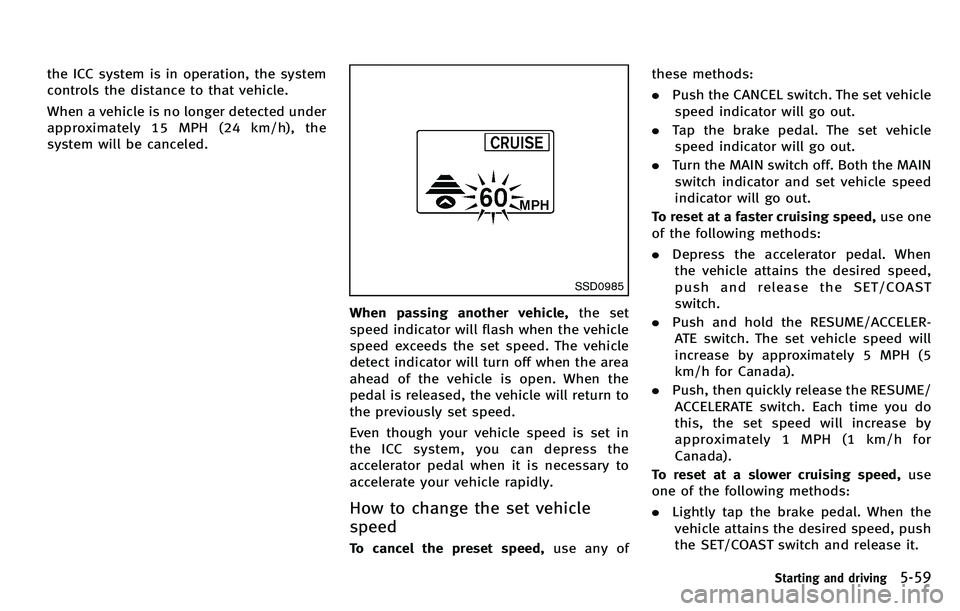
When passing another vehicle,the set
speed indicator will flash when the vehicle
speed exceeds the set speed. The vehicle
detect indicator will turn off when the area
ahead of the vehicle is open. When the
pedal is released, the vehicle will return to
the previously set speed.
Even though your vehicle speed is set in
the ICC system, you can depress the
accelerator pedal when it is necessary to
accelerate your vehicle rapidly.
How to change the set vehicle
speed
To cancel the preset speed, use any ofthese methods:
.
Push the CANCEL switch. The set vehicle
speed indicator will go out.
. Tap the brake pedal. The set vehicle
speed indicator will go out.
. Turn the MAIN switch off. Both the MAIN
switch indicator and set vehicle speed
indicator will go out.
To reset at a faster cruising speed, use one
of the following methods:
. Depress the accelerator pedal. When
the vehicle attains the desired speed,
push and release the SET/COAST
switch.
. Push and hold the RESUME/ACCELER-
ATE switch. The set vehicle speed will
increase by approximately 5 MPH (5
km/h for Canada).
. Push, then quickly release the RESUME/
ACCELERATE switch. Each time you do
this, the set speed will increase by
approximately 1 MPH (1 km/h for
Canada).
To reset at a slower cruising speed, use
one of the following methods:
. Lightly tap the brake pedal. When the
vehicle attains the desired speed, push
the SET/COAST switch and release it.
Starting and driving5-59
Page 373 of 522
5-60Starting and driving
.Push and hold the SET/COAST switch.
The set vehicle speed will decrease by
approximately 5 MPH (5 km/h for
Canada).
. Push, then quickly release the SET/
COAST switch. Each time you do this,
the set speed will decrease by approxi-
mately 1 MPH (1 km/h for Canada).
To resume the preset speed, push and
release the RESUME/ACCELERATE switch.
The vehicle will resume the last set
cruising speed when the vehicle speed is
over 20 MPH (32 km/h).
SSD0986
How to change the set distance to
the vehicle ahead
The distance to the vehicle ahead can be
selected at any time depending on the
traffic conditions.
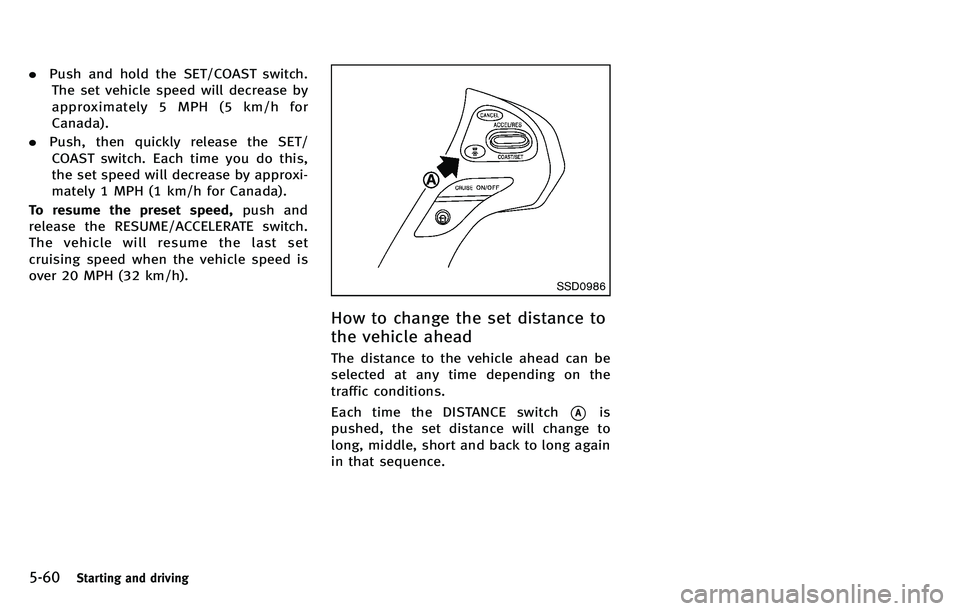
Each time the DISTANCE switch
*Ais
pushed, the set distance will change to
long, middle, short and back to long again
in that sequence.
Page 374 of 522
JVS0082M
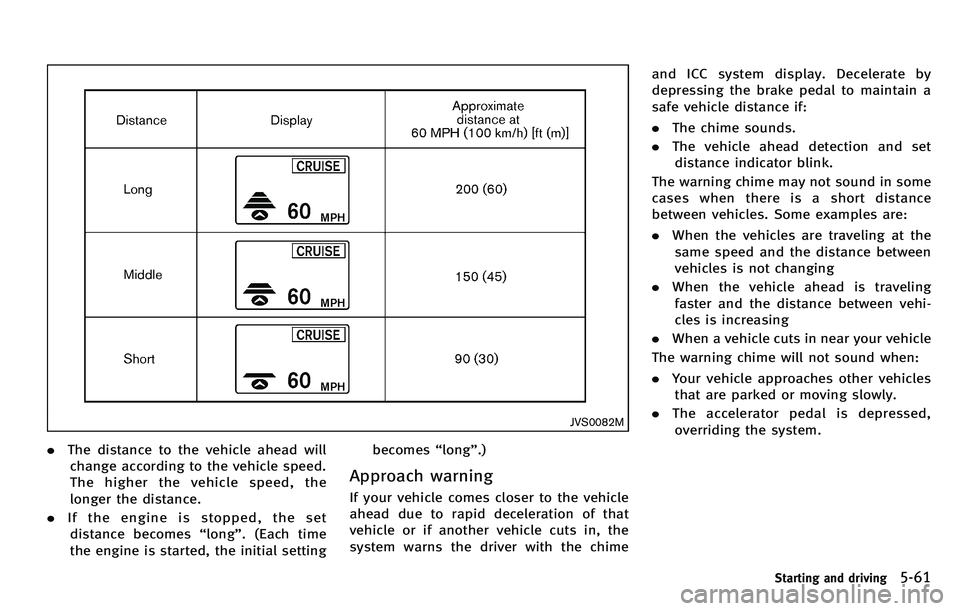
.The distance to the vehicle ahead will
change according to the vehicle speed.
The higher the vehicle speed, the
longer the distance.
. If the engine is stopped, the set
distance becomes “long ”. (Each time
the engine is started, the initial setting becomes
“long ”.)
Approach warning
If your vehicle comes closer to the vehicle
ahead due to rapid deceleration of that
vehicle or if another vehicle cuts in, the
system warns the driver with the chime and ICC system display. Decelerate by
depressing the brake pedal to maintain a
safe vehicle distance if:
.
The chime sounds.
. The vehicle ahead detection and set
distance indicator blink.
The warning chime may not sound in some
cases when there is a short distance
between vehicles. Some examples are:
. When the vehicles are traveling at the
same speed and the distance between
vehicles is not changing
. When the vehicle ahead is traveling
faster and the distance between vehi-
cles is increasing
. When a vehicle cuts in near your vehicle
The warning chime will not sound when:
. Your vehicle approaches other vehicles
that are parked or moving slowly.
. The accelerator pedal is depressed,
overriding the system.
Starting and driving5-61