maintenance INFINITI M 2012 Owner's Manual
[x] Cancel search | Manufacturer: INFINITI, Model Year: 2012, Model line: M, Model: INFINITI M 2012Pages: 522, PDF Size: 3.8 MB
Page 303 of 522
4-132Monitor, climate, audio, phone and voice recognition systems
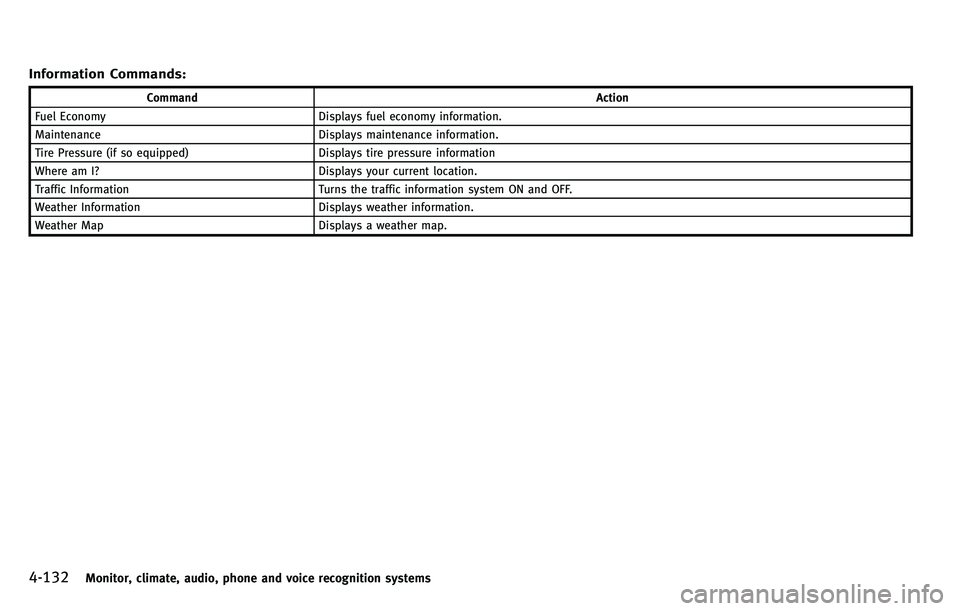
Information Commands:
CommandAction
Fuel Economy Displays fuel economy information.
Maintenance Displays maintenance information.
Tire Pressure (if so equipped) Displays tire pressure information
Where am I? Displays your current location.
Traffic Information Turns the traffic information system ON and OFF.
Weather Information Displays weather information.
Weather Map Displays a weather map.
Page 314 of 522

5 Starting and driving
Precautions when starting and driving ................. 5-3Exhaust gas (carbon monoxide) ....................... 5-3
Three-way catalyst........................................... 5-3
Tire Pressure Monitoring System (TPMS) ........ 5-4
Avoiding collision and rollover......................... 5-6
Off-road recovery............................................. 5-7
Rapid air pressure loss ................................... 5-7
Drinking alcohol/drugs and driving ................. 5-8
Intelligent All-Wheel Drive (AWD) driving
safety precautions ........................................... 5-8
Push-button ignition switch ................................. 5-9 Operating range for engine start function ...... 5-10
Push-button ignition switch operation ........... 5-10
Steering lock (if so equipped)........................ 5-11
Push-button ignition switch positions ............ 5-11
Emergency engine shut off ............................ 5-12
Intelligent Key battery discharge ................... 5-12
Before starting the engine ................................. 5-13
Starting the engine............................................ 5-13
Driving the vehicle ............................................. 5-14
Automatic transmission ................................. 5-14
Parking brake .................................................... 5-18
INFINITI drive mode selector............................... 5-19
Standard mode ............................................. 5-19
Sport mode ................................................... 5-19 Snow mode ................................................. 5-20
Eco mode .................................................... 5-20
Lane Departure Warning (LDW) system/Lane
Departure Prevention (LDP) system (if
so equipped)..................................................... 5-22 Lane Departure Warning (LDW) system......... 5-23
Lane Departure Prevention (LDP) system ...... 5-26
Lane camera unit maintenance .................... 5-31
Blind Spot Warning (BSW) system/Blind Spot
Intervention
TM(BSI) system (if so equipped)...... 5-31
BSW system operation ................................. 5-33
BSI system operation................................... 5-36
BSW/BSI driving situations .......................... 5-39
BSW/BSI malfunction................................... 5-44
System maintenance.................................... 5-44
Cruise control.................................................... 5-45
Precautions on cruise control....................... 5-45
Cruise control operations ............................. 5-45
Intelligent Cruise Control (ICC) system (if
so equipped)..................................................... 5-47
Selecting the vehicle-to-vehicle distance
control mode ............................................... 5-48
Vehicle-to-vehicle distance control mode...... 5-48
Precautions on vehicle-to-vehicle distance
control mode ............................................... 5-49
Page 317 of 522
5-4Starting and driving
WARNING
.The exhaust gas and the exhaust system
are very hot. Keep people, animals or
flammable materials away from the
exhaust system components.
. Do not stop or park the vehicle over
flammable materials such as dry grass,
waste paper or rags. They may ignite and
cause a fire.
CAUTION
.Do not use leaded gasoline. Deposits
from leaded gasoline seriously reduce
the three-way catalyst ’s ability to help
reduce exhaust pollutants.
. Keep your engine tuned up. Malfunctions
in the ignition, fuel injection, or elec-
trical systems can cause overrich fuel
flow into the three-way catalyst, causing
it to overheat. Do not keep driving if the
engine misfires, or if noticeable loss of
performance or other unusual operating
conditions are detected. Have the vehicle
inspected promptly by an INFINITI retai-
ler. .
Avoid driving with an extremely low fuel
level. Running out of fuel could cause
the engine to misfire, damaging the
three-way catalyst.
. Do not race the engine while warming it
up.
. Do not push or tow your vehicle to start
the engine.
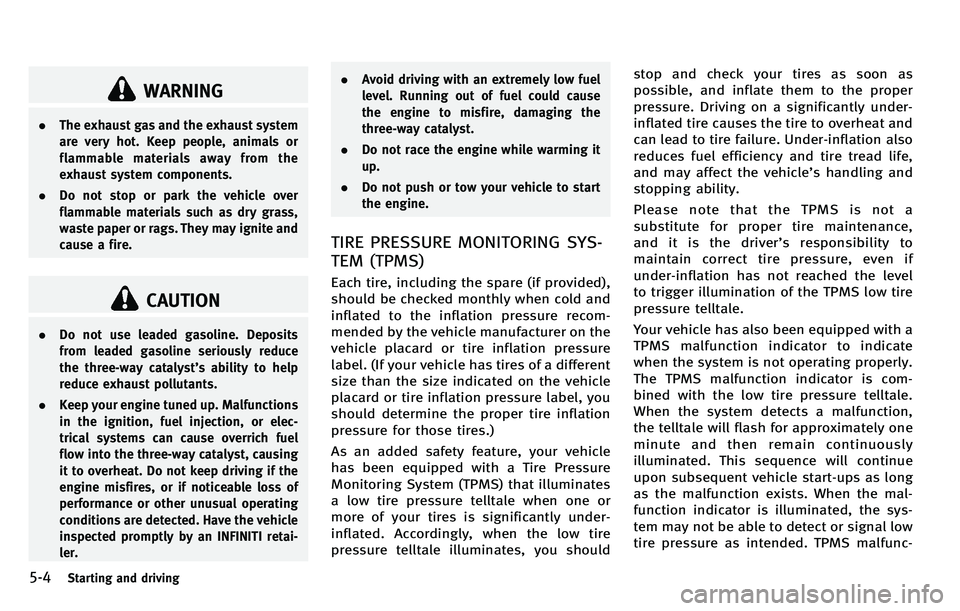
TIRE PRESSURE MONITORING SYS-
TEM (TPMS)
Each tire, including the spare (if provided),
should be checked monthly when cold and
inflated to the inflation pressure recom-
mended by the vehicle manufacturer on the
vehicle placard or tire inflation pressure
label. (If your vehicle has tires of a different
size than the size indicated on the vehicle
placard or tire inflation pressure label, you
should determine the proper tire inflation
pressure for those tires.)
As an added safety feature, your vehicle
has been equipped with a Tire Pressure
Monitoring System (TPMS) that illuminates
a low tire pressure telltale when one or
more of your tires is significantly under-
inflated. Accordingly, when the low tire
pressure telltale illuminates, you should stop and check your tires as soon as
possible, and inflate them to the proper
pressure. Driving on a significantly under-
inflated tire causes the tire to overheat and
can lead to tire failure. Under-inflation also
reduces fuel efficiency and tire tread life,
and may affect the vehicle
’s handling and
stopping ability.
Please note that the TPMS is not a
substitute for proper tire maintenance,
anditisthedriver ’s responsibility to
maintain correct tire pressure, even if
under-inflation has not reached the level
to trigger illumination of the TPMS low tire
pressure telltale.
Your vehicle has also been equipped with a
TPMS malfunction indicator to indicate
when the system is not operating properly.
The TPMS malfunction indicator is com-
bined with the low tire pressure telltale.
When the system detects a malfunction,
the telltale will flash for approximately one
minute and then remain continuously
illuminated. This sequence will continue
upon subsequent vehicle start-ups as long
as the malfunction exists. When the mal-
function indicator is illuminated, the sys-
tem may not be able to detect or signal low
tire pressure as intended. TPMS malfunc-
Page 320 of 522
sudden steering maneuvers, because
these driving practices could cause you to
lose control of your vehicle.As with any
vehicle, a loss of control could result in a
collision with other vehicles or objects, or
cause the vehicle to rollover, particularly if
the loss of control causes the vehicle to
slide sideways. Be attentive at all times,
and avoid driving when tired. Never drive
when under the influence of alcohol or
drugs (including prescription or over-the-
counter drugs which may cause drowsi-
ness). Always wear your seat belt as
outlined in the “Seat belts ”in the “1.
Safety —Seats, seat belts and supple-
mental restraint system ”section of this
manual, and also instruct your passengers
to do so.
Seat belts help reduce the risk of injury in
collisions and rollovers. In a rollover crash,
an unbelted or improperly belted person is
significantly more likely to be injured or
killed than a person properly wearing a
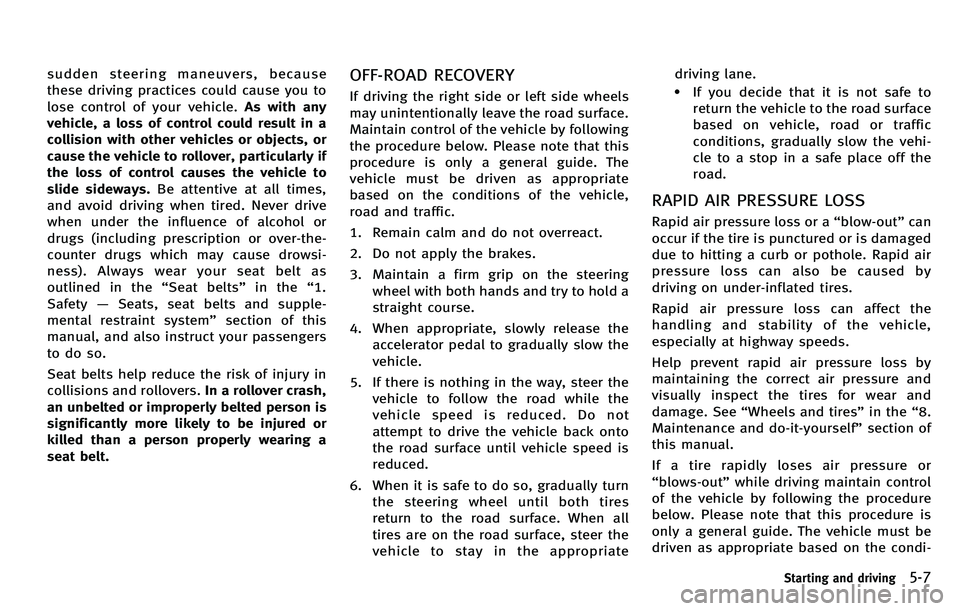
seat belt.OFF-ROAD RECOVERY
If driving the right side or left side wheels
may unintentionally leave the road surface.
Maintain control of the vehicle by following
the procedure below. Please note that this
procedure is only a general guide. The
vehicle must be driven as appropriate
based on the conditions of the vehicle,
road and traffic.
1. Remain calm and do not overreact.
2. Do not apply the brakes.
3. Maintain a firm grip on the steering
wheel with both hands and try to hold a
straight course.
4. When appropriate, slowly release the accelerator pedal to gradually slow the
vehicle.
5. If there is nothing in the way, steer the vehicle to follow the road while the
vehicle speed is reduced. Do not
attempt to drive the vehicle back onto
the road surface until vehicle speed is
reduced.
6. When it is safe to do so, gradually turn the steering wheel until both tires
return to the road surface. When all
tires are on the road surface, steer the
vehicle to stay in the appropriate driving lane..If you decide that it is not safe to
return the vehicle to the road surface
based on vehicle, road or traffic
conditions, gradually slow the vehi-
cle to a stop in a safe place off the
road.
RAPID AIR PRESSURE LOSS
Rapid air pressure loss or a “blow-out ”can
occur if the tire is punctured or is damaged
due to hitting a curb or pothole. Rapid air
pressure loss can also be caused by
driving on under-inflated tires.
Rapid air pressure loss can affect the
handling and stability of the vehicle,
especially at highway speeds.
Help prevent rapid air pressure loss by
maintaining the correct air pressure and
visually inspect the tires for wear and
damage. See “Wheels and tires ”in the “8.
Maintenance and do-it-yourself ”section of
this manual.
If a tire rapidly loses air pressure or
“ blows-out ”while driving maintain control
of the vehicle by following the procedure
below. Please note that this procedure is
only a general guide. The vehicle must be
driven as appropriate based on the condi-
Starting and driving5-7
Page 325 of 522
5-12Starting and driving
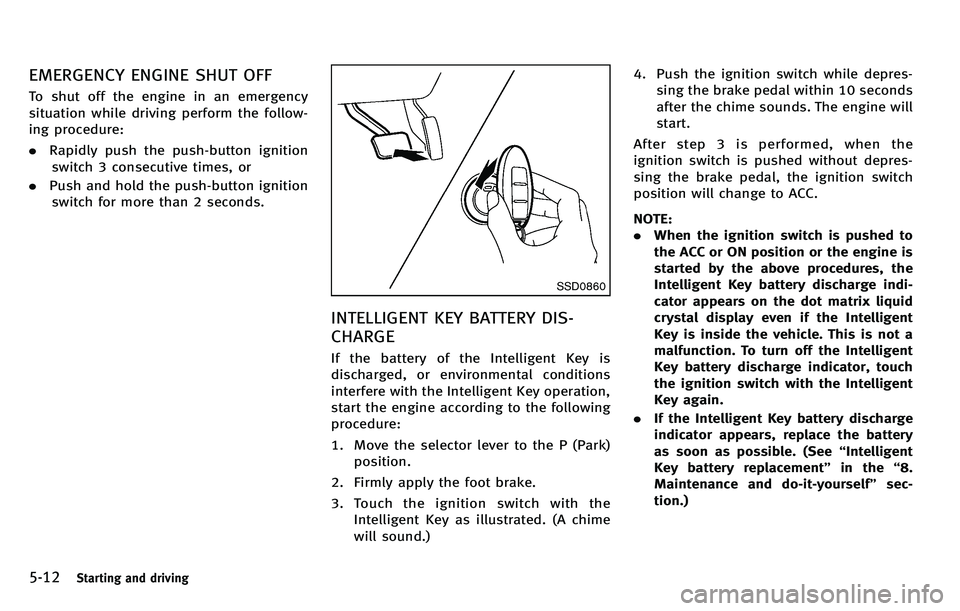
EMERGENCY ENGINE SHUT OFF
To shut off the engine in an emergency
situation while driving perform the follow-
ing procedure:
.Rapidly push the push-button ignition
switch 3 consecutive times, or
. Push and hold the push-button ignition
switch for more than 2 seconds.
SSD0860
INTELLIGENT KEY BATTERY DIS-
CHARGE
If the battery of the Intelligent Key is
discharged, or environmental conditions
interfere with the Intelligent Key operation,
start the engine according to the following
procedure:
1. Move the selector lever to the P (Park)
position.
2. Firmly apply the foot brake.
3. Touch the ignition switch with the Intelligent Key as illustrated. (A chime
will sound.) 4. Push the ignition switch while depres-
sing the brake pedal within 10 seconds
after the chime sounds. The engine will
start.
After step 3 is performed, when the
ignition switch is pushed without depres-
sing the brake pedal, the ignition switch
position will change to ACC.
NOTE:
. When the ignition switch is pushed to
the ACC or ON position or the engine is
started by the above procedures, the
Intelligent Key battery discharge indi-
cator appears on the dot matrix liquid
crystal display even if the Intelligent
Key is inside the vehicle. This is not a
malfunction. To turn off the Intelligent
Key battery discharge indicator, touch
the ignition switch with the Intelligent
Key again.
. If the Intelligent Key battery discharge
indicator appears, replace the battery
as soon as possible. (See “Intelligent
Key battery replacement” in the“8.
Maintenance and do-it-yourself ”sec-
tion.)
Page 344 of 522
SSD0453
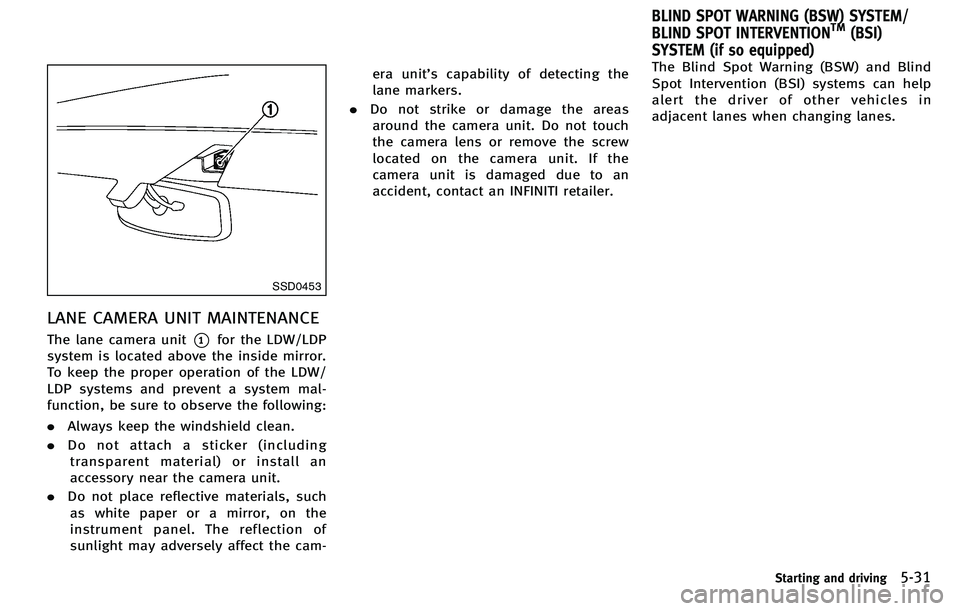
LANE CAMERA UNIT MAINTENANCE
The lane camera unit*1for the LDW/LDP
system is located above the inside mirror.
To keep the proper operation of the LDW/
LDP systems and prevent a system mal-
function, be sure to observe the following:
. Always keep the windshield clean.
. Do not attach a sticker (including
transparent material) or install an
accessory near the camera unit.
. Do not place reflective materials, such
as white paper or a mirror, on the
instrument panel. The reflection of
sunlight may adversely affect the cam- era unit
’s capability of detecting the
lane markers.
. Do not strike or damage the areas
around the camera unit. Do not touch
the camera lens or remove the screw
located on the camera unit. If the
camera unit is damaged due to an
accident, contact an INFINITI retailer. The Blind Spot Warning (BSW) and Blind
Spot Intervention (BSI) systems can help
alert the driver of other vehicles in
adjacent lanes when changing lanes.
Starting and driving5-31
BLIND SPOT WARNING (BSW) SYSTEM/
BLIND SPOT INTERVENTIONTM(BSI)
SYSTEM (if so equipped)
Page 357 of 522

5-44Starting and driving
BSW/BSI MALFUNCTION
When the BSW/BSI systems malfunction,
they will be turned off automatically, a
beep will sound and the BSW/BSI system
warning light (orange) will illuminate.
Action to take:
Stop the vehicle in a safe location, turn the
engine off and restart the engine.
If the warning light (orange) continues to
illuminate, have the BSW/BSI systems
checked by an INFINITI retailer.
SSD1027
SYSTEM MAINTENANCE
.The two radar sensor units*1for the
BSW and BSI systems are located near
the rear bumper. Always keep the area
near the radar sensors clean. Do not
attach stickers (including transparent
material), install accessories or apply
additional paint near the radar sensors.
Do not strike or damage the area
around the radar sensors. Consult an
INFINITI retailer if the area around the
radar sensors is damaged due to a
collision.
. The BSI system uses the same camera
*2that is used by the LDW/LDP system
located in front of the inside mirror.
For maintenance of the camera, see “Lane
Departure Warning (LDW) system/Lane
Departure Prevention (LDP) system” earlier
in this section.
Radio frequency statement
This device complies with part 15 of the
FCC Rules and RSS-310 of Industry Canada.
Operation is subject to the following two
conditions:
1. This device may not cause harmful
interference.
2. This device must accept any interfer- ence received, including interference
that may cause undesired operation.
Frequency of operation: 24.05GHz —
24.25GHz
Field Strength: Not greater than 2.5V/m
peak (0.25V/m average) at a distance of 3
m
The manufacturer is not responsible for
any radio or TV interference caused by
unauthorized modifications to this equip-
ment. Such modifications could void the
user ’s authority to operate the equipment.
Page 377 of 522
5-64Starting and driving
SSD0979
Condition C:
When the ICC system is not operating
properly, the chime sounds and the ICC
system warning light (orange) will come
on.
Action to take:
If the warning light comes on, park the
vehicle in a safe place. Turn the engine off,
restart the engine, resume driving and set
the ICC system again.
If it is not possible to set the system or the
indicator stays on, it may indicate that the
ICC system is malfunctioning. Although
the vehicle is still driveable under normalconditions, have the vehicle checked at an
INFINITI retailer.
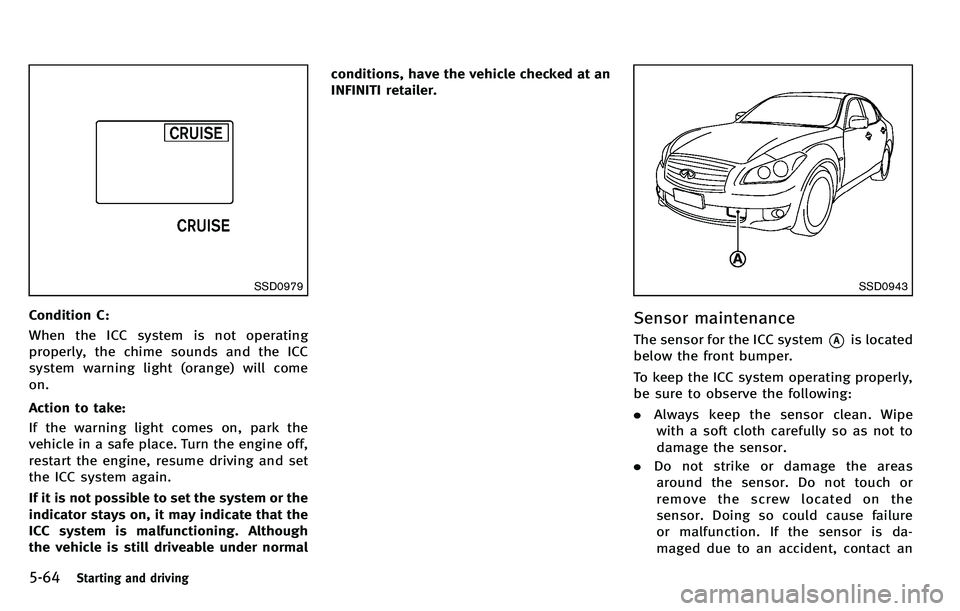
SSD0943
Sensor maintenance
The sensor for the ICC system*Ais located
below the front bumper.
To keep the ICC system operating properly,
be sure to observe the following:
. Always keep the sensor clean. Wipe
with a soft cloth carefully so as not to
damage the sensor.
. Do not strike or damage the areas
around the sensor. Do not touch or
remove the screw located on the
sensor. Doing so could cause failure
or malfunction. If the sensor is da-
maged due to an accident, contact an
Page 395 of 522
5-82Starting and driving
conditions, have the vehicle checked at an
INFINITI retailer.
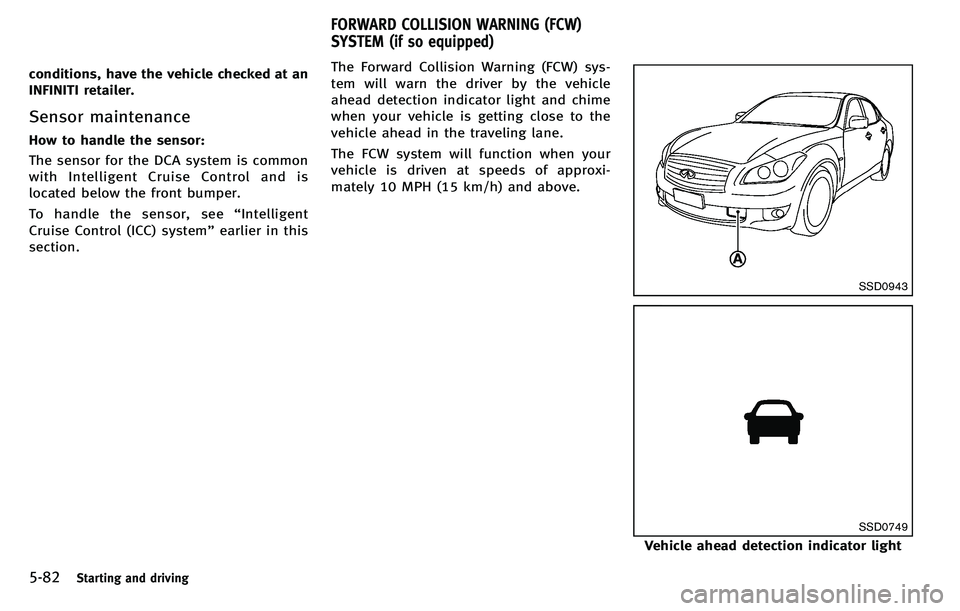
Sensor maintenance
How to handle the sensor:
The sensor for the DCA system is common
with Intelligent Cruise Control and is
located below the front bumper.
To handle the sensor, see“Intelligent
Cruise Control (ICC) system” earlier in this
section. The Forward Collision Warning (FCW) sys-
tem will warn the driver by the vehicle
ahead detection indicator light and chime
when your vehicle is getting close to the
vehicle ahead in the traveling lane.
The FCW system will function when your
vehicle is driven at speeds of approxi-
mately 10 MPH (15 km/h) and above.
SSD0943
SSD0749
Vehicle ahead detection indicator light
FORWARD COLLISION WARNING (FCW)
SYSTEM (if so equipped)
Page 399 of 522
5-86Starting and driving
JVS0080X
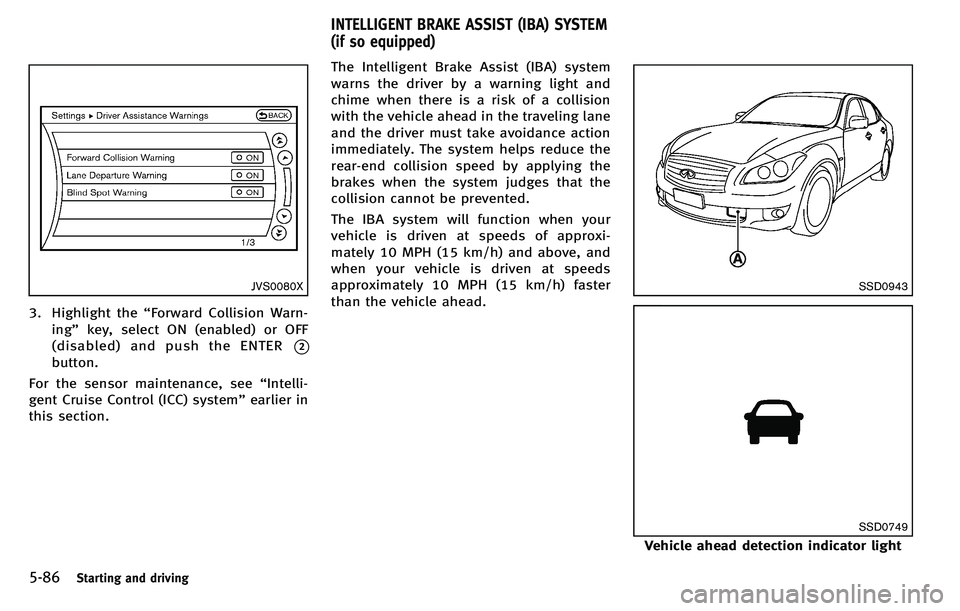
3. Highlight the“Forward Collision Warn-
ing ”key, select ON (enabled) or OFF
(disabled) and push the ENTER
*2
button.
For the sensor maintenance, see “Intelli-
gent Cruise Control (ICC) system” earlier in
this section. The Intelligent Brake Assist (IBA) system
warns the driver by a warning light and
chime when there is a risk of a collision
with the vehicle ahead in the traveling lane
and the driver must take avoidance action
immediately. The system helps reduce the
rear-end collision speed by applying the
brakes when the system judges that the
collision cannot be prevented.
The IBA system will function when your
vehicle is driven at speeds of approxi-
mately 10 MPH (15 km/h) and above, and
when your vehicle is driven at speeds
approximately 10 MPH (15 km/h) faster
than the vehicle ahead.
SSD0943
SSD0749
Vehicle ahead detection indicator light
INTELLIGENT BRAKE ASSIST (IBA) SYSTEM
(if so equipped)