wheel INFINITI M 2012 Manual PDF
[x] Cancel search | Manufacturer: INFINITI, Model Year: 2012, Model line: M, Model: INFINITI M 2012Pages: 522, PDF Size: 3.8 MB
Page 349 of 522
5-36Starting and driving
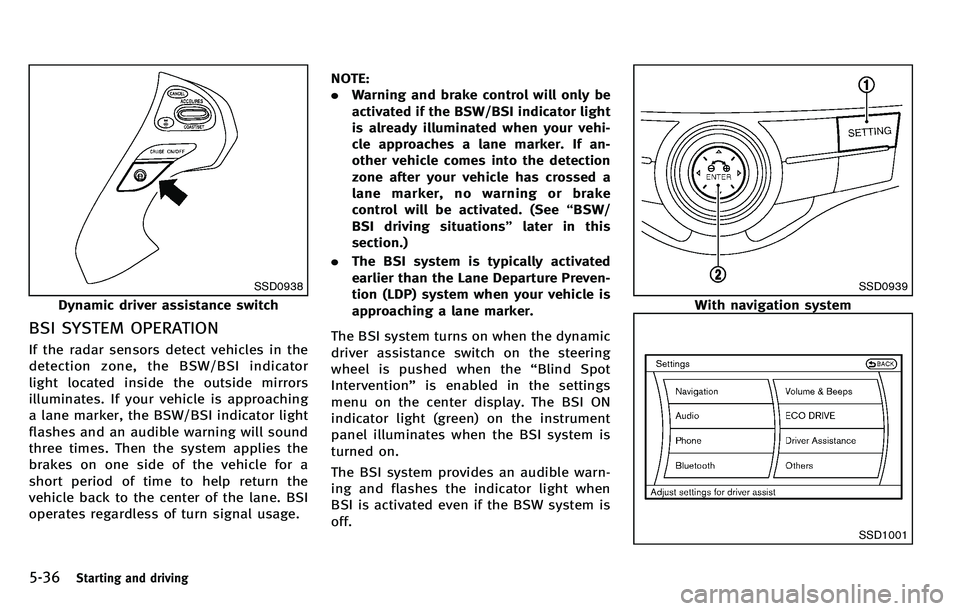
SSD0938
Dynamic driver assistance switch
BSI SYSTEM OPERATION
If the radar sensors detect vehicles in the
detection zone, the BSW/BSI indicator
light located inside the outside mirrors
illuminates. If your vehicle is approaching
a lane marker, the BSW/BSI indicator light
flashes and an audible warning will sound
three times. Then the system applies the
brakes on one side of the vehicle for a
short period of time to help return the
vehicle back to the center of the lane. BSI
operates regardless of turn signal usage.NOTE:
.
Warning and brake control will only be
activated if the BSW/BSI indicator light
is already illuminated when your vehi-
cle approaches a lane marker. If an-
other vehicle comes into the detection
zone after your vehicle has crossed a
lane marker, no warning or brake
control will be activated. (See “BSW/
BSI driving situations ”later in this
section.)
. The BSI system is typically activated
earlier than the Lane Departure Preven-
tion (LDP) system when your vehicle is
approaching a lane marker.
The BSI system turns on when the dynamic
driver assistance switch on the steering
wheel is pushed when the “Blind Spot
Intervention” is enabled in the settings
menu on the center display. The BSI ON
indicator light (green) on the instrument
panel illuminates when the BSI system is
turned on.
The BSI system provides an audible warn-
ing and flashes the indicator light when
BSI is activated even if the BSW system is
off.
SSD0939
With navigation system
SSD1001
Page 350 of 522

How to enable/disable the BSI
system using the settings menu
Perform the following steps to enable or
disable the BSI system.
1. Push the SETTING
*1button and high-
light the “Driver Assistance ”key on the
display using the INFINITI controller.
Then push the ENTER
*2button.
2. Highlight the “Dynamic Assistance Set-
tings ”key,andpushtheENTER
*2
button.
SSD1002
3. Highlight the “Blind Spot Intervention ”
key, select ON (enabled) or OFF (dis-
abled) and push the ENTER
*2button.
For the LDP and DCA systems, see “Lane
Departure Prevention (LDP) system” earlier
in this section and “Distance Control Assist
(DCA) system ”later in this section.
WARNING
. Do not use the BSI system under the
following conditions because the system
may not function properly.
—During bad weather (e.g. rain, fog,
snow, wind, etc.)
—When driving on slippery roads,such as on ice or snow, etc.
—When driving on winding or uneven roads.
—When there is a lane closure due toroad repairs.
—When driving in a makeshift lane.
—When driving on roads where the
lane width is too narrow.
—When driving with a tire that is notwithin normal tire conditions (e.g.
tire wear, low tire pressure, installa-
tion of spare tire, tire chains, non-
standard wheels).
—When the vehicle is equipped withnon-original brake parts or suspen-
sion parts.
. Excessive noise (e.g. audio system vo-
lume, open vehicle window) will interfere
with the chime sound, and it may not be
heard.
.The radar sensors may not be able to
detect and activate BSI/BSW when
Starting and driving5-37
Page 351 of 522

5-38Starting and driving
certain objects are present such as:
—Pedestrians, bicycles, animals
— Several types of vehicles such as
motorcycles
— Oncoming vehicles
— Vehicles remaining in the detection
zone when you accelerate from a
stop
(See “BSW/BSI driving situations ”
later in this section)
— A vehicle merging into an adjacent
lane at a speed approximately the
same as your vehicle
(See “BSW/BSI driving situations ”
later in this section)
— A vehicle approaching rapidly from
behind.
(See “BSW/BSI driving situations ”
later in this section)
— A vehicle which your vehicle over-
takes rapidly.
(See “BSW/BSI driving situations ”
later in this section)
. Severe weather or road spray condi-
tions may reduce the ability of the
radar to detect other vehicles.
. The radar sensors detection zone is
designed based on a standard lane
width. When driving in a wider lane, the radar sensors may not detect vehicles
in an adjacent lane. When driving in a
narrow lane, the radar sensors may
detect vehicles driving two lanes away.
. The radar sensors are designed to
ignore most stationary objects, how-
ever objects such as guardrails, walls,
foliage and parked vehicles may occa-
sionally be detected. This is a normal
operating condition.
. The camera may not detect lane mar-
kers in the following situations and the
BSI system may not operate properly.
— On roads where there are multiple
parallel lane markers; lane markers
that are faded or not painted clearly;
yellow painted lane markers; non-
standard lane markers; lane mar-
kers covered with water, dirt, snow,
etc.
— On roads where discontinued lane
markers are still detectable.
— On roads where there are sharp
curves.
— On roads where there are sharply
contrasting objects, such as sha-
dows, snow, water, wheel ruts,
seams or lines remaining after road
repairs. —
On roads where the traveling lane
merges or separates.
— When the vehicle ’s traveling direc-
tion does not align with the lane
markers.
— When traveling close to the vehicle
in front of you, which obstructs the
lane camera unit detection range.
— When rain, snow or dirt adheres to
the windshield in front of a lane
camera unit.
— When the headlights are not bright
due to dirt on the lens or if aiming is
not adjusted properly.
— When strong light enters a lane
c a mera
unit. (e.g. light directly
shines on the front of the vehicle
at sunrise or sunset.)
— When a sudden change in bright-
ness occurs. (e.g. when the vehicle
enters or exits a tunnel or under a
bridge.)
Page 367 of 522
5-54Starting and driving
SSD0977
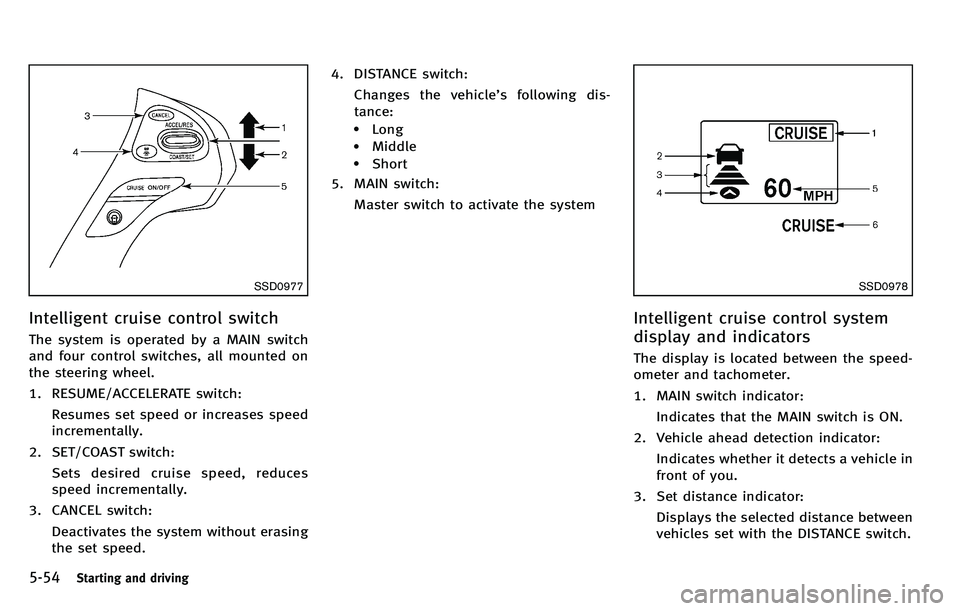
Intelligent cruise control switch
The system is operated by a MAIN switch
and four control switches, all mounted on
the steering wheel.
1. RESUME/ACCELERATE switch:Resumes set speed or increases speed
incrementally.
2. SET/COAST switch: Sets desired cruise speed, reduces
speed incrementally.
3. CANCEL switch:
Deactivates the system without erasing
the set speed. 4. DISTANCE switch:
Changes the vehicle ’s following dis-
tance:
.Long.Middle.Short
5. MAIN switch:
Master switch to activate the system
SSD0978
Intelligent cruise control system
display and indicators
The display is located between the speed-
ometer and tachometer.
1. MAIN switch indicator:Indicates that the MAIN switch is ON.
2. Vehicle ahead detection indicator: Indicates whether it detects a vehicle in
front of you.
3. Set distance indicator: Displays the selected distance between
vehicles set with the DISTANCE switch.
Page 370 of 522
SSD0983
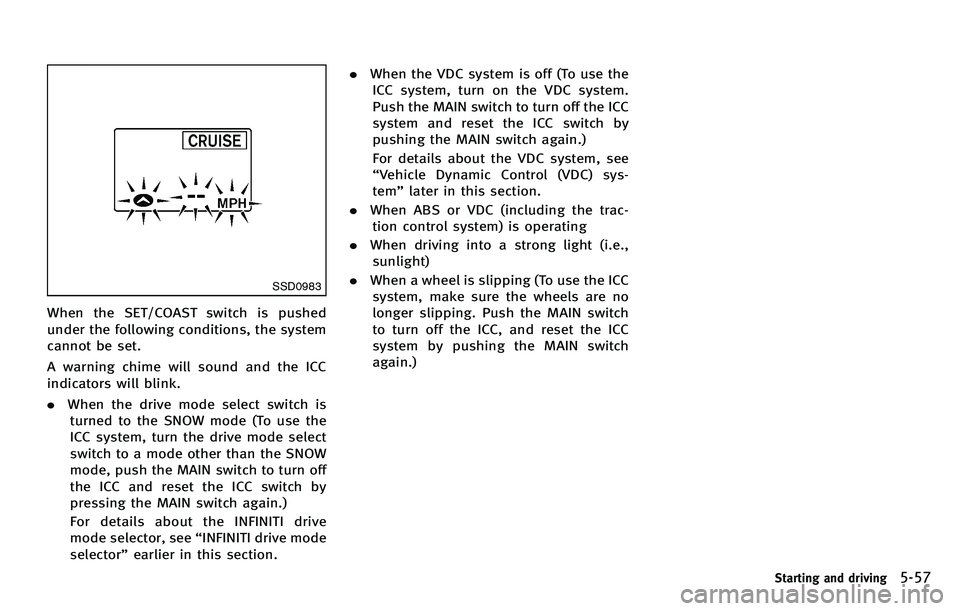
When the SET/COAST switch is pushed
under the following conditions, the system
cannot be set.
A warning chime will sound and the ICC
indicators will blink.
.When the drive mode select switch is
turned to the SNOW mode (To use the
ICC system, turn the drive mode select
switch to a mode other than the SNOW
mode, push the MAIN switch to turn off
the ICC and reset the ICC switch by
pressing the MAIN switch again.)
For details about the INFINITI drive
mode selector, see “INFINITI drive mode
selector ”earlier in this section. .
When the VDC system is off (To use the
ICC system, turn on the VDC system.
Push the MAIN switch to turn off the ICC
system and reset the ICC switch by
pushing the MAIN switch again.)
For details about the VDC system, see
“ Vehicle Dynamic Control (VDC) sys-
tem ”later in this section.
. When ABS or VDC (including the trac-
tion control system) is operating
. When driving into a strong light (i.e.,
sunlight)
. When a wheel is slipping (To use the ICC
system, make sure the wheels are no
longer slipping. Push the MAIN switch
to turn off the ICC, and reset the ICC
system by pushing the MAIN switch
again.)
Starting and driving5-57
Page 375 of 522
5-62Starting and driving
SSD0284A
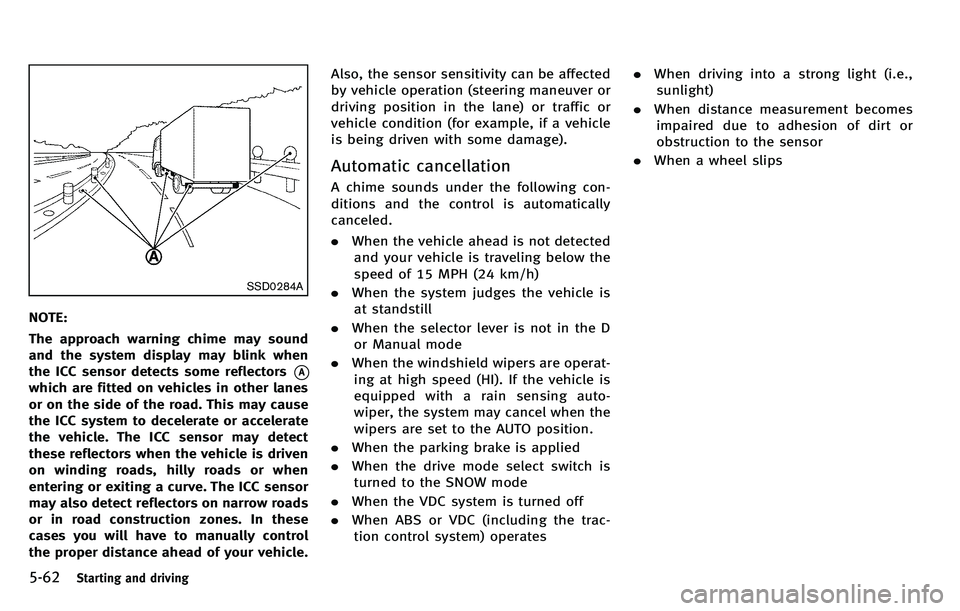
NOTE:
The approach warning chime may sound
and the system display may blink when
the ICC sensor detects some reflectors
*A
which are fitted on vehicles in other lanes
or on the side of the road. This may cause
the ICC system to decelerate or accelerate
the vehicle. The ICC sensor may detect
these reflectors when the vehicle is driven
on winding roads, hilly roads or when
entering or exiting a curve. The ICC sensor
may also detect reflectors on narrow roads
or in road construction zones. In these
cases you will have to manually control
the proper distance ahead of your vehicle.Also, the sensor sensitivity can be affected
by vehicle operation (steering maneuver or
driving position in the lane) or traffic or
vehicle condition (for example, if a vehicle
is being driven with some damage).
Automatic cancellation
A chime sounds under the following con-
ditions and the control is automatically
canceled.
.
When the vehicle ahead is not detected
and your vehicle is traveling below the
speed of 15 MPH (24 km/h)
. When the system judges the vehicle is
at standstill
. When the selector lever is not in the D
or Manual mode
. When the windshield wipers are operat-
ing at high speed (HI). If the vehicle is
equipped with a rain sensing auto-
wiper, the system may cancel when the
wipers are set to the AUTO position.
. When the parking brake is applied
. When the drive mode select switch is
turned to the SNOW mode
. When the VDC system is turned off
. When ABS or VDC (including the trac-
tion control system) operates .
When driving into a strong light (i.e.,
sunlight)
. When distance measurement becomes
impaired due to adhesion of dirt or
obstruction to the sensor
. When a wheel slips
Page 388 of 522
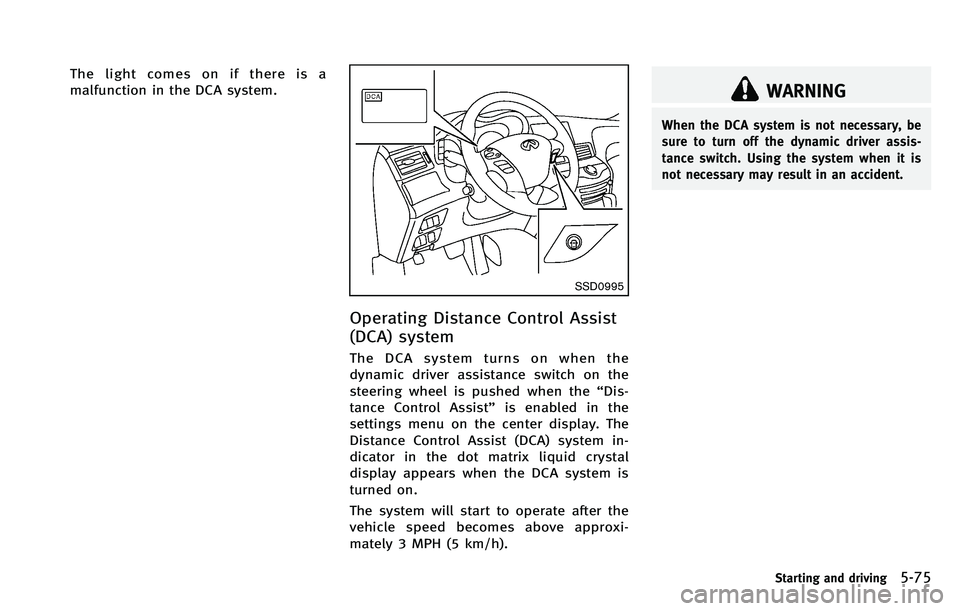
The light comes on if there is a
malfunction in the DCA system.
SSD0995
Operating Distance Control Assist
(DCA) system
The DCA system turns on when the
dynamic driver assistance switch on the
steering wheel is pushed when the“Dis-
tance Control Assist ”is enabled in the
settings menu on the center display. The
Distance Control Assist (DCA) system in-
dicator in the dot matrix liquid crystal
display appears when the DCA system is
turned on.
The system will start to operate after the
vehicle speed becomes above approxi-
mately 3 MPH (5 km/h).
WARNING
When the DCA system is not necessary, be
sure to turn off the dynamic driver assis-
tance switch. Using the system when it is
not necessary may result in an accident.
Starting and driving5-75
Page 403 of 522
5-90Starting and driving
CAUTION
During the first 1,200 miles (2,000 km),
follow these recommendations to obtain
maximum engine performance and ensure
the future reliability and economy of your
new vehicle.
Failure to follow these recommendations
may result in shortened engine life and
reduced engine performance.
.Avoid driving for long periods at con-
stant speed, either fast or slow. Do not
run the engine over 4,000 rpm.
. Do not accelerate at full throttle in any
gear.
. Avoid quick starts.
. Avoid hard braking as much as possi-
ble. .
Accelerate slowly and smoothly. Main-
tain cruising speeds with a constant
accelerator position.
. Drive at moderate speeds on the high-
way.
. Avoid unnecessary stopping and brak-
ing. Keep a safe distance behind other
vehicles.
. Select a gear range suitable to road
conditions.
. Avoid unnecessary prolonged engine
idling.
. Keep your engine tuned up.
. Follow the recommended periodic main-
tenance schedule.
. Keep the tires inflated at the correct
pressure. Improper tire pressure will
increase wear and waste fuel.
. Make sure the front wheels are properly
aligned. Improper alignment will cause
premature tire wear and lower fuel
economy.
. Climate control operation lowers fuel
economy. Use the air conditioner only
when necessary.
. When cruising at highway speeds, it is
more economical to use the air condi-
tioner and leave the windows closed to
reduce drag.
SSD0336
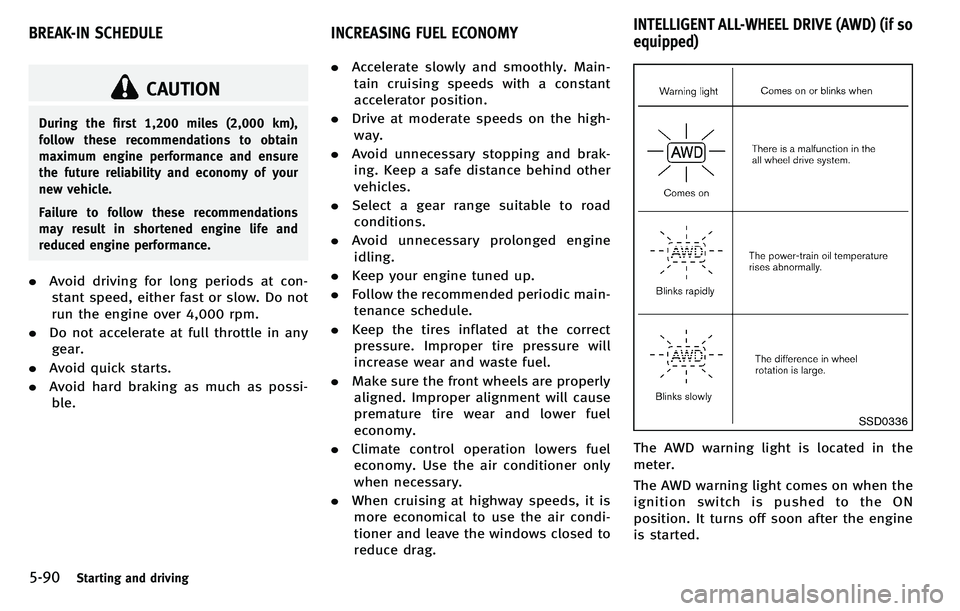
The AWD warning light is located in the
meter.
The AWD warning light comes on when the
ignition switch is pushed to the ON
position. It turns off soon after the engine
is started.
BREAK-IN SCHEDULE INCREASING FUEL ECONOMYINTELLIGENT ALL-WHEEL DRIVE (AWD) (if so
equipped)
Page 404 of 522
If any malfunction occurs in the Intelligent
AWD system while the engine is running,
the warning light will come on.
The warning light may blink rapidly (about
twice per second) while trying to free a
stuck vehicle due to high power train oil
temperature. The driving mode may change
to two-wheel drive. If the warning light
blinks rapidly during operation, stop the
vehicle with the engine idling in a safe
place immediately. Then if the light goes
off after a while, you can continue driving.
A large difference between the diameters
of front and rear wheels will make the
warning light blink slowly (about once per
two seconds). Pull off the road in a safe
area, and idle the engine. Check that all
tire sizes are the same, tire pressure is
correct and tires are not worn.
If the warning light is blinking after the
above operation, have your vehicle
checked by an INFINITI retailer as soon as
possible.
WARNING
.For AWD equipped vehicles, do not
attempt to raise two wheels off the ground and shift the transmission to
any drive or reverse position with the
engine running. Doing so may result in
drivetrain damage or unexpected vehicle
movement which could result in serious
vehicle damage or personal injury.
. Do not attempt to test an AWD equipped
vehicle on a 2-wheel dynamometer (such
as the dynamometers used by some
states for emissions testing) or similar
equipment even if the other two wheels
are raised off the ground. Make sure that
you inform the test facility personnel
that your vehicle is equipped with AWD
before it is placed on a dynamometer.
Using the wrong test equipment may
result in drivetrain damage or unex-
pected vehicle movement which could
result in serious vehicle damage or
personal injury.
CAUTION
.Do not operate the engine on a free
roller when any of the wheels are raised.
. If the warning light comes on while
driving there may be a malfunction in the AWD system. Reduce the vehicle
speed and have your vehicle checked by
an INFINITI retailer as soon as possible.
. If the warning light remains on after the
above operation, have your vehicle
checked by an INFINITI retailer as soon
as possible.
. The power train may be damaged if you
continue driving with the warning light
blinking.
Starting and driving5-91
Page 405 of 522
5-92Starting and driving
SD1006MA
WARNING
.Do not stop or park the vehicle over
flammable materials such as dry grass,
waste paper or rags. They may ignite and
cause a fire.
. Never leave the engine running while the
vehicle is unattended.
. Do not leave children unattended inside
the vehicle. They could unknowingly
activate switches or controls. Unat-
tended children could become involved
in serious accidents. .
Safe parking procedures require that
both the parking brake be applied and
the transmission placed into P (Park).
Failure to do so could cause the vehicle
to move unexpectedly or roll away and
result in an accident.
. Make sure the automatic transmission
selector lever has been pushed as far
forward as it can go and cannot be
moved without depressing the foot
brake pedal.
1. Firmly apply the parking brake. 2. Move the selector lever to the P (Park)
position.
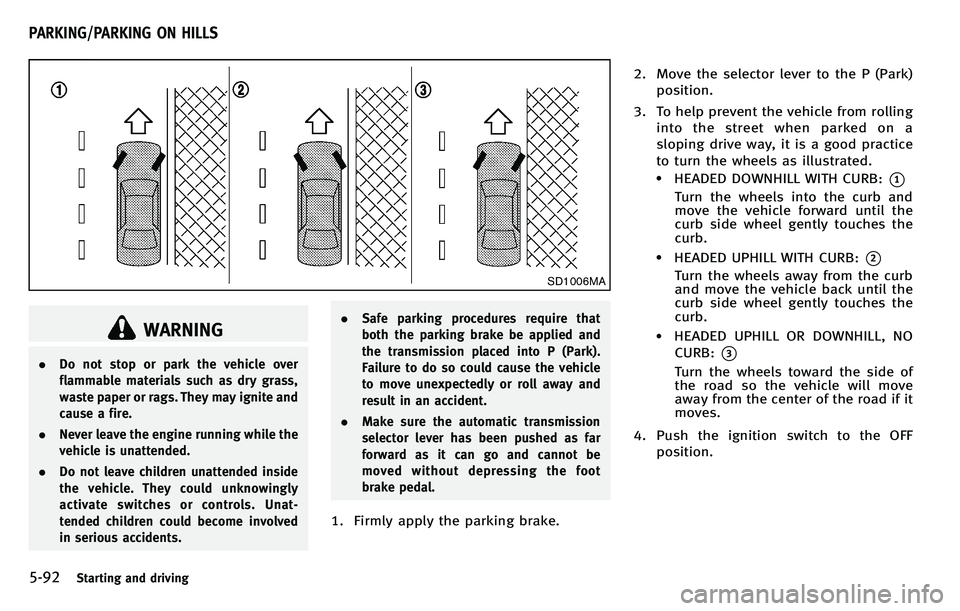
3. To help prevent the vehicle from rolling into the street when parked on a
sloping drive way, it is a good practice
to turn the wheels as illustrated.
.HEADED DOWNHILL WITH CURB:*1
Turn the wheels into the curb and
move the vehicle forward until the
curb side wheel gently touches the
curb.
.HEADED UPHILL WITH CURB:*2
Turn the wheels away from the curb
and move the vehicle back until the
curb side wheel gently touches the
curb.
.HEADED UPHILL OR DOWNHILL, NOCURB:
*3
Turn the wheels toward the side of
the road so the vehicle will move
away from the center of the road if it
moves.
4. Push the ignition switch to the OFF position.
PARKING/PARKING ON HILLS