battery INFINITI M 2012 Owners Manual
[x] Cancel search | Manufacturer: INFINITI, Model Year: 2012, Model line: M, Model: INFINITI M 2012Pages: 522, PDF Size: 3.8 MB
Page 17 of 522
0-10Illustrated table of contents
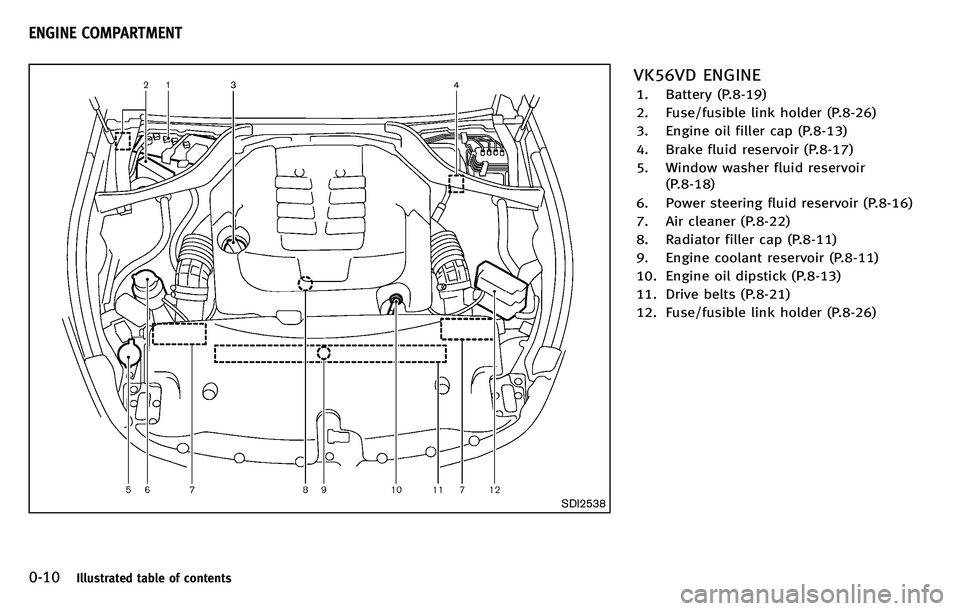
SDI2538
VK56VD ENGINE
1. Battery (P.8-19)
2. Fuse/fusible link holder (P.8-26)
3. Engine oil filler cap (P.8-13)
4. Brake fluid reservoir (P.8-17)
5. Window washer fluid reservoir(P.8-18)
6. Power steering fluid reservoir (P.8-16)
7. Air cleaner (P.8-22)
8. Radiator filler cap (P.8-11)
9. Engine coolant reservoir (P.8-11)
10. Engine oil dipstick (P.8-13)
11. Drive belts (P.8-21)
12. Fuse/fusible link holder (P.8-26)
ENGINE COMPARTMENT
Page 18 of 522
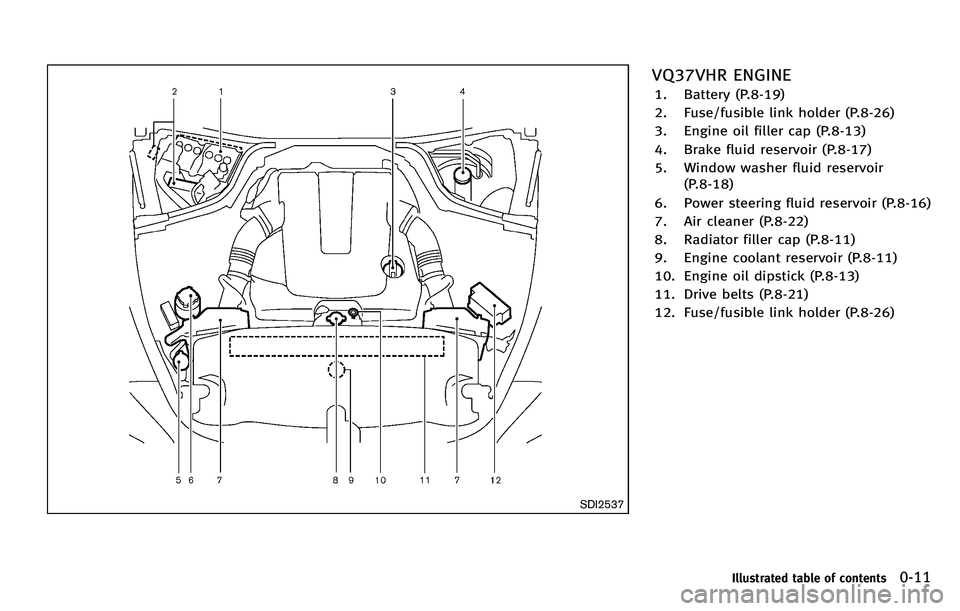
SDI2537
VQ37VHR ENGINE
1. Battery (P.8-19)
2. Fuse/fusible link holder (P.8-26)
3. Engine oil filler cap (P.8-13)
4. Brake fluid reservoir (P.8-17)
5. Window washer fluid reservoir(P.8-18)
6. Power steering fluid reservoir (P.8-16)
7. Air cleaner (P.8-22)
8. Radiator filler cap (P.8-11)
9. Engine coolant reservoir (P.8-11)
10. Engine oil dipstick (P.8-13)
11. Drive belts (P.8-21)
12. Fuse/fusible link holder (P.8-26)
Illustrated table of contents0-11
Page 22 of 522
FRONT SEATS
Front power seat adjustment
Operating tips:
.The power seat motor has an auto-reset
overload protection circuit. If the motor
stops during operation, wait 30 sec-
onds, then reactivate the switch.
. Do not operate the power seat switch
for a long period of time when the
engine is off. This will discharge the
battery.
See “Automatic drive positioner ”in the “3.
Pre-driving checks and adjustments ”sec-
tion for the seat position memory function.
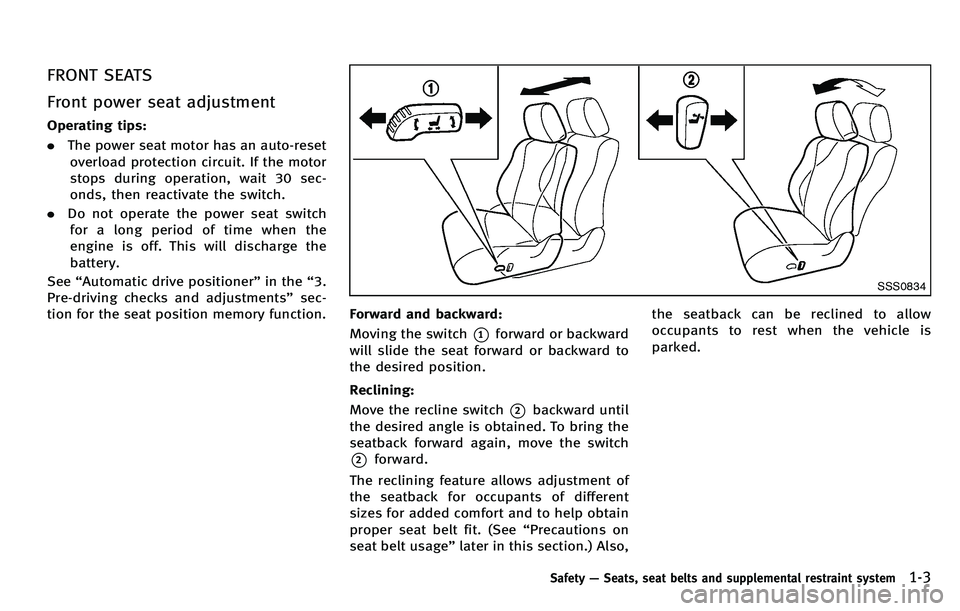
SSS0834
Forward and backward:
Moving the switch
*1forward or backward
will slide the seat forward or backward to
the desired position.
Reclining:
Move the recline switch
*2backward until
the desired angle is obtained. To bring the
seatback forward again, move the switch
*2forward.
The reclining feature allows adjustment of
the seatback for occupants of different
sizes for added comfort and to help obtain
proper seat belt fit. (See “Precautions on
seat belt usage ”later in this section.) Also, the seatback can be reclined to allow
occupants to rest when the vehicle is
parked.
Safety
—Seats, seat belts and supplemental restraint system1-3
Page 75 of 522
Console box .................................................. 2-50
Card holder ................................................... 2-51
Rear pocket ................................................... 2-51
Coat hooks .................................................... 2-52
Trunk hooks .................................................. 2-52
Windows ........................................................... 2-53 Power windows ............................................. 2-53
Moonroof........................................................... 2-55
Automatic moonroof ...................................... 2-55
Rear sunshade (if so equipped) ......................... 2-57
Welcome light.................................................... 2-58
Battery saver system ..................................... 2-58
Interior lights..................................................... 2-59 Map lights..................................................... 2-59
Personal lights .............................................. 2-59 Interior light control switch .......................... 2-60
Vanity mirror lights ........................................... 2-61
Trunk light ........................................................ 2-61
HomeLink
®Universal Transceiver ...................... 2-61
Programming HomeLink®............................. 2-62
Programming HomeLink®for
Canadian customers .................................... 2-63
Operating the HomeLink
®
Universal Transceiver ................................... 2-64
Programming trouble-diagnosis ................... 2-64
Clearing the programmed information .......... 2-64
Reprogramming a single
HomeLink
®button ....................................... 2-64
If your vehicle is stolen ............................... 2-65
Page 95 of 522

2-22Instruments and controls
INDICATORS FOR OPERATION
1. Engine start operation indicator
This indicator appears when the selector
lever is in the P (Park) position.
This indicator means that the engine will
start by pushing the ignition switch with
the brake pedal depressed. You can start
the engine directly in any position.
2. Steering lock release malfunc-
tion indicator (if so equipped)
This indicator appears when the steering
wheel cannot be released from the LOCK
position.
If this indicator appears, push the push-
button ignition switch while lightly turning
the steering wheel right and left.
3. NO KEY warning
This warning appears in either of the
following conditions.
No key inside the vehicle:
The warning appears when the door is
closed with the Intelligent Key left outside
the vehicle and the ignition switch in the
ACC or ON position. Make sure that the
Intelligent Key is inside the vehicle.Unregistered Intelligent Key:
The warning appears when the ignition
switch is pushed from the LOCK position
and the Intelligent Key cannot be recog-
nized by the system. You cannot start the
engine with an unregistered key. Use the
registered Intelligent Key.
See
“Intelligent Key system” in the“3. Pre-
driving checks and adjustments” section
for more details.
4. SHIFT “P ” warning
This warning appears when the ignition
switch is pushed to stop the engine with
the selector lever in any position except
the P (Park) position.
If this warning appears, move the selector
lever to the P (Park) position or push the
ignition switch to the ON position.
An inside warning chime will also sound.
(See “Intelligent Key system” in the“3.
Pre-driving checks and adjustments ”sec-
tion.)
5. “PUSH ”warning
This warning appears when the selector
lever is moved to the P (Park) position with
the ignition switch in the ACC position after
the SHIFT “P ” warning appears. To push the ignition switch to the OFF
position, perform the following procedure:
.
SHIFT “P”warning ?(Move the selec-
tor lever to “P ”) ? PUSH warning ?
(Push the ignition switch ?ignition
switch position is turned to ON) ?
PUSH warning ?(Push the ignition
switch ?ignition switch position is
turned to OFF)
6. Intelligent Key battery discharge
indicator
This indicator appears when the Intelligent
Key battery is running out of power.
If this indicator appears, replace the
battery with a new one. (See “Intelligent
Key battery replacement ”in the “8. Main-
tenance and do-it-yourself ”section.)
7. Engine start operation for Intel-
ligent Key system indicator
This indicator appears when the Intelligent
Key battery is running out of power and
when the Intelligent Key System and
vehicle are not communicating normally.
If this indicator appears, touch the ignition
switch with the Intelligent Key while
depressing the brake pedal. (See “Intelli-
gent Key battery discharge ”in the “5.
Page 109 of 522
2-36Instruments and controls
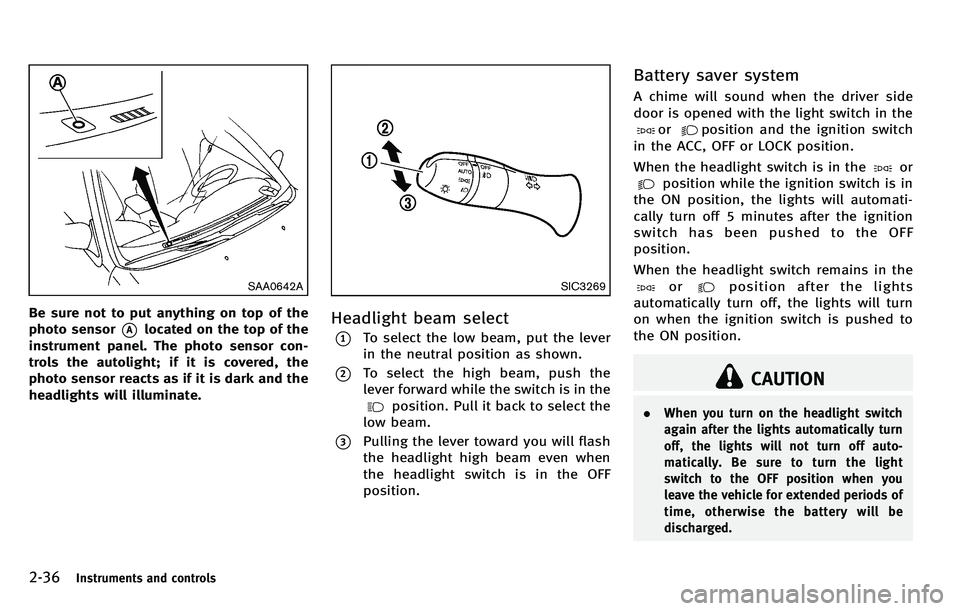
SAA0642A
Be sure not to put anything on top of the
photo sensor
*Alocated on the top of the
instrument panel. The photo sensor con-
trols the autolight; if it is covered, the
photo sensor reacts as if it is dark and the
headlights will illuminate.
SIC3269
Headlight beam select
*1To select the low beam, put the lever
in the neutral position as shown.
*2To select the high beam, push the
lever forward while the switch is in the
position. Pull it back to select the
low beam.
*3Pulling the lever toward you will flash
the headlight high beam even when
the headlight switch is in the OFF
position.
Battery saver system
A chime will sound when the driver side
door is opened with the light switch in the
orposition and the ignition switch
in the ACC, OFF or LOCK position.
When the headlight switch is in the
or
position while the ignition switch is in
the ON position, the lights will automati-
cally turn off 5 minutes after the ignition
switch has been pushed to the OFF
position.
When the headlight switch remains in the
orposition after the lights
automatically turn off, the lights will turn
on when the ignition switch is pushed to
the ON position.
CAUTION
. When you turn on the headlight switch
again after the lights automatically turn
off, the lights will not turn off auto-
matically. Be sure to turn the light
switch to the OFF position when you
leave the vehicle for extended periods of
time, otherwise the battery will be
discharged.
Page 114 of 522

Push the switch again to turn the heated
steering wheel system off manually. The
indicator light will turn off.
NOTE:
If the surface temperature of the steering
wheel is above 688F(20 8C) when the
switch is turned on, the system will not
heat the steering wheel. This is not a
malfunction.
SIC4332
To sound the horn, push the center pad
area of the steering wheel.
WARNING
Do not disassemble the horn. Doing so
could affect proper operation of the supple-
mental front air bag system. Tampering with
the supplemental front air bag system may
result in serious personal injury.
WARNING
Do not use or allow occupants to use the
seat heater if you or the occupants cannot
monitor elevated seat temperatures or have
an inability to feel pain in body parts that
contact the seat. Use of the seat heater by
such people could result in serious injury.
CAUTION
. The battery could run down if the seat
heater is operated while the engine is
not running.
. Do not use the seat heater for extended
periods or when no one is using the
seat.
. Do not put anything on the seat which
insulates heat, such as a blanket,
cushion, seat cover, etc. Otherwise, the
seat may become overheated.
. Do not place anything hard or heavy on
the seat or pierce it with a pin or similar
object. This may result in damage to the
heater.
Instruments and controls2-41
HORN HEATED SEATS
Page 116 of 522

SIC4334
The climate controlled seat warms up or
cools down the front seats by blowing
warm or cool air from the surface of the
seat. The switches located on the center
console can be operated independently of
each other.
1. Start the engine.
2. Turn the control knob
*Ato the heat
side
*1or to the cool side*2. The
indicator light
*Bon the control knob
will illuminate.
3. Adjust the temperature using the con- trol knob
*A.
4. When the vehicle ’s interior is warmed or cooled, and/or before you leave the
vehicle, be sure to turn the control
knob to the OFF position (center). The
indicator light
*Bon the control knob
goes off at the OFF position.
To check the air filter for the climate
controlled seat, contact an INFINITI
retailer.
WARNING
Do not use or allow occupants to use the
seat heater if you or the occupants cannot
monitor elevated seat temperatures or have
an inability to feel pain in body parts that
contact the seat. Use of the seat heater by
such people could result in serious injury.
CAUTION
. The battery could run down if the climate
controlled seat is operated while the
engine is not running.
. Do not use the climate controlled seat
for extended periods or when no one is
using the seat. .
Do not put anything on the seat which
insulates heat, such as a blanket,
cushion, seat cover, etc. Otherwise, the
seat may become overheated.
. Do not place anything hard or heavy on
the seat or pierce it with a pin or similar
object. This may result in damage to the
climate controlled seat.
. Any liquid spilled on the seat should be
removed immediately with a dry cloth.
. The climate controlled seat has an air
filter. Do not operate climate controlled
seat without an air filter. This may result
in damage to the system.
. When cleaning the seat, never use
gasoline, thinner, or any similar materi-
als.
. If any malfunctions are found or the
climate controlled seat does not operate,
turn the switch off and have the system
checked by an INFINITI retailer.
Instruments and controls2-43
CLIMATE CONTROLLED SEATS (if so
equipped)
Page 119 of 522
2-46Instruments and controls
SIC4338
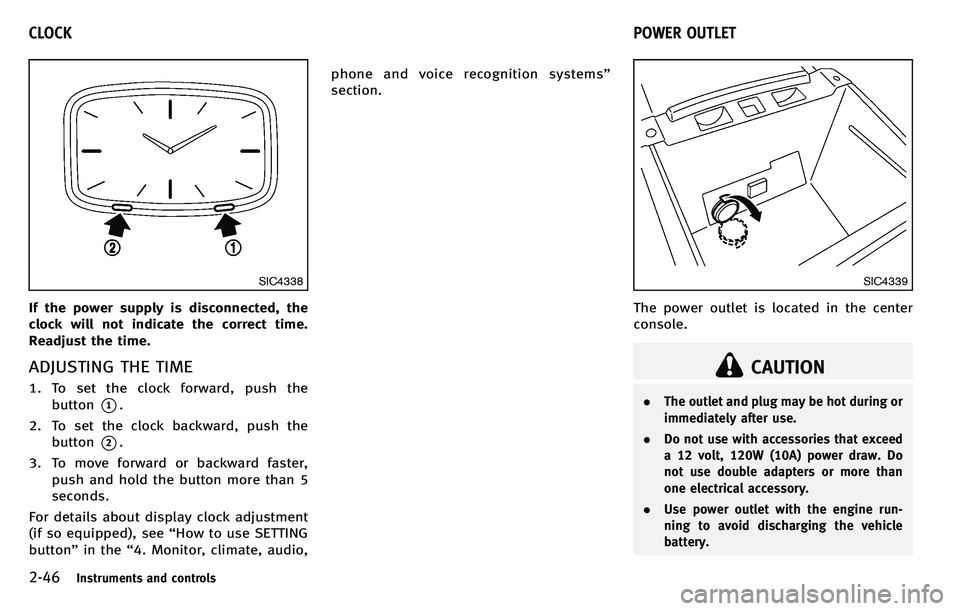
If the power supply is disconnected, the
clock will not indicate the correct time.
Readjust the time.
ADJUSTING THE TIME
1. To set the clock forward, push thebutton
*1.
2. To set the clock backward, push the button
*2.
3. To move forward or backward faster, push and hold the button more than 5
seconds.
For details about display clock adjustment
(if so equipped), see “How to use SETTING
button ”in the “4. Monitor, climate, audio, phone and voice recognition systems
”
section.
SIC4339
The power outlet is located in the center
console.
CAUTION
. The outlet and plug may be hot during or
immediately after use.
. Do not use with accessories that exceed
a 12 volt, 120W (10A) power draw. Do
not use double adapters or more than
one electrical accessory.
. Use power outlet with the engine run-
ning to avoid discharging the vehicle
battery.
CLOCK POWER OUTLET
Page 131 of 522
2-58Instruments and controls
CAUTION
.Do not place objects (such as news-
papers, handkerchiefs, etc.) on the
sunshade inlet port. Doing so may
entangle these objects in the sunshade
when it is extending or retracting,
causing improper operation or damage
to the sunshade.
. Do not push the sunshade arm with your
hands, etc., as this may deform it.
Improper operation or damage to the
sunshade may result.
. Do not put any object into the sunshade
inlet port as this may result in improper
operation or damage the sunshade.
. Do not hang any object on the arm rail
as this may result in improper operation
or damage the sunshade.
. Do not forcefully pull the sunshade.
Doing so may elongate the sunshade.
Improper operation or damage to the
sunshade may result.
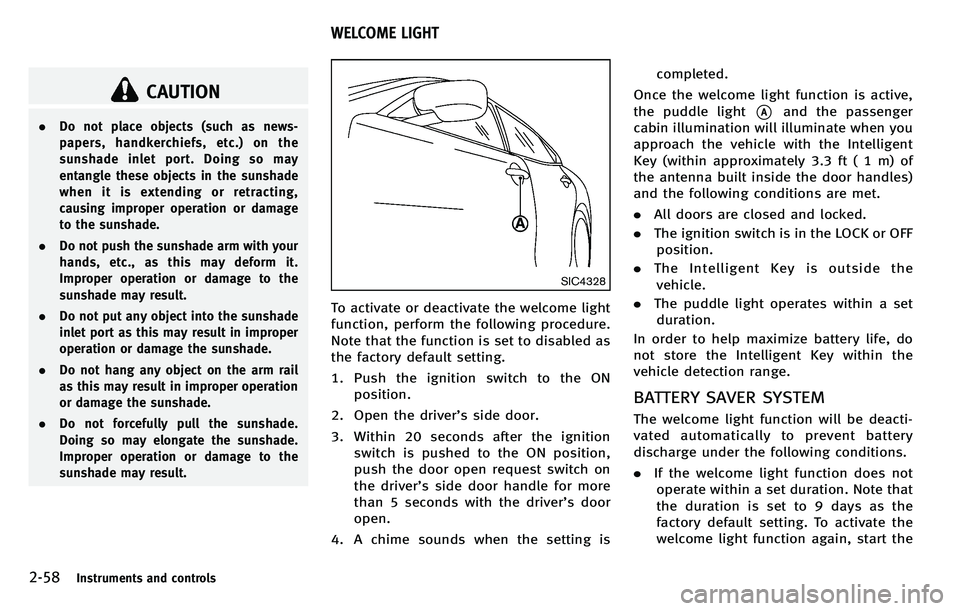
SIC4328
To activate or deactivate the welcome light
function, perform the following procedure.
Note that the function is set to disabled as
the factory default setting.
1. Push the ignition switch to the ON
position.
2. Open the driver ’s side door.
3. Within 20 seconds after the ignition switch is pushed to the ON position,
push the door open request switch on
the driver ’s side door handle for more
than 5 seconds with the driver ’s door
open.
4. A chime sounds when the setting is completed.
Once the welcome light function is active,
the puddle light
*Aand the passenger
cabin illumination will illuminate when you
approach the vehicle with the Intelligent
Key (within approximately 3.3 ft ( 1 m) of
the antenna built inside the door handles)
and the following conditions are met.
. All doors are closed and locked.
. The ignition switch is in the LOCK or OFF
position.
. The Intelligent Key is outside the
vehicle.
. The puddle light operates within a set
duration.
In order to help maximize battery life, do
not store the Intelligent Key within the
vehicle detection range.
BATTERY SAVER SYSTEM
The welcome light function will be deacti-
vated automatically to prevent battery
discharge under the following conditions.
. If the welcome light function does not
operate within a set duration. Note that
the duration is set to 9 days as the
factory default setting. To activate the
welcome light function again, start the
WELCOME LIGHT