ad blue INFINITI M 2013 User Guide
[x] Cancel search | Manufacturer: INFINITI, Model Year: 2013, Model line: M, Model: INFINITI M 2013Pages: 522, PDF Size: 3.72 MB
Page 236 of 522
Audio main operation
Head unit :
The auto loudness circuit enhances the low
and high frequency ranges automatically in
both radio reception and CD playback.
ON·OFF/Volume control:
Push the ignition switch to the ACC or ON
position, and then push the ON·OFF button
while the system is off to turn on the last
audio source, which was playing immedi-
ately before the system was turned off.
While the system is on, pushing the
ON·OFF button turns the system off.
Turn the VOL control knob to adjust the
volume.
Adjusting tone quality and speaker bal-
ance:
To adjust Bass, Treble, Balance and Fade,
push the Audio control knob. When the
display shows the setting you want to
change (Bass, Treble, Balance and Fade),
rotate the Audio control knob to set the
desired setting. For the other setting
methods, see“How to use SETTING button”
earlier in this section.
This vehicle has some sound effect func-
tions as follows: .
Speed Sensitive Vol.
. Precision Phased Audio (if so equipped)
. BOSE®Centerpoint®2 (if so equipped)
. BOSE®AudioPilot®2 (if so equipped)
. Surround effect (if so equipped)
For more details, see “How to use SETTING
button” earlier in this section.
Switching the display:
Pushing the DISC·AUX button will switch
the displays as follows:
. Models with navigation system
iPod
®/USB ?CD/DVD ?Bluetooth®
Audio ?iPod®/USB
. Models without navigation system
iPod
®/USB ?CD ?iPod®/USB
Linking Intelligent Key (models with navi-
gation system):
The audio settings can be memorized for
each Intelligent Key. For more details, see
“Setting memory function” in the“3. Pre-
driving checks and adjustments” section.
FM-AM-SAT radio operation
When the radio band select button is
pushed while the ignition switch is in the
ACC or ON position, the radio will come on
at the channel last played. The last channel played will also come on
when the ON·OFF button is pushed to ON.
If another audio source is playing when the
radio band select button is turned to ON,
the audio source will automatically be
turned off and the last radio channel
played will come on.
When the stereo broadcast signal is weak,
the radio will automatically change from
stereo to monaural reception.
radio (FM·AM) band select :
Pushing the XM radio band select button
will change the band as follows:
AM ?FM1 ?FM2 ?AM
radio (XM) band select:
Pushing the XM radio band select button
will change the band as follows:
XM1 ?XM2 ?XM3 ?XM1
The satellite radio is not available in
Alaska, Hawaii and Guam.
TUNE (Tuning) : . For AM and FM radio
Turn the radio TUNE knob for manual
tuning.
Monitor, climate, audio, phone and voice recognition systems4-65
Page 247 of 522
4-76Monitor, climate, audio, phone and voice recognition systems
Input the number to be searched and
select the“OK”key.
The specified folder/file will be played.
. Display
To adjust the image quality of the
screen, select the preferred adjustment
items.
. DRC
DRC (Dynamic Range Compression)
automatically adjusts the soundtrack
volume level to maintain a more even
sound to the speakers.
. Audio
Select the preferred language for audio.
. Subtitle
Select the preferred language for sub-
title.
. Display Mode
Select the “Normal”,“Wide”,“Cinema”
or “Full” mode.Bluetooth®STREAMING AUDIO
(models with navigation system)
Your INFINITI is equipped with Bluetooth®
Streaming Audio. If you have a compatible
Bluetooth®device with streaming audio
(A2DP profile), you can set up the wireless
connection between your Bluetooth
®de-
vice and the in-vehicle audio system. This
connection allows you to listen to the
audio from the Bluetooth
®device using
your vehicle speakers. It also may allow
basic control of the device for playing and
skipping audio files using the AVRCP
Bluetooth
®profile. All Bluetooth®Devices
do not have the same level of controls for
AVRCP. Please consult the manual for your
Bluetooth
®Device for more details.
Once your Bluetooth®device is connected
to the in-vehicle audio system, it will
automatically reconnect whenever the de-
vice is present in the vehicle and you select
Bluetooth
®Audio from your audio system.
You do not need to manually reconnect for
each usage.
Wireless LAN (Wi-Fi) and the Bluetooth
®
functions share the same frequency band
(2.4 GHz). Using the Bluetooth®and the
wireless LAN functions at the same time
may slow down or disconnect the commu- nication and cause undesired noise. It is
recommended that you turn off the wire-
less LAN (Wi-Fi) when using the Bluetooth
®
functions.
Regulatory information
FCC Regulatory information:
.
CAUTION: To maintain compliance with
FCC’s RF exposure guidelines, use only
the supplied antenna. Unauthorized
antenna, modification, or attachments
could damage the transmitter and may
violate FCC regulations.
. Operation is subject to the following
two conditions:
1) This device may not cause inter- ference and
2) This device must accept any inter- ference, including interference that
may cause undesired operation of
the device
IC Regulatory information:
. Operation is subject to the following
two conditions:
1) This device may not cause inter- ference, and
2) This device must accept any inter- ference, including interference that
Page 248 of 522
may cause undesired operation of
the device.
. This Class B digital apparatus meets all
requirements of the Canadian Interfer-
ence-Causing Equipment Regulations.
Bluetooth trademark:
Bluetooth®is a trademark
owned by Bluetooth SIG, Inc.
and licensed to Clarion Co., Ltd.
SAA3009
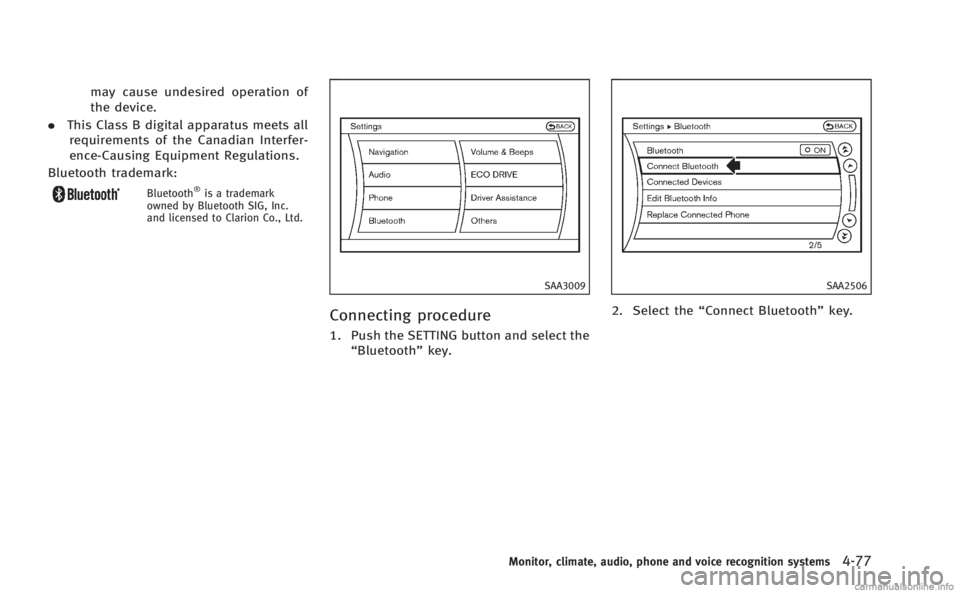
Connecting procedure
1. Push the SETTING button and select the
“Bluetooth” key.
SAA2506
2. Select the “Connect Bluetooth” key.
Monitor, climate, audio, phone and voice recognition systems4-77
Page 249 of 522
4-78Monitor, climate, audio, phone and voice recognition systems
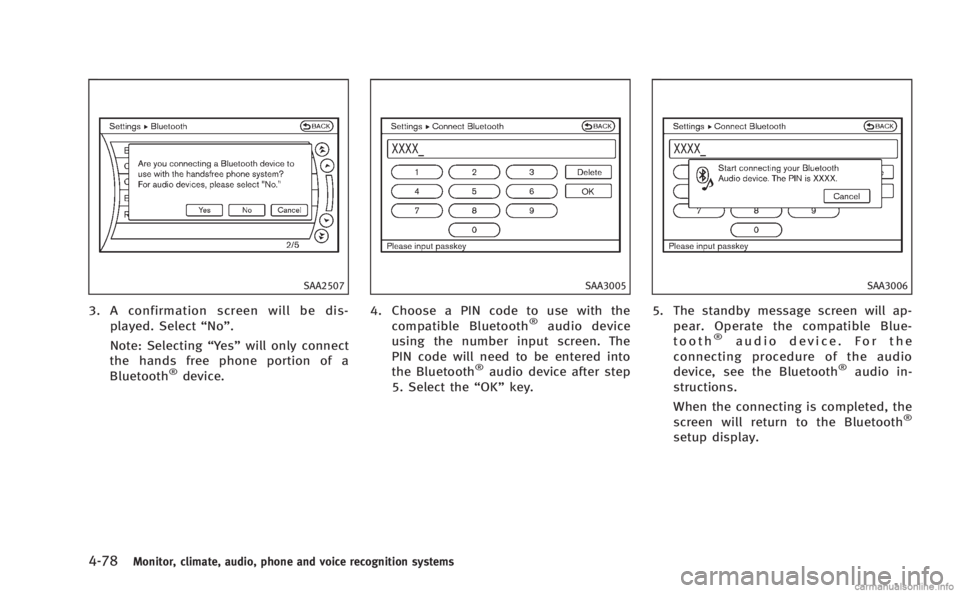
SAA2507
3. A confirmation screen will be dis-played. Select “No”.
Note: Selecting “Yes”will only connect
the hands free phone portion of a
Bluetooth
®device.
SAA3005
4. Choose a PIN code to use with the
compatible Bluetooth®audio device
using the number input screen. The
PIN code will need to be entered into
the Bluetooth
®audio device after step
5. Select the “OK”key.
SAA3006
5. The standby message screen will ap-
pear. Operate the compatible Blue-
tooth
®audio device. For the
connecting procedure of the audio
device, see the Bluetooth
®audio in-
structions.
When the connecting is completed, the
screen will return to the Bluetooth
®
setup display.
Page 250 of 522
SAA2510
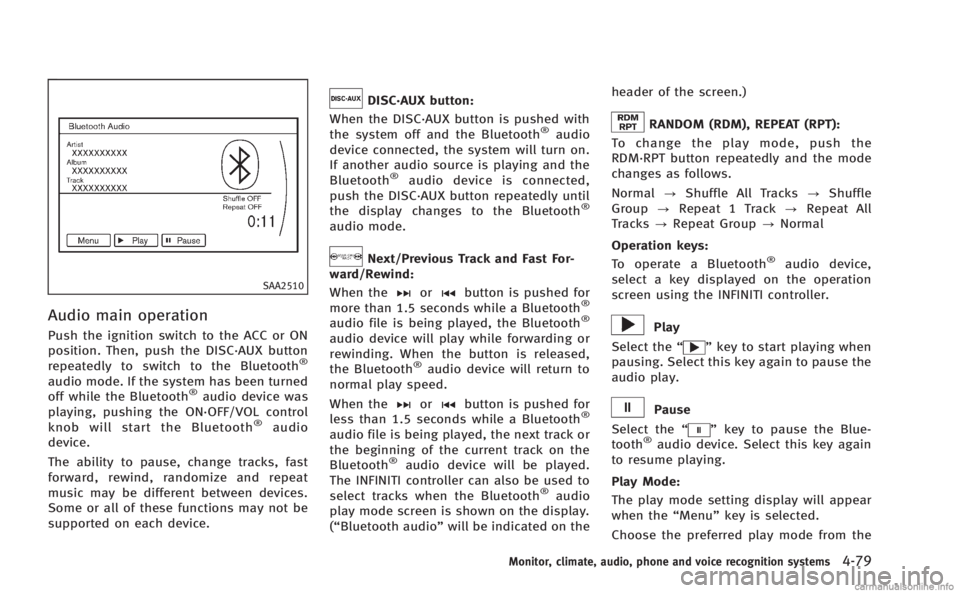
Audio main operation
Push the ignition switch to the ACC or ON
position. Then, push the DISC·AUX button
repeatedly to switch to the Bluetooth
®
audio mode. If the system has been turned
off while the Bluetooth®audio device was
playing, pushing the ON·OFF/VOL control
knob will start the Bluetooth
®audio
device.
The ability to pause, change tracks, fast
forward, rewind, randomize and repeat
music may be different between devices.
Some or all of these functions may not be
supported on each device.
DISC·AUX button:
When the DISC·AUX button is pushed with
the system off and the Bluetooth
®audio
device connected, the system will turn on.
If another audio source is playing and the
Bluetooth
®audio device is connected,
push the DISC·AUX button repeatedly until
the display changes to the Bluetooth
®
audio mode.
Next/Previous Track and Fast For-
ward/Rewind:
When the
orbutton is pushed for
more than 1.5 seconds while a Bluetooth®
audio file is being played, the Bluetooth®
audio device will play while forwarding or
rewinding. When the button is released,
the Bluetooth
®audio device will return to
normal play speed.
When the
orbutton is pushed for
less than 1.5 seconds while a Bluetooth®
audio file is being played, the next track or
the beginning of the current track on the
Bluetooth
®audio device will be played.
The INFINITI controller can also be used to
select tracks when the Bluetooth
®audio
play mode screen is shown on the display.
(“Bluetooth audio” will be indicated on the header of the screen.)
RANDOM (RDM), REPEAT (RPT):
To change the play mode, push the
RDM·RPT button repeatedly and the mode
changes as follows.
Normal ?Shuffle All Tracks ?Shuffle
Group ?Repeat 1 Track ?Repeat All
Tracks ?Repeat Group ?Normal
Operation keys: To operate a Bluetooth
®audio device,
select a key displayed on the operation
screen using the INFINITI controller.
Play
Select the “
”key to start playing when
pausing. Select this key again to pause the
audio play.
Pause
Select the “
”key to pause the Blue-
tooth®audio device. Select this key again
to resume playing.
Play Mode:
The play mode setting display will appear
when the “Menu”key is selected.
Choose the preferred play mode from the
Monitor, climate, audio, phone and voice recognition systems4-79
Page 251 of 522
4-80Monitor, climate, audio, phone and voice recognition systems
following items.
.Shuffle
Choose “Shuffle OFF” ,“Shuffle All
Tracks” and“Shuffle Group”.
. Repeat
Choose from “Repeat OFF”, “Repeat 1
Track”, “Repeat All Tracks” and“Repeat
Group”.
SAA2511
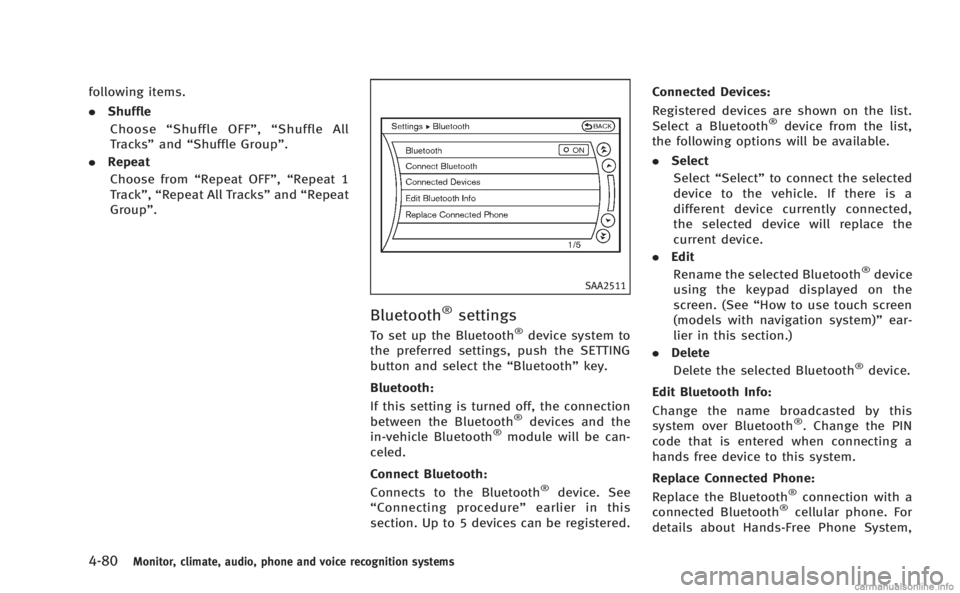
Bluetooth®settings
To set up the Bluetooth®device system to
the preferred settings, push the SETTING
button and select the “Bluetooth”key.
Bluetooth:
If this setting is turned off, the connection
between the Bluetooth
®devices and the
in-vehicle Bluetooth®module will be can-
celed.
Connect Bluetooth:
Connects to the Bluetooth
®device. See
“ Connecting procedure ”earlier in this
section. Up to 5 devices can be registered. Connected Devices:
Registered devices are shown on the list.
Select a Bluetooth
®device from the list,
the following options will be available.
. Select
Select “Select” to connect the selected
device to the vehicle. If there is a
different device currently connected,
the selected device will replace the
current device.
. Edit
Rename the selected Bluetooth
®device
using the keypad displayed on the
screen. (See “How to use touch screen
(models with navigation system)” ear-
lier in this section.)
. Delete
Delete the selected Bluetooth
®device.
Edit Bluetooth Info:
Change the name broadcasted by this
system over Bluetooth
®. Change the PIN
code that is entered when connecting a
hands free device to this system.
Replace Connected Phone:
Replace the Bluetooth
®connection with a
connected Bluetooth®cellular phone. For
details about Hands-Free Phone System,
Page 252 of 522
see“Bluetooth®Hands-Free Phone System
(models with navigation system)” later in
this section.
SAA2964
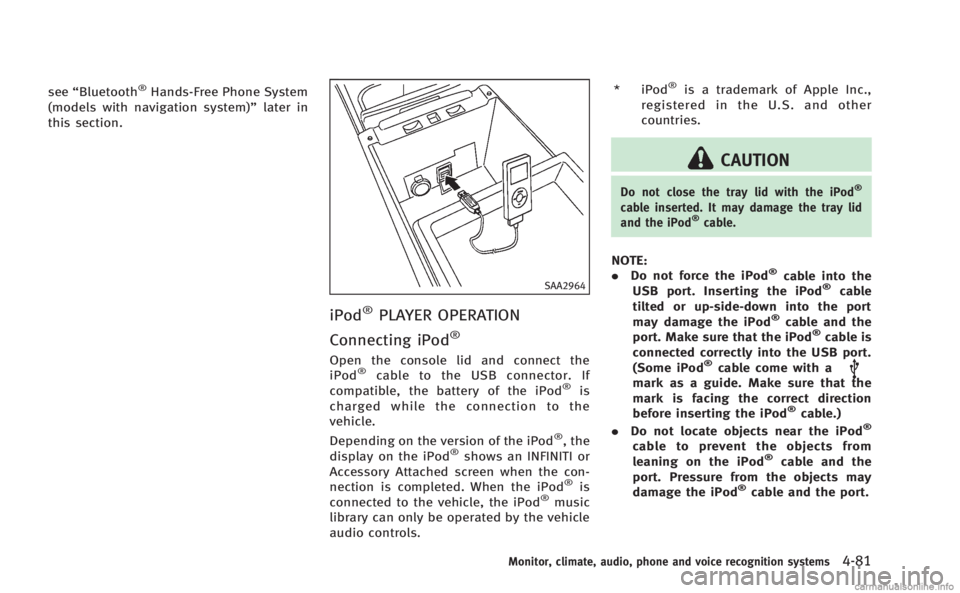
iPod®PLAYER OPERATION
Connecting iPod
®
Open the console lid and connect the
iPod®cable to the USB connector. If
compatible, the battery of the iPod®is
charged while the connection to the
vehicle.
Depending on the version of the iPod
®, the
display on the iPod®shows an INFINITI or
Accessory Attached screen when the con-
nection is completed. When the iPod
®is
connected to the vehicle, the iPod®music
library can only be operated by the vehicle
audio controls. * iPod
®is a trademark of Apple Inc.,
registered in the U.S. and other
countries.
CAUTION
Do not close the tray lid with the iPod®
cable inserted. It may damage the tray lid
and the iPod®cable.
NOTE:
. Do not force the iPod®cable into the
USB port. Inserting the iPod®cable
tilted or up-side-down into the port
may damage the iPod
®cable and the
port. Make sure that the iPod®cable is
connected correctly into the USB port.
(Some iPod
®cable come with amark as a guide. Make sure that the
mark is facing the correct direction
before inserting the iPod
®cable.)
. Do not locate objects near the iPod®
cable to prevent the objects from
leaning on the iPod®cable and the
port. Pressure from the objects may
damage the iPod
®cable and the port.
Monitor, climate, audio, phone and voice recognition systems4-81
Page 256 of 522
folder number (if playing compressed
audio files).
. Pushing the menu control switch will
show the CD Menu.
DVD (models with navigation system):
. Tilting up/down for less than 1.5
seconds will increase or decrease the
track number.
. Tilting up/down for more than 1.5
seconds will increase or decrease the
title number.
. Pushing the menu control switch will
select an item from the DVD display.
. When the transparent operation menu
appears, the switch will control the
menu.
USB:
. Tilting up/down for less than 1.5
seconds will increase or decrease the
track number.
. Tilting up/down for more than 1.5
seconds will increase/decrease the
folder number
. Pushing the menu control switch will
show the USB Menu. Bluetooth®Audio (models with navigation
system):
. Tilting up/down for less than 1.5
seconds will increase or decrease the
track number.
BACK switch (models with
navigation system)
Push this switch to go back to the previous
screen or cancel the selection if it is not
completed.
Volume control switches
Push the upper (+) or lower (−) side switch
to increase or decrease the volume.
Audio source switch
Push the audio source switch to change
the mode as follows.
. Models with navigation system
AM ?FM ?SAT ?CD/DVD ?USB/
iPod
®? Bluetooth®Audio
. Models without navigation system
AM ?FM ?CD ?USB/iPod
®?SAT
ANTENNA
Window antenna
The antenna pattern is printed inside the
rear window.
CAUTION
. Do not place metalized film near the rear
window glass or attach any metal parts
to it. This may cause poor reception or
noise.
. When cleaning the inside of the rear
window, be careful not to scratch or
damage the rear window antenna.
Lightly wipe along the antenna with a
dampened soft cloth.
Monitor, climate, audio, phone and voice recognition systems4-85
Page 257 of 522
4-86Monitor, climate, audio, phone and voice recognition systems
When installing a car phone or a CB radio
in your vehicle, be sure to observe the
following cautions, otherwise the new
equipment may adversely affect the elec-
tronic control modules and electronic con-
trol system harness.
WARNING
.A cellular phone should not be used for
any purpose while driving so full atten-
tion may be given to vehicle operation.
Some jurisdictions prohibit the use of
cellular phones while driving.
. If you must make a call while your
vehicle is in motion, the hands-free
cellular phone operational mode (if so
equipped) is highly recommended. Ex-
ercise extreme caution at all times so full
attention may be given to vehicle opera-
tion.
. If a conversation in a moving vehicle
requires you to take notes, pull off the
road to a safe location and stop your
vehicle before doing so.
CAUTION
.Keep the antenna as far away as
possible from the electronic control
modules.
. Keep the antenna wire more than 8 in
(20 cm) away from the electronic control
system harness. Do not route the anten-
na wire next to any harness.
. Adjust the antenna standing-wave ratio
as recommended by the manufacturer.
. Connect the ground wire from the CB
radio chassis to the body.
. For details, consult an INFINITI retailer.
WARNING
.Use a phone after stopping your vehicle
in a safe location. If you have to use a
phone while driving, exercise extreme
caution at all times so full attention may
be given to vehicle operation.
. If you find yourself unable to devote full
attention to vehicle operation while
talking on the phone, pull off the road
to a safe location and stop your vehicle
before doing so.
CAUTION
To avoid draining the vehicle battery, use a
phone after starting the engine.
Your INFINITI is equipped with Bluetooth®
Hands-Free Phone System. If you are an
owner of a compatible Bluetooth®enabled
cellular phone, you can set up the wireless
connection between your cellular phone
and the in-vehicle phone module. With
Bluetooth
®wireless technology, you can
make or receive a telephone call with your
cellular phone in your pocket.
CAR PHONE OR CB RADIO Bluetooth®HANDS-FREE PHONE SYSTEM
(models with navigation system)
Page 258 of 522

Once a cellular phone is connected to the
in-vehicle phone module, no phone con-
necting procedure is required anymore.
Your phone is automatically connected
with the in-vehicle phone module when
the ignition switch is pushed to the ON
position with the registered cellular phone
turned on and carried in the vehicle.
You can register up to 5 different Blue-
tooth
®cellular phones in the in-vehicle
phone module. However, you can talk on
only one cellular phone at a time.
The INFINITI Voice Recognition system
supports the phone commands, so dialing
a phone number using your voice is
possible. For more details, see “INFINITI
Voice Recognition system (models with
navigation system)” later in this section.
Before using the Bluetooth
®Hands-Free
Phone System, refer to the following notes.
. Wireless LAN (Wi-Fi) and the Bluetooth
®
functions share the same frequency
band (2.4 GHz). Using the Bluetooth®
and the wireless LAN functions at the
same time may slow down or discon-
nect the communication and cause
undesired noise. It is recommended
that you turn off the wireless LAN (Wi-
Fi) when using the Bluetooth
®func- tions.
. Set up the wireless connection between
a compatible cellular phone and the in-
vehicle phone module before using the
Bluetooth
®Hands-Free Phone System.
. Some Bluetooth®enabled cellular
phones may not be recognized by the
in-vehicle phone module. Please visit
www.InfinitiUSA.com/bluetooth for a
recommended phone list.
. You will not be able to use a hands-free
phone under the following conditions:
— Your vehicle is outside of the tele-
phone service area.
— Your vehicle is in an area where it is
difficult to receive radio waves; such
as in a tunnel, in an underground
parking garage, behind a tall build-
ing or in a mountainous area.
— Your cellular phone is locked in
order not to be dialed.
. When the radio wave condition is not
ideal or ambient sound is too loud, it
may be difficult to hear the other
person’s voice during a call.
. Immediately after the ignition switch is
pushed to the ON position, it may be
impossible to receive a call for a short
period of time. .
Do not place the cellular phone in an
area surrounded by metal or far away
from the in-vehicle phone module to
prevent tone quality degradation and
wireless connection disruption.
. While a cellular phone is connected
through the Bluetooth®wireless con-
nection, the battery power of the
cellular phone may discharge quicker
than usual.
. If the Bluetooth
®Hands-Free Phone
System seems to be malfunctioning,
please visit www.InfinitiUSA.com/blue-
tooth for troubleshooting help.
. Some cellular phones or other devices
may cause interference or a buzzing
noise to come from the audio system
speakers. Storing the device in a
different location may reduce or elim-
inate the noise.
. Refer to the cellular phone Owner’s
Manual regarding the telephone pairing
procedure specific to your phone,
battery charging, cellular phone anten-
na, etc.
. The antenna display on the monitor will
not coincide with the antenna display
of some cellular phones.
Monitor, climate, audio, phone and voice recognition systems4-87