battery INFINITI M-HEV 2013 User Guide
[x] Cancel search | Manufacturer: INFINITI, Model Year: 2013, Model line: M-HEV, Model: INFINITI M-HEV 2013Pages: 530, PDF Size: 3.71 MB
Page 19 of 530

Hybrid System-12Hybrid System Overview
JVO0021X
CAUTION
Do not place objects over or into the air
vent. The Li-ion battery may overheat and be
damaged.
JVO0006X
CAUTION
Do not load large amounts of water in open
containers (aquariums or buckets) into the
vehicle. If the water spills onto the Li-ion
battery, it may cause a short circuit and
damage the battery.
JVO0020X
CAUTION
Do not allow any liquid to get on or in the air
vent. It may cause a short circuit and
damage the Li-ion battery.
Noise and vibration
After the hybrid system is activated, the
following noises and vibrations that are
unique to the hybrid system may occur.
This does not indicate a malfunction.
.Electric motor noise from the engine
compartment
Page 25 of 530

0-4Illustrated table of contents
JVC0258X
1. Trunk—Intelligent Key system (P.3-7)
— Remote keyless entry system
(P.3-14)
— Trunk lid (P.3-18)
— 12-volt battery (P.8-18) 2. High-mounted stop light (bulb repla-
cement) (P.8-29)
3. Rear combination light (bulb replace- ment) (P.8-29)
4. Satellite antenna (P.4-49)
5. Rear window defroster (P.2-39) 6. Sonar system (if so equipped) (P.5-91)
7. Rear view camera (P.4-27)
8. Fuel-filler door
—Operation (P.3-22)
— Fuel recommendation (P.9-4)
9. Child safety rear door locks (P.3-6)
EXTERIOR REAR
Page 32 of 530
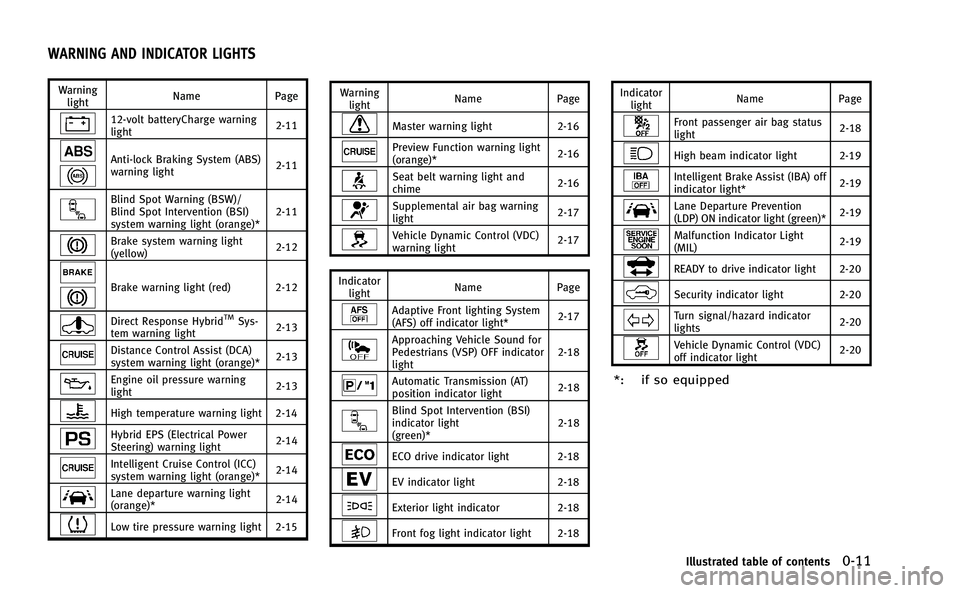
Warninglight Name
Page
12-volt batteryCharge warning
light 2-11
Anti-lock Braking System (ABS)
warning light2-11
Blind Spot Warning (BSW)/
Blind Spot Intervention (BSI)
system warning light (orange)*2-11
Brake system warning light
(yellow)
2-12
Brake warning light (red) 2-12
Direct Response HybridTMSys-
tem warning light 2-13
Distance Control Assist (DCA)
system warning light (orange)*
2-13
Engine oil pressure warning
light2-13
High temperature warning light 2-14
Hybrid EPS (Electrical Power
Steering) warning light2-14
Intelligent Cruise Control (ICC)
system warning light (orange)*2-14
Lane departure warning light
(orange)*
2-14
Low tire pressure warning light 2-15 Warning
light Name
Page
Master warning light 2-16
Preview Function warning light
(orange)* 2-16
Seat belt warning light and
chime2-16
Supplemental air bag warning
light
2-17
Vehicle Dynamic Control (VDC)
warning light2-17
Indicator light Name
Page
Adaptive Front lighting System
(AFS) off indicator light* 2-17
Approaching Vehicle Sound for
Pedestrians (VSP) OFF indicator
light2-18
Automatic Transmission (AT)
position indicator light
2-18
Blind Spot Intervention (BSI)
indicator light
(green)*2-18
ECO drive indicator light 2-18
EV indicator light
2-18
Exterior light indicator2-18
Front fog light indicator light 2-18 Indicator
light Name
Page
Front passenger air bag status
light 2-18
High beam indicator light 2-19
Intelligent Brake Assist (IBA) off
indicator light*2-19
Lane Departure Prevention
(LDP) ON indicator light (green)*
2-19
Malfunction Indicator Light
(MIL)2-19
READY to drive indicator light 2-20
Security indicator light 2-20
Turn signal/hazard indicator
lights2-20
Vehicle Dynamic Control (VDC)
off indicator light2-20
*: if so equipped
Illustrated table of contents0-11
WARNING AND INDICATOR LIGHTS
Page 36 of 530
FRONT SEATS
Front power seat adjustment
Operating tips:
.The power seat motor has an auto-reset
overload protection circuit. If the motor
stops during operation, wait 30 sec-
onds, then reactivate the switch.
. Do not operate the power seat switch
for a long period of time when the
INFINITI Direct Response Hybrid
TMSys-
tem is not running. This will discharge
the 12-volt battery.
See “Automatic drive positioner” in the“3.
Pre-driving checks and adjustments” sec-
tion for the seat position memory function.
SSS1051
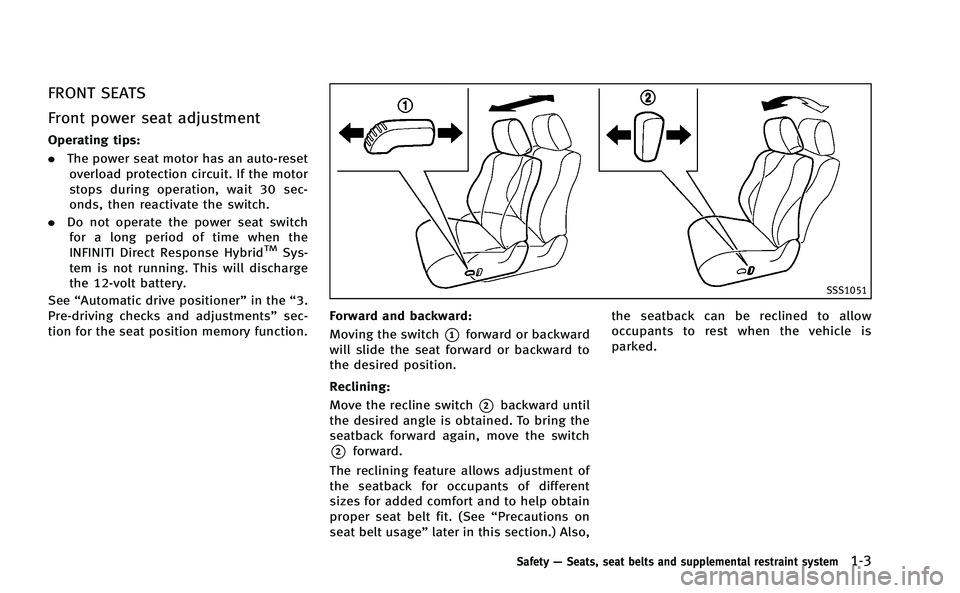
Forward and backward:
Moving the switch
*1forward or backward
will slide the seat forward or backward to
the desired position.
Reclining:
Move the recline switch
*2backward until
the desired angle is obtained. To bring the
seatback forward again, move the switch
*2forward.
The reclining feature allows adjustment of
the seatback for occupants of different
sizes for added comfort and to help obtain
proper seat belt fit. (See “Precautions on
seat belt usage ”later in this section.) Also, the seatback can be reclined to allow
occupants to rest when the vehicle is
parked.
Safety
—Seats, seat belts and supplemental restraint system1-3
Page 87 of 530
Rear pocket................................................... 2-56
Coat hooks .................................................... 2-57
Trunk hooks .................................................. 2-57
Windows ........................................................... 2-58
Power windows ............................................. 2-58
Moonroof........................................................... 2-60 Automatic moonroof ...................................... 2-60
Rear sunshade (if so equipped) ......................... 2-62
Welcome light.................................................... 2-63 Battery saver system ..................................... 2-63
Interior lights..................................................... 2-64
Map lights..................................................... 2-64
Personal lights .............................................. 2-64
Interior light control switch............................ 2-64 Vanity mirror lights ........................................... 2-65
Trunk light ........................................................ 2-66
HomeLink
®Universal Transceiver ...................... 2-66
Programming HomeLink®............................. 2-67
Programming HomeLink®for Canadian
customers and gate openers........................ 2-68
Operating the HomeLink
®
Universal Transceiver ................................... 2-69
Programming troubleshooting ...................... 2-69
Clearing the programmed information .......... 2-69
Reprogramming a single
HomeLink
®button ....................................... 2-69
If your vehicle is stolen ............................... 2-70
Page 93 of 530
2-8Instruments and controls
JVI0196X
TACHOMETER
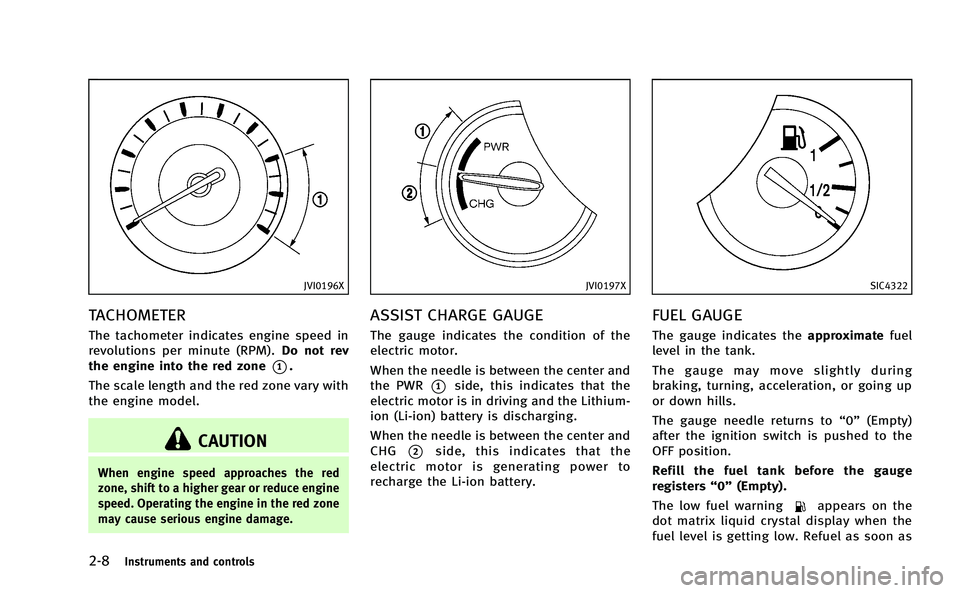
The tachometer indicates engine speed in
revolutions per minute (RPM).Do not rev
the engine into the red zone
*1.
The scale length and the red zone vary with
the engine model.
CAUTION
When engine speed approaches the red
zone, shift to a higher gear or reduce engine
speed. Operating the engine in the red zone
may cause serious engine damage.
JVI0197X
ASSIST CHARGE GAUGE
The gauge indicates the condition of the
electric motor.
When the needle is between the center and
the PWR
*1side, this indicates that the
electric motor is in driving and the Lithium-
ion (Li-ion) battery is discharging.
When the needle is between the center and
CHG
*2side, this indicates that the
electric motor is generating power to
recharge the Li-ion battery.
SIC4322
FUEL GAUGE
The gauge indicates the approximatefuel
level in the tank.
The gauge may move slightly during
braking, turning, acceleration, or going up
or down hills.
The gauge needle returns to “0”(Empty)
after the ignition switch is pushed to the
OFF position.
Refill the fuel tank before the gauge
registers “0”(Empty).
The low fuel warning
appears on the
dot matrix liquid crystal display when the
fuel level is getting low. Refuel as soon as
Page 95 of 530
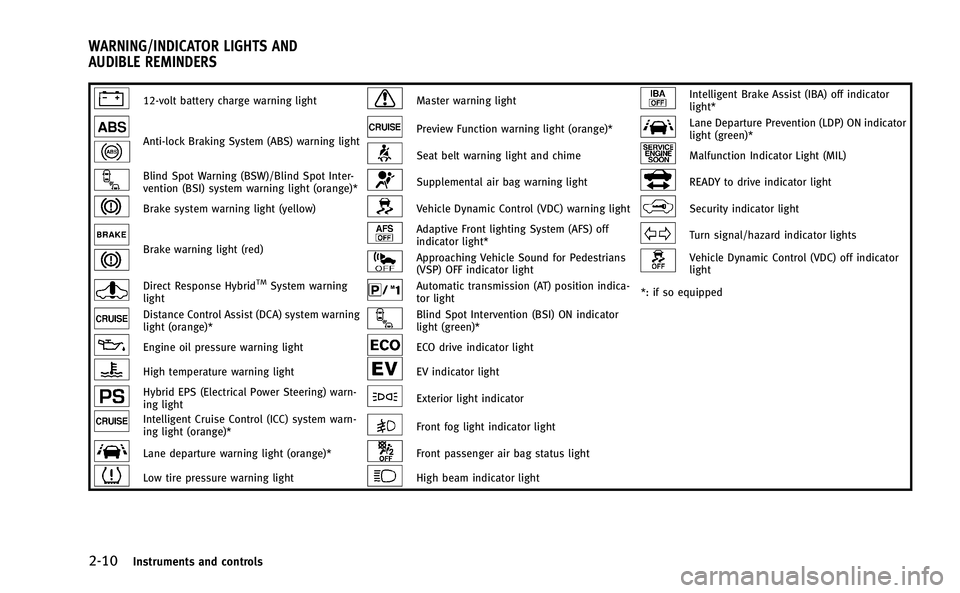
2-10Instruments and controls
12-volt battery charge warning lightMaster warning lightIntelligent Brake Assist (IBA) off indicator
light*
Anti-lock Braking System (ABS) warning lightPreview Function warning light (orange)*Lane Departure Prevention (LDP) ON indicator
light (green)*
Seat belt warning light and chimeMalfunction Indicator Light (MIL)
Blind Spot Warning (BSW)/Blind Spot Inter-
vention (BSI) system warning light (orange)*Supplemental air bag warning lightREADY to drive indicator light
Brake system warning light (yellow)Vehicle Dynamic Control (VDC) warning lightSecurity indicator light
Brake warning light (red)
Adaptive Front lighting System (AFS) off
indicator light*Turn signal/hazard indicator lights
Approaching Vehicle Sound for Pedestrians
(VSP) OFF indicator lightVehicle Dynamic Control (VDC) off indicator
light
Direct Response HybridTMSystem warning
lightAutomatic transmission (AT) position indica-
tor light *: if so equipped
Distance Control Assist (DCA) system warning
light (orange)*Blind Spot Intervention (BSI) ON indicator
light (green)*
Engine oil pressure warning lightECO drive indicator light
High temperature warning lightEV indicator light
Hybrid EPS (Electrical Power Steering) warn-
ing lightExterior light indicator
Intelligent Cruise Control (ICC) system warn-
ing light (orange)*Front fog light indicator light
Lane departure warning light (orange)*Front passenger air bag status light
Low tire pressure warning lightHigh beam indicator light
WARNING/INDICATOR LIGHTS AND
AUDIBLE REMINDERS
Page 96 of 530
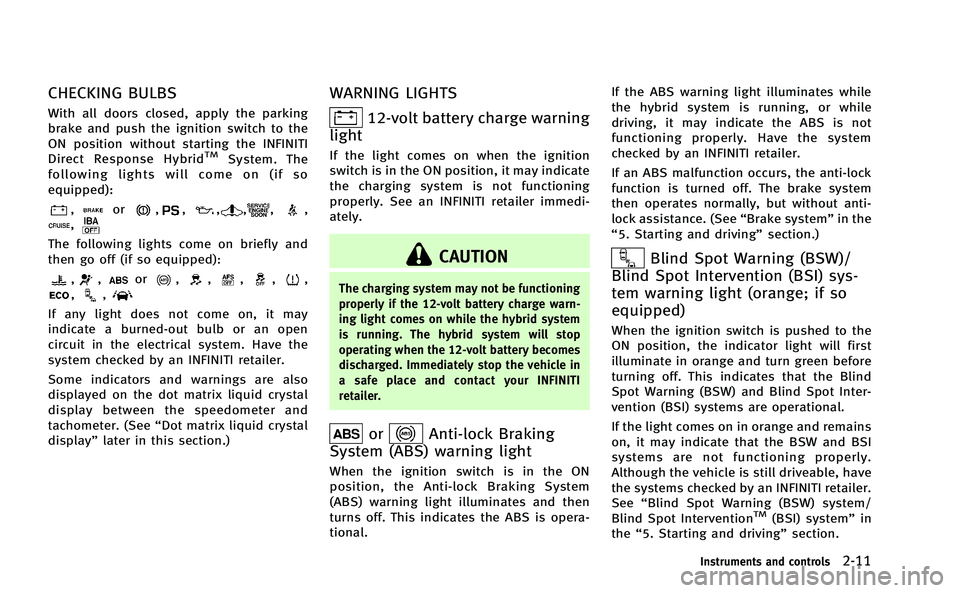
CHECKING BULBS
With all doors closed, apply the parking
brake and push the ignition switch to the
ON position without starting the INFINITI
Direct Response Hybrid
TMSystem. The
following lights will come on (if so
equipped):
,or,,,,,,,
The following lights come on briefly and
then go off (if so equipped):
,,or,,,,,,,
If any light does not come on, it may
indicate a burned-out bulb or an open
circuit in the electrical system. Have the
system checked by an INFINITI retailer.
Some indicators and warnings are also
displayed on the dot matrix liquid crystal
display between the speedometer and
tachometer. (See “Dot matrix liquid crystal
display” later in this section.)
WARNING LIGHTS
12-volt battery charge warning
light
If the light comes on when the ignition
switch is in the ON position, it may indicate
the charging system is not functioning
properly. See an INFINITI retailer immedi-
ately.
CAUTION
The charging system may not be functioning
properly if the 12-volt battery charge warn-
ing light comes on while the hybrid system
is running. The hybrid system will stop
operating when the 12-volt battery becomes
discharged. Immediately stop the vehicle in
a safe place and contact your INFINITI
retailer.
orAnti-lock Braking
System (ABS) warning light
When the ignition switch is in the ON
position, the Anti-lock Braking System
(ABS) warning light illuminates and then
turns off. This indicates the ABS is opera-
tional. If the ABS warning light illuminates while
the hybrid system is running, or while
driving, it may indicate the ABS is not
functioning properly. Have the system
checked by an INFINITI retailer.
If an ABS malfunction occurs, the anti-lock
function is turned off. The brake system
then operates normally, but without anti-
lock assistance. (See
“Brake system”in the
“5. Starting and driving” section.)
Blind Spot Warning (BSW)/
Blind Spot Intervention (BSI) sys-
tem warning light (orange; if so
equipped)
When the ignition switch is pushed to the
ON position, the indicator light will first
illuminate in orange and turn green before
turning off. This indicates that the Blind
Spot Warning (BSW) and Blind Spot Inter-
vention (BSI) systems are operational.
If the light comes on in orange and remains
on, it may indicate that the BSW and BSI
systems are not functioning properly.
Although the vehicle is still driveable, have
the systems checked by an INFINITI retailer.
See “Blind Spot Warning (BSW) system/
Blind Spot Intervention
TM(BSI) system” in
the “5. Starting and driving” section.
Instruments and controls2-11
Page 98 of 530

retailer as soon as possible for an
inspection.
WARNING
.Your brake system may not be working
properly if the brake warning light (red)
is on. Driving could be dangerous. If you
judge it to be safe, drive carefully to the
nearest service station for repairs.
Otherwise, have your vehicle towed
because driving it could be dangerous.
. Pressing the brake pedal with the hybrid
system stopped and/or low brake fluid
level may increase your stopping dis-
tance and braking will require greater
pedal effort as well as pedal travel.
. If the brake fluid level is below the
minimum or MIN mark on the brake fluid
reservoir, do not drive until the brake
system has been checked at an INFINITI
retailer.
Direct Response HybridTM
System warning light
When the ignition switch is in the "ON"
position, the Direct Response HybridTM
System warning light illuminates. After starting the hybrid system, the hybrid
system warning light turns off.
If the hybrid system warning light illumi-
nates while driving, it may indicate that
there is a malfunction in the electric motor
and/or other hybrid system components.
Stop your vehicle immediately and contact
your INFINITI retailer.
If the hybrid system warning light blinks
while driving, it may indicate that the Li-ion
battery charge is low and you cannot
continue to drive.
Do not allow the vehicle to coast when the
Li-ion battery is low or when the hybrid
system warning light blinks while driving.
The engine will not automatically start to
charge the Li-ion battery while the vehicle
is coasting.
Distance Control Assist (DCA)
system warning light (orange; if so
equipped)
This light comes on if there is a malfunc-
tion in the Distance Control Assist (DCA)
system.
If the warning light illuminates, park the
vehicle in a safe place. Stop the hybrid
system, restart the hybrid system, resume driving and turn on the DCA system again.
If it is not possible to turn on the system
or the warning light stays on, it may
indicate that the system is malfunctioning.
Although the vehicle is still driveable
under normal conditions, have the vehicle
checked at an INFINITI retailer.
Engine oil pressure warning
light
This light warns of low engine oil pressure.
If the light flickers or comes on during
normal driving, pull off the road in a safe
area, stop the engine immediatelyand call
an INFINITI retailer or other authorized
repair shop.
The engine oil pressure warning light is
not designed to indicate a low oil level.
Use the dipstick to check the oil level. (See
“Engine oil” in the“8. Maintenance and
do-it-yourself” section.)
CAUTION
Running the engine with the engine oil
pressure warning light on could cause
serious damage to the engine almost
immediately. Such damage is not covered
Instruments and controls2-13
Page 109 of 530

2-24Instruments and controls
OPERATIONAL INDICATORS
1. Hybrid system start operation
indicator
This indicator appears when the selector
lever is in the P (Park) position.
This indicator means that the hybrid
system will start by pushing the ignition
switch with the brake pedal depressed. You
can start the hybrid system directly from
any ignition switch position.
2. Steering lock release malfunc-
tion indicator (if so equipped)
This indicator appears when the steering
wheel cannot be released from the LOCK
position.
If this indicator appears, push the push-
button ignition switch while lightly turning
the steering wheel right and left.
3. NO KEY warning
This warning appears in either of the
following conditions.
No key inside the vehicle:
The warning appears when the door is
closed with the Intelligent Key left outside
the vehicle and the ignition switch in the
ACC or ON position. Make sure that theIntelligent Key is inside the vehicle.
Unregistered Intelligent Key:
The warning appears when the ignition
switch is pushed from the LOCK position
and the Intelligent Key cannot be recog-
nized by the system. You cannot start the
hybrid system with an unregistered key.
Use the registered Intelligent Key.
See “Intelligent Key system” in the“3. Pre-
driving checks and adjustments” section
for more details.
4. SHIFT “P”warning
This will be displayed in the following
conditions.
.When the selector lever is in any
position except P (Park) and the push
button ignition switch has been placed
in the OFF position from the ON
position.
. When the selector lever is operated
while the READY to drive indicator light
is flashing.
. The driver’s door is opened with the
shift selector in “N”,“D”or“R”.
. When the vehicle cannot be driven
because the hybrid system temperature
has become too high. .
When the selector lever is in the “N”
position and level of remaining charge
in the Litium-ion (Li-ion) battery is low.
. When the engine stops due to sudden
deceleration on a cold winter day.
. If a malfunction occurs in a situation
other than those described above and
the engine cannot start automatically.
When this warning appears, place the
selector lever in the P (Park) position.
When the Shift “P”warning appears, a
buzzer will sound.
This will turn off in the following condi-
tions.
. When the selector lever has been
placed in the P (Park) position.
. When the push button ignition switch
has been pushed to ON.
5. “PUSH” warning
This warning appears when the selector
lever is moved to the P (Park) position with
the ignition switch in the ACC position after
the SHIFT “P”warning appears.
To push the ignition switch to the OFF
position, perform the following procedure:
. SHIFT “P”warning ?(Move the selec-
tor lever to “P”)?PUSH warning ?