battery INFINITI M-HEV 2013 Owner's Manual
[x] Cancel search | Manufacturer: INFINITI, Model Year: 2013, Model line: M-HEV, Model: INFINITI M-HEV 2013Pages: 530, PDF Size: 3.71 MB
Page 110 of 530

(Push the ignition switch?ignition
switch position is turned to ON) ?
PUSH warning ?(Push the ignition
switch ?ignition switch position is
turned to OFF)
6. Intelligent Key battery discharge
indicator
This indicator appears when the Intelligent
Key battery is running out of power.
If this indicator appears, replace the
battery with a new one. (See “Intelligent
Key battery replacement” in the“8. Main-
tenance and do-it-yourself” section.)
7. Intelligent Key ignition indicator
This indicator appears when the Intelligent
Key battery is running out of power and
when the Intelligent Key System and
vehicle are not communicating normally.
If this indicator appears, touch the ignition
switch with the Intelligent Key while
depressing the brake pedal. (See “Intelli-
gent Key battery discharge” in the“5.
Starting and driving” section.)
8. Parking brake release warning
This warning appears when the vehicle
speed is above 4 MPH (7 km/h) and the parking brake is applied.
9. Low fuel warning
This warning appears when the fuel level in
the tank is getting low. Refuel as soon as it
is convenient, preferably before the fuel
gauge reaches the empty (0) position.
There is a small reserve of fuel remaining
in the tank when the fuel gauge reaches
the empty (0) position.
10. Low washer fluid warning
This warning appears when the washer
tank fluid is at a low level. Add washer fluid
as necessary. (See
“Window washer fluid”
in the “8. Maintenance and do-it-yourself”
section.)
11. Door/trunk open warning (igni-
tion switch is in the ON position)
This warning appears if any of the doors
and/or the trunk lid are open or not closed
securely. The vehicle icon indicates which
door or the trunk lid is open on the display.
12. Intelligent Key system warning
This warning appears if there is a malfunc-
tion in the steering lock system or Intelli-
gent Key system. If this warning appears while the hybrid
system is stopped, the steering lock (if so
equipped) cannot be released or the hybrid
system cannot be started. If this warning
appears while the hybrid system is run-
ning, the vehicle can be driven. However,
contact an INFINITI retailer for repair as
soon as possible.
13. Loose fuel cap warning
This warning appears when the fuel-filler
cap is not tightened correctly after the
vehicle has been refueled. (See
“Fuel-filler
cap ”in the “3. Pre-driving checks and
adjustments” section.)
14. Check tire pressure warning
This warning appears when the low tire
pressure warning light in the meter illumi-
nates and low tire pressure is detected. If
this warning appears, stop the vehicle and
adjust the pressure to the recommended
COLD tire pressure shown on the recom-
mended COLD tire pressure shown on the
Tire and Loading Information label. (See
“Low tire pressure warning light” earlier in
this section and “Tire Pressure Monitoring
System (TPMS) ”in the “5. Starting and
driving” section.)
Instruments and controls2-25
Page 114 of 530

SIC4327
TRIP COMPUTER
Switches for the trip computer are located
on the right side of the combination meter
panel. To operate the trip computer, push
the side or front of the switches as shown
above.
*Aswitch
*Bswitch
When the ignition switch is pushed to the
ON position, modes of the trip computer
can be selected by pushing the
switch
*A.
Each time the
switch*Ais pushed, the
display will change as follows: Energy monitor
?Li-ion battery state of
charge and acceleration guide ?EV mode
odometer and twin trip odometer ?
Current fuel consumption ?Average fuel
consumption and speed ?Elapsed time
and trip odometer ?Distance to empty
(dte) ?Engine coolant temperature
gauge? Outside air temperature (ICY) ?
Setting ?Warning check
1. Energy monitor
The energy flow related to the hybrid
system is shown by the arrow symbols.
*A: Li-ion battery
*B: Engine
*Ashows the charge level of the Li-ion
battery.
+ : Charge level is high
- : Charge level is low
The charge level display will continuously
change as the Li-ion battery charge level
increase or decreases during normal vehi-
cle operation. Movement of the display
from the far right to the far left of the bar is
normal.
The energy monitor is also displayed on
the navigation system (if so equipped).
(See “Energy monitors” in the“Hybrid System Overview”
section.)
2. Li-ion battery state of charge and
acceleration guide
*ALi-ion battery state of charge:
This displays the remaining charge in the
Li-ion battery.
The charge level display will continuously
change as the Li-ion battery charge level
increase or decrease during normal vehicle
operation. Movement of the display from
the far right to the far left of the bar is
normal.
This works in conjunction with the remain-
ing battery display on the navigation
system screen (if so equipped).
*BAcceleration guide:
This display provides the driver a visual
display of how efficiently the vehicle is
being driven based on accelerator pedal
position. When the drive mode is set to
ECO using the drive mode selector, the
acceleration guide operates with the ECO
drive indicator (See “ECO drive indicator
light” earlier in this section) and ECO pedal
(if so equipped) to help you improve fuel
economy. (See “INFINITI drive mode selec-
tor” and“ECO pedal system” in the“5.
Instruments and controls2-29
Page 126 of 530

SAA0642A
Be sure not to put anything on top of the
photo sensor
*Alocated on the top of the
instrument panel. The photo sensor con-
trols the autolight; if it is covered, the
photo sensor reacts as if it is dark and the
headlights will illuminate.
SIC3269
Headlight beam select
*1To select the low beam, put the lever
in the neutral position as shown.
*2To select the high beam, push the
lever forward while the switch is in the
position. Pull it back to select the
low beam.
*3Pulling the lever toward you will flash
the headlight high beam even when
the headlight switch is in the OFF
position.
Battery saver system
A chime will sound when the driver side
door is opened with the light switch in the
orposition and the ignition switch
in the ACC, OFF or LOCK position.
When the headlight switch is in the
orposition while the ignition switch is in
the ON position, the lights will automati-
cally turn off within a period of time after
the ignition switch has been pushed to the
OFF position.
When the headlight switch remains in the
orposition after the lights
automatically turn off, the lights will turn
on when the ignition switch is pushed to
the ON position.
CAUTION
. When you turn on the headlight switch
again after the lights automatically turn
off, the lights will not turn off auto-
matically. Be sure to turn the light
switch to the OFF position when you
leave the vehicle for extended periods of
time, otherwise the 12-volt battery will
be discharged.
Instruments and controls2-41
Page 131 of 530
2-46Instruments and controls
Push the switch again to turn the heated
steering wheel system off manually. The
indicator light will turn off.
NOTE:
If the surface temperature of the steering
wheel is above 688F (208C) when the
switch is turned on, the system will not
heat the steering wheel. This is not a
malfunction.
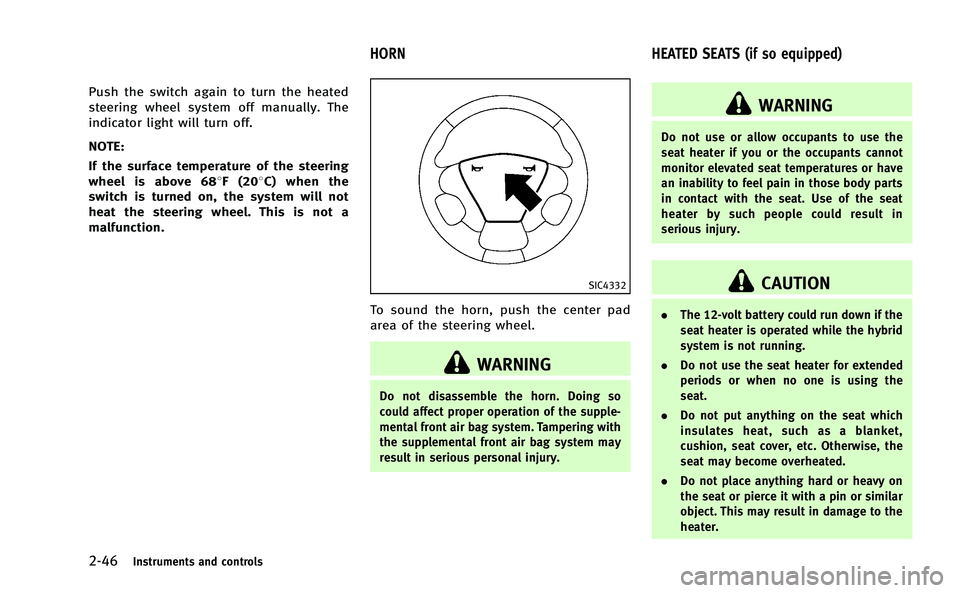
SIC4332
To sound the horn, push the center pad
area of the steering wheel.
WARNING
Do not disassemble the horn. Doing so
could affect proper operation of the supple-
mental front air bag system. Tampering with
the supplemental front air bag system may
result in serious personal injury.
WARNING
Do not use or allow occupants to use the
seat heater if you or the occupants cannot
monitor elevated seat temperatures or have
an inability to feel pain in those body parts
in contact with the seat. Use of the seat
heater by such people could result in
serious injury.
CAUTION
. The 12-volt battery could run down if the
seat heater is operated while the hybrid
system is not running.
. Do not use the seat heater for extended
periods or when no one is using the
seat.
. Do not put anything on the seat which
insulates heat, such as a blanket,
cushion, seat cover, etc. Otherwise, the
seat may become overheated.
. Do not place anything hard or heavy on
the seat or pierce it with a pin or similar
object. This may result in damage to the
heater.
HORN HEATED SEATS (if so equipped)
Page 133 of 530
2-48Instruments and controls
SIC4334
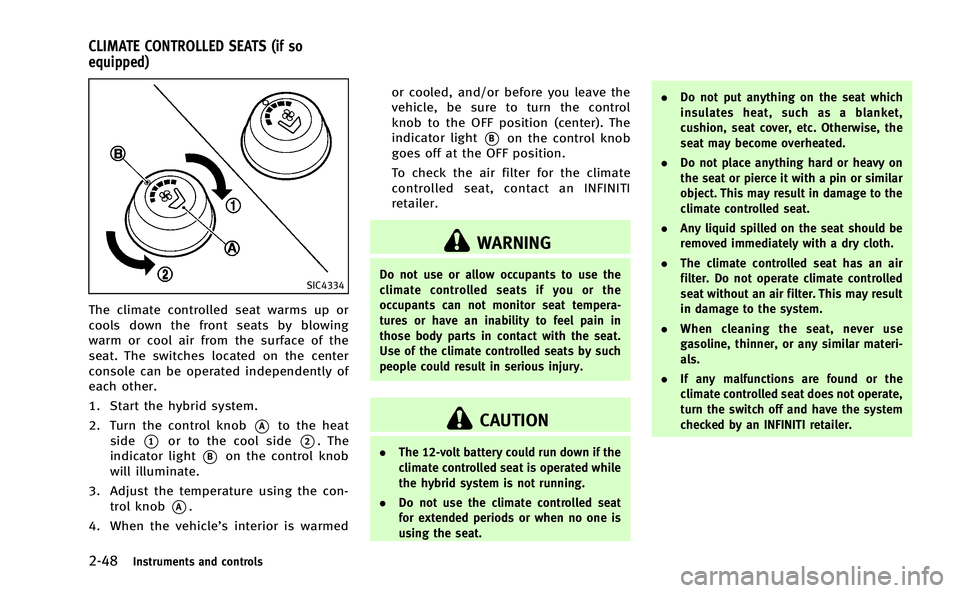
The climate controlled seat warms up or
cools down the front seats by blowing
warm or cool air from the surface of the
seat. The switches located on the center
console can be operated independently of
each other.
1. Start the hybrid system.
2. Turn the control knob
*Ato the heat
side
*1or to the cool side*2. The
indicator light
*Bon the control knob
will illuminate.
3. Adjust the temperature using the con- trol knob
*A.
4. When the vehicle’s interior is warmed or cooled, and/or before you leave the
vehicle, be sure to turn the control
knob to the OFF position (center). The
indicator light
*Bon the control knob
goes off at the OFF position.
To check the air filter for the climate
controlled seat, contact an INFINITI
retailer.
WARNING
Do not use or allow occupants to use the
climate controlled seats if you or the
occupants can not monitor seat tempera-
tures or have an inability to feel pain in
those body parts in contact with the seat.
Use of the climate controlled seats by such
people could result in serious injury.
CAUTION
. The 12-volt battery could run down if the
climate controlled seat is operated while
the hybrid system is not running.
. Do not use the climate controlled seat
for extended periods or when no one is
using the seat. .
Do not put anything on the seat which
insulates heat, such as a blanket,
cushion, seat cover, etc. Otherwise, the
seat may become overheated.
. Do not place anything hard or heavy on
the seat or pierce it with a pin or similar
object. This may result in damage to the
climate controlled seat.
. Any liquid spilled on the seat should be
removed immediately with a dry cloth.
. The climate controlled seat has an air
filter. Do not operate climate controlled
seat without an air filter. This may result
in damage to the system.
. When cleaning the seat, never use
gasoline, thinner, or any similar materi-
als.
. If any malfunctions are found or the
climate controlled seat does not operate,
turn the switch off and have the system
checked by an INFINITI retailer.
CLIMATE CONTROLLED SEATS (if so
equipped)
Page 137 of 530

2-52Instruments and controls
battery.
. Avoid using power outlet when the air
conditioner, headlights or rear window
defroster is on.
. This power outlet is not designed for use
with a cigarette lighter unit.
. Push the plug in as far as it will go. If
good contact is not made, the plug may
overheat or the internal temperature
fuse may blow.
. Before inserting or disconnecting a plug,
be sure the electrical accessory being
used is turned OFF.
. When not in use, be sure to close the
cap. Do not allow water or any liquid to
contact the outlet.
. Do not leave the console box open. The
open lid may suddenly close when the
vehicle stops.
SIC4340
FRONT
To open the ashtray lid, push the lid down
and release it
*1.
To empty the ashtray, pull out
*2.
The cigarette lighter operates when the
ignition switch is in the ON position.
Push the lighter in all the way
*3, then
release it. When the lighter is heated, it will
spring out. Return the lighter to its original
position after use.
CAUTION
. The cigarette lighter socket is a power
source for the cigarette lighter element
only. The use of the cigarette lighter
socket as a power source for any other
accessory is not recommended.
. Do not use any other power outlet for an
accessory lighter.
CIGARETTE LIGHTER AND ASHTRAYS
Page 148 of 530

SIC4328
To activate or deactivate the welcome light
function, perform the following procedure.
1. Push the ignition switch to the ONposition.
2. Open the driver’s side door.
3. Within 20 seconds after the ignition switch is pushed to the ON position,
push the door open request switch on
the driver’s side door handle for more
than 5 seconds with the driver’s door
open.
4. A chime sounds when the setting is completed.
Once the welcome light function is active, the courtesy light
*Aand the passenger
cabin illumination will illuminate when you
approach the vehicle with the Intelligent
Key (within approximately 3.3 ft (1 m) of
the antenna built inside the door handles)
and the following conditions are met.
. All doors are closed and locked.
. The ignition switch is in the LOCK or OFF
position.
. The Intelligent Key is outside the
vehicle.
. The courtesy light operates within a set
duration.
In order to help maximize 12-volt battery
life, do not store the Intelligent Key within
the vehicle detection range.
BATTERY SAVER SYSTEM
The welcome light function will be deacti-
vated automatically to prevent 12-volt
battery discharge under the following
conditions.
. If the welcome light function does not
operate within a set duration. Note that
the duration is set to 9 days as the
factory default setting. To activate the
welcome light function again, start the
engine. .
If the welcome light function is acti-
vated 15 consecutive times when you
approach and leave the vehicle with the
Intelligent Key without the doors being
unlocked. To activate the welcome light
function again, unlock any door.
Instruments and controls2-63
WELCOME LIGHT
Page 150 of 530

.ignition switch is switched to the OFF
position
— remain on for about 15 seconds.
. doors are unlocked by pushing the
UNLOCK button on the Intelligent Key
or door handle request switch with the
ignition switch in the LOCK position
— remain on for about 15 seconds.
. any door is opened and then closed
with the ignition switch in the LOCK
position
— remain on for about 15 seconds.
. any door is opened
— remain on while the door is opened.
When the door is closed, the lights
go off.
When the DOOR OFF switch
*2is pushed
on, the map and rear personal lights will
not illuminate under the above condition.
The map and rear personal lights can be
turned on only with the ON switch
*1.
The lights will also turn off after a period
of time when the lights remain illuminated
after the ignition switch has been pushed
to the OFF or LOCK position to prevent the
12-volt battery from becoming discharged.
When the auto interior illumination is set
to the OFF position (see “Vehicle informa-tion and settings”
in the“4. Monitor,
climate, audio, phone and voice recogni-
tion systems” section), the lights will
illuminate under the following condition:
. any door is opened with the ignition
switch in any position
— remain on while the door is opened.
When the door is closed, the lights
go off.
CAUTION
Do not use for extended periods of time with
the INFINITI Direct Response HybridTMSys-
tem stopped. This could result in a dis-
charged 12-volt battery.
SIC3869
The light on the vanity mirror will turn on
when the cover on the vanity mirror is
opened.
When the cover is closed, the light will turn
off.
The lights will also turn off after a period
of time when the lights remain illuminated
to prevent the 12-volt battery from becom-
ing discharged.
Instruments and controls2-65
VANITY MIRROR LIGHTS
Page 151 of 530

2-66Instruments and controls
The light illuminates when the trunk lid is
opened. When the trunk lid is closed, the
light will turn off.
The light will also turn off after a period of
time when the light remains illuminated
after the ignition switch has been pushed
to the OFF or LOCK position to prevent the
12-volt battery from becoming discharged.The HomeLink®Universal Transceiver pro-
vides a convenient way to consolidate the
functions of up to three individual hand-
held transmitters into one built-in device.
HomeLink
®Universal Transceiver:
. Will operate most Radio Frequency (RF)
devices such as garage doors, gates,
home and office lighting, entry door
locks and security systems.
. Is powered by your vehicle’s 12-volt
battery. No separate batteries are
required. If the vehicle’s 12-volt battery
is discharged or is disconnected,
HomeLink
®will retain all programming.
When the HomeLink®Universal Transcei-
ver is programmed, retain the original
transmitter for future programming proce-
dures (Example: new vehicle purchases).
Upon sale of the vehicle, the programmed
HomeLink
®Universal Transceiver buttons
should be erased for security purposes.
For additional information, refer to “Pro-
gramming HomeLink
®” later in this sec-
tion.
WARNING
. Do not use the HomeLink®Universal
Transceiver with any garage door opener that lacks safety stop and reverse
features as required by federal safety
standards. (These standards became
effective for opener models manufac-
tured after April 1, 1982). A garage door
opener which cannot detect an object in
the path of a closing garage door and
then automatically stop and reverse,
does not meet current federal safety
standards. Using a garage door opener
without these features increases the risk
of serious injury or death.
. During the programming, procedure your
garage door or security gate will open
and close (if the transmitter is within
range). Make sure that people or objects
are clear of the garage door, gate, etc.
that you are programming.
. Your vehicle’s INFINITI Direct Response
Hybrid
TMSystem should be turned off
while programming the HomeLink®Uni-
versal Transceiver. Do not breathe ex-
haust gases: they contain colorless and
odorless carbon monoxide. Carbon mon-
oxide is dangerous. It can cause uncon-
sciousness or death.
TRUNK LIGHT HomeLink®UNIVERSAL TRANSCEIVER
Page 152 of 530

PROGRAMMING HomeLink®
If you have any questions or are having
difficulty programming your HomeLink®
buttons, refer to the HomeLink®web site
at: www.homelink.com or call 1-800-355-
3515.
NOTE:
It is also recommended that a new battery
be placed in the hand-held transmitter of
the device being programmed to
HomeLink
®for quicker programming and
accurate transmission of the radio-fre-
quency.
1. Position the end of your hand-held transmitter 1-3 in (26-76 mm) away
from the HomeLink
®surface, keeping
the HomeLink®indicator light*1in
view.
JVI0428X
2. Using both hands, simultaneously
press and hold the desired HomeLink®
button and handheld transmitter but-
ton. DO NOT release until the
HomeLink
®indicator light*1flashes
slowly and then rapidly. When the
indicator light flashes rapidly, both
buttons may be released. (The rapid
flashing indicates successful program-
ming.)
NOTE:
Some devices to be programmed may
require you to replace Step 2 with the
cycling procedure noted in the “Pro-
gramming HomeLink
®for Canadian customers and gate openers”
later in
this section.
Instruments and controls2-67