check INFINITI M35 2006 Factory Service Manual
[x] Cancel search | Manufacturer: INFINITI, Model Year: 2006, Model line: M35, Model: INFINITI M35 2006Pages: 5621, PDF Size: 65.56 MB
Page 3324 of 5621
![INFINITI M35 2006 Factory Service Manual CYLINDER BLOCK
EM-261
[VK45DE]
C
D
E
F
G
H
I
J
K
L
MA
EM
Revision: 2006 January2006 M35/M45
HOW TO SELECT CONNECTING ROD BEARING
When New Connecting Rod and Crankshaft are Used
Check pin diameter grad](/img/42/57023/w960_57023-3323.png "INFINITI M35 2006 Factory Service Manual CYLINDER BLOCK
EM-261
[VK45DE]
C
D
E
F
G
H
I
J
K
L
MA
EM
Revision: 2006 January2006 M35/M45
HOW TO SELECT CONNECTING ROD BEARING
When New Connecting Rod and Crankshaft are Used
Check pin diameter grad")
CYLINDER BLOCK
EM-261
[VK45DE]
C
D
E
F
G
H
I
J
K
L
MA
EM
Revision: 2006 January2006 M35/M45
HOW TO SELECT CONNECTING ROD BEARING
When New Connecting Rod and Crankshaft are Used
Check pin diameter grade (“0”, “1” or “2”) on front of crankshaft, and
select connecting rod bearing of the same grade.
NOTE:
There is no grading for connecting rod big end diameter.
When Crankshaft and Connecting Rod are Reused
1. Measure the connecting rod big end diameter. Refer to EM-268, "CONNECTING ROD BIG END DIAME-
TER" .
2. Make sure that the connecting rod big end diameter is within the standard value.
3. Measure the crankshaft pin journal diameter. Refer to EM-272, "
CRANKSHAFT PIN JOURNAL DIAME-
TER" .
4. Determine the grade of crankshaft pin diameter grade by corresponding to the measured dimension in
“Crankshaft pin journal diameter” column of “Connecting Rod Bearing Selection Table”.
5. Select connecting rod bearing of the same grade.
Connecting Rod Bearing Selection Table
Unit: mm (in)
Unit: mm (in)
Under Size Bearings Usage Guide
When the specified connecting rod bearing oil clearance is not obtained with standard size connecting rod
bearings, use undersize (US) bearings.
When using undersize (US) bearing, measure the connecting rod bearing inner diameter with bearing
installed, and grind crankshaft pin so that the connecting rod bearing oil clearance satisfies the standard.
CAUTION:
In grinding crankshaft pin to use undersize bearings, keep
the fillet R [1.5 mm (0.059 in)].
Bearing undersize table
Unit: mm (in)
PBIC2374E
Connecting rod big end diameter 55.000 - 55.013 (2.1654 - 2.1659)
Crankshaft Connecting rod bearing
Crankshaft pin journal diameter Grade (Mark) Dimension (Bearing thickness range) Bearing grade No. Color
51.968 - 51.974 (2.0460 - 2.0462) 0 1.500 - 1.503 (0.0591 - 0.0592) STD 0 No color
51.962 - 51.968 (2.0457 - 2.0460) 1 1.503 - 1.506 (0.0592 - 0.0593) STD 1 Brown
51.956 - 51.962 (2.0455 - 2.0457) 2 1.506 - 1.509 (0.0593 - 0.0594) STD 2 Green
PBIC2373E
Size Thickness
US 0.25 (0.0098) 1.626 - 1.634 (0.0640 - 0.0643)
Page 3331 of 5621
![INFINITI M35 2006 Factory Service Manual EM-268
[VK45DE]
CYLINDER BLOCK
Revision: 2006 January2006 M35/M45
CONNECTING ROD BEND AND TORSION
Check with connecting rod aligner.
If it exceeds the limit, replace connecting rod assembly.
CONNECTIN](/img/42/57023/w960_57023-3330.png "INFINITI M35 2006 Factory Service Manual EM-268
[VK45DE]
CYLINDER BLOCK
Revision: 2006 January2006 M35/M45
CONNECTING ROD BEND AND TORSION
Check with connecting rod aligner.
If it exceeds the limit, replace connecting rod assembly.
CONNECTIN")
EM-268
[VK45DE]
CYLINDER BLOCK
Revision: 2006 January2006 M35/M45
CONNECTING ROD BEND AND TORSION
Check with connecting rod aligner.
If it exceeds the limit, replace connecting rod assembly.
CONNECTING ROD BIG END DIAMETER
Install connecting rod bearing cap without installing connecting
rod bearing, and tightening connecting rod bolts to the specified
torque. Refer to EM-254, "
ASSEMBLY" for the tightening proce-
dure.
Measure the inner diameter of connecting rod big end with
inside micrometer.
If out of the standard, replace connecting rod assembly.
CONNECTING ROD BUSHING OIL CLEARANCE
Connecting Rod Bushing Inner Diameter
Measure the inner diameter of connecting rod bushing with inside
micrometer.Bend:
Limit : 0.15 mm (0.0059 in) per 100 mm (3.94 in) length
To r s i o n :
Limit : 0.30 mm (0.012 in) per 100 mm (3.94 in) length
PBIC2077E
Standard : 55.000 - 55.013 mm (2.1654 - 2.1659 in)
PBIC1641E
Standard : 22.000 - 22.012 mm (0.8661 - 0.8666 in)
PBIC0120E
Page 3338 of 5621
![INFINITI M35 2006 Factory Service Manual CYLINDER BLOCK
EM-275
[VK45DE]
C
D
E
F
G
H
I
J
K
L
MA
EM
Revision: 2006 January2006 M35/M45
CRUSH HEIGHT OF MAIN BEARING
When main bearing cap is removed after being tightened to the
specified torq](/img/42/57023/w960_57023-3337.png "INFINITI M35 2006 Factory Service Manual CYLINDER BLOCK
EM-275
[VK45DE]
C
D
E
F
G
H
I
J
K
L
MA
EM
Revision: 2006 January2006 M35/M45
CRUSH HEIGHT OF MAIN BEARING
When main bearing cap is removed after being tightened to the
specified torq")
CYLINDER BLOCK
EM-275
[VK45DE]
C
D
E
F
G
H
I
J
K
L
MA
EM
Revision: 2006 January2006 M35/M45
CRUSH HEIGHT OF MAIN BEARING
When main bearing cap is removed after being tightened to the
specified torque with main bearings installed, the tip end of bear-
ing must protrude. Refer to EM-254, "
ASSEMBLY" for the tight-
ening procedure.
If the standard is not met, replace main bearings.
CRUSH HEIGHT OF CONNECTING ROD BEARING
When connecting rod bearing cap is removed after being tight-
ened to the specified torque with connecting rod bearings
installed, the tip end of bearing must protrude. Refer to EM-254,
"ASSEMBLY" for the tightening procedure.
If the standard is not met, replace connecting rod bearings.
DRIVE PLATE
Check drive plate and signal plate for deformation or cracks.
CAUTION:
Do not disassemble drive plate.
Do not place drive plate with signal plate facing down.
When handling signal plate, take care not to damage or
scratch it.
Handle signal plate in a manner that prevents it from
becoming magnetized.
If anything is found, replace drive plate.Standard : There must be crush height.
SEM502G
Standard : There must be crush height.
PBIC1646E
PBIC2367E
Page 3352 of 5621

EX-1
EXHAUST SYSTEM
B ENGINE
CONTENTS
C
D
E
F
G
H
I
J
K
L
M
SECTION EX
A
EX
Revision: 2006 January2006 M35/M45
EXHAUST SYSTEM
PREPARATION ........................................................... 2
Special Service Tools ............................................... 2
Commercial Service Tools ........................................ 2
EXHAUST SYSTEM ................................................... 3
Checking Exhaust System ....................................... 3
Components ............................................................. 4
Removal and Installation .......................................... 5
REMOVAL ........................................................
..... 5INSTALLATION ..................................................... 5
INSPECTION AFTER INSTALLATION .................. 5
Components ............................................................. 6
Removal and installation .......................................... 7
REMOVAL ........................................................
..... 7
INSTALLATION ..................................................... 7
INSPECTION AFTER INSTALLATION .................. 7
Page 3354 of 5621
EXHAUST SYSTEM
EX-3
C
D
E
F
G
H
I
J
K
L
MA
EX
Revision: 2006 January2006 M35/M45
EXHAUST SYSTEMPFP:20100
Checking Exhaust SystemNBS005RJ
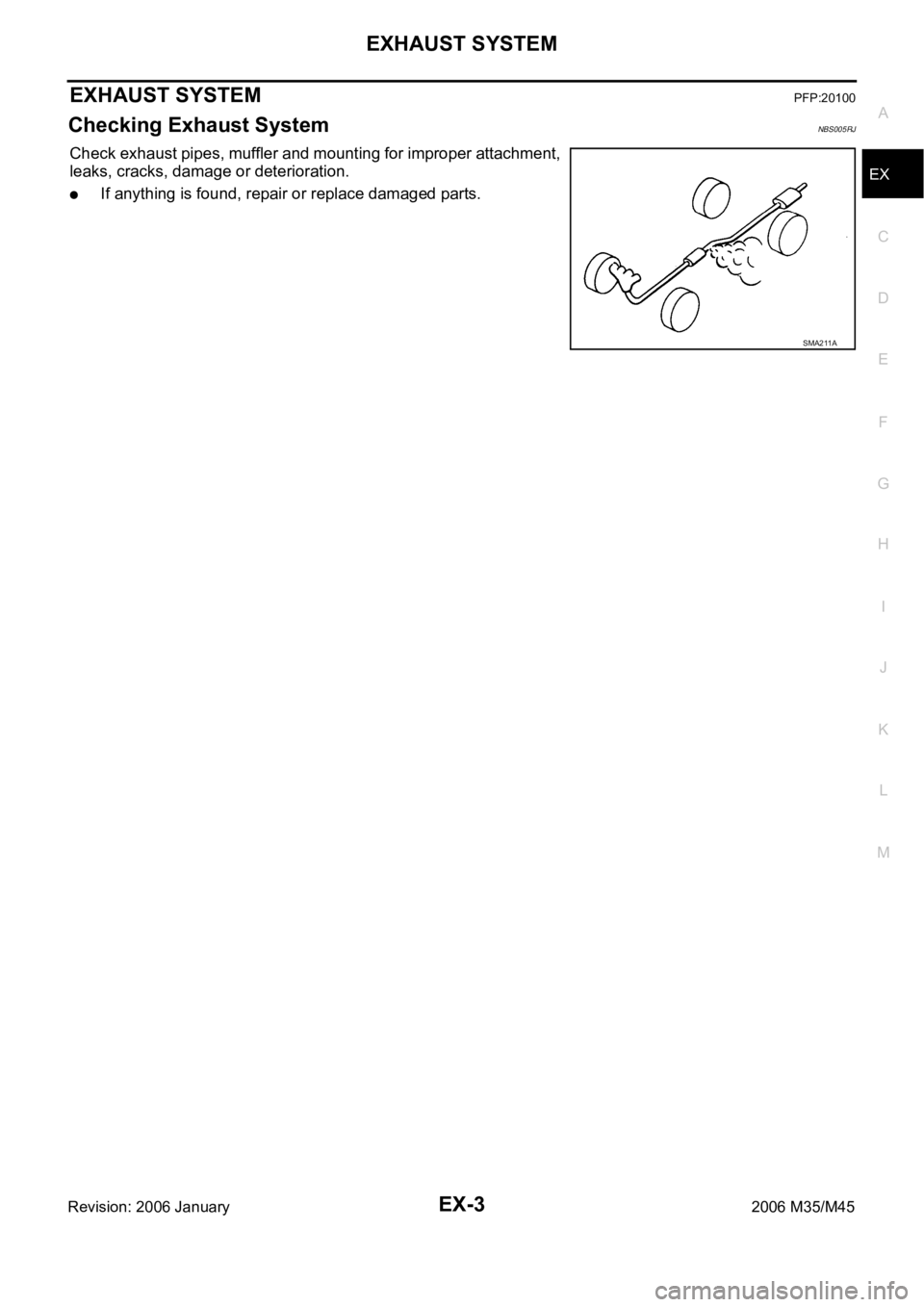
Check exhaust pipes, muffler and mounting for improper attachment,
leaks, cracks, damage or deterioration.
If anything is found, repair or replace damaged parts.
SMA211A
Page 3356 of 5621
EXHAUST SYSTEM
EX-5
C
D
E
F
G
H
I
J
K
L
MA
EX
Revision: 2006 January2006 M35/M45
Removal and InstallationNBS005RL
CAUTION:
Be sure to use genuine exhaust system parts or equivalents which are specially designed for heat
resistance, corrosion resistance, and shape.
Perform the operation with the exhaust system fully cooled down because the system will be hot
just after engine stops.
Be careful not to cut your hand on the heat insulator edge.
REMOVAL
Disconnect each joint and mounting using power tool.
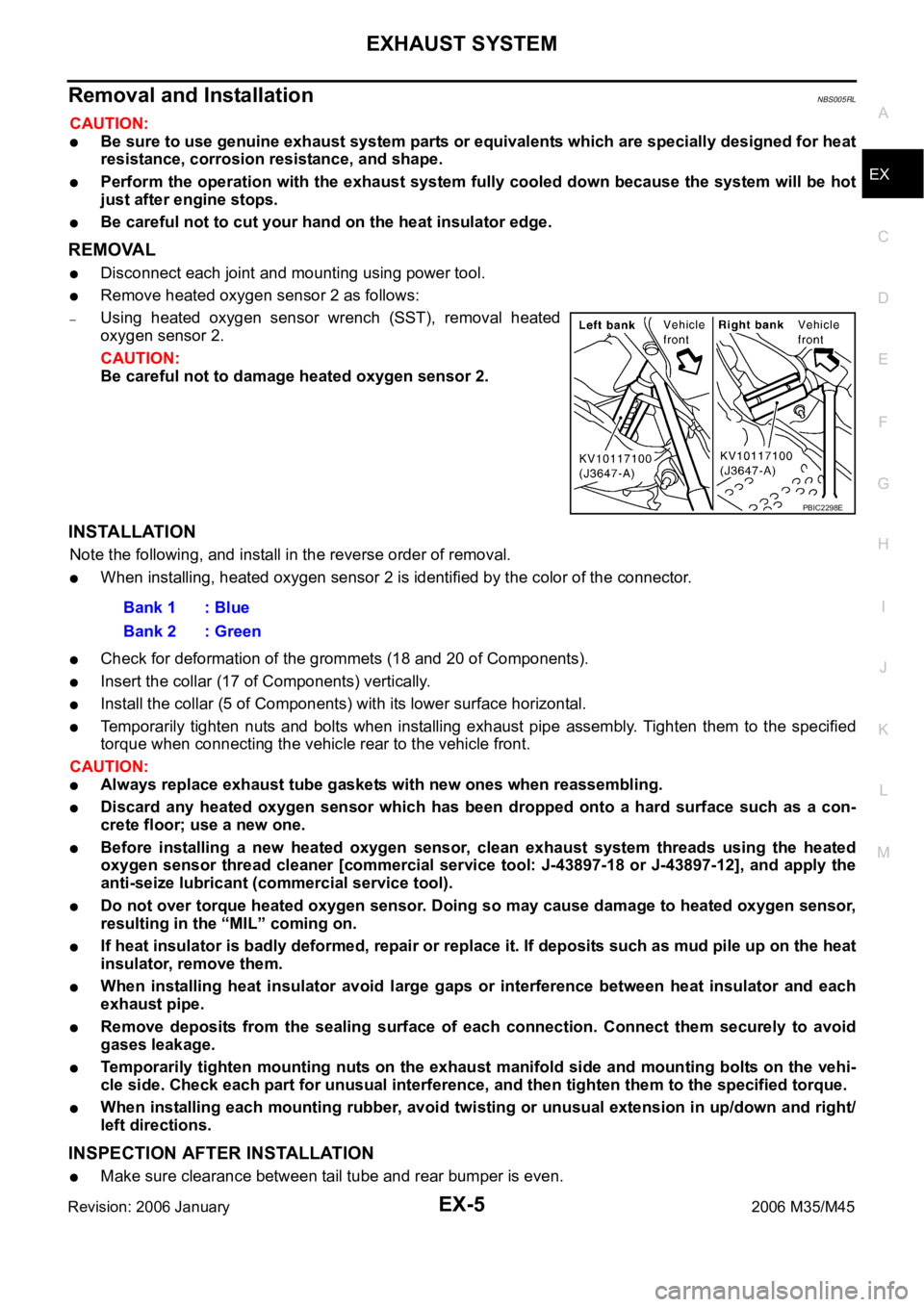
Remove heated oxygen sensor 2 as follows:
–Using heated oxygen sensor wrench (SST), removal heated
oxygen sensor 2.
CAUTION:
Be careful not to damage heated oxygen sensor 2.
INSTALLATION
Note the following, and install in the reverse order of removal.
When installing, heated oxygen sensor 2 is identified by the color of the connector.
Check for deformation of the grommets (18 and 20 of Components).
Insert the collar (17 of Components) vertically.
Install the collar (5 of Components) with its lower surface horizontal.
Temporarily tighten nuts and bolts when installing exhaust pipe assembly. Tighten them to the specified
torque when connecting the vehicle rear to the vehicle front.
CAUTION:
Always replace exhaust tube gaskets with new ones when reassembling.
Discard any heated oxygen sensor which has been dropped onto a hard surface such as a con-
crete floor; use a new one.
Before installing a new heated oxygen sensor, clean exhaust system threads using the heated
oxygen sensor thread cleaner [commercial service tool: J-43897-18 or J-43897-12], and apply the
anti-seize lubricant (commercial service tool).
Do not over torque heated oxygen sensor. Doing so may cause damage to heated oxygen sensor,
resulting in the “MIL” coming on.
If heat insulator is badly deformed, repair or replace it. If deposits such as mud pile up on the heat
insulator, remove them.
When installing heat insulator avoid large gaps or interference between heat insulator and each
exhaust pipe.
Remove deposits from the sealing surface of each connection. Connect them securely to avoid
gases leakage.
Temporarily tighten mounting nuts on the exhaust manifold side and mounting bolts on the vehi-
cle side. Check each part for unusual interference, and then tighten them to the specified torque.
When installing each mounting rubber, avoid twisting or unusual extension in up/down and right/
left directions.
INSPECTION AFTER INSTALLATION
Make sure clearance between tail tube and rear bumper is even.
PBIC2298E
Bank 1 : Blue
Bank 2 : Green
Page 3357 of 5621
EX-6
EXHAUST SYSTEM
Revision: 2006 January2006 M35/M45
With engine running, check exhaust tube joints for gas leakage and unusual noises.
Check to ensure that mounting brackets and mounting rubbers are installed properly and free from undue
stress. Improper installation could result in excessive noise and vibration.
ComponentsNBS005RM
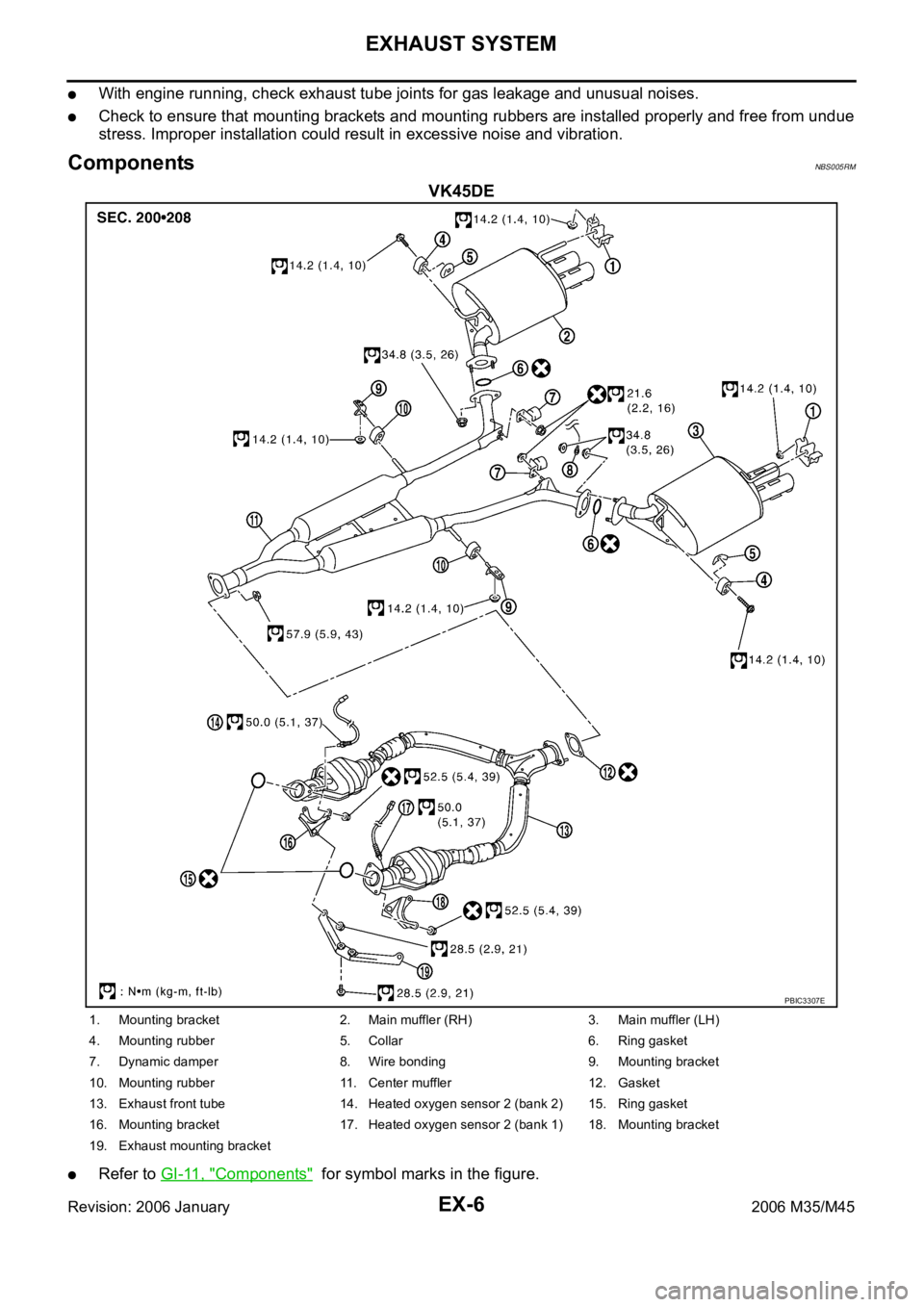
VK45DE
Refer to GI-11, "Components" for symbol marks in the figure.
PBIC3307E
1. Mounting bracket 2. Main muffler (RH) 3. Main muffler (LH)
4. Mounting rubber 5. Collar 6. Ring gasket
7. Dynamic damper 8. Wire bonding 9. Mounting bracket
10. Mounting rubber 11. Center muffler 12. Gasket
13. Exhaust front tube 14. Heated oxygen sensor 2 (bank 2) 15. Ring gasket
16. Mounting bracket 17. Heated oxygen sensor 2 (bank 1) 18. Mounting bracket
19. Exhaust mounting bracket
Page 3358 of 5621
EXHAUST SYSTEM
EX-7
C
D
E
F
G
H
I
J
K
L
MA
EX
Revision: 2006 January2006 M35/M45
Removal and installationNBS005RN
CAUTION:
Be sure to use genuine exhaust system parts or equivalents which are specially designed for heat
resistance, corrosion resistance, and shape.
Perform the operation with the exhaust system fully cooled down because the system will be hot
just after engine stops.
Be careful not to cut your hand on the heat insulator edge.
REMOVAL
Disconnect each joint and mounting using power tool.
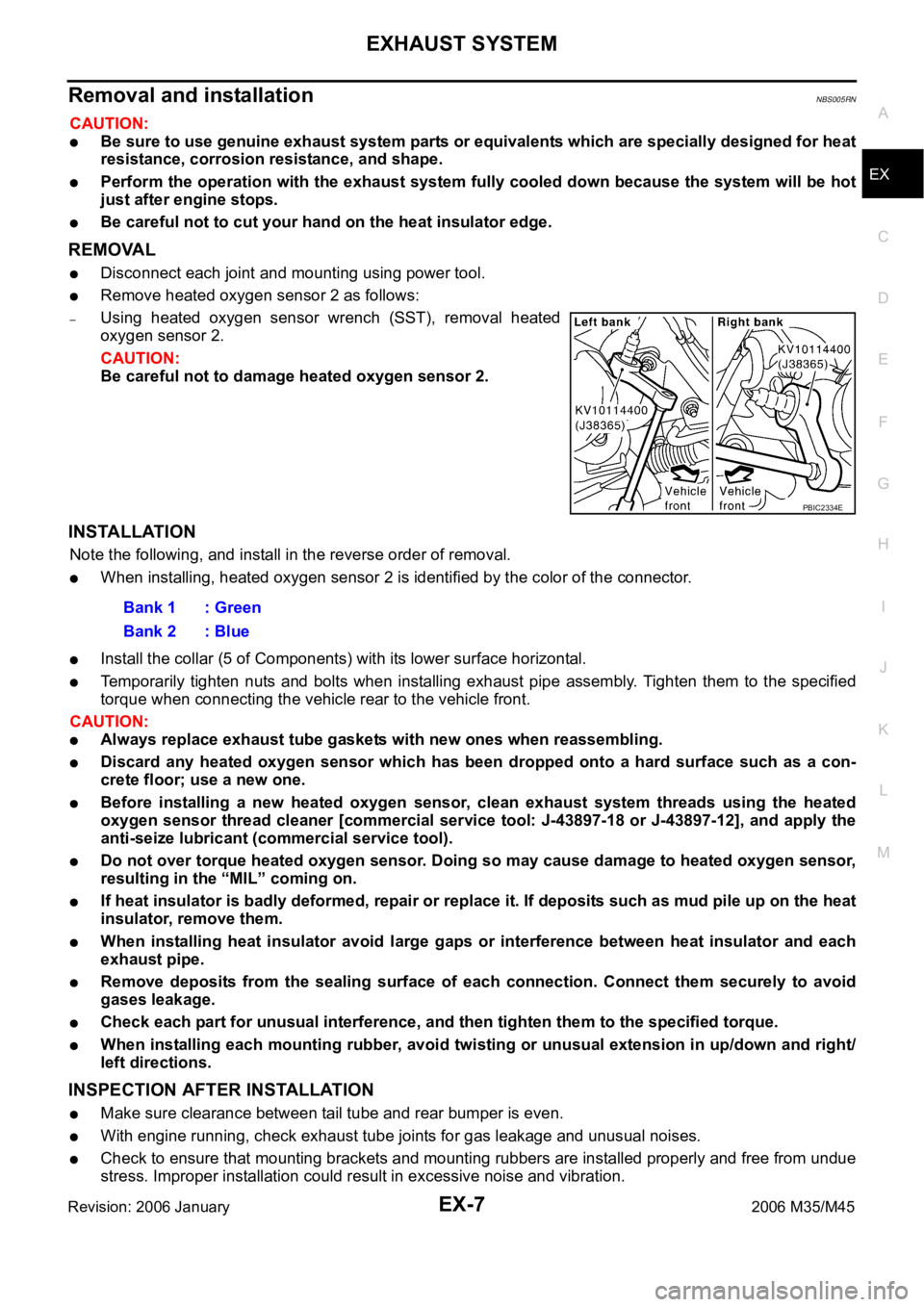
Remove heated oxygen sensor 2 as follows:
–Using heated oxygen sensor wrench (SST), removal heated
oxygen sensor 2.
CAUTION:
Be careful not to damage heated oxygen sensor 2.
INSTALLATION
Note the following, and install in the reverse order of removal.
When installing, heated oxygen sensor 2 is identified by the color of the connector.
Install the collar (5 of Components) with its lower surface horizontal.
Temporarily tighten nuts and bolts when installing exhaust pipe assembly. Tighten them to the specified
torque when connecting the vehicle rear to the vehicle front.
CAUTION:
Always replace exhaust tube gaskets with new ones when reassembling.
Discard any heated oxygen sensor which has been dropped onto a hard surface such as a con-
crete floor; use a new one.
Before installing a new heated oxygen sensor, clean exhaust system threads using the heated
oxygen sensor thread cleaner [commercial service tool: J-43897-18 or J-43897-12], and apply the
anti-seize lubricant (commercial service tool).
Do not over torque heated oxygen sensor. Doing so may cause damage to heated oxygen sensor,
resulting in the “MIL” coming on.
If heat insulator is badly deformed, repair or replace it. If deposits such as mud pile up on the heat
insulator, remove them.
When installing heat insulator avoid large gaps or interference between heat insulator and each
exhaust pipe.
Remove deposits from the sealing surface of each connection. Connect them securely to avoid
gases leakage.
Check each part for unusual interference, and then tighten them to the specified torque.
When installing each mounting rubber, avoid twisting or unusual extension in up/down and right/
left directions.
INSPECTION AFTER INSTALLATION
Make sure clearance between tail tube and rear bumper is even.
With engine running, check exhaust tube joints for gas leakage and unusual noises.
Check to ensure that mounting brackets and mounting rubbers are installed properly and free from undue
stress. Improper installation could result in excessive noise and vibration.
PBIC2334E
Bank 1 : Green
Bank 2 : Blue
Page 3365 of 5621

FAX-6
FRONT WHEEL HUB AND KNUCKLE
Revision: 2006 January2006 M35/M45
5. Put matching mark on disc rotor and wheel hub and bearing
assembly, then remove disc rotor.
6. Remove cotter pin, then loosen hub lock nut with a power tool.
(AWD)
7. Separate wheel hub and bearing assembly from drive shaft by
lightly tapping the end with a hammer (suitable tool) and a wood
block, and then remove hub lock nut. (AWD)
CAUTION:
Do not place drive shaft joint at an extreme angle. Also be
careful not to overextend slide joint.
Do not allow drive shaft to hang down without support for
housing (or joint sub-assembly), shaft and the other
parts.
NOTE:
Use a puller (suitable tool) if wheel hub and bearing assembly
and drive shaft cannot be separated even after performing the
above procedure.
8. Remove wheel hub and bearing assembly mounting bolts, and then remove splash guard and wheel hub
and bearing assembly from steering knuckle.
Steering knuckle
1. Refer to the procedure from 1 to 7 in “Wheel Hub and Bearing Assembly” FA X - 5 , "REMOVAL" .
2. Remove cotter pin (1), and then loosen the nut.
3. Remove steering outer socket (2) from steering knuckle (3) so
as not to damage ball joint boot (4) using the ball joint remover
(suitable tool).
CAUTION:
Temporarily tighten the nut to prevent damage to threads
and to prevent the ball joint remover (suitable tool) from
suddenly coming off.
4. Remove cotter pin of transverse link and steering knuckle, and
then loosen nut.
5. Remove transverse link from steering knuckle so as not to dam-
age ball joint boot using the ball joint remover (suitable tool).
CAUTION:
Temporarily tighten the nut to prevent damage to threads and to prevent ball joint remover (suit-
able tool) from suddenly coming off.
6. Remove fixing nut and bolt with a power tool, and then remove steering knuckle from upper link. Refer to
FSU-8, "
Components" .
7. Remove wheel hub and bearing assembly mounting bolts, and then remove splash guard and wheel hub
and bearing assembly from steering knuckle.
INSPECTION AFTER REMOVAL
Check components for deformation, cracks, and other damage. Replace if there are.
Ball Joint Inspection
Check boots of transverse link and steering outer socket ball joint for breakage, axial play, and torque. Refer to
FSU-14, "
INSPECTION AFTER REMOVAL" , “TRANSVERSE LINK”, PS-22, "INSPECTION AFTER DISAS-
SEMBLY" , “POWER STEERING GEAR”.
SDIA2608E
SDIA1821E
SGIA1183E
Page 3366 of 5621

FRONT WHEEL HUB AND KNUCKLE
FAX-7
C
E
F
G
H
I
J
K
L
MA
B
FA X
Revision: 2006 January2006 M35/M45
INSTALLATION
Installation is the reverse order of the removal. For tightening torque, refer to FAX-5, "COMPONENT" .
Perform the final tightening of each of parts under unladen conditions, which were removed when remov-
ing wheel hub and bearing assembly and steering knuckle. Check the wheel alignment. Refer to FSU-6,
"Wheel Alignment Inspection" (2WD), FSU-23, "Wheel Alignment Inspection" (AWD).
Adjust neutral position of steering angle sensor after checking the wheel alignment. Refer to BRC-6,
"Adjustment of Steering Angle Sensor Neutral Position" .
Check wheel sensor harness for proper connection. Refer to BRC-57, "WHEEL SENSOR" .
Assemble disc rotor and wheel hub and bearing assembly by
aligning each matching mark as shown in the figure when install-
ing disc rotor.
NOTE:
Refer to BR-28, "
DISC ROTOR INSPECTION" , for assembly
when removing disc without matching mark.
SDIA2608E