check INFINITI M35 2006 Factory Service Manual
[x] Cancel search | Manufacturer: INFINITI, Model Year: 2006, Model line: M35, Model: INFINITI M35 2006Pages: 5621, PDF Size: 65.56 MB
Page 3574 of 5621

POWER WINDOW SYSTEM
GW-55
C
D
E
F
G
H
J
K
L
MA
B
GW
Revision: 2006 January2006 M35/M45
3. CHECK DOOR KEY CYLINDER SWITCH GROUND
Check continuity between front door lock assembly (driver side) connector ground.
OK or NG
OK >> GO TO 4.
NG >> Repair or replace harness.
4. CHECK DOOR KEY CYLINDER SWITCH
Check front door lock assembly (driver side).
OK or NG
OK >> Further inspection is necessary. Refer to symptom
chart.
NG >> Replace front door key cylinder (driver side) switch.
Front door lock
assembly
(driver side)
connectorTerminal
GroundContinuity
D14 4 Yes
PIIB5974E
Te r m i n a l
Key position Continuity
Front door lock assembly
(driver side)
5
4Unlock Yes
Neutral / Lock No
6Lock Yes
Neutral / Unlock No
PIIB5975E
Page 3575 of 5621

GW-56
POWER WINDOW SYSTEM
Revision: 2006 January2006 M35/M45
Power Window Serial Link Check (Passenger Side)NIS00223
1. CHECK POWER WINDOW SWITCH OUTPUT SIGNAL
With CONSULT-II
Check (“CDL LOCK SW ”, “CDL UNLOCK SW”) in DATA MONITOR mode for “POWER DOOR LOCK SYS-
TEM” with CONSULT-II. Refer to GW-31, "
DATE MONITOR" .
Without CONSULT-II
1. Remove key from ignition switch, and the door of driver side and passenger side is closed.
2. Check signal between BCM connector and ground with oscilloscope when door lock and unlock switch
(driver side and passenger side) is turned “LOCK” or “UNLOCK”.
3. Make sure signals which are shown in the figure below can be detected during 10 second just after door
lock and unlock switch (driver side and passenger side) is turned “LOCK” or “UNLOCK”.
OK or NG
OK >> Power window serial link is OK.
NG >> GO TO 2.
Monitor item Condition
CDL LOCK SW LOCK : ON
UNLOCK : OFF
CDL UNLOCK SW LOCK : OFF
UNLOCK : ON
PIIA7068E
Terminal
Signal
(Reference value) (+)
(–)
BCM connector Terminal
M1 22 Ground
PIIB5957EPIIA1297E
Page 3576 of 5621

POWER WINDOW SYSTEM
GW-57
C
D
E
F
G
H
J
K
L
MA
B
GW
Revision: 2006 January2006 M35/M45
2. CHECK POWER WINDOW SWITCH GROUND
1. Turn ignition switch OFF.
2. Disconnect power window main switch and front power window switch (passenger side) connector.
3. Check continuity between power window main switch connector and ground.
4. Check continuity between power window sub-switch (front passenger side) connector and ground.
OK or NG
OK >> GO TO 3.
NG >> Repair or replace harness.
3. CHECK POWER WINDOW SERIAL LINK CIRCUIT
1. Disconnect BCM connector.
2. Check continuity between BCM connector and power window main switch connector.
3. Check continuity between BCM connector and power window sub-switch (front passenger side) connec-
tor.
OK or NG
OK >> Replace power window main switch.
NG >> Repair or replace harness.
Power window main
switch connectorTerminal
GroundContinuity
D11 17 Yes
PIIB5937E
Power window
sub-switch
(front passenger side)
connectorTerminal
GroundContinuity
D46 11 Yes
PIIB5941E
AB
Continuity
BCM connector TerminalPower window
main switch
connectorTerminal
M1 22 D10 14 Yes
PIIB5958E
AB
Continuity
BCM connector TerminalPower window
sub- switch
(front passenger side)
connectorTerminal
M1 22 D46 16 Yes
PIIB5959E
Page 3577 of 5621
GW-58
POWER WINDOW SYSTEM
Revision: 2006 January2006 M35/M45
Power Window Serial Link Check (Rear LH or RH)NIS00224
1. CHECK POWER WINDOW SWITCH
Change with operative power window sub-switch (rear LH or RH).
Whether operates normally is confirmed?
YES >> Replace power window sub-switch (rear LH or RH).
NO >> GO TO 2.
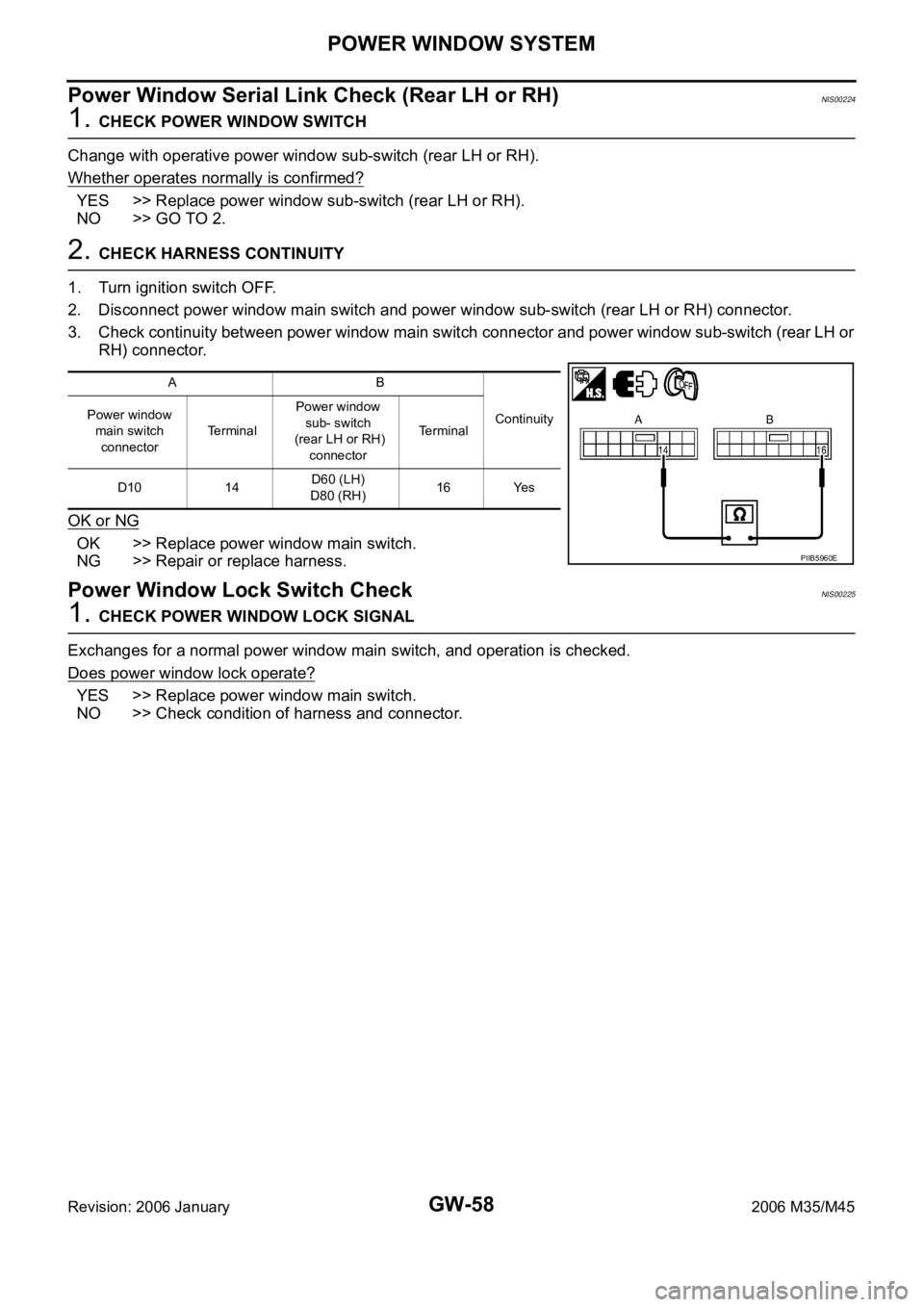
2. CHECK HARNESS CONTINUITY
1. Turn ignition switch OFF.
2. Disconnect power window main switch and power window sub-switch (rear LH or RH) connector.
3. Check continuity between power window main switch connector and power window sub-switch (rear LH or
RH) connector.
OK or NG
OK >> Replace power window main switch.
NG >> Repair or replace harness.
Power Window Lock Switch CheckNIS00225
1. CHECK POWER WINDOW LOCK SIGNAL
Exchanges for a normal power window main switch, and operation is checked.
Does power window lock operate?
YES >> Replace power window main switch.
NO >> Check condition of harness and connector.
AB
Continuity Power window
main switch
connectorTe r m i n a lPower window
sub- switch
(rear LH or RH)
connectorTerminal
D10 14D60 (LH)
D80 (RH)16 Yes
PIIB5960E
Page 3584 of 5621
FRONT DOOR GLASS AND REGULATOR
GW-65
C
D
E
F
G
H
J
K
L
MA
B
GW
Revision: 2006 January2006 M35/M45
Inspection after Removal
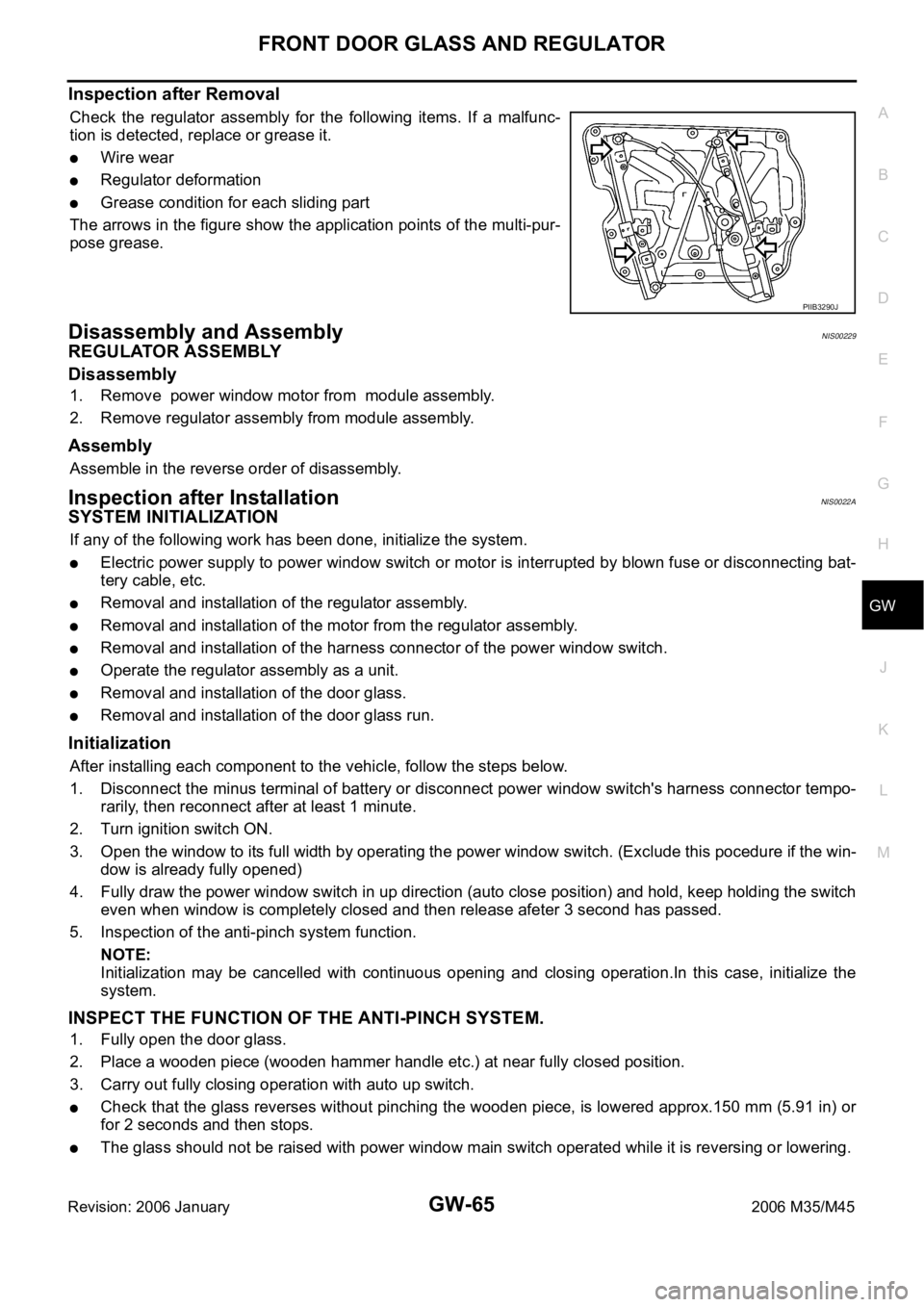
Check the regulator assembly for the following items. If a malfunc-
tion is detected, replace or grease it.
Wire wear
Regulator deformation
Grease condition for each sliding part
The arrows in the figure show the application points of the multi-pur-
pose grease.
Disassembly and AssemblyNIS00229
REGULATOR ASSEMBLY
Disassembly
1. Remove power window motor from module assembly.
2. Remove regulator assembly from module assembly.
Assembly
Assemble in the reverse order of disassembly.
Inspection after InstallationNIS0022A
SYSTEM INITIALIZATION
If any of the following work has been done, initialize the system.
Electric power supply to power window switch or motor is interrupted by blown fuse or disconnecting bat-
tery cable, etc.
Removal and installation of the regulator assembly.
Removal and installation of the motor from the regulator assembly.
Removal and installation of the harness connector of the power window switch.
Operate the regulator assembly as a unit.
Removal and installation of the door glass.
Removal and installation of the door glass run.
Initialization
After installing each component to the vehicle, follow the steps below.
1. Disconnect the minus terminal of battery or disconnect power window switch's harness connector tempo-
rarily, then reconnect after at least 1 minute.
2. Turn ignition switch ON.
3. Open the window to its full width by operating the power window switch. (Exclude this pocedure if the win-
dow is already fully opened)
4. Fully draw the power window switch in up direction (auto close position) and hold, keep holding the switch
even when window is completely closed and then release afeter 3 second has passed.
5. Inspection of the anti-pinch system function.
NOTE:
Initialization may be cancelled with continuous opening and closing operation.In this case, initialize the
system.
INSPECT THE FUNCTION OF THE ANTI-PINCH SYSTEM.
1. Fully open the door glass.
2. Place a wooden piece (wooden hammer handle etc.) at near fully closed position.
3. Carry out fully closing operation with auto up switch.
Check that the glass reverses without pinching the wooden piece, is lowered approx.150 mm (5.91 in) or
for 2 seconds and then stops.
The glass should not be raised with power window main switch operated while it is reversing or lowering.
PIIB3290J
Page 3585 of 5621

GW-66
FRONT DOOR GLASS AND REGULATOR
Revision: 2006 January2006 M35/M45
CAUTION:
Do not inspect with pinching a part of worker's body, a hand etc. Work carefully not to be pinched.
Check that auto up function is normal before inspection following the system initialization.
FITTING INSPECTION
Make sure the glass is securely fit into the glass run groove.
Lower the glass slightly [approx. 10 to 20 mm (0.39 to 0.79 in)] and make sure the clearance to the sash is
parallel. If the clearance between the glass and sash is not parallel, loosen the regulator mounting bolts,
guide rail mounting bolts, and glass and guide rail mounting bolts to correct the glass position.
Page 3588 of 5621

REAR DOOR GLASS AND REGULATOR
GW-69
C
D
E
F
G
H
J
K
L
MA
B
GW
Revision: 2006 January2006 M35/M45
3. Operate the power window switch to raise/lower the door win-
dow until the glass mounting bolts can be seen.
4. Remove the glass mounting bolts.
5. Raise up the door glass and hold with a suction lifter A.
6. Disconnect the connector for the regulator assembly.
7. Remove the regulator mounting bolts, and remove the regulator
from the door panel.
Installation
Install in the reverse order of removal.
Inspection after Removal
Check the regulator assembly for the following items. If a malfunction is detected, replace or grease it.
Gear wear
Regulator deformation
Grease condition for each sliding part
The arrows in the figure show the application points of the multi-pur-
pose grease.
PIIB3297J
PIIB3511J
PIIB3298J
PIIB3299J
Page 3589 of 5621

GW-70
REAR DOOR GLASS AND REGULATOR
Revision: 2006 January2006 M35/M45
Disassembly and AssemblyNIS0022C
REGULATOR ASSEMBLY
Disassembly
Remove power window motor from regulator assembly.
Assembly
Assemble in the reverse order of disassembly.
Inspection after InstallationNIS0022D
SYSTEM INITIALIZATION
If any of the following work has been done, initialize the system.
Electric power sauce to power window switch or motor is interrupted by broken fuse or disconnecting bat-
tery cable, etc.
Removal and installation of the regulator assembly.
Removal and installation of the motor from the regulator assembly.
Removal and installation of the harness connector of the power window switch.
Operate the regulator assembly as a unit.
Removal and installation of the door glass.
Removal and installation of the door glass run.
Initialization
After installing each component to the vehicle, follow the steps below.
1. Disconnect the minus terminal of battery or disconnect power window switch's harness connector tempo-
rarily, then reconnect after at least 1 minute.
2. Turn ignition switch ON.
3. Open the window to its full width by operating the power window switch. (Exclude this pocedure if the win-
dow is already fully opened)
4. Fully draw the power window switch in up direction (auto close position) and hold, keep holding the switch
even when window is completely closed and then release afeter 3 second has passed.
5. Inspection of the anti-pinch system function.
NOTE:
Initialization may be cancelled with continuous opening and closing operation.In this case, initialize the
system.
INSPECT THE FUNCTION OF THE ANTI-PINCH SYSTEM
1. Fully open the door glass.
2. Place a wooden piece (wooden hammer handle etc.) at near fully closed position.
3. Carry out fully closing operation with auto up switch.
Check that the glass reverses without pinching the wooden piece, is lowered approx.150mm (5.91in) or
for 2 seconds and then stops.
The glass should not be raised with power window main switch operated while it is reversing or lowering.
CAUTION:
Do not inspect with pinching a part of worker's body, a hand etc. Work carefully not to be pinched.
Check that auto up function is normal before inspection following the system initialization.
FITTING INSPECTION
Make sure the glass is securely fit into the glass run groove.
Lower the glass slightly [approx. 10 to 20 mm (0.39 to 0.79 in)], and make sure the clearance to the sash
is parallel. If the clearance between the glass and sash is not parallel, loosen the regulator mounting bolts,
guide rail mounting bolts, and glass and carrier plate mounting bolts to correct the glass position.
Page 3603 of 5621
GW-84
REAR WINDOW DEFOGGER
Revision: 2006 January2006 M35/M45
Work FlowNIS0022P
1. Check the symptom and customer's requests.
2. Understand the outline of system. Refer to GW-73, "
System Description" .
3. According to the trouble diagnosis chart, repair or replace the cause of the malfunction. Refer to GW-84,
"Trouble Diagnoses Symptom Chart" .
4. Does rear window defogger operate normally? YES: GO TO 5, NO: GO TO 3.
5. INSPECTION END.
Trouble Diagnoses Symptom ChartNIS0022Q
Make sure other systems using the signal of the following systems operate normally.
*1: With navigation system
*2: Without navigation systemSymptom Diagnoses / Service procedure Refer to page
Rear window defogger and door mirror defogger do not
operate. 1. BCM power supply and ground circuit check.GW-85
2. IPDM E/R auto active test checkPG-24
3. Rear window defogger switch circuit checkGW-86
4. Rear window defogger power supply circuit checkGW-86
5. Replace IPDM E/ RPG-31
Rear window defogger does not operate but both of door
mirror defogger operate.1. Rear window defogger circuit checkGW-88
2. Filament checkGW-94
Both of door mirror defogger does not operated but rear
window defogger operates. 1. Door mirror defogger power supply circuit checkGW-89
Driver side door mirror defogger does not operate. 1. Driver side door mirror defogger circuit checkGW-91
Passenger side door mirror defogger does not operate. 1. Passenger side door mirror defogger circuit checkGW-92
Rear window defogger switch does not light, and rear win-
dow defogger is not displayed on the display.
But rear window defogger operates. 1. Rear window defogger signal checkAV-253*1
AV-108*2
Rear window defogger switch does not light, but rear win-
dow defogger operates1. Replace multi-function switchATC-124
Page 3604 of 5621

REAR WINDOW DEFOGGER
GW-85
C
D
E
F
G
H
J
K
L
MA
B
GW
Revision: 2006 January2006 M35/M45
BCM Power Supply and Ground Circuit CheckNIS0022R
First perform the “SELF-DIAG RESULTS” in “BCM” with CONSULT-II, when perform the each trouble
diagnosis. Refer to BCS-15, "
CAN Communication Inspection Using CONSULT-II (Self-Diagnosis)" .
1. CHECK FUSE
Check 15A fuse [No.1, located in the fuse block (J/B)]
Check 10A fuse [No.21, located in the fuse block (J/B)]
Check 50A fusible link (letter F located in the fuse and fusible link box).
NOTE:
Refer to GW-73, "
Component Parts and Harness Connector Location" .
OK or NG
OK >> GO TO 2.
NG >> If fuse is blown out, be sure to eliminate cause of malfunction before installing new fuse. Refer to
PG-3, "
POWER SUPPLY ROUTING CIRCUIT" .
2. CHECK POWER SUPPLY CIRCUIT
1. Turn ignition switch ON.
2. Check voltage between BCM connector and ground.
OK or NG
OK >> GO TO 3.
NG >> Check BCM power supply circuit for open or short.
3. CHECK GROUND CIRCUIT
1. Turn ignition switch OFF.
2. Disconnect BCM connector.
3. Check continuity between BCM connector and ground.
OK or NG
OK >> Power supply and ground circuit are OK.
NG >> Check BCM ground circuit for open or short.
Terminals
Condition of
ignition switchVoltage (V)
(Approx.) (+)
(–)
BCM connector Terminal
M1 38
GroundON
Battery voltage
M242
OFF
55
PIIB5934E
BCM connector Terminal
GroundContinuity
M2 52 Yes
PIIB5935E