ABS INFINITI Q50 2014 User Guide
[x] Cancel search | Manufacturer: INFINITI, Model Year: 2014, Model line: Q50, Model: INFINITI Q50 2014Pages: 394, PDF Size: 1.99 MB
Page 255 of 394

5-80Starting and driving
approximately 650 ft (200 m) ahead.
WARNING
.This system is only an aid to assist the
driver and is not a collision warning or
avoidance device. It is the driver’ s
responsibility to stay alert, drive safely
and be in control of the vehicle at all
times.
. This system will not adapt automatically
to road conditions. Do not use the
system on roads with sharp curves, or
on icy roads, in heavy rain or in fog.
The radar sensor will not detect the
following objects:
.Stationary and slow moving vehicles
. Pedestrians or objects in the roadway
. Oncoming vehicles in the same lane
. Motorcycles traveling offset in the travel
lane
WARNING
. As there is a performance limit to the
distance control function, never rely solely on the DCA system. This system
does not correct careless, inattentive or
absent-minded driving, or overcome
poor visibility in rain, fog, or other bad
weather. Decelerate the vehicle speed by
depressing the brake pedal, depending
on the distance to the vehicle ahead and
the surrounding circumstances in order
to maintain a safe distance between
vehicles.
. The system may not detect the vehicle in
front of you in certain road or weather
conditions. To avoid accidents, never use
the DCA system under the following
conditions:
—On roads with sharp curves
—On slippery road surfaces such as
on ice or snow, etc.
—During bad weather (rain, fog, snow,etc.)
—When rain, snow or dirt adhere tothe system sensor
—On steep downhill roads (frequentbraking may result in overheating
the brakes)
—On repeated uphill and downhillroads .
In some road or traffic conditions, a
vehicle or object can unexpectedly come
into the sensor detection zone and cause
automatic braking. You may need to
control the distance from other vehicles
using the accelerator pedal. Always stay
alert and avoid using the DCA system
when it is not recommended in this
section.
Page 260 of 394
.When the INFINITI Drive Mode Selector
is turned to the SNOW mode (To use the
DCA system, turn the INFINITI Drive
Mode Selector to a mode other than the
SNOW mode, then turn on the dynamic
driver assistance switch.)
For details about the INFINITI Drive
Mode Selector, see “INFINITI Drive
Mode Selector” (P.5-21).
. When the VDC system is off (To use the
DCA system, turn on the VDC, then
push the dynamic driver assistance
switch.)
For details about the VDC system, see
“Vehicle Dynamic Control (VDC) sys-
tem” (P.5-108).
. When ABS or VDC (including the trac-
tion control system) is operating
When the Conventional (fixed speed) cruise
control mode is operating, the DCA system
will not operate. (To use the DCA system,
turn the Conventional (fixed speed) cruise
control mode off, then push the dynamic
driver assistance switch.)
For details about the Conventional (fixed
speed) cruise control mode, see “Intelli-
gent Cruise Control (ICC) system” (P.5-58).
When the engine is turned off, the DCA
system is automatically turned off.
JVS0244X
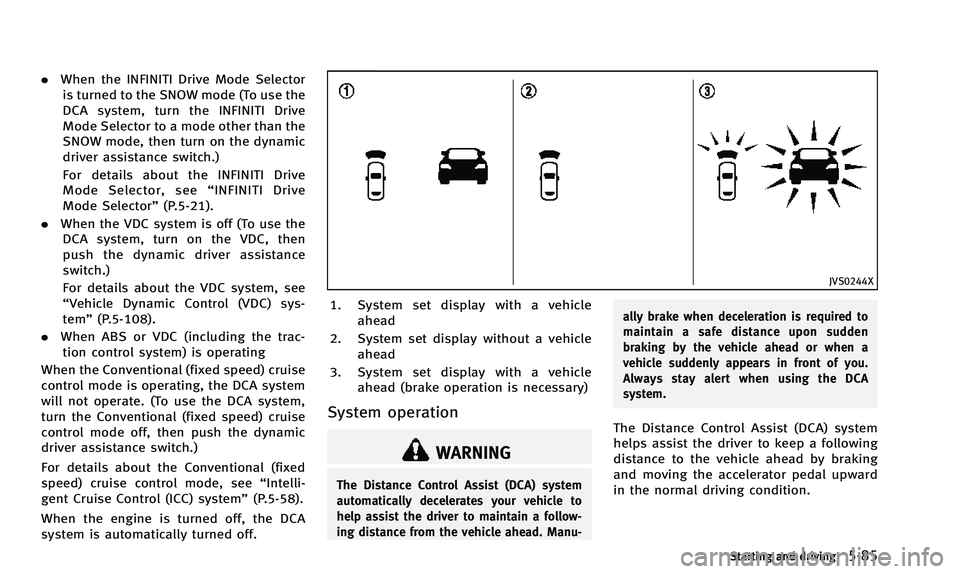
1. System set display with a vehicle ahead
2. System set display without a vehicle ahead
3. System set display with a vehicle ahead (brake operation is necessary)
System operation
WARNING
The Distance Control Assist (DCA) system
automatically decelerates your vehicle to
help assist the driver to maintain a follow-
ing distance from the vehicle ahead. Manu- ally brake when deceleration is required to
maintain a safe distance upon sudden
braking by the vehicle ahead or when a
vehicle suddenly appears in front of you.
Always stay alert when using the DCA
system.
The Distance Control Assist (DCA) system
helps assist the driver to keep a following
distance to the vehicle ahead by braking
and moving the accelerator pedal upward
in the normal driving condition.
Starting and driving5-85
Page 262 of 394

.The driver assist system forward indi-
cator (orange) blinks.
. When the vehicles are traveling at the
same speed and the distance between
vehicles is not changing
. When the vehicle ahead is traveling
faster and the distance between vehi-
cles is increasing
. When a vehicle cuts in near your vehicle
The driver assist system forward indicator
(orange) blinks and the warning chime will
not sound when your vehicle approaches
vehicles that are parked or moving slowly.
SSD0284A
NOTE:
The approach warning chime may sound
and the driver assist system forward
indicator (orange) may blink when the
radar sensor detects objects on the side of
the vehicle
*Aor on the side of the road
*A. This may cause the DCA system to
decelerate or accelerate the vehicle. The
radar sensor may detect these objects
when the vehicle is driven on winding
roads, narrow roads, hilly roads or when
entering or exiting a curve. In these cases
you will have to manually control the
proper distance ahead of your vehicle.
Also, the sensor sensitivity can be affected by vehicle operation (steering maneuver or
driving position in the lane) or traffic or
vehicle condition (for example, if a vehicle
is being driven with some damage).
Automatic cancellation
Condition A:
Under the following conditions, the Dis-
tance Control Assist (DCA) system is
automatically canceled. The chime will
sound and the
“currently unavailable”
warning message will appear in the vehicle
information display. The system will not be
able to be set.
. When the VDC system is turned off
. When the VDC or ABS (including the
traction control system) operates
. When the INFINITI Drive Mode Selector
is turned to the SNOW mode
. When the radar signal is temporarily
interrupted.
Action to take:
When the conditions listed above are no
longer present, turn the DCA system back
on to use the system.
Condition B:
When the radar sensor area of the front
bumper is covered with dirt or is ob-
Starting and driving5-87
Page 279 of 394

5-104Starting and driving
HYDRAULIC POWER STEERING TYPE
WARNING
If the engine is not running or is turned off
while driving, the power assist for the
steering will not work. Steering will be
harder to operate.
The power assisted steering uses a hy-
draulic pump, driven by the engine, to
assist steering.
If the engine stops or the drive belt breaks,
you will still have control of the vehicle.
However, much greater steering effort is
needed, especially in sharp turns and at
low speeds.
DIRECT ADAPTIVE STEERING TYPE
WARNING
When the power steering warning light
illuminates with the engine running, the
power assist for the steering will cease
operation. You will still have control of the
vehicle, but the steering will be harder to
operate.
CAUTION
.If wheels or tires other than the INFINITI
recommended ones are used, Direct
Adaptive Steering may not operate
properly and the power steering warning
light may illuminate.
. Do not modify the vehicle’s suspension.
If suspension parts such as shock
absorbers, struts, springs, stabilizer
bars, bushings and wheels are not
INFINITI recommended for your vehicle
or are extremely deteriorated, Direct
Adaptive Steering may not operate
properly and the power steering warning
light may illuminate.
. Do not modify the vehicle’s steering. If
steering parts are not INFINITI recom-
mended for your vehicle or are extremely
deteriorated, Direct Adaptive Steering
may not operate properly and the power
steering warning light may illuminate.
. If the VDC warning light illuminates, the
power steering warning light may also
illuminate at the same time. Stop the
vehicle in a safe location, turn the
engine off and restart the engine. If the
power steering warning light continues to illuminate, have the system checked
by an INFNITI retailer. For VDC system,
see
“Vehicle Dynamic Control (VDC)
system” (P.5-108).
. Do not place the ignition switch is in the
ON position while the steering wheel or
a tire is removed.
. Do not turn the steering wheel as much
as possible while the ignition switch is
in any position other than the ON
position.
. Installing an accessory on the steering
wheel, or changing the steering wheel,
may reduce the steering performance.
Direct Adaptive Steering is designed to
control the steering force and steering
angle according to the vehicle speed and
amount of turning of the steering wheel.
The steering characteristic can be selected
with the INFINITI Drive Mode Selector. See
“INFINITI Drive Mode Selector” (P.5-21).
When the steering wheel is operated
repeatedly or continuously while parking
or driving at a very low speed, the power
assist for the steering wheel will be
reduced and the steering wheel may be
slightly turned even when driving on a
POWER STEERING
Page 282 of 394

BRAKE ASSIST
When the force applied to the brake pedal
exceeds a certain level, the Brake Assist is
activated generating greater braking force
than a conventional brake booster even
with light pedal force.
WARNING
The Brake Assist is only an aid to assist
braking operation and is not a collision
warning or avoidance device. It is the
driver’s responsibility to stay alert, drive
safely and be in control of the vehicle at all
times.
ANTI-LOCK BRAKING SYSTEM (ABS)
WARNING
.The Anti-lock Braking System (ABS) is a
sophisticated device, but it cannot pre-
vent accidents resulting from careless or
dangerous driving techniques. It can
help maintain vehicle control during
braking on slippery surfaces. Remember
that stopping distances on slippery
surfaces will be longer than on normal surfaces even with ABS. Stopping dis-
tances may also be longer on rough,
gravel or snow covered roads, or if you
are using tire chains. Always maintain a
safe distance from the vehicle in front of
you. Ultimately, the driver is responsible
for safety.
. Tire type and condition may also affect
braking effectiveness.
—When replacing tires, install the
specified size of tires on all four
wheels.
—When installing a spare tire, make sure that it is the proper size and
type as specified on the Tire and
Loading Information label. See “Tire
and loading information label” (P.9-
13) of this manual.
—For detailed information, see “Wheels and tires” (P.8-29) of this
manual.
The Anti-lock Braking System (ABS) con-
trols the brakes so the wheels do not lock
during hard braking or when braking on
slippery surfaces. The system detects the
rotation speed at each wheel and varies
the brake fluid pressure to prevent each wheel from locking and sliding. By pre-
venting each wheel from locking, the
system helps the driver maintain steering
control and helps to minimize swerving
and spinning on slippery surfaces.
Using the system
Depress the brake pedal and hold it down.
Depress the brake pedal with firm steady
pressure, but do not pump the brakes. The
ABS will operate to prevent the wheels
from locking up. Steer the vehicle to avoid
obstacles.
WARNING
Do not pump the brake pedal. Doing so may
result in increased stopping distances.
Self-test feature
The ABS includes electronic sensors, elec-
tric pumps, hydraulic solenoids and a
computer. The computer has a built-in
diagnostic feature that tests the system
each time you start the engine and move
the vehicle at a low speed in forward or
reverse. When the self-test occurs, you may
hear a
“clunk” noise and/or feel a pulsa-
Starting and driving5-107
BRAKE ASSIST
Page 283 of 394

5-108Starting and driving
tion in the brake pedal. This is normal and
does not indicate a malfunction. If the
computer senses a malfunction, it switches
the ABS off and illuminates the ABS
warning light on the instrument panel.
The brake system then operates normally,
but without anti-lock assistance.
If the ABS warning light illuminates during
the self-test or while driving, have the
vehicle checked by an INFINITI retailer.
Normal operation
The ABS operates at speeds above 3 to 6
MPH (5 to 10 km/h).
When the ABS senses that one or more
wheels are close to locking up, the actuator
rapidly applies and releases hydraulic
pressure. This action is similar to pumping
the brakes very quickly. You may feel a
pulsation in the brake pedal and hear a
noise from under the hood or feel a
vibration from the actuator when it is
operating. This is normal and indicates
that the ABS is operating properly. How-
ever, the pulsation may indicate that road
conditions are hazardous and extra care is
required while driving.The Vehicle Dynamic Control (VDC) system
uses various sensors to monitor driver
inputs and vehicle motion. Under certain
driving conditions, the VDC system helps
to perform the following functions.
.
Controls brake pressure to reduce
wheel slip on one slipping drive wheel
so power is transferred to a non
slipping drive wheel on the same axle.
. Controls brake pressure and engine
output to reduce drive wheel slip based
on vehicle speed (traction control func-
tion).
. Controls brake pressure at individual
wheels and engine output to help the
driver maintain control of the vehicle in
the following conditions:
— understeer (vehicle tends to not
follow the steered path despite
increased steering input)
— oversteer (vehicle tends to spin due
to certain road or driving condi-
tions).
The VDC system can help the driver to
maintain control of the vehicle, but it
cannot prevent loss of vehicle control in
all driving situations.
When the VDC system operates, the VDC
warning light
in the instrument panel flashes so note the following:
.
The road may be slippery or the system
may determine some action is required
to help keep the vehicle on the steered
path.
. You may feel a pulsation in the brake
pedal and hear a noise or vibration
from under the hood. This is normal
and indicates that the VDC system is
working properly.
. Adjust your speed and driving to the
road conditions.
See “Vehicle Dynamic Control (VDC) warn-
ing light” (P.2-17).
If a malfunction occurs in the system, the
VDC warning light
illuminates in the
instrument panel. The VDC system auto-
matically turns off.
The VDC OFF switch is used to turn off the
VDC system. The VDC off indicator light
illuminates to indicate the VDC system is
off. When the VDC switch is used to turn off
the system, the VDC system still operates
to prevent one drive wheel from slipping by
transferring power to a non slipping drive
wheel. The VDC warning light
flashes if
this occurs. All other VDC functions are off,
except for brake force distribution, and the
VDC warning light
will not flash. The
VEHICLE DYNAMIC CONTROL (VDC) SYSTEM
Page 284 of 394
VDC system is automatically reset to on
when the ignition switch is placed in the off
position then back to the on position.
See“Vehicle Dynamic Control (VDC) warn-
ing light” (P.2-17) and “Vehicle Dynamic
Control (VDC) off indicator light” (P.2-19).
The computer has a built-in diagnostic
feature that tests the system each time you
start the engine and move the vehicle
forward or in reverse at a slow speed.
When the self-test occurs, you may hear a
“clunk” noise and/or feel a pulsation in the
brake pedal. This is normal and is not an
indication of a malfunction.
BRAKE FORCE DISTRIBUTION
During braking while driving through turns,
the system optimizes the distribution of
force to each of the four wheels depending
on the radius of the turn.
WARNING
. The VDC system is designed to help the
driver maintain stability but does not
prevent accidents due to abrupt steering
operation at high speeds or by careless
or dangerous driving techniques. Reduce
vehicle speed and be especially careful when driving and cornering on slippery
surfaces and always drive carefully.
. The brake force distribution system may
not be effective depending on the driv-
ing condition. Always drive carefully and
attentively.
. Do not modify the vehicle’s suspension.
If suspension parts such as shock
absorbers, struts, springs, stabilizer
bars, bushings and wheels are not
INFINITI recommended for your vehicle
or are extremely deteriorated, the VDC
system may not operate properly. This
could adversely affect vehicle handling
performance, and the VDC warning light
may illuminate.
. If brake related parts such as brake
pads, rotors and calipers are not INFINITI
recommended or are extremely deterio-
rated, the VDC system may not operate
properly and the VDC warning light
may illuminate.
. If engine control related parts are not
INFINITI recommended or are extremely
deteriorated, the VDC warning light
may illuminate.
. When driving on extremely inclined
surfaces such as higher banked corners, the VDC system may not operate prop-
erly and the VDC warning light
may
illuminate. Do not drive on these types
of roads.
. When driving on an unstable surface
such as a turntable, ferry, elevator or
ramp, the VDC warning light
may
illuminate. This is not a malfunction.
Restart the engine after driving onto a
stable surface.
. If wheels or tires other than the INFINITI
recommended ones are used, the VDC
system may not operate properly and
the VDC warning light
may illumi-
nate.
. The VDC system is not a substitute for
winter tires or tire chains on a snow
covered road.
Starting and driving5-109
Page 341 of 394

8-24Maintenance and do-it-yourself
operate, remove the extended storage fuse
switch and check for an open fuse.
NOTE:
If the extended storage fuse switch mal-
functions or if the fuse is open, it is not
necessary to replace the switch. In this
case, remove the extended storage fuse
switch and replace it with a new fuse of
the same rating.
How to remove the extended storage fuse
switch:
1. To remove the extended storage fuseswitch, be sure the ignition switch is in
the OFF or LOCK position.
2. Be sure the headlight switch is in the OFF position.
3. Remove the fuse box cover.
4. Pinch the locking tabs
*1found on
each side of the storage fuse switch.
5. Pull the storage fuse switch straight out from the fuse box
*2.
CAUTION
Be careful not to allow children to swallow
the battery and removed parts.
JVM0317X
To replace the battery:
1. Release the lock knob at the back of theIntelligent Key and remove the mechan-
ical key.
2. Insert a flat-blade screwdriver wrapped with a cloth into the slit of the corner
and twist it to separate the upper part
INTELLIGENT KEY BATTERY REPLACEMENT
Page 384 of 394
10 Index
A
ABS (Anti-lock Braking System) ....................... 5-107
Active Lane Control ........................................... 5-24
Active trace control ......................................... 5-110
Air bag systemFront-seat mounted side-impact
supplemental air bag system ....................... 1-52
Roof-mounted curtain side-impact
supplemental air bag system ....................... 1-52
Air bag warning labels ...................................... 1-55
Air bag warning light ............................... 1-55, 2-16
Air cleaner housing filter ................................... 8-19
Air conditioner Air conditioner specification label ................ 9-13
Air conditioning system refrigerant and
lubricant recommendations ............................ 9-7
Air deflectors .................................................... 9-15
Alarm How to stop alarm (see vehicle
security system) ........................................... 2-32
Alcohol, drugs and driving .................................. 5-9
Antenna .............................................................. 4-3
Anti-lock Braking System (ABS) ....................... 5-107
Appearance care Exterior appearance care ................................ 7-2
Interior appearance care ................................ 7-5
Armrest ............................................................... 1-7
Ashtrays ........................................................... 2-44
Audible reminders ............................................ 2-19
Autolight system ............................................... 2-37 Automatic
Automatic transmission fluid (ATF) ............... 8-12
Driving with automatic transmission ............ 5-15
Automatic door locks .......................................... 3-5
Automatic drive positioner ................................ 3-29
Automatic moonroof.......................................... 2-52
Automatic seat positioner ................................. 3-29
Average speed .................................................. 2-28
Avoiding collision and rollover ............................ 5-8
B
Back-up Collision Intervention (BCI) system ....... 5-48
Battery .............................................................. 8-15
Battery replacement, Intelligent Key ............... 3-2
Battery saver system ................................... 2-40
Intelligent Key .............................................. 8-24
Variable voltage control system ................... 8-17
Before starting the engine ................................ 5-13
Belts (See drive belts) ....................................... 8-17
Blind Spot Warning (BSW) system/Blind Spot
Intervention
TM(BSI) system ............................... 5-37
Brake
Anti-lock Braking System (ABS) .................. 5-107
Brake fluid ................................................... 8-13
Brake force distribution ............................. 5-109
Brake system ............................................. 5-106
Parking brake operation ............................... 5-20
Brake warning light ........................................... 2-13
Break-in schedule ............................................. 5-99 Bulb check/instrument panel ............................ 2-12
Bulb replacement .............................................. 8-26
C
Capacities and recommended fuel/lubricants ...... 9-2
Car phone or CB radio ........................................ 4-3
Card holder ....................................................... 2-47
Catalytic converter Three-way catalyst ......................................... 5-4
Chassis control ............................................... 5-112
Check tire pressure warning .............................. 2-23
Child restraints ................................................. 1-24 LATCH system .............................................. 1-26
Precautions on child restraints ..................... 1-24
Child safety ...................................................... 1-22
Child safety rear door lock .................................. 3-6
Chimes Audible reminders ....................................... 2-19
Seat belt warning light and chime ............... 2-16
Circuit breaker Fusible link .................................................. 8-22
Cleaning exterior and interior ....................... 7-2, 7-5
Clock ............................................................... 2-30
Coat hooks ....................................................... 2-48
Cockpit ............................................................... 2-3
Cold weather driving ....................................... 5-112
Compact spare tire ........................................... 8-40
Compass ............................................................. 2-9
Console box ...................................................... 2-47
Page 390 of 394

TPMS, Tire pressure monitoring systemTPMS with Tire Inflation Indicator................... 5-7
Trailer towing .................................................... 9-19
Transceiver
HomeLink
®Universal Transceiver ................. 2-56
Transmission
Automatic transmission fluid (ATF) ............... 8-12
Driving with automatic transmission ............ 5-15
Transmission shift lever lock release ............ 5-18
Transmitter (See remote keyless entry system) ... 3-14
Traveling or registering your vehicle in
another country ................................................ 9-11
Trip computer ................................................... 2-28
Trip odometer ................................................... 2-28
Trunk Interior trunk lid release .............................. 3-21
Light ............................................................ 2-56
Pass-through ................................................. 1-7
Trunk hooks ................................................. 2-48
Trunk lid ...................................................... 3-19
Trunk lid release switch ............................... 3-19
Trunk open request switch ........................... 3-19
Trunk release power cancel switch ............... 3-20
Turn signal switch ............................................. 2-42
U
Underbody cleaning ............................................ 7-3
Uniform tire quality grading .............................. 9-19
V
Vanity mirror ..................................................... 3-29
Vanity mirror lights ........................................... 2-55
Variable voltage control system ........................ 8-17
Vehicle
Dimensions .................................................. 9-10
Recovery (freeing a stuck vehicle) ................ 6-16
Vehicle Dynamic Control (VDC) off switch ..... 2-43
Vehicle Dynamic Control (VDC) system ....... 5-108
Vehicle Dynamic Control (VDC)
warning light ............................................... 2-17
Vehicle identification number (VIN) ................... 9-11
Vehicle information display ............................... 2-20
Vehicle loading information .............................. 9-16
Vehicle security system ..................................... 2-31
Ventilators .......................................................... 4-2
W
Warning
Blind Spot Warning (BSW) system ................ 5-38
Flat Tire - Visit dealer warning ..................... 2-23
Hazard warning flasher switch ....................... 6-2
Indicators for operation (vehicle
information display) ..................................... 2-22
Lane Departure Warning (LDW) system ......... 5-31
Predictive forward collision
warning system ........................................... 5-94
Tire Pressure Monitoring
System (TPMS) .............................. 5-4, 6-3, 8-29
Vehicle information display .......................... 2-20 Warning/indicator lights and
audible reminders ........................................ 2-12
Warning labels Air bag warning labels ................................. 1-55
Warning light Air bag warning light ......................... 1-55, 2-16
Anti-lock Braking System (ABS)
warning light ............................................... 2-12
Brake warning light ...................................... 2-13
Forward emergency braking system
warning light ............................................... 2-13
Low fuel warning light ................................. 2-14
Low tire pressure warning light .................... 2-14
Power steering warning light ........................ 2-16
Seat belt warning light and chime ............... 2-16
Warranty
Emission control system warranty ................ 9-20
Washer switch Windshield wiper and washer switch ........... 2-33
Washing ............................................................. 7-2
Waxing ............................................................... 7-2
Wheel/tire size ................................................... 9-9
Wheels and tires ............................................... 8-29 Care of wheels ............................................... 7-3
Cleaning aluminum alloy wheels .................... 7-3
Cleaning bright wheels .................................. 7-4
Window washer fluid ........................................ 8-14
Window(s)
Cleaning ........................................................ 7-3
Power windows ............................................ 2-49
Windshield wiper and washer switch ................ 2-33
10-7