power INFINITI Q50 2018 User Guide
[x] Cancel search | Manufacturer: INFINITI, Model Year: 2018, Model line: Q50, Model: INFINITI Q50 2018Pages: 458, PDF Size: 2.13 MB
Page 88 of 458

JVC0969X
1. Paddle shifter (if so equipped) (P.5-18)
2. Meters and gauges (P.2-6)— Clock (P.2-29)
3. Push-button ignition switch (P.5-11)
4. Center ventilator (P.4-2)
5. Automatic climate control system* 6. Upper touch screen display* (upper
display) and Navigation system* (if so
equipped)
7. Lower touch screen display* (lower display)
8. Rear window and outside mirror defroster switch (P.2-35) 9. Front passenger supplemental air bag
(P.1-42)
10. Hood release handle (P.3-23)
11. Fuse box cover (P.8-23)
12. Parking brake (P.5-21)
13. Storage box (P.2-49) and power outlet (P.2-45)
14. Seat heater switch (if so equipped) (P.2-43)
15. Audio system*
16. Trunk release power cancel switch (P.3-25)
17. Glove box (P.2-48)
*: Refer to the Infiniti InTouch Owner’s Manual.
Instruments and controls2-5
INSTRUMENT PANEL
Page 93 of 458

2-10Instruments and controls
Anti-lock Braking System (ABS) warning
lightPower steering warning lightHigh beam assist indicator light (if so
equipped)
Brake warning lightSeat belt warning light and chimeHigh beam indicator light
Supplemental air bag warning lightIdling Stop System indicator light (if so
equipped)
Charge warning lightVehicle Dynamic Control (VDC) warning
lightMalfunction Indicator Light (MIL)
Forward Emergency Braking (FEB) sys-
tem warning light (if so equipped)ECO drive indicator light (if so equipped)Security indicator light
Low fuel warning lightExterior light indicatorTurn signal/hazard indicator lights
Low tire pressure warning lightFront fog light indicator lightVehicle Dynamic Control (VDC) off in-
dicator light
Master warning lightFront passenger air bag status light
CHECKING LIGHTS
With all doors closed, apply the parking
brake, fasten the seat belts and place the
ignition switch in the ON position without
starting the engine. The following lights (if
so equipped) will come on:
,or,,,
The following lights (if so equipped) will
come on briefly and then go off:
,or,,,
If any light does not come on or operates in a
way other than described, it may indicate a
burned-out bulb and/or a system malfunc-tion. It is recommended you have the system
checked by an INFINITI retailer.
Some indicators and warnings are also
displayed in the vehicle information display
between the speedometer and tachometer.
(See “Vehicle information display” (P.2-19).)
WARNING LIGHTS
orAnti-lock Braking
System (ABS) warning light
When the ignition switch is in the ON
position, the Anti-lock Braking System
(ABS) warning light illuminates and then
turns off. This indicates the ABS is opera-
tional.
If the ABS warning light illuminates while the
engine is running, or while driving, it may
indicate the ABS is not functioning properly.
Have the system checked. It is recommended
WARNING LIGHTS, INDICATOR
LIGHTS AND AUDIBLE REMINDERS
Page 97 of 458

2-14Instruments and controls
Master warning light
When the ignition switch is in the ON
position, the master warning light illumi-
nates if any of the following warnings
appear in the vehicle information display:
.No key warning
. PUSH warning
. Key ID Incorrect warning
. Low washer fluid warning
. Door/trunk open warning
. Loose fuel cap warning
. Tire Pressure Low - Add Air warning
. Flat Tire - Visit dealer warning (if so
equipped)
. All-Wheel Drive (AWD) warning (if so
equipped)
. Headlight warning
. Adaptive Front lighting System (AFS)
warning (if so equipped)
. Intelligent Key system warning
. Chassis control warning
. Parking brake release warning
. SHIFT “P” warning
. Low oil pressure warning
See “Vehicle information display” (P.2-19).
If the driver assist system warnings appear
in the vehicle information display, the master
warning light also illuminates. See “Lane Departure Warning (LDW)/Lane Departure
Prevention (LDP)” (P.5-34), “Blind Spot
Warning (BSW)” (P.5-41), “Blind Spot Inter-
vention® (BSI)” (P.5-49), “Back-up Collision
Intervention (BCI)” (P.5-61), “Distance Con-
trol Assist (DCA)” (P.5-94), “Forward Emer-
gency Braking (FEB)” (P.5-105) and
“Predictive Forward Collision Warning
(PFCW)” (P.5-112).
Power steering warning light
Models with Direct Adaptive Steering :
When the ignition switch is in the ON
position, the power steering warning light
illuminates. After starting the engine, the
power steering warning light stays on for a
few seconds and turns off. This indicates
that Direct Adaptive Steering is operational.
Drive the vehicle after the power steering
warning light turns off.
If the power steering warning light illumi-
nates while driving, pull off the road to a
safe location and stop the vehicle. If the
power steering warning light turns off, you
can drive again. If the power steering
warning light continues to illuminate, it is
recommended you have Direct Adaptive
Steering checked by an INFINITI retailer.
(See “Direct Adaptive Steering type” (P.5-
128).)
Models with hydraulic pump electric power
steering :
When the ignition switch is in the ON
position, the power steering warning light
illuminates. After starting the engine, the
power steering warning light turns off. This
indicates that or hydraulic pump electric
power steering is operational.
If the power steering warning light illumi-
nates while the engine is running, it may
indicate hydraulic pump electric power
steering is not functioning properly and
may need servicing. It is recommended you
have the hydraulic pump electric power
steering checked by an INFINITI retailer.
(See “Hydraulic pump electric power steering
type” (P.5-127).)
Models with electric power steering :
When the ignition switch is in the ON
position, the power steering warning light
illuminates. After starting the engine, the
power steering warning light turns off. This
indicates the electric power steering is
operational.
If the power steering warning light illumi-
nates while the engine is running, it may
indicate the electric power steering is not
functioning properly and may need servicing.
It is recommended you have the electric
power steering checked by an INFINITI
retailer.
Page 98 of 458

When the power steering warning light
illuminates with the engine running, the
power assist to the steering will cease
operation but you will still have control of
the vehicle. At this time, greater steering
efforts are required to operate the steering
wheel, especially in sharp turns and at low
speeds.
See “Electric power steering type” (P.5-127).
Seat belt warning light and
chime
The light and chime remind you to fasten
seat belts. The light illuminates whenever
the ignition switch is pushed to the ON
position, and will remain illuminated until the
driver’s seat belt is fastened. At the same
time, the chime will sound for about 6
seconds unless the driver’s seat belt is
securely fastened.
The seat belt warning light for the front
passenger will illuminate if the seat belt is
not fastened when the front passenger’s
seat is occupied.
See “Seat belts” (P.1-12) for precautions on
seat belt usage.
Supplemental air bag warning
light
After pushing the ignition switch to the ON
position, the supplemental air bag warning
light will illuminate. The supplemental air bag
warning light will turn off after about 7
seconds if the supplemental front air bag
and supplemental side air bag, curtain side-
impact air bag systems and/or pretensioner
seat belt are operational.
If any of the following conditions occur, the
supplemental front air bag, supplemental
side air bag, supplemental curtain side-
impact air bag and pretensioner seat belt
needs servicing.
. The supplemental air bag warning light
remains on after approximately 7 sec-
onds.
. The supplemental air bag warning light
flashes intermittently.
. The supplemental air bag warning light
does not come on at all.
It is recommended you visit an INFINITI
retailer for these services.
Unless checked and repaired, the Supple-
mental Restraint Systems and/or the pre-
tensioner seat belt may not function
properly.
For additional information, see “Supplemen- tal restraint system” (P.1-42).WARNING
If the supplemental air bag warning light
is on, it could mean that the front air
bag, side air bag, curtain air bag systems
and/or pretensioner seat belt will not
operate in an accident. To help avoid
injury to yourself or others, have your
vehicle checked. It is recommended you
visit an INFINITI retailer for this service.
Vehicle Dynamic Control
(VDC) warning light
When the ignition switch is in the ON
position, the Vehicle Dynamic Control
(VDC) warning light illuminates and then
turns off.
The light will blink when the VDC system or
the traction control system is operating, thus
alerting the driver that the vehicle is nearing
its traction limits. The road surface may be
slippery.
When the VDC warning light illuminates
when the VDC system is turned on, this light
alerts the driver to the fact that the VDC
system’s fail-safe mode is operating, for
example the VDC, active trace control func-
Instruments and controls2-15
Page 104 of 458

INDICATORS FOR OPERATION
1. Engine start operation indicator
This indicator appears when the shift lever is
in the P (Park) position.
This indicator means that the engine will
start by pushing the ignition switch with the
brake pedal depressed. You can start the
engine directly in any position of the ignition
switch.
2. NO KEY warning
The warning appears when the door is
closed with the Intelligent Key left outside
the vehicle and the ignition switch in the
ACC or ON position. Make sure that the
Intelligent Key is inside the vehicle.
See “Intelligent Key system” (P.3-7) for more
details.
3. SHIFT “P” warning
This warning appears when the ignition
switch is pushed to stop the engine with
the shift lever in any position except the P
(Park) position.
If this warning appears, move the shift lever
to the P (Park) position or push the ignition
switch to the ON position.
An inside warning chime will also sound. (See
“Troubleshooting guide” (P.3-15).)
4. “PUSH” warning
This warning appears when the shift lever is
moved to the P (Park) position with the
ignition switch in the ACC position after the
SHIFT “P” warning appears.
To push the ignition switch to the OFF
position, perform the following procedure:
.SHIFT “P” warning ?(Move the shift
lever to “P”) ?PUSH warning ?(Push
the ignition switch ?ignition switch
position is turned to ON) ?PUSH
warning ?(Push the ignition switch ?
ignition switch position is turned to OFF)
5. Intelligent Key battery discharge
indicator
This indicator appears when the Intelligent
Key battery is running out of power.
If this indicator appears, replace the battery
with a new one. (See “Intelligent Key battery
replacement” (P.8-26).)
6. Engine start operation for Intel-
ligent Key system indicator
This indicator appears when the Intelligent
Key battery is running out of power and
when the Intelligent Key System and vehicle
are not communicating normally.
If this indicator appears, touch the ignition
switch with the Intelligent Key while depres- sing the brake pedal. (See “Intelligent Key
battery discharge” (P.5-14).)
7. Remote engine start indicator (if
so equipped)
This indicator appears when the engine has
been started using the remote start function.
To start the vehicle, depress the brake pedal
and place the ignition switch in the ON
position.
For more details, see “Remote engine start”
(P.3-20).
8. Key ID Incorrect warning
This warning appears when the ignition
switch is pushed from the LOCK position
and the Intelligent Key cannot be recognized
by the system. You cannot start the engine
with an unregistered key. Use the registered
Intelligent Key.
See “Intelligent Key system” (P.3-7).
9. Parking brake release warning
This warning appears when the vehicle
speed is above 4 MPH (7 km/h) and the
parking brake is applied.
10. Low fuel warning
This warning appears when the fuel level in
the tank is getting low. Refuel as soon as it is
convenient, preferably before the fuel gauge
Instruments and controls2-21
Page 106 of 458

19. All-Wheel Drive (AWD) warning
(if so equipped)
This warning appears when the Intelligent
All-Wheel Drive (AWD) system is not func-
tioning properly while the engine is running.
The displayed message will vary depending
on the condition of the AWD system mal-
function. (See “Intelligent All-Wheel Drive
(AWD)” (P.5-124).)
20. Extended storage fuse warning
This warning may appear if the extended
storage fuse switch is not pushed in
(switched on). When this warning appears,
push in (switch on) the extended storage
fuse switch to turn off the warning. For
more information, see “Extended storage
fuse switch” (P.8-25).
21. Headlight warning
This warning appears if the LED headlights
are malfunctioning. It is recommended you
have the system checked by an INFINITI
retailer.
22. Adaptive Front lighting System
(AFS) warning (if so equipped)
This warning appears when the Adaptive
Front lighting System (AFS) is not function-
ing properly. It is recommended you have the
system checked by an INFINITI retailer.(See “Adaptive Front lighting System (AFS)”
(P.2-40).)
23. Power will turn off to save the
battery warning
This warning appears after a period of time
if the shift lever has not moved from the “P”
(Park) position with the ignition switch in the
ACC or ON position.
24. Power turned off to save the
battery warning
This warning appears after the ignition
switch is automatically turned OFF to save
the battery.
25. Light reminder warning
This warning appears when the driver side
door is opened with the headlight switch is
left ON and the ignition switch is placed in
the ACC, OFF or LOCK position. Place the
headlight switch to “OFF” or “AUTO” posi-
tion. For additional information, see “Head-
light and turn signal switch” (P.2-35).
26. “TIMER” indicator
This indicator appears when the set “TIMER”
indicator activates. You can set the time for
up to 6 hours. (See the Infiniti InTouch
Owner’s Manual.)
27. Low outside temperature
warning
This warning appears if the outside tem-
perature is below 37°F (3°C). The warning
can be set not to be displayed. (See the
Infiniti InTouch Owner’s Manual.)
28. Chassis control warning
This warning appears if Active Lane Control
(if so equipped), the active trace control
system and/or chassis control are not
functioning properly. It is recommended
you have the system checked by an INFINITI
retailer. (See “Active Lane Control” (P.5-26),
“Active trace control” (P.5-134) and “Chas-
sis control” (P.5-136).)
29. Cruise indicator
Models without Intelligent Cruise Control
(ICC) system:
This indicator shows the cruise control
system status. The status is shown by the
color.
See “Cruise control” (P.5-71) for details.
Models with Intelligent Cruise Control (ICC)
system:
This indicator shows the conventional (fixed
speed) cruise control mode status. The
status is shown by the color.
Instruments and controls2-23
Page 114 of 458

SIC2045
How to arm the vehicle security
system
1. Close all windows.The system can be armed even if the
windows are open.
2. Push the ignition switch to the OFF position.
3. Remove the Intelligent Key from the vehicle.
4. Close all doors, hood and trunk. Lock all doors. The doors can be locked with the
Intelligent Key, door handle request
switch, power door lock switch or me-
chanical key. 5. Confirm that the security indicator light
comes on. The security indicator light
stays on for about 30 seconds. The
vehicle security system is now pre-
armed. After about 30 seconds the
vehicle security system automatically
shifts into the armed phase. The security
light begins to flash once every approxi-
mately 3 seconds. If, during this 30-
second pre-arm time period, the door is
unlocked, or the ignition switch is pushed
to ACC or ON, the system will not arm.
Even when the driver and/or passengers
are in the vehicle, the system will activate
with all doors, hood, and trunk lid locked
with the ignition switch in the LOCK
position. When pushing the ignition switch
to the ACC or ON position, the system will
be released.
Vehicle security system activation
The vehicle security system will give the
following alarm:
. The headlights blink and the horn sounds
intermittently.
. The alarm automatically turns off after
approximately 1 minute. However, the
alarm reactivates if the vehicle is tam-
pered with again. The alarm is activated by:
.
Unlocking the door or opening the trunk
lid without using the button on the
Intelligent Key, the door handle request
switch, one touch unlock sensor or the
mechanical key. (Even if the door is
opened by releasing the door inside lock
knob, the alarm will activate.)
. Opening the hood.
How to stop an activated alarm
The alarm will stop by unlocking a door by
pushing the UNLOCK button on the Intelli-
gent Key, the door handle request switch,
touching the one touch unlock sensor or
using the mechanical key. The alarm will not
stop if the ignition switch is placed in the
ACC or ON position.
If the system does not operate as described
above, it is recommended you have it
checked by an INFINITI retailer.
INFINITI VEHICLE IMMOBILIZER
SYSTEM
The INFINITI Vehicle Immobilizer System
will not allow the engine to start without
the use of the registered Intelligent Key.
Never leave these keys in the vehicle.
Instruments and controls2-31
Page 125 of 458
2-42Instruments and controls
SIC3272
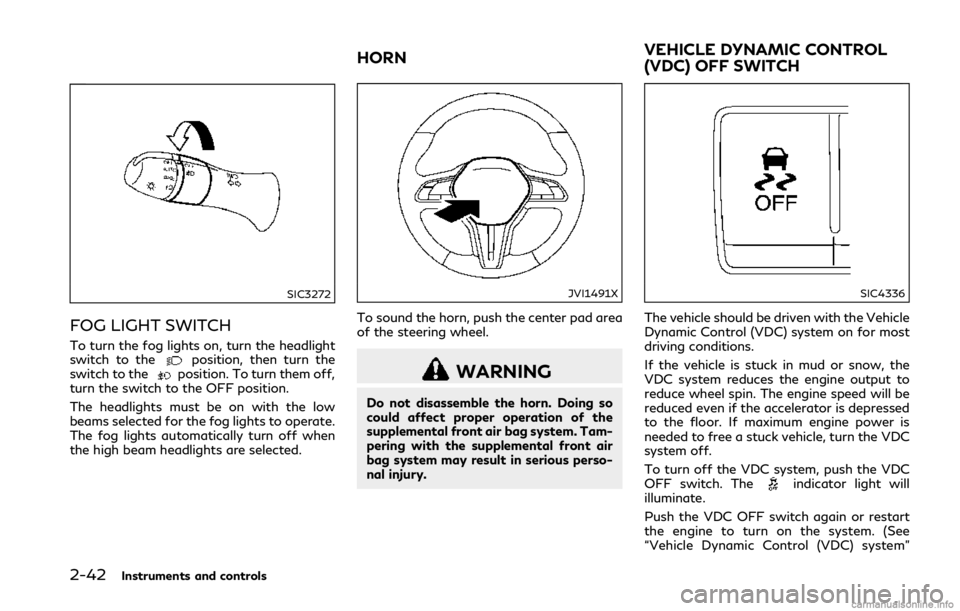
FOG LIGHT SWITCH
To turn the fog lights on, turn the headlight
switch to theposition, then turn the
switch to theposition. To turn them off,
turn the switch to the OFF position.
The headlights must be on with the low
beams selected for the fog lights to operate.
The fog lights automatically turn off when
the high beam headlights are selected.
JVI1491X
To sound the horn, push the center pad area
of the steering wheel.
WARNING
Do not disassemble the horn. Doing so
could affect proper operation of the
supplemental front air bag system. Tam-
pering with the supplemental front air
bag system may result in serious perso-
nal injury.
SIC4336
The vehicle should be driven with the Vehicle
Dynamic Control (VDC) system on for most
driving conditions.
If the vehicle is stuck in mud or snow, the
VDC system reduces the engine output to
reduce wheel spin. The engine speed will be
reduced even if the accelerator is depressed
to the floor. If maximum engine power is
needed to free a stuck vehicle, turn the VDC
system off.
To turn off the VDC system, push the VDC
OFF switch. The
indicator light will
illuminate.
Push the VDC OFF switch again or restart
the engine to turn on the system. (See
“Vehicle Dynamic Control (VDC) system”
HORN VEHICLE DYNAMIC CONTROL
(VDC) OFF SWITCH
Page 128 of 458
![INFINITI Q50 2018 User Guide system checked. It is recommended
that you visit an INFINITI retailer for
this service.
Push the CLIMATE button and touch
[Steering Heater] on the lower display to
turn on or off the steering wheel he](/img/42/34988/w960_34988-127.png "INFINITI Q50 2018 User Guide system checked. It is recommended
that you visit an INFINITI retailer for
this service.
Push the CLIMATE button and touch
[Steering Heater] on the lower display to
turn on or off the steering wheel he")
system checked. It is recommended
that you visit an INFINITI retailer for
this service.
Push the CLIMATE button and touch
[Steering Heater] on the lower display to
turn on or off the steering wheel heating
manually. The steering wheel heating will
turn off automatically 30 minutes after it
has been turned on. When the steering
wheel heating is turned on, the indicator
above [Steering Heater] will turn on.
If the surface temperature of the steering
wheel is above the temperature within which
the system is designed to operate, the
system will not heat the steering wheel. This
is not a malfunction.
Automatic steering wheel heating can be
turned on or off from the climate control
settings screen. For details, see the Infiniti
InTouch Owner’s Manual.
SIC4316
In the storage box
JVI1298X
In the console box The power outlets are located in the storage
box and in the console box.
CAUTION
.
The outlet and plug may be hot
during or immediately after use.
. Do not use with accessories that
exceed a 12 volt, 120W (10A) power
draw. Do not use double adapters or
more than one electrical accessory.
. Use power outlet with the engine
running to avoid discharging the
vehicle battery.
. Avoid using power outlet when the
air conditioner, headlights or rear
window defroster is on.
. This power outlet is not designed for
use with a cigarette lighter unit.
. Push the plug in as far as it will go. If
good contact is not made, the plug
may overheat or the internal tem-
perature fuse may blow.
. Before inserting or disconnecting a
plug, be sure the electrical accessory
being used is turned OFF.
. When not in use, be sure to close the
cap. Do not allow water or any liquid
to contact the outlet.
Instruments and controls2-45
POWER OUTLETS
Page 133 of 458
2-50Instruments and controls
SIC4350
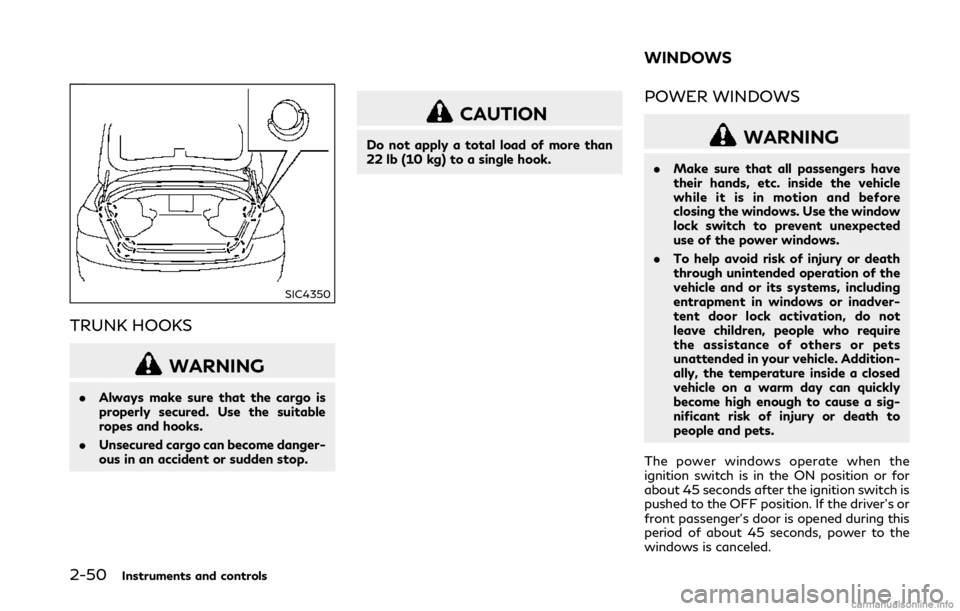
TRUNK HOOKS
WARNING
.Always make sure that the cargo is
properly secured. Use the suitable
ropes and hooks.
. Unsecured cargo can become danger-
ous in an accident or sudden stop.
CAUTION
Do not apply a total load of more than
22 lb (10 kg) to a single hook.
POWER WINDOWS
WARNING
.Make sure that all passengers have
their hands, etc. inside the vehicle
while it is in motion and before
closing the windows. Use the window
lock switch to prevent unexpected
use of the power windows.
. To help avoid risk of injury or death
through unintended operation of the
vehicle and or its systems, including
entrapment in windows or inadver-
tent door lock activation, do not
leave children, people who require
the assistance of others or pets
unattended in your vehicle. Addition-
ally, the temperature inside a closed
vehicle on a warm day can quickly
become high enough to cause a sig-
nificant risk of injury or death to
people and pets.
The power windows operate when the
ignition switch is in the ON position or for
about 45 seconds after the ignition switch is
pushed to the OFF position. If the driver’s or
front passenger’s door is opened during this
period of about 45 seconds, power to the
windows is canceled.
WINDOWS