emergency INFINITI Q50 2020 Owner's Manual
[x] Cancel search | Manufacturer: INFINITI, Model Year: 2020, Model line: Q50, Model: INFINITI Q50 2020Pages: 468, PDF Size: 2.17 MB
Page 289 of 468

MPH (13 km/h) below the set speed.
. If you move the shift lever to N (Neutral)
position, the cruise control will be can-
celed.
To reset at a faster cruising speed, use one
of the following methods:
. Depress the accelerator pedal. When the
vehicle attains the desired speed, push
and release the SET/COAST (-) switch.
. Push and hold the RESUME/ACCELER-
ATE (+) switch. When the vehicle attains
the speed you desire, release the switch.
. Push, then quickly release the RESUME/
ACCELERATE (+) switch. Each time you
do this, the set speed will increase by
about 1 MPH (1.6 km/h).
To reset at a slower cruising speed, use one
of the following methods:
. Lightly tap the brake pedal. When the
vehicle attains the desired speed, push
the SET/COAST (-) switch and release it.
. Push and hold the SET/COAST (-)
switch. Release the switch when the
vehicle slows down to the desired speed.
. Push, then quickly release the SET/
COAST (-) switch. Each time you do this,
the set speed will decrease by about 1
MPH (1.6 km/h). To resume the preset speed,
push and
release the RESUME/ACCELERATE (+)
switch. The vehicle will resume the last set
cruising speed when the vehicle speed is over
25 MPH (40 km/h).
WARNING
Failure to follow the warnings and
instructions for proper use of the ICC
system could result in serious injury or
death.
. ICC is not a collision avoidance or
warning device. For highway use only
and it is not intended for congested
areas or city driving. Failure to apply
the brakes could result in an accident.
. Always observe posted speed limits
and do not set the speed over them.
. Always drive carefully and atten-
tively when using either cruise con-
trol mode. Read and understand the
Owner’s Manual thoroughly before
using the cruise control. To avoid
serious injury or death, do not rely
on the system to prevent accidents or
to control the vehicle’s speed in
emergency situations. Do not use
cruise control except in appropriate
road and traffic conditions.
. In the conventional (fixed speed)
cruise control mode, a warning chime
will not sound to warn you if you are
too close to the vehicle ahead. Pay
special attention to the distance
between your vehicle and the vehicle
Starting and driving5-71
INTELLIGENT CRUISE CONTROL
(ICC) (if so equipped)
Page 310 of 468

5-92Starting and driving
WARNING
Failure to follow the warnings and
instructions for proper use of the DCA
system could result in serious personal
injury or death.
.Always drive carefully and atten-
tively when using the DCA system.
Read and understand the Owner’s
Manual thoroughly before using the
DCA system. To avoid serious injury
or death, do not rely on the system to
prevent accidents or to control the
vehicle’s speed in emergency situa-
tions. Do not use the DCA system
except in appropriate road and traffic
conditions.
. This system is only an aid to assist the
driver and is not a collision warning or
avoidance device. It is the driver’s
responsibility to stay alert, drive
safely and be in control of the vehicle
at all times.
. As there is a performance limit to the
distance control function, never rely
solely on the DCA system. This sys-
tem does not correct careless, inat-
tentive or absent-minded driving, or
overcome poor visibility in rain, fog,
or other bad weather. Decelerate the vehicle speed by depressing the brake
pedal, depending on the distance to
the vehicle ahead and the surround-
ing circumstances in order to main-
tain a safe distance between vehicles.
. Always pay attention to the opera-
tion of the vehicle and be ready to
manually decelerate to maintain the
proper following distance. The DCA
system may not be able to decelerate
the vehicle under some circum-
stances.
. This system only brakes and moves
the accelerator pedal upward to help
assist the driver to maintain a follow-
ing distance from the vehicle ahead.
Acceleration should be operated by
the driver.
. The DCA system does not control
vehicle speed or warn you when you
approach stationary and slow moving
vehicles. You must pay attention to
vehicle operation to maintain proper
distance from vehicles ahead.
. The DCA system automatically de-
celerates your vehicle to help assist
the driver to maintain a following
distance from the vehicle ahead.
Manually brake when deceleration is
required to maintain a safe distance
upon sudden braking by the vehicle ahead or when a vehicle suddenly
appears in front of you. Always stay
alert when using the DCA system.
. If the vehicle ahead comes to a stop,
the vehicle decelerates to a standstill
within the limitations of the system.
The system will cancel with a warning
chime once it judges that the vehicle
has come to a standstill. To prevent
the vehicle from moving, the driver
must depress the brake pedal.
DISTANCE CONTROL ASSIST
(DCA) (if so equipped)
Page 321 of 468

2.This device must accept any interfer-
ence received, including interference
that may cause undesired operation.
FCC Warning
Changes or modification not expressly ap-
proved by the party responsible for com-
pliance could void the user’s authority to
operate the equipment.
For Canada:
This device complies with Industry Canada
licence-exempt RSS standard(s). Operation
is subject to the following two conditions:
1. This device may not cause interference,
and
2. This device must accept any interfer-
ence, including interference that may
cause undesired operation of the device.
WARNING
Failure to follow the warnings and
instructions for proper use of the FEB
system could result in serious personal
injury or death.
.The FEB system is a supplemental aid
to the driver. It is not a replacement
for the driver’s attention to traffic
conditions or responsibility to drive
safely. It cannot prevent accidents
due to carelessness or dangerous
driving techniques.
. The FEB system does not function in
all driving, traffic, weather and road
conditions.
The FEB system can assist the driver when
there is a risk of a forward collision with the
vehicle ahead in the traveling lane.
JVS1123X
The FEB system uses a radar sensorlocated behind the lower grille of the front
bumper to measure the distance to the
vehicle ahead in the same lane.
Starting and driving5-103
FORWARD EMERGENCY BRAKING (FEB)
Page 324 of 468
![INFINITI Q50 2020 Owners Manual 5-106Starting and driving
TURNING THE FEB SYSTEM ON/
OFF
Perform the following steps to turn the FEB
system on or off.
1. Push the MENU button
and touch
[Driver Assistance] on the lower display
.
2. T](/img/42/41086/w960_41086-323.png "INFINITI Q50 2020 Owners Manual 5-106Starting and driving
TURNING THE FEB SYSTEM ON/
OFF
Perform the following steps to turn the FEB
system on or off.
1. Push the MENU button
and touch
[Driver Assistance] on the lower display
.
2. T")
5-106Starting and driving
TURNING THE FEB SYSTEM ON/
OFF
Perform the following steps to turn the FEB
system on or off.
1. Push the MENU button
and touch
[Driver Assistance] on the lower display
.
2. Touch [Emergency Assist].
3. Touch [Emergency Braking] to turn the system ON/OFF.
When the FEB system is turned off, the FEB
system warning light (orange)
illuminates.
The FEB system will be automatically turned
ON when the engine is restarted.
The displayed keys on the lower display may
vary depending on models, specifications
and software versions.
NOTE:
The PFCW system is integrated into the
FEB system. There is not a separate selec-
tion in the display for the PFCW system.
When the FEB is turned off, the PFCW
system is also turned off.
FEB SYSTEM LIMITATIONS
WARNING
Listed below are the system limitations
for the FEB system. Failure to operate
the vehicle in accordance with these
system limitations could result in serious
injury or death.
. The FEB system cannot detect all
vehicles under all conditions.
. The radar sensor does not detect the
following objects:
— Pedestrians, animals or obstacles in the roadway
— Oncoming vehicles
— Crossing vehicles
. The radar sensor has some perfor-
mance limitations. If a stationary
vehicle is in the vehicle’s path, the
FEB system will not function when
the vehicle is driven at speeds over
approximately 45 MPH (70 km/h).
. The radar sensor may not detect a
vehicle ahead in the following condi-
tions:
— Dirt, ice, snow or other material covering the radar sensor. — Interference by other radar
sources.
— Snow or road spray from travel- ing vehicles.
— If the vehicle ahead is narrow (e.g. motorcycle)
— When driving on a steep downhill slope or roads with sharp curves.
. In some road or traffic conditions, the
FEB system may unexpectedly push
the accelerator pedal up or apply
partial braking. When acceleration is
necessary, continue to depress the
accelerator pedal to override the
system.
. Braking distances increase on slip-
pery surfaces.
. The system is designed to automati-
cally check the sensor’s functionality,
within certain limitations. The system
may not detect some forms of ob-
struction of the sensor area such as
ice, snow, stickers, for example. In
these cases, the system may not be
able to warn the driver properly. Be
sure that you check, clean and clear
the sensor area regularly.
. Excessive noise will interfere with the
warning chime sound, and the chime
Page 331 of 468
JVS0847X
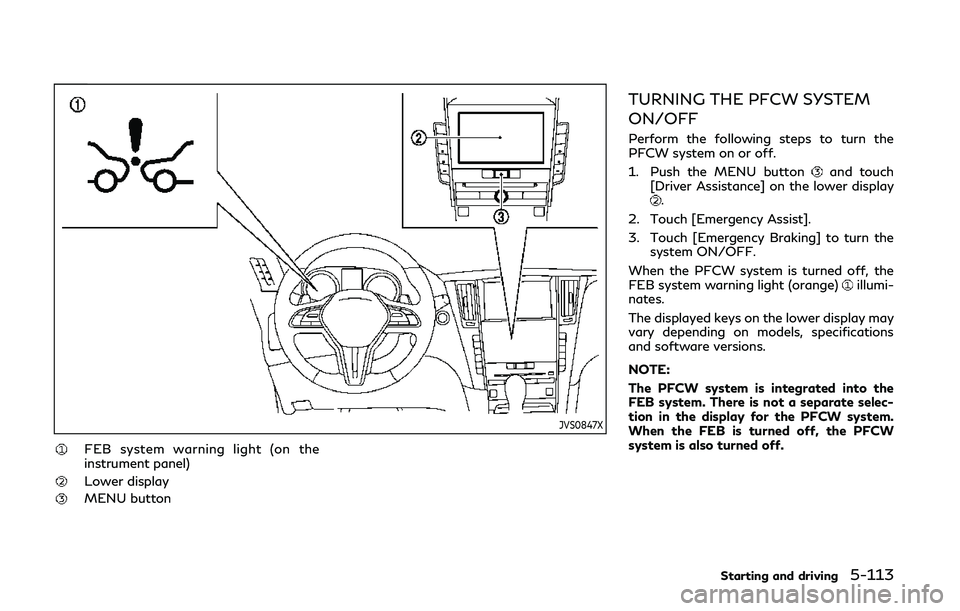
FEB system warning light (on the
instrument panel)
Lower display
MENU button
TURNING THE PFCW SYSTEM
ON/OFF
Perform the following steps to turn the
PFCW system on or off.
1. Push the MENU button
and touch
[Driver Assistance] on the lower display
.
2. Touch [Emergency Assist].
3. Touch [Emergency Braking] to turn the system ON/OFF.
When the PFCW system is turned off, the
FEB system warning light (orange)
illumi-
nates.
The displayed keys on the lower display may
vary depending on models, specifications
and software versions.
NOTE:
The PFCW system is integrated into the
FEB system. There is not a separate selec-
tion in the display for the PFCW system.
When the FEB is turned off, the PFCW
system is also turned off.
Starting and driving5-113
Page 357 of 468

6 In case of emergency
Hazard warning flasher switch ..................................... 6-2
Roadside assistance program ....................................... 6-2
Emergency engine shut off ............................................ 6-3
Flat tire ........................................................................\
........ 6-3Tire Pressure Monitoring System (TPMS) ........... 6-3
Run-flat tires (if so equipped) .................................. 6-4 Jump starting .................................................................... 6-5
Push starting ...................................................................... 6-7
If your vehicle overheats ................................................. 6-7
Towing your vehicle ........................................................ 6-8
Towing recommended by INFINITI ..................... 6-9
Vehicle recovery (freeing a stuck vehicle) ........ 6-10
Page 358 of 468
6-2In case of emergency
SIC2574
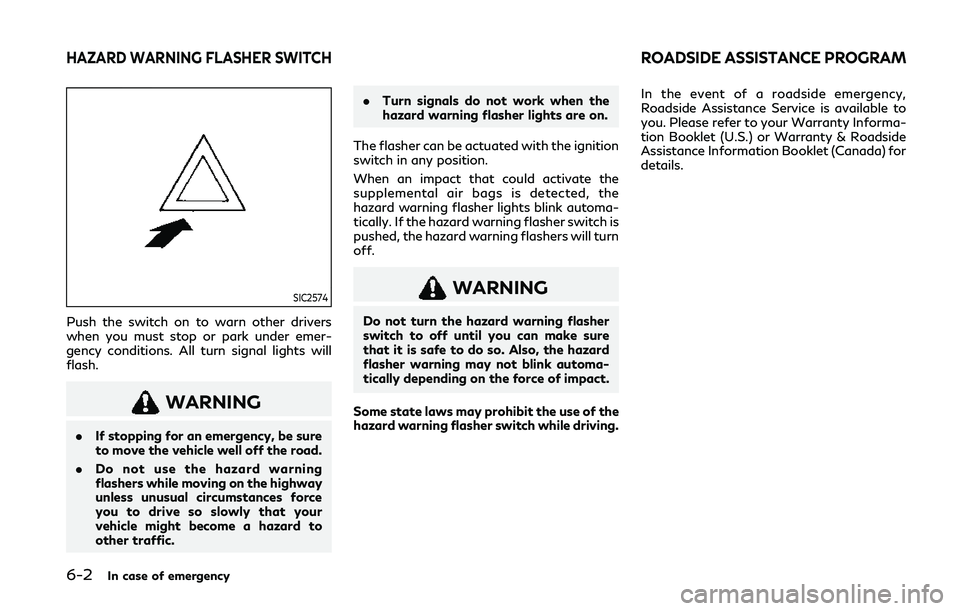
Push the switch on to warn other drivers
when you must stop or park under emer-
gency conditions. All turn signal lights will
flash.
WARNING
.If stopping for an emergency, be sure
to move the vehicle well off the road.
. Do not use the hazard warning
flashers while moving on the highway
unless unusual circumstances force
you to drive so slowly that your
vehicle might become a hazard to
other traffic. .
Turn signals do not work when the
hazard warning flasher lights are on.
The flasher can be actuated with the ignition
switch in any position.
When an impact that could activate the
supplemental air bags is detected, the
hazard warning flasher lights blink automa-
tically. If the hazard warning flasher switch is
pushed, the hazard warning flashers will turn
off.
WARNING
Do not turn the hazard warning flasher
switch to off until you can make sure
that it is safe to do so. Also, the hazard
flasher warning may not blink automa-
tically depending on the force of impact.
Some state laws may prohibit the use of the
hazard warning flasher switch while driving. In the event of a roadside emergency,
Roadside Assistance Service is available to
you. Please refer to your Warranty Informa-
tion Booklet (U.S.) or Warranty & Roadside
Assistance Information Booklet (Canada) for
details.
HAZARD WARNING FLASHER SWITCHROADSIDE ASSISTANCE PROGRAM
Page 359 of 468
To shut off the engine in an emergency
situation while driving, perform the follow-
ing procedure:
.Rapidly push the push-button ignition
switch 3 consecutive times in less than
1.5 seconds, or
. Push and hold the push-button ignition
switch for more than 2 seconds. If you have a flat tire, follow the instructions
in this section.
For models with run-flat tires, you can
continue driving to a safe location even if
they are punctured. (See “Run-flat tires”
(P.6-4) and “Run-flat tires” (P.8-32).)
TIRE PRESSURE MONITORING
SYSTEM (TPMS)
This vehicle is equipped with the Tire
Pressure Monitoring System (TPMS). It
monitors tire pressure of all tires except the
spare. When the low tire pressure warning
light is lit and the “Tire Pressure Low - Add
Air” warning appears in the vehicle informa-
tion display, one or more of your tires is
significantly under-inflated. If the vehicle is
being driven with low tire pressure, the
TPMS will activate and warn you of it by
the low tire pressure warning light. This
system will activate only when the vehicle is
driven at speeds above 16 MPH (25 km/h).
For more details, see “Warning lights, in-
dicator lights and audible reminders” (P.2-
10) and “Tire Pressure Monitoring System
(TPMS)” (P.5-5).
WARNING
.
Radio waves could adversely affect
electric medical equipment. Those who use a pacemaker should contact
the electric medical equipment man-
ufacturer for the possible influences
before use.
. If the low tire pressure warning light
illuminates while driving, avoid sud-
den steering maneuvers or abrupt
braking, reduce vehicle speed, pull
off the road to a safe location and
stop the vehicle as soon as possible.
Driving with under-inflated tires may
permanently damage the tires and
increase the likelihood of tire failure.
Serious vehicle damage could occur
and may lead to an accident and
could result in serious personal injury.
Check the tire pressure for all four
tires. Adjust the tire pressure to the
recommended COLD tire pressure
shown on the Tire and Loading
Information label to turn the low tire
pressure warning light OFF. If the
light still illuminates while driving
after adjusting the tire pressure, a
tire may be flat. If you have a flat tire,
replace it with a spare tire (if so
equipped).
. Since the spare tire is not equipped
with the TPMS, when a spare tire is
mounted or a wheel is replaced, the
TPMS will not function and the low
tire pressure warning light will flash
In case of emergency6-3
EMERGENCY ENGINE SHUT OFF FLAT TIRE
Page 360 of 468

6-4In case of emergency
for approximately 1 minute. The light
will remain on after 1 minute. Have
your tires replaced and/or TPMS
system reset as soon as possible. It
is recommended you visit an INFINITI
retailer for these services.
. Replacing tires with those not origin-
ally specified by INFINITI could affect
the proper operation of the TPMS.
. Do not inject any tire liquid or aerosol
tire sealant into the tires, as this may
cause a malfunction of the tire pres-
sure sensors.
RUN-FLAT TIRES (if so equipped)
Run-flat tires are those tires that can be
used temporarily if they are punctured. See
“Run-flat tires” (P.8-32).
Also, refer to “Important Tire Safety Infor-
mation” (US) or “Tire Safety Information”
(Canada) in the INFINITI Warranty Informa-
tion Booklet.
WARNING
.Although you can continue driving
with a punctured run-flat tire, re-
member that vehicle handling stabi-
lity is reduced, which could lead to an accident and personal injury. Also,
driving a long distance at high speeds
may damage the tires.
. Do not drive at speeds above 50
MPH (80 km/h) and do not drive
more than approximately 93 miles
(150 km) with a punctured run-flat
tire. The actual distance the vehicle
can be driven on a flat tire depends on
outside temperature, vehicle load,
road conditions and other factors.
. Drive safely at reduced speeds. Avoid
hard cornering or braking, which may
cause you to lose control of the
vehicle.
. If you detect any unusual sounds or
vibrations while driving with a punc-
tured run-flat tire, pull off the road
to a safe location and stop the vehicle
as soon as possible. The tire may be
seriously damaged and need to be
replaced.
CAUTION
.Never install tire chains on a punctu-
red run-flat tire, as this could damage
your vehicle. .
Avoid driving over any projection or
pothole, as the clearance between
the vehicle and the ground is smaller
than normal.
. Do not enter an automated car wash
with a punctured run-flat tire.
. It is recommended you have the
punctured tire inspected by an
INFINITI retailer or other authorized
repair shop. Replace the tire as soon
as possible if the tire is seriously
damaged.
If you have a flat tire and have to stop the
vehicle, follow the instructions below.
1. Safely move the vehicle off the road and away from traffic.
2. Turn on the hazard warning flashers.
3. Park on a level surface and apply the parking brake. Move the shift lever to the
P (Park) position.
4. Turn off the engine.
5. Raise the hood to warn other traffic, and to signal professional road assistance
personnel that you need assistance.
6. Have all passengers get out of the vehicle and stand in a safe place, away
from traffic and clear of the vehicle.
For the tire removing procedure, see “Jack-
Page 361 of 468

ing up the vehicle and replacing tires” (P.8-
38).To start your engine with a booster battery,
the instructions and precautions below must
be followed.
WARNING
.
If done incorrectly, jump starting can
lead to a battery explosion, resulting
in severe injury or death. It could also
damage your vehicle.
. Explosive hydrogen gas is always
present in the vicinity of the battery.
Keep all sparks and flames away from
the battery.
. Do not allow battery fluid to come
into contact with eyes, skin, clothing
or painted surfaces. Battery fluid is a
corrosive sulphuric acid solution
which can cause severe burns. If the
fluid should come into contact with
anything, immediately flush the con-
tacted area with water.
. Keep the battery out of the reach of
children.
. The booster battery must be rated at
12 volts. Use of an improperly rated
battery can damage your vehicle.
. Whenever working on or near a
battery, always wear suitable eye
protectors (for example, goggles or industrial safety spectacles) and re-
move rings, metal bands, or any other
jewelry. Do not lean over the battery
when jump starting.
. Do not attempt to jump start a
frozen battery. It could explode and
cause serious injury.
. Your vehicle has an automatic engine
cooling fan. It could come on at any
time. Keep hands and other objects
away from it.
In case of emergency6-5
JUMP STARTING