light INFINITI Q50 2023 Workshop Manual
[x] Cancel search | Manufacturer: INFINITI, Model Year: 2023, Model line: Q50, Model: INFINITI Q50 2023Pages: 494, PDF Size: 2.19 MB
Page 122 of 494

2-38Instruments and controls
SIC3784
Be sure not to put anything on top of the
photo sensorlocated on the top of the
instrument panel. The photo sensor controls
the autolight; if it is covered, the photo
sensor reacts as if it is dark and the head-
lights will illuminate.
SIC3269
Example
Headlight beam select
To select the low beam, put the lever in
the neutral position as shown.
To select the high beam, push the lever
forward while the switch is in the
position. Pull it back to select the low
beam.
Pulling the lever toward you will flash
the headlight high beam even when the
headlight switch is in the OFF position
(if so equipped).
High beam assist (if so equipped)
The high beam assist system will operate
when the vehicle is driven at speeds of
approximately 22 MPH (35 km/h) and
above. If an oncoming vehicle or leading
vehicle appears in front of your vehicle when
the headlight high beam is on, the headlight
will be switched to the low beam automa-
tically.
Precautions on high beam assist:
WARNING
. The high beam assist system is a
convenience but it is not a substitute
for safe driving operation. The driver
should remain alert at all times,
ensure safe driving practices and
switch the high beams and low beam
manually when necessary.
. The high beam or low beam may not
switch automatically under the fol-
lowing conditions. Switch the high
beam and low beam manually.
— During bad weather (rain, fog, snow, wind, etc.).
— When a light source similar to a headlight or tail light is in the
vicinity of the vehicle.
Page 123 of 494
— When the headlights of the on-coming vehicle or the leading
vehicle are turned off, when the
color of the light is affected due to
foreign materials on the lights, or
when the light beam is out of
position.
— When there is a sudden, contin- uous change in brightness.
— When driving on a road that passes over rolling hills, or a road
that has level differences.
— When driving on a road with many curves.
— When a sign or mirror-like sur- face is reflecting intense light
towards the front of the vehicle.
— When the container, etc. being towed by a leading vehicle is
reflecting intense light.
— When a headlight on your vehicle is damaged or dirty.
— When the vehicle is leaning at an angle due to a punctured tire,
being towed, etc.
. The timing of switching the low beam
and high beam may change under the
following situations. — The brightness of the headlights
of the oncoming vehicle or leading
vehicle.
— The movement and direction of the oncoming vehicle and the
leading vehicle.
— When only one light on the on- coming vehicle or the leading
vehicle is illuminated.
— When the oncoming vehicle or the leading vehicle is a two-wheeled
vehicle.
— Road conditions (incline, curve, the road surface, etc.).
— The number of passengers and the amount of luggage.
WAC0771X
Example
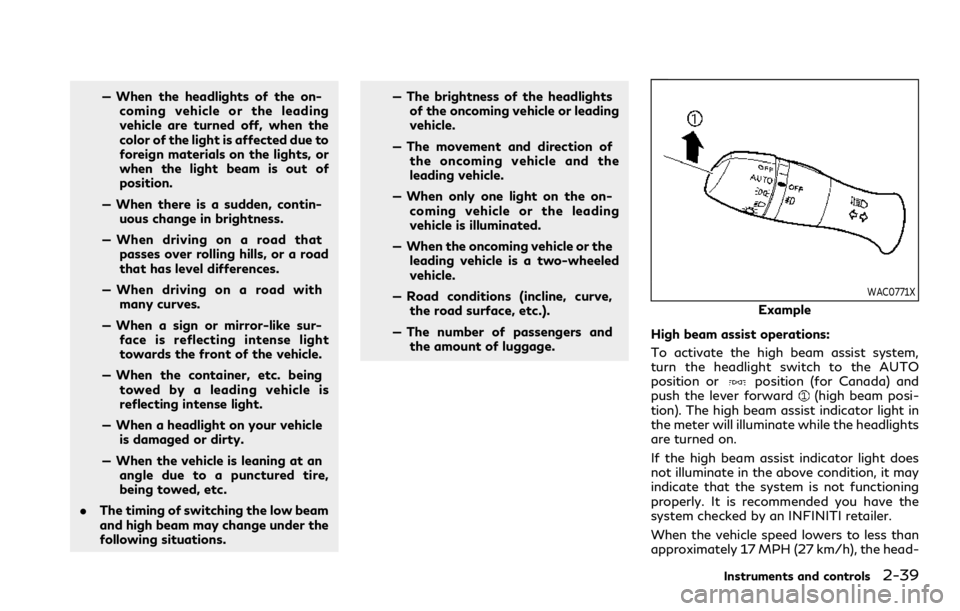
High beam assist operations:
To activate the high beam assist system,
turn the headlight switch to the AUTO
position or
position (for Canada) and
push the lever forward(high beam posi-
tion). The high beam assist indicator light in
the meter will illuminate while the headlights
are turned on.
If the high beam assist indicator light does
not illuminate in the above condition, it may
indicate that the system is not functioning
properly. It is recommended you have the
system checked by an INFINITI retailer.
When the vehicle speed lowers to less than
approximately 17 MPH (27 km/h), the head-
Instruments and controls2-39
Page 124 of 494

2-40Instruments and controls
light remains the low beam.
To turn off the high beam assist system, turn
the headlight switch to the
position or
select the low beam position by placing the
lever in the neutral position.
JVI0670X
Ambient image sensor maintenance:
The ambient image sensor
for the high
beam assist system is located in front of the
inside mirror. To keep the proper operation
of the high beam assist system and prevent a
system malfunction, be sure to observe the
following:
. Always keep the windshield clean.
. Do not attach a sticker (including trans-
parent material) or install an accessory
near the ambient image sensor.
. Do not strike or damage the areas around
the ambient image sensor. Do not touch
the sensor lens that is located on the
ambient image sensor. If the ambient image sensor is damaged due
to an accident, it is recommended you
contact an INFINITI retailer.
Battery saver system
A chime will sound and the light reminder
warning will appear in the vehicle informa-
tion display when the driver side door is
opened with the headlight switch in the
orposition and the ignition switch in
the ACC, OFF or LOCK position.
When the headlight switch is in the
orposition while the ignition switch is in
the ON position, the lights will automatically
turn off after a period of time when the
ignition switch has been pushed to the OFF
position.
When the headlight switch remains in the
orposition after the lights auto-
matically turn off, the lights will turn on
when the ignition switch is pushed to the ON
position.
CAUTION
. When you turn on the headlight
switch again after the lights auto-
matically turn off, the lights will not
turn off automatically. Be sure to
turn the headlight switch to the OFF
position (if so equipped) or AUTO
Page 125 of 494
position when you leave the vehicle
for extended periods of time, other-
wise the battery will be discharged.
. Never leave the headlight switch on
when the engine is not running for a
period of time even if the headlights
turn off automatically.
Daytime Running Light (DRL) sys-
tem
Type A (if so equipped):
The daytime running lights automatically
illuminate when the engine is started with
the parking brake released. The daytime
running lights operate with the headlight
switch in the OFF, AUTO (when the head-
lights are off) or
position. Turn the
headlight switch to theposition for full
illumination when driving at night.
If the parking brake is applied before the
engine is started, the daytime running lights
do not illuminate. The daytime running lights
illuminate once the parking brake is released.
The daytime running lights will remain on
until the ignition switch is pushed to the OFF
position.
Type B (if so equipped):
The daytime running lights automatically
illuminate when the engine is started with the parking brake released. The daytime
running lights operate with the headlight
switch in the AUTO or
position, when
the headlights are off. Turn the headlight
switch to the
position for full illumina-
tion when driving at night.
If the parking brake is applied before the
engine is started, the daytime running lights
do not illuminate. The daytime running lights
illuminate once the parking brake is released.
The daytime running lights will remain on
until the ignition switch is pushed to the OFF
position.
WARNING
When the daytime running light system
is active with the headlight switch in the
OFF position (if so equipped), tail lights
on your vehicle are not on. It is necessary
at dusk to turn on your headlights.
Failure to do so could cause an accident
injuring yourself and others.
Adaptive Front lighting System
(AFS) (if so equipped)
The Adaptive Front lighting System (AFS)
will automatically adjust the headlights (low
beam) toward the turning direction to
improve the driver’s view. When the head- light switch is ON and the driver operates
the steering wheel in a turn, the AFS system
will be activated.
The AFS will operate:
.
when the headlight switch is ON.
. when the shift lever is in any position
other than P (Park) or R (Reverse).
. when the vehicle is driven at above 3
MPH (5 km/h) for the left-side head-
light. Note that the right-side low beam
headlight will swivel but the left-side
headlight will not swivel when the vehicle
is below 3 MPH (5 km/h) and the
steering wheel is turned.
AFS will also adjust the headlight to a proper
axis automatically, depending on the number
of occupants in the vehicle, the load the
vehicle is carrying and the road conditions.
If the AFS warning appears in the vehicle
information display after the ignition switch
has been pushed to the ON position, this
may indicate that the AFS is not functioning
properly. Have the system checked. It is
recommended you visit an INFINITI retailer
for this service. When the engine is started,
the headlights will vibrate to check the
system condition. This is not a malfunction.
Instruments and controls2-41
Page 126 of 494

2-42Instruments and controls
JVI0644X
JVI0937X
Instrument brightness control
The instrument brightness control switch
can be operated when the ignition switch is
in the ON position. When the switch is
operated, the vehicle information display
switches to the brightness adjustment
mode.
Push the + side of the switch
to brighten
the instrument panel lights. The barmoves
to the + side.
Push the - side of the switch
to dim the
instrument panel lights. The barmoves to
the − side. When the brightness level reaches
the minimum, the instrument panel lights will
turn off during the nighttime.
When the brightness level reaches the max-
imum or minimum, a beep will sound.
The vehicle information display returns to
the normal display when the instrument
brightness control switch is not operated
for more than 5 seconds.
SIC3271
Example
TURN SIGNAL SWITCH
Turn signal
Move the lever up or down to signal the
turning direction. When the turn is com-
pleted, the turn signals cancel automatically.
Lane change signal
. Move the lever up or down until the turn
signal begins to flash, but the lever does
not latch, to signal a lane change. Hold
the lever until the lane change is com-
pleted.
. Move the lever up or down until the turn
signal begins to flash, but the lever does
Page 127 of 494

not latch, and release the lever. The turn
signal will automatically flash three
times.
Choose the appropriate method to signal a
lane change based on road and traffic
conditions.
SIC3272
Example
FOG LIGHT SWITCH
To turn the fog lights on, turn the headlight
switch to theposition, then turn the
switch to theposition. To turn them off,
turn the switch to the OFF position.
The headlights must be on with the low
beams selected for the fog lights to operate.
The fog lights automatically turn off when
the high beam headlights are selected.
JVI1491X
To sound the horn, push the center pad area
of the steering wheel.
WARNING
Do not disassemble the horn. Doing so
could affect proper operation of the
supplemental front air bag system. Tam-
pering with the supplemental front air
bag system may result in serious perso-
nal injury.
Instruments and controls2-43
HORN
Page 128 of 494

2-44Instruments and controls
SIC4336
The vehicle should be driven with the Vehicle
Dynamic Control (VDC) system on for most
driving conditions.
If the vehicle is stuck in mud or snow, the
VDC system reduces the engine output to
reduce wheel spin. The engine speed will be
reduced even if the accelerator is depressed
to the floor. If maximum engine power is
needed to free a stuck vehicle, turn the VDC
system off.
To turn off the VDC system, push the VDC
OFF switch. The
indicator light will
illuminate.
Push the VDC OFF switch again or restart
the engine to turn on the system. (See
“Vehicle Dynamic Control (VDC) system” (P.5-131).)
WARNING
Do not use or allow occupants to use the
seat heater if you or the occupants
cannot monitor elevated seat tempera-
tures or have an inability to feel pain in
those body parts in contact with the
seat. Use of the seat heater by such
people could result in serious injury.
CAUTION
.
The battery could run down if the
seat heater is operated while the
engine is not running.
. Do not use the seat heater for
extended periods or when no one is
using the seat.
. Do not put anything on the seat
which insulates heat, such as a blan-
ket, cushion, seat cover, etc. Other-
wise, the seat may become
overheated.
. Do not place anything hard or heavy
on the seat or pierce it with a pin or
similar object. This may result in
damage to the heater.
VEHICLE DYNAMIC CONTROL
(VDC) OFF SWITCH HEATED SEATS (if so equipped)
Page 129 of 494

.Any liquid spilled on the heated seat
should be removed immediately with
a dry cloth.
. When cleaning the seat, never use
gasoline, thinner, or any similar ma-
terials.
. If any malfunctions are found or the
heated seat does not operate, turn
the switch off and have the system
checked. It is recommended you visit
an INFINITI retailer for this service.
JVR0505X
The front seats can be warmed by built-in
heaters. The heating system of driver’s seat
and front passenger seat can be operated
independently.
OPERATION WITH SWITCH
1. Start the engine.
2. Push the switch on the instrument panel.
.Each time the switch is pushed, the
seat heating mode will change in the
following order.
AUTO ?High ?Mid ?Low ?OFF
.The indicator light on the switch will
illuminate when the heater is on.
When the vehicle’s interior is warmed, or
before you leave the vehicle, be sure to turn off the seat heater.
OPERATION WITH TOUCH
SCREEN
Push the CLIMATE button and touch []
or [] on the lower display. Select an item
from [AUTO], [High], [Mid], [Low] or [OFF].
AUTO MODE SETTING
When in the AUTO mode, the heater will
turn on or off automatically according to the
conditions such as the temperature inside
the vehicle compartment. Depending on the
conditions, the heater will not turn on even if
AUTO is selected. The settings for the AUTO
mode can be changed. For details, see
“Climate settings” (P.4-42).
Instruments and controls2-45
Page 131 of 494

WAC0146X
In the console box
The power outlets are located in the storage
box and in the console box.
CAUTION
. The outlet and plug may be hot
during or immediately after use.
. Do not use with accessories that
exceed a 12 volt, 120W (10A) power
draw. Do not use double adapters or
more than one electrical accessory.
. Use power outlet with the engine
running to avoid discharging the
vehicle battery. .
Avoid using power outlet when the
air conditioner, headlights or rear
window defroster is on.
. This power outlet is not designed for
use with a cigarette lighter unit.
. Push the plug in as far as it will go. If
good contact is not made, the plug
may overheat or the internal tem-
perature fuse may blow.
. Before inserting or disconnecting a
plug, be sure the electrical accessory
being used is turned OFF.
. When not in use, be sure to close the
cap. Do not allow water or any liquid
to contact the outlet.
EMERGENCY SUPPORT
INFINITI InTouchTMprovides various ser-
vices to support dealing with emergencies of
the subscribed vehicle and the driver.
For example, in case of an illness or serious
injury, you can seek support by pushing the
in-vehicle Emergency Call (SOS) button and
connecting to the Response Center. The
Response Center can specify the location
of the vehicle via GPS, and the information
will be sent to the police or other agencies as
needed.
For information about other INFINITI In-
Touch
TMemergency support related ser-
vices, contact the INFINITI InTouchTM
support line at 1-855-444-7244 or refer
to the INFINITI InTouchTMServices website
www.infinitiusa.com/intouch (for U.S.)/
www.infiniti.ca/intouch/en/ (for Canada).
WARNING
. Please note that the Emergency Call
function cannot be used in the fol-
lowing conditions:
— Emergency functions and services will not be available without a
paid subscription to INFINITI In-
Touch
TM.
Instruments and controls2-47
EMERGENCY CALL (SOS)
BUTTON (if so equipped)
Page 132 of 494

2-48Instruments and controls
— The INFINITI InTouchTMnetwork
system is disabled.
— The vehicle moves outside the service area where the TCU (Tele-
matics Control Unit) is connected
to the system.
— The vehicle is outside the area where the cellular network service
is receivable.
— The vehicle is in a location with poor signal reception such as
tunnels, underground parking
garages, behind buildings or in
mountainous areas.
— The line is busy.
— The TCU (Telematics Control Unit) or other systems of your
vehicle are not working properly.
— It may not be possible to make an emergency call depending on the
severity of a collision and/or
emergency.
. Park the vehicle in a safe location and
set the parking brake before operat-
ing the Emergency Call (SOS) button.
. Only use this service in case of an
emergency. There may be a penalty
for inappropriate use of the service. .
Radio waves could adversely affect
electric medical equipment. Indivi-
duals who use a pacemaker should
contact the device manufacturer re-
garding any possible effects before
using the system.
. The TCU (Telematics Control Unit)
antenna is installed inside the upper
central part of the instrument panel.
An occupant should not get any
closer to the antenna than specified
by the pacemaker manufacturer. The
radio waves from the TCU antenna
may adversely affect the operation of
the pacemaker while using INFINITI
InTouch
TM.
WAC0510X
Making an emergency call
The Emergency Call (SOS) button is located
near the map light.
1. Push the Emergency Call (SOS) button.
2. When the line is connected, speak to the
Response Specialist.
If you want to cancel the emergency call,
push and hold the Emergency Call (SOS)
button for a few seconds.
NOTE:
. After the Emergency Call (SOS) button
is pushed, it may take some time until
the system initiates connection, de-
pending on the technical environment
and whether the TCU (Telematics Con-