ignition INFINITI Q50-HYBRID 2018 Owner's Guide
[x] Cancel search | Manufacturer: INFINITI, Model Year: 2018, Model line: Q50-HYBRID, Model: INFINITI Q50-HYBRID 2018Pages: 442, PDF Size: 2.9 MB
Page 115 of 442
2-30Instruments and controls
ing (FEB)” (P.5-104) and “Predictive For-
ward Collision Warning (PFCW)” (P.5-112).
12. Tire pressure
The tire pressure mode shows the pressure
of all four tires while the vehicle is driven.
When the “Tire Pressure Low - Add Air” or
“Flat Tire - Visit dealer” warning appears,
the display can be switched to the tire
pressure mode by pushing the
orswitch.
The tire pressure unit can be changed in the
[TPMS setting] under the [Settings] menu
on the lower display. (See the Infiniti InTouch
Owner’s Manual.)
NOTE:
After the ignition switch is placed in the ON
position, it may take a period of time for the
tire pressure to be displayed while the
vehicle is driven. Depending on the radio
wave circumstance, tire pressure may not
correctly be displayed.
13. Chassis control
When Active Lane Control (if so equipped) or
the active trace control system is operated, it
shows the operating condition. See “Active
Lane Control” (P.5-24) and “Active trace
control” (P.5-132) for more details.
Warning check
The present warnings are displayed. If no
warning is present, “No Warning” is dis-
played.
JVI0679M
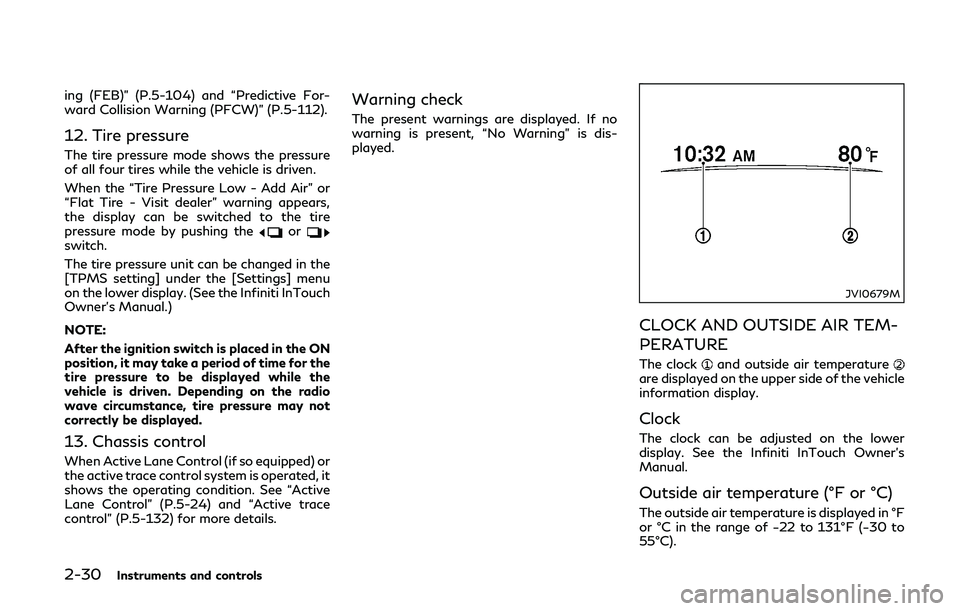
CLOCK AND OUTSIDE AIR TEM-
PERATURE
The clockand outside air temperatureare displayed on the upper side of the vehicle
information display.
Clock
The clock can be adjusted on the lower
display. See the Infiniti InTouch Owner’s
Manual.
Outside air temperature (°F or °C)
The outside air temperature is displayed in °F
or °C in the range of −22 to 131°F (−30 to
55°C).
Page 117 of 442

2-32Instruments and controls
SIC2045
How to arm the vehicle security
system
1. Close all windows.The system can be armed even if the
windows are open.
2. Push the ignition switch to the OFF position.
3. Remove the Intelligent Key from the vehicle.
4. Close all doors, hood and trunk. Lock all doors. The doors can be locked with the
Intelligent Key, door handle request
switch, power door lock switch or me-
chanical key. 5. Confirm that the security indicator light
comes on. The security indicator light
stays on for about 30 seconds. The
vehicle security system is now pre-
armed. After about 30 seconds the
vehicle security system automatically
shifts into the armed phase. The security
light begins to flash once every approxi-
mately 3 seconds. If, during this 30-
second pre-arm time period, the door is
unlocked, or the ignition switch is pushed
to ACC or ON, the system will not arm.
Even when the driver and/or passengers
are in the vehicle, the system will activate
with all doors, hood, and trunk lid locked
with the ignition switch in the LOCK
position. When pushing the ignition switch
to the ACC or ON position, the system will
be released.
Vehicle security system activation
The vehicle security system will give the
following alarm:
. The headlights blink and the horn sounds
intermittently.
. The alarm automatically turns off after
approximately 1 minute. However, the
alarm reactivates if the vehicle is tam-
pered with again.
The alarm is activated by: .
Unlocking the door or opening the trunk
lid without using the button on the
Intelligent Key, the door handle request
switch, one touch unlock sensor or the
mechanical key. (Even if the door is
opened by releasing the door inside lock
knob, the alarm will activate.)
. Opening the hood.
How to stop an activated alarm
The alarm will stop by unlocking a door by
pushing the UNLOCK button on the Intelli-
gent Key, pushing the door handle request
switch, touching the one touch unlock
sensor or using the mechanical key. The
alarm will not stop if the ignition switch is
placed in the ACC or ON position.
If the system does not operate as described
above, it is recommended you have it
checked by an INFINITI retailer.
INFINITI VEHICLE IMMOBILIZER
SYSTEM
The INFINITI Vehicle Immobilizer System
will not allow the INFINITI Direct Response
Hybrid
®System to start without the use of
the registered Intelligent Key. Never leave
these keys in the vehicle.
Page 118 of 442

FCC Notice:
For USA:
This device complies with Part 15 of the
FCC Rules. Operation is subject to the
following two conditions: (1) This device
may not cause harmful interference, and (2)
this device must accept any interference
received, including interference that may
cause undesired operation.
NOTE:
Changes or modifications not expressly
approved by the party responsible for
compliance could void the user’s authority
to operate the equipment.
For Canada:
This device complies with Industry Canada
licence-exempt RSS standard(s). Operation
is subject to the following two conditions:
(1) this device may not cause interference,
and (2) this device must accept any inter-
ference, including interference that may
cause undesired operation of the device.
SIC2045
Security indicator light
The security indicator light is located on the
meter panel. It indicates the status of the
INFINITI Vehicle Immobilizer System.
The light blinks after the ignition switch was
in the LOCK, ACC or OFF position. This
function indicates the security systems
equipped on the vehicle are operational.
If the INFINITI Vehicle Immobilizer System is
malfunctioning, this light will remain on
while the ignition switch is in the ON
position.If the light still remains on and/or the
hybrid system will not start, seek service
for the INFINITI Vehicle Immobilizer System
as soon as possible. Please bring all regis-
tered keys that you have. It is recommended
you visit an INFINITI retailer for this
service.
Instruments and controls2-33
Page 119 of 442

2-34Instruments and controls
WARNING
In freezing temperatures the washer
solution may freeze on the windshield
and obscure your vision which may lead
to an accident. Warm windshield with
the defroster before you wash the wind-
shield.
CAUTION
.Do not operate the washer continu-
ously for more than 30 seconds.
. Do not operate the washer if the
reservoir tank is empty.
. Do not fill the window washer re-
servoir tank with washer fluid con-
centrates at full strength. Some
methyl alcohol based washer fluid
concentrates may permanently stain
the grille if spilled while filling the
window washer reservoir tank.
. Pre-mix washer fluid concentrates
with water to the manufacturer’s
recommended levels before pouring
the fluid into the window washer
reservoir tank. Do not use the win-
dow washer reservoir tank to mix the washer fluid concentrate and water.JVI0738X
The windshield wiper and washer operates
when the ignition switch is in the ON
position.
Push the lever down to operate the wiper at
the following speed:
AUTO — See “Rain-sensing auto wiper
system” (P.2-35).
LO — continuous low speed operation
HI — continuous high speed operation
MIST — one sweep operation of the
wiper
Pull the lever toward you
to operate the
washer. Then the wiper will also operate
several times.
WIPER AND WASHER SWITCH
Page 120 of 442

Pulling up the wiper arm:
The wiper arm should be in the up position
when replacing the wiper.
To pull up the wiper arm, push up
twice
when the ignition switch is in the OFF
position within 1 minute. The wiper opera-
tion stops in mid-operation and the wiper
arm can be pulled up.
The shift lever should be in the P (Park)
position.
To return the wiper arm, place the wiper arm
in the down position and operate the wiper
switch once.
CAUTION
Do not operate the windshield wiper
while the wiper arm is pulled up. The
wiper arm may be damaged.
Wiper drip wipe system:
The wiper will also operate once about 3
seconds after the washer and wiper are
operated. This operation is to wipe washer
fluid that has dripped on the windshield.
JVI0739X
RAIN-SENSING AUTO WIPER
SYSTEM
The rain-sensing auto wiper system can
automatically turn on the wipers and adjust
the wiper speed depending on the rainfall
and the vehicle speed by using the rain
sensor located on the upper part of the
windshield.
To set the rain-sensing auto wiper system,
push the lever down to the AUTO position
. The wiper will sweep once while the
ignition switch is in the ON position.
The rain sensor sensitivity level can be
adjusted by turning the knob toward
(High) or toward(Low). .
High — High sensitive operation
. Low — Low sensitive operation
To turn the rain-sensing auto wiper system
off, push up the lever to the OFF position, or
pull down the lever to the LO or HI position.
CAUTION
Do not touch the rain sensor and around
it when the wiper switch is in the AUTO
position and the ignition switch is in the
ON position. The wipers may operate
unexpectedly and cause an injury or may
damage a wiper.
. The rain-sensing auto wipers are in-
tended for use during rain. If the switch
is left in the AUTO position, the wipers
may operate unexpectedly when dirt,
fingerprints, oil film or insects are stuck
on or around the sensor. The wipers may
also operate when exhaust gas or
moisture affect the rain sensor.
. The rain-sensing auto wipers may not
operate if rain does not hit the rain
sensor even if it is raining.
. When the windshield glass is coated
with water repellent, the speed of the
rain-sensing auto wipers may be higher
even though the amount of the rainfall is
small.
Instruments and controls2-35
Page 122 of 442
SIC3268
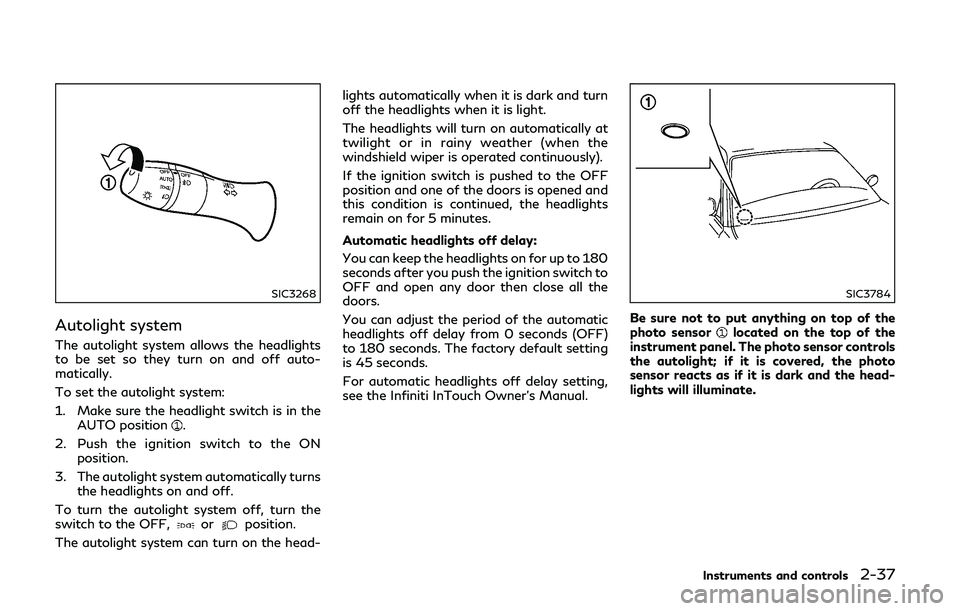
Autolight system
The autolight system allows the headlights
to be set so they turn on and off auto-
matically.
To set the autolight system:
1. Make sure the headlight switch is in theAUTO position
.
2. Push the ignition switch to the ON position.
3. The autolight system automatically turns the headlights on and off.
To turn the autolight system off, turn the
switch to the OFF,
orposition.
The autolight system can turn on the head- lights automatically when it is dark and turn
off the headlights when it is light.
The headlights will turn on automatically at
twilight or in rainy weather (when the
windshield wiper is operated continuously).
If the ignition switch is pushed to the OFF
position and one of the doors is opened and
this condition is continued, the headlights
remain on for 5 minutes.
Automatic headlights off delay:
You can keep the headlights on for up to 180
seconds after you push the ignition switch to
OFF and open any door then close all the
doors.
You can adjust the period of the automatic
headlights off delay from 0 seconds (OFF)
to 180 seconds. The factory default setting
is 45 seconds.
For automatic headlights off delay setting,
see the Infiniti InTouch Owner’s Manual.
SIC3784
Be sure not to put anything on top of the
photo sensorlocated on the top of the
instrument panel. The photo sensor controls
the autolight; if it is covered, the photo
sensor reacts as if it is dark and the head-
lights will illuminate.
Instruments and controls2-37
Page 125 of 442
2-40Instruments and controls
JVI0670X
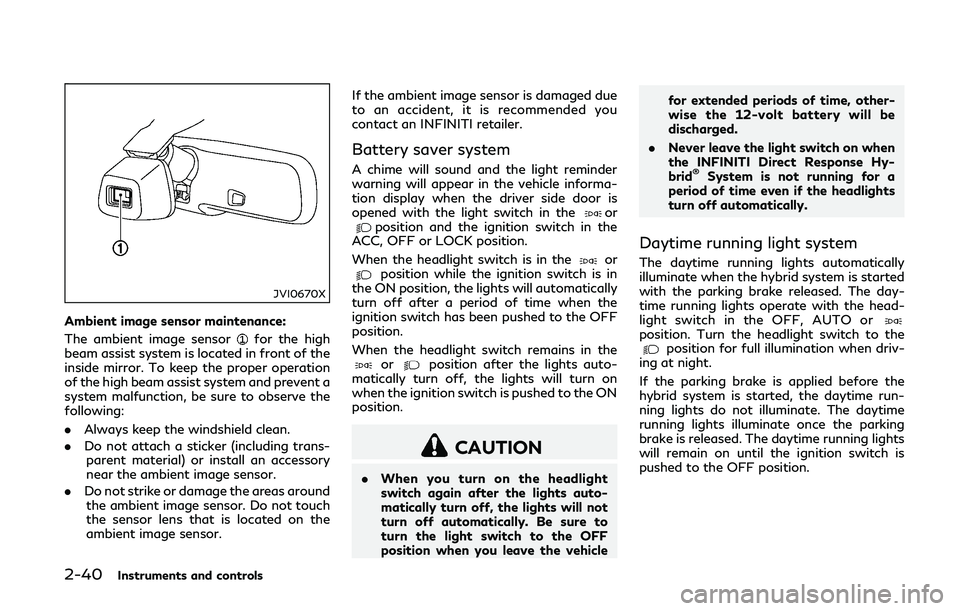
Ambient image sensor maintenance:
The ambient image sensor
for the high
beam assist system is located in front of the
inside mirror. To keep the proper operation
of the high beam assist system and prevent a
system malfunction, be sure to observe the
following:
. Always keep the windshield clean.
. Do not attach a sticker (including trans-
parent material) or install an accessory
near the ambient image sensor.
. Do not strike or damage the areas around
the ambient image sensor. Do not touch
the sensor lens that is located on the
ambient image sensor. If the ambient image sensor is damaged due
to an accident, it is recommended you
contact an INFINITI retailer.
Battery saver system
A chime will sound and the light reminder
warning will appear in the vehicle informa-
tion display when the driver side door is
opened with the light switch in the
orposition and the ignition switch in the
ACC, OFF or LOCK position.
When the headlight switch is in the
orposition while the ignition switch is in
the ON position, the lights will automatically
turn off after a period of time when the
ignition switch has been pushed to the OFF
position.
When the headlight switch remains in the
orposition after the lights auto-
matically turn off, the lights will turn on
when the ignition switch is pushed to the ON
position.
CAUTION
. When you turn on the headlight
switch again after the lights auto-
matically turn off, the lights will not
turn off automatically. Be sure to
turn the light switch to the OFF
position when you leave the vehicle for extended periods of time, other-
wise the 12-volt battery will be
discharged.
. Never leave the light switch on when
the INFINITI Direct Response Hy-
brid
®System is not running for a
period of time even if the headlights
turn off automatically.
Daytime running light system
The daytime running lights automatically
illuminate when the hybrid system is started
with the parking brake released. The day-
time running lights operate with the head-
light switch in the OFF, AUTO or
position. Turn the headlight switch to theposition for full illumination when driv-
ing at night.
If the parking brake is applied before the
hybrid system is started, the daytime run-
ning lights do not illuminate. The daytime
running lights illuminate once the parking
brake is released. The daytime running lights
will remain on until the ignition switch is
pushed to the OFF position.
Page 126 of 442
WARNING
When the daytime running light system
is active, tail lights on your vehicle are
not on. It is necessary at dusk to turn on
your headlights. Failure to do so could
cause an accident injuring yourself and
others.
Adaptive Front lighting System
(AFS) (if so equipped)
The Adaptive Front lighting System (AFS)
will automatically adjust the headlights (low
beam) toward the turning direction to
improve the driver’s view. When the head-
light switch is ON and the driver operates
the steering wheel in a turn, the AFS system
will be activated.
The AFS will operate:
.when the headlight switch is ON.
. when the shift lever is in any position
other than P (Park) or R (Reverse).
. when the vehicle is driven at above 3
MPH (5 km/h) for the left-side head-
light. Note that the right-side low beam
headlight will swivel but the left-side
headlight will not swivel when the vehicle
is below 3 MPH (5 km/h) and the
steering wheel is turned. AFS will also adjust the headlight to a proper
axis automatically, depending on the number
of occupants in the vehicle, the load the
vehicle is carrying and the road conditions.
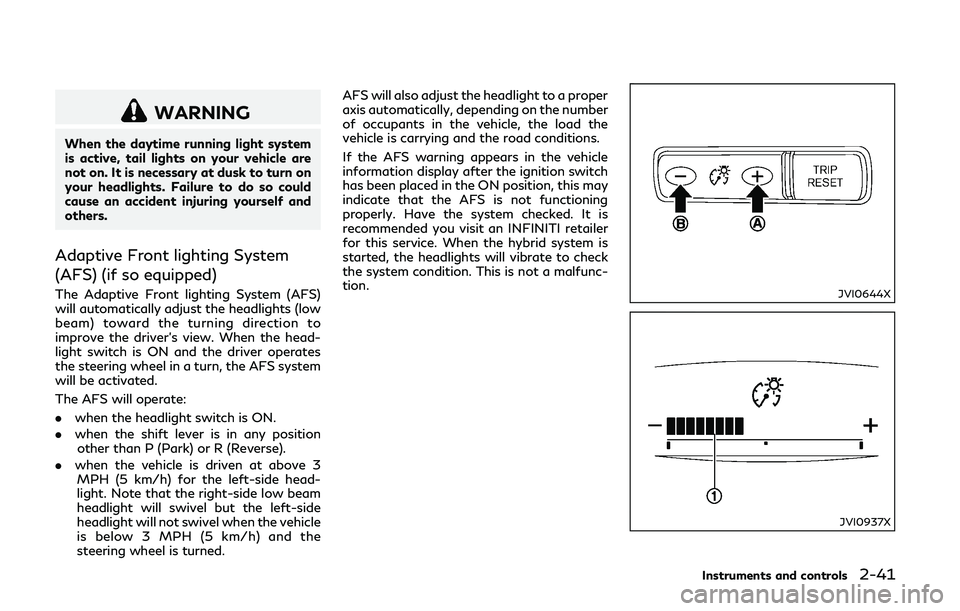
If the AFS warning appears in the vehicle
information display after the ignition switch
has been placed in the ON position, this may
indicate that the AFS is not functioning
properly. Have the system checked. It is
recommended you visit an INFINITI retailer
for this service. When the hybrid system is
started, the headlights will vibrate to check
the system condition. This is not a malfunc-
tion.JVI0644X
JVI0937X
Instruments and controls2-41
Page 127 of 442
2-42Instruments and controls
Instrument brightness control
The instrument brightness control switch
can be operated when the ignition switch is
in the ON position. When the switch is
operated, the vehicle information display
switches to the brightness adjustment
mode.
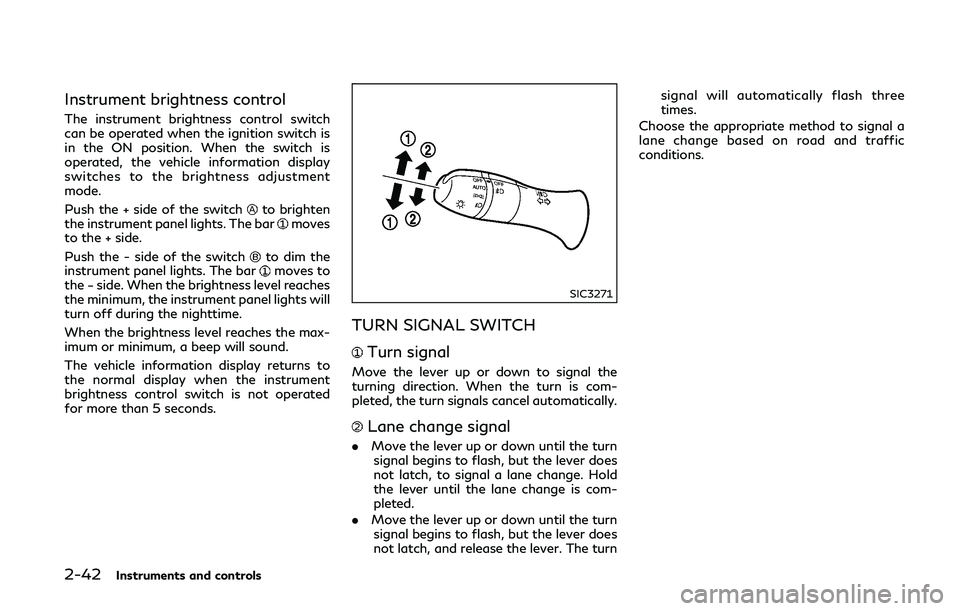
Push the + side of the switch
to brighten
the instrument panel lights. The barmoves
to the + side.
Push the - side of the switch
to dim the
instrument panel lights. The barmoves to
the − side. When the brightness level reaches
the minimum, the instrument panel lights will
turn off during the nighttime.
When the brightness level reaches the max-
imum or minimum, a beep will sound.
The vehicle information display returns to
the normal display when the instrument
brightness control switch is not operated
for more than 5 seconds.
SIC3271
TURN SIGNAL SWITCH
Turn signal
Move the lever up or down to signal the
turning direction. When the turn is com-
pleted, the turn signals cancel automatically.
Lane change signal
. Move the lever up or down until the turn
signal begins to flash, but the lever does
not latch, to signal a lane change. Hold
the lever until the lane change is com-
pleted.
. Move the lever up or down until the turn
signal begins to flash, but the lever does
not latch, and release the lever. The turn signal will automatically flash three
times.
Choose the appropriate method to signal a
lane change based on road and traffic
conditions.
Page 137 of 442
2-52Instruments and controls
POWER WINDOWS
WARNING
.Make sure that all passengers have
their hands, etc. inside the vehicle
while it is in motion and before
closing the windows. Use the window
lock switch to prevent unexpected
use of the power windows.
. To help avoid risk of injury or death
through unintended operation of the
vehicle and or its systems, including
entrapment in windows or inadver-
tent door lock activation, do not
leave children, people who require
the assistance of others or pets
unattended in your vehicle. Addition-
ally, the temperature inside a closed
vehicle on a warm day can quickly
become high enough to cause a sig-
nificant risk of injury or death to
people and pets.
The power windows operate when the
ignition switch is in the ON position or for
about 45 seconds after the ignition switch is
pushed to the OFF position. If the driver’s or
front passenger’s door is opened during this
period of about 45 seconds, power to the
windows is canceled.
JVI0740X
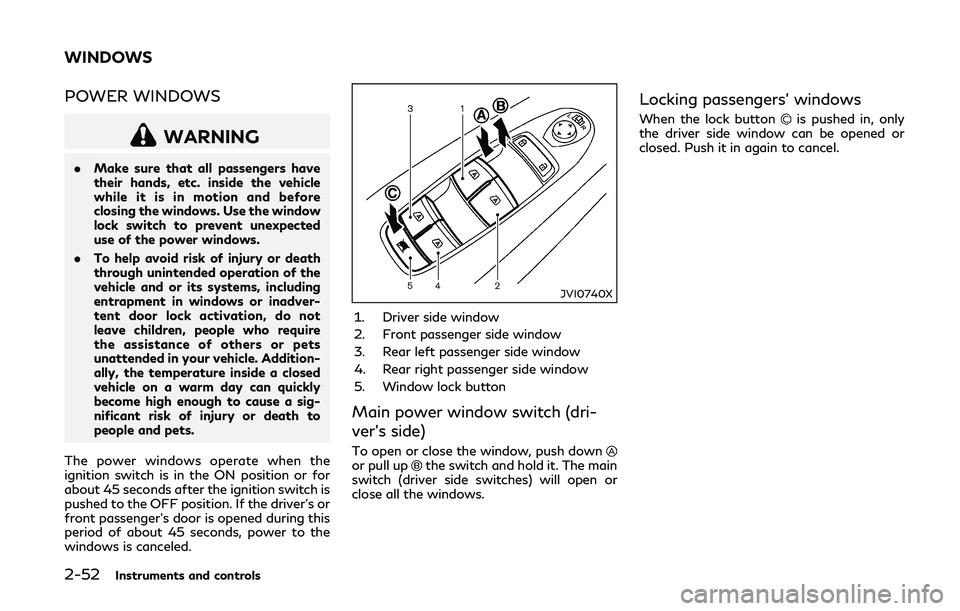
1. Driver side window
2. Front passenger side window
3. Rear left passenger side window
4. Rear right passenger side window
5. Window lock button
Main power window switch (dri-
ver’s side)
To open or close the window, push downor pull upthe switch and hold it. The main
switch (driver side switches) will open or
close all the windows.
Locking passengers’ windows
When the lock buttonis pushed in, only
the driver side window can be opened or
closed. Push it in again to cancel.
WINDOWS