climate control INFINITI Q60 2014 User Guide
[x] Cancel search | Manufacturer: INFINITI, Model Year: 2014, Model line: Q60, Model: INFINITI Q60 2014Pages: 466, PDF Size: 3.2 MB
Page 173 of 466

4-4Monitor, climate, audio, phone and voice recognition systems
SAA1524
Models without navigation system
1. “AUX” button (P.4-39)
2. “RADIO AM·FM” band selector button
(P.4-39)
3. INFINITI controller (P.4-5)
4. “
OFF” brightness control and
display ON/OFF button (P.4-9)
5. “INFO” vehicle information button
(P.4-9)
6. “DISC” selector button (P.4-39)
7. “STATUS” status display button
(P.4-9)
8. “SETTING” button (P.4-13)
When you use this system, make sure the
engine is running. If you use the system with the engine not
running (ignition ON or ACC) for a long
time, it will use up all the battery power,
and the engine will not start.
SAA1541
Models with navigation system
SAA1508
Models without navigation system
Page 174 of 466
HOW TO USE INFINITI CONTROLLER
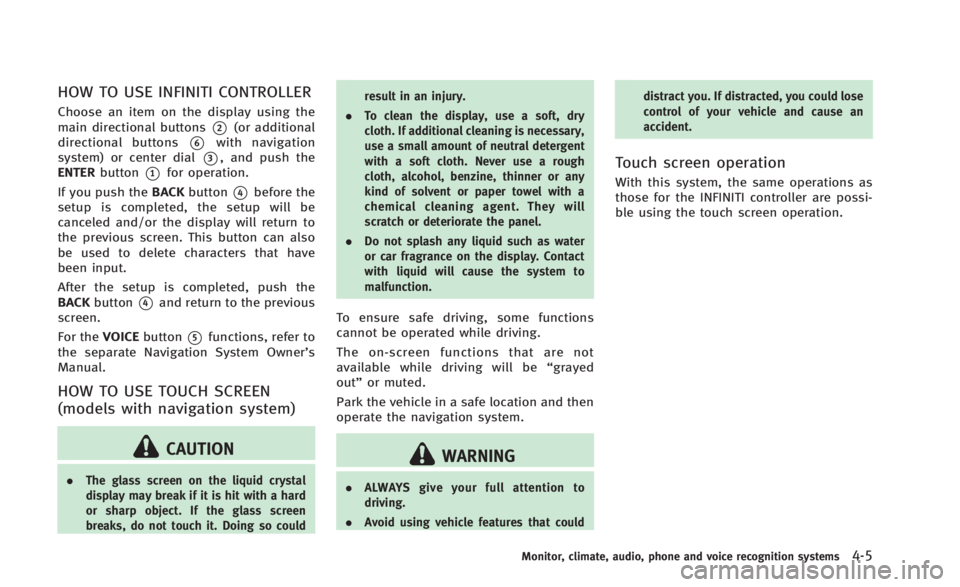
Choose an item on the display using the
main directional buttons
*2(or additional
directional buttons
*6with navigation
system) or center dial
*3, and push the
ENTER button
*1for operation.
If you push the BACKbutton
*4before the
setup is completed, the setup will be
canceled and/or the display will return to
the previous screen. This button can also
be used to delete characters that have
been input.
After the setup is completed, push the
BACK button
*4and return to the previous
screen.
For the VOICEbutton
*5functions, refer to
the separate Navigation System Owner’s
Manual.
HOW TO USE TOUCH SCREEN
(models with navigation system)
CAUTION
. The glass screen on the liquid crystal
display may break if it is hit with a hard
or sharp object. If the glass screen
breaks, do not touch it. Doing so could result in an injury.
. To clean the display, use a soft, dry
cloth. If additional cleaning is necessary,
use a small amount of neutral detergent
with a soft cloth. Never use a rough
cloth, alcohol, benzine, thinner or any
kind of solvent or paper towel with a
chemical cleaning agent. They will
scratch or deteriorate the panel.
. Do not splash any liquid such as water
or car fragrance on the display. Contact
with liquid will cause the system to
malfunction.
To ensure safe driving, some functions
cannot be operated while driving.
The on-screen functions that are not
available while driving will be “grayed
out” or muted.
Park the vehicle in a safe location and then
operate the navigation system.
WARNING
. ALWAYS give your full attention to
driving.
. Avoid using vehicle features that could distract you. If distracted, you could lose
control of your vehicle and cause an
accident.
Touch screen operation
With this system, the same operations as
those for the INFINITI controller are possi-
ble using the touch screen operation.
Monitor, climate, audio, phone and voice recognition systems4-5
Page 176 of 466

.Delete:
Deletes the last character that has been
input with one touch. Push and hold
the button to delete all of the char-
acters.
. OK:
Completes character inputs.
Touch screen maintenance
If you clean the display screen, use a dry,
soft cloth. If additional cleaning is neces-
sary, use a small amount of neutral
detergent with a soft cloth. Never spray
the screen with water or detergent. Dam-
pen the cloth first, and then wipe the
screen.
SAA1525
MENU OPTIONS (models with navi-
gation system)
The start menu can be displayed using the
menu control switch on the steering-wheel-
mounted controls.
1. While the MAP or STATUS screen is displayed, push and hold the menu
control switch until the “Menu Options”
screen appears.
2. Highlight the preferred item by tilting the menu control switch up or down,
and then push the menu control switch
to select it.
SAA2476
Available items
Destination/Route:
These items are for the navigation system.
See the separate Navigation System Own-
er’s Manual for details.
Info:
Displays the information screen. It is the
same screen that appears when you push
the INFO button.
Settings:
Displays the settings screen. It is the same
screen that appears when you push the
SETTING button.
Monitor, climate, audio, phone and voice recognition systems4-7
Page 177 of 466
4-8Monitor, climate, audio, phone and voice recognition systems
SAA2477
With navigation system
JVH0179M
Without navigation system
HOW TO SELECT MENUS ON THE
SCREEN
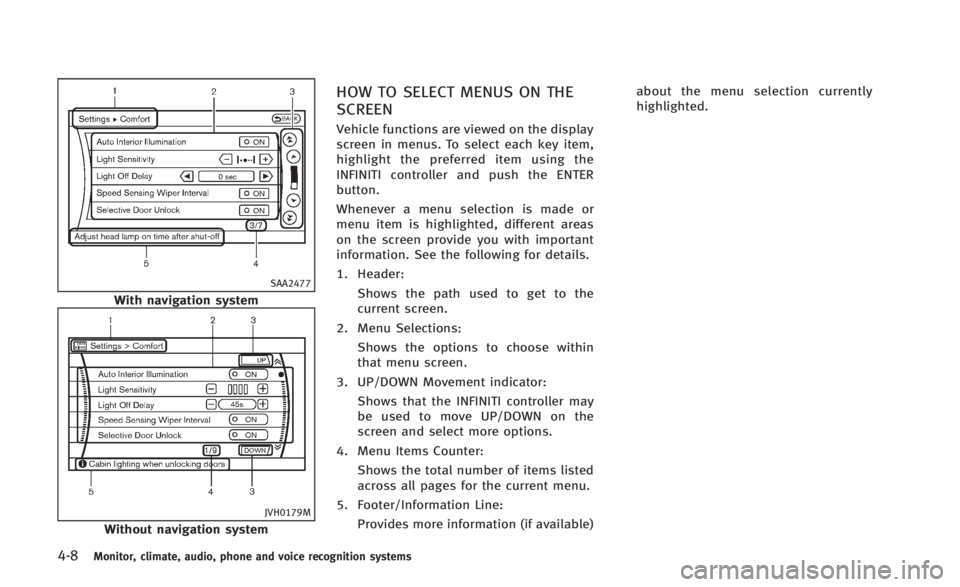
Vehicle functions are viewed on the display
screen in menus. To select each key item,
highlight the preferred item using the
INFINITI controller and push the ENTER
button.
Whenever a menu selection is made or
menu item is highlighted, different areas
on the screen provide you with important
information. See the following for details.
1. Header:Shows the path used to get to the
current screen.
2. Menu Selections: Shows the options to choose within
that menu screen.
3. UP/DOWN Movement indicator: Shows that the INFINITI controller may
be used to move UP/DOWN on the
screen and select more options.
4. Menu Items Counter: Shows the total number of items listed
across all pages for the current menu.
5. Footer/Information Line: Provides more information (if available) about the menu selection currently
highlighted.
Page 178 of 466

HOW TO USE STATUS BUTTON
You can check information related to the
audio, climate control system, fuel con-
sumption and navigation system (if so
equipped) by pressing the STATUS button
repeatedly.
HOW TO USE BRIGHTNESS CON-
TROL AND DISPLAY ON/OFF BUTTON
Push the“OFF”button to switch the
display brightness to the daytime mode or
the nighttime mode, and to adjust the
display brightness using the INFINITI con-
troller while the indicator is displayed at
the bottom of the screen.
The display brightness can also be ad-
justed using the brightness UP button (+)
or brightness DOWN button (−)(models
with navigation system).
Push and hold the “
OFF”button for
more than 2 seconds to turn the display
off. Push the button again to turn the
display on.
HOW TO USE INFO BUTTON
The display screen shows vehicle and
navigation (if so equipped) information
for your convenience.
The information shown on the screen
should be a guide to determine the
condition of the vehicle. See the following
for details.
SAA2478
Models with navigation system
SAA1511
Models without navigation system
Monitor, climate, audio, phone and voice recognition systems4-9
VEHICLE INFORMATION AND SETTINGS
Page 179 of 466
4-10Monitor, climate, audio, phone and voice recognition systems
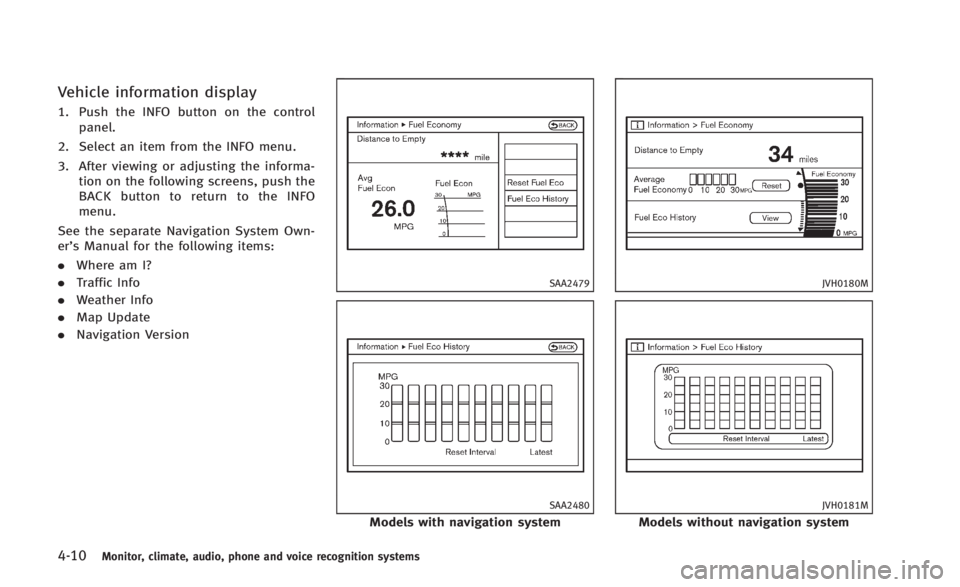
Vehicle information display
1. Push the INFO button on the controlpanel.
2. Select an item from the INFO menu.
3. After viewing or adjusting the informa- tion on the following screens, push the
BACK button to return to the INFO
menu.
See the separate Navigation System Own-
er’s Manual for the following items:
. Where am I?
. Traffic Info
. Weather Info
. Map Update
. Navigation Version
SAA2479
SAA2480
Models with navigation system
JVH0180M
JVH0181M
Models without navigation system
Page 183 of 466

4-14Monitor, climate, audio, phone and voice recognition systems
SAA2975
Models with navigation system
JVH0251X
Models without navigation system
Audio settings
The display as illustrated will appear when
pushing the SETTING button and selecting
the“Audio” key.
Bass/Treble/Balance/Fade:
To adjust the speaker tone quality and
sound balance, select the “Bass”,“Treble”,
“Balance ”or “Fade” key and adjust it with
the INFINITI controller.
These items can also be adjusted by
pushing and turning the AUDIO knob.
Precision Phased Audio (if so equipped):
When this item is turned to ON, super high
pitch sound and super low pitch sound are
emphasized and midrange sound is played
naturally.
Speed Sensitive Vol. (if so equipped):
The audio system’s volume is increased
with the vehicle speed. Select the “Speed
Sensitive Vol.” and adjust the effect level
with the INFINITI controller. The Speed
Sensitive Volume function is turned off
when the level is set to OFF. Increasing the
value will cause the volume to increase
faster with vehicle speed. BOSE
®AudioPilot®(if so equipped):
BOSE®AudioPilot®adjusts the volume and
sound quality depending on the changes of
the vehicle speeds and the noise picked up
by the microphone. It compensates for
noise from different road surface condi-
tions and open windows.
Surround Vol. (if so equipped):
To adjust the surround sound volume,
select “Surround Vol.” and adjust it with
the INFINITI controller.
DivX
®Registration Code (models with
navigation system):
The registration code for a device that is
used to download DivX
®files will be
displayed on the screen. If a disc is loaded
or a USB memory is connected to the audio
system, this function will not be activated.
Display Album Cover Art (models with
navigation system):
When this item is turned to ON, the album
cover image is displayed when playing
iPod
®or MP3 music files through a CD,
DVD or USB memory. When the image is
not properly embedded in the file or
device, the image will not be displayed.
Page 184 of 466

Phone settings (models with navi-
gation system)
For details of the“Phone”settings, see
“ Bluetooth®Hands-Free Phone System
(models with navigation system)” (P.4-77).
Bluetooth®settings (models with
navigation system)
For details of the “Bluetooth®”settings,
see “Bluetooth®Hands-Free Phone System
(models with navigation system)” (P.4-77).
SAA2554
Volume and Beeps settings (models
with navigation system)
The display as illustrated will appear when
pushing the SETTING button, selecting the
“Volume & Beeps”key.
Audio Volume:
To increase or decrease the audio volume,
select the “Audio Volume” and adjust it
with the INFINITI controller. You can also
adjust the audio volume by turning the
VOLUME control knob. Guidance Volume:
To adjust the guidance voice volume select
the
“Guidance Volume” and adjust it with
the INFINITI controller.
You can also adjust the guidance voice
volume by turning the VOLUME control
knob while voice guidance is being an-
nounced.
Ringtone/Incoming Call/Outgoing Call:
For the details of these items, see “Blue-
tooth
®Hands-Free Phone System (models
with navigation system)” (P.4-77).
Switch Beeps:
When this item is turned to ON, you will
hear a beep sound when you use a button.
Guidance Voice:
When this item is turned to ON, you will
hear voice guidance in the navigation
operation or in other operations.
NOTE:
When the voice guidance is being an-
nounced during audio playback, turning
the volume knob does not adjust the
music level; it adjusts the guidance
volume level. If voice guidance is not
being heard, please check the Guidance
Volume level.
Monitor, climate, audio, phone and voice recognition systems4-15
Page 185 of 466

4-16Monitor, climate, audio, phone and voice recognition systems
JVH0176M
Switch beeps settings (models
without navigation system)
The“Switch Beeps” screen will appear
when pushing the SETTINGbutton, select-
ing the “Switch Beeps” key with the
INFINITI controller and pushing the ENTER
button.
Switch Beeps:
When this item is turned to ON, you will
hear a beep sound when you use a button.
SAA2486
Display settings (models with na-
vigation system)
The display as illustrated will appear when
pushing the SETTING button and selecting
the “Display” key.
Display Adjustment:
To adjust the display settings, select the
“Display Adjustment” key. The following
settings are available.
. Display
To turn off the screen, push the ENTER
button and turn the “Display”indicator off.
The other method is to push and hold the
“
OFF” button for more than 2 seconds. When any mode button is pushed with the
screen off, the screen turns on for further
operation. The screen will turn off auto-
matically 5 seconds after the operation is
finished.
To turn on the screen, set this item to the
ON position, or push and hold the
“
OFF”button.
. Brightness/Contrast/Background Color
To adjust the brightness and contrast of
the screen, select the “Brightness” or
“Contrast” key.
Then, you can adjust the brightness and
the contrast using the INFINITI controller.
For information on the “Background Color”
key, refer to the separate Navigation
System Owner’s Manual.
Operating tips:
Depending on the driver’s seat positions or
the weather conditions, the display could
be hard to read. Adjust the brightness and
contrast of the display on the setting
screen.
Color Theme:
Choose the theme color of the menu screen
from “Black”, “Brown” or“Silver”.
Page 186 of 466
SAA2115
DISPLAY settings (models without
navigation system)
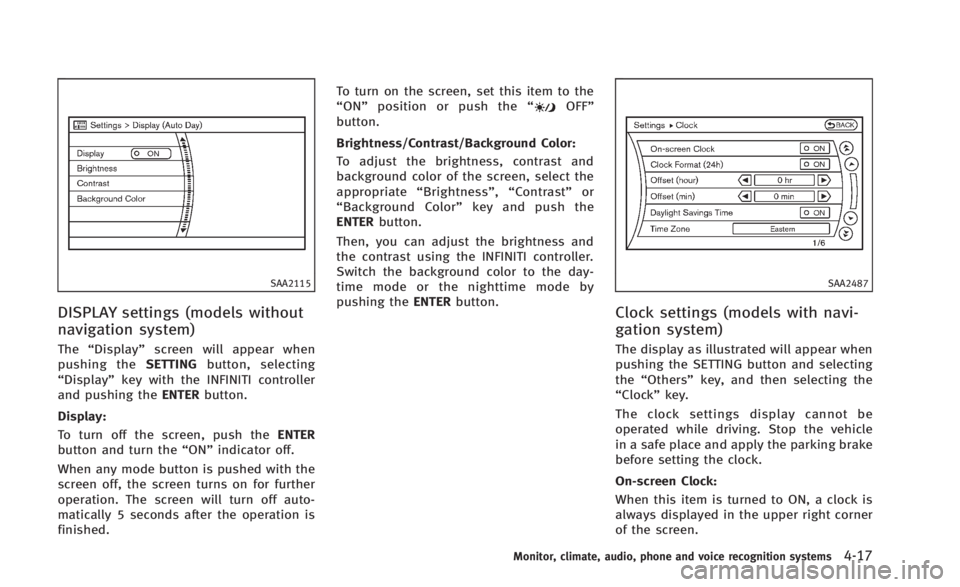
The“Display” screen will appear when
pushing the SETTINGbutton, selecting
“Display” key with the INFINITI controller
and pushing the ENTERbutton.
Display:
To turn off the screen, push the ENTER
button and turn the “ON”indicator off.
When any mode button is pushed with the
screen off, the screen turns on for further
operation. The screen will turn off auto-
matically 5 seconds after the operation is
finished. To turn on the screen, set this item to the
“
ON” position or push the “
OFF”
button.
Brightness/Contrast/Background Color:
To adjust the brightness, contrast and
background color of the screen, select the
appropriate “Brightness” ,“Contrast” or
“ Background Color” key and push the
ENTER button.
Then, you can adjust the brightness and
the contrast using the INFINITI controller.
Switch the background color to the day-
time mode or the nighttime mode by
pushing the ENTERbutton.
SAA2487
Clock settings (models with navi-
gation system)
The display as illustrated will appear when
pushing the SETTING button and selecting
the“Others” key, and then selecting the
“Clock” key.
The clock settings display cannot be
operated while driving. Stop the vehicle
in a safe place and apply the parking brake
before setting the clock.
On-screen Clock:
When this item is turned to ON, a clock is
always displayed in the upper right corner
of the screen.
Monitor, climate, audio, phone and voice recognition systems4-17