automatic transmission INFINITI Q60 2014 Owner's Manual
[x] Cancel search | Manufacturer: INFINITI, Model Year: 2014, Model line: Q60, Model: INFINITI Q60 2014Pages: 466, PDF Size: 3.2 MB
Page 167 of 466

3-40Pre-driving checks and adjustments
approximately 0.5 second. When the
memory has stored in position, the
indicator light will stay on for approxi-
mately 5 seconds.
. If the battery cable is disconnected, or if
the fuse opens, the memory will be
canceled. In this case, reset the desired
position using the previous procedure.
. If optional Intelligent Keys are added to
your vehicle, the memory storage pro-
cedure to switch 1 or 2 and linking
Intelligent Key procedure to a stored
memory position should be performed
again for each Intelligent Key. For
additional Intelligent Key information,
see “Keys” (P.3-3).
Selecting the memorized position
1.Automatic transmission models:
Move the shift lever to the P (Park)
position.
Manual transmission models:
Apply the parking brake.
2. Raise the seatback.
3. Use one of the following methods to move the driver’ s seat, the outside
mirrors and the steering wheel.
.Push the ignition switch to the ON position and push the memory
switch (1 or 2) fully for at least 1
second.
.Within 45 seconds of opening the
driver’ s door, push the memory
switch (1 or 2) fully for at least 1
second.
The driver’s seat, steering column
and outside mirrors will move to the
memorized position with the indica-
tor light flashing, and then the light
will stay on for approximately 5
seconds.
For manual transmission models, the
memory positions can be selected even
when the engine is running. In this case,
move the shift lever to the N (Neutral)
position and apply the parking brake.
Then, perform step 2.
SYSTEM OPERATION
The automatic drive positioner system will
not work or will stop operating under the
following conditions:
. When the vehicle speed is above 4 MPH
(7 km/h).
. When the adjusting switch for the
driver’s seat and steering column is
turned on while the automatic drive positioner is operating.
. When the memory switch 1 or 2 is not
pushed for at least 1 second.
. When the seat, steering column and
outside mirrors have already been
moved to the memorized position.
. When no position is stored in the
memory switch.
. When the parking brake is released (MT
models).
. When the speed is above 4 MPH (7
km/h) while the parking brake is
applied (MT models).
. To restart the drive positioner system,
move the parking brake to off and on.
. When the engine is started while
moving the automatic drive positioner.
. When the driver’s door remains open
for more than 45 seconds and the
ignition switch is not in the ON posi-
tion.
. When the seatback is folded.
. While the walk-in function operates.
. The seat synchronization function is
automatically disabled if the outside
mirrors or steering wheel reaches its
maximum adjustment.
Page 194 of 466

SAA1897
1. Visually check that the parking space issafe before parking your vehicle.
2. The rearview of the vehicle is displayed on the screen
*Aas illustrated when
the shift lever is moved to the R
(Reverse) position.
SAA1898
3. Slowly back up the vehicle adjusting the steering wheel so that the predic-
tive course lines
*Benter the parking
space
*C.
4. Maneuver the steering wheel to make the vehicle width guide lines
*Dparallel to the parking space*Cwhile referring to the predictive course lines.
5. When the vehicle is parked in the space completely, move the shift lever to the
P (Park) position (Automatic Transmis-
sion models) or in an appropriate gear
(Manual Transmission models) and
apply the parking brake.
DIFFERENCE BETWEEN PREDICTIVE
AND ACTUAL DISTANCES
The distance guide line and the vehicle
width guide line should be used as a
reference only when the vehicle is on a
level, paved surface. The distance viewed
on the monitor is for reference only and
may be different from the actual distance
between the vehicle and displayed objects.
Monitor, climate, audio, phone and voice recognition systems4-25
Page 226 of 466

CD:
.Disc title
. Track title
CD with compressed audio files:
. Folder title
. File title
. Song title
. Album title
. Artist
Next/Previous Track and Fast
Forward/Rewind:
Push the Forward or Rewind button for
more than 1.5 seconds while a CD is being
played to fast forward or rewind through
the track. When the button is released, the
CD will return to normal play speed.
When the Forward button is pushed for
less than 1.5 seconds while a CD is being
played, the next track on the CD will be
played.
When the Rewind button is pushed for less
than 1.5 seconds within 3 seconds after
the current track started playing, the
previous track will be played.
When the Rewind button is pushed for less
than 1.5 seconds after 3 seconds from when the current track started playing, the
beginning of the current track will be
played.
REPEAT (RPT), RANDOM (RDM):
When the RPT button is pushed while the
CD is played, the play pattern can be
changed as follows:
(CD)
(CD with compressed audio files)
CD EJECT:
When the CD EJECT button is pushed with
the CD loaded, the CD will be ejected.
When this button is pushed while the CD is
being played, the CD will be ejected.
If the CD comes out and is not removed, it
will be pulled back into the slot to protect
it.
DVD (Digital Versatile Disc) PLAYER
OPERATION (models with naviga-
tion system)
Precautions
Start the engine when using the DVD
entertainment system.
Movies will not be shown on the front
display while the vehicle is in any drive
position to reduce driver distraction. Audio
is available when a movie is played. To
view movies in the front display, stop the
vehicle in a safe location, move the shift
lever to the P (Park) position (Automatic
Transmission models) or in an appropriate
gear (Manual Transmission models) and
apply the parking brake.
WARNING
. The driver must not attempt to operate
the DVD system or wear the headphones
while the vehicle is in motion so that full
attention may be given to vehicle opera-
tion.
. Do not attempt to modify the system to
display a movie on the front screen while
the vehicle is being driven. Doing so may
Monitor, climate, audio, phone and voice recognition systems4-57
Page 230 of 466
SAA2973
Automatic transmission models
SAA2610
Manual transmission models
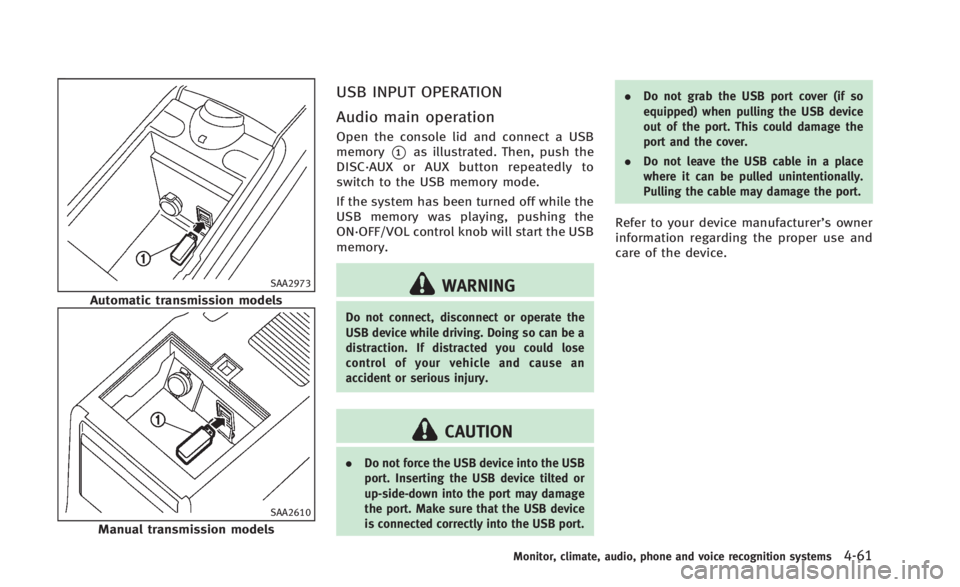
USB INPUT OPERATION
Audio main operation
Open the console lid and connect a USB
memory
*1as illustrated. Then, push the
DISC·AUX or AUX button repeatedly to
switch to the USB memory mode.
If the system has been turned off while the
USB memory was playing, pushing the
ON·OFF/VOL control knob will start the USB
memory.
WARNING
Do not connect, disconnect or operate the
USB device while driving. Doing so can be a
distraction. If distracted you could lose
control of your vehicle and cause an
accident or serious injury.
CAUTION
. Do not force the USB device into the USB
port. Inserting the USB device tilted or
up-side-down into the port may damage
the port. Make sure that the USB device
is connected correctly into the USB port. .
Do not grab the USB port cover (if so
equipped) when pulling the USB device
out of the port. This could damage the
port and the cover.
. Do not leave the USB cable in a place
where it can be pulled unintentionally.
Pulling the cable may damage the port.
Refer to your device manufacturer’s owner
information regarding the proper use and
care of the device.
Monitor, climate, audio, phone and voice recognition systems4-61
Page 240 of 466
SAA2974
Automatic transmission models
SAA2426
Manual transmission models
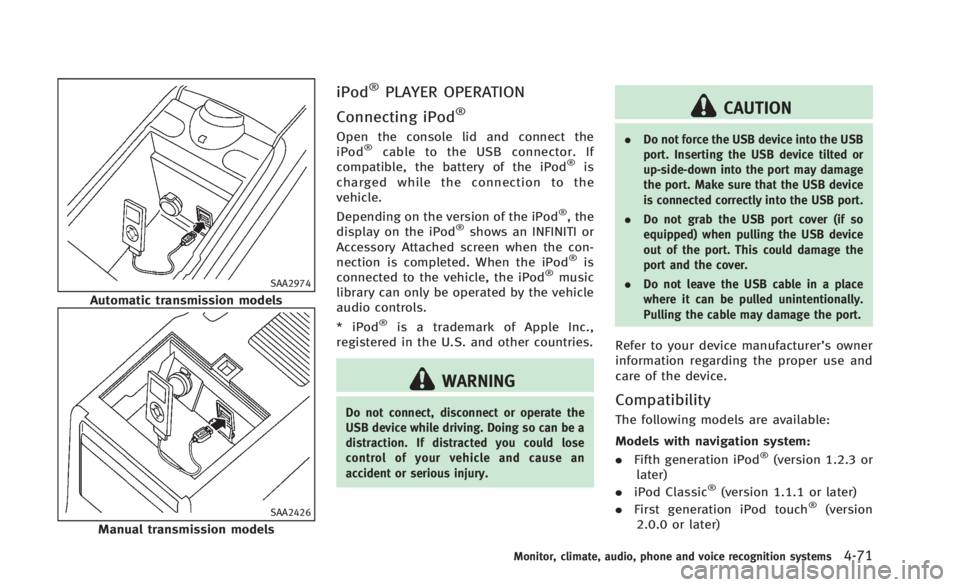
iPod®PLAYER OPERATION
Connecting iPod
®
Open the console lid and connect the
iPod®cable to the USB connector. If
compatible, the battery of the iPod®is
charged while the connection to the
vehicle.
Depending on the version of the iPod
®, the
display on the iPod®shows an INFINITI or
Accessory Attached screen when the con-
nection is completed. When the iPod
®is
connected to the vehicle, the iPod®music
library can only be operated by the vehicle
audio controls.
* iPod
®is a trademark of Apple Inc.,
registered in the U.S. and other countries.
WARNING
Do not connect, disconnect or operate the
USB device while driving. Doing so can be a
distraction. If distracted you could lose
control of your vehicle and cause an
accident or serious injury.
CAUTION
. Do not force the USB device into the USB
port. Inserting the USB device tilted or
up-side-down into the port may damage
the port. Make sure that the USB device
is connected correctly into the USB port.
. Do not grab the USB port cover (if so
equipped) when pulling the USB device
out of the port. This could damage the
port and the cover.
. Do not leave the USB cable in a place
where it can be pulled unintentionally.
Pulling the cable may damage the port.
Refer to your device manufacturer’s owner
information regarding the proper use and
care of the device.
Compatibility
The following models are available:
Models with navigation system:
.Fifth generation iPod
®(version 1.2.3 or
later)
. iPod Classic
®(version 1.1.1 or later)
. First generation iPod touch®(version
2.0.0 or later)
Monitor, climate, audio, phone and voice recognition systems4-71
Page 270 of 466
transmission in Park.
3. Press the
button.
4. Speak: “Help”. The system acknowl-
edges the command and announces
the next set of available commands.
5. Speak: "Voice Adaptation". The system acknowledges the command and dis-
plays the voice adaptation mode
screen.
6. Voice memory A or memory B is selected automatically. If both memory
locations are already in use, the system
will prompt you to overwrite one.
Follow the instructions provided by
the system.
7. When preparation is complete and you are ready to begin, press the
button.
8. The voice adaptation mode will be explained. Follow the instructions pro-
vided by the system.
9. When training is finished, the system will tell you an adequate number of
phrases have been recorded.
10. The system will ask you to say your name. Follow the instructions to regis-
ter your name. 11. The system will announce that voice
adaptation has been completed and
the system is ready.
The voice adaptation mode will stop if:
. The
button is pressed in voice
adaptation mode.
. The vehicle is driven during voice
adaptation mode.
. The ignition switch is placed in the OFF
or LOCK position. INFINITI Voice Recognition allows hands-
free operation of the Phone, Navigation,
Information and Audio systems in one of
two modes, Standard Mode or Alternate
Command Mode.
In Standard Mode, commands that are
available are always shown on the display
and announced by the system. You can
complete your desired operation by simply
following the prompts given by the system.
(See
“INFINITI Voice Recognition Standard
Mode” (P.4-102) for details.)
For advanced operation, you can use the
Alternate Command Mode. (See “INFINITI
Voice Recognition Alternate Command
Mode” (P.4-114) for details.) When this
mode is active, an expanded list of
commands can be spoken after pushing
the TALK
switch, and the voice
command menu prompts are turned off.
Review the expanded command list, which
is available when this mode is active. Note
that in this mode the recognition success
rate may be affected as the number of
available commands and the ways of
speaking each command are increased.
To switch one mode to another, see each
mode description later in this section.
To improve the recognition success rate
Monitor, climate, audio, phone and voice recognition systems4-101
INFINITI VOICE RECOGNITION SYSTEM
(models with navigation system)
Page 300 of 466
5 Starting and driving
Precautions when starting and driving................. 5-3
Exhaust gas (carbon monoxide) ....................... 5-3
Three-way catalyst........................................... 5-4
Tire Pressure Monitoring System (TPMS).......... 5-4
Avoiding collision and rollover......................... 5-7
Off-road recovery............................................. 5-7
Rapid air pressure loss ................................... 5-7
Drinking alcohol/drugs and driving ................. 5-8
Push-button ignition switch ................................. 5-9 Operating range for engine start function ........ 5-9
Push-button ignition switch operation ........... 5-10
Push-button ignition switch positions ............ 5-10
Emergency engine shut off ............................ 5-11
Intelligent Key battery discharge ................... 5-11
Before starting the engine ................................. 5-12
Starting the engine ............................................ 5-12
Driving the vehicle ............................................. 5-13 Automatic transmission ................................. 5-13
Manual transmission ..................................... 5-18
Parking brake .................................................... 5-20
Automatic transmission models ..................... 5-21
Manual transmission models ......................... 5-21 Cruise control.................................................... 5-21
Precautions on cruise control....................... 5-21
Cruise control operations ............................. 5-22
Intelligent Cruise Control (ICC) system (if
so equipped)..................................................... 5-23 Selecting the vehicle-to-vehicle distance
control mode ............................................... 5-24
Vehicle-to-vehicle distance control mode...... 5-25
Precautions on vehicle-to-vehicle distance
control mode ............................................... 5-25
Vehicle-to-vehicle distance control
mode operation ........................................... 5-27
Conventional (fixed speed) cruise
control mode ............................................... 5-41
Preview function (for Intelligent Cruise
Control system equipped models) ................ 5-45
Break-in schedule ............................................. 5-46
Fuel Efficient Driving Tips .................................. 5-46
Increasing fuel economy.................................... 5-47
Parking/parking on hills.................................... 5-48
Sonar system (if so equipped) .......................... 5-49 Sonar indicator ............................................ 5-50
Sonar system off switch............................... 5-51
Page 308 of 466

WARNING
Do not operate the push-button ignition
switch while driving the vehicle except in an
emergency. (The engine will stop when the
ignition switch is pushed 3 consecutive
times or the ignition switch is pushed and
held for more than 2 seconds.) If the engine
stops while the vehicle is being driven, this
could lead to a crash and serious injury.
Before operating the push-button ignition
switch, be sure to move the shift lever to
the P (Park) position (for automatic trans-
mission model) or the shift lever to the N
(Neutral) position (for manual transmission
model).SSD0872
OPERATING RANGE FOR ENGINE
START FUNCTION
The Intelligent Key can only be used for
starting the engine when the Intelligent
Key is within the specified operating range
*1.
When the Intelligent Key battery is almost
discharged or strong radio waves are
present near the operating location, the
Intelligent Key system’s operating range
becomes narrower and may not function
properly.
If the Intelligent Key is within the operating
range, it is possible for anyone, even someone who does not carry the Intelligent
Key, to push the ignition switch to start the
engine.
.
The trunk area is not included in the
operating range but the Intelligent Key
may function.
. If the Intelligent Key is placed on the
instrument panel, rear parcel shelf,
inside the glove box or door pocket,
the Intelligent Key may not function.
. If the Intelligent Key is placed near the
door or window outside the vehicle, the
Intelligent Key may function.
Starting and driving5-9
PUSH-BUTTON IGNITION SWITCH
Page 309 of 466
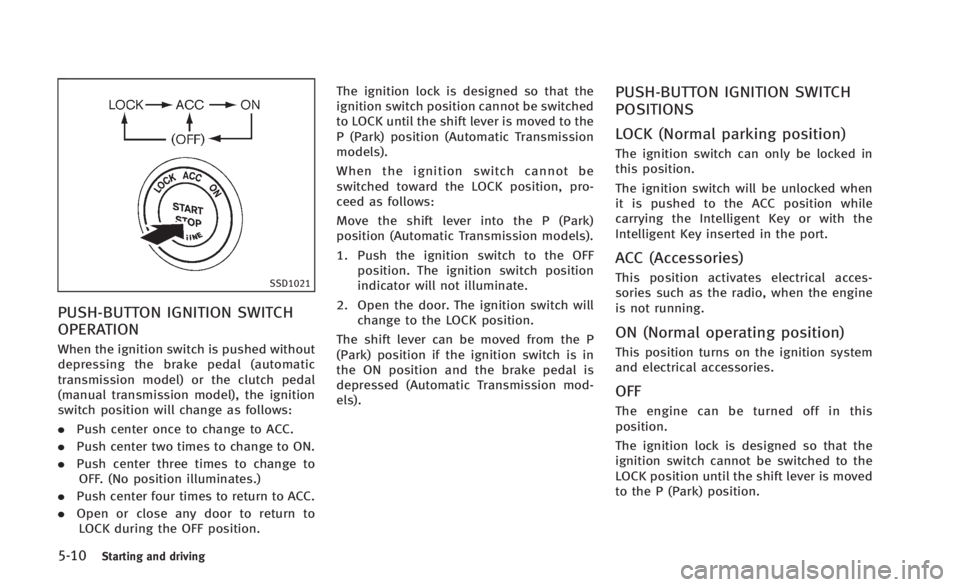
5-10Starting and driving
SSD1021
PUSH-BUTTON IGNITION SWITCH
OPERATION
When the ignition switch is pushed without
depressing the brake pedal (automatic
transmission model) or the clutch pedal
(manual transmission model), the ignition
switch position will change as follows:
.Push center once to change to ACC.
. Push center two times to change to ON.
. Push center three times to change to
OFF. (No position illuminates.)
. Push center four times to return to ACC.
. Open or close any door to return to
LOCK during the OFF position. The ignition lock is designed so that the
ignition switch position cannot be switched
to LOCK until the shift lever is moved to the
P (Park) position (Automatic Transmission
models).
When the ignition switch cannot be
switched toward the LOCK position, pro-
ceed as follows:
Move the shift lever into the P (Park)
position (Automatic Transmission models).
1. Push the ignition switch to the OFF
position. The ignition switch position
indicator will not illuminate.
2. Open the door. The ignition switch will change to the LOCK position.
The shift lever can be moved from the P
(Park) position if the ignition switch is in
the ON position and the brake pedal is
depressed (Automatic Transmission mod-
els).
PUSH-BUTTON IGNITION SWITCH
POSITIONS
LOCK (Normal parking position)
The ignition switch can only be locked in
this position.
The ignition switch will be unlocked when
it is pushed to the ACC position while
carrying the Intelligent Key or with the
Intelligent Key inserted in the port.
ACC (Accessories)
This position activates electrical acces-
sories such as the radio, when the engine
is not running.
ON (Normal operating position)
This position turns on the ignition system
and electrical accessories.
OFF
The engine can be turned off in this
position.
The ignition lock is designed so that the
ignition switch cannot be switched to the
LOCK position until the shift lever is moved
to the P (Park) position.
Page 311 of 466

5-12Starting and driving
.Make sure the area around the vehicle
is clear.
. Check fluid levels such as engine oil,
coolant, brake fluid and window
washer fluid as frequently as possible,
or at least whenever you refuel.
. Check that all windows and lights are
clean.
. Visually inspect tires for their appear-
ance and condition. Also check tires for
proper inflation.
. Lock all doors.
. Position seat and adjust head re-
straints.
. Adjust inside and outside mirrors.
. Fasten seat belts and ask all passen-
gers to do likewise.
. Check the operation of warning lights
when the ignition switch is pushed to
the ON position. (See “Warning/indica-
tor lights and audible reminders” (P.2-
10).) 1. Apply the parking brake.
2.
Automatic Transmission (AT) model:
Move the shift lever to the P (Park) or N
(Neutral) position. (P is recommended.)
The starter is designed not to operate
unless the shift lever is in either of the
above positions.
Manual Transmission (MT) model:
Move the shift lever to the N (Neutral)
position. Depress the clutch pedal fully
to the floor.
The starter is designed not to operate
unless the clutch pedal is fully de-
pressed.
The Intelligent Key must be carried
when operating the ignition switch.
3. Push the ignition switch to the ON position. Depress the brake pedal (AT
model) or the clutch pedal (MT model)
and push the ignition switch to start
the engine.
To start the engine immediately, push
and release the ignition switch while
depressing the brake pedal or the
clutch pedal (MT model) with the
ignition switch in any position.
.If the engine is very hard to start inextremely cold weather or when restarting, depress the accelerator
pedal a little (approximately 1/3 to
the floor) and while holding, crank
the engine. Release the accelerator
pedal when the engine starts.
.If the engine is very hard to start
because it is flooded, depress the
accelerator pedal all the way to the
floor and hold it. Push the ignition
switch to the ON position to start
cranking the engine. After 5 or 6
seconds, stop cranking by pushing
the ignition switch to OFF. After
cranking the engine, release the
accelerator pedal. Crank the engine
with your foot off the accelerator
pedal by depressing the brake pedal
and the clutch pedal (MT model) and
pushing the push-button ignition
switch to start the engine. If the
engine starts, but fails to run, repeat
the above procedure.
CAUTION
Do not operate the starter for more than 15
seconds at a time. If the engine does not
start, push the ignition switch to OFF and
wait 10 seconds before cranking again,
BEFORE STARTING THE ENGINE STARTING THE ENGINE