climate control INFINITI Q60 2014 Repair Manual
[x] Cancel search | Manufacturer: INFINITI, Model Year: 2014, Model line: Q60, Model: INFINITI Q60 2014Pages: 466, PDF Size: 3.2 MB
Page 275 of 466
4-106Monitor, climate, audio, phone and voice recognition systems
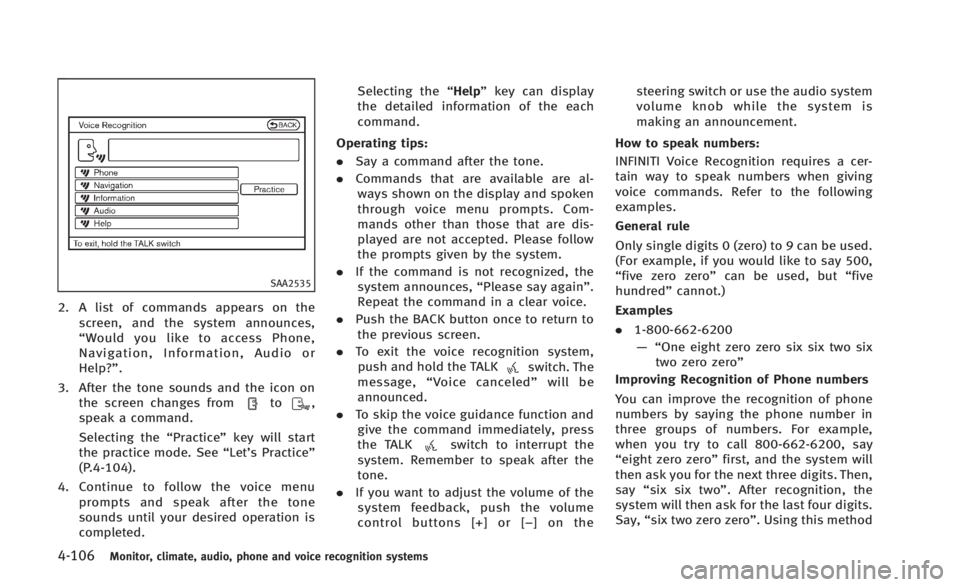
SAA2535
2. A list of commands appears on thescreen, and the system announces,
“Would you like to access Phone,
Navigation, Information, Audio or
Help?”.
3. After the tone sounds and the icon on the screen changes from
to,
speak a command.
Selecting the “Practice”key will start
the practice mode. See “Let’s Practice”
(P.4-104).
4. Continue to follow the voice menu prompts and speak after the tone
sounds until your desired operation is
completed. Selecting the
“Help”key can display
the detailed information of the each
command.
Operating tips:
. Say a command after the tone.
. Commands that are available are al-
ways shown on the display and spoken
through voice menu prompts. Com-
mands other than those that are dis-
played are not accepted. Please follow
the prompts given by the system.
. If the command is not recognized, the
system announces, “Please say again”.
Repeat the command in a clear voice.
. Push the BACK button once to return to
the previous screen.
. To exit the voice recognition system,
push and hold the TALK
switch. The
message, “Voice canceled” will be
announced.
. To skip the voice guidance function and
give the command immediately, press
the TALK
switch to interrupt the
system. Remember to speak after the
tone.
. If you want to adjust the volume of the
system feedback, push the volume
control buttons [+] or [− ] on thesteering switch or use the audio system
volume knob while the system is
making an announcement.
How to speak numbers:
INFINITI Voice Recognition requires a cer-
tain way to speak numbers when giving
voice commands. Refer to the following
examples.
General rule
Only single digits 0 (zero) to 9 can be used.
(For example, if you would like to say 500,
“five zero zero” can be used, but “five
hundred” cannot.)
Examples
. 1-800-662-6200
—“ One eight zero zero six six two six
two zero zero”
Improving Recognition of Phone numbers
You can improve the recognition of phone
numbers by saying the phone number in
three groups of numbers. For example,
when you try to call 800-662-6200, say
“eight zero zero” first, and the system will
then ask you for the next three digits. Then,
say “six six two”. After recognition, the
system will then ask for the last four digits.
Say, “six two zero zero”. Using this method
Page 280 of 466
JVH0481X
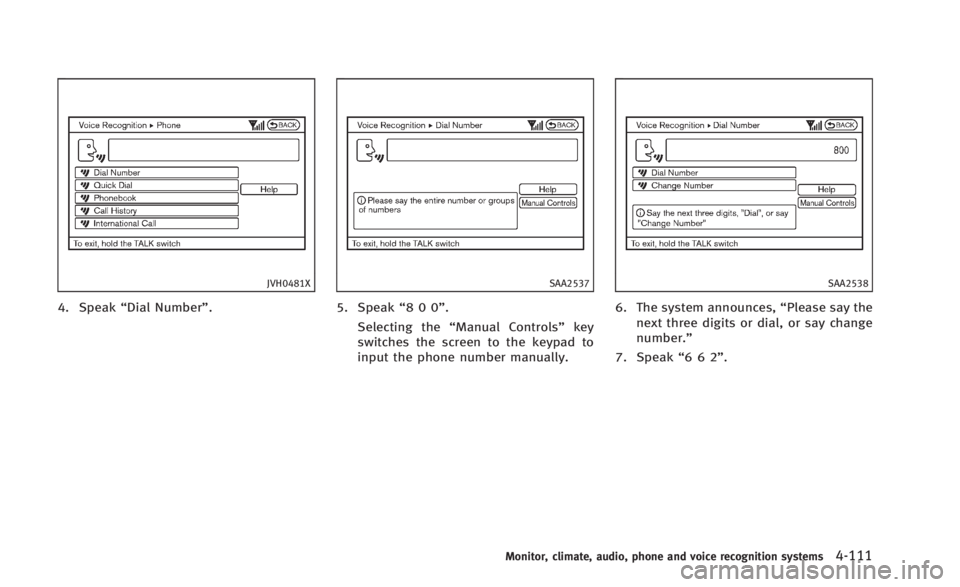
4. Speak“Dial Number”.
SAA2537
5. Speak“800”.
Selecting the “Manual Controls” key
switches the screen to the keypad to
input the phone number manually.
SAA2538
6. The system announces, “Please say the
next three digits or dial, or say change
number.”
7. Speak “662”.
Monitor, climate, audio, phone and voice recognition systems4-111
Page 284 of 466
SAA2529
Activating Alternate Command
Mode
When the Standard Mode is active, perform
the following steps to switch to the
Alternate Command Mode.
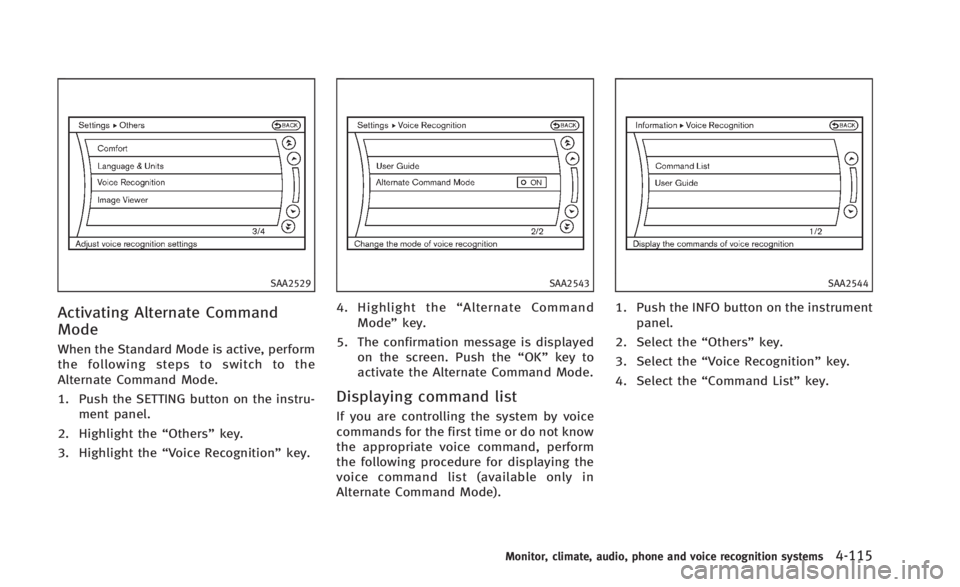
1. Push the SETTING button on the instru-ment panel.
2. Highlight the “Others”key.
3. Highlight the “Voice Recognition” key.
SAA2543
4. Highlight the“Alternate Command
Mode” key.
5. The confirmation message is displayed on the screen. Push the “OK”key to
activate the Alternate Command Mode.
Displaying command list
If you are controlling the system by voice
commands for the first time or do not know
the appropriate voice command, perform
the following procedure for displaying the
voice command list (available only in
Alternate Command Mode).
SAA2544
1. Push the INFO button on the instrument
panel.
2. Select the “Others”key.
3. Select the “Voice Recognition” key.
4. Select the “Command List” key.
Monitor, climate, audio, phone and voice recognition systems4-115
Page 285 of 466
4-116Monitor, climate, audio, phone and voice recognition systems
SAA2545
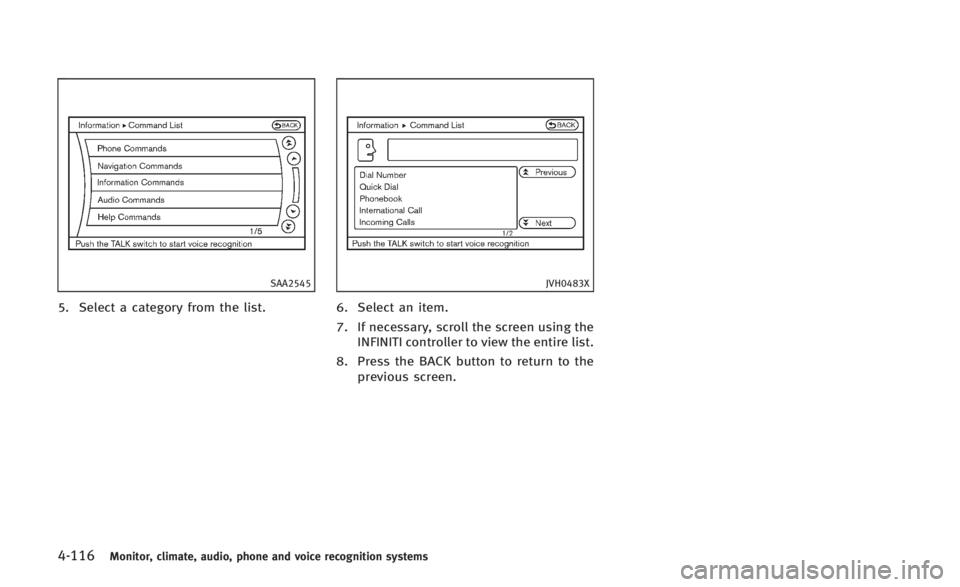
5. Select a category from the list.
JVH0483X
6. Select an item.
7. If necessary, scroll the screen using theINFINITI controller to view the entire list.
8. Press the BACK button to return to the previous screen.
Page 292 of 466
SAA2547
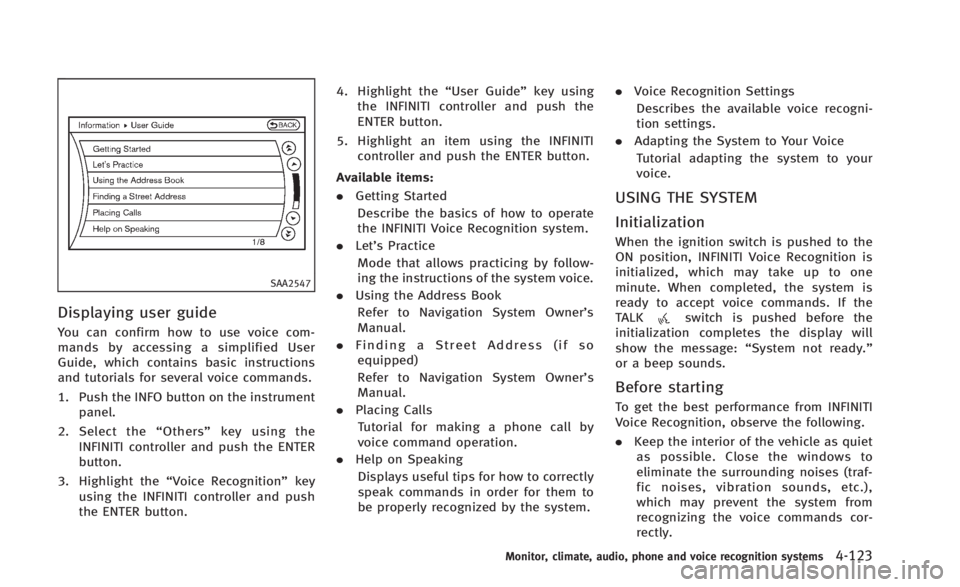
Displaying user guide
You can confirm how to use voice com-
mands by accessing a simplified User
Guide, which contains basic instructions
and tutorials for several voice commands.
1. Push the INFO button on the instrumentpanel.
2. Select the “Others” key using the
INFINITI controller and push the ENTER
button.
3. Highlight the “Voice Recognition” key
using the INFINITI controller and push
the ENTER button. 4. Highlight the
“User Guide”key using
the INFINITI controller and push the
ENTER button.
5. Highlight an item using the INFINITI controller and push the ENTER button.
Available items:
. Getting Started
Describe the basics of how to operate
the INFINITI Voice Recognition system.
. Let’s Practice
Mode that allows practicing by follow-
ing the instructions of the system voice.
. Using the Address Book
Refer to Navigation System Owner’s
Manual.
. Finding a Street Address (if so
equipped)
Refer to Navigation System Owner’s
Manual.
. Placing Calls
Tutorial for making a phone call by
voice command operation.
. Help on Speaking
Displays useful tips for how to correctly
speak commands in order for them to
be properly recognized by the system. .
Voice Recognition Settings
Describes the available voice recogni-
tion settings.
. Adapting the System to Your Voice
Tutorial adapting the system to your
voice.
USING THE SYSTEM
Initialization
When the ignition switch is pushed to the
ON position, INFINITI Voice Recognition is
initialized, which may take up to one
minute. When completed, the system is
ready to accept voice commands. If the
TALK
switch is pushed before the
initialization completes the display will
show the message: “System not ready.”
or a beep sounds.
Before starting
To get the best performance from INFINITI
Voice Recognition, observe the following.
. Keep the interior of the vehicle as quiet
as possible. Close the windows to
eliminate the surrounding noises (traf-
fic noises, vibration sounds, etc.),
which may prevent the system from
recognizing the voice commands cor-
rectly.
Monitor, climate, audio, phone and voice recognition systems4-123
Page 293 of 466
4-124Monitor, climate, audio, phone and voice recognition systems
.When the air conditioner is in the AUTO
mode, the fan speed decreases auto-
matically for easy recognition.
. Wait until a tone sounds before speak-
ing a command.
. Speak in a natural voice without paus-
ing between words.
SAA1588
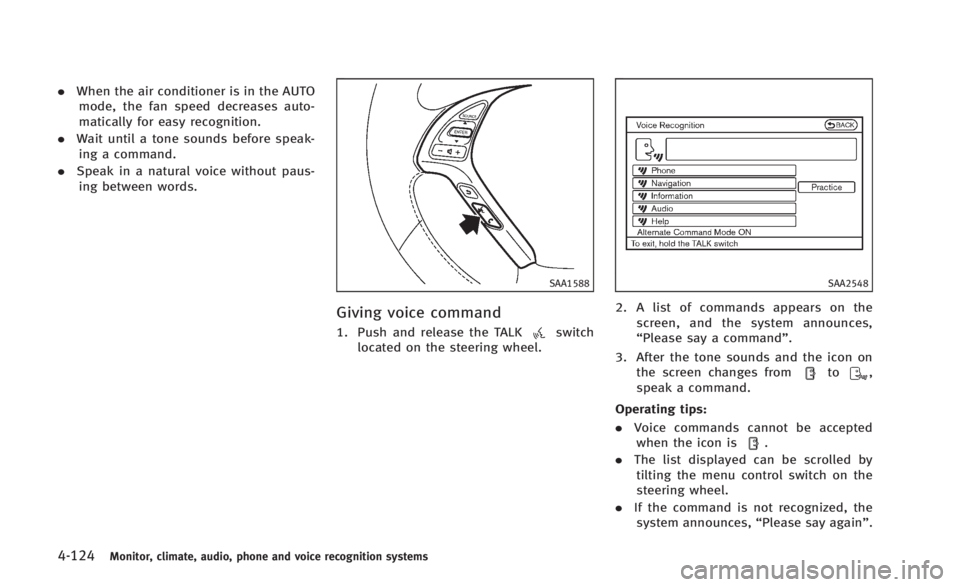
Giving voice command
1. Push and release the TALKswitch
located on the steering wheel.
SAA2548
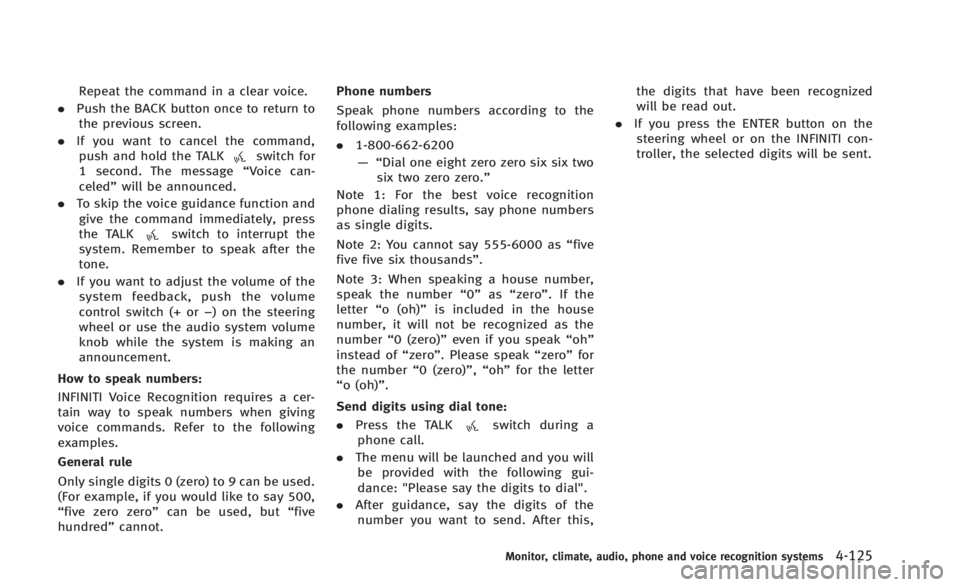
2. A list of commands appears on the
screen, and the system announces,
“Please say a command”.
3. After the tone sounds and the icon on the screen changes from
to,
speak a command.
Operating tips:
. Voice commands cannot be accepted
when the icon is
.
. The list displayed can be scrolled by
tilting the menu control switch on the
steering wheel.
. If the command is not recognized, the
system announces, “Please say again”.
Page 294 of 466
Repeat the command in a clear voice.
. Push the BACK button once to return to
the previous screen.
. If you want to cancel the command,
push and hold the TALK
switch for
1 second. The message “Voice can-
celed” will be announced.
. To skip the voice guidance function and
give the command immediately, press
the TALK
switch to interrupt the
system. Remember to speak after the
tone.
. If you want to adjust the volume of the
system feedback, push the volume
control switch (+ or −) on the steering
wheel or use the audio system volume
knob while the system is making an
announcement.
How to speak numbers:
INFINITI Voice Recognition requires a cer-
tain way to speak numbers when giving
voice commands. Refer to the following
examples.
General rule
Only single digits 0 (zero) to 9 can be used.
(For example, if you would like to say 500,
“five zero zero” can be used, but “five
hundred” cannot. Phone numbers
Speak phone numbers according to the
following examples:
.
1-800-662-6200
—“ Dial one eight zero zero six six two
six two zero zero.”
Note 1: For the best voice recognition
phone dialing results, say phone numbers
as single digits.
Note 2: You cannot say 555-6000 as “five
five five six thousands” .
Note 3: When speaking a house number,
speak the number “0”as“zero”. If the
letter “o (oh)” is included in the house
number, it will not be recognized as the
number “0 (zero)” even if you speak “oh”
instead of “zero”. Please speak “zero”for
the number “0 (zero)”,“oh”for the letter
“o (oh)”.
Send digits using dial tone:
. Press the TALK
switch during a
phone call.
. The menu will be launched and you will
be provided with the following gui-
dance: "Please say the digits to dial".
. After guidance, say the digits of the
number you want to send. After this, the digits that have been recognized
will be read out.
. If you press the ENTER button on the
steering wheel or on the INFINITI con-
troller, the selected digits will be sent.
Monitor, climate, audio, phone and voice recognition systems4-125
Page 452 of 466

DOT (Department Of Transportation) Qual-
ity Grades: All passenger car tires must
conform to federal safety requirements in
addition to these grades.
Quality grades can be found where applic-
able on the tire sidewall between tread
shoulder and maximum section width. For
example:
Treadwear 200 Traction AA Temperature A
TREADWEAR
The treadwear grade is a comparative
rating based on the wear rate of the tire
when tested under controlled conditions
on a specified government test course. For
example, a tire graded 150 would wear one
and one-half (1 1/2) times as well on the
government course as a tire graded 100.
The relative performance of tires depends
upon actual conditions of their use, how-
ever, and may depart significantly from the
norm due to variations in driving habits,
service practices and differences in road
characteristics and climate.
TRACTION AA, A, B AND C
The traction grades, from highest to low-
est, are AA, A, B and C. Those grades
represent the tire’s ability to stop on wet
pavement as measured under controlled
conditions on specified government test
surfaces of asphalt and concrete. A tire
marked C may have poor traction perfor-
mance.
WARNING
The traction grade assigned to this tire is
based on straight-ahead braking traction
tests, and does not include acceleration,
cornering, hydroplaning, or peak traction
characteristics.
TEMPERATURE A, B AND C
The temperature grades A (the highest), B,
and C, representing the tire’s resistance to
the generation of heat and its ability to
dissipate heat when tested under con-
trolled conditions on a specified indoor
laboratory test wheel. Sustained high
temperature can cause the material of the
tire to degenerate and reduce tire life, and
excessive temperature can lead to suddentire failure. The grade C corresponds to a
level of performance which all passenger
car tires must meet under the Federal
Motor Vehicle Safety Standard No. 109.
Grades B and A represent higher levels of
performance on the laboratory test wheel
than the minimum required by law.
WARNING
The temperature grade for this tire is
established for a tire that is properly
inflated and not overloaded. Excessive
speed, under-inflation, or excessive loading,
either separately or in combination, can
cause heat build-up and possible tire failure.
Technical and consumer information9-21
UNIFORM TIRE QUALITY GRADING
Page 456 of 466

10 Index
A
ABS (Anti-lock Braking System) ......................... 5-55
Advanced air bag system .................................. 1-40
Air bag systemAdvanced air bag system ............................. 1-40
Door-mounted curtain side-impact
supplemental air bag system ....................... 1-45
Front passenger air bag and status light ...... 1-42
Front-seat mounted side-impact
supplemental air bag system ....................... 1-45
Air bag warning labels ...................................... 1-48
Air bag warning light ............................... 1-48, 2-14
Air cleaner housing filter ................................... 8-19
Air conditioner
Air conditioner service ................................. 4-38
Air conditioner specification label ................ 9-13
Air conditioning system refrigerant and
lubricant recommendations ................... 4-38, 9-7
Automatic climate control ............................ 4-30
In-cabin microfilter ....................................... 4-38
Alarm, How to stop alarm (see vehicle
security system) ................................................ 2-29
Alcohol, drugs and driving .................................. 5-8
Antenna ............................................................ 4-75
Anti-lock Braking System (ABS) ......................... 5-55
Anti-lock braking system (ABS) warning light .... 2-10
Appearance care Exterior appearance care ................................ 7-2
Interior appearance care ................................ 7-4
Ashtrays (See cigarette lighter and ashtrays) .... 2-44 Audible reminders ............................................ 2-17
Audio operation precautions ............................. 4-39
Audio system .................................................... 4-39
Steering wheel audio controls ...................... 4-74
Auto closure ..................................................... 3-29
Autolight system ............................................... 2-35
Automatic Automatic adjusting function
(front windows) ............................................ 2-51
Automatic climate control .................. 4-32, 4-34
Automatic transmission fluid (ATF) ............... 8-12
Climate control ............................................ 4-30
Door locks ..................................................... 3-6
Drive positioner ........................................... 3-38
Driving with automatic transmission ............ 5-13
Seat positioner ............................................ 3-38
Average fuel consumption and speed ................ 2-26
Avoiding collision and rollover ............................ 5-7
B
Battery .............................................................. 8-15
Battery saver system ................................... 2-37
Intelligent Key .............................................. 8-25
Variable voltage control system ................... 8-17
Before starting the engine ................................ 5-12
Bluetooth
®hands-free phone system
(models with navigation system) ....................... 4-77
Bluetooth
®hands-free phone system
(models without navigation system) .................. 4-87 Bluetooth
®streaming audio ............................. 4-66
Brake
Anti-lock Braking System (ABS) .................... 5-55
Brake and clutch fluid .................................. 8-13
Brake fluid ................................................... 8-14
Brake system ............................................... 5-52
Parking brake operation ............................... 5-20
Warning light ............................................... 2-11
Break-in schedule ............................................. 5-46
Brightness control Display ON/OFF button .................................. 4-9
Instrument panel ......................................... 2-38
Bulb check/instrument panel ............................ 2-10
Bulb replacement .............................................. 8-27
C
Cabin air filter ................................................... 4-38
Capacities and recommended fuel/lubricants ...... 9-2
Car phone or CB radio ...................................... 4-76
Catalytic converter, Three way catalyst ................ 5-4
CD/CF/USB memory care and cleaning ............. 4-73
Center multi-function control panel ..................... 4-3
Child restraints ................................................. 1-19 Child Restraint Lower Anchors ...................... 1-21
Precautions on child restraints ..................... 1-20
Child safety ...................................................... 1-17
Chimes, Audible reminders ............................... 2-17
Cigarette lighter and ashtrays ........................... 2-44
Circuit breaker, Fusible link............................... 8-23
Page 457 of 466

10-2
Cleaning exterior and interior ....................... 7-2, 7-4
Climate control, Automatic climate control ........ 4-30
Clock ................................................................ 2-43
Closing the retractable hard top ....................... 3-24
Clutch fluid ....................................................... 8-13
Cockpit ............................................................... 2-3
Cold weather driving ......................................... 5-58
Compact Disc (CD) player (See audio system) ... 4-56
Compact spare tire ........................................... 8-39
Console box ...................................................... 2-47
Controller, Center multi-function control panel .... 4-5
ControlsControl panel button ...................................... 4-3
INFINITI Controller .......................................... 4-5
Coolant Capacities and
recommended fuel/lubricants ........................ 9-2
Changing engine coolant ............................... 8-9
Checking engine coolant level ........................ 8-9
Corrosion protection ........................................... 7-7
Cruise control ................................................... 5-21 Fixed speed cruise control (on ICC system) ... 5-41
Intelligent cruise control (ICC) system .......... 5-23
Cup holders ...................................................... 2-45
Current fuel consumption .................................. 2-26
D
Daytime running light system ........................... 2-37
Defroster switch, Rear window and outside mirror
defroster switch ................................................ 2-34
Dimensions ....................................................... 9-10 Distance to empty ............................................. 2-26
Door/trunk open warning .................................. 2-21
Dot matrix liquid crystal display ....................... 2-17
Drive belt .......................................................... 8-18
Drive positioner ................................................ 3-38
Driving
Cold weather driving .................................... 5-58
Driving with automatic transmission ............ 5-13
Driving with manual transmission ................ 5-18
Precautions when starting and driving ........... 5-3
DS (Drive Sport) mode ...................................... 5-15
DVD player operation ........................................ 4-57
E
Economy, Fuel ................................................... 5-47
Elapsed time ..................................................... 2-26
Elapsed time and trip odometer ........................ 2-26
Emergency tire puncture repair kit ...................... 6-8
Emission control information label .................... 9-12
Emission control system warranty ..................... 9-22
Engine Before starting the engine ........................... 5-12
Break-in schedule ........................................ 5-46
Capacities and
recommended fuel/lubricants ........................ 9-2
Changing engine coolant ............................... 8-9
Changing engine oil and filter ...................... 8-10
Checking engine coolant level ........................ 8-9
Checking engine oil level ............................. 8-10
Coolant temperature gauge ............................ 2-8
Emergency engine shut off ........................... 5-11 Engine block heater ..................................... 5-59
Engine compartment check locations ............. 8-7
Engine cooling system ................................... 8-8
Engine oil .................................................... 8-10
Engine oil and oil filter recommendation ........ 9-6
Engine oil replacement indicator .................. 2-24
Engine oil viscosity ........................................ 9-7
Engine serial number ................................... 9-12
Engine specifications ..................................... 9-8
Engine start operation indicator (Automatic
Transmission models) .................................. 2-20
Engine start operation indicator (Manual
Transmission models) .................................. 2-21
If your vehicle overheats .............................. 6-16
Starting the engine ...................................... 5-12
Event Data Recorders (EDR) ............................... 9-24
Exhaust gas (carbon monoxide) .......................... 5-3
F
F.M.V.S.S./C.M.V.S.S. certification label ............. 9-12
Filter
Air cleaner housing filter .............................. 8-19
Changing engine oil and filter ...................... 8-10
Flashers (See hazard warning flasher switch) ...... 6-2
Flat tire ............................................................... 6-3 Changing flat tire (with spare tire) ................. 6-4
Repairing flat tire (with emergency tire
puncture repair kit) ........................................ 6-8
Flat towing ........................................................ 9-20
Floor mat cleaning .............................................. 7-5