ignition INFINITI Q60 COUPE 2014 Owner's Guide
[x] Cancel search | Manufacturer: INFINITI, Model Year: 2014, Model line: Q60 COUPE, Model: INFINITI Q60 COUPE 2014Pages: 458, PDF Size: 4.27 MB
Page 108 of 458
Battery saver system
A chime will sound when the driver side
door is opened with the light switch in the
orposition and the ignition switch
in the ACC, OFF or LOCK position.
When the headlight switch is in the
orposition while the ignition switch is in
the ON position, the lights will automati-
cally turn off after a period of time when
the ignition switch has been pushed to the
OFF position.
When the headlight switch remains in the
orposition after the lights
automatically turn off, the lights will turn
on when the ignition switch is pushed to
the ON position.
CAUTION
. When you turn on the headlight switch
again after the lights automatically turn
off, the lights will not turn off auto-
matically. Be sure to turn the light
switch to the OFF position when you
leave the vehicle for extended periods of
time, otherwise the battery will be
discharged. .
Never leave the light switch on when the
engine is not running for extended
periods of time even if the headlights
turn off automatically.
Daytime running light system (Ca-
nada only)
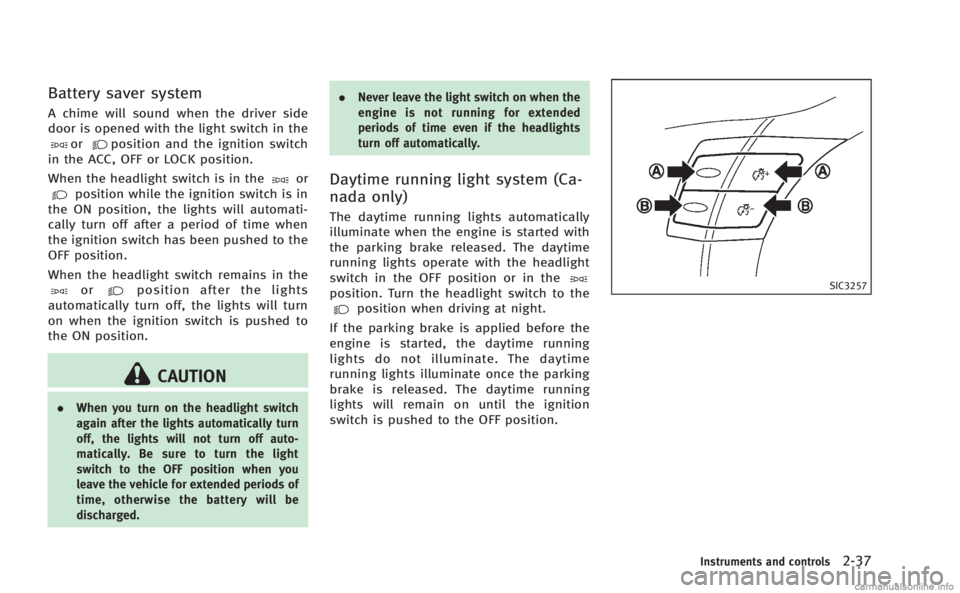
The daytime running lights automatically
illuminate when the engine is started with
the parking brake released. The daytime
running lights operate with the headlight
switch in the OFF position or in the
position. Turn the headlight switch to theposition when driving at night.
If the parking brake is applied before the
engine is started, the daytime running
lights do not illuminate. The daytime
running lights illuminate once the parking
brake is released. The daytime running
lights will remain on until the ignition
switch is pushed to the OFF position.
SIC3257
Instruments and controls2-37
Page 109 of 458
2-38Instruments and controls
SIC3270
Instrument brightness control
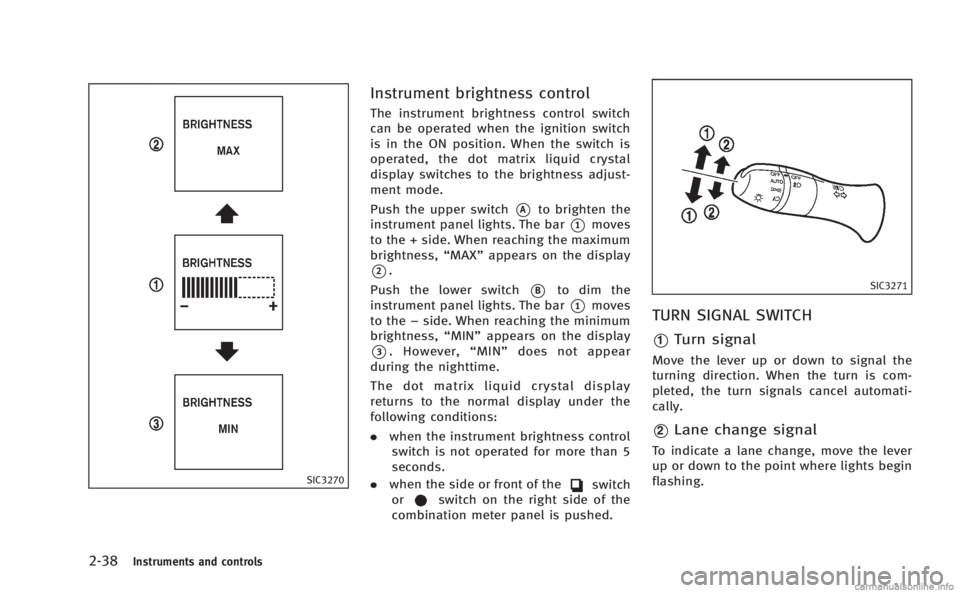
The instrument brightness control switch
can be operated when the ignition switch
is in the ON position. When the switch is
operated, the dot matrix liquid crystal
display switches to the brightness adjust-
ment mode.
Push the upper switch
*Ato brighten the
instrument panel lights. The bar
*1moves
to the + side. When reaching the maximum
brightness, “MAX”appears on the display
*2.
Push the lower switch
*Bto dim the
instrument panel lights. The bar
*1moves
to the −side. When reaching the minimum
brightness, “MIN”appears on the display
*3. However, “MIN” does not appear
during the nighttime.
The dot matrix liquid crystal display
returns to the normal display under the
following conditions:
. when the instrument brightness control
switch is not operated for more than 5
seconds.
. when the side or front of the
switch
orswitch on the right side of the
combination meter panel is pushed.
SIC3271
TURN SIGNAL SWITCH
*1Turn signal
Move the lever up or down to signal the
turning direction. When the turn is com-
pleted, the turn signals cancel automati-
cally.
*2Lane change signal
To indicate a lane change, move the lever
up or down to the point where lights begin
flashing.
Page 114 of 458
.Avoid using power outlet when the air
conditioner, headlights or rear window
defroster is on.
. This power outlet is not designed for use
with a cigarette lighter unit.
. Push the plug in as far as it will go. If
good contact is not made, the plug may
overheat or the internal temperature
fuse may blow.
. Before inserting or disconnecting a plug,
be sure the electrical accessory being
used is turned OFF.
. When not in use, be sure to close the
cap. Do not allow water or any liquid to
contact the outlet.
SIC3219
FRONT
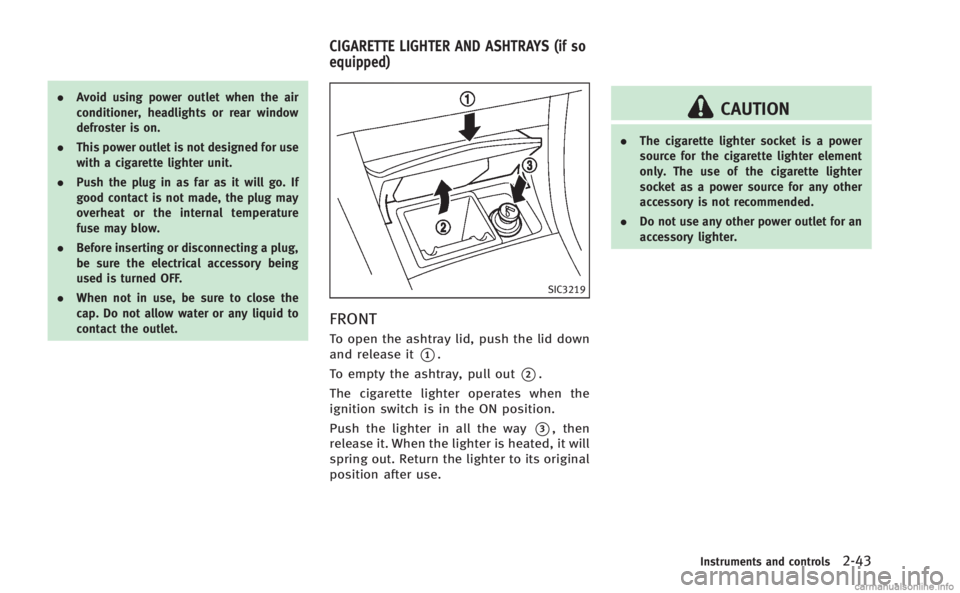
To open the ashtray lid, push the lid down
and release it
*1.
To empty the ashtray, pull out
*2.
The cigarette lighter operates when the
ignition switch is in the ON position.
Push the lighter in all the way
*3, then
release it. When the lighter is heated, it will
spring out. Return the lighter to its original
position after use.
CAUTION
. The cigarette lighter socket is a power
source for the cigarette lighter element
only. The use of the cigarette lighter
socket as a power source for any other
accessory is not recommended.
. Do not use any other power outlet for an
accessory lighter.
Instruments and controls2-43
CIGARETTE LIGHTER AND ASHTRAYS (if so
equipped)
Page 121 of 458
2-50Instruments and controls
SIC3320
CARGO NET RETAINERS
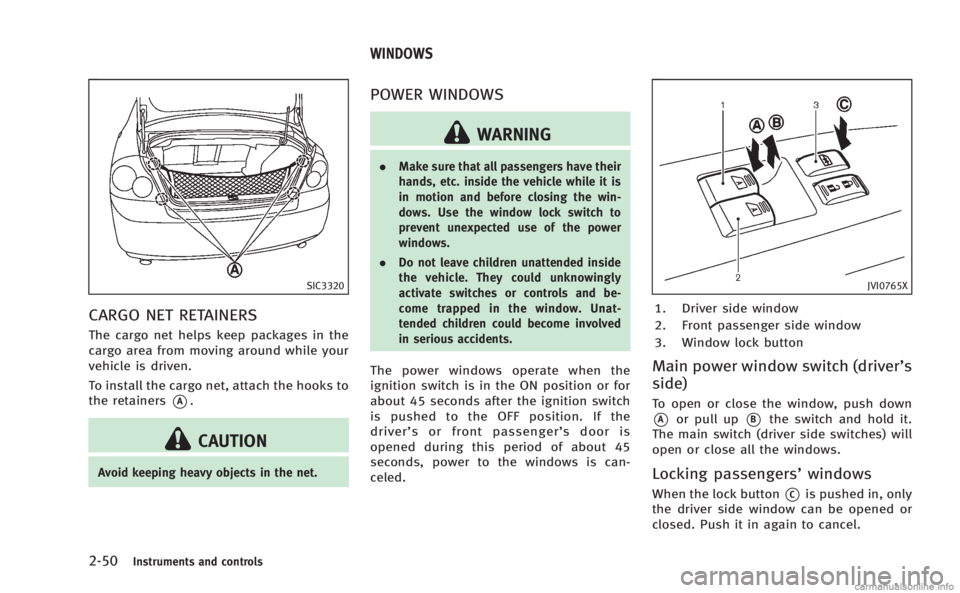
The cargo net helps keep packages in the
cargo area from moving around while your
vehicle is driven.
To install the cargo net, attach the hooks to
the retainers
*A.
CAUTION
Avoid keeping heavy objects in the net.
POWER WINDOWS
WARNING
.Make sure that all passengers have their
hands, etc. inside the vehicle while it is
in motion and before closing the win-
dows. Use the window lock switch to
prevent unexpected use of the power
windows.
. Do not leave children unattended inside
the vehicle. They could unknowingly
activate switches or controls and be-
come trapped in the window. Unat-
tended children could become involved
in serious accidents.
The power windows operate when the
ignition switch is in the ON position or for
about 45 seconds after the ignition switch
is pushed to the OFF position. If the
driver’ s or front passenger’ s door is
opened during this period of about 45
seconds, power to the windows is can-
celed.
JVI0765X
1. Driver side window
2. Front passenger side window
3. Window lock button
Main power window switch (driver’s
side)
To open or close the window, push down
*Aor pull up*Bthe switch and hold it.
The main switch (driver side switches) will
open or close all the windows.
Locking passengers’ windows
When the lock button*Cis pushed in, only
the driver side window can be opened or
closed. Push it in again to cancel.
WINDOWS
Page 122 of 458
SIC3241
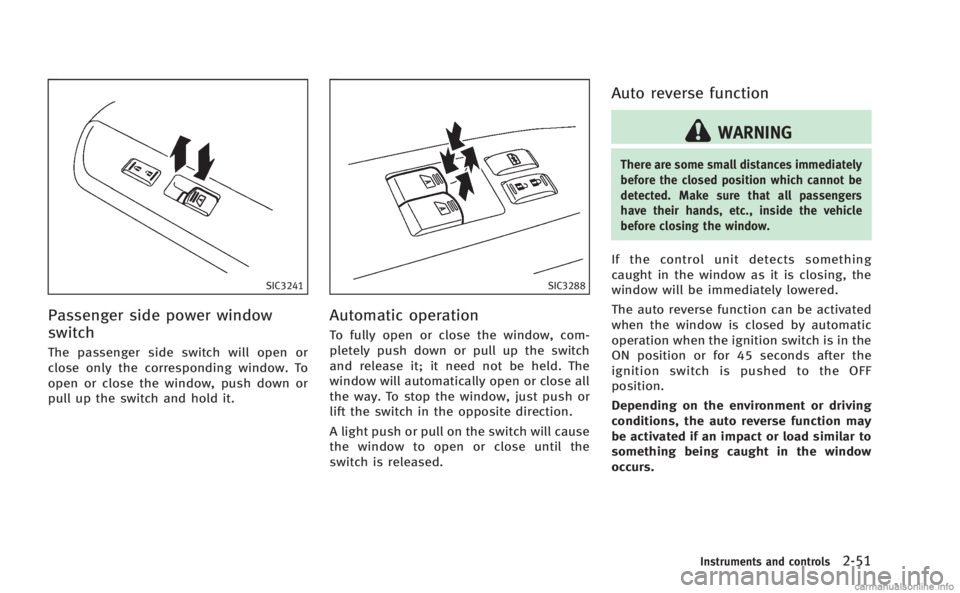
Passenger side power window
switch
The passenger side switch will open or
close only the corresponding window. To
open or close the window, push down or
pull up the switch and hold it.
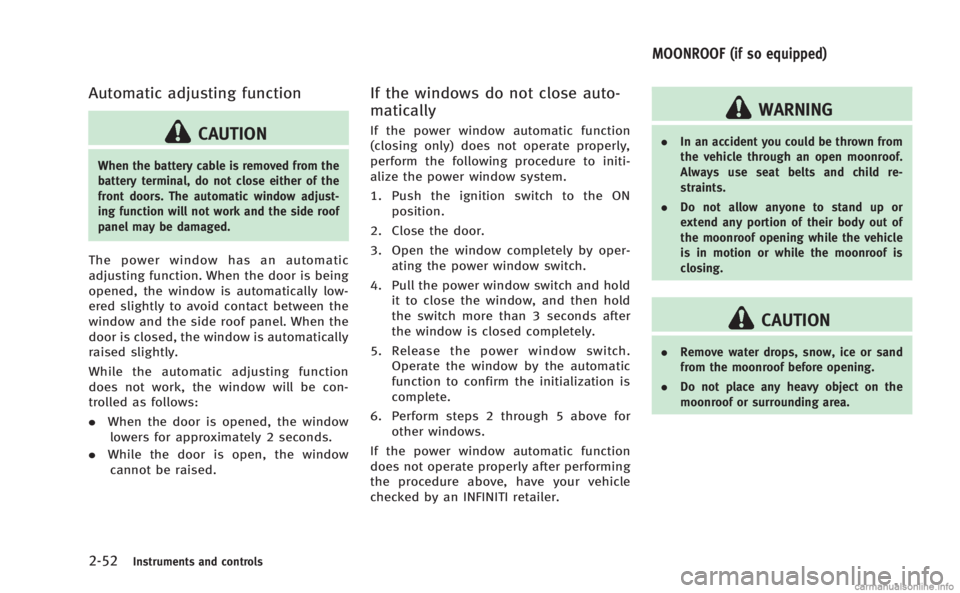
SIC3288
Automatic operation
To fully open or close the window, com-
pletely push down or pull up the switch
and release it; it need not be held. The
window will automatically open or close all
the way. To stop the window, just push or
lift the switch in the opposite direction.
A light push or pull on the switch will cause
the window to open or close until the
switch is released.
Auto reverse function
WARNING
There are some small distances immediately
before the closed position which cannot be
detected. Make sure that all passengers
have their hands, etc., inside the vehicle
before closing the window.
If the control unit detects something
caught in the window as it is closing, the
window will be immediately lowered.
The auto reverse function can be activated
when the window is closed by automatic
operation when the ignition switch is in the
ON position or for 45 seconds after the
ignition switch is pushed to the OFF
position.
Depending on the environment or driving
conditions, the auto reverse function may
be activated if an impact or load similar to
something being caught in the window
occurs.
Instruments and controls2-51
Page 123 of 458
2-52Instruments and controls
Automatic adjusting function
CAUTION
When the battery cable is removed from the
battery terminal, do not close either of the
front doors. The automatic window adjust-
ing function will not work and the side roof
panel may be damaged.
The power window has an automatic
adjusting function. When the door is being
opened, the window is automatically low-
ered slightly to avoid contact between the
window and the side roof panel. When the
door is closed, the window is automatically
raised slightly.
While the automatic adjusting function
does not work, the window will be con-
trolled as follows:
.When the door is opened, the window
lowers for approximately 2 seconds.
. While the door is open, the window
cannot be raised.
If the windows do not close auto-
matically
If the power window automatic function
(closing only) does not operate properly,
perform the following procedure to initi-
alize the power window system.
1. Push the ignition switch to the ON position.
2. Close the door.
3. Open the window completely by oper- ating the power window switch.
4. Pull the power window switch and hold it to close the window, and then hold
the switch more than 3 seconds after
the window is closed completely.
5. Release the power window switch. Operate the window by the automatic
function to confirm the initialization is
complete.
6. Perform steps 2 through 5 above for other windows.
If the power window automatic function
does not operate properly after performing
the procedure above, have your vehicle
checked by an INFINITI retailer.
WARNING
. In an accident you could be thrown from
the vehicle through an open moonroof.
Always use seat belts and child re-
straints.
. Do not allow anyone to stand up or
extend any portion of their body out of
the moonroof opening while the vehicle
is in motion or while the moonroof is
closing.
CAUTION
.Remove water drops, snow, ice or sand
from the moonroof before opening.
. Do not place any heavy object on the
moonroof or surrounding area.
MOONROOF (if so equipped)
Page 124 of 458
AUTOMATIC MOONROOF
The moonroof only operates when the
ignition switch is in the ON position.
The automatic moonroof is operational for
about 45 seconds, even if the ignition
switch is pushed to the OFF position. If the
driver’s door or the passenger’s door is
opened during this period of about 45
seconds, power to the moonroof is can-
celed.
SIC3243
Sunshade
The sunshade will open automatically
when the moonroof is opened. However,
it must be closed manually.
Tilting the moonroof
To tilt up, first close the moonroof, then
push the UP
*1side of the moonroof
switch and release it; it need not be held.
To tilt down the moonroof, push the DOWN
*2side.
Sliding the moonroof
To fully open or close the moonroof, push
the CLOSE
*1or OPEN*2side of the moonroof switch and release it; it need
not be held. The roof will automatically
open or close all the way. To stop the roof,
push the switch once more while it is
opening or closing.
Auto reverse function
WARNING
There are some small distances immediately
before the closed position which cannot be
detected. Make sure that all passengers
have their hands, etc., inside the vehicle
before closing the moonroof.
If the control unit detects something
caught in the moonroof when it is closing,
the moonroof will be immediately opened.
The auto reverse function can be activated
when the moonroof is closed by automatic
operation when the ignition switch is in the
ON position or for about 45 seconds after
the ignition switch is pushed to the OFF
position.
If the moonroof cannot be closed auto-
matically when the auto reverse function
activates due to a malfunction, push and
hold the CLOSE
*1side of the
Instruments and controls2-53
Page 125 of 458
2-54Instruments and controls
moonroof switch.
Depending on the environment or driving
conditions, the auto reverse function may
be activated if an impact or load similar to
something being caught in the moonroof
occurs.
If the moonroof does not operate
If the moonroof does not operate properly,
perform the following procedure to initi-
alize the moonroof operation system.
1. If the moonroof is open, close it fully byrepeatedly pushing the CLOSE
*1
side of the moonroof switch to tilt the
moonroof up.
2. Push and hold the CLOSE
*1side
of the moonroof switch.
3. Release the moonroof switch after the moonroof moves slightly up and down.
4. Push and hold the OPEN
*2side of
the moonroof switch to fully tilt the
moonroof down.
5. Check if the moonroof switch operates normally.
If the moonroof does not operate properly
after performing the procedure above, have
your vehicle checked by an INFINITI retailer.
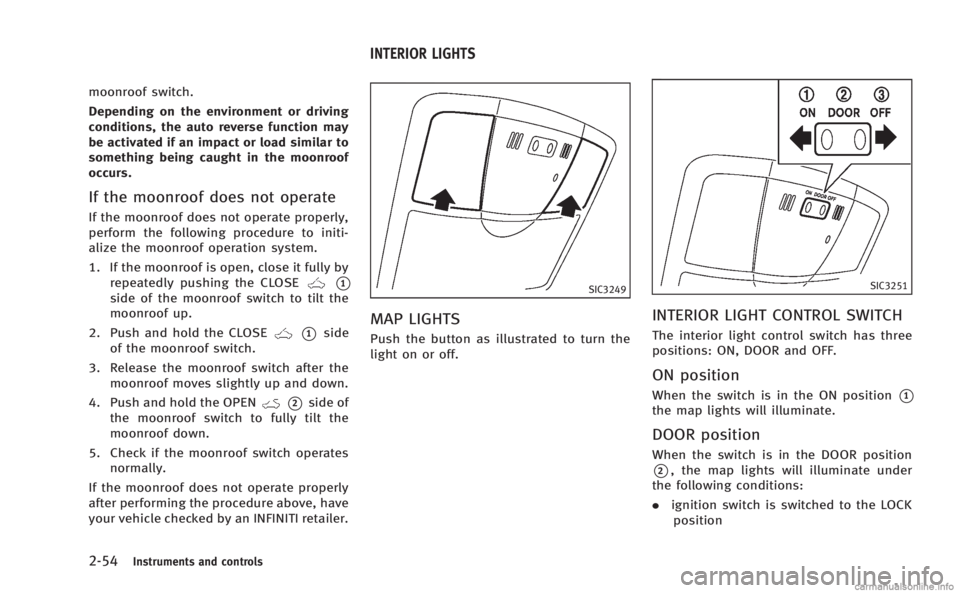
SIC3249
MAP LIGHTS
Push the button as illustrated to turn the
light on or off.
SIC3251
INTERIOR LIGHT CONTROL SWITCH
The interior light control switch has three
positions: ON, DOOR and OFF.
ON position
When the switch is in the ON position*1
the map lights will illuminate.
DOOR position
When the switch is in the DOOR position
*2, the map lights will illuminate under
the following conditions:
. ignition switch is switched to the LOCK
position
INTERIOR LIGHTS
Page 126 of 458

—remain on for about 15 seconds.
. doors are unlocked by pushing the
UNLOCK button on the Intelligent Key
or door handle request switch with the
ignition switch in the LOCK position
— remain on for about 15 seconds.
. any door is opened and then closed
with the ignition switch in the LOCK
position
— remain on for about 15 seconds.
. any door is opened with the ignition
switch in the ACC or ON position
— remain on while the door is opened.
When the door is closed, the lights
go off.
The lights will also turn off after a period
of time when the lights remain illuminated
after the ignition switch has been pushed
to the OFF or LOCK position to prevent the
battery from becoming discharged.
When the auto interior illumination is set
to the OFF position (see “Vehicle informa-
tion and settings” (P.4-9)), the lights will
illuminate under the following condition:
. any door is opened with the ignition
switch in any position
— remain on while the door is opened.
When the door is closed, the lights go off.
OFF position
When the switch is in the OFF position*3,
the lights will not illuminate, regardless of
the condition.
CAUTION
Do not use for extended periods of time with
the engine stopped. This could result in a
discharged battery.
SIC3869
The light on the vanity mirror will turn on
when the cover on the vanity mirror is
opened.
When the cover is closed, the light will turn
off.
The lights will also turn off after a period
of time when the lights remain illuminated
to prevent the battery from becoming
discharged.
Instruments and controls2-55
VANITY MIRROR LIGHTS
Page 127 of 458
2-56Instruments and controls
The light illuminates when the trunk lid is
opened. When the trunk lid is closed, the
light will turn off.
The light will also turn off after a period of
time when the light remains illuminated
after the ignition switch has been pushed
to the OFF or LOCK position to prevent the
battery from becoming discharged.The HomeLink®Universal Transceiver pro-
vides a convenient way to consolidate the
functions of up to three individual hand-
held transmitters into one built-in device.
HomeLink
®Universal Transceiver:
. Will operate most Radio Frequency (RF)
devices such as garage doors, gates,
home and office lighting, entry door
locks and security systems.
. Is powered by your vehicle’s battery. No
separate batteries are required. If the
vehicle’s battery is discharged or is
disconnected, HomeLink
®will retain all
programming.
When the HomeLink
®Universal Transcei-
ver is programmed, retain the original
transmitter for future programming proce-
dures (Example: new vehicle purchases).
Upon sale of the vehicle, the programmed
HomeLink
®Universal Transceiver buttons
should be erased for security purposes.
For additional information, refer to “Pro-
gramming HomeLink
®” (P.2-57).
WARNING
. Do not use the HomeLink®Universal
Transceiver with any garage door opener
that lacks safety stop and reverse features as required by federal safety
standards. (These standards became
effective for opener models manufac-
tured after April 1, 1982). A garage door
opener which cannot detect an object in
the path of a closing garage door and
then automatically stop and reverse,
does not meet current federal safety
standards. Using a garage door opener
without these features increases the risk
of serious injury or death.
. During the programming procedure your
garage door or security gate will open
and close (if the transmitter is within
range). Make sure that people or objects
are clear of the garage door, gate, etc.
that you are programming.
. Your vehicle’s engine should be turned
off while programming the HomeLink
®
Universal Transceiver. Do not breathe
exhaust gases; they contain colorless
and odorless carbon monoxide. Carbon
monoxide is dangerous. It can cause
unconsciousness or death.
TRUNK LIGHT HomeLink®UNIVERSAL TRANSCEIVER