ignition INFINITI Q60 COUPE 2014 Service Manual
[x] Cancel search | Manufacturer: INFINITI, Model Year: 2014, Model line: Q60 COUPE, Model: INFINITI Q60 COUPE 2014Pages: 458, PDF Size: 4.27 MB
Page 136 of 458
SPA1814
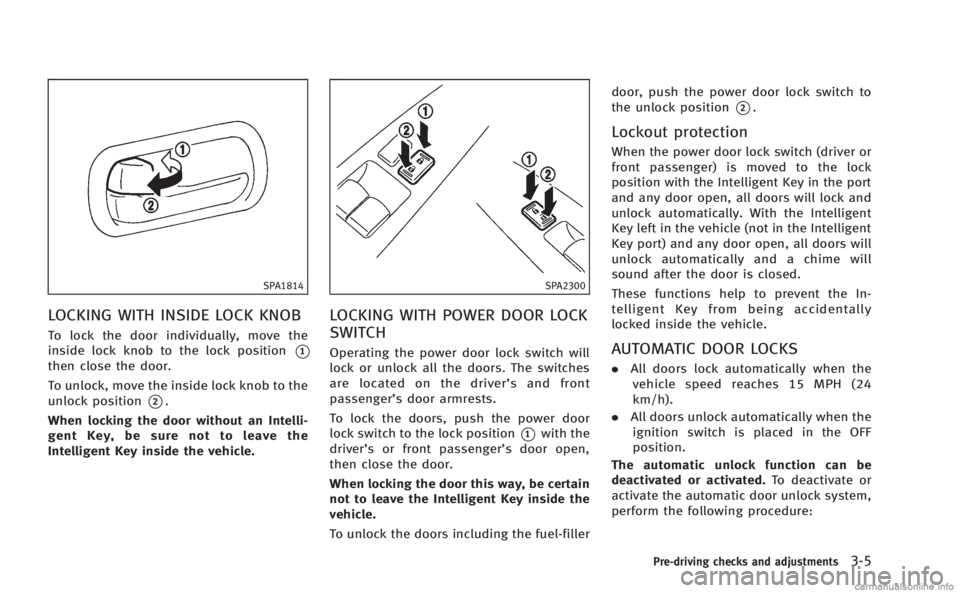
LOCKING WITH INSIDE LOCK KNOB
To lock the door individually, move the
inside lock knob to the lock position
*1
then close the door.
To unlock, move the inside lock knob to the
unlock position
*2.
When locking the door without an Intelli-
gent Key, be sure not to leave the
Intelligent Key inside the vehicle.
SPA2300
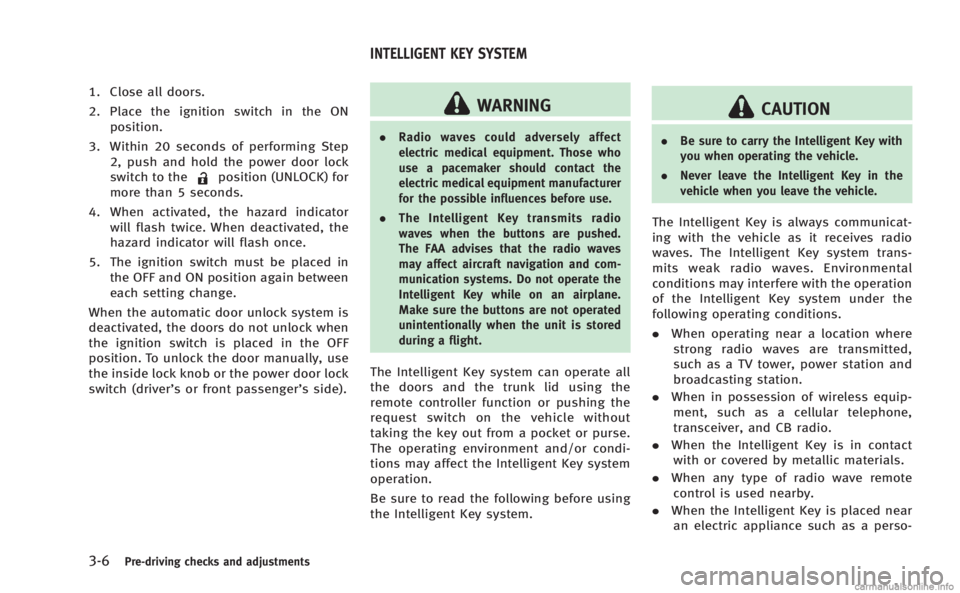
LOCKING WITH POWER DOOR LOCK
SWITCH
Operating the power door lock switch will
lock or unlock all the doors. The switches
are located on the driver’ s and front
passenger’s door armrests.
To lock the doors, push the power door
lock switch to the lock position
*1with the
driver’s or front passenger’s door open,
then close the door.
When locking the door this way, be certain
not to leave the Intelligent Key inside the
vehicle.
To unlock the doors including the fuel-filler door, push the power door lock switch to
the unlock position
*2.
Lockout protection
When the power door lock switch (driver or
front passenger) is moved to the lock
position with the Intelligent Key in the port
and any door open, all doors will lock and
unlock automatically. With the Intelligent
Key left in the vehicle (not in the Intelligent
Key port) and any door open, all doors will
unlock automatically and a chime will
sound after the door is closed.
These functions help to prevent the In-
telligent Key from being accidentally
locked inside the vehicle.
AUTOMATIC DOOR LOCKS
.
All doors lock automatically when the
vehicle speed reaches 15 MPH (24
km/h).
. All doors unlock automatically when the
ignition switch is placed in the OFF
position.
The automatic unlock function can be
deactivated or activated. To deactivate or
activate the automatic door unlock system,
perform the following procedure:
Pre-driving checks and adjustments3-5
Page 137 of 458
3-6Pre-driving checks and adjustments
1. Close all doors.
2. Place the ignition switch in the ONposition.
3. Within 20 seconds of performing Step 2, push and hold the power door lock
switch to the
position (UNLOCK) for
more than 5 seconds.
4. When activated, the hazard indicator will flash twice. When deactivated, the
hazard indicator will flash once.
5. The ignition switch must be placed in the OFF and ON position again between
each setting change.
When the automatic door unlock system is
deactivated, the doors do not unlock when
the ignition switch is placed in the OFF
position. To unlock the door manually, use
the inside lock knob or the power door lock
switch (driver’s or front passenger’s side).
WARNING
. Radio waves could adversely affect
electric medical equipment. Those who
use a pacemaker should contact the
electric medical equipment manufacturer
for the possible influences before use.
. The Intelligent Key transmits radio
waves when the buttons are pushed.
The FAA advises that the radio waves
may affect aircraft navigation and com-
munication systems. Do not operate the
Intelligent Key while on an airplane.
Make sure the buttons are not operated
unintentionally when the unit is stored
during a flight.
The Intelligent Key system can operate all
the doors and the trunk lid using the
remote controller function or pushing the
request switch on the vehicle without
taking the key out from a pocket or purse.
The operating environment and/or condi-
tions may affect the Intelligent Key system
operation.
Be sure to read the following before using
the Intelligent Key system.
CAUTION
.Be sure to carry the Intelligent Key with
you when operating the vehicle.
. Never leave the Intelligent Key in the
vehicle when you leave the vehicle.
The Intelligent Key is always communicat-
ing with the vehicle as it receives radio
waves. The Intelligent Key system trans-
mits weak radio waves. Environmental
conditions may interfere with the operation
of the Intelligent Key system under the
following operating conditions.
.When operating near a location where
strong radio waves are transmitted,
such as a TV tower, power station and
broadcasting station.
. When in possession of wireless equip-
ment, such as a cellular telephone,
transceiver, and CB radio.
. When the Intelligent Key is in contact
with or covered by metallic materials.
. When any type of radio wave remote
control is used nearby.
. When the Intelligent Key is placed near
an electric appliance such as a perso-
INTELLIGENT KEY SYSTEM
Page 138 of 458
nal computer.
. When the vehicle is parked near a
parking meter.
In such cases, correct the operating condi-
tions before using the Intelligent Key
function or use the mechanical key.
Although the life of the battery varies
depending on the operating conditions,
the battery’s life is approximately 2 years.
If the battery is discharged, replace it with
a new one.
When the Intelligent Key battery is almost
discharged, insert the Intelligent Key into
the Intelligent Key port to start the engine.
Replace the discharged battery with a new
one as soon as possible. For more details,
see “Push-button ignition switch” (P.5-9).
Since the Intelligent Key is continuously
receiving radio waves, if the key is left near
equipment which transmits strong radio
waves, such as signals from a TV and
personal computer, the battery life may
become shorter.
For information regarding replacement of a
battery, see “Intelligent Key battery repla-
cement” (P.8-25).
As many as 4 Intelligent Keys can be
registered and used with one vehicle. For information about the purchase and use of
additional Intelligent Keys, contact an
INFINITI retailer.
CAUTION
.
Do not allow the Intelligent Key, which
contains electrical components, to come
into contact with water or salt water.
This could affect the system function.
. Do not drop the Intelligent Key.
. Do not strike the Intelligent Key sharply
against another object.
. Do not change or modify the Intelligent
Key.
. Wetting may damage the Intelligent Key.
If the Intelligent Key gets wet, immedi-
ately wipe until it is completely dry.
. If the outside temperature is below 148F
(− 108 C) degrees, the battery of the
Intelligent Key may not function prop-
erly.
. Do not place the Intelligent Key for an
extended period in an area where
temperatures exceed 1408F (608C).
. Do not attach the Intelligent Key with a
key holder that contains a magnet. .
Do not place the Intelligent Key near
equipment that produces a magnetic
field, such as a TV, audio equipment
and personal computers.
If an Intelligent Key is lost or stolen,
INFINITI recommends erasing the ID code
of that Intelligent Key from the vehicle. This
may prevent the unauthorized use of the
Intelligent Key to operate the vehicle. For
information regarding the erasing proce-
dure, contact an INFINITI retailer.
Pre-driving checks and adjustments3-7
Page 140 of 458
trunk, make sure you carry the key with
you and then lock the doors or the
trunk.
. Do not pull the door handle before
pushing the door handle request
switch. The door will be unlocked but
will not open. Release the door handle
once and pull it again to open the door.
. The Intelligent Key system (opening/
closing doors with the door handle
request switch) can be set to remain
inactive. (See “Vehicle information and
settings” (P.4-9).)
SPA2584
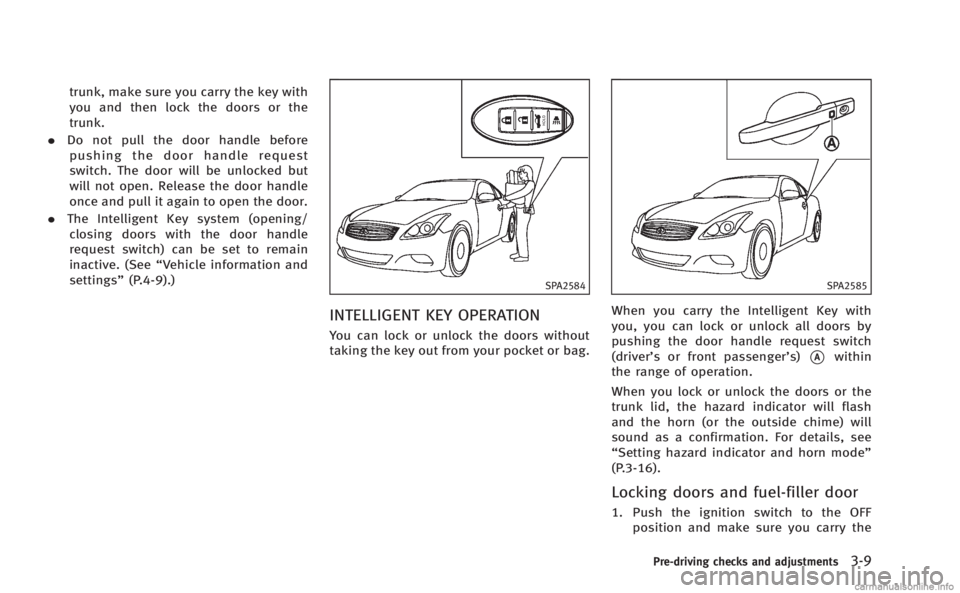
INTELLIGENT KEY OPERATION
You can lock or unlock the doors without
taking the key out from your pocket or bag.
SPA2585
When you carry the Intelligent Key with
you, you can lock or unlock all doors by
pushing the door handle request switch
(driver’s or front passenger’s)
*Awithin
the range of operation.
When you lock or unlock the doors or the
trunk lid, the hazard indicator will flash
and the horn (or the outside chime) will
sound as a confirmation. For details, see
“Setting hazard indicator and horn mode”
(P.3-16).
Locking doors and fuel-filler door
1. Push the ignition switch to the OFF position and make sure you carry the
Pre-driving checks and adjustments3-9
Page 141 of 458

3-10Pre-driving checks and adjustments
Intelligent Key with you.*1
2. Close all the doors.*2
3. Push the door handle request switch (driver’s or front passenger’s)
*Awhile
carrying the Intelligent Key with you.*3
4. All the doors and fuel-filler door will lock.
5. The hazard indicator flashes twice and the outside chime sounds twice.
*1: Doors will lock with the Intelligent Key
while the ignition switch is in the ACC or
ON position.
*2: Doors will not lock with the Intelligent
Key while any door is open.
*3: Doors will not lock by pushing the door
handle request switch with the Intelligent
Key inside the vehicle. However, when an
Intelligent Key is inside the vehicle, doors
can be locked with another registered
Intelligent Key.
CAUTION
. After locking the doors using the request
switch, make sure that the doors have
been securely locked by operating the
door handles. .
When locking the doors using the
request switch, make sure to have the
Intelligent Key in your possession before
operating the request switch to prevent
the Intelligent Key from being left in the
vehicle.
. The request switch is operational only
when the Intelligent Key has been
detected by the Intelligent Key system.
Lockout protection:
To prevent the Intelligent Key from being
accidentally locked in the vehicle, lockout
protection is equipped with the Intelligent
Key system.
When the driver’s side door is open, the
doors are locked, and then the Intelligent
Key is put inside the vehicle and all the
doors are closed; the lock will automati-
cally unlock and the door buzzer sounds.
NOTE:
The doors may not lock when the Intelli-
gent Key is in the same hand that is
operating the request switch to lock the
door. Put the Intelligent Key in a purse,
pocket or your other hand.
CAUTION
The lockout protection may not function
under the following conditions:
.When the Intelligent Key is placed on top
of the instrument panel.
. When the Intelligent Key is placed inside
the glove box or a storage bin.
. When the Intelligent Key is placed inside
the door pockets.
. When the Intelligent Key is placed inside
or near metallic materials.
Unlocking doors and fuel-filler door
1. Push the door handle request switch
(driver’s or front passenger’s)
*Aonce
while carrying the Intelligent Key with
you.
2. The hazard indicator flashes once and outside chime sounds once. The corre-
sponding door and the fuel-filler door
will unlock.
3. Push the door handle request switch again within 1 minute.
4. The hazard indicator flashes once and outside chime sounds once again. All
Page 142 of 458
the doors will unlock.
All doors and the fuel-filler door will be
locked automatically unless one of the
following operations is performed within 1
minute after pushing the request switch
while the doors are locked.
. Opening any door
. Pushing the ignition switch
. Inserting the Intelligent Key into the
Intelligent Key port.
During this 1-minute time period, if the
UNLOCK
button on the Intelligent Key
is pushed, all doors will be locked auto-
matically after another 1 minute.SPA2586
SPA2404
Opening trunk lid
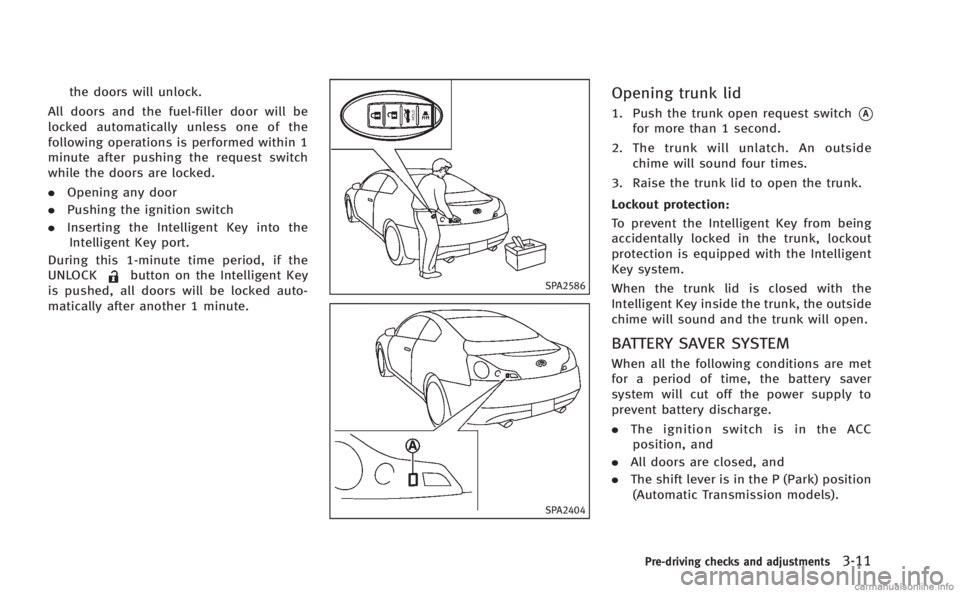
1. Push the trunk open request switch*A
for more than 1 second.
2. The trunk will unlatch. An outside chime will sound four times.
3. Raise the trunk lid to open the trunk.
Lockout protection:
To prevent the Intelligent Key from being
accidentally locked in the trunk, lockout
protection is equipped with the Intelligent
Key system.
When the trunk lid is closed with the
Intelligent Key inside the trunk, the outside
chime will sound and the trunk will open.
BATTERY SAVER SYSTEM
When all the following conditions are met
for a period of time, the battery saver
system will cut off the power supply to
prevent battery discharge.
. The ignition switch is in the ACC
position, and
. All doors are closed, and
. The shift lever is in the P (Park) position
(Automatic Transmission models).
Pre-driving checks and adjustments3-11
Page 144 of 458
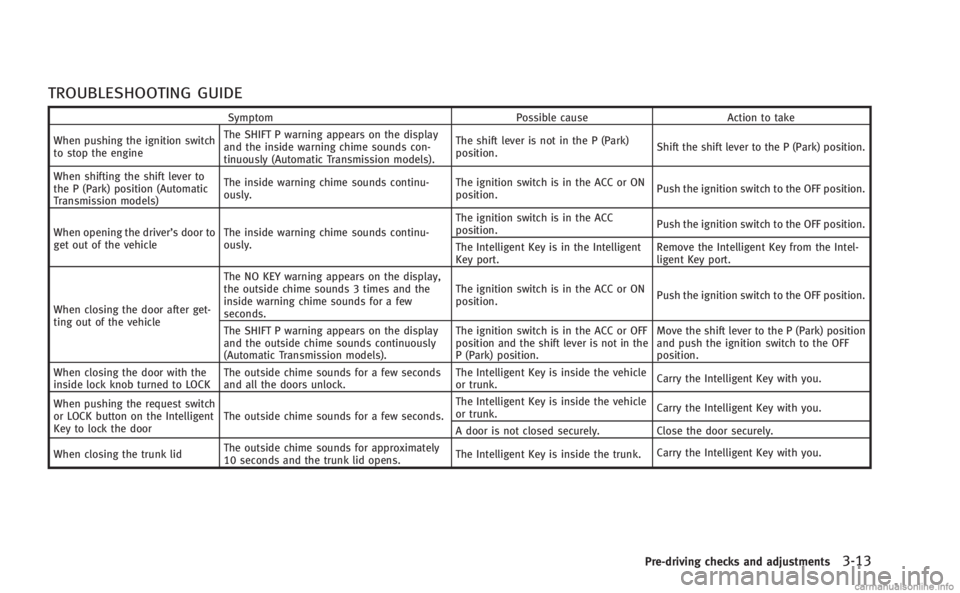
TROUBLESHOOTING GUIDE
SymptomPossible causeAction to take
When pushing the ignition switch
to stop the engine The SHIFT P warning appears on the display
and the inside warning chime sounds con-
tinuously (Automatic Transmission models).
The shift lever is not in the P (Park)
position.
Shift the shift lever to the P (Park) position.
When shifting the shift lever to
the P (Park) position (Automatic
Transmission models) The inside warning chime sounds continu-
ously.
The ignition switch is in the ACC or ON
position.
Push the ignition switch to the OFF position.
When opening the driver’s door to
get out of the vehicle The inside warning chime sounds continu-
ously. The ignition switch is in the ACC
position.
Push the ignition switch to the OFF position.
The Intelligent Key is in the Intelligent
Key port. Remove the Intelligent Key from the Intel-
ligent Key port.
When closing the door after get-
ting out of the vehicle The NO KEY warning appears on the display,
the outside chime sounds 3 times and the
inside warning chime sounds for a few
seconds.
The ignition switch is in the ACC or ON
position.
Push the ignition switch to the OFF position.
The SHIFT P warning appears on the display
and the outside chime sounds continuously
(Automatic Transmission models). The ignition switch is in the ACC or OFF
position and the shift lever is not in the
P (Park) position.Move the shift lever to the P (Park) position
and push the ignition switch to the OFF
position.
When closing the door with the
inside lock knob turned to LOCK The outside chime sounds for a few seconds
and all the doors unlock. The Intelligent Key is inside the vehicle
or trunk.
Carry the Intelligent Key with you.
When pushing the request switch
or LOCK button on the Intelligent
Key to lock the door The outside chime sounds for a few seconds. The Intelligent Key is inside the vehicle
or trunk.
Carry the Intelligent Key with you.
A door is not closed securely. Close the door securely.
When closing the trunk lid The outside chime sounds for approximately
10 seconds and the trunk lid opens.
The Intelligent Key is inside the trunk.
Carry the Intelligent Key with you.
Pre-driving checks and adjustments3-13
Page 146 of 458
Locking doors and fuel-filler door
1. Push the ignition switch to the OFFposition and make sure you carry the
Intelligent Key with you.*
2. Close all the doors.
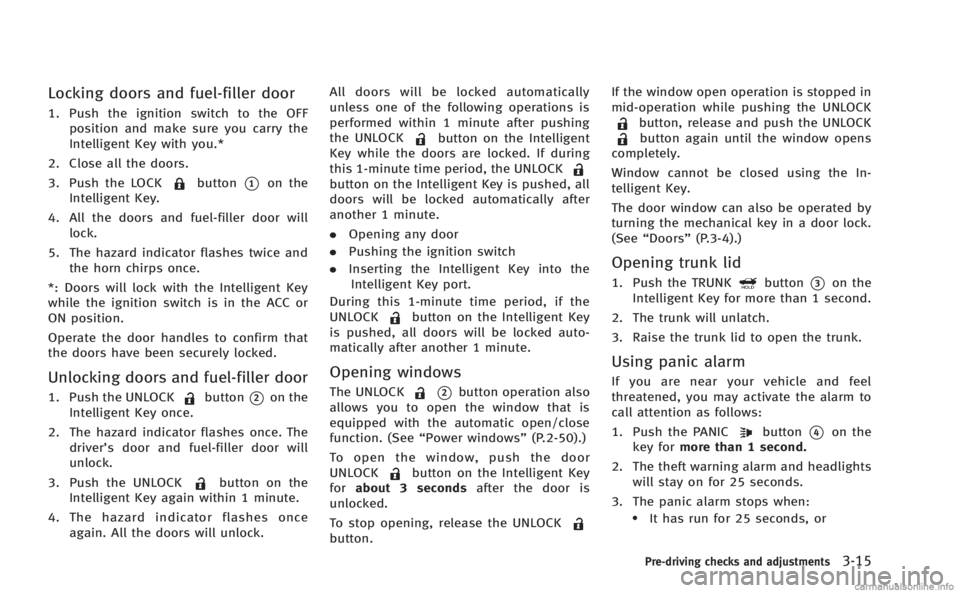
3. Push the LOCK
button*1on the
Intelligent Key.
4. All the doors and fuel-filler door will lock.
5. The hazard indicator flashes twice and the horn chirps once.
*: Doors will lock with the Intelligent Key
while the ignition switch is in the ACC or
ON position.
Operate the door handles to confirm that
the doors have been securely locked.
Unlocking doors and fuel-filler door
1. Push the UNLOCKbutton*2on the
Intelligent Key once.
2. The hazard indicator flashes once. The driver’s door and fuel-filler door will
unlock.
3. Push the UNLOCK
button on the
Intelligent Key again within 1 minute.
4. The hazard indicator flashes once again. All the doors will unlock. All doors will be locked automatically
unless one of the following operations is
performed within 1 minute after pushing
the UNLOCK
button on the Intelligent
Key while the doors are locked. If during
this 1-minute time period, the UNLOCK
button on the Intelligent Key is pushed, all
doors will be locked automatically after
another 1 minute.
. Opening any door
. Pushing the ignition switch
. Inserting the Intelligent Key into the
Intelligent Key port.
During this 1-minute time period, if the
UNLOCK
button on the Intelligent Key
is pushed, all doors will be locked auto-
matically after another 1 minute.
Opening windows
The UNLOCK*2button operation also
allows you to open the window that is
equipped with the automatic open/close
function. (See “Power windows” (P.2-50).)
To open the window, push the door
UNLOCK
button on the Intelligent Key
for about 3 seconds after the door is
unlocked.
To stop opening, release the UNLOCK
button. If the window open operation is stopped in
mid-operation while pushing the UNLOCK
button, release and push the UNLOCKbutton again until the window opens
completely.
Window cannot be closed using the In-
telligent Key.
The door window can also be operated by
turning the mechanical key in a door lock.
(See “Doors” (P.3-4).)
Opening trunk lid
1. Push the TRUNKbutton*3on the
Intelligent Key for more than 1 second.
2. The trunk will unlatch.
3. Raise the trunk lid to open the trunk.
Using panic alarm
If you are near your vehicle and feel
threatened, you may activate the alarm to
call attention as follows:
1. Push the PANIC
button*4on the
key for more than 1 second.
2. The theft warning alarm and headlights will stay on for 25 seconds.
3. The panic alarm stops when:
.It has run for 25 seconds, or
Pre-driving checks and adjustments3-15
Page 157 of 458

3-26Pre-driving checks and adjustments
Automatic anti-glare type
The inside mirror is designed so that it
automatically changes reflection according
to the intensity of the headlights of the
following vehicle.
The anti-glare system will be automatically
turned on when the ignition switch is
pushed to the ON position.
When the anti-glare system is turned on,
the indicator light
*Awill illuminate and
excessive glare from the headlights of the
vehicle behind you will be reduced.
Type A: Push the
switch*Bto make the
inside rearview mirror operate normally
and the indicator light will turn off. Push
the
switch again to turn the system on.
Type B: Push the “*”switch
*Cto make
the inside rearview mirror operate nor-
mally. The indicator light will turn off. Push
the “I”switch
*Dto turn the system on.
Do not allow any object to cover the
sensors
*Eor apply glass cleaner on
them. Doing so will reduce the sensitivity
of the sensor, resulting in improper
operation.
For the compass (if so equipped) opera- tion, see
“Compass” (P.2-9).
For the HomeLink
®Universal Transceiver
operation, see “HomeLink®Universal
Transceiver” (P.2-56).
SPA2319
OUTSIDE MIRRORS
WARNING
Objects viewed in the outside mirror on the
passenger side are closer than they appear.
Be careful when moving to the right. Using
only this mirror could cause an accident.
Use the inside mirror or glance over your
shoulder to properly judge distances to
other objects.
Page 158 of 458
Adjusting outside mirrors
The outside mirror control switch is located
on the armrest.
The outside mirror will operate only when
the ignition switch is in the ACC or ON
position.
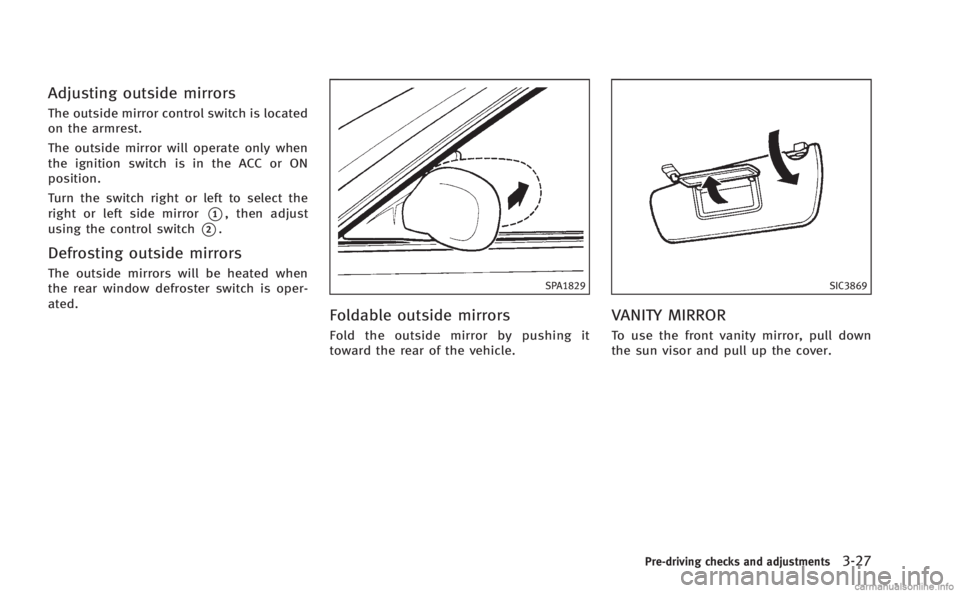
Turn the switch right or left to select the
right or left side mirror
*1, then adjust
using the control switch
*2.
Defrosting outside mirrors
The outside mirrors will be heated when
the rear window defroster switch is oper-
ated.SPA1829
Foldable outside mirrors
Fold the outside mirror by pushing it
toward the rear of the vehicle.
SIC3869
VANITY MIRROR
To use the front vanity mirror, pull down
the sun visor and pull up the cover.
Pre-driving checks and adjustments3-27