ignition INFINITI Q60 COUPE 2014 Workshop Manual
[x] Cancel search | Manufacturer: INFINITI, Model Year: 2014, Model line: Q60 COUPE, Model: INFINITI Q60 COUPE 2014Pages: 458, PDF Size: 4.27 MB
Page 159 of 458
3-28Pre-driving checks and adjustments
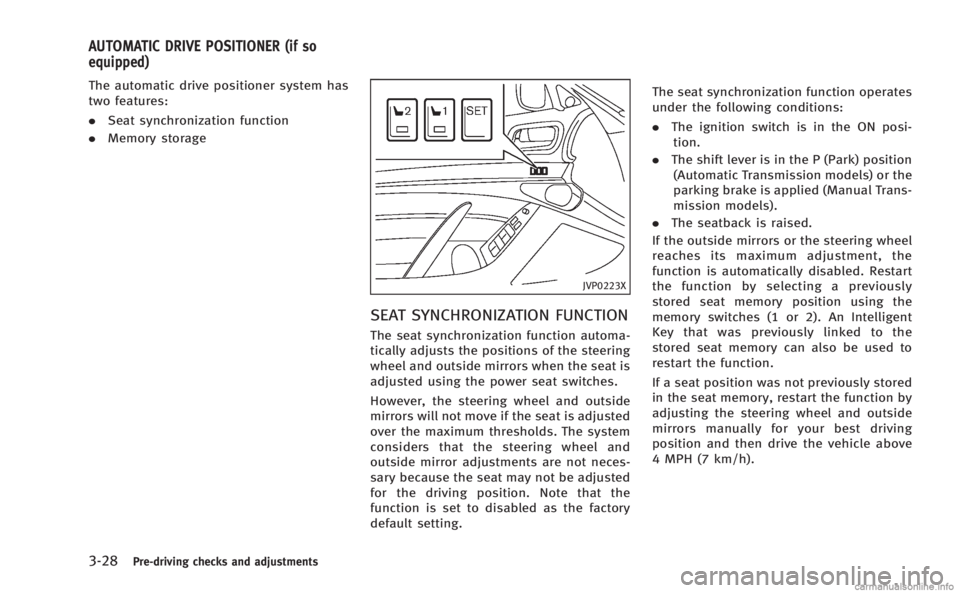
The automatic drive positioner system has
two features:
.Seat synchronization function
. Memory storage
JVP0223X
SEAT SYNCHRONIZATION FUNCTION
The seat synchronization function automa-
tically adjusts the positions of the steering
wheel and outside mirrors when the seat is
adjusted using the power seat switches.
However, the steering wheel and outside
mirrors will not move if the seat is adjusted
over the maximum thresholds. The system
considers that the steering wheel and
outside mirror adjustments are not neces-
sary because the seat may not be adjusted
for the driving position. Note that the
function is set to disabled as the factory
default setting. The seat synchronization function operates
under the following conditions:
.
The ignition switch is in the ON posi-
tion.
. The shift lever is in the P (Park) position
(Automatic Transmission models) or the
parking brake is applied (Manual Trans-
mission models).
. The seatback is raised.
If the outside mirrors or the steering wheel
reaches its maximum adjustment, the
function is automatically disabled. Restart
the function by selecting a previously
stored seat memory position using the
memory switches (1 or 2). An Intelligent
Key that was previously linked to the
stored seat memory can also be used to
restart the function.
If a seat position was not previously stored
in the seat memory, restart the function by
adjusting the steering wheel and outside
mirrors manually for your best driving
position and then drive the vehicle above
4 MPH (7 km/h).
AUTOMATIC DRIVE POSITIONER (if so
equipped)
Page 160 of 458
Cancel or activate seat synchroni-
zation function
For Automatic Transmission models:
The shift lever must be in the P (Park)
position with the ignition switch in the ACC
position.
For Manual Transmission models:
The parking brake must be applied with
the ignition switch in the ACC position.
The seat synchronization function can be
activated or canceled by pushing and
holding the SET switch for more than 10
seconds while the ignition switch is in the
ACC position.
The indicator lights on the memory
switches (1 and 2) will blink once when
the function is canceled, and the indicator
lights will blink twice when the function is
activated. Note that the indicator lights
may illuminate after 5 seconds while
holding the SET switch. This indicates
readiness for linking the Intelligent Key to
a stored memory position. Keep the SET
switch pushed for more than 10 seconds to
turn on or off the seat synchronization
function.
MEMORY STORAGE
Two positions for the driver’s seat, steering
column and outside mirrors can be stored
in the automatic drive positioner memory.
Follow these procedures to use the mem-
ory system.
1.Automatic transmission models:
Move the shift lever to the P (Park)
position.
Manual transmission models:
Apply the parking brake.
2. Raise the seatback.
3. Push the ignition switch to the ON position.
4. Adjust the driver’s seat, steering col- umn and outside mirrors to the desired
positions by manually operating each
adjusting switch. For additional infor-
mation, see “Seats”(P.1-2) and “Tilt/
telescopic steering” (P.3-23) and“Out-
side mirrors” (P.3-26).
5. Push the SET switch and, within 5 seconds, push the memory switch (1
or 2) fully for at least 1 second.
The indicator light for the pushed
memory switch will stay on for approxi-
mately 5 seconds after pushing the switch.
If memory is stored in the same
memory switch, the previous memory
will be deleted.
Linking Intelligent Key to a stored
memory position
The Intelligent Key can be linked to a
stored memory position with the following
procedure.
1. Follow the steps for storing a memory
position.
2. While the indicator light for the memory switch being set is illuminated for 5
seconds, push the
button on the
Intelligent Key. If the indicator light
blinks, the Intelligent Key is linked to
that memory setting.
Push the ignition switch to the OFF posi-
tion, and then push the
button on the
Intelligent Key. The driver’s seat, steering
wheel and outside mirrors will move to the
memorized position.
Confirming memory storage
. Push the ignition switch to the ON
position and push the SET switch. If
the main memory has not been stored,
the indicator light will come on for
Pre-driving checks and adjustments3-29
Page 161 of 458

3-30Pre-driving checks and adjustments
approximately 0.5 second. When the
memory has stored in position, the
indicator light will stay on for approxi-
mately 5 seconds.
. If the battery cable is disconnected, or if
the fuse opens, the memory will be
canceled. In this case, reset the desired
position using the previous procedure.
. If optional Intelligent Keys are added to
your vehicle, the memory storage pro-
cedure to switch 1 or 2 and linking
Intelligent Key procedure to a stored
memory position should be performed
again for each Intelligent Key. For
additional Intelligent Key information,
see “Keys” (P.3-2).
Selecting the memorized position
1.Automatic transmission models:
Move the shift lever to the P (Park)
position.
Manual transmission models:
Apply the parking brake.
2. Raise the seatback.
3. Use one of the following methods to move the driver’ s seat, the outside
mirrors and the steering wheel.
.Push the ignition switch to the ON position and push the memory
switch (1 or 2) fully for at least 1
second.
.Within 45 seconds of opening the
driver’ s door, push the memory
switch (1 or 2) fully for at least 1
second.
The driver’s seat, steering column
and outside mirrors will move to the
memorized position with the indica-
tor light flashing, and then the light
will stay on for approximately 5
seconds.
For manual transmission models, the
memory positions can be selected even
when the engine is running. In this case,
move the shift lever to the N (Neutral)
position and apply the parking brake.
Then, perform step 2.
SYSTEM OPERATION
The automatic drive positioner system will
not work or will stop operating under the
following conditions:
. When the vehicle speed is above 4 MPH
(7 km/h).
. When the adjusting switch for the
driver’s seat and steering column is
turned on while the automatic drive positioner is operating.
. When the memory switch 1 or 2 is not
pushed for at least 1 second.
. When the seat, steering column and
outside mirrors have already been
moved to the memorized position.
. When no position is stored in the
memory switch.
. When the parking brake is released (MT
models).
. When the speed is above 4 MPH (7
km/h) while the parking brake is
applied (MT models).
To restart the drive positioner system,
move the parking brake to off and on.
. When the engine is started while
moving the automatic drive positioner.
. When the AT shift lever is moved from
the P (Park) position to any other
position.
. When the driver’s door remains open
for more than 45 seconds and the
ignition switch is not in the ON posi-
tion.
. When the seatback is folded.
. While the walk-in function operates.
. The seat synchronization function is
automatically disabled if the outside
Page 167 of 458

4-4Monitor, climate, audio, phone and voice recognition systems
SAA1524
Models without navigation system
1. “AUX” button (P.4-39)
2. “RADIO AM·FM” band selector button
(P.4-39)
3. INFINITI controller (P.4-5)
4. “
OFF” brightness control and
display ON/OFF button (P.4-9)
5. “INFO” vehicle information button
(P.4-9)
6. “DISC” selector button (P.4-39)
7. “STATUS” status display button
(P.4-9)
8. “SETTING” button (P.4-14)
When you use this system, make sure the
engine is running. If you use the system with the engine not
running (ignition ON or ACC) for a long
time, it will use up all the battery power,
and the engine will not start.
SAA1541
Models with navigation system
SAA1508
Models without navigation system
Page 176 of 458
The Reminder will be automatically dis-
played when the specified distance has
been driven and every time the ignition
switch is pushed to the ACC or ON position.
The reminder will not appear while driving.
Select the“OK”key to hide the reminder
for the rest of the current drive.
To stop the reminder from appearing,
perform one of the following actions:
. Select the “Reset Distance”.
. Deactivate the “Reminder”.
. Increase the “Interval”distance to be
more than the current distance being
tracked.
SAA2483
Others information (models with
navigation system)
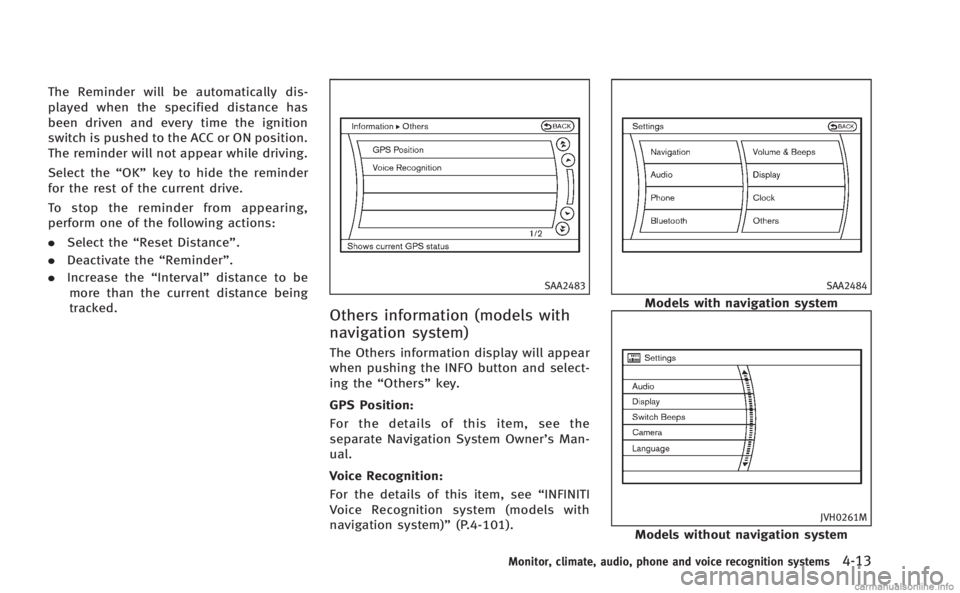
The Others information display will appear
when pushing the INFO button and select-
ing the “Others” key.
GPS Position:
For the details of this item, see the
separate Navigation System Owner’s Man-
ual.
Voice Recognition:
For the details of this item, see “INFINITI
Voice Recognition system (models with
navigation system)” (P.4-101).
SAA2484
Models with navigation system
JVH0261M
Models without navigation system
Monitor, climate, audio, phone and voice recognition systems4-13
Page 182 of 458
SAA2488
Models with navigation system
JVH0182M
Models without navigation system
Comfort settings
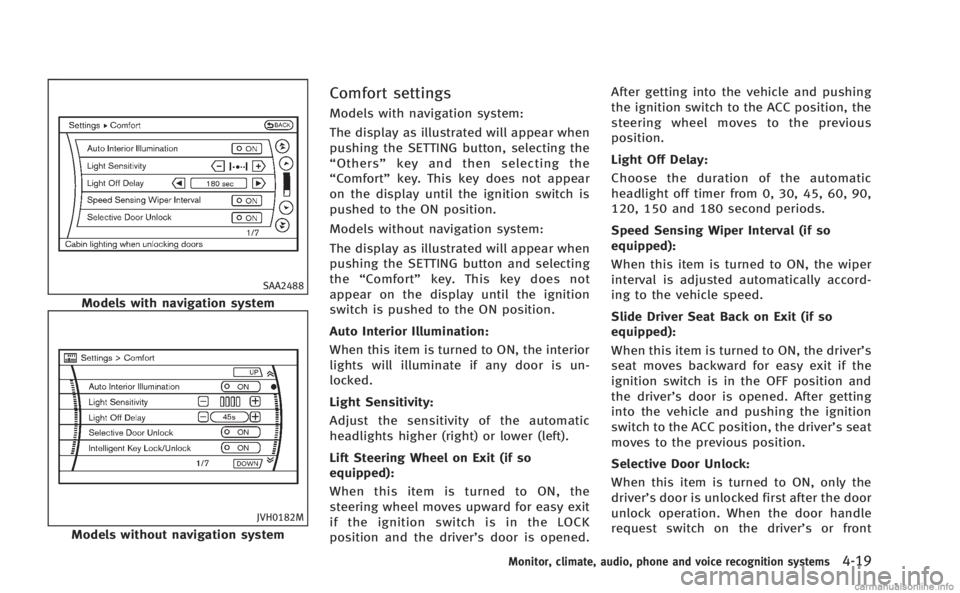
Models with navigation system:
The display as illustrated will appear when
pushing the SETTING button, selecting the
“Others” key and then selecting the
“Comfort” key. This key does not appear
on the display until the ignition switch is
pushed to the ON position.
Models without navigation system:
The display as illustrated will appear when
pushing the SETTING button and selecting
the “Comfort” key. This key does not
appear on the display until the ignition
switch is pushed to the ON position.
Auto Interior Illumination:
When this item is turned to ON, the interior
lights will illuminate if any door is un-
locked.
Light Sensitivity:
Adjust the sensitivity of the automatic
headlights higher (right) or lower (left).
Lift Steering Wheel on Exit (if so
equipped):
When this item is turned to ON, the
steering wheel moves upward for easy exit
if the ignition switch is in the LOCK
position and the driver’s door is opened. After getting into the vehicle and pushing
the ignition switch to the ACC position, the
steering wheel moves to the previous
position.
Light Off Delay:
Choose the duration of the automatic
headlight off timer from 0, 30, 45, 60, 90,
120, 150 and 180 second periods.
Speed Sensing Wiper Interval (if so
equipped):
When this item is turned to ON, the wiper
interval is adjusted automatically accord-
ing to the vehicle speed.
Slide Driver Seat Back on Exit (if so
equipped):
When this item is turned to ON, the driver’s
seat moves backward for easy exit if the
ignition switch is in the OFF position and
the driver’s door is opened. After getting
into the vehicle and pushing the ignition
switch to the ACC position, the driver’s seat
moves to the previous position.
Selective Door Unlock:
When this item is turned to ON, only the
driver’s door is unlocked first after the door
unlock operation. When the door handle
request switch on the driver’s or front
Monitor, climate, audio, phone and voice recognition systems4-19
Page 202 of 458
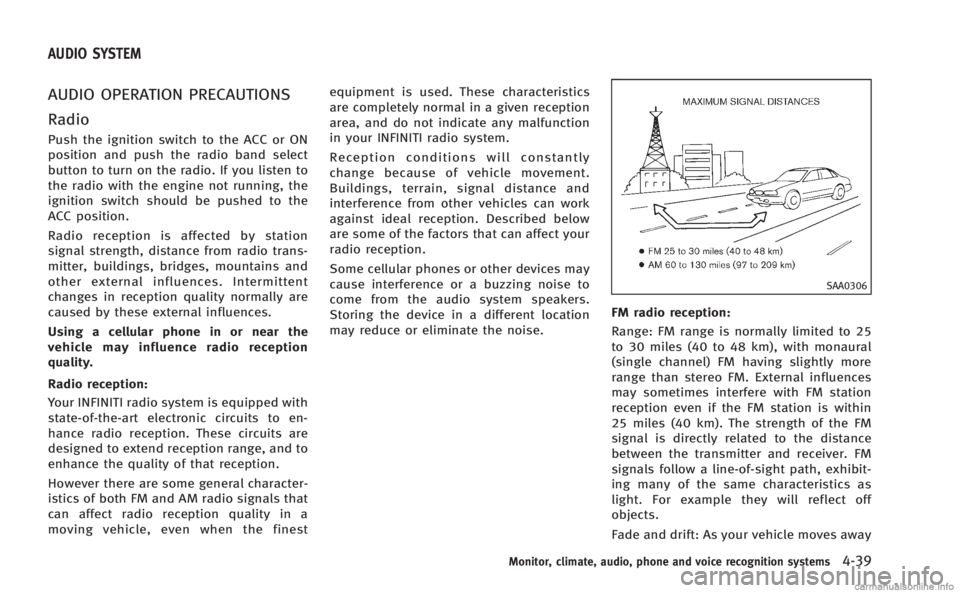
AUDIO OPERATION PRECAUTIONS
Radio
Push the ignition switch to the ACC or ON
position and push the radio band select
button to turn on the radio. If you listen to
the radio with the engine not running, the
ignition switch should be pushed to the
ACC position.
Radio reception is affected by station
signal strength, distance from radio trans-
mitter, buildings, bridges, mountains and
other external influences. Intermittent
changes in reception quality normally are
caused by these external influences.
Using a cellular phone in or near the
vehicle may influence radio reception
quality.
Radio reception:
Your INFINITI radio system is equipped with
state-of-the-art electronic circuits to en-
hance radio reception. These circuits are
designed to extend reception range, and to
enhance the quality of that reception.
However there are some general character-
istics of both FM and AM radio signals that
can affect radio reception quality in a
moving vehicle, even when the finestequipment is used. These characteristics
are completely normal in a given reception
area, and do not indicate any malfunction
in your INFINITI radio system.
Reception conditions will constantly
change because of vehicle movement.
Buildings, terrain, signal distance and
interference from other vehicles can work
against ideal reception. Described below
are some of the factors that can affect your
radio reception.
Some cellular phones or other devices may
cause interference or a buzzing noise to
come from the audio system speakers.
Storing the device in a different location
may reduce or eliminate the noise.
SAA0306
FM radio reception:
Range: FM range is normally limited to 25
to 30 miles (40 to 48 km), with monaural
(single channel) FM having slightly more
range than stereo FM. External influences
may sometimes interfere with FM station
reception even if the FM station is within
25 miles (40 km). The strength of the FM
signal is directly related to the distance
between the transmitter and receiver. FM
signals follow a line-of-sight path, exhibit-
ing many of the same characteristics as
light. For example they will reflect off
objects.
Fade and drift: As your vehicle moves away
Monitor, climate, audio, phone and voice recognition systems4-39
AUDIO SYSTEM
Page 216 of 458

SAA1533
Models with navigation system
1. Radio band select button
2. DISC·AUX button
SAA2922
Models without navigation system
1. AUX/Satellite band select button
2. Radio band select button
3. DISC button
FM-AM-SAT RADIO WITH COMPACT
DISC (CD) PLAYER
For all operation precautions, see “Audio
operation precautions” (P.4-39).
The satellite radio mode requires an active
SiriusXM Satellite Radio subscription. The
satellite radio is not available in Alaska,
Hawaii and Guam.
It may take some time to receive the
activation signal after subscribing the SiriusXM Satellite Radio. After receiving
the activation signal, an available channel
list will be automatically updated in the
radio. For SiriusXM Satellite Radio, push
the ignition switch from LOCK to ACC to
update the channel list.
Audio main operation
Head unit:
The auto loudness circuit enhances the low
and high frequency ranges automatically in
both radio reception and CD playback.
ON·OFF/Volume control:
Push the ignition switch to the ACC or ON
position, and then push the ON·OFF button
while the system is off to turn on the last
audio source, which was playing immedi-
ately before the system was turned off.
While the system is on, pushing the
ON·OFF button turns the system off.
Turn the VOL control knob to adjust the
volume.
Adjusting tone quality and speaker bal-
ance:
To adjust Bass, Treble, Balance and Fade,
push the Audio control knob. When the
display shows the setting you want to
change (Bass, Treble, Balance and Fade),
Monitor, climate, audio, phone and voice recognition systems4-53
Page 217 of 458

4-54Monitor, climate, audio, phone and voice recognition systems
rotate the Audio control knob to set the
desired setting. For the other setting
methods, see“How to use SETTING button”
(P.4-14).
This vehicle has some sound effect func-
tions as follows:
. Speed Sensitive Vol.
. Precision Phased Audio (if so equipped)
. Driver’s Audio Stage (if so equipped)
For more details, see “How to use SETTING
button” (P.4-14).
Switching the display:
. Models with navigation system
Pushing the DISC·AUX button will switch
the displays as follows:
iPod
®/USB ?CD/DVD ?Bluetooth®
Audio ?iPod®/USB
. Models without navigation system
Pushing the AUX button will switch the
display as follows:
USB/iPod
®? XM1 ?XM2 ?XM3 ?
USB/iPod®
FM-AM-SAT radio operation
When the radio band select button is
pushed while the ignition switch is in the
ACC or ON position, the radio will come on at the channel last played.
The last channel played will also come on
when the ON·OFF button is pushed to ON.
The satellite radio is not available in
Alaska, Hawaii and Guam.
If another audio source is playing when the
radio or satellite band select button is
turned to ON, the audio source will
automatically be turned off and the last
radio channel played will come on.
When the stereo broadcast signal is weak,
the radio will automatically change from
stereo to monaural reception.
radio (AM/FM) orradio (FM/
AM/SAT) band select (Type A):
Pushing the RADIO AM·FM or FM·AM radio
band select button will change the band as
follows:
. Models with navigation system
AM ?FM1 ?FM2 ?XM1 ?XM2 ?XM3
? AM
. Models without navigation system
AM ?FM1 ?FM2 ?AM
radio (SAT) band select (Type A
without navigation system):
Push the satellite band select button to
select the satellite radio mode XM1, XM2
or XM3.
radio (FM/AM/SAT) band select
(Type B):
Pushing the radio band select button will
change the band as follows:
AM ?FM ?XM ?AM
When the radio band select button is
pushed while the ignition switch is in the
ACC or ON position, the radio will come on
at the station last played.
TUNE (Tuning):
. For AM and FM radio
Turn the radio TUNE knob for manual
tuning.
. For SiriusXM Satellite Radio
Turn the radio TUNE knob to seek
channels from all of the categories
when any category is not selected.
SEEK tuning/CATEGORY (CAT):
. For AM and FM radio
Push the SEEK·CAT or TRACK button
Page 219 of 458

4-56Monitor, climate, audio, phone and voice recognition systems
being played. Touch the“Alert”key to
be reminded when the stored artist or
song is playing on a station while
listening to SiriusXM Satellite Radio.
. Categories
Selecting a category will go to the first
channel in that category as defined by
SiriusXM Satellite Radio.
. Direct Tune
Inputs the channel number by using a
keypad.
Text (models without navigation system):
When the “Text”key is selected with the
INFINITI controller on the display and then
the ENTER button is pushed while the
satellite radio is being played, the text
information listed below will be displayed
on the screen.
. CH Name
. Category
. Name
. Title
. OtherCompact Disc (CD) player operation
Push the ignition switch to the ACC or ON
position and insert the Compact Disc (CD)
into the slot with the label side facing up.
The CD will be guided automatically into
the slot and start playing.
After loading the CD, the number of tracks
on the CD and the play time will appear on
the display.
If the radio is already operating, it will
automatically turn off and the CD will play.
If the system has been turned off while the
CD was playing, pushing the ON·OFF
button will start the CD.
Do not use 3.1 in (8 cm) discs.
orPLAY:
When the DISC·AUX or DISC (CD play)
button is pushed with the system off and
the CD loaded, the system will turn on and
the CD will start to play.
When the DISC·AUX or DISC button is
pushed with the CD loaded and the radio
playing, the radio will automatically be
turned off and the CD will start to play. Menu (models with navigation system):
When the “Menu”key on the display is
selected while the CD is being played, the
menu screen will be displayed. The follow-
ing menu options are available.
. Folder List (for CD with compressed
audio files)
Displays the folder list.
. Track List
Displays the track list.
. Play Mode
Select a play mode from the following
items.
— Normal
— 1 Folder Repeat (for CD with com-
pressed audio files)
— 1 Track Repeat
— 1 Disc Random
— 1 Folder Random (for CD with
compressed audio files)
Text (models without navigation system): When the “Text”key is selected in the
screen using the INFINITI controller and
then the ENTER button is pushed while the
CD is being played, the music information
below will be displayed on the screen.
CD: