brakes INFINITI Q70 2018 Owner's Guide
[x] Cancel search | Manufacturer: INFINITI, Model Year: 2018, Model line: Q70, Model: INFINITI Q70 2018Pages: 458, PDF Size: 2.21 MB
Page 312 of 458

FEB SYSTEM OPERATION
The FEB system operates at speeds above
approximately 3 MPH (5 km/h).
If a risk of a forward collision is detected, the
FEB system will provide the first warning to
the driver by blinking the vehicle ahead
detection indicator in the vehicle information
display and providing an audible warning. In
addition, the FEB system pushes the accel-
erator pedal up. If the driver releases the
accelerator pedal, then the system applies
partial braking.
If the driver applies the brakes quickly and
forcefully after the warning, and the FEB
system detects that there is still the possi-
bility of a forward collision, the system will
automatically increase the braking force.
If a forward collision is imminent and the
driver does not take action, the FEB system
issues the second visual (flashing) and
audible warning and automatically applies
harder braking.
NOTE:
The vehicle’s stop lights come on when
braking is performed by the FEB system.
Depending on vehicle speed and distance to
the vehicle ahead, as well as driving and
roadway conditions, the system may help
the driver avoid a forward collision or may
help mitigate the consequences of a collisionshould one be unavoidable.
If the driver is handling the steering wheel,
accelerating or braking, the FEB system will
function later or will not function.
The automatic braking will cease under the
following conditions:
.
When the steering wheel is turned as far
as necessary to avoid a collision.
. When the accelerator pedal is depressed.
. When there is no longer a vehicle de-
tected ahead.
If the FEB system has stopped the vehicle,
the vehicle will remain at a standstill for
approximately 2 seconds before the brakes
are released.
Starting and driving5-103
Page 330 of 458
BRAKING PRECAUTIONS
The brake system has two separate hydrau-
lic circuits. If one circuit malfunctions, you
will still have braking at two wheels.
Vacuum assisted brakes
The brake booster aids braking by using
engine vacuum. If the engine stops, you can
stop the vehicle by depressing the brake
pedal. However, greater foot pressure on
the brake pedal will be required to stop the
vehicle and the stopping distance will be
longer.
When the brake pedal is depressed slowly
and firmly, you may hear a clicking noise and
feel a slight pulsation. This is normal and
indicates that the Brake Assist System is
operating.
Wet brakes
When the vehicle is washed or driven
through water, the brakes may get wet. As
a result, your braking distance will be longer
and the vehicle may pull to one side during
braking.
To dry brakes, drive the vehicle at a safe
speed while lightly tapping the brake pedal
to heat-up the brakes. Do this until the
brakes return to normal. Avoid driving the
vehicle at high speeds until the brakes
function correctly.
PARKING BRAKE BREAK-IN
Break in the parking brake shoes whenever
the stopping effect of the parking brake is
weakened or whenever the parking brake
shoes and/or drums/rotors are replaced, in
order to assure the best braking perfor-
mance.
This procedure is described in the vehicle
service manual. It is recommended you visit
an INFINITI retailer for this service.
Using the brakes
Avoid resting your foot on the brake pedal
while driving. This will cause overheating of
the brakes, wearing out the brake and pads
faster and reduce gas mileage.
To help save the brakes and to prevent the
brakes from overheating, reduce speed and
downshift to a lower gear before going
down a slope or long grade. Overheated
brakes may reduce braking performance and
could result in loss of vehicle control.
WARNING
.While driving on a slippery surface,
be careful when braking, accelerating
or downshifting. Abrupt braking or
accelerating could cause the wheels
to skid and result in an accident. .
If the engine is not running or is
turned off while driving, the power
assist for the brakes will not work.
Braking will be harder.
Starting and driving5-121
BRAKE SYSTEM
Page 331 of 458
5-122Starting and driving
BRAKE ASSIST
When the force applied to the brake pedal
exceeds a certain level, the Brake Assist is
activated generating greater braking force
than a conventional brake booster even with
light pedal force.
WARNING
The Brake Assist is only an aid to assist
braking operation and is not a collision
warning or avoidance device. It is the
driver’s responsibility to stay alert, drive
safely and be in control of the vehicle at
all times.
ANTI-LOCK BRAKING SYSTEM
(ABS)
WARNING
.The Anti-lock Braking System (ABS)
is a sophisticated device, but it
cannot prevent accidents resulting
from careless or dangerous driving
techniques. It can help maintain ve-
hicle control during braking on slip-
pery surfaces. Remember that
stopping distances on slippery sur- faces will be longer than on normal
surfaces even with ABS. Stopping
distances may also be longer on
rough, gravel or snow covered roads,
or if you are using tire chains. Always
maintain a safe distance from the
vehicle in front of you. Ultimately,
the driver is responsible for safety.
. Tire type and condition may also
affect braking effectiveness.
— When replacing tires, install the specified size of tires on all four
wheels.
— When installing a spare tire, make sure that it is the proper size and
type as specified on the Tire and
Loading Information label. See
“Tire and loading information la-
bel” (P.10-16).
— For detailed information, see “Wheels and tires” (P.8-30).
The Anti-lock Braking System (ABS) controls
the brakes so the wheels do not lock during
hard braking or when braking on slippery
surfaces. The system detects the rotation
speed at each wheel and varies the brake
fluid pressure to prevent each wheel from
locking and sliding. By preventing each
wheel from locking, the system helps the driver maintain steering control and helps to
minimize swerving and spinning on slippery
surfaces.
Using the system
Depress the brake pedal and hold it down.
Depress the brake pedal with firm steady
pressure, but do not pump the brakes. The
ABS will operate to prevent the wheels from
locking up. Steer the vehicle to avoid
obstacles.
WARNING
Do not pump the brake pedal. Doing so
may result in increased stopping dis-
tances.
Self-test feature
The ABS includes electronic sensors, electric
pumps, hydraulic solenoids and a computer.
The computer has a built-in diagnostic
feature that tests the system each time you
start the engine and move the vehicle at a
low speed in forward or reverse. When the
self-test occurs, you may hear a “clunk”
noise and/or feel a pulsation in the brake
pedal. This is normal and does not indicate a
malfunction. If the computer senses a mal-
function, it switches the ABS off and
BRAKE ASSIST
Page 332 of 458

illuminates the ABS warning light on the
instrument panel. The brake system then
operates normally, but without anti-lock
assistance.
If the ABS warning light illuminates during
the self-test or while driving, have the
vehicle checked. It is recommended you visit
an INFINITI retailer for this service.
Normal operation
The ABS operates at speeds above 3 to 6
MPH (5 to 10 km/h).
When the ABS senses that one or more
wheels are close to locking up, the actuator
rapidly applies and releases hydraulic pres-
sure. This action is similar to pumping the
brakes very quickly. You may feel a pulsation
in the brake pedal and hear a noise from
under the hood or feel a vibration from the
actuator when it is operating. This is normal
and indicates that the ABS is operating
properly. However, the pulsation may indi-
cate that road conditions are hazardous and
extra care is required while driving.The Vehicle Dynamic Control (VDC) system
uses various sensors to monitor driver inputs
and vehicle motion. Under certain driving
conditions, the VDC system helps to perform
the following functions.
.
Controls brake pressure to reduce wheel
slip on one slipping drive wheel so power
is transferred to a non slipping drive
wheel on the same axle.
. Controls brake pressure and engine out-
put to reduce drive wheel slip based on
vehicle speed (traction control function).
. Controls brake pressure at individual
wheels and engine output to help the
driver maintain control of the vehicle in
the following conditions:
— understeer (vehicle tends to not follow the steered path despite increased
steering input)
— oversteer (vehicle tends to spin due to certain road or driving conditions).
The VDC system can help the driver to
maintain control of the vehicle, but it cannot
prevent loss of vehicle control in all driving
situations.
When the VDC system operates, the VDC
warning light
in the instrument panel
flashes so note the following:
. The road may be slippery or the system
may determine some action is required to
help keep the vehicle on the steered path. .
You may feel a pulsation in the brake
pedal and hear a noise or vibration from
under the hood. This is normal and
indicates that the VDC system is working
properly.
. Adjust your speed and driving to the road
conditions.
See “Vehicle Dynamic Control (VDC) warn-
ing light” (P.2-16).
If a malfunction occurs in the system, the
VDC warning light
illuminates in the
instrument panel. The VDC system automa-
tically turns off.
The VDC OFF switch is used to turn off the
VDC system. The VDC off indicator light
illuminates to indicate the VDC system is off.
When the VDC switch is used to turn off the
system, the VDC system still operates to
prevent one drive wheel from slipping by
transferring power to a non slipping drive
wheel. The VDC warning light
flashes if
this occurs. All other VDC functions are off,
except for rise-up and build-up and brake
force distribution, and the VDC warning
light
will not flash. The VDC system is
automatically reset to on when the ignition
switch is placed in the off position then back
to the on position.
See “Vehicle Dynamic Control (VDC) warn-
ing light” (P.2-16) and “Vehicle Dynamic
Control (VDC) off indicator light” (P.2-19).
Starting and driving5-123
VEHICLE DYNAMIC CONTROL
(VDC) SYSTEM
Page 334 of 458

a stable surface.
. If wheels or tires other than the
INFINITI recommended ones are
used, the VDC system may not oper-
ate properly and the VDC warning
light
may illuminate.
. The VDC system is not a substitute
for winter tires or tire chains on a
snow covered road.
WARNING
.Never rely solely on the hill start
assist system to prevent the vehicle
from moving backward on a hill.
Always drive carefully and atten-
tively. Depress the brake pedal when
the vehicle is stopped on a steep hill.
Be especially careful when stopped
on a hill on frozen or muddy roads.
Failure to prevent the vehicle from
rolling backwards may result in a loss
of control of the vehicle and possible
serious injury or death.
. The hill start assist system is not
designed to hold the vehicle at a
standstill on a hill. Depress the brake
pedal when the vehicle is stopped on
a steep hill. Failure to do so may
cause the vehicle to roll backwards
and may result in a collision or serious
personal injury.
. The hill start assist system may not
prevent the vehicle from rolling back-
wards on a hill under all load or road
conditions. Always be prepared to
depress the brake pedal to prevent
the vehicle from rolling backwards.
Failure to do so may result in a
collision or serious personal injury. The hill start assist system automatically
keeps the brakes applied to help prevent the
vehicle from rolling backwards in the time it
takes the driver to release the brake pedal
and apply the accelerator when the vehicle is
stopped on a hill.
The hill start assist system will operate
automatically under the following condi-
tions:
.
The transmission is shifted to a forward
or reverse gear.
. The vehicle is stopped completely on a hill
by applying the brake.
The maximum holding time is 2 seconds.
After 2 seconds the vehicle will begin to roll
back and the hill start assist system will stop
operating completely.
The hill start assist system will not operate
when the transmission is shifted to the N
(Neutral) or P (Park) position or on a flat and
level road.
Starting and driving5-125
HILL START ASSIST SYSTEM
Page 362 of 458

8 Do-it-yourself
Maintenance precautions ................................................ 8-2
Engine compartment check locations .......................... 8-3VK56VD engine ............................................................ 8-3
VQ37VHR engine......................................................... 8-5
Engine cooling system...................................................... 8-8 Checking engine coolant level................................... 8-9
Changing engine coolant......................................... 8-10
Engine oil.....................................................................\
...... 8-10 Checking engine oil level .......................................... 8-11
Changing engine oil and filter................................. 8-11
Automatic Transmission Fluid (ATF).......................... 8-13
Power steering fluid........................................................ 8-14
Brake fluid...................................................................\
....... 8-14 Brake fluid .................................................................... 8-15
Window washer fluid...................................................... 8-15
Battery ........................................................................\
........ 8-16
Jump starting............................................................... 8-17
Variable voltage control system.................................. 8-18
Drive belts ........................................................................\
.. 8-18
Spark plugs ........................................................................\
8-19
Replacing spark plugs................................................ 8-19 Air cleaner........................................................................\
.. 8-19
Windshield wiper blades ............................................... 8-21
Cleaning....................................................................... 8-21
Replacing..................................................................... 8-21
Brakes..................................................................\
............... 8-22 Self-adjusting brakes............................................... 8-22
Brake pad wear warning........................................ 8-22
Fuses...................................................................\
................ 8-23 Engine compartment............................................... 8-23
Passenger compartment ....................................... 8-24
Intelligent Key battery replacement........................... 8-25
Lights........................................................................\
.......... 8-27 Headlights.................................................................. 8-28
Exterior and interior lights.................................... 8-28
Wheels and tires............................................................. 8-30 Tire pressure ............................................................. 8-30
Tire labeling............................................................... 8-34
Types of tires............................................................. 8-36
Tire chains................................................................... 8-36
Changing wheels and tires..................................... 8-37
Page 383 of 458
8-22Do-it-yourself
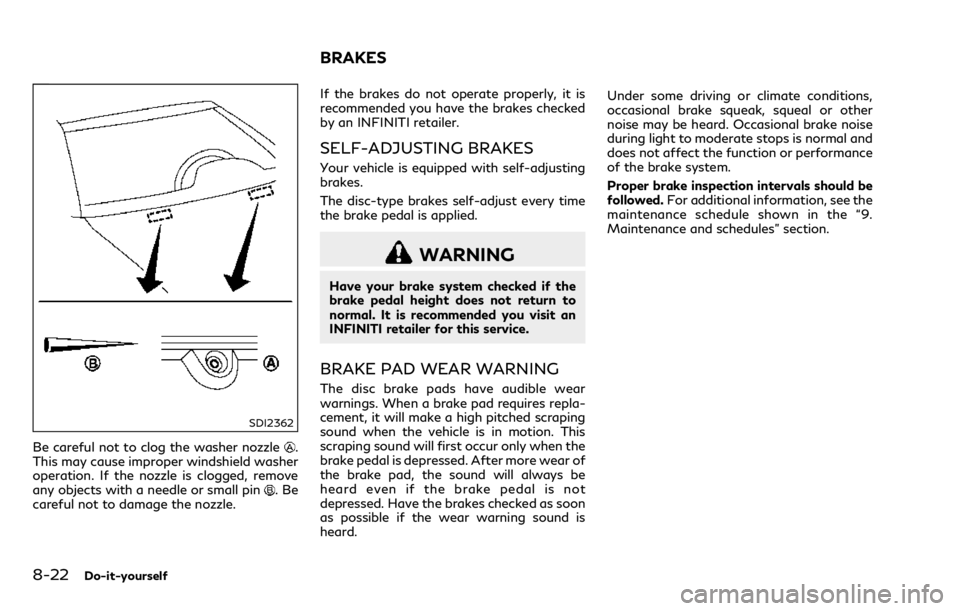
SDI2362
Be careful not to clog the washer nozzle.
This may cause improper windshield washer
operation. If the nozzle is clogged, remove
any objects with a needle or small pin
.Be
careful not to damage the nozzle. If the brakes do not operate properly, it is
recommended you have the brakes checked
by an INFINITI retailer.
SELF-ADJUSTING BRAKES
Your vehicle is equipped with self-adjusting
brakes.
The disc-type brakes self-adjust every time
the brake pedal is applied.
WARNING
Have your brake system checked if the
brake pedal height does not return to
normal. It is recommended you visit an
INFINITI retailer for this service.
BRAKE PAD WEAR WARNING
The disc brake pads have audible wear
warnings. When a brake pad requires repla-
cement, it will make a high pitched scraping
sound when the vehicle is in motion. This
scraping sound will first occur only when the
brake pedal is depressed. After more wear of
the brake pad, the sound will always be
heard even if the brake pedal is not
depressed. Have the brakes checked as soon
as possible if the wear warning sound is
heard.Under some driving or climate conditions,
occasional brake squeak, squeal or other
noise may be heard. Occasional brake noise
during light to moderate stops is normal and
does not affect the function or performance
of the brake system.
Proper brake inspection intervals should be
followed.
For additional information, see the
maintenance schedule shown in the “9.
Maintenance and schedules” section.
BRAKES
Page 404 of 458

other corrosive materials, check lubrication
frequently.
Lights*:Clean the headlights on a regular
basis. Make sure that the headlights, stop
lights, tail lights, turn signal lights, and other
lights are all operating properly and installed
securely. Also check headlight aim.
Road wheel nuts (lug nuts)*: When checking
the tires, make sure no wheel nuts are
missing, and check for any loose wheel nuts.
Tighten if necessary.
Tire rotation*: Tires should be rotated every
5,000 miles (8,000 km).
Tires*: Check the pressure with a gauge
often and always prior to long distance trips.
If necessary, adjust the pressure in all tires,
including the spare, to the pressure speci-
fied. Check carefully for damage, cuts or
excessive wear.
Tire Pressure Monitoring System (TPMS)
transmitter components: Replace the TPMS
transmitter grommet seal, valve core and
cap when the tires are replaced due to wear
or age.
Wheel alignment and balance: If the vehicle
should pull to either side while driving on a
straight and level road, or if you detect
uneven or abnormal tire wear, there may be
a need for wheel alignment.
If the steering wheel or seat vibrates at normal highway speeds, wheel balancing
may be needed.
For additional information regarding tires,
refer to “Important Tire Safety Information”
(US) or “Tire Safety Information” (Canada) in
the INFINITI Warranty Information Booklet.
Windshield:
Clean the windshield on a
regular basis. Check the windshield at least
every six months for cracks or other damage.
Have a damaged windshield repaired by a
qualified repair facility.
Windshield wiper blades*: Check for cracks
or wear if they do not wipe properly.
Inside the vehicle
The maintenance items listed here should be
checked on a regular basis, such as when
performing periodic maintenance, cleaning
the vehicle, etc.
Accelerator pedal: Check the pedal for
smooth operation and make sure the pedal
does not catch or require uneven effort.
Keep the floor mat away from the pedal.
Automatic transmission P (Park) mechan-
ism: On a fairly steep hill, check that your
vehicle is held securely with the shift lever in
the P (Park) position without applying any
brakes.
Brake pedal: Check the pedal for smooth
operation. If the brake pedal suddenly goes
down further than normal, the pedal feels spongy or the vehicle seems to take longer to
stop, have your vehicle checked immediately.
It is recommended you visit an INFINITI
retailer for this service. Keep the floor mat
away from the pedal.
Brakes:
Check that the brakes do not pull the
vehicle to one side when applied.
Parking brake: Check the parking brake
operation regularly. The vehicle should be
securely held on a fairly steep hill with only
the parking brake applied. If the parking
brake needs adjusted, it is recommended you
visit an INFINITI retailer for this service.
Seats: Check seat position controls such as
seat adjusters, seatback recliner, etc. to
ensure they operate smoothly and that all
latches lock securely in every position. Check
that the head restraints move up and down
smoothly and that the locks (if so equipped)
hold securely in all latched positions.
Seat belts: Check that all parts of the seat
belt system (for example, buckles, anchors,
adjuster and retractors) operate properly
and smoothly, and are installed securely.
Check the belt webbing for cuts, fraying,
wear or damage.
Steering wheel: Check for changes in the
steering conditions, such as excessive free
play, hard steering or strange noises.
Warning lights and chimes: Make sure that
all warning lights and chimes are operating
Maintenance and schedules9-3