brake light INFINITI Q70 2018 Owner's Guide
[x] Cancel search | Manufacturer: INFINITI, Model Year: 2018, Model line: Q70, Model: INFINITI Q70 2018Pages: 458, PDF Size: 2.21 MB
Page 287 of 458

5-78Starting and driving
Approach warning
If your vehicle comes closer to the vehicle
ahead due to rapid deceleration of that
vehicle or if another vehicle cuts in, the
system warns the driver with the chime and
ICC system display. Decelerate by depres-
sing the brake pedal to maintain a safe
vehicle distance if:
.The chime sounds.
. The vehicle ahead detection and set
distance indicator blink.
The warning chime may not sound in some
cases when there is a short distance be-
tween vehicles. Some examples are:
. When the vehicles are traveling at the
same speed and the distance between
vehicles is not changing
. When the vehicle ahead is traveling
faster and the distance between vehicles
is increasing
. When a vehicle cuts in near your vehicle
The warning chime will not sound when:
. Your vehicle approaches other vehicles
that are parked or moving slowly.
. The accelerator pedal is depressed, over-
riding the system.
NOTE:
The approach warning chime may sound
and the system display may blink when the radar sensor detects objects on the side of
the vehicle or on the side of the road. This
may cause the ICC system to decelerate or
accelerate the vehicle. The radar sensor may
detect these objects when the vehicle is
driven on winding roads, narrow roads, hilly
roads or when entering or exiting a curve. In
these cases you will have to manually
control the proper distance ahead of your
vehicle.
Also, the sensor sensitivity can be affected
by vehicle operation (steering maneuver or
driving position in the lane) or traffic or
vehicle condition (for example, if a vehicle is
being driven with some damage).
Automatic cancellation
A chime sounds under the following condi-
tions and the control is automatically can-
celed.
.
When the vehicle ahead is not detected
and your vehicle is traveling below the
speed of 15 MPH (24 km/h)
. When the system judges the vehicle is at
standstill
. When the shift lever is not in the D (Drive)
or manual shift mode
. When the parking brake is applied
. When the INFINITI Drive Mode Selector
is turned to the SNOW mode .
When the VDC system is turned off
. When ABS or VDC (including the traction
control system) operates
. When distance measurement becomes
impaired due to adhesion of dirt or
obstruction to the sensor
. When a wheel slips
. When the radar signal is temporarily
interrupted
Vehicle-to-vehicle distance control
mode limitations
WARNING
Listed below are the system limitations
for the ICC system. Failure to operate
the vehicle in accordance with these
system limitations could result in serious
injury or death.
. The system is primarily intended for
use on straight, dry, open roads with
light traffic. It is not advisable to use
the system in city traffic or con-
gested areas.
. This system will not adapt automati-
cally to road conditions. This system
should be used in evenly flowing
traffic. Do not use the system on
roads with sharp curves, or on icy
Page 296 of 458

switch again will turn the system completely
off.
When the ignition switch is pushed to the
OFF position, the system is also automati-
cally turned off.
To use the ICC system again, quickly push
and release the MAIN switch (vehicle-to-
vehicle distance control mode) or push and
hold it (conventional cruise control mode)
again to turn it on.
When the Distance Control Assist (DCA)
system is on, the conventional (fixed speed)
cruise control mode cannot be turned on
even though the MAIN switch is pushed and
held.
To turn on the conventional (fixed speed)
cruise control mode, turn off the DCA
system. See “Distance Control Assist
(DCA)” (P.5-88).
CAUTION
To avoid accidentally engaging cruise
control, make sure to turn the MAIN
switch off when not using the ICC
system.
SSD0993
To set cruising speed,accelerate your
vehicle to the desired speed, push the
COAST/SET switch and release it. (The
SET indicator will come on in the display.)
Take your foot off the accelerator pedal.
Your vehicle will maintain the set speed.
. To pass another vehicle, depress the
accelerator pedal. When you release the
pedal, the vehicle will return to the
previously set speed.
. The vehicle may not maintain the set
speed when going up or down steep hills.
If this happens, manually maintain vehi-
cle speed. To cancel the preset speed,
use any of the
following methods:
1. Push the CANCEL switch. The SET indicator will turn off.
2. Tap the brake pedal. The SET indicator will turn off.
3. Turn the MAIN switch off. Both the MAIN switch indicator and SET indicator
will turn off.
To reset at a faster cruising speed, use one
of the following three methods:
1. Depress the accelerator pedal. When the vehicle attains the desired speed, push
and release the COAST/SET switch.
2. Push and hold the ACCELERATE/RE- SUME set switch. When the vehicle
attains the desired speed, release the
switch.
3. Push, then quickly release the ACCEL- ERATE/RESUME switch. Each time you
do this, the set speed will increase by
about 1 MPH (1.6 km/h).
To reset at a slower cruising speed, use one
of the following three methods:
1. Lightly tap the brake pedal. When the vehicle attains the desired speed, push
the COAST/SET switch and release it.
2. Push and hold the COAST/SET switch. Release the switch when the vehicle
Starting and driving5-87
Page 297 of 458
5-88Starting and driving
slows down to the desired speed.
3. Push, then quickly release the COAST/ SET switch. Each time you do this, the
set speed will decrease by about 1 MPH
(1.6 km/h).
To resume the preset speed, push and
release the ACCELERATE/RESUME
switch. The vehicle will resume the last set
cruising speed when the vehicle speed is over
25 MPH (40 km/h).
System temporarily unavailable
A chime sounds under the following condi-
tions and the control is automatically can-
celed.
. When the vehicle slows down more than
8 MPH (13 km/h) below the set speed
. When the shift lever is not in the D (Drive)
or manual shift mode
. When the parking brake is applied.
. When the VDC operates (including the
traction control system)
. When a wheel slipsJVS0715X
Warning light
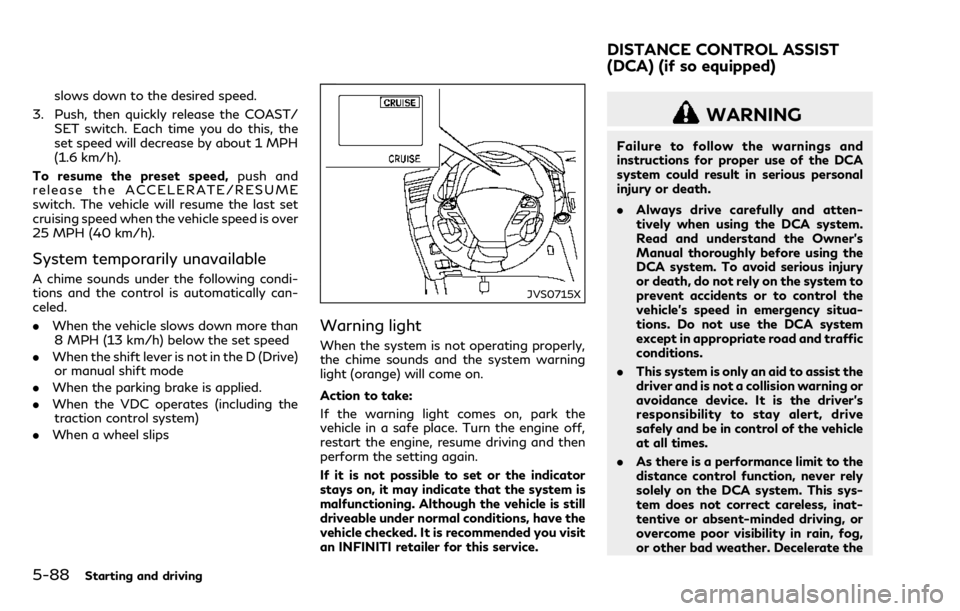
When the system is not operating properly,
the chime sounds and the system warning
light (orange) will come on.
Action to take:
If the warning light comes on, park the
vehicle in a safe place. Turn the engine off,
restart the engine, resume driving and then
perform the setting again.
If it is not possible to set or the indicator
stays on, it may indicate that the system is
malfunctioning. Although the vehicle is still
driveable under normal conditions, have the
vehicle checked. It is recommended you visit
an INFINITI retailer for this service.
WARNING
Failure to follow the warnings and
instructions for proper use of the DCA
system could result in serious personal
injury or death.
.Always drive carefully and atten-
tively when using the DCA system.
Read and understand the Owner’s
Manual thoroughly before using the
DCA system. To avoid serious injury
or death, do not rely on the system to
prevent accidents or to control the
vehicle’s speed in emergency situa-
tions. Do not use the DCA system
except in appropriate road and traffic
conditions.
. This system is only an aid to assist the
driver and is not a collision warning or
avoidance device. It is the driver’s
responsibility to stay alert, drive
safely and be in control of the vehicle
at all times.
. As there is a performance limit to the
distance control function, never rely
solely on the DCA system. This sys-
tem does not correct careless, inat-
tentive or absent-minded driving, or
overcome poor visibility in rain, fog,
or other bad weather. Decelerate the
DISTANCE CONTROL ASSIST
(DCA) (if so equipped)
Page 299 of 458

5-90Starting and driving
JVS1112X
Indicators (on the vehicle information
display)
Dynamic driver assistance switch
Center multi-function control panel
DCA SYSTEM OPERATION
WARNING
Failure to follow the warnings and
instructions for proper use of the DCAsystem could result in serious personal
injury or death.
.
When the vehicle ahead detection
indicator light is not illuminated,
system will not control the vehicle
or warn the driver.
. Never place your foot under the
brake pedal. Your foot may be caught
when the system controls the brake.
. Depending on the position of the
accelerator pedal, the system may
not be able to assist the driver to
release the accelerator pedal appro-
priately.
The DCA system brakes and moves the
accelerator pedal upward according to the
distance from and the relative speed of the
vehicle ahead to help assist the driver in
maintaining a following distance. The sys-
tem will decelerate as necessary and if the
vehicle ahead comes to a stop, the vehicle
decelerates to a standstill. However, the
DCA system can only apply up to approxi-
mately 40% of the vehicle’s total braking
power. If a vehicle moves into the traveling
lane ahead or if a vehicle traveling ahead
rapidly decelerates, the distance between
vehicles may become closer because the
DCA system cannot decelerate the vehicle
quickly enough. If this occurs, the DCA
Page 301 of 458

5-92Starting and driving
pedal.
NOTE:
.The stop lights of the vehicle come on
when braking is performed by the DCA
system.
. When the brake operates, a noise may be
heard. This is not a malfunction.
Overriding the system:
The following driver’s operation overrides
the system operation.
. When the driver depresses the accelera-
tor pedal even further while the system is
moving the accelerator pedal upward,
the DCA system control of the accel-
erator pedal is canceled.
. When the driver’s foot is on the accel-
erator pedal, the brake control by the
system is not operated.
. When the driver’s foot is on the brake
pedal, neither the brake control nor the
alert by the system operates.
. When the Intelligent Cruise Control (ICC)
system is set, the DCA system will be
cancelled.
Approach warning
If your vehicle comes closer to the vehicle
ahead due to rapid deceleration of that
vehicle or if another vehicle cuts in, the
system warns the driver with the chime and DCA system display. Decelerate by depres-
sing the brake pedal to maintain a safe
vehicle distance if:
.
The chime sounds.
. The vehicle ahead detection indicator
blinks.
The warning chime may not sound in some
cases when there is a short distance be-
tween vehicles. Some examples are:
. When the vehicles are traveling at the
same speed and the distance between
vehicles is not changing
. When the vehicle ahead is traveling
faster and the distance between vehicles
is increasing
. When a vehicle cuts in near your vehicle
The warning chime will not sound when your
vehicle approaches vehicles that are parked
or moving slowly.
NOTE:
The approach warning chime may sound
and the system display may blink when the
radar sensor detects objects on the side of
the vehicle or on the side of the road. This
may cause the DCA system to decelerate or
accelerate the vehicle. The radar sensor may
detect these objects when the vehicle is
driven on winding roads, narrow roads, hilly
roads or when entering or exiting a curve. In
these cases you will have to manually control the proper distance ahead of your
vehicle.
Also, the sensor sensitivity can be affected
by vehicle operation (steering maneuver or
driving position in the lane) or traffic or
vehicle condition (for example, if a vehicle is
being driven with some damage).
Page 312 of 458

FEB SYSTEM OPERATION
The FEB system operates at speeds above
approximately 3 MPH (5 km/h).
If a risk of a forward collision is detected, the
FEB system will provide the first warning to
the driver by blinking the vehicle ahead
detection indicator in the vehicle information
display and providing an audible warning. In
addition, the FEB system pushes the accel-
erator pedal up. If the driver releases the
accelerator pedal, then the system applies
partial braking.
If the driver applies the brakes quickly and
forcefully after the warning, and the FEB
system detects that there is still the possi-
bility of a forward collision, the system will
automatically increase the braking force.
If a forward collision is imminent and the
driver does not take action, the FEB system
issues the second visual (flashing) and
audible warning and automatically applies
harder braking.
NOTE:
The vehicle’s stop lights come on when
braking is performed by the FEB system.
Depending on vehicle speed and distance to
the vehicle ahead, as well as driving and
roadway conditions, the system may help
the driver avoid a forward collision or may
help mitigate the consequences of a collisionshould one be unavoidable.
If the driver is handling the steering wheel,
accelerating or braking, the FEB system will
function later or will not function.
The automatic braking will cease under the
following conditions:
.
When the steering wheel is turned as far
as necessary to avoid a collision.
. When the accelerator pedal is depressed.
. When there is no longer a vehicle de-
tected ahead.
If the FEB system has stopped the vehicle,
the vehicle will remain at a standstill for
approximately 2 seconds before the brakes
are released.
Starting and driving5-103
Page 316 of 458

Condition B
In the following conditions, the FEB system
is automatically turned off. The FEB system
warning light (orange)
will illuminate and
the “FRONT RADAR OBSTRUCTION”
warning message will appear in the vehicle
information display.
. The sensor area on the front of the
vehicle is covered with dirt or is ob-
structed.
Action to take:
If the warning light (orange)
comes on,
stop the vehicle in a safe place, place the
shift lever in the P (Park) position and turn
the engine off. Clean the radar cover on
lower grille with a soft cloth, and restart the
engine. If the warning light continues to
illuminate, have the FEB system checked. It
is recommended you visit an INFINITI re-
tailer for this service.
. When driving on roads with limited road
structures or buildings (for example, long
bridges, deserts, snow fields, driving next
to long walls).
Action to take:
When the above conditions no longer exist,
the FEB system will resume automatically.
Condition C
When the accelerator pedal actuator detects
that the internal motor temperature is high,
the FEB system is automatically turned off.
The FEB system warning light (orange)
will illuminate.
Action to take:
When the above conditions no longer exist,
the FEB system will resume automatically.
Condition D
When VDC system is OFF, the FEB brake
will not operate. In this case only visible and
audible warning operates. The FEB system
warning light (orange) will illuminate.
Action to take:
When the above conditions no longer exist,
the FEB system will resume automatically.
SYSTEM MALFUNCTION
If the FEB system malfunctions, it will be
turned off automatically, a chime will sound,
the FEB system warning light (orange)
will
illuminate.
Action to take:
If the warning light (orange)
illuminates,
stop the vehicle in a safe location and place
the shift lever in the P (Park) position. Turn
the engine off and restart the engine. If the
warning light continues to illuminate, have the FEB system checked. It is recommended
you visit an INFINITI retailer for this service.
Starting and driving5-107
Page 325 of 458

5-116Starting and driving
could cause failure or malfunction.
. Do not alter, remove or paint the front
bumper. It is recommended you contact
an INFINITI retailer before customizing
or restoring the front bumper.
FCC Notice:
For USA:
This device complies with Part 15 of the
FCC Rules. Operation is subject to the
following two conditions:
1. This device may not cause harmful
interference, and
2. This device must accept any interfer-
ence received, including interference
that may cause undesired operation.
FCC Warning
Changes or modification not expressly ap-
proved by the party responsible for com-
pliance could void the user’s authority to
operate the equipment.
For Canada:
This device complies with Industry Canada
licence-exempt RSS standard(s). Operation
is subject to the following two conditions:
1. This device may not cause interference,
and
2. This device must accept any interfer-
ence, including interference that may
cause undesired operation of the device.
CAUTION
During the first 1,200 miles (2,000 km),
follow these recommendations to obtain
maximum engine performance and en-
sure the future reliability and economy
of your new vehicle.
Failure to follow these recommendations
may result in shortened engine life and
reduced engine performance.
. Avoid driving for long periods at constant
speed, either fast or slow. Do not run the
engine over 4,000 rpm.
. Do not accelerate at full throttle in any
gear.
. Avoid quick starts.
. Avoid hard braking as much as possible. Follow these easy-to-use Fuel Efficient
Driving Tips to help you achieve the most
fuel economy from your vehicle.
1. Use smooth accelerator and brake pedal
application.
.Avoid rapid starts and stops..Use smooth, gentle accelerator andbrake application whenever possible.
.Maintain constant speed while com-muting and coast whenever possible.
2. Maintain constant speed.
.Look ahead to try and anticipate and minimize stops.
.Synchronizing your speed with traffic
lights allows you to reduce your
number of stops.
.Maintaining a steady speed can mini-mize red light stops and improve fuel
efficiency.
3. Use air conditioning (A/C) at higher vehicle speeds.
.Below 40 MPH (64 km/h), it is moreefficient to open windows to cool the
vehicle due to reduced engine load.
.Above 40 MPH (64 km/h), it is moreefficient to use A/C to cool the
vehicle due to increased aerodynamic
drag.
.Recirculating the cool air in the cabinwhen the A/C is on reduces cooling
load.
BREAK-IN SCHEDULE FUEL EFFICIENT DRIVING TIPS
Page 328 of 458

.If the warning light remains on after
the above operation, have your ve-
hicle checked as soon as possible. It is
recommended you visit an INFINITI
retailer for this service.
. The power train may be damaged if
you continue driving with the warn-
ing light blinking.
SD1006MA
WARNING
.Do not stop or park the vehicle over
flammable materials such as dry
grass, waste paper or rags. They
may ignite and cause a fire.
. Never leave the engine running while
the vehicle is unattended.
. Do not leave children unattended
inside the vehicle. They could un-
knowingly activate switches or con-
trols. Unattended children could
become involved in serious accidents. .
To help avoid risk of injury or death
through unintended operation of the
vehicle and/or its systems, do not
leave children, people who require the
assistance of others or pets unat-
tended in your vehicle. Additionally,
the temperature inside a closed ve-
hicle on a warm day can quickly
become high enough to cause a sig-
nificant risk of injury or death to
people and pets.
. Safe parking procedures require that
both the parking brake be applied
and the transmission placed into P
(Park). Failure to do so could cause
Starting and driving5-119
PARKING/PARKING ON HILLS
Page 330 of 458
BRAKING PRECAUTIONS
The brake system has two separate hydrau-
lic circuits. If one circuit malfunctions, you
will still have braking at two wheels.
Vacuum assisted brakes
The brake booster aids braking by using
engine vacuum. If the engine stops, you can
stop the vehicle by depressing the brake
pedal. However, greater foot pressure on
the brake pedal will be required to stop the
vehicle and the stopping distance will be
longer.
When the brake pedal is depressed slowly
and firmly, you may hear a clicking noise and
feel a slight pulsation. This is normal and
indicates that the Brake Assist System is
operating.
Wet brakes
When the vehicle is washed or driven
through water, the brakes may get wet. As
a result, your braking distance will be longer
and the vehicle may pull to one side during
braking.
To dry brakes, drive the vehicle at a safe
speed while lightly tapping the brake pedal
to heat-up the brakes. Do this until the
brakes return to normal. Avoid driving the
vehicle at high speeds until the brakes
function correctly.
PARKING BRAKE BREAK-IN
Break in the parking brake shoes whenever
the stopping effect of the parking brake is
weakened or whenever the parking brake
shoes and/or drums/rotors are replaced, in
order to assure the best braking perfor-
mance.
This procedure is described in the vehicle
service manual. It is recommended you visit
an INFINITI retailer for this service.
Using the brakes
Avoid resting your foot on the brake pedal
while driving. This will cause overheating of
the brakes, wearing out the brake and pads
faster and reduce gas mileage.
To help save the brakes and to prevent the
brakes from overheating, reduce speed and
downshift to a lower gear before going
down a slope or long grade. Overheated
brakes may reduce braking performance and
could result in loss of vehicle control.
WARNING
.While driving on a slippery surface,
be careful when braking, accelerating
or downshifting. Abrupt braking or
accelerating could cause the wheels
to skid and result in an accident. .
If the engine is not running or is
turned off while driving, the power
assist for the brakes will not work.
Braking will be harder.
Starting and driving5-121
BRAKE SYSTEM