Air INFINITI QX 2013 Manual PDF
[x] Cancel search | Manufacturer: INFINITI, Model Year: 2013, Model line: QX, Model: INFINITI QX 2013Pages: 578, PDF Size: 3.92 MB
Page 302 of 578

JVH0473X
CONNECTING PROCEDURE
1. Push thebutton, and select the
“Connect Phone” key.
SAA2520
2. When a PIN code appears on the
screen, operate the compatible Blue-
tooth
®cellular phone to enter the PIN
code.
The connecting procedure of the cellu-
lar phone varies according to each
cellular phone. See the cellular phone
Owner’s Manual for the details. You can
also visit
www.InfinitiUSA.com/bluetooth or call
INFINITI Consumer Affairs Department
for instructions on pairing INFINITI
recommended cellular phones.
When the connection process is com-
pleted, the screen will return to the Phone menu display.
PHONE SELECTION
Up to 5 cellular phones can be registered
to the system. To switch to connect another
cellular phone, push PHONE button and
select the
“Connected Phones” key. The
registered cellular phones are shown on
the list. If you select a cellular phone that
is different from the one currently con-
nected, the newly selected phone will be
connected to the system.
QUICK DIAL
This vehicle has two phonebooks available
for hands-free use. Depending on the
phone, the system may automatically
download the entire cell phone’s phone-
book into the “Phonebook”. For the details
about downloading a phonebook, see
“Phone setting” later in this section. If a
phonebook does not automatically down-
load, the Quick Dial may be set for up to 40
entries. This phonebook allows the record-
ing of a name to speak while using voice
recognition.
Monitor, climate, audio, phone and voice recognition systems4-101
Page 308 of 578

Download Phonebook
Download the contacts registered in a
Bluetooth®cellular phone. Availability of
this function depends on each cellular
phone. The memory downloading proce-
dure from the cellular phone also varies
according to each cellular phone. See
cellular phone Owner’s Manual for details.
When “Auto Downloaded” is active, the
system will automatically re-download the
entries registered in the phone every time
it is paired with the vehicle, even after you
delete the entries from your vehicle’ s
Handset Memory.
Volume & Ringtone
The following kinds of phone volume can
be set. Pushing the PHONE button and
selecting the “Volume & Ringtone” key can
also operate the same settings.
. Ringtone/Incoming Call/Outgoing Call
To increase or decrease the volume,
select the “Ringtone”, “Incoming Call”
or “Outgoing Call” key and adjust it
with the INFINITI controller.
. Automatic Hold
When this function is activated, an
incoming phone call is automatically
held. .
Vehicle Ringtone
When this function is activated, a
specific ringtone that is different from
the cellular phone will sound when
receiving a call.
Auto Downloaded
When this item is activated and supported
by a compatible phone, the phonebook of
the hands-free phone is automatically
downloaded at the same time that the
hands-free phone is connected.
When this item is active, the system will
automatically re-download the entries re-
gistered in the connected phone even after
you delete the entries from your vehicle’s
Handset Memory.
Monitor, climate, audio, phone and voice recognition systems4-107
Page 313 of 578

4-112Monitor, climate, audio, phone and voice recognition systems
SAA2533
Useful tips for correct operation
You can display useful speaking tips to
help the system recognize your voice
commands correctly.
Select“Help on Speaking” to start display.
USING THE SYSTEM
Initialization
When the ignition switch is pushed to the
ON position, INFINITI Voice Recognition is
initialized, which may take up to one
minute. When completed, the system is
ready to accept voice commands. If the
TALK
switch is pushed before the
initialization completes, the display will
show the message: “System not ready.” or
a beep sounds.
Before starting
To get the best recognition performance
from INFINITI Voice Recognition, observe
the following:
. The interior of the vehicle should be as
quiet as possible. Close the windows to
eliminate the surrounding noises (traf-
fic noise and vibration sounds, etc.),
which may prevent the system from
correctly recognizing the voice com-
mands.
. Wait until the tone sounds before
speaking a command.
. Speak in a natural conversational voice
without pausing between words. .
If the air conditioner is set to “Auto”,
the fan speed is automatically lowered
so that your commands can be recog-
nized more easily.
Page 336 of 578

.When the air conditioner is in the
“AUTO” mode, the fan speed decreases
automatically for easy recognition.
. Wait until a tone sounds before speak-
ing a command.
. Speak in a natural voice without paus-
ing between words.
SAA3164
Giving voice command
1. Push and release the TALKswitch
located on the steering wheel.
SAA2548
2. A list of commands appears on the
screen, and the system announces,
“Please say a command”.
3. After the tone sounds and the icon on the screen changes from
to,
speak a command.
Operating tips:
. Voice commands cannot be accepted
when the icon is
.
. The list displayed can be scrolled by
tilting the menu control switch on the
steering wheel.
. If the command is not recognized, the
system announces, “Please say again”.
Monitor, climate, audio, phone and voice recognition systems4-135
Page 342 of 578
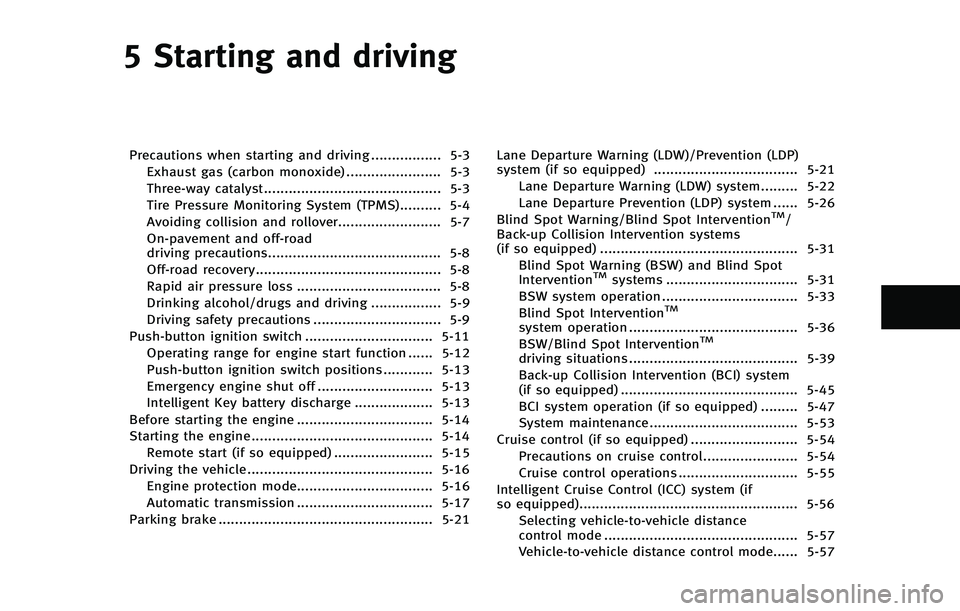
5 Starting and driving
Precautions when starting and driving ................. 5-3Exhaust gas (carbon monoxide) ....................... 5-3
Three-way catalyst........................................... 5-3
Tire Pressure Monitoring System (TPMS).......... 5-4
Avoiding collision and rollover......................... 5-7
On-pavement and off-road
driving precautions.......................................... 5-8
Off-road recovery............................................. 5-8
Rapid air pressure loss ................................... 5-8
Drinking alcohol/drugs and driving ................. 5-9
Driving safety precautions ............................... 5-9
Push-button ignition switch ............................... 5-11 Operating range for engine start function ...... 5-12
Push-button ignition switch positions ............ 5-13
Emergency engine shut off ............................ 5-13
Intelligent Key battery discharge ................... 5-13
Before starting the engine ................................. 5-14
Starting the engine ............................................ 5-14 Remote start (if so equipped) ........................ 5-15
Driving the vehicle ............................................. 5-16
Engine protection mode................................. 5-16
Automatic transmission ................................. 5-17
Parking brake .................................................... 5-21 Lane Departure Warning (LDW)/Prevention (LDP)
system (if so equipped) ................................... 5-21
Lane Departure Warning (LDW) system......... 5-22
Lane Departure Prevention (LDP) system ...... 5-26
Blind Spot Warning/Blind Spot Intervention
TM/
Back-up Collision Intervention systems
(if so equipped) ................................................ 5-31
Blind Spot Warning (BSW) and Blind Spot
Intervention
TMsystems ................................ 5-31
BSW system operation ................................. 5-33
Blind Spot Intervention
TM
system operation ......................................... 5-36
BSW/Blind Spot InterventionTM
driving situations ......................................... 5-39
Back-up Collision Intervention (BCI) system
(if so equipped) ........................................... 5-45
BCI system operation (if so equipped) ......... 5-47
System maintenance.................................... 5-53
Cruise control (if so equipped) .......................... 5-54 Precautions on cruise control....................... 5-54
Cruise control operations ............................. 5-55
Intelligent Cruise Control (ICC) system (if
so equipped)..................................................... 5-56
Selecting vehicle-to-vehicle distance
control mode ............................................... 5-57
Vehicle-to-vehicle distance control mode...... 5-57
Page 344 of 578
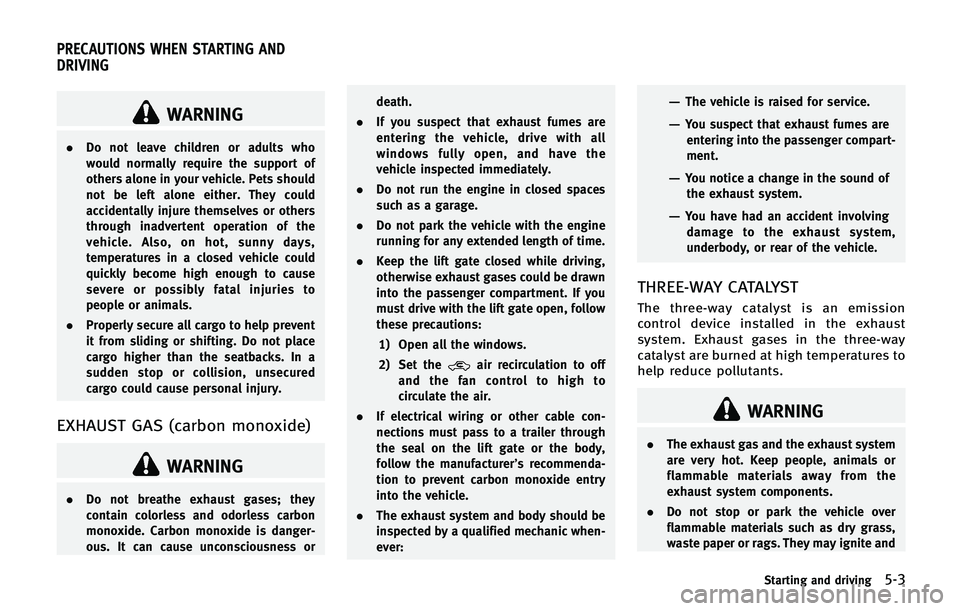
WARNING
.Do not leave children or adults who
would normally require the support of
others alone in your vehicle. Pets should
not be left alone either. They could
accidentally injure themselves or others
through inadvertent operation of the
vehicle. Also, on hot, sunny days,
temperatures in a closed vehicle could
quickly become high enough to cause
severe or possibly fatal injuries to
people or animals.
. Properly secure all cargo to help prevent
it from sliding or shifting. Do not place
cargo higher than the seatbacks. In a
sudden stop or collision, unsecured
cargo could cause personal injury.
EXHAUST GAS (carbon monoxide)
WARNING
.Do not breathe exhaust gases; they
contain colorless and odorless carbon
monoxide. Carbon monoxide is danger-
ous. It can cause unconsciousness or death.
. If you suspect that exhaust fumes are
entering the vehicle, drive with all
windows fully open, and have the
vehicle inspected immediately.
. Do not run the engine in closed spaces
such as a garage.
. Do not park the vehicle with the engine
running for any extended length of time.
. Keep the lift gate closed while driving,
otherwise exhaust gases could be drawn
into the passenger compartment. If you
must drive with the lift gate open, follow
these precautions:
1) Open all the windows.
2) Set the
air recirculation to off
and the fan control to high to
circulate the air.
. If electrical wiring or other cable con-
nections must pass to a trailer through
the seal on the lift gate or the body,
follow the manufacturer’s recommenda-
tion to prevent carbon monoxide entry
into the vehicle.
. The exhaust system and body should be
inspected by a qualified mechanic when-
ever:
—The vehicle is raised for service.
—You suspect that exhaust fumes are
entering into the passenger compart-
ment.
—You notice a change in the sound ofthe exhaust system.
—You have had an accident involvingdamage to the exhaust system,
underbody, or rear of the vehicle.
THREE-WAY CATALYST
The three-way catalyst is an emission
control device installed in the exhaust
system. Exhaust gases in the three-way
catalyst are burned at high temperatures to
help reduce pollutants.
WARNING
. The exhaust gas and the exhaust system
are very hot. Keep people, animals or
flammable materials away from the
exhaust system components.
. Do not stop or park the vehicle over
flammable materials such as dry grass,
waste paper or rags. They may ignite and
Starting and driving5-3
PRECAUTIONS WHEN STARTING AND
DRIVING
Page 346 of 578
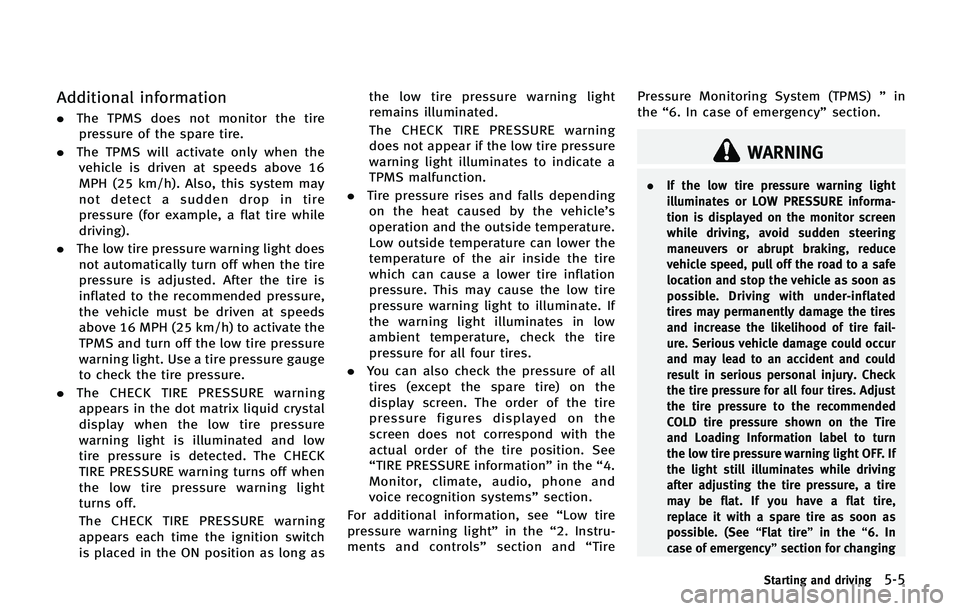
Additional information
.The TPMS does not monitor the tire
pressure of the spare tire.
. The TPMS will activate only when the
vehicle is driven at speeds above 16
MPH (25 km/h). Also, this system may
not detect a sudden drop in tire
pressure (for example, a flat tire while
driving).
. The low tire pressure warning light does
not automatically turn off when the tire
pressure is adjusted. After the tire is
inflated to the recommended pressure,
the vehicle must be driven at speeds
above 16 MPH (25 km/h) to activate the
TPMS and turn off the low tire pressure
warning light. Use a tire pressure gauge
to check the tire pressure.
. The CHECK TIRE PRESSURE warning
appears in the dot matrix liquid crystal
display when the low tire pressure
warning light is illuminated and low
tire pressure is detected. The CHECK
TIRE PRESSURE warning turns off when
the low tire pressure warning light
turns off.
The CHECK TIRE PRESSURE warning
appears each time the ignition switch
is placed in the ON position as long as the low tire pressure warning light
remains illuminated.
The CHECK TIRE PRESSURE warning
does not appear if the low tire pressure
warning light illuminates to indicate a
TPMS malfunction.
. Tire pressure rises and falls depending
on the heat caused by the vehicle’s
operation and the outside temperature.
Low outside temperature can lower the
temperature of the air inside the tire
which can cause a lower tire inflation
pressure. This may cause the low tire
pressure warning light to illuminate. If
the warning light illuminates in low
ambient temperature, check the tire
pressure for all four tires.
. You can also check the pressure of all
tires (except the spare tire) on the
display screen. The order of the tire
pressure figures displayed on the
screen does not correspond with the
actual order of the tire position. See
“TIRE PRESSURE information” in the“4.
Monitor, climate, audio, phone and
voice recognition systems” section.
For additional information, see “Low tire
pressure warning light” in the“2. Instru-
ments and controls” section and“Tire Pressure Monitoring System (TPMS)
”in
the “6. In case of emergency” section.
WARNING
.If the low tire pressure warning light
illuminates or LOW PRESSURE informa-
tion is displayed on the monitor screen
while driving, avoid sudden steering
maneuvers or abrupt braking, reduce
vehicle speed, pull off the road to a safe
location and stop the vehicle as soon as
possible. Driving with under-inflated
tires may permanently damage the tires
and increase the likelihood of tire fail-
ure. Serious vehicle damage could occur
and may lead to an accident and could
result in serious personal injury. Check
the tire pressure for all four tires. Adjust
the tire pressure to the recommended
COLD tire pressure shown on the Tire
and Loading Information label to turn
the low tire pressure warning light OFF. If
the light still illuminates while driving
after adjusting the tire pressure, a tire
may be flat. If you have a flat tire,
replace it with a spare tire as soon as
possible. (See “Flat tire”in the“6. In
case of emergency” section for changing
Starting and driving5-5
Page 347 of 578
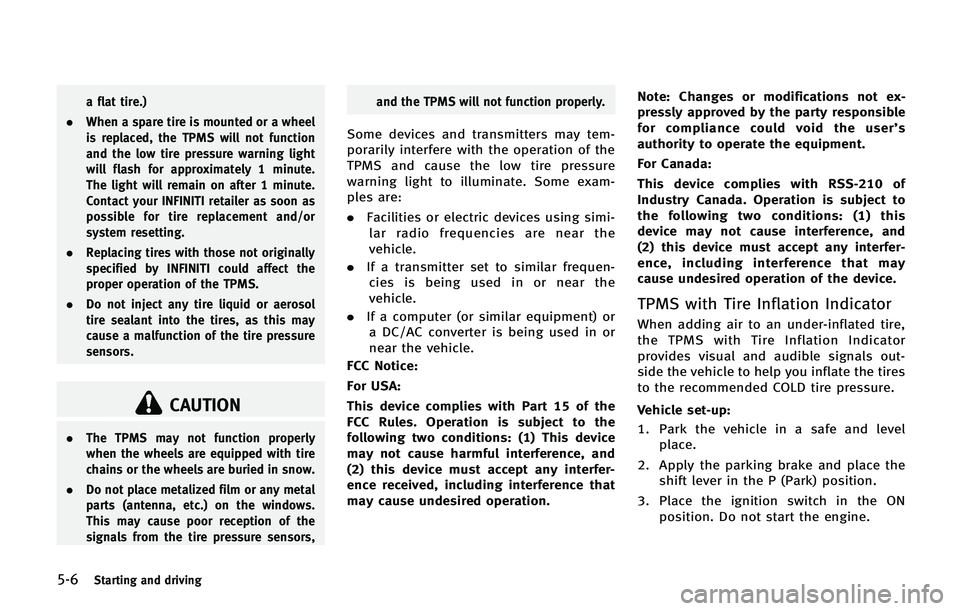
5-6Starting and driving
a flat tire.)
. When a spare tire is mounted or a wheel
is replaced, the TPMS will not function
and the low tire pressure warning light
will flash for approximately 1 minute.
The light will remain on after 1 minute.
Contact your INFINITI retailer as soon as
possible for tire replacement and/or
system resetting.
. Replacing tires with those not originally
specified by INFINITI could affect the
proper operation of the TPMS.
. Do not inject any tire liquid or aerosol
tire sealant into the tires, as this may
cause a malfunction of the tire pressure
sensors.
CAUTION
.The TPMS may not function properly
when the wheels are equipped with tire
chains or the wheels are buried in snow.
. Do not place metalized film or any metal
parts (antenna, etc.) on the windows.
This may cause poor reception of the
signals from the tire pressure sensors, and the TPMS will not function properly.
Some devices and transmitters may tem-
porarily interfere with the operation of the
TPMS and cause the low tire pressure
warning light to illuminate. Some exam-
ples are:
.
Facilities or electric devices using simi-
lar radio frequencies are near the
vehicle.
. If a transmitter set to similar frequen-
cies is being used in or near the
vehicle.
. If a computer (or similar equipment) or
a DC/AC converter is being used in or
near the vehicle.
FCC Notice:
For USA:
This device complies with Part 15 of the
FCC Rules. Operation is subject to the
following two conditions: (1) This device
may not cause harmful interference, and
(2) this device must accept any interfer-
ence received, including interference that
may cause undesired operation. Note: Changes or modifications not ex-
pressly approved by the party responsible
for compliance could void the user’
s
authority to operate the equipment.
For Canada:
This device complies with RSS-210 of
Industry Canada. Operation is subject to
the following two conditions: (1) this
device may not cause interference, and
(2) this device must accept any interfer-
ence, including interference that may
cause undesired operation of the device.
TPMS with Tire Inflation Indicator
When adding air to an under-inflated tire,
the TPMS with Tire Inflation Indicator
provides visual and audible signals out-
side the vehicle to help you inflate the tires
to the recommended COLD tire pressure.
Vehicle set-up:
1. Park the vehicle in a safe and level place.
2. Apply the parking brake and place the shift lever in the P (Park) position.
3. Place the ignition switch in the ON position. Do not start the engine.
Page 348 of 578
Operation:
1. Add air to the tire.
2. After a few seconds, the hazard indica-tors will start flashing.
3. When the designated pressure is reached, the horn beeps once and the
hazard indicators stop flashing.
4. Perform the above steps for each tire.
. If the tire is over-inflated more than
approximately 4 psi (30 kPa), the horn
beeps and the hazard indicators flash 3
times. To correct the pressure, push the
core of the valve stem on the tire briefly
to release pressure. When the pressure
reaches the designated pressure, the
horn beeps once.
. If the hazard indicator does not flash
within approximately 15 seconds after
starting to inflate the tire, it indicates
that the Tire Inflation Indicator is not
operating.
. The TPMS will not activate the Tire
Inflation Indicator under the following
conditions:
— If there is interference from an
external device or transmitter
— The air pressure from the inflation
device such as those using a power socket is not sufficient to inflate the
tire
— If an electrical equipment is being
used in or near the vehicle
— There is a malfunction in the TPMS
system
— There is a malfunction in the horn or
hazard indicators
. If the Tire Inflation Indicator does not
operate due to TPMS interference,
move the vehicle about 3 ft (1m)
backward or forward and try again.
If the Tire Inflation Indicator is not working,
use a tire pressure gauge.
AVOIDING COLLISION AND ROLL-
OVER
WARNING
Failure to operate this vehicle in a safe and
prudent manner may result in loss of control
or an accident.
Be alert and drive defensively at all times.
Obey all traffic regulations. Avoid exces-
sive speed, high speed cornering, or
sudden steering maneuvers, because these driving practices could cause you to
lose control of your vehicle.
As with any
vehicle, a loss of control could result in a
collision with other vehicles or objects, or
cause the vehicle to rollover, particularly if
the loss of control causes the vehicle to
slide sideways. Be attentive at all times,
and avoid driving when tired. Never drive
when under the influence of alcohol or
drugs (including prescription or over-the-
counter drugs which may cause drowsi-
ness). Always wear your seat belt as
outlined in the “Seat belts”in the“1.
Safety —seats, seat belts and supple-
mental restraint system” section of this
manual, and also instruct your passengers
to do so.
Seat belts help reduce the risk of injury in
collisions and rollovers. In a rollover crash,
an unbelted or improperly belted person is
significantly more likely to be injured or
killed than a person properly wearing a
seat belt.
Starting and driving5-7
Page 349 of 578

5-8Starting and driving
ON-PAVEMENT AND OFF-ROAD
DRIVING PRECAUTIONS
Utility vehicles have a significantly higher
rollover rate than other types of vehicles.
They have higher ground clearance than
passenger cars to make them capable of
performing in a variety of on-pavement and
off-road applications. This gives them a
higher center of gravity than ordinary cars.
An advantage of higher ground clearance is
a better view of the road, allowing you to
anticipate problems. However, they are not
designed for cornering at the same speeds
as conventional passenger cars any more
than low-slung sports cars are designed to
perform satisfactorily under off-road con-
ditions. If at all possible, avoid sharp turns
or abrupt maneuvers, particularly at high
speeds. As with other vehicles of this type,
failure to operate this vehicle correctly may
result in loss of control or vehicle rollover.
Seat belts help reduce the risk of injury in
collisions and rollovers. In a rollover crash,
an unbelted or improperly belted person is
significantly more likely to be injured or
killed than a person properly wearing a
seat belt.
Be sure to read“Driving safety precau-
tions” later in this section.
OFF-ROAD RECOVERY
While driving, the right side or left side
wheels may unintentionally leave the road
surface. If this occurs, maintain control of
the vehicle by following the procedure
below. Please note that this procedure is
only a general guide. The vehicle must be
driven as appropriate based on the condi-
tions of the vehicle, road and traffic.
1. Remain calm and do not overreact.
2. Do not apply the brakes.
3. Maintain a firm grip on the steering
wheel with both hands and try to hold a
straight course.
4. When appropriate, slowly release the accelerator pedal to gradually slow the
vehicle.
5. If there is nothing in the way, steer the vehicle to follow the road while the
vehicle speed is reduced. Do not
attempt to drive the vehicle back onto
the road surface until vehicle speed is
reduced.
6. When it is safe to do so, gradually turn the steering wheel until both tires
return to the road surface. When all
tires are on the road surface, steer the
vehicle to stay in the appropriate driving lane..If you decide that it is not safe to
return the vehicle to the road surface
based on vehicle, road or traffic
conditions, gradually slow the vehi-
cle to a stop in a safe place off the
road.
RAPID AIR PRESSURE LOSS
Rapid air pressure loss or a “blow-out”can
occur if the tire is punctured or is damaged
due to hitting a curb or pothole. Rapid air
pressure loss can also be caused by
driving on under-inflated tires.
Rapid air pressure loss can affect the
handling and stability of the vehicle,
especially at highway speeds.
Help prevent rapid air pressure loss by
maintaining the correct air pressure and
visually inspect the tires for wear and
damage. See “Wheels and tires” in the“8.
Maintenance and do-it-yourself” section of
this manual.
If a tire rapidly loses air pressure or
“blows-out” while driving maintain control
of the vehicle by following the procedure
below. Please note that this procedure is
only a general guide. The vehicle must be
driven as appropriate based on the condi-