Air INFINITI QX 2013 Workshop Manual
[x] Cancel search | Manufacturer: INFINITI, Model Year: 2013, Model line: QX, Model: INFINITI QX 2013Pages: 578, PDF Size: 3.92 MB
Page 190 of 578

SPA2778
LIFT GATE RELEASE LEVER
If the lift gate cannot be opened with the
door lock switch due to a discharged
battery, follow these steps.
1. Remove the cover
*Ainside of the lift
gate using a suitable tool.
2. Move the lever
*Bas illustrated to
open the lift gate.
Contact an INFINITI retailer as soon as
possible for repair.
OPENING THE FUEL-FILLER DOOR
CAUTION
Lock all doors before going through auto-
matic car wash. Locking doors helps prevent
fuel-filler door from opening and becoming
damaged.
SPA2752
To open the fuel-filler door, unlock the fuel-
filler door by using one of the following
operations, then push the right side of the
door.
. Push the driver’s door handle request
switch with the Intelligent Key carried
with you.
. Push the passenger’ s door handle
request switch or lift gate request
switch twice with the Intelligent Key
carried with you.
. Push the UNLOCK button on the Intelli-
gent Key.
. Insert the mechanical key into the door
lock cylinder and rotate it towards the
Pre-driving checks and adjustments3-25
FUEL-FILLER DOOR
Page 193 of 578

3-28Pre-driving checks and adjustments
3. Push theswitch*Aon the right
side of the combination meter panel for
longer than 1 second to turn off the
LOOSE FUEL CAP warning after tighten-
ing the fuel cap.WARNING
. Do not adjust the steering wheel while
driving. You could lose control of your
vehicle and cause an accident.
. Do not adjust the steering wheel any
closer to you than is necessary for
proper steering operation and comfort.
The driver’s air bag inflates with great
force. If you are unrestrained, leaning
forward, sitting sideways or out of
position in any way, you are at greater
risk of injury or death in a crash. You
may also receive serious or fatal injuries
from the air bag if you are up against it
when it inflates. Always sit back against
the seatback and as far away as practical
from the steering wheel. Always use the
seat belts.
SPA2754
ELECTRIC OPERATION
Tilt or telescopic operation
Move the lever*1to adjust the steering
wheel up or down, forward or rearward to
the desired position.
Entry/Exit function operation:
The automatic drive positioner system will
make the steering wheel move up auto-
matically when the driver’s door is opened
with the ignition switch in the LOCK
position. This lets the driver get into and
out of the seat more easily.
For more information, see “Automatic drive
TILT/TELESCOPIC STEERING
Page 200 of 578

The driver’s seat, steering column and
outside mirrors will move to the mem-
orized position or to the exit position
when the entry/exit function is set to
active with the indicator light flashing,
and then the light will stay on for
approximately 5 seconds.
SETTING MEMORY FUNCTION
The status of the following settings can be
linked to the Intelligent Key and the
memorized settings can be available for
each Intelligent Key.
.Air conditioner system
. Navigation system
. Audio system
To use the memory function, lock the doors
with the Intelligent Key that is linked to the
settings.
To enable the memorized settings:
1. Carry the Intelligent Key that is linked to the settings, and unlock the doors by
pushing the driver’s door handle re-
quest switch or “UNLOCK”
button
on the Intelligent Key.
2. Push the ignition switch to the “ON”
position. “Connection with the key has
been done” will be displayed on the screen and the memorized settings are
available (only when a new Intelligent
Key is used).
SYSTEM OPERATION
The automatic drive positioner system will
not work or will stop operating under the
following conditions:
.
When the vehicle speed is above 4 MPH
(7 km/h).
. When the adjusting switch for the
driver’s seat and steering column is
turned on while the automatic drive
positioner is operating.
. When the memory switch 1 or 2 is not
pushed for at least 1 second.
. When the seat, steering column and
outside mirrors have already been
moved to the memorized position.
. When no position is stored in the
memory switch.
. When the engine is started while
moving the automatic drive positioner.
. When the AT shift lever is moved from
the P (Park) position to any other
position. (However, it will not be
canceled if the switch is pushed while
the seat and steering column are
returning to the previous positions (entry/exit function).)
. When the driver’s door remains open
for more than 45 seconds and the
ignition switch is not in the ON posi-
tion.
Pre-driving checks and adjustments3-35
Page 231 of 578
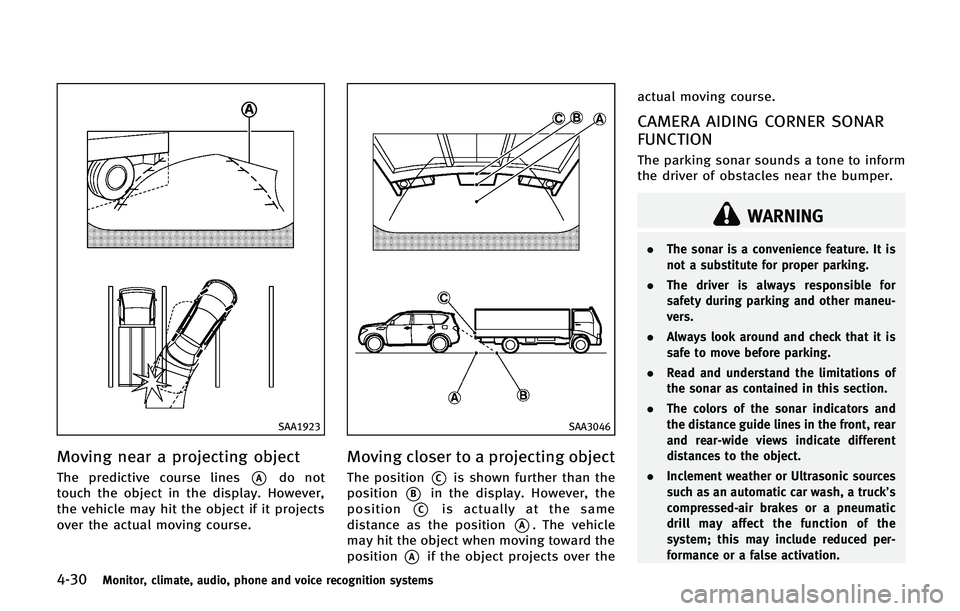
4-30Monitor, climate, audio, phone and voice recognition systems
SAA1923
Moving near a projecting object
The predictive course lines*Ado not
touch the object in the display. However,
the vehicle may hit the object if it projects
over the actual moving course.
SAA3046
Moving closer to a projecting object
The position*Cis shown further than the
position
*Bin the display. However, the
position
*Cis actually at the same
distance as the position
*A. The vehicle
may hit the object when moving toward the
position
*Aif the object projects over the actual moving course.
CAMERA AIDING CORNER SONAR
FUNCTION
The parking sonar sounds a tone to inform
the driver of obstacles near the bumper.
WARNING
.
The sonar is a convenience feature. It is
not a substitute for proper parking.
. The driver is always responsible for
safety during parking and other maneu-
vers.
. Always look around and check that it is
safe to move before parking.
. Read and understand the limitations of
the sonar as contained in this section.
. The colors of the sonar indicators and
the distance guide lines in the front, rear
and rear-wide views indicate different
distances to the object.
. Inclement weather or Ultrasonic sources
such as an automatic car wash, a truck’s
compressed-air brakes or a pneumatic
drill may affect the function of the
system; this may include reduced per-
formance or a false activation.
Page 239 of 578

4-38Monitor, climate, audio, phone and voice recognition systems
SAA3053
Center ventilators
Open/close the ventilators by moving the
control to either direction.
: This symbol indicates that the ventilators are closed. Moving the side control to this
direction will close the ventilators.
: This symbol indicates that the ventilators areopen. Moving the side control to this direction
will open the ventilators.
Adjust the air flow direction of the ventila-
tors by moving the center knob (up/down,
left/right) until the desired position is
achieved.
SAA3054
Side ventilators
Open/close the ventilators by moving the
control to either direction.
: This symbol indicates that the ventilators are closed. Moving the side control to this
direction will close the ventilators.
: This symbol indicates that the ventilators areopen. Moving the side control to this direction
will open the ventilators.
Adjust the air flow direction of the ventila-
tors by moving the center knob (up/down,
left/right) until the desired position is
achieved.
SAA3055
Rear ventilators
Open/close the ventilators by moving the
control to either direction.
Adjust the air flow direction of the ventila-
tors by moving the center knob (up/down,
left/right) until the desired position is
achieved.
VENTILATORS
Page 240 of 578

WARNING
.The air conditioner cooling function
operates only when the engine is run-
ning.
. Do not leave children or adults who
would normally require the support of
others alone in your vehicle. Pets should
not be left alone either. On hot, sunny
days, temperatures in a closed vehicle
could quickly become high enough to
cause severe or possibly fatal injuries to
people or animals.
. Do not use the recirculation mode for
long periods as it may cause the interior
air to become stale and the windows to
fog up.
. Do not adjust the heating and air
conditioning controls while driving so
that full attention may be given to
vehicle operation.
Start the engine and operate the automatic
climate control system.
SAA2723
When the STATUS button is pushed, the
automatic climate control status screen
will appear. (See “How to use STATUS
button” earlier in this section.)
Monitor, climate, audio, phone and voice recognition systems4-39
AUTOMATIC CLIMATE CONTROL
Page 241 of 578

4-40Monitor, climate, audio, phone and voice recognition systems
SAA3059
Without Advanced Climate Control System
SAA3161
With Advanced Climate Control System1.
“AUTO” automatic climate control ON
button/Temperature control dial (dri-
ver side)
2. “
”front defroster button
3. “
”rear window defroster button
(See “Rear window and outside mirror
defroster switch” in the“2. Instru-
ments and controls” section.)
4. “
”fan speed decrease button
5. “OFF” button for climate control sys-
tem
6. “
”fan speed increase button
7. “
”intake air control button
8. “
”air recirculation button
9. “DUAL” zone control ON/OFF button/
Temperature control dial (passenger
side)
10. “MODE” manual air flow control but-
ton
11. “REAR” control button
12. “A/C” air conditioner ON/OFF button
13. “
”upper vent button
14. “
”auto-recirculation button
Page 242 of 578

AUTOMATIC CLIMATE CONTROL
Automatic operation
Cooling and/or dehumidified heating
(AUTO):
This mode may be used all year round. The
system works automatically to control the
inside temperature, air flow distribution
and fan speed after the preferred tempera-
ture is set manually.
1. Push the“AUTO” button on. (The
indicator on the button will illuminate
and AUTO will be displayed.)
2. Turn the temperature control dial (dri- ver side) to set the desired tempera-
ture.
.The temperature can be set withinthe following range.
— For U.S.: 60 to 908F
— For Canada: 18 to 328C
.The temperature of the passenger
compartment will be maintained
automatically. Air flow distribution
and fan speed will also be controlled
automatically.
3. You can individually set driver and front passenger side temperature using each
temperature control button. When the “DUAL”
button is pushed or the pas-
senger side temperature control button
is turned, the DUAL indicator will come
on. To turn off the passenger side
temperature control, push the “DUAL”
button.
4. To turn off the climate control system, push the “OFF”button.
A visible mist may be seen coming from the
ventilators in hot, humid conditions as the
air is cooled rapidly. This does not indicate
a malfunction.
Heating (A/C OFF):
The air conditioner does not activate in this
mode. When you need to heat only, use
this mode.
1. Push the “AUTO”button on.
2. Push the “A/C” button. (The A/C
indicator will turn off.)
3. Turn the temperature control dial to set the desired temperature.
. The temperature of the passenger
compartment will be maintained auto-
matically. Air flow distribution and fan
speed are also controlled automati-
cally. .
Do not set the temperature lower than
the outside air temperature. Otherwise
the system may not work properly.
. Not recommended if windows fog up.
Dehumidified defrosting or defogging: 1. Push the “
”front defroster button.
(The indicator light on the button will
illuminate.)
2. Turn the temperature control dial to set the desired temperature.
. To quickly remove ice from the outside
of the windows, push the fan speed
increase button “
”and set it to the
maximum position.
. As soon as possible after the wind-
shield is clean, push the “AUTO”button
to return to the auto mode.
. When the “
”front defroster button
is pushed, the air conditioner will
automatically be turned on at outside
temperatures above 238 F(−58C) to
defog the windshield, and the air
recirculate mode will automatically be
turned off.
Outside air is drawn into the passenger
compartment to improve the defogging
performance.
Monitor, climate, audio, phone and voice recognition systems4-41
Page 243 of 578

4-42Monitor, climate, audio, phone and voice recognition systems
Manual operation
Fan speed control:
Push the fan speed increase“
”or
decrease “”buttons to manually con-
trol the fan speed.
Push the “AUTO” button to return to
automatic control of the fan speed.
Temperature control:
Turn the temperature control dial to set the
desired temperature.
. The temperature can be set within the
following range.
— For U.S.: 60 to 908F
— For Canada: 18 to 328C
Air flow control:
Pushing the “MODE” manual air flow
control button selects the air outlet to:
: Air flows from center and side ventilators.
: Air flows from center and side ventilators and foot outlets.
: Air flows mainly from foot outlets.
: Air flows from defroster and foot outlets.
Air recirculation:
Push the intake air control button to
recirculate interior air inside the vehicle.
The indicator light on the “
”button will illuminate.
The air recirculation mode cannot be
activated when the air conditioner is in
the front defrosting mode
“
”.
Outside air circulation:
Push the intake air control button to draw
outside air into the passenger compart-
ment. The indicator light on the “
”
button will turn off and “”(if so
equipped) will illuminate.
Automatic intake air control:
In the AUTO mode, the intake air will be
controlled automatically.
. Without Advanced Climate Control Sys-
tem:
— When the outside air circulation
mode is on, push and hold the
“
” intake air control button.
— When the air recirculation mode is
on, push and hold the “
”air
recirculation button.
When setting the automatic control
mode, both indicator lights will blink
twice indicating that the system is in
the automatic control mode.
. With Advanced Climate Control System:
To return to the automatic control mode, push the
“
”auto-recircula-
tion button. The indicator light on the
“
” auto-recirculation button will
illuminate.
Turning the system off
Push the OFF button.
Upper vent system
When the upper vent “”button is
pushed, the air flow against the driver’s
or passenger’s upper body becomes gen-
tle. The indicator light on the button will
illuminate.
In this mode, air from the upper ventilator
flows in order to control the cabin tem-
perature without blowing air directly on the
occupants.
Push the upper vent “
”button when
you want the air conditioner to work
quickly.
To turn the system off, push the upper vent
“
” button to turn the indicator light off.
Advanced Climate Control System
(if so equipped)
The Advanced Climate Control System
keeps the air inside of the vehicle clean,
using the ion control and the automatic air
Page 244 of 578

intake control with exhaust gas detecting
sensor.
SAA2734
Ion control:
This unit generates highly concentrated
Plasmacluster
®ions into the air blown
from the ventilators and reduces odor
absorbed into the interior trim.
The high-density Plasmacluster
®ions gen-
erated in the air conditioner’s air stream
not only suppress airborne bacteria and
reduce the adherence of odors to the
interior trim, but also have a proven skin
moisture preserving effect.
When the air conditioner is turned on, the
system generates Plasmacluster
®ions
automatically. The amount of Plasmacluster
®ions in-
creases according to the amount of air
flow. When the air flow is high, “
”is
displayed on the screen and when the air
flow is low, the indication in the screen
changes to “
”.
Plasmacluster®and Plasmacluster®ion
are registered trademarks of Sharp Cor-
poration.
Exhaust gas/outside odor detection sen-
sor:
This vehicle is equipped with an exhaust
gas detection sensor. When the automatic
intake air control is ON, the sensor detects
industry odors such as pulp or chemicals,
and exhaust gas such as gasoline or
diesel. When such odors or gas are
detected, the system automatically
changes from the outside air circulation
mode to the recirculation mode.
When the auto-recirculation button is
pushed under the following conditions,
the indicator light on the “
”button will
illuminate and the exhaust gas detection
sensor will turn on.
. The air flow control is not in the front
defroster mode (the indicator light on
the “
”front defroster button is
Monitor, climate, audio, phone and voice recognition systems4-43