oil filter INFINITI QX50 2014 Owners Manual
[x] Cancel search | Manufacturer: INFINITI, Model Year: 2014, Model line: QX50, Model: INFINITI QX50 2014Pages: 498, PDF Size: 2.47 MB
Page 95 of 498
2-24Instruments and controls
The cruise control set indicator (SET) is
displayed while the vehicle is controlled by
the conventional (fixed speed) cruise con-
trol mode of the ICC system.
For more details, see“Intelligent Cruise
Control (ICC) system (FULL SPEED RANGE)”
(P.5-36).
18. Distance Control Assist (DCA)
system switch indicator (if so
equipped)
The indicator is displayed when the Dis-
tance Control Assist (DCA) system switch is
pushed on. When the switch is pushed
again, the indicator disappears. While the
indicator is displayed, the DCA system is
operational. (See “Distance Control Assist
(DCA) system” (P.5-59).)
SIC4325
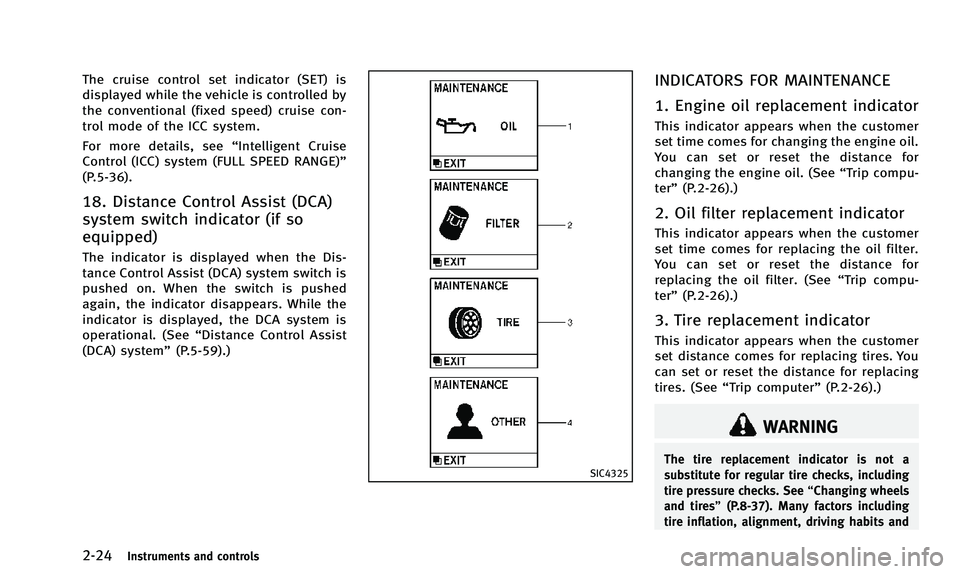
INDICATORS FOR MAINTENANCE
1. Engine oil replacement indicator
This indicator appears when the customer
set time comes for changing the engine oil.
You can set or reset the distance for
changing the engine oil. (See “Trip compu-
ter” (P.2-26).)
2. Oil filter replacement indicator
This indicator appears when the customer
set time comes for replacing the oil filter.
You can set or reset the distance for
replacing the oil filter. (See “Trip compu-
ter” (P.2-26).)
3. Tire replacement indicator
This indicator appears when the customer
set distance comes for replacing tires. You
can set or reset the distance for replacing
tires. (See “Trip computer” (P.2-26).)
WARNING
The tire replacement indicator is not a
substitute for regular tire checks, including
tire pressure checks. See “Changing wheels
and tires” (P.8-37). Many factors including
tire inflation, alignment, driving habits and
Page 96 of 498
road conditions affect tire wear and when
tires should be replaced. Setting the tire
replacement indicator for a certain driving
distance does not mean your tires will last
that long. Use the tire replacement indicator
as a guide only and always perform regular
tire checks. Failure to perform regular tire
checks, including tire pressure checks could
result in tire failure. Serious vehicle damage
could occur and may lead to a collision,
which could result in serious personal injury
or death.
4.“OTHER” indicator
This indicator appears when the customer
set time comes for replacing items other
than the engine oil, oil filter and tires. You
can set or reset the distance for replacing
the items. (See “Trip computer” (P.2-26).)
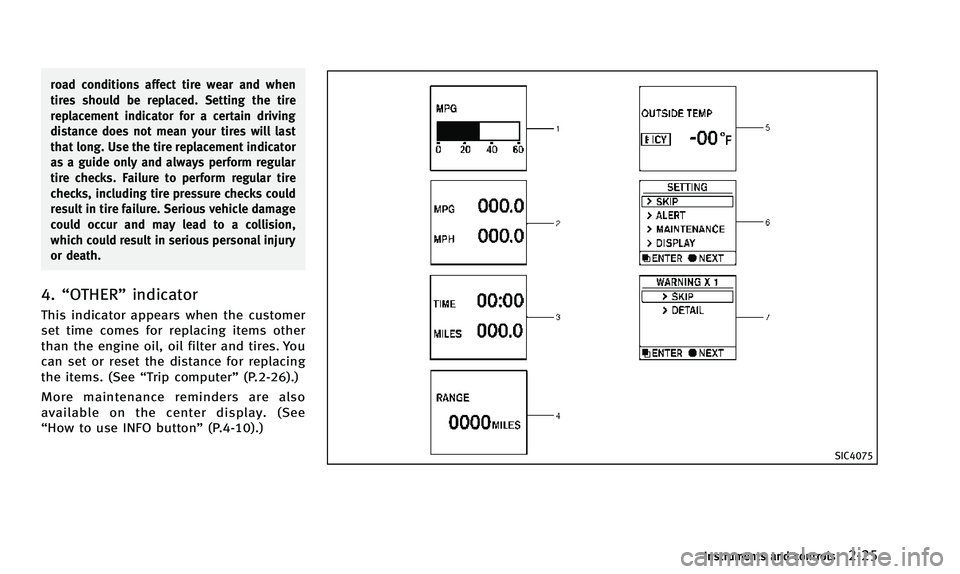
More maintenance reminders are also
available on the center display. (See
“How to use INFO button” (P.4-10).)
SIC4075
Instruments and controls2-25
Page 98 of 498
amount of fuel in the fuel tank and the
actual fuel consumption.
The display is updated every 30 seconds.
The dte mode includes a low range warning
feature. If the fuel level is low, the warning
is displayed on the screen.
When the fuel level drops even lower, the
dte display will change to“——”.
. If the amount of fuel added is small, the
display just before the ignition switch
is pushed to the OFF position may
continue to be displayed.
. When driving uphill or rounding curves,
the fuel in the tank shifts, which may
momentarily change the display.
5. Outside air temperature (ICY —8F
or 8C)
The outside air temperature is displayed in
8For 8C in the range of −22 to 1318F(−30
to 558C).
The outside air temperature mode includes
a low temperature warning feature. If the
outside air temperature is below 378 F
(38C), the warning is displayed on the
screen.
The outside temperature sensor is located
in front of the radiator. The sensor may be affected by road or engine heat, wind
directions and other driving conditions.
The display may differ from the actual
outside temperature or the temperature
displayed on various signs or billboards.
6. Setting
Setting cannot be made while driving. A
message
“Setting can only be operated
when stopped” is also displayed on the
dot matrix crystal display.
The
switch*Aandswitch*Bare
used in the setting mode to select and
decide a menu.
SKIP:
Push the
switch*Ato move to the
warning check mode.
Push the
switch*Bto select other
menus.
ALERT:
There are 3 submenus under the alert
menu.
. BACK
Select this submenu to return to the top
page of the setting mode.
. TIMER
Select this submenu to specify when the
“timer” indicator activates.
. ICY
Select this submenu to display the low
outside temperature warning.
MAINTENANCE: There are 5 submenus under the main-
tenance menu.
. BACK
Select this submenu to return to the top
page of the setting mode.
. ENGINE OIL
Select this submenu to set or reset the
distance for changing the engine oil.
. OIL FILTER
Select this submenu to set or reset the
distance for replacing the oil filter.
. TIRE
Select this submenu to set or reset the
distance for replacing tires.
. OTHER
Select this submenu and set or reset
the distance for replacing items other
than the engine oil, oil filter and tires.
The maintenance distance will increase by
250 miles (500 km) up to 18,500 miles
(30,000 km). To increase the number by
500 miles (1,000 km), push and hold the
Instruments and controls2-27
Page 176 of 498
Maintenance information
The maintenance intervals can be dis-
played for the engine oil, oil filter, tire
and other reminders.
To set a maintenance interval, select a
preferred item from the list.
You can also set to display a message to
remind you that the maintenance needs to
be performed.
The following example shows how to set
the engine oil maintenance information.
Use the same steps to set the other
maintenance information.
1. Set the interval (mileage) of the main-tenance schedule. To determine the
recommended maintenance interval,
refer to your “INFINITI Service and
Maintenance Guide”.
2. To display the reminder automatically when the desired distance is reached,
select the “Reminder” key.
3. Reset the driving distance to the new maintenance schedule.
4. To return to the previous screen, push the BACK button.
The unit can be converted between “US”
and “Metric”. (See “How to use SETTING button”
(P.4-14).)
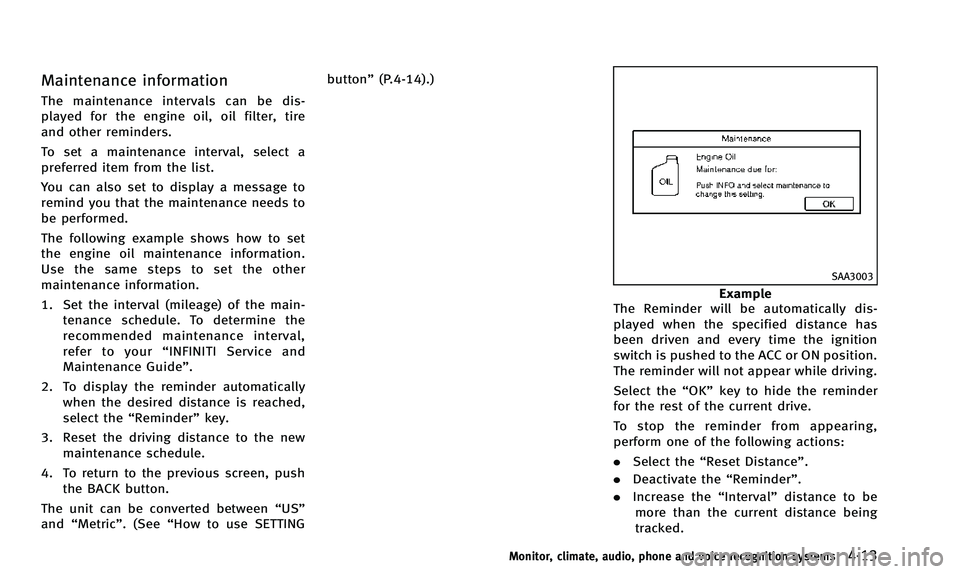
SAA3003
Example
The Reminder will be automatically dis-
played when the specified distance has
been driven and every time the ignition
switch is pushed to the ACC or ON position.
The reminder will not appear while driving.
Select the “OK”key to hide the reminder
for the rest of the current drive.
To stop the reminder from appearing,
perform one of the following actions:
. Select the “Reset Distance”.
. Deactivate the “Reminder”.
. Increase the “Interval”distance to be
more than the current distance being
tracked.
Monitor, climate, audio, phone and voice recognition systems4-13
Page 389 of 498

5-80Starting and driving
.Keep your engine tuned up.
. Follow the recommended scheduled
maintenance.
. Keep the tires inflated to the correct
pressure. Low tire pressure increases
tire wear and lowers fuel economy.
. Keep the wheels in correct alignment.
Improper alignment increases tire wear
and lowers fuel economy.
. Use the recommended viscosity engine
oil. (See “Engine oil and oil filter
recommendation” (P.9-5).)
SSD0336
The AWD warning light is located in the
meter.
The AWD warning light comes on when the
ignition switch is pushed to the ON
position. It turns off soon after the engine
is started. If any malfunction occurs in the AWD
system while the engine is running, the
warning light will come on.
The warning light may blink rapidly (about
twice per second) while trying to free a
stuck vehicle due to high power train oil
temperature. The driving mode may change
to two-wheel drive. If the warning light
blinks rapidly during operation, stop the
vehicle with the engine idling in a safe
place immediately. Then if the light goes
off after a while, you can continue driving.
A large difference between the diameters
of front and rear wheels will make the
warning light blink slowly (about once per
two seconds). Pull off the road in a safe
area, and idle the engine. Check that all
tire sizes are the same, tire pressure is
correct and tires are not worn.
If the warning light is blinking after the
above operation, have your vehicle
checked by an INFINITI retailer as soon as
possible.
WARNING
.
For AWD equipped vehicles, do not
attempt to raise two wheels off the
INCREASING FUEL ECONOMY ALL-WHEEL DRIVE (AWD) (if so equipped)
Page 424 of 498
8 Maintenance and do-it-yourself
Maintenance requirement .................................... 8-2Scheduled maintenance .................................. 8-2
General maintenance....................................... 8-2
Where to go for service ................................... 8-2
General maintenance ........................................... 8-2 Explanation of maintenance items ................... 8-2
Maintenance precautions ..................................... 8-5
Engine compartment check locations ................... 8-7 VQ37VHR engine ............................................. 8-7
Engine cooling system ......................................... 8-7
Checking engine coolant level ......................... 8-8
Changing engine coolant ................................. 8-9
Engine oil ............................................................ 8-9
Checking engine oil level................................. 8-9
Changing engine oil and filter ....................... 8-10
Automatic transmission fluid ............................. 8-12
Power steering fluid........................................... 8-12
Brake fluid......................................................... 8-13
Window washer fluid ......................................... 8-14
Battery .............................................................. 8-15
Jump starting ................................................ 8-16
Variable voltage control system ......................... 8-16
Drive belts ......................................................... 8-17 Spark plugs ...................................................... 8-17
Replacing spark plugs ................................. 8-18
Air cleaner ........................................................ 8-18
Windshield wiper blades ................................... 8-20 Cleaning ...................................................... 8-20
Replacing..................................................... 8-20
Rear window wiper blades ................................ 8-21
Brakes .............................................................. 8-21 Self-adjusting brakes ................................... 8-21
Brake pad wear warning .............................. 8-21
Fuses ................................................................ 8-22 Engine compartment .................................... 8-22
Passenger compartment............................... 8-23
Intelligent Key battery replacement ................... 8-24
Lights................................................................ 8-26 Headlights ................................................... 8-26
Exterior and interior lights ........................... 8-28
Wheels and tires ............................................... 8-30 Tire pressure ............................................... 8-30
Tire labeling ................................................ 8-34
Types of tires............................................... 8-36
Tire chains ................................................... 8-37
Changing wheels and tires........................... 8-37
Page 433 of 498

8-10Maintenance and do-it-yourself
recommended oil through the opening.
Do not overfill
*3.
6. Recheck oil level with the dipstick.
It is normal to add some oil between oil
maintenance intervals or during the break-
in period, depending on the severity of
operating conditions.
CAUTION
Oil level should be checked regularly.
Operating the engine with an insufficient
amount of oil can damage the engine, and
such damage is not covered by warranty.
CHANGING ENGINE OIL AND FILTER
Vehicle set-up
1. Park the vehicle on a level surface and apply the parking brake.
2. Run the engine until it reaches operat- ing temperature.
3. Turn the engine off and wait more than 15 minutes.
4. Raise and support the vehicle using a suitable floor jack and safety jack
stands.
.Place the safety jack stands underthe vehicle jack-up points.
.A suitable adapter should be at-tached to the jack stand saddle.
5. Remove the plastic engine undercover. a. Remove the small plastic clip at thecenter point of the undercover.
b. Then remove the other bolts that hold the undercover in place.
CAUTION
Make sure the correct lifting and support
points are used to avoid vehicle damage.
SDI2335
Two-wheel drive (2WD) models
SDI2047
All-wheel drive (AWD) models
Page 434 of 498
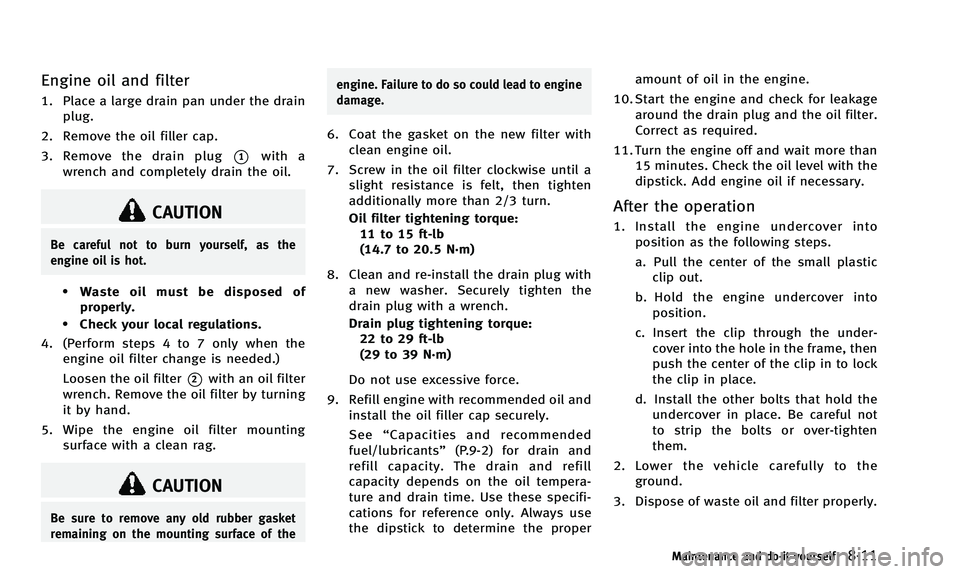
Engine oil and filter
1. Place a large drain pan under the drainplug.
2. Remove the oil filler cap.
3. Remove the drain plug
*1with a
wrench and completely drain the oil.
CAUTION
Be careful not to burn yourself, as the
engine oil is hot.
.Waste oil must be disposed of
properly.
.Check your local regulations.
4. (Perform steps 4 to 7 only when the engine oil filter change is needed.)
Loosen the oil filter
*2with an oil filter
wrench. Remove the oil filter by turning
it by hand.
5. Wipe the engine oil filter mounting surface with a clean rag.
CAUTION
Be sure to remove any old rubber gasket
remaining on the mounting surface of the engine. Failure to do so could lead to engine
damage.
6. Coat the gasket on the new filter with
clean engine oil.
7. Screw in the oil filter clockwise until a slight resistance is felt, then tighten
additionally more than 2/3 turn.
Oil filter tightening torque:11 to 15 ft-lb
(14.7 to 20.5 N·m)
8. Clean and re-install the drain plug with a new washer. Securely tighten the
drain plug with a wrench.
Drain plug tightening torque:22 to 29 ft-lb
(29 to 39 N·m)
Do not use excessive force.
9. Refill engine with recommended oil and install the oil filler cap securely.
See “Capacities and recommended
fuel/lubricants” (P.9-2) for drain and
refill capacity. The drain and refill
capacity depends on the oil tempera-
ture and drain time. Use these specifi-
cations for reference only. Always use
the dipstick to determine the proper amount of oil in the engine.
10. Start the engine and check for leakage around the drain plug and the oil filter.
Correct as required.
11. Turn the engine off and wait more than 15 minutes. Check the oil level with the
dipstick. Add engine oil if necessary.
After the operation
1. Install the engine undercover intoposition as the following steps.
a. Pull the center of the small plasticclip out.
b. Hold the engine undercover into position.
c. Insert the clip through the under- cover into the hole in the frame, then
push the center of the clip in to lock
the clip in place.
d. Install the other bolts that hold the undercover in place. Be careful not
to strip the bolts or over-tighten
them.
2. Lower the vehicle carefully to the ground.
3. Dispose of waste oil and filter properly.
Maintenance and do-it-yourself8-11
Page 464 of 498

9 Technical and consumer information
Capacities and recommended fuel/lubricants....... 9-2Fuel information .............................................. 9-3
Engine oil and oil filter recommendation ......... 9-5
Air conditioning system refrigerant and
lubricant recommendations ............................. 9-6
Specifications ...................................................... 9-7
Engine............................................................. 9-7
Wheels and tires ............................................. 9-8
Dimensions ..................................................... 9-9
When traveling or registering your vehicle in
another country ................................................. 9-10
Vehicle identification ......................................... 9-10 Vehicle Identification Number (VIN) plate ....... 9-10
Vehicle identification number
(chassis number) ........................................... 9-10
Engine serial number .................................... 9-11
F.M.V.S.S./C.M.V.S.S. certification label .......... 9-11
Emission control information label ................ 9-11
Tire and Loading Information label ................ 9-12
Air conditioner specification label.................. 9-12 Installing front license plate .............................. 9-13
Vehicle loading information............................... 9-14 Terms .......................................................... 9-14
Vehicle load capacity ................................... 9-15
Loading tips................................................. 9-16
Measurement of weights.............................. 9-17
Towing a trailer ................................................. 9-17 Flat towing................................................... 9-17
Uniform tire quality grading .............................. 9-18 Treadwear .................................................... 9-18
Traction AA, A, B and C................................ 9-18
Temperature A, B and C ............................... 9-18
Emission control system warranty ..................... 9-19
Reporting safety defects.................................... 9-19
Readiness for Inspection/Maintenance (I/M)
test .................................................................. 9-20
Event Data Recorders (EDR) ............................... 9-21
Owner’s Manual/Service Manual
order information .............................................. 9-22
Page 465 of 498
9-2Technical and consumer information
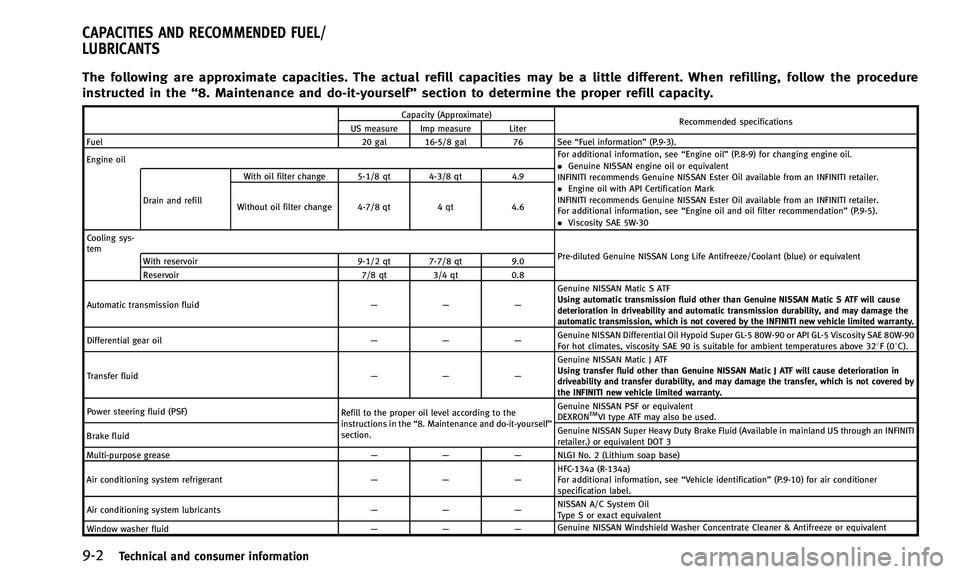
The following are approximate capacities. The actual refill capacities may be a little different. When refilling, follow the procedure
instructed in the“8. Maintenance and do-it-yourself” section to determine the proper refill capacity.
Capacity (Approximate)
Recommended specifications
US measure Imp measure Liter
Fuel 20 gal 16-5/8 gal 76 See “Fuel information”(P.9-3).
Engine oil For additional information, see
“Engine oil”(P.8-9) for changing engine oil.
. Genuine NISSAN engine oil or equivalent
INFINITI recommends Genuine NISSAN Ester Oil available from an INFINITI retailer.
. Engine oil with API Certification Mark
INFINITI recommends Genuine NISSAN Ester Oil available from an INFINITI retailer.
For additional information, see “Engine oil and oil filter recommendation” (P.9-5).
. Viscosity SAE 5W-30
Drain and refill With oil filter change 5-1/8 qt 4-3/8 qt
4.9
Without oil filter change 4-7/8 qt 4 qt4.6
Cooling sys-
tem Pre-diluted Genuine NISSAN Long Life Antifreeze/Coolant (blue) or equivalent
With reservoir 9-1/2 qt 7-7/8 qt 9.0
Reservoir 7/8 qt3/4 qt 0.8
Automatic transmission fluid —— —Genuine NISSAN Matic S ATF
Using automatic transmission fluid other than Genuine NISSAN Matic S ATF will cause
deterioration in driveability and automatic transmission durability, and may damage the
automatic transmission, which is not covered by the INFINITI new vehicle limited warranty.
Differential gear oil —— —Genuine NISSAN Differential Oil Hypoid Super GL-5 80W-90 or API GL-5 Viscosity SAE 80W-90
For hot climates, viscosity SAE 90 is suitable for ambient temperatures above 328F(0
8C).
Transfer fluid —— —Genuine NISSAN Matic J ATF
Using transfer fluid other than Genuine NISSAN Matic J ATF will cause deterioration in
driveability and transfer durability, and may damage the transfer, which is not covered by
the INFINITI new vehicle limited warranty.
Power steering fluid (PSF) Refill to the proper oil level according to the
instructions in the“8. Maintenance and do-it-yourself”
section. Genuine NISSAN PSF or equivalent
DEXRON
TMVI type ATF may also be used.
Brake fluid Genuine NISSAN Super Heavy Duty Brake Fluid (Available in mainland US through an INFINITI
retailer.) or equivalent DOT 3
Multi-purpose grease —— —NLGI No. 2 (Lithium soap base)
Air conditioning system refrigerant —— —HFC-134a (R-134a)
For additional information, see
“Vehicle identification”(P.9-10) for air conditioner
specification label.
Air conditioning system lubricants —— —NISSAN A/C System Oil
Type S or exact equivalent
Window washer fluid —— —Genuine NISSAN Windshield Washer Concentrate Cleaner & Antifreeze or equivalent
CAPACITIES AND RECOMMENDED FUEL/
LUBRICANTS