service INFINITI QX50 2014 Owners Manual
[x] Cancel search | Manufacturer: INFINITI, Model Year: 2014, Model line: QX50, Model: INFINITI QX50 2014Pages: 498, PDF Size: 2.47 MB
Page 2 of 498
Your INFINITI represents a new way of
thinking about vehicle design. It integrates
advanced engineering and superior crafts-
manship with a simple, refined aesthetic
sensitivity associated with traditional Ja-
panese culture.
The result is a different notion of luxury
and beauty. The car itself is important, but
so is the sense of harmony that the vehicle
evokes in its driver, and the sense of
satisfaction you feel with the INFINITI—
from the way it looks and drives to the high
level of retailer service.
To ensure that you enjoy your INFINITI to
the fullest, we encourage you to read this
Owner’s Manual immediately. It explains
all of the features, controls and perfor-
mance characteristics of your INFINITI; it
also provides important instructions and
safety information.
A separate Warranty Information Booklet
is included in your Owner’ s literature
portfolio. The INFINITI Service and Main-
tenance Guide explains details about
maintaining and servicing your vehicle.
Always carry it with you when you take
your vehicle to an INFINITI retailer. The
Warranty Information Booklet contents
provide complete information about all warranties covering this vehicle, the re-
quirements to keep the warranties in effect
as well as the INFINITI Roadside Assis-
tance program.
Additionally, a separate Customer Care
and Lemon Law Information Booklet will
explain how to resolve any concerns you
may have with your vehicle, as well as
clarify your rights under your state’
s
lemon law.
In addition to factory installed options,
your vehicle may also be equipped with
additional accessories installed by INFINITI
or by your INFINITI retailer prior to delivery.
It is important that you familiarize yourself
with all disclosures, warnings, cautions
and instructions concerning proper use of
such accessories prior to operating the
vehicle and/or accessory. See an INFINITI
retailer for details concerning the particu-
lar accessories with which your vehicle is
equipped.READ FIRST —THEN DRIVE SAFELY
Before driving your vehicle, read your
Owner’s Manual carefully. This will ensure
familiarity with controls and maintenance
requirements, assisting you in the safe
operation of your vehicle.
WARNING
IMPORTANT SAFETY INFORMATION REMIN-
DERS FOR SAFETY!
Follow these important driving rules to help
ensure a safe and comfortable trip for you
and your passengers!
. NEVER drive under the influence of
alcohol or drugs.
. ALWAYS observe posted speed limits
and never drive too fast for conditions.
. ALWAYS give your full attention to
driving and avoid using vehicle features
or taking other actions that could dis-
tract you.
. ALWAYS use your seat belts and appro-
priate child restraint systems. Pre-teen
children should be seated in the rear
seat.
Foreword
Page 5 of 498
INFINITI CUSTOMER CARE PROGRAM
INFINITI CARES ...
Both INFINITI and your INFINITI retailer are dedicated to serving all your automotive needs. Your satisfaction with your vehicle and your
INFINITI retailer are our primary concerns. Your INFINITI retailer is always available to assist you with all your automobile sales and service
needs.
However, if there is something that your
INFINITI retailer cannot assist you with or
you would like to provide INFINITI directly
with comments or questions, please con-
tact our (INFINITI’s) Consumer Affairs De-
partment using our toll-free number:For U.S. customers1-800-662-6200
For Canadian customers 1-800-361-4792
The Consumer Affairs Department will ask
for the following information:
. Your name, address, and telephone
number
. Vehicle identification number (on dash
panel)
. Date of purchase
. Current odometer reading
. Your INFINITI retailer’s name
. Your comments or questions
OR You can write to INFINITI with the informa-
tion on the left at:
For U.S. customersINFINITI Division
Nissan North America, Inc.
Consumer Affairs Department
P.O. Box 685003
Franklin, TN 37068-5003
or via e-mail at:
[email protected]
For Canadian customers
INFINITI Division
Nissan Canada Inc.
5290 Orbitor Drive
Mississauga, Ontario L4W 4Z5
or via e-mail at:
information.centre@nissancanada.
com If you prefer, visit us at:
www.infinitiUSA.com (for U.S. customer) or
www.infiniti.ca (for Canadian customers)
We appreciate your interest in INFINITI and
thank you for buying a quality INFINITI
vehicle.
Page 68 of 498

SEAT BELTS WITH PRETENSIONERS
(front seats)
WARNING
.The pretensioners cannot be reused after
activation. They must be replaced to-
gether with the retractor and buckle as a
unit.
. If the vehicle becomes involved in a
collision but a pretensioner is not
activated, be sure to have the preten-
sioner system checked and, if necessary,
replaced by an INFINITI retailer.
. No unauthorized changes should be
made to any components or wiring of
the pretensioner system. This is to
prevent damage to or accidental activa-
tion of the pretensioners. Tampering
with the pretensioner system may result
in serious personal injury.
. Work around and on the pretensioner
system should be done by an INFINITI
retailer. Installation of electrical equip-
ment should also be done by an INFINITI
retailer. Unauthorized electrical test
equipment and probing devices should
not be used on the pretensioner system. .
If you need to dispose of the preten-
sioner or scrap the vehicle, contact an
INFINITI retailer. Correct pretensioner
disposal procedures are set forth in the
appropriate INFINITI Service Manual.
Incorrect disposal procedures could
cause personal injury.
The pretensioner system may activate with
the supplemental air bag system in certain
types of collisions. Working with the seat
belt retractor, it helps tighten the seat belt
when the vehicle becomes involved in
certain types of collisions, helping to
restrain front seat occupants.
The pretensioner is encased with the seat
belt retractor. These seat belts are used the
same way as conventional seat belts.
When a pretensioner activates, smoke is
released and a loud noise may be heard.
The smoke is not harmful, and it does not
indicate a fire. Care should be taken not to
inhale it as it may cause irritation and
choking. Those with a history of a breath-
ing condition should get fresh air promptly.
After pretensioner activation, load limiters
allow the seat belt to release webbing (if
necessary) to reduce forces against the
chest. The supplemental air bag warning light
is used to indicate malfunctions in the
pretensioner system. (See “Supplemental
air bag warning light” (P.1-50) for more
details.) If the operation of the supple-
mental air bag warning light indicates
there is a malfunction, have the system
checked by an INFINITI retailer.
When selling your vehicle, we request that
you inform the buyer about the preten-
sioner system and guide the buyer to the
appropriate sections in this Owner’s Man-
ual.
Safety —Seats, seat belts and supplemental restraint system1-49
Page 70 of 498

REPAIR AND REPLACEMENT PROCE-
DURE
The front air bags, side air bags, curtain air
bags and pretensioners are designed to
activate on a one-time-only basis. As a
reminder, unless it is damaged, the sup-
plemental air bag warning light will remain
illuminated after inflation has occurred.
Repair and replacement of these systems
should be done only by an INFINITI retailer.
When maintenance work is required on the
vehicle, the front air bags, side air bags,
curtain air bags, pretensioners and related
parts should be pointed out to the person
conducting the maintenance. The ignition
switch should always be in the LOCK
position when working under the hood or
inside the vehicle.
WARNING
.Once a front air bag, side air bag or
curtain air bag has inflated, the air bag
module will not function again and must
be replaced. Additionally, the activated
pretensioner must also be replaced. The
air bag module and pretensioner system
should be replaced by an INFINITI retailer. The air bag module and preten-
sioner system cannot be repaired.
. The front air bag, side air bag, curtain air
bag systems and the pretensioner sys-
tem should be inspected by an INFINITI
retailer if there is any damage to the
front end or side portion of the vehicle.
. If you need to dispose of a supplemental
air bag or pretensioner systems or scrap
the vehicle, contact an INFINITI retailer.
Correct supplemental air bag and pre-
tensioner system disposal procedures
are set forth in the appropriate INFINITI
Service Manual. Incorrect disposal pro-
cedures could cause personal injury.
Safety —Seats, seat belts and supplemental restraint system1-51
Page 83 of 498
2-12Instruments and controls
parking brake is applied.
Low brake fluid warning light:
When the ignition switch is in the ON
position, the light warns of a low brake
fluid level. If the light comes on while the
engine is running with the parking brake
not applied, stop the vehicle and perform
the following:
1. Check the brake fluid level. Add brakefluid as necessary. (See “Brake fluid”
(P.8-13).)
2. If the brake fluid level is correct, have the warning system checked by an
INFINITI retailer.
Anti-lock Braking System (ABS) warning
indicator:
When the parking brake is released and
the brake fluid level is sufficient, if both
the brake warning light and the Anti-lock
Braking System (ABS) warning light illumi-
nate, it may indicate the ABS is not
functioning properly. Have the brake sys-
tem checked, and if necessary repaired, by
an INFINITI retailer promptly. (See “Anti-
lock Braking System (ABS) warning light”
(P.2-11).)
WARNING
. Your brake system may not be working
properly if the warning light is on.
Driving could be dangerous. If you judge
it to be safe, drive carefully to the
nearest service station for repairs.
Otherwise, have your vehicle towed
because driving it could be dangerous.
. Pressing the brake pedal with the
engine stopped and/or low brake fluid
level may increase your stopping dis-
tance and braking will require greater
pedal effort as well as pedal travel.
. If the brake fluid level is below the
minimum or MIN mark on the brake fluid
reservoir, do not drive until the brake
system has been checked at an INFINITI
retailer.
Charge warning light
If the light comes on while the engine is
running, it may indicate the charging
system is not functioning properly. Turn
the engine off and check the alternator
belt. If the belt is loose, broken, missing or
if the light remains on, see an INFINITI retailer immediately.
CAUTION
Do not continue driving if the alternator belt
is loose, broken or missing.
Distance Control Assist (DCA)
system warning light (orange; if so
equipped)
This light comes on if there is a malfunc-
tion in the Distance Control Assist (DCA)
system.
If the warning light illuminates, park the
vehicle in a safe place. Turn the engine off,
restart the engine, resume driving and turn
on the DCA system again.
If it is not possible to turn on the system
or the warning light stays on, it may
indicate that the system is malfunctioning.
Although the vehicle is still driveable
under normal conditions, have the vehicle
checked at an INFINITI retailer.
See “Distance Control Assist (DCA) system”
(P.5-59).
Page 102 of 498

If the light still remains on and/or the
engine will not start, see an INFINITI
retailer for INFINITI Vehicle Immobilizer
System service as soon as possible.
Please bring all Intelligent Keys that you
have when visiting an INFINITI retailer for
service.WARNING
In freezing temperatures the washer solu-
tion may freeze on the window and obscure
your vision which may lead to an accident.
Warm the window with the defroster before
you wash the window.
CAUTION
.Do not operate the washer continuously
for more than 30 seconds.
. Do not operate the washer if the
reservoir tank is empty.
. Do not fill the window washer reservoir
tank with washer fluid concentrates at
full strength. Some methyl alcohol
based washer fluid concentrates may
permanently stain the grille if spilled
while filling the window washer reser-
voir tank.
. Pre-mix washer fluid concentrates with
water to the manufacturer’ s recom-
mended levels before pouring the fluid
into the window washer reservoir tank.
Do not use the window washer reservoir tank to mix the washer fluid concentrate
and water.
If the windshield wiper operation is inter-
rupted by snow or ice, the wiper may stop
moving to protect its motor. If this occurs,
turn the wiper switch to the OFF position
and remove the snow or ice that is on and
around the wiper arms. In approximately 1
minute, turn the switch on again to
operate the wiper.
Instruments and controls2-31
WINDSHIELD WIPER AND WASHER SWITCH
Page 176 of 498
Maintenance information
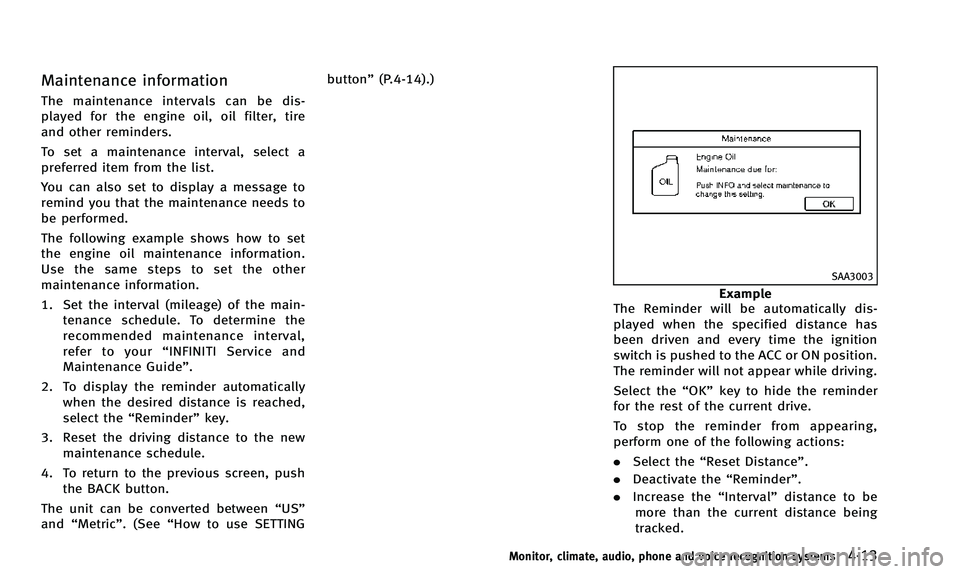
The maintenance intervals can be dis-
played for the engine oil, oil filter, tire
and other reminders.
To set a maintenance interval, select a
preferred item from the list.
You can also set to display a message to
remind you that the maintenance needs to
be performed.
The following example shows how to set
the engine oil maintenance information.
Use the same steps to set the other
maintenance information.
1. Set the interval (mileage) of the main-tenance schedule. To determine the
recommended maintenance interval,
refer to your “INFINITI Service and
Maintenance Guide”.
2. To display the reminder automatically when the desired distance is reached,
select the “Reminder” key.
3. Reset the driving distance to the new maintenance schedule.
4. To return to the previous screen, push the BACK button.
The unit can be converted between “US”
and “Metric”. (See “How to use SETTING button”
(P.4-14).)
SAA3003
Example
The Reminder will be automatically dis-
played when the specified distance has
been driven and every time the ignition
switch is pushed to the ACC or ON position.
The reminder will not appear while driving.
Select the “OK”key to hide the reminder
for the rest of the current drive.
To stop the reminder from appearing,
perform one of the following actions:
. Select the “Reset Distance”.
. Deactivate the “Reminder”.
. Increase the “Interval”distance to be
more than the current distance being
tracked.
Monitor, climate, audio, phone and voice recognition systems4-13
Page 185 of 498

4-22Monitor, climate, audio, phone and voice recognition systems
Language & Units settings
The Language & Units settings display will
appear when pushing the SETTING button,
selecting the“Language & Units” key with
the INFINITI controller and pushing the
ENTER button.
For models with the navigation system,
select the “Others” key to show the
“Language & Units” key.
Select Language:
Select the “Select Language” key. Choose
“English”, “Français” or“Español” for your
favorite display appearance.
If you select the “Français”key, the French
language will be displayed, so please use
the French Owner’s Manual. To obtain a
French Owner’ s Manual, see “Owner’ s
Manual/Service Manual order information”
(P.9-22).
Select Units:
Select the “Select Units” key. Choose“US”
(Mile, 8F, MPG) or “Metric”(km,8C, L/100
km) for your favorite display appearance.
Voice Recognition settings (models
with navigation system)
For details about the “Voice Recognition”
settings, see “INFINITI Voice Recognition
system (models with navigation system)”
(P.4-116).
SAA2491
Image Viewer (models with naviga-
tion system)
The image files in the USB memory will be
displayed. To display the Image Viewer,
push the SETTING button, select the
“Other” key and then select the “Image
Viewer” key. The image of the selected file
is displayed on the right side of the screen.
When a number of folders are included in
the USB memory, select a folder from the
list to display the file list.
Images will not be shown on the display
while the vehicle is in any drive position in
order to reduce driver distraction. To view
Page 215 of 498

4-52Monitor, climate, audio, phone and voice recognition systems
the system then automatically changes
from the outside air circulation mode to
the recirculation mode.
When the intake air control button is
pushed under the following conditions,
the indicator light on the“
”side will
illuminate and the exhaust gas/outside
odor detecting sensor will turn on.
. The air flow control is not in the front
defroster mode (the indicator light on
the “
”front defroster button is
turned off).
. The outside temperature is about 328F
(08C) or more.
. The exhaust gas/outside odor detecting
sensor detects industrial odors such as
pulp or chemicals and exhaust gas
such as gasoline or diesel.
When the automatic intake air control is
ON, for the first 5 minutes, the recircula-
tion mode is selected to prevent dust, dirt
and pollen from entering the vehicle and
cleans the air inside of the vehicle with
Plasmacluster
®ions that are emitted from
the ventilator.
After 5 minutes, the sensor detects outside
odor and exhaust gas and automatically
alternates between the recirculation mode
and outside air circulation mode.
OPERATING TIPS
When the engine coolant temperature and
outside air temperature are low, the air
flow from the foot outlets may not operate.
This is not a malfunction. After the coolant
temperature warms up, air will flow nor-
mally from the foot outlets.
SAA1983
The sunload sensor*Aon the instrument
panel helps maintain a constant tempera-
ture. Do not put anything on or around this
sensor.
IN-CABIN MICROFILTER
To make sure that the air conditioner
heats, defogs/defrosts and ventilates effi-
ciently, replace the filter according the
specified maintenance intervals listed in
the INFINITI Service and Maintenance
Guide. To replace the filter, contact an
INFINITI retailer.
The filter should be replaced if the air flow
decreases significantly or if windows fog
Page 216 of 498

up easily when operating the heater or air
conditioner. A natural grape seed polyphe-
nol filter (if so equipped) collects and
neutralizes dirt, pollen, dust, etc.
SERVICING CLIMATE CONTROL
The climate control system in your INFINITI
is charged with a refrigerant designed with
the environment in mind.This refrigerant
will not harm the earth’s ozone layer.
However, special charging equipment and
lubricant are required when servicing your
INFINITI air conditioner. Using improper
refrigerants or lubricants will cause severe
damage to your climate control system.
(See “Capacities and recommended fuel/
lubricants” (P.9-2) for climate control sys-
tem refrigerant and lubricant recommenda-
tions.)
Your INFINITI retailer will be able to service
your environmentally friendly climate con-
trol system.
WARNING
The system contains refrigerant under high
pressure. To avoid personal injury, any air
conditioner service should be done only by
an experienced technician with the proper equipment.
AUDIO OPERATION PRECAUTIONS
Radio
Push the ignition switch to the ACC or ON
position and push the radio band select
button to turn on the radio. If you listen to
the radio with the engine not running, the
ignition switch should be pushed to the
ACC position.
Radio reception is affected by station
signal strength, distance from radio trans-
mitter, buildings, bridges, mountains and
other external influences. Intermittent
changes in reception quality normally are
caused by these external influences.
Using a cellular phone in or near the
vehicle may influence radio reception
quality.
Radio reception:
Your INFINITI radio system is equipped with
state-of-the-art electronic circuits to en-
hance radio reception. These circuits are
designed to extend reception range, and to
enhance the quality of that reception.
However there are some general character-
istics of both FM and AM radio signals that
can affect radio reception quality in a
moving vehicle, even when the finest
Monitor, climate, audio, phone and voice recognition systems4-53
AUDIO SYSTEM