oil INFINITI QX50 2020 User Guide
[x] Cancel search | Manufacturer: INFINITI, Model Year: 2020, Model line: QX50, Model: INFINITI QX50 2020Pages: 580, PDF Size: 7.43 MB
Page 259 of 580
∙ If the surface temperature of thesteering-wheel is above the tempera-
ture within which the system is de-
signed to operate, the system will not
heat the steering-wheel. This is not a
malfunction. The air conditioner system in your INFINITI
vehicle is charged with a refrigerant designed
with the environment in mind.
This refrigerant does not harm the earth’s
ozone layer.
Special charging equipment and lubricant is
required when servicing your INFINITI air
conditioner. Using improper refrigerants or
lubricants will cause severe damage to your
air conditioner system. For additional infor-
mation, refer to “Air conditioner system re-
frigerant and oil recommendations” in the
“Technical and consumer information” sec-
tion of this manual.
It is recommended that you visit an INFINITI
retailer for servicing your “environmentally
friendly” air conditioning system.
WARNING
The air conditioner system contains refrig-
erant under high pressure. To avoid per-
sonal injury, any air conditioner service
should be done only by an experienced
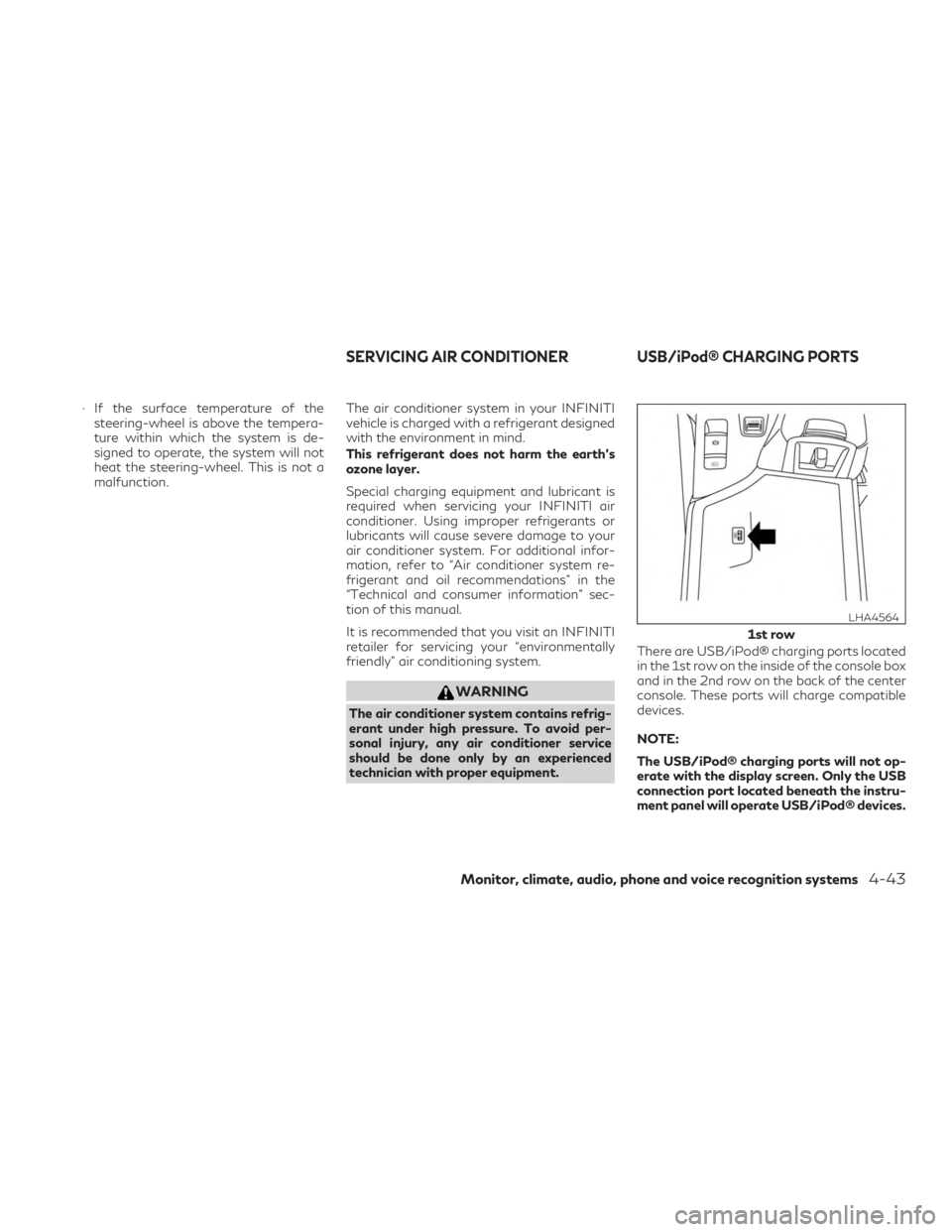
technician with proper equipment. There are USB/iPod® charging ports located
in the 1st row on the inside of the console box
and in the 2nd row on the back of the center
console. These ports will charge compatible
devices.
NOTE:
The USB/iPod® charging ports will not op-
erate with the display screen. Only the USB
connection port located beneath the instru-
ment panel will operate USB/iPod® devices.
1st row
LHA4564
SERVICING AIR CONDITIONER USB/iPod® CHARGING PORTS
Monitor, climate, audio, phone and voice recognition systems4-43
Page 279 of 580
INFINITI VEHICLE IMMOBILIZER
SYSTEM
The INFINITI Vehicle Immobilizer System will
not allow the engine to start without the use
of the registered key.
If the engine fails to start using the registered
key, it may be due to interference caused by
another registered key, an automated toll
road device or automated payment device on
the key ring. Restart the engine using the
following procedures:1. Leave the ignition switch in the ON po- sition for approximately 5 seconds.
2. Place the ignition switch in the OFF or LOCK position and wait approximately
5 seconds.
3. Repeat steps 1 and 2.
4. Restart the engine while holding the de- vice (which may have caused the inter-
ference) separate from the registered
key.
If the no start condition re-occurs, INFINITI
recommends placing the registered key on a
separate key ring to avoid interference from
other devices. ∙ Make sure the area around the vehicle is
clear.
∙ Check fluid levels such as engine oil, cool- ant, brake fluid, and windshield-washer
fluid as frequently as possible, or at least
whenever you refuel.
∙ Check that all windows and lights are clean.
∙ Visually inspect tires for their appearance and condition. Also check tires for proper
inflation.
∙ Check that all doors are closed.
∙ Position seat and adjust head restraints/headrests.
∙ Adjust inside and outside mirrors.
∙ Fasten seat belts and ask all passengers to do likewise.
∙ Check the operation of warning lights when the ignition switch is placed in the
ON position. For additional information,
refer to “Warning lights, indicator lights
and audible reminders” in the “Instru-
ments and controls” section of this
manual. 1. Apply the parking brake.
2. Press the Park button to place the ve-
hicle in P (Park) or move the shift lever to
N (Neutral). P (Park) is recommended.
The starter is designed not to operate if
the shift lever is in any of the driving
positions.
3. Push the ignition switch to the ON posi- tion. Depress the brake pedal and push
the ignition switch to start the engine.
To start the engine immediately, push
and release the ignition switch while de-
pressing the brake pedal with the ignition
switch in any position.
∙ If the engine is very hard to start in extremely cold weather or when re-
starting, depress the accelerator pedal
a little (approximately 1/3 to the floor)
and while holding, crank the engine.
Release the accelerator pedal when
the engine starts.
BEFORE STARTING THE ENGINE STARTING THE ENGINE
Starting and driving5-17
Page 389 of 580

WARNING
Steering Assist is not a system for a hands-
free driving. Always keep your hands on the
steering wheel and drive your vehicle
safely. Failure to do so could cause a colli-
sion resulting in serious personal injury or
death.
NOTE:
If the driver lightly touches (instead of firmly
grips) the steering wheel, the steering
torque sensor may not detect the driver’s
hand(s) on the steering wheel and a sequence
of warnings may occur. When the driver
holds and operates the steering wheel again,
the warnings turn off.
Steering Assist limitations
WARNING
∙ In the following situations, the camera may not detect lane markers correctly or
may detect lane markers incorrectly and
the Steering Assist may not operate
properly: – When driving on roads where there
are multiple parallel lane markers, lane
markers that are faded or not painted
clearly, nonstandard lane markers, or
lane markers covered with water, dirt,
snow, etc.
– When driving on roads with discontin- ued lane markers
– When driving on roads with a widen- ing or narrowing lane width
– When driving on roads where there are multiple lanes or unclear lane
markers due to road construction
– When driving on roads where there are sharply contrasting objects, such
as shadows, snow, water, wheel ruts,
seams, or lines remaining after road
repairs (the Steering Assist could de-
tect these items as lane markers)
– When driving on roads where the traveling lane merges or separates
∙ Do not use the Steering Assist under the following conditions because the system
may not properly detect lane markers.
Doing so could cause a loss of vehicle con-
trol and result in an accident. – During bad weather (rain, fog, snow,
dust, etc.)
– When rain, snow, sand, etc., is thrown up by the wheels of other vehicles
– When dirt, oil, ice, snow, water, or an- other object adheres to the camera
unit
– When the lens of the camera unit is foggy
– When strong light (for example, sun- light or high beams from oncoming ve-
hicles) shines on the camera
– When the headlights are not bright due to dirt on the lens or the head-
lights are off in tunnels or darkness
– When a sudden change in brightness occurs (for example, when the vehicle
enters or exits a tunnel or is under a
bridge)
– When driving on roads where the traveling lane merges or separates or
where there are temporary lane mark-
ers because of road construction
– When there is a lane closure due to road repairs
Starting and driving5-127
Page 434 of 580

Follow these easy-to-use Fuel Efficient Driv-
ing Tips to help you achieve the most fuel
economy from your vehicle.1. Use Smooth Accelerator and Brake
Pedal Application
∙ Avoid rapid starts and stops.
∙ Use smooth, gentle accelerator and brake application whenever possible.
∙ Maintain constant speed while com- muting and coast whenever possible.
2. Maintain Constant Speed
∙ Look ahead to try and anticipate and minimize stops.
∙ Synchronizing your speed with traffic lights allows you to reduce your num-
ber of stops.
∙ Maintaining a steady speed can mini- mize red light stops and improve fuel
efficiency.
3. Use Air Conditioning (A/C) at Higher
Vehicle Speeds
∙ Below 40 mph (64 km/h), it is more efficient to open windows to cool the
vehicle due to reduced engine load. ∙ Above 40 mph (64 km/h), it is more
efficient to use A/C to cool the vehicle
due to increased aerodynamic drag.
∙ Recirculating the cool air in the cabin when the A/C is on reduces cooling
load.
4. Drive at Economical Speeds and Dis-
tances
∙ Observing the speed limit and not ex- ceeding 60 mph (97 km/h) (where le-
gally allowed) can improve fuel effi-
ciency due to reduced aerodynamic
drag.
∙ Maintaining a safe following distance behind other vehicles reduces unnec-
essary braking.
∙ Safely monitoring traffic to anticipate changes in speed permits reduced
braking and smooth acceleration
changes.
∙ Select a gear range suitable to road conditions.
5. Use Cruise Control
∙ Using cruise control during highway driving helps maintain a steady speed. ∙ Cruise control is particularly effective
in providing fuel savings when driving
on flat terrains.
6. Plan for the Shortest Route
∙ Utilize a map or navigation system to determine the best route to save time.
7. Avoid Idling
∙ Shutting off your engine when safe for stops exceeding 30–60 seconds saves
fuel and reduces emissions.
8. Buy an Automated Pass for Toll Roads
∙ Automated passes permit drivers to use special lanes to maintain cruising
speed through the toll and avoid stop-
ping and starting.
9. Winter Warm Up
∙ Limit idling time to minimize impact to fuel economy.
∙ Vehicles typically need no more than 30 seconds of idling at start-up to ef-
fectively circulate the engine oil before
driving.
∙ Your vehicle will reach its ideal operat- ing temperature more quickly while
driving versus idling.
FUEL EFFICIENT DRIVING TIPS
5-172Starting and driving
Page 435 of 580
10.Keeping your Vehicle Cool
∙ Park your vehicle in a covered parking area or in the shade whenever pos-
sible.
∙ When entering a hot vehicle, opening the windows will help to reduce the
inside temperature faster, resulting in
reduced demand on your A/C system. ∙ Keep your engine tuned up.
∙ Follow the recommended scheduled
maintenance.
∙ Keep the tires inflated to the correct pressure. Low tire pressure increases tire
wear and lowers fuel economy.
∙ Keep all the wheels in correct alignment. Improper alignment increases tire wear
and lowers fuel economy.
∙ Use the recommended viscosity engine oil. For additional information, refer to
“Engine oil and oil filter recommenda-
tions” in the “Technical and consumer in-
formation” section of this manual. If any malfunction occurs in the Intelligent
AWD system while the engine is running,
messages are displayed in the meter.
INCREASING FUEL ECONOMY INTELLIGENT ALL-WHEEL DRIVE
(AWD) (if so equipped)
Starting and driving5-173
Page 436 of 580
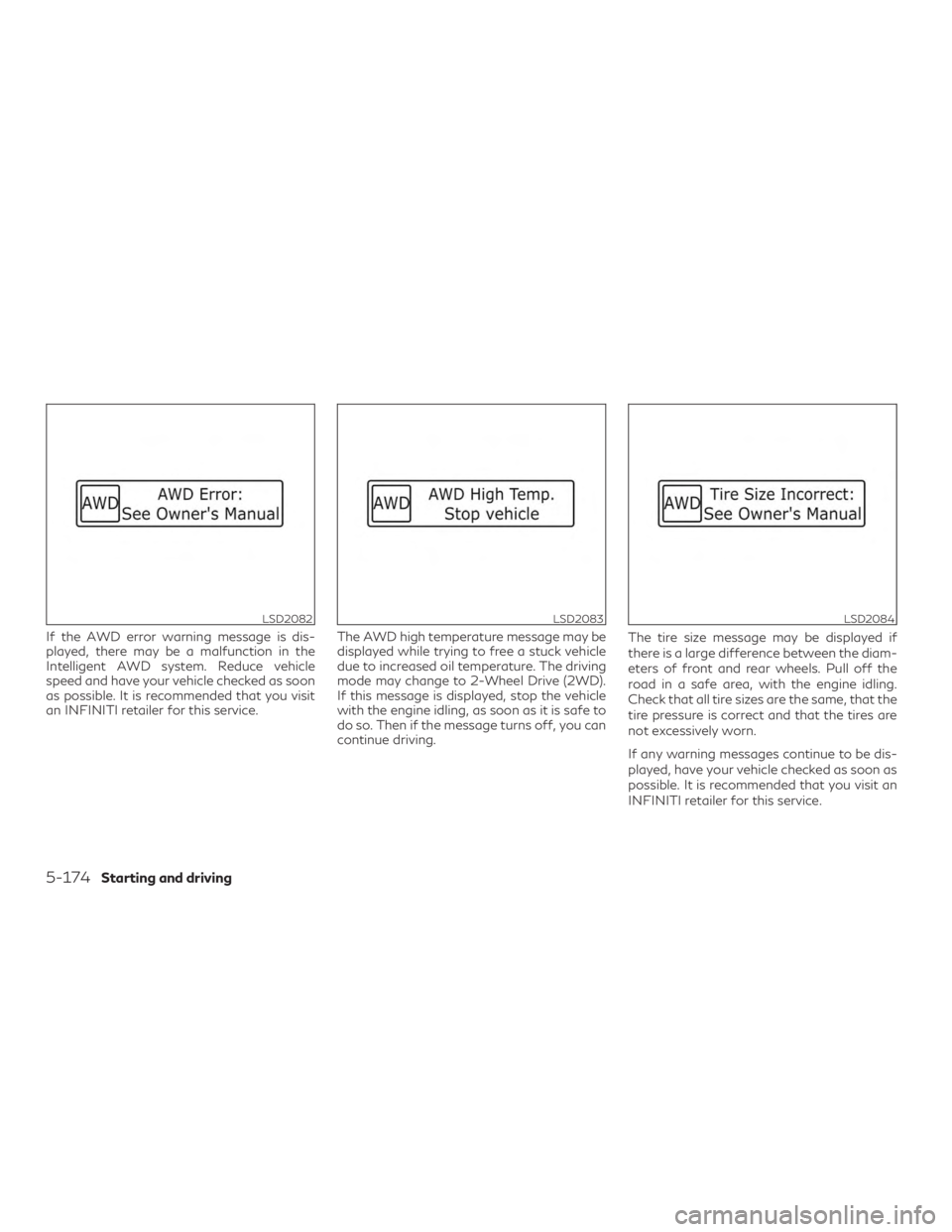
If the AWD error warning message is dis-
played, there may be a malfunction in the
Intelligent AWD system. Reduce vehicle
speed and have your vehicle checked as soon
as possible. It is recommended that you visit
an INFINITI retailer for this service.The AWD high temperature message may be
displayed while trying to free a stuck vehicle
due to increased oil temperature. The driving
mode may change to 2-Wheel Drive (2WD).
If this message is displayed, stop the vehicle
with the engine idling, as soon as it is safe to
do so. Then if the message turns off, you can
continue driving.The tire size message may be displayed if
there is a large difference between the diam-
eters of front and rear wheels. Pull off the
road in a safe area, with the engine idling.
Check that all tire sizes are the same, that the
tire pressure is correct and that the tires are
not excessively worn.
If any warning messages continue to be dis-
played, have your vehicle checked as soon as
possible. It is recommended that you visit an
INFINITI retailer for this service.
LSD2082LSD2083LSD2084
5-174Starting and driving
Page 471 of 580
door are open. Spray water under the body
and in the wheel wells to loosen the dirt and
wash away road salt.
A damp chamois can be used to dry the ve-
hicle to avoid water spots.
WAXING
Regular waxing protects the paint surface
and helps retain new vehicle appearance.
Polishing is recommended to remove built-up
wax residue and to avoid a weathered ap-
pearance before re-applying wax.
An INFINITI retailer can assist you in choos-
ing the proper product.∙ Wax your vehicle only after a thorough washing. Follow the instructions supplied
with the wax.
∙ Do not use a wax containing any abra- sives, cutting compounds or cleaners that
may damage the vehicle finish.
Machine compounding or aggressive polish-
ing on a base coat/clear coat paint finish may
dull the finish or leave swirl marks.
REMOVING SPOTS
Remove tar and oil spots, industrial dust, in-
sects, and tree sap as quickly as possible from
the surface of the paint to avoid lasting dam-
age or staining. Special cleaning products are
available at an INFINITI retailer or any auto-
motive accessory store. It is recommended
that you visit an INFINITI retailer for these
products.
UNDERBODY
In areas where road salt is used in winter, it is
necessary to clean the underbody regularly in
order to prevent dirt and salt from building up
and causing the acceleration of corrosion on
the underbody and suspension. Before the
winter period and again in the spring, the
underseal must be checked and, if necessary,
re-treated.
GLASS
Use glass cleaner to remove smoke and dust
film from the glass surfaces. It is normal for
glass to become coated with a film after the
vehicle is parked in the hot sun. Glass cleaner
and a soft cloth will easily remove this film.
CAUTION
When cleaning the inside of the windows,
do not use sharp-edged tools, abrasive
cleaners or chlorine-based disinfectant
cleaners. They could damage the electrical
conductors, radio antenna elements or rear
window defroster elements.
ALUMINUM ALLOY WHEELS
Wash the wheels regularly with a sponge
dampened in a mild soap solution, especially
during winter months in areas where road
salt is used. If not removed, road salt can
discolor the wheels.
CAUTION
Follow the directions below to avoid stain-
ing or discoloring the wheels:
∙ Do not use a cleaner that uses strong acid or alkali contents to clean the wheels.
∙ Do not apply wheel cleaners to the wheels when they are hot. The wheel
temperature should be the same as ambi-
ent temperature.
∙ Rinse the wheel to completely remove the cleaner within 15 minutes after the
cleaner is applied.
Appearance and care7-3
Page 472 of 580

CHROME PARTS
Clean all chrome parts regularly with a non-
abrasive chrome polish to maintain the finish.
TIRE DRESSINGS
INFINITI does not recommend the use of tire
dressings. Tire manufacturers apply a coating
to the tires to help reduce discoloration of the
rubber. If a tire dressing is applied to the tires,
it may react with the coating and form a
compound. This compound may come off the
tire while driving and stain the vehicle paint.
If you choose to use a tire dressing, take the
following precautions:∙ Use a water-based tire dressing. The coating on the tire dissolves more easily
than with an oil-based tire dressing.
∙ Apply a light coat of tire dressing to help prevent it from entering the tire
tread/grooves (where it would be diffi-
cult to remove).
∙ Wipe off excess tire dressing using a dry towel. Make sure the tire dressing is com-
pletely removed from the tire
tread/grooves.
∙ Allow the tire dressing to dry as recom- mended by tire dressing manufacturer. This vehicle has new and unique surfaces on
the center console and door pull finishers. If
cleaning is required use mild soap and water.
However if mild soap and water won’t clean
the center console and door pull finishers, use
Genuine INFINITI Vinyl and Leather Cleaner
(or equivalent).
Occasionally remove loose dust from the in-
terior trim, plastic parts and seats using a
vacuum cleaner or soft bristled brush. Wipe
the vinyl and leather surfaces with a clean,
soft cloth dampened in mild soap solution,
then wipe clean with a dry, soft cloth.
Regular care and cleaning is required in order
to maintain the appearance of the leather.
Before using any fabric protector, read the
manufacturer’s recommendations. Some
fabric protectors contain chemicals that may
stain or bleach the seat material.
Use a cloth dampened only with water to
clean the meter and gauge lens.
Use a slightly moist (with water) microfiber
cloth to clean the wood trim. If necessary, use
water with natural soap or wood dedicated
cleaning products, such as furniture polish.
WARNING
Do not use water or acidic cleaners (hot
steam cleaners) on the seat. This can dam-
age the seat or occupant classification sen-
sor. This can also affect the operation of the
air bag system and result in serious per-
sonal injury.
CAUTION
∙ Never use benzine, thinner, or any similar
material on the interior surfaces or sur-
face damage may occur. Such damage is
not covered under the INFINITI
warranty.
∙ Small dirt particles can be abrasive and damaging to leather surfaces and should
be removed promptly. Do not use saddle
soap, car waxes, polishes, oils, cleaning
fluids, solvents, detergents or ammonia-
based cleaners as they may damage the
leather’s natural finish.
∙ Never use fabric protectors unless rec- ommended by the manufacturer.
∙ Do not use glass or plastic cleaner on me- ter or gauge lens covers. It may damage
the lens cover.
CLEANING INTERIOR
7-4Appearance and care
Page 473 of 580

LEATHER CLEANING KIT (if so
equipped)
Spray onto leather cleaning cloth, then gently
wipe the surface of the leather. Use a dry
towel to absorb any excess moisture.
Clean light-colored leather more frequently
because soiling on such surfaces is much
more visible.
Always follow the manufacturer’s instruc-
tions supplied with the leather cleaning kit.
You can obtain the leather cleaning kit from
an INFINITI retailer or other authorized repair
shop.
CAUTION
Do not leave the leather cleaning kit inside
the vehicle. The leather cleaning kit left in a
closed vehicle can become very hot.
AIR FRESHENERS
Most air fresheners use a solvent that could
affect the vehicle interior. If you use an air
freshener, take the following precautions:∙ Hanging-type air fresheners can cause permanent discoloration when they con-
tact vehicle interior surfaces. Place the air
freshener in a location that allows it to
hang free and not contact an interior sur-
face.
∙ Liquid-type air fresheners typically clip on the vents. These products can cause im-
mediate damage and discoloration when
spilled on interior surfaces.
Carefully read and follow the manufacturer’s
instructions before using the air fresheners.
POWER MOONROOF (if so
equipped)
The sunshade is made from a tricot material.
CAUTION
To help prevent damaging the moonroof
while cleaning:
∙ Do not rub the material with a cloth. Do- ing so can damage the surface of the ma-
terial or cause a stain to spread.
∙ Never use benzine, thinner or any similar chemical to clean the sunshade. This may
discolor the moonroof and damage the
surface.
∙ Clean water based stains by patting the surface with a clean soft cloth dampened
in warm water. Press a clean dry cloth
onto the surface to remove as much
dampness as possible and then let air dry.
∙ Clean oil based stains by patting the sur- face with a clean soft cloth dampened in
warm water. Press a clean dry cloth onto
the surface to remove as much dampness
as possible and then let air dry.
Appearance and care7-5
Page 477 of 580
8 Do-it-yourself
Maintenance precautions.........................8-2
Engine compartment check locations ..............8-3
Engine cooling system ........................... 8-4
Checking engine coolant level ..................8-5
Changing engine coolant ......................8-5
Engine oil ........................................8-6
Checking engine oil level .......................8-6
Changing engine oil and oil filter ...............8-6
Continuously Variable Transmission (CVT) fluid . . 8-10
Brake fluid ..................................... 8-10
Windshield-washer fluid ......................... 8-11
Windshield-washer fluid reservoir .............8-11
Battery ......................................... 8-11
Jump starting ............................... 8-12
Variable voltage control system .................8-13
Drive belt ...................................... 8-13
Spark plugs .................................... 8-14
Replacing spark plugs ....................... 8-14
Air cleaner ..................................... 8-15
In-cabin microfilter .......................... 8-15Windshield wiper blades
........................ 8-16
Cleaning .................................... 8-16
Replacing ................................... 8-16
Brakes ......................................... 8-18
Fuses .......................................... 8-18
Engine compartment ........................ 8-19
Passenger compartment .....................8-20
Battery replacement ............................ 8-21
INFINITI Intelligent Key ......................8-21
Lights ......................................... 8-23
Headlights .................................. 8-23
Fog lights (if so equipped) ...................8-23
Exterior and interior lights ...................8-23
Wheels and tires ............................... 8-25
Tire pressure ................................ 8-25
Tire labeling ................................. 8-28
Types of tires ............................... 8-31
Tire chains .................................. 8-34
Changing wheels
and tires ................... 8-34