horn INFINITI QX50 2021 Owner's Manual
[x] Cancel search | Manufacturer: INFINITI, Model Year: 2021, Model line: QX50, Model: INFINITI QX50 2021Pages: 542, PDF Size: 3.51 MB
Page 3 of 542
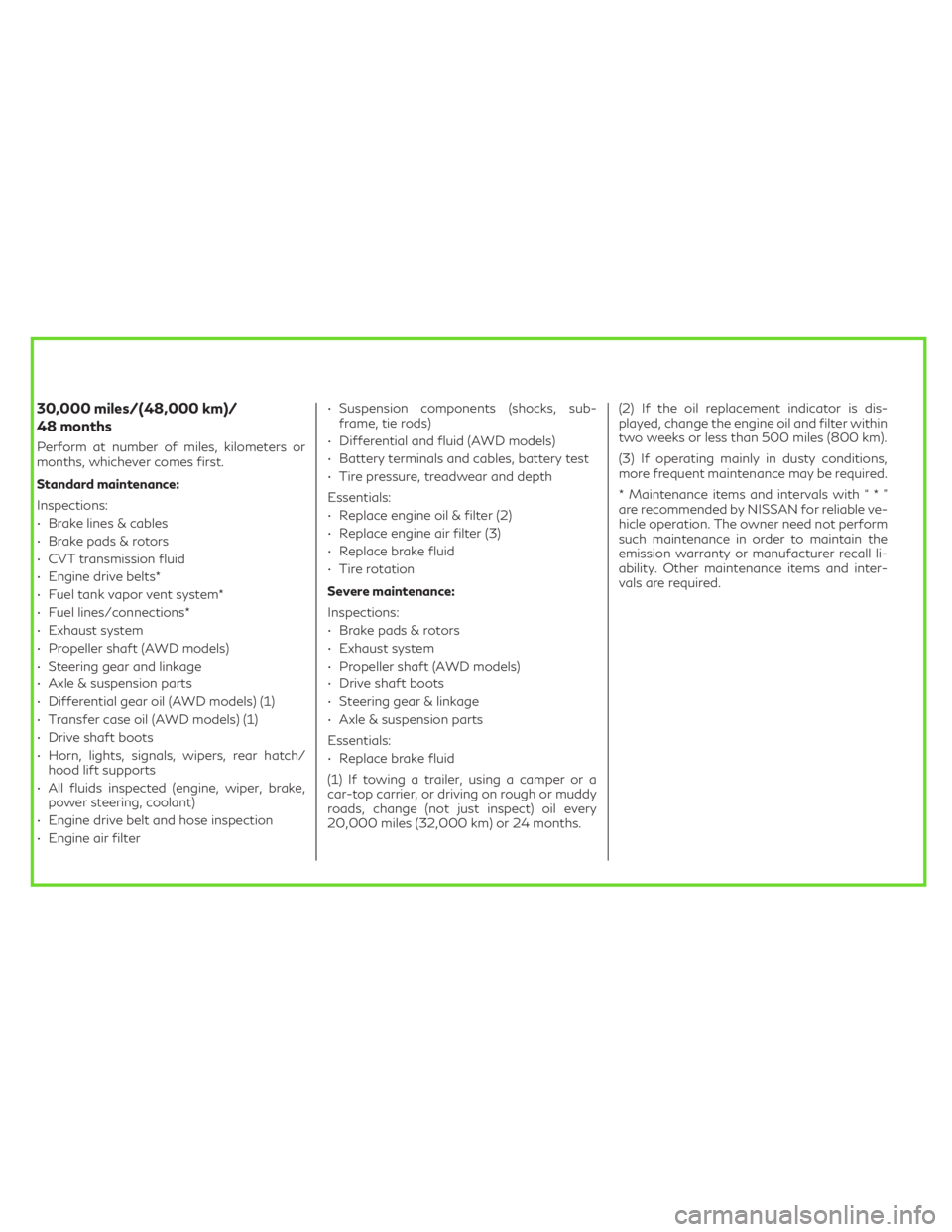
30,000 miles/(48,000 km)/
48 months
Perform at number of miles, kilometers or
months, whichever comes first.
Standard maintenance:
Inspections:
• Brake lines & cables
• Brake pads & rotors
• CVT transmission fluid
• Engine drive belts*
• Fuel tank vapor vent system*
• Fuel lines/connections*
• Exhaust system
• Propeller shaft (AWD models)
• Steering gear and linkage
• Axle & suspension parts
• Differential gear oil (AWD models) (1)
• Transfer case oil (AWD models) (1)
• Drive shaft boots
• Horn, lights, signals, wipers, rear hatch/
hood lift supports
• All fluids inspected (engine, wiper, brake,
power steering, coolant)
• Engine drive belt and hose inspection
• Engine air filter• Suspension components (shocks, sub-
frame, tie rods)
• Differential and fluid (AWD models)
• Battery terminals and cables, battery test
• Tire pressure, treadwear and depth
Essentials:
• Replace engine oil & filter (2)
• Replace engine air filter (3)
• Replace brake fluid
• Tire rotation
Severe maintenance:
Inspections:
• Brake pads & rotors
• Exhaust system
• Propeller shaft (AWD models)
• Drive shaft boots
• Steering gear & linkage
• Axle & suspension parts
Essentials:
• Replace brake fluid
(1) If towing a trailer, using a camper or a
car-top carrier, or driving on rough or muddy
roads, change (not just inspect) oil every
20,000 miles (32,000 km) or 24 months.(2) If the oil replacement indicator is dis-
played, change the engine oil and filter within
two weeks or less than 500 miles (800 km).
(3) If operating mainly in dusty conditions,
more frequent maintenance may be required.
* Maintenance items and intervals with“*”
are recommended by NISSAN for reliable ve-
hicle operation. The owner need not perform
such maintenance in order to maintain the
emission warranty or manufacturer recall li-
ability. Other maintenance items and inter-
vals are required.
Page 16 of 542
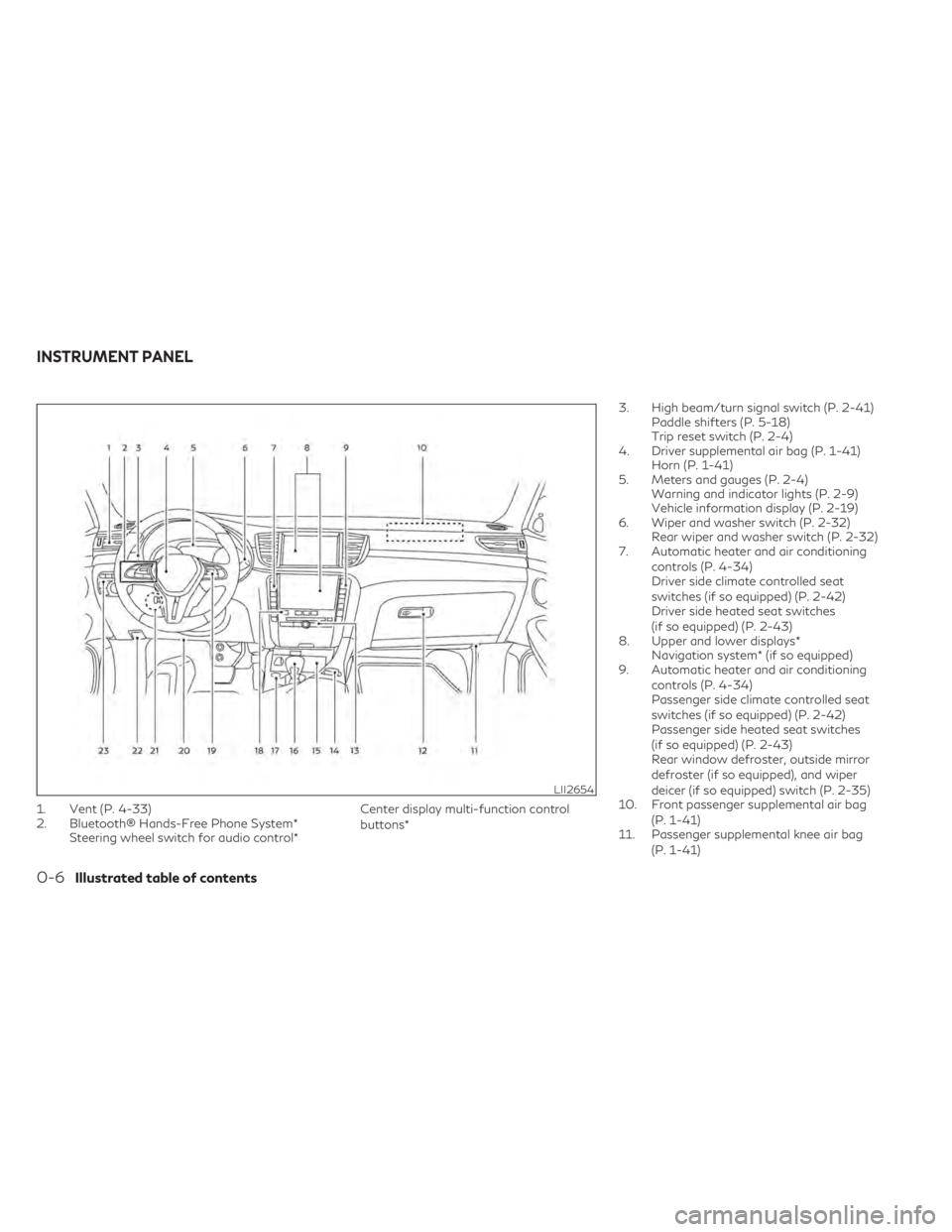
1. Vent (P. 4-33)
2. Bluetooth® Hands-Free Phone System*Steering wheel switch for audio control* Center display multi-function control
buttons*3. High beam/turn signal switch (P. 2-41)
Paddle shifters (P. 5-18)
Trip reset switch (P. 2-4)
4. Driver supplemental air bag (P. 1-41) Horn (P. 1-41)
5. Meters and gauges (P. 2-4) Warning and indicator lights (P. 2-9)
Vehicle information display (P. 2-19)
6. Wiper and washer switch (P. 2-32) Rear wiper and washer switch (P. 2-32)
7. Automatic heater and air conditioning
controls (P. 4-34)
Driver side climate controlled seat
switches (if so equipped) (P. 2-42)
Driver side heated seat switches
(if so equipped) (P. 2-43)
8. Upper and lower displays* Navigation system* (if so equipped)
9. Automatic heater and air conditioning
controls (P. 4-34)
Passenger side climate controlled seat
switches (if so equipped) (P. 2-42)
Passenger side heated seat switches
(if so equipped) (P. 2-43)
Rear window defroster, outside mirror
defroster (if so equipped), and wiper
deicer (if so equipped) switch (P. 2-35)
10. Front passenger supplemental air bag
(P. 1-41)
11. Passenger supplemental knee air bag
(P. 1-41)
LII2654
INSTRUMENT PANEL
0-6Illustrated table of contents
Page 84 of 542
2 Instruments and controls
Instrument panel.................................2-2
Meters and gauges ..............................2-4
Speedometer and odometer ...................2-4
Tachometer ..................................2-6
Engine coolant temperature gauge ............2-6
Fuel gauge ...................................2-7
Distance To Empty (DTE) .....................2-7
Variable Compression Turbo ..................2-8
Warning lights, indicator lights and audible
reminders ........................................2-9
Checking lights .............................. 2-10
Warning/Indicator lights (red) ...............2-10
Warning/Indicator lights (yellow) ............2-13
Warning/Indicator lights (other) ..............2-17
Audible reminders ........................... 2-18
Vehicle information display .....................2-19
How to use the vehicle information
display ...................................... 2-19
Startup display .............................. 2-20
Resetting the trip computer .................2-20
Oil control system ........................... 2-20
Vehicle information display warnings and
indicators .................................... 2-21
Security systems ............................... 2-29
Vehicle security system ......................2-29
INFINITI Vehicle Immobilizer System .........2-30 Wiper and washer switch
......................2-32
Switch operation ............................ 2-32
Rain-sensing auto wiper system
(if so equipped) ............................. 2-33
Rear switch operation ....................... 2-34
Rear window defroster, outside mirror
defroster (if so equipped), and wiper deicer
(if so equipped) switch ......................... 2-35
Headlight switch ............................... 2-36
Headlight control switch ....................2-36
LED Daytime Running Lights (DRL)
system ..................................... 2-40
Instrument brightness control ................2-41
Turn signal switch ........................... 2-41
Fog light switch (if so equipped) .............2-42
Horn .......................................... 2-42
Climate controlled seat switches
(if so equipped) ................................
2-42
Heated
seats (if so equipped) ...................2-43
Steering Assist switch (for vehicles with
ProPILOT Assist) (if so equipped) ...............2-45
Front and rear sonar system switch
(if so equipped) ................................ 2-45
Head Up Display (HUD) (if so equipped) .........2-46
HowtousetheHUD........................ 2-46
Page 86 of 542
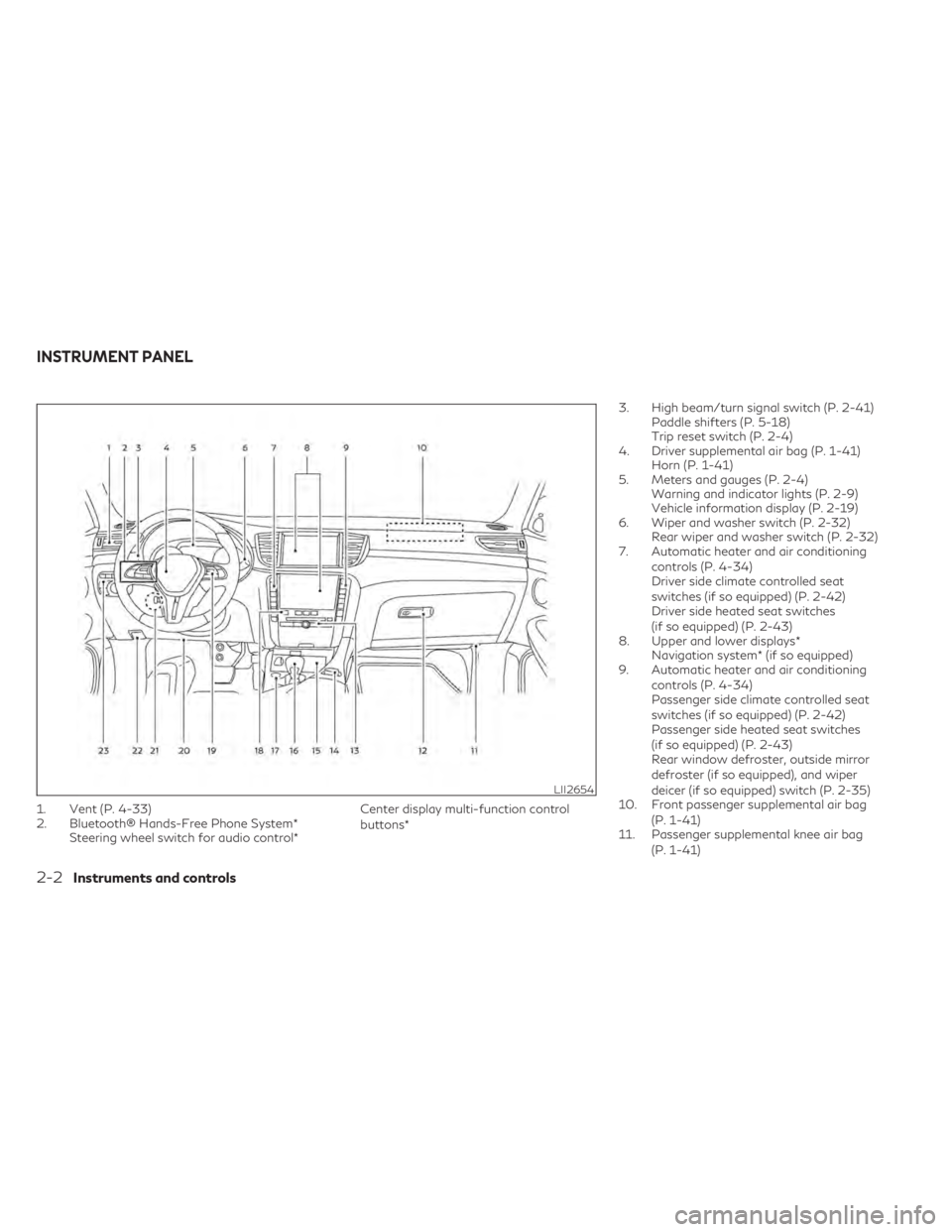
1. Vent (P. 4-33)
2. Bluetooth® Hands-Free Phone System*Steering wheel switch for audio control* Center display multi-function control
buttons*3. High beam/turn signal switch (P. 2-41)
Paddle shifters (P. 5-18)
Trip reset switch (P. 2-4)
4. Driver supplemental air bag (P. 1-41) Horn (P. 1-41)
5. Meters and gauges (P. 2-4) Warning and indicator lights (P. 2-9)
Vehicle information display (P. 2-19)
6. Wiper and washer switch (P. 2-32) Rear wiper and washer switch (P. 2-32)
7. Automatic heater and air conditioning
controls (P. 4-34)
Driver side climate controlled seat
switches (if so equipped) (P. 2-42)
Driver side heated seat switches
(if so equipped) (P. 2-43)
8. Upper and lower displays* Navigation system* (if so equipped)
9. Automatic heater and air conditioning
controls (P. 4-34)
Passenger side climate controlled seat
switches (if so equipped) (P. 2-42)
Passenger side heated seat switches
(if so equipped) (P. 2-43)
Rear window defroster, outside mirror
defroster (if so equipped), and wiper
deicer (if so equipped) switch (P. 2-35)
10. Front passenger supplemental air bag
(P. 1-41)
11. Passenger supplemental knee air bag
(P. 1-41)
LII2654
INSTRUMENT PANEL
2-2Instruments and controls
Page 114 of 542
3. Close all doors, hood and liftgate. Lock alldoors. The doors can be locked with the
Intelligent Key, door handle request
switch, or power door lock switch.
4. Confirm that the
security indicator
light stays on for about 30 seconds. The
vehicle security system is now pre-armed.
The vehicle security system will automati-
cally shift into the armed phase. The
security light begins to flash once every
three seconds. If during the pre-armed
phase one of the following occurs, the
system will not arm:
• Any door is unlocked with the Intelligent Key or door request switch.
• Ignition switch is placed in AUTO ACC or ON position.
• Even when the driver and/or passengers
are in the vehicle, the system will activate
with all the doors, hood and liftgate locked
with the ignition switch placed in the
LOCK position. When placing the ignition
switch in the AUTO ACC or ON position,
the system will be released.
Vehicle security system activation
The vehicle security system will give the fol-
lowing alarm:
• The turn signals blink and the horn sounds intermittently.
• The alarm automatically turns off after a period of time. However, the alarm reacti-
vates if the vehicle is tampered with again.
The alarm can be shut off by pressing the
button on the Intelligent Key.
The alarm is activated by:
• Opening the door or liftgate without using the Intelligent Key (even if the door is un-
locked by releasing the door inside lock
switch).
How to stop an activated alarm
The alarm stops only by unlocking the driver’s
door or the liftgate by pressing the
button on the Intelligent Key or pushing the
request switch on the driver's or passenger's
door with the Intelligent Key in range of the
door handle.
INFINITI VEHICLE IMMOBILIZER
SYSTEM
The INFINITI Vehicle Immobilizer System will
not allow the engine to start without the use
of a registered INFINITI Vehicle Immobilizer
System key.
If the engine fails to start using a registered
INFINITI Vehicle Immobilizer System key (for
example, when interference is caused by an-
other INFINITI Vehicle Immobilizer System
key, an automated toll road device or auto-
matic payment device on the key ring), restart
the engine using the following procedures:
1. Leave the ignition switch in the ON posi- tion for approximately 5 seconds.
2. Place the ignition switch in the OFF or LOCK position, and wait approximately
10 seconds.
3. Repeat steps 1 and 2.
4. Restart the engine while holding the de- vice (which may have caused the interfer-
ence) separate from the registered
INFINITI Vehicle Immobilizer System key.
If the no start condition re-occurs, INFINITI
recommends placing the registered INFINITI
2-30Instruments and controls
Page 126 of 542

FOG LIGHT SWITCH (if so
equipped)
To turn the fog lights on, turn the headlight
switch to theposition, then push the fog
light switch on.
To turn the fog lights on with the headlight
switch in the AUTO position, the headlights
must be on, then push the fog light switch on.
To turn the fog lights off, push the fog light
switch again.
The headlights must be on and the low beams
selected for the fog lights to operate. The fog
lights automatically turn off when the high
beam headlights are selected. To sound the horn, push near the horn icon on
the steering wheel.WARNING
Do not disassemble the horn. Doing so
could affect proper operation of the
supplemental front air bag system. Tam-
pering with the supplemental front air bag
system may result in serious personal
injury.
WARNING
Do not use or allow occupants to use the
climate controlled seats if you or the occu-
pants cannot monitor seat temperatures
or have an inability to feel pain in those
body parts in contact with the seat. Use of
the climate controlled seats by such people
could result in serious injury.
LIC3824LIC4311LIC3905
HORN CLIMATE CONTROLLED SEAT
SWITCHES (if so equipped)
2-42Instruments and controls
Page 175 of 542

3. Press thebutton on the Intelligent
Key.
4. The hazard indicator lights flash twice and the horn beeps once.
5. All doors, liftgate and fuel-filler door will be locked.
WARNING
After locking the doors using the Intelli-
gent Key, be sure that the doors have been
securely locked by operating the door
handles within two seconds of locking.
Failure to follow these instructions may re-
sult in inadvertently unlocking the doors,
which may decrease the safety and secu-
rity of your vehicle.
Unlocking doors
1. Press thebutton on the Intelligent
Key.
2. The hazard indicator lights flash once and the driver’s and fuel-filler doors unlock.
3. Press the
button again within 1 min-
ute to unlock all doors and liftgate. All doors, liftgate and fuel-filler door will be
locked automatically unless one of the fol-
lowing operations is performed within 1 min-
ute after pressing the
button:
• Opening any doors.
• Pushing the ignition switch.
Using the interior lights
The interior lights illuminate for a period of
time when a door is unlocked.
The lights can be turned off without waiting
by performing one of the following
operations:
• Placing the ignition switch in the ON position.
• Locking the doors with the Intelligent Key.
• Switching the interior light switch to the OFF position.
For additional information, see “Interior
lights” (P. 2-68).
Opening windows
The Intelligent Key allows you to simultane-
ously open windows equipped with auto-
matic operation.
To open the windows, press and hold the
button on the Intelligent Key for longer
than 3 seconds after all doors are unlocked. The door windows will open while pressing
the
button on the Intelligent Key.
The door windows cannot be closed by using
the Intelligent Key.
Releasing the rear liftgate
The rear liftgate can be opened and closed by
performing the following:
• Press the
button for longer than 1
second to open the rear liftgate.
• Press the
button again for longer than
1 second to close the rear liftgate.
When the
button is pressed during the
open or close process, the liftgate motors will
stop. When the
button is pressed again
for longer than 1 second the liftgate will re-
verse direction.
Using the panic alarm
If you are near your vehicle and feel threat-
ened, you may activate the panic alarm to call
attention by pressing and holding the
button on the Intelligent Key for longer than
0.5 seconds.
The panic alarm and headlights will stay on
for a period of time.
Pre-driving checks and adjustments3-15
Page 176 of 542

The panic alarm stops when:
• It has run for a period of time, or
• Any button is pressed on the Intelligent Key.
• The request switch on the driver or passen-ger door is pushed and the Intelligent Key is
in range of the door handle.
Answer back horn feature
If desired, the answer back horn feature can
be deactivated using the Intelligent Key.
When it is deactivated and the
button
is pressed, the hazard indicator lights flash
twice. When the
button is pressed, nei-
ther the hazard indicator lights nor the horn
operates.
NOTE:
If you change the answer back horn and light
flash feature with the Intelligent Key, the
lower touch-screen display will show the
current mode after the ignition switch has
been cycled from the OFF to the ON position
of the ”Comfort & Convenience” options of
the “Settings” menu in the lower touch-
screen display can also be used to change the
answer back horn mode between “Conve-
nience” and “Security” settings. To deactivate:
Press and hold the
andbuttonsfor at least 2 seconds.
The hazard indicator lights will flash three
times to confirm that the answer back horn
feature has been deactivated.
To activate: Press and hold the
andbuttonsfor at least 2 seconds once
more.
The hazard indicator lights will flash once and
the horn will sound once to confirm that the
horn beep feature has been reactivated.
Deactivating the horn beep feature does not
silence the horn if the alarm is triggered.
WARNING SIGNALS
To help prevent the vehicle from moving un-
expectedly by erroneous operation of the In-
telligent Key or to help prevent the vehicle
from being stolen, a chime or buzzer sounds
from inside and outside the vehicle and a
warning is displayed in the instrument panel.
When a chime or beep sounds or a warning is
displayed, be sure to check the vehicle and
the Intelligent Key.
For additional information, see “Trouble-
shooting guide” (P. 3-16) and the separate
INFINITI InTouch™ Owner’s Manual.
TROUBLESHOOTING GUIDE
Verify the location of all Intelligent Keys that
are programmed for the vehicle. If another
Intelligent Key is in range or inside the vehicle,
the vehicle system may respond differently
than expected.
3-16Pre-driving checks and adjustments
Page 250 of 542
Operation:
1. Add air to the tire.
2. After a few seconds, the hazard indicatorswill start flashing.
3. When the designated pressure is reached, the horn beeps once and the hazard indi-
cators stop flashing.
4. Perform the above steps for each tire. • If the tire is over-inflated more than ap-proximately 4 psi (30 kPa), the horn
beeps and the hazard indicators flash
three times. To correct the pressure,
push the core of the valve stem on the
tire briefly to release pressure. When the
pressure reaches the designated pres-
sure, the horn beeps once.
• If the hazard indicator does not flash within approximately 15 seconds after
starting to inflate the tire, it indicates
that the TPMS with Tire Inflation Indi-
cator is not operating.
• The TPMS will not activate the TPMS with Tire Inflation Indicator under the
following conditions:– If there is interference from an exter- nal device or transmitter.
– The air pressure from the inflation de- vice is not sufficient to inflate the tire. – There is a malfunction in the TPMS.
– There is a malfunction in the horn or
hazard indicators.
– The identification code of the tire pressure sensor is not registered to
the system.
– The battery of the tire pressure sensor is low.
• If the TPMS with Tire Inflation Indicator does not operate due to TPMS interfer-
ence, move the vehicle about 3 ft (1 m)
backward or forward and try again.
If the TPMS with Tire Inflation Indicator is
not working, use a tire pressure gauge.
ON-PAVEMENT AND OFF-ROAD
DRIVING PRECAUTIONS
Utility vehicles have a significantly higher
rollover rate than other types of vehicles.
They have higher ground clearance than pas-
senger cars to make them capable of per-
forming in a variety of on-pavement and off-
road applications. This gives them a higher
center of gravity than ordinary vehicles. An
advantage of higher ground clearance is a
better view of the road, allowing you to an-
ticipate problems. However, they are not de-
signed for cornering at the same speeds as
conventional 2-Wheel Drive vehicles any
more than low-slung sports cars are de- signed to perform satisfactorily under off-
road conditions. If at all possible, avoid sharp
turns at high speeds. As with other vehicles of
this type, failure to operate this vehicle cor-
rectly may result in loss of control or vehicle
rollover. In a rollover crash, an unbelted per-
son is significantly more likely to die than a
person wearing a seat belt.
For additional information, see “Driving
safety precautions” (P. 5-10).
AVOIDING COLLISION AND
ROLLOVER
WARNING
Failure to operate this vehicle in a safe and
prudent manner may result in loss of con-
trol or an accident.
Be alert and drive defensively at all times.
Obey all traffic regulations. Avoid excessive
speed, high speed cornering, or sudden steer-
ing maneuvers, because these driving prac-
tices could cause you to lose control of your
vehicle.
As with any vehicle, loss of control could re-
sult in a collision with other vehicles or ob-
jects or cause the vehicle to roll over, par-
ticularly if the loss of control causes the
vehicle to slide sideways.
5-8Starting and driving
Page 479 of 542
2.0L 4 CYLINDER (KR20DDET
engine model)
The following shows the maintenance
schedule.
Choose the maintenance schedule needed
based on your vehicle driving conditions.
After 90,000 miles (144,000 km)/144
months, continue maintenance at the same
mileage/time interval.
NOTE:
For information regarding coolant or spark
plug replacement, see “Additional informa-
tion” (P. 9-25).
3,750 miles/(6,000 km)/6 months
Perform at number of miles, kilometers or
months, whichever comes first.
Standard maintenance:
• Not applicable. Proceed to the nextinterval.
Severe maintenance:
Inspections:
• Brake pads & rotors
• Exhaust system
• Propeller shaft (AWD models)
• Drive shaft boots
• Steering gear and linkage
• Axle & suspension parts
• Horn, lights, signals, wipers, rear hatch/ hood lift supports
• All fluids inspected (engine, wiper, brake, power steering, coolant)
• Engine drive belt and hose inspections
• Engine air filter
• Suspension components (shocks, sub- frame, tie rods)
• Differential and fluid (AWD models)
• Battery terminals and cables, battery test
• Tire pressure, treadwear and depth
7,500 miles/(12,000 km)/12 months
Perform at number of miles, kilometers or
months, whichever comes first.
Standard maintenance:
Inspections:
• Brake lines & cables
• Brake pads & rotors
• CVT transmission fluid
• Propeller shaft (AWD models)
• Differential gear oil (AWD models) (1)
• Transfer case oil (AWD models) (1)
• Drive shaft boots
• Horn, lights, signals, wipers, rear hatch/ hood lift supports
• All fluids inspected (engine, wiper, brake, power steering, coolant)
• Engine drive belts and hose inspections
• Engine air filter
• Suspension components (shocks, sub- frame, tie rods)
• Differential and fluid (AWD models)
• Battery terminals and cables, battery test
• Tire pressure, treadwear and depth
Essentials:
• Replace engine oil & filter (2)
• Tire rotation
Maintenance and schedules9-9