horn INFINITI QX50 2023 Owners Manual
[x] Cancel search | Manufacturer: INFINITI, Model Year: 2023, Model line: QX50, Model: INFINITI QX50 2023Pages: 548, PDF Size: 6.17 MB
Page 14 of 548
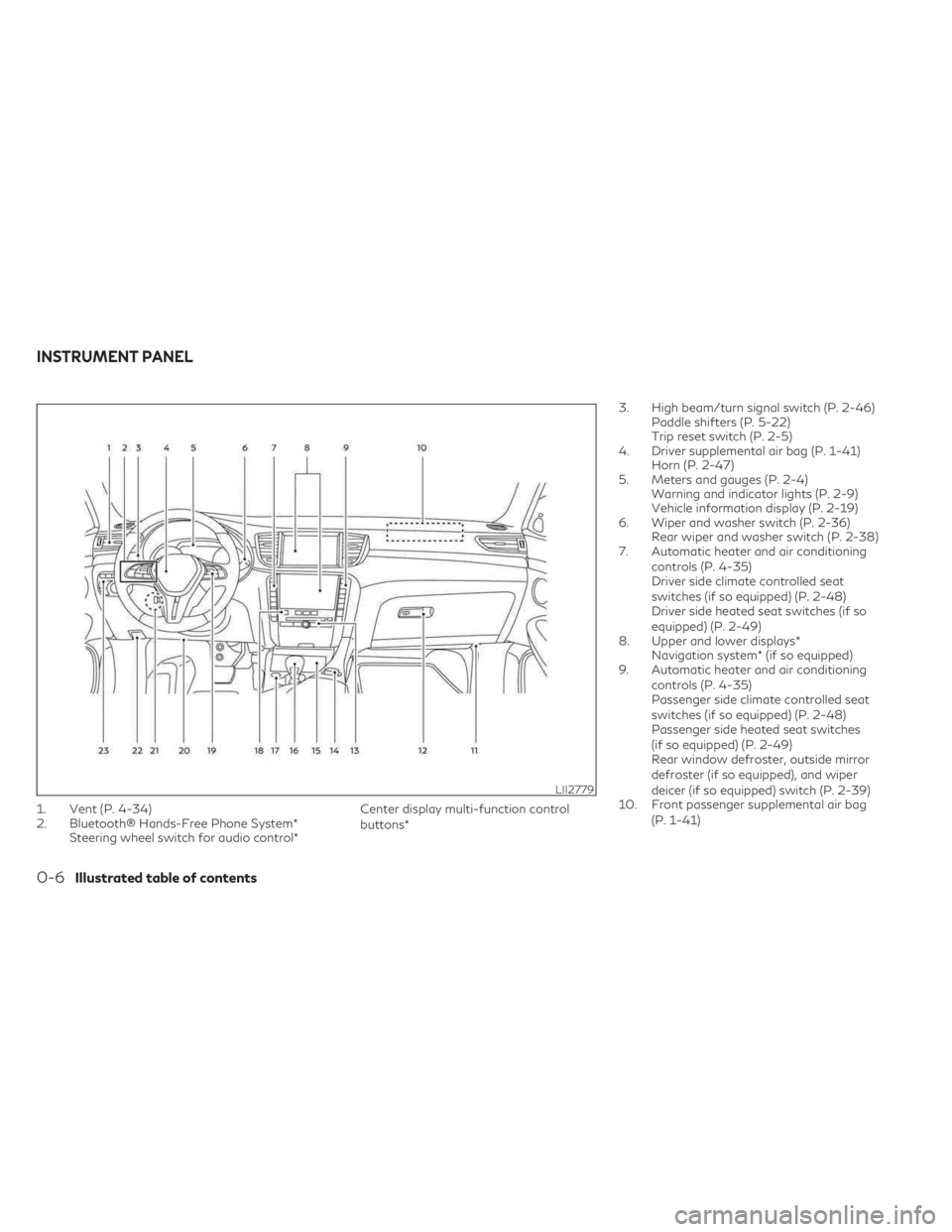
1. Vent (P. 4-34)
2. Bluetooth® Hands-Free Phone System*Steering wheel switch for audio control* Center display multi-function control
buttons*3. High beam/turn signal switch (P. 2-46)
Paddle shifters (P. 5-22)
Trip reset switch (P. 2-5)
4. Driver supplemental air bag (P. 1-41) Horn (P. 2-47)
5. Meters and gauges (P. 2-4) Warning and indicator lights (P. 2-9)
Vehicle information display (P. 2-19)
6. Wiper and washer switch (P. 2-36) Rear wiper and washer switch (P. 2-38)
7. Automatic heater and air conditioning
controls (P. 4-35)
Driver side climate controlled seat
switches (if so equipped) (P. 2-48)
Driver side heated seat switches (if so
equipped) (P. 2-49)
8. Upper and lower displays* Navigation system* (if so equipped)
9. Automatic heater and air conditioning
controls (P. 4-35)
Passenger side climate controlled seat
switches (if so equipped) (P. 2-48)
Passenger side heated seat switches
(if so equipped) (P. 2-49)
Rear window defroster, outside mirror
defroster (if so equipped), and wiper
deicer (if so equipped) switch (P. 2-39)
10. Front passenger supplemental air bag
(P. 1-41)
LII2779
INSTRUMENT PANEL
0-6Illustrated table of contents
Page 84 of 548

2 Instruments and controls
Instrument panel.................................2-2
Meters and gauges ..............................2-4
Speedometer and odometer ...................2-4
Tachometer ..................................2-6
Engine coolant temperature gauge ............2-6
Fuel gauge ...................................2-7
Distance To Empty (DTE) .....................2-7
Variable Compression Turbo ..................2-8
Warning lights, indicator lights and audible
reminders ........................................2-9
Checking lights .............................. 2-10
Warning/Indicator lights (red) ...............2-10
Warning/Indicator lights (yellow) ............2-13
Warning/Indicator lights (other) ..............2-17
Audible reminders ........................... 2-18
Vehicle information display .....................2-19
How to use the vehicle information
display ...................................... 2-20
Startup display .............................. 2-20
Trip computer ............................... 2-21
Resetting the trip computer .................2-23
Tire Pressure Information (Display
Settings) .................................... 2-23
Oil control system ........................... 2-24
Vehicle information display warnings and
indicators ................................... 2-24Security systems
............................... 2-33
Vehicle security system ......................2-33
INFINITI Vehicle Immobilizer System .........2-34
Wiper and washer switch ......................2-36
Switch operation ............................ 2-36
Rain-sensing auto wiper system (if so
equipped) ................................... 2-37
Rear switch operation ....................... 2-38
Rear window defroster, outside mirror
defroster (if so equipped), and wiper deicer
(if so equipped) switch ......................... 2-39
Headlight switch ............................... 2-40
Headlight control switch ....................2-40
LED Daytime Running Lights (DRL)
system ..................................... 2-45
Instrument brightness control ................2-46
Turn signal switch ........................... 2-46
Fog light switch (if so equipped) .............2-47
Horn .......................................... 2-47
Climate
controlled seat switches (if so
equipped) ...................................... 2-48
Heated seats (if so equipped) ...................2-49
Heated 2nd row seat switches (if so equipped) . . 2-50
Steering Assist switch ........................... 2-51
Page 86 of 548
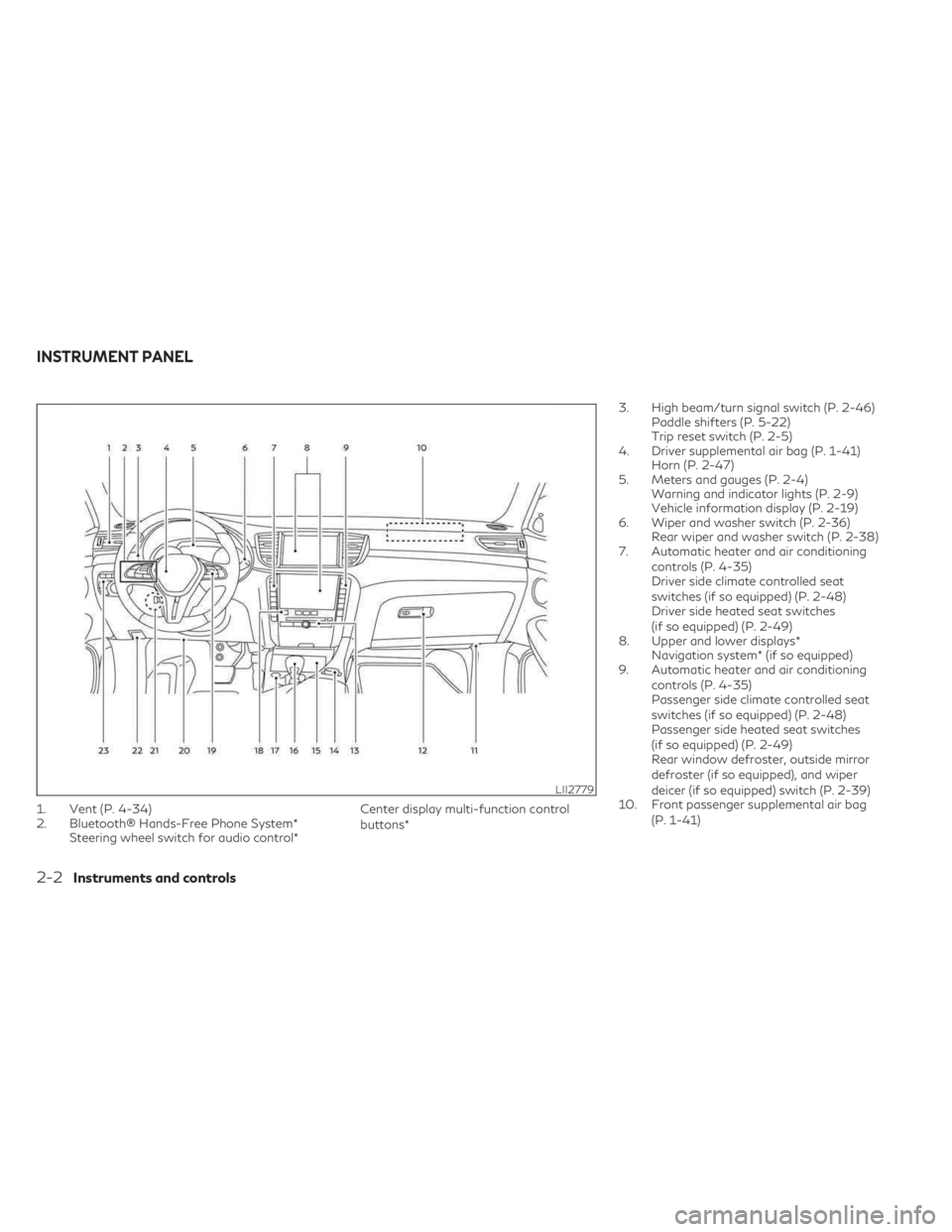
1. Vent (P. 4-34)
2. Bluetooth® Hands-Free Phone System*Steering wheel switch for audio control* Center display multi-function control
buttons*3. High beam/turn signal switch (P. 2-46)
Paddle shifters (P. 5-22)
Trip reset switch (P. 2-5)
4. Driver supplemental air bag (P. 1-41) Horn (P. 2-47)
5. Meters and gauges (P. 2-4) Warning and indicator lights (P. 2-9)
Vehicle information display (P. 2-19)
6. Wiper and washer switch (P. 2-36) Rear wiper and washer switch (P. 2-38)
7. Automatic heater and air conditioning
controls (P. 4-35)
Driver side climate controlled seat
switches (if so equipped) (P. 2-48)
Driver side heated seat switches
(if so equipped) (P. 2-49)
8. Upper and lower displays* Navigation system* (if so equipped)
9. Automatic heater and air conditioning
controls (P. 4-35)
Passenger side climate controlled seat
switches (if so equipped) (P. 2-48)
Passenger side heated seat switches
(if so equipped) (P. 2-49)
Rear window defroster, outside mirror
defroster (if so equipped), and wiper
deicer (if so equipped) switch (P. 2-39)
10. Front passenger supplemental air bag
(P. 1-41)
LII2779
INSTRUMENT PANEL
2-2Instruments and controls
Page 109 of 548

Key ID Incorrect
This warning appears when the ignition
switch is placed in the OFF position and the
Intelligent Key is not recognized by the sys-
tem. You cannot start the engine with an
unregistered key.
For additional information, see “INFINITI In-
telligent Key System” (P. 3-6).
Key System Error: See
Owner’s Manual
After the ignition switch is placed in the ON
position, this warning appears for a period of
time and then turns off.
The Key System Error message warns of a
malfunction with the Intelligent Key system.
If the warning appears while the engine is
stopped, it may be impossible to start the
engine.
If the warning appears while the engine is
running, you can drive the vehicle. However in
these cases, have the system checked. It is
recommended that you visit an INFINITI re-
tailer for this service.
No Key Detected
This warning appears when the Intelligent
Key is left outside the vehicle with the ignition
switch in the ON position. Make sure the
Intelligent Key is inside the vehicle.
For additional information, see “INFINITI
Intelligent Key System” (P. 3-6).
AFS System Error: See Owner’s Manual
This message may appear when the Adaptive
Front lighting System (AFS) encounters an
error.
For additional information, see Adaptive
Front lighting System (AFS) (P. 2-45).
Rear Door Alert is activated
When the system is enabled, this message
appears when the Rear Door Alert system is
active and can remind the driver to check the
back seat.
• Using the steering wheel switch, a drivercan select “Dismiss Message” to clear the
display for a period of time. If no selection is
made, this message automatically turns off
after a period of time.
• Using the steering wheel switch, a driver can select “Disable Alert” to disable the
horn alert for the remainder of the current
trip.
WARNING
Selecting “Dismiss Message” during a stop
within a trip temporarily dismisses the
message for that stop without turning the
system off. Alerts can be provided for
other stops during the trip. Selecting “Dis-
able Alert” turns off the Rear Door Alert
system for the remainder of a trip and no
audible alert will be provided.
NOTE:
This system is disabled until a driver enables
it using the vehicle information display. For
additional information, see “How to use the
vehicle information display” (P. 2-20).
For additional information, see “Rear Door
Alert” (P. 2-58).
Check Rear Seat For All Articles
When the system is enabled, this message
appears when the vehicle comes to a com-
plete stop, the vehicle is transitioned from the
D (Drive) position to P (Park) position, and the
driver exits the vehicle. This message alerts
the driver, after a period of time, to check for
items in the rear seat after the audible alert
has been provided.
Instruments and controls2-25
Page 118 of 548
The system helps deter vehicle theft but can-
not prevent it nor can it prevent the theft of
interior or exterior vehicle components in all
situations. Always secure your vehicle even if
parking for a brief period. Never leave your
Intelligent Key in the vehicle, and always lock
the vehicle when unattended. Be aware of
your surroundings, and park in secure, well-lit
areas whenever possible.
Many devices offering additional protection,
such as component locks, identification
markers, and tracking systems, are available
at auto supply stores and specialty shops.
An INFINITI retailer may also offer such
equipment. Check with your insurance com-
pany to see if you may be eligible for dis-
counts for various theft protection features.
How to arm the vehicle security
system
1. Close all windows and the moonroof (if soequipped). (The system can be armed even
if the windows and moonroof are open.)
2. Remove the Intelligent Key from the vehicle.
3. Close all doors, hood and liftgate. Lock all doors. The doors can be locked with the
Intelligent Key, door handle request
switch, or power door lock switch. 4. Confirm that the
security indicator
light stays on for about 30 seconds. The
vehicle security system is now pre-armed.
The vehicle security system will automati-
cally shift into the armed phase. The
security light begins to flash once every
three seconds. If during the pre-armed
phase one of the following occurs, the
system will not arm:
• Any door is unlocked with the Intelligent Key or door request switch.
• Ignition switch is placed in AUTO ACC or ON position.
• Even when the driver and/or passengers
are in the vehicle, the system will activate
with all the doors, hood and liftgate locked
with the ignition switch placed in the
LOCK position. When placing the ignition
switch in the AUTO ACC or ON position,
the system will be released.
Vehicle security system activation
The vehicle security system will give the fol-
lowing alarm:
• The turn signals blink and the horn sounds intermittently. • The alarm automatically turns off after a
period of time. However, the alarm reacti-
vates if the vehicle is tampered with again.
The alarm can be shut off by pressing the
button on the Intelligent Key.
The alarm is activated by:
• Opening the door or liftgate without using the Intelligent Key (even if the door is un-
locked by releasing the door inside lock
switch).
How to stop an activated alarm
The alarm stops only by unlocking the driver’s
door or the liftgate by pressing the
button on the Intelligent Key or pushing the
request switch on the driver's or passenger's
door with the Intelligent Key in range of the
door handle.
INFINITI VEHICLE IMMOBILIZER
SYSTEM
The INFINITI Vehicle Immobilizer System will
not allow the engine to start without the use
of a registered INFINITI Vehicle Immobilizer
System key.
2-34Instruments and controls
Page 131 of 548

FOG LIGHT SWITCH (if so
equipped)
To turn the fog lights on, turn the headlight
switch to theposition, then push the fog
light switch on.
To turn the fog lights on with the headlight
switch in the AUTO position, the headlights
must be on, then push the fog light switch on.
To turn the fog lights off, push the fog light
switch again. The headlights must be on and the low beams
selected for the fog lights to operate. The fog
lights automatically turn off when the high
beam headlights are selected.
To sound the horn, push near the horn icon on
the steering wheel.WARNING
Do not disassemble the horn. Doing so
could affect proper operation of the
supplemental front air bag system. Tam-
pering with the supplemental front air bag
system may result in serious personal
injury.
LIC3824LIC4757
HORN
Instruments and controls2-47
Page 142 of 548
The Rear Door Alert system functions under
certain conditions to indicate there may be an
object or passenger in the rear seat(s). Check
the seat(s) before exiting the vehicle.
The Rear Door Alert system is initially dis-
abled. The driver can enable the system using
the lower display. For additional information,
see “Vehicle information display warnings
and indicators” (P. 2-24).
When the system is enabled:
• The system is activated when a rear door isopened and closed within 10 minutes of
the vehicle being driven. When the driver
door is closed and the system is activated, a
visual message appears in the vehicle infor-
mation display. For additional information,
see “Rear Door Alert is activated (P. 2-25)
• If a rear door is opened and closed but the vehicle is not driven within approximately
10 minutes, the system will not be acti-
vated. A rear door must be opened and
closed and the car driven within 10 minutes
for the system to activate. When the Rear Door Alert system is acti-
vated:
• When the driver puts the vehicle in the P
(Park) position, a notification message ap-
pears in the vehicle information display
with the options to “Dismiss Message” or
“Disable Alert” if desired.• Select “Disable Alert” to temporarily dis- able for that stop.
• No selection or ‘Dismiss Message” will keep the alert enabled for that stop.
• If the alert is enabled when a driver exits the vehicle, a message will appear in the vehicle
information display that states “Check
Back Seat For All Articles.”
If “Horn & Alert” setting is selected:
• An audible horn sound will occur after a short time unless a rear door is opened
and closed within a short time to deacti-
vate the alert.
• If the doors are locked before the alert is deactivated by opening a rear door, the
horn will sound.
• If the liftgate is opened before a rear door is opened, the horn will be delayed
until after the liftgate is closed.NOTE:
If “Alert Only” setting is selected, the mes-
sage alert will still be shown in the vehicle
information display but the horn will not
sound.
WARNING
• If the driver selects “Disable Alert”, no
audible alert will be provided regardless
of rear door open/close status.
• There may be times when there is an ob-
ject or passenger in the rear seat(s) but
the audible alert does not sound. For ex-
ample, this may occur if rear seat passen-
gers enter or exit the vehicle during a
trip.
• The system does not directly detect ob-
jects or passengers in the rear seat(s).
Instead, it can detect when a rear door is
opened and closed, indicating that there
may be something in the rear seat(s).
NOTE:
There may be times when the horn sounds
but there are no objects or passengers in the
rear seat(s).
For additional information, see “Rear Door
Alert is activated (P. 2-25).
REAR DOOR ALERT
2-58Instruments and controls
Page 182 of 548

1.(remote engine start) button
2.
(lock) button
3.
(unlock) button
4.
(liftgate) button
5.
(panic) button
Locking doors and fuel-filler door
1. Place the ignition switch in the LOCK position.
2. Close all doors. 3. Press the
button on the Intelligent
Key.
4. The hazard indicator lights flash twice and the horn beeps once.
5. All doors, liftgate and fuel-filler door will be locked.
WARNING
After locking the doors using the Intelli-
gent Key, be sure that the doors have been
securely locked by operating the door
handles within two seconds of locking.
Failure to follow these instructions may re-
sult in inadvertently unlocking the doors,
which may decrease the safety and secu-
rity of your vehicle.
Unlocking doors and fuel-filler door
1. Press thebutton on the Intelligent
Key.
2. The hazard indicator lights flash once and the driver’s and fuel-filler doors unlock.
3. Press the
button again within 1 min-
ute to unlock all doors and liftgate. All doors, liftgate and fuel-filler door will be
locked automatically unless one of the fol-
lowing operations is performed within 1 min-
ute after pressing the
button:
• Opening any doors.
• Pushing the ignition switch.
Using the interior lights
The interior lights illuminate for a period of
time when a door is unlocked.
The lights can be turned off without waiting by
performing one of the following operations:
• Placing the ignition switch in the ON position.
• Locking the doors with the Intelligent Key.
• Switching the interior light switch to the OFF position.
For additional information, see “Interior
lights” (P. 2-78).
Opening windows
The Intelligent Key allows you to simultane-
ously open windows equipped with auto-
matic operation.
To open the windows, press and hold the
button on the Intelligent Key for longer
than 3 seconds after all doors are unlocked.
LPD3702
3-14Pre-driving checks and adjustments
Page 183 of 548

The door windows will open while pressing
thebutton on the Intelligent Key.
The door windows cannot be closed by using
the Intelligent Key.
Releasing the rear liftgate
The rear liftgate can be opened and closed by
performing the following:
• Press the
button for longer than 1
second to open the rear liftgate.
• Press the
button again for longer than
1 second to close the rear liftgate.
When the
button is pressed during the
open or close process, the liftgate motors will
stop. When the
button is pressed again
for longer than 1 second the liftgate will re-
verse direction.
Using the panic alarm
If you are near your vehicle and feel threat-
ened, you may activate the panic alarm to call
attention by pressing and holding the
button on the Intelligent Key for longer than
0.5 seconds.
The panic alarm and headlights will stay on
for a period of time. The panic alarm stops when:
• It has run for a period of time.
• Any button is pressed on the Intelligent Key.
• The request switch on the driver or passen-
ger door is pushed and the Intelligent Key is
in range of the door handle.
Answer back horn feature
If desired, the answer back horn feature can
be deactivated using the Intelligent Key.
When it is deactivated and the
button
is pressed, the hazard indicator lights flash
twice. When the
button is pressed, nei-
ther the hazard indicator lights nor the horn
operates.
NOTE:
If you change the answer back horn and light
flash feature with the Intelligent Key, the
lower touch-screen display will show the
current mode after the ignition switch has
been cycled from the OFF to the ON posi-
tion. The ”Comfort & Convenience” options
of the “Settings” menu in the lower touch-
screen display can also be used to change the
answer back horn mode between “Conve-
nience” and “Security” settings. To deactivate:
Press and hold the
andbuttonsfor at least 2 seconds.
The hazard indicator lights will flash three
times to confirm that the answer back horn
feature has been deactivated.
To activate: Press and hold the
andbuttonsfor at least 2 seconds once
more.
The hazard indicator lights will flash once and
the horn will sound once to confirm that the
horn beep feature has been reactivated.
Deactivating the horn beep feature does not
silence the horn if the alarm is triggered.
WARNING SIGNALS
To help prevent the vehicle from moving un-
expectedly by erroneous operation of the In-
telligent Key or to help prevent the vehicle
from being stolen, a chime or buzzer sounds
from inside and outside the vehicle and a
warning is displayed in the instrument panel.
When a chime or beep sounds or a warning is
displayed, be sure to check the vehicle and
the Intelligent Key.
For additional information, see “Trouble-
shooting guide” (P. 3-16) and the separate
INFINITI InTouch® Owner’s Manual.
Pre-driving checks and adjustments3-15
Page 184 of 548

TROUBLESHOOTING GUIDE
Verify the location of all Intelligent Keys that
are programmed for the vehicle. If another
Intelligent Key is in range or inside the vehicle,
the vehicle system may respond differently
than expected.
SymptomPossible CauseRemedy
When engaging the P (Park) position The Push Ignition to OFF warning
appears in the display. The ignition switch is in the ON position.Place the ignition switch in the OFF
position.
When opening the driver’s door to get
out of the vehicle The Door Open warning appears on the
display.
The ignition switch is in the ON position.Place the ignition switch in the OFF
position.
When closing the door after getting out
of the vehicle The No Key Detected warning appears
on the display, the outside chime sounds
three times.
The ignition switch is in the ON position.
Place the ignition switch in the OFF
position.
The Rear Door Alert warning message
appears on the display, the horn sounds
three times twice, or a Check Rear Seat
for All Articles warning appears on the
display. The Rear Door Alert is activated.
Check the back seat for all articles, press
the OK button to clear the Rear Door
Alert warning message.
When closing the door with the inside
lock knob turned to LOCK The outside chime sounds for approxi-
mately 3 seconds and all the doors un-
lock.
The Intelligent Key is inside the vehicle. Carry the Intelligent Key with you.
3-16Pre-driving checks and adjustments