ad blue INFINITI QX56 2010 Factory User Guide
[x] Cancel search | Manufacturer: INFINITI, Model Year: 2010, Model line: QX56, Model: INFINITI QX56 2010Pages: 4210, PDF Size: 81.91 MB
Page 277 of 4210
![INFINITI QX56 2010 Factory User Guide AV-80
< COMPONENT DIAGNOSIS >[AUDIO SYSTEM]
RGB (B: BLUE) SIGNAL CIRCUIT
RGB (B: BLUE) SIGNAL CIRCUIT
DescriptionINFOID:0000000005146315
Transmit the image displayed with AV control unit with RGB sign](/img/42/57032/w960_57032-276.png "INFINITI QX56 2010 Factory User Guide AV-80
< COMPONENT DIAGNOSIS >[AUDIO SYSTEM]
RGB (B: BLUE) SIGNAL CIRCUIT
RGB (B: BLUE) SIGNAL CIRCUIT
DescriptionINFOID:0000000005146315
Transmit the image displayed with AV control unit with RGB sign")
AV-80
< COMPONENT DIAGNOSIS >[AUDIO SYSTEM]
RGB (B: BLUE) SIGNAL CIRCUIT
RGB (B: BLUE) SIGNAL CIRCUIT
DescriptionINFOID:0000000005146315
Transmit the image displayed with AV control unit with RGB signal to the display unit.
Diagnosis ProcedureINFOID:0000000005146316
Regarding Wiring Diagram information, refer to
AV-116, "Wiring Diagram".
1.CHECK CONTINUITY RGB (B: BLUE) SIGNAL CIRCUIT
1. Turn ignition switch OFF.
2. Disconnect display unit connector M93 and AV control unit con- nector M43.
3. Check continuity between display unit harness connector M93 (A) terminal 18 and AV control unit harness connector M43 (B)
terminal 23.
4. Check continuity between display unit harness connector M93 (A) terminal 18 and ground.
Are continuity results as specified?
YES >> GO TO 2.
NO >> Repair harness or connector.
2.CHECK RGB (B: BLUE) SIGNAL
1. Connect display unit connector M93 and AV control unit connec- tor M43.
2. Turn ignition switch ON.
3. Check signal between display unit harness connector M93 ter- minal 18 and ground.
Are voltage readings as specified?
YES >> Replace display unit. Refer to AV-171, "Removal and Installation".
NO >> Replace AV control unit. Refer to AV-169, "
Removal and Installation".
AB
Continuity
Connector Terminal Connector Terminal
M9318M4323 Yes
A —Continuity
Connector Terminal
M93 18Ground No
ALNIA0411GB
(+)
(-) Condition Reference signal
Connector Terminal
M93 18 Ground Receive
audio sig-
nal
ALNIA0387GB
SKIB2237J
Revision: April 20092010 QX56
Page 309 of 4210
![INFINITI QX56 2010 Factory User Guide AV-112
< ECU DIAGNOSIS >[AUDIO SYSTEM]
AV CONTROL UNIT
21
(W) 24 RGB signal (R: red) Output Ignition
switch ON Start confirmation/adjust-
ment mode, and then dis-
play color bar by selecting
“Col](/img/42/57032/w960_57032-308.png "INFINITI QX56 2010 Factory User Guide AV-112
< ECU DIAGNOSIS >[AUDIO SYSTEM]
AV CONTROL UNIT
21
(W) 24 RGB signal (R: red) Output Ignition
switch ON Start confirmation/adjust-
ment mode, and then dis-
play color bar by selecting
“Col")
AV-112
< ECU DIAGNOSIS >[AUDIO SYSTEM]
AV CONTROL UNIT
21
(W) 24 RGB signal (R: red) Output Ignition
switch ON Start confirmation/adjust-
ment mode, and then dis-
play color bar by selecting
“Color Spectrum Bar” on
DISPLAY DIAGNOSIS
screen.
22
(B) 24 RGB signal (G: green) Output Ignition
switch ON Start confirmation/adjust-
ment mode, and then dis-
play color bar by selecting
“Color Spectrum Bar” on
DISPLAY DIAGNOSIS
screen.
23
(R) 24 RGB signal (B: blue) Output Ignition
switch ON Start confirmation/adjust-
ment mode, and then dis-
play color bar by selecting
“Color Spectrum Bar” on
DISPLAY DIAGNOSIS
screen.
24 Ground RGB signal ground —Ignition
switch OFF —0
V
25
(W) 26 RGB synchronizing signal Output Ignition
switch ON —
26 Ground RGB synchronizing signal
ground
—Ignition
switch ON —0
V
27
(O) Ground RGB area (YS) signal Output Ignition
switch ON At RGB image displayed
5V
At rear view camera image
displayed
Terminal
(Wire color) Description
ConditionReference value
(Approx.)
+ – Signal nameInput/
Output
SKIB2238J
SKIB2236J
SKIB2237J
SKIB3603E
PKIB4948J
Revision: April 20092010 QX56
Page 342 of 4210
![INFINITI QX56 2010 Factory User Guide AV
AV CONTROL UNITAV-145
< ECU DIAGNOSIS > [AUDIO SYSTEM]
C
D
E
F
G H
I
J
K L
M B A
O P
Error item Refer to
CAN COMM CIRCUIT [U1000] AV- 4 1
CONTROL UNIT (CAN) [U1010]AV- 4 2
CONTROL UNIT (AV) [U1310]](/img/42/57032/w960_57032-341.png "INFINITI QX56 2010 Factory User Guide AV
AV CONTROL UNITAV-145
< ECU DIAGNOSIS > [AUDIO SYSTEM]
C
D
E
F
G H
I
J
K L
M B A
O P
Error item Refer to
CAN COMM CIRCUIT [U1000] AV- 4 1
CONTROL UNIT (CAN) [U1010]AV- 4 2
CONTROL UNIT (AV) [U1310]")
AV
AV CONTROL UNITAV-145
< ECU DIAGNOSIS > [AUDIO SYSTEM]
C
D
E
F
G H
I
J
K L
M B A
O P
Error item Refer to
CAN COMM CIRCUIT [U1000] AV- 4 1
CONTROL UNIT (CAN) [U1010]AV- 4 2
CONTROL UNIT (AV) [U1310]AV- 6 7
Control Unit FLASH-ROM [U1200]AV- 4 3
Gyro NO CONN [U1201]AV- 4 4
CAN CONT [U1216]AV- 4 9
BLUETOOTH CONN [U1217]AV- 5 0
HDD CONN [U1218]AV- 5 1
HDD READ [U1219]AV- 5 2
XM SERIAL COMM [U1220]AV- 5 9
HDD WRITE [U121A]AV- 5 3
HDD COMM [U121B]AV- 5 4
HDD ACCESS [U121C]AV- 5 5
DSP CONN [U121D]AV- 5 6
DSP COMM [U121E]AV- 5 7
INTERNAL COMM [U121F]AV- 5 8
GPS COMM [U1204]AV- 4 5
GPS ROM [U1205]AV- 4 6
GPS RAM [U1206]AV- 4 7
GPS RTC [U1207]AV- 4 8
FRONT DISP CONN [U1243]AV- 6 0
GPS ANTENNA CONN [U1244]AV- 6 2
CAMERA CONT. CONN [U1250]AV- 6 3
XM ANTENNA CONN [U1258]AV- 6 5
• AV COMM CIRCUIT [U1300]
• SWITCHE CONN [U1240]AV- 6 6
• AV COMM CIRCUIT [U1300]
• REAR CAMERA LAN CONN
[U1252] AV- 6 6
Revision: April 20092010 QX56
Page 345 of 4210
![INFINITI QX56 2010 Factory User Guide AV-148
< ECU DIAGNOSIS >[AUDIO SYSTEM]
DISPLAY UNIT
18
(R) Ground RGB signal (B: blue) Input Ignition
switch ON Start confirmation/adjust-
ment mode, and then dis-
play color bar by
selecting“Col](/img/42/57032/w960_57032-344.png "INFINITI QX56 2010 Factory User Guide AV-148
< ECU DIAGNOSIS >[AUDIO SYSTEM]
DISPLAY UNIT
18
(R) Ground RGB signal (B: blue) Input Ignition
switch ON Start confirmation/adjust-
ment mode, and then dis-
play color bar by
selecting“Col")
AV-148
< ECU DIAGNOSIS >[AUDIO SYSTEM]
DISPLAY UNIT
18
(R) Ground RGB signal (B: blue) Input Ignition
switch ON Start confirmation/adjust-
ment mode, and then dis-
play color bar by
selecting“Color Spectrum
Bar” on DISPLAY DIAGNO-
SIS screen.
19
(W) Ground RGB synchronizing signal Input Ignition
switch ON —
20
(O/L) Ground Vertical synchronizing (VP)
signal OutputIgnition
switch On —
21 Ground RGB synchronizing ground — — — 0V
22
(LG) Ground
Communication signal
(DISP→CONT) OutputIgnition
switch
ON When adjusting display-
brightness
23 — Shield — —— —
24 — Shield — —— —
Terminal
(Wire color) Description
ConditionReference value
(Approx.)
+ – Signal nameInput/
Output
SKIB2237J
SKIB3603E
SKIB3598E
PKIB5039J
Revision: April 20092010 QX56
Page 384 of 4210
![INFINITI QX56 2010 Factory User Guide AV
MICROPHONEAV-187
< ON-VEHICLE REPAIR > [AUDIO SYSTEM]
C
D
E
F
G H
I
J
K L
M B A
O P
MICROPHONE
Removal and InstallationINFOID:0000000005146373
REMOVAL
1. Remove the front roof console finisher. Ref](/img/42/57032/w960_57032-383.png "INFINITI QX56 2010 Factory User Guide AV
MICROPHONEAV-187
< ON-VEHICLE REPAIR > [AUDIO SYSTEM]
C
D
E
F
G H
I
J
K L
M B A
O P
MICROPHONE
Removal and InstallationINFOID:0000000005146373
REMOVAL
1. Remove the front roof console finisher. Ref")
AV
MICROPHONEAV-187
< ON-VEHICLE REPAIR > [AUDIO SYSTEM]
C
D
E
F
G H
I
J
K L
M B A
O P
MICROPHONE
Removal and InstallationINFOID:0000000005146373
REMOVAL
1. Remove the front roof console finisher. Refer to INT-17,
"Removal and Installation".
2. Disconnect the Bluetooth microphone connector (A).
3. Detach the Bluetooth microphone (1) from the front roof console finisher and remove the Bluetooth microphone (1).
INSTALLATION
Installation is in the reverse order of removal.
ALNIA0275ZZALNIA0274ZZ
Revision: April 20092010 QX56
Page 1272 of 4210
![INFINITI QX56 2010 Factory User Guide DLN-190
< SERVICE DATA AND SPECIFICATIONS (SDS) [PROPELLER SHAFT: 2F1310]
SERVICE DATA AND SPECIFICATIONS (SDS)
SERVICE DATA AND SPECIFICATIONS (SDS)
SERVICE DATA AND SPECIFICATIONS (SDS)
General Spec](/img/42/57032/w960_57032-1271.png "INFINITI QX56 2010 Factory User Guide DLN-190
< SERVICE DATA AND SPECIFICATIONS (SDS) [PROPELLER SHAFT: 2F1310]
SERVICE DATA AND SPECIFICATIONS (SDS)
SERVICE DATA AND SPECIFICATIONS (SDS)
SERVICE DATA AND SPECIFICATIONS (SDS)
General Spec")
DLN-190
< SERVICE DATA AND SPECIFICATIONS (SDS) [PROPELLER SHAFT: 2F1310]
SERVICE DATA AND SPECIFICATIONS (SDS)
SERVICE DATA AND SPECIFICATIONS (SDS)
SERVICE DATA AND SPECIFICATIONS (SDS)
General SpecificationINFOID:0000000005148903
Unit: mm (in)
Propeller Shaft Runout
Unit: mm (in)
Propeller Shaft Joint Flex Effort
Unit: N·m (kg-m, in-lb)
Journal Axial Play
Unit: mm (in)
Snap RingINFOID:0000000005148904
Model 2F1310 (4WD)
Unit: mm (in)
*Always check with the Parts Department for the latest parts information.Applied model
4WD
VK56DE A/T
Propeller shaft model 2F1310
Number of joints 2
Coupling method with front final drive Flange type
Coupling method with transfer Flange type
Shaft length (Spider to spider) 696 (27.40)
Shaft outer diameter 63.5 (2.5)
ItemLimit
Propeller shaft runout 0.6 (0.024)
ItemLimit
Propeller shaft joint flex effort 1.96 (0.20, 17) or less
ItemLimit
Journal axial play 0.02 (0.0008)
ThicknessColorPart Number*
1.99 (0.0783) White37146-C9400
2.02 (0.0795) Yellow37147-C9400
2.05 (0.0807) Red37148-C9400
2.08 (0.0819) Green37149-C9400
2.11 (0.0831) Blue37150-C9400
2.14 (0.0843) Light brown 37151-C9400
2.17 (0.0854) Black37152-C9400
2.20 (0.0866) No paint37153-C9400
Revision: April 20092010 QX56
Page 1283 of 4210
![INFINITI QX56 2010 Factory User Guide SERVICE DATA AND SPECIFICATIONS (SDS)DLN-201
< SERVICE DATA AND SPECIFICATIONS (SDS) [PROPELLER SHAFT: 2S1410]
C
EF
G H
I
J
K L
M A
B
DLN
N
O P
SERVICE DATA AND SPECIFICATIONS (SDS)
SERVICE DATA AND](/img/42/57032/w960_57032-1282.png "INFINITI QX56 2010 Factory User Guide SERVICE DATA AND SPECIFICATIONS (SDS)DLN-201
< SERVICE DATA AND SPECIFICATIONS (SDS) [PROPELLER SHAFT: 2S1410]
C
EF
G H
I
J
K L
M A
B
DLN
N
O P
SERVICE DATA AND SPECIFICATIONS (SDS)
SERVICE DATA AND")
SERVICE DATA AND SPECIFICATIONS (SDS)DLN-201
< SERVICE DATA AND SPECIFICATIONS (SDS) [PROPELLER SHAFT: 2S1410]
C
EF
G H
I
J
K L
M A
B
DLN
N
O P
SERVICE DATA AND SPECIFICATIONS (SDS)
SERVICE DATA AND SPECIFICATIONS (SDS)
General SpecificationINFOID:0000000005148910
Propeller Shaft Runout
Unit: mm (in)
Propeller Shaft Joint Flex Effort
Unit: N·m (kg-m, in-lb)
Journal Axial Play
Unit: mm (in)
Snap RingINFOID:0000000005148911
Model (2WD) Unit: mm (in)
*Always check with the Parts Department for the latest parts information.
Model (4WD)
Unit: mm (in)
Applied model2WD
4WD
VK56DE A/T
Propeller shaft model 2S1410
Number of joints 2
Coupling method with rear final drive Flange type
Coupling method with transfer Sleeve type
Shaft length (Spider to spider) 1637.1 (44.35)1156.8 (45.54)
Shaft outer diameter 127.60 (5.02)102.46 (4.03)
Item Limit
Propeller shaft runout 1.02 (0.0402) or less
ItemLimit
Propeller shaft joint flex effort 2.26 (0.23, 20) or less
ItemLimit
Journal axial play 0.02 (0.0008) or less
ThicknessColorPart Number*
1.600 - 1.638 (0.0630 - 0.0645) Black37146-EA500
1.549 - 1.588 (0.0610 - 0.0625) Black37147-EA500
1.524 - 1.562 (0.0600 - 0.0615) Black37148-EA500
1.499 - 1.537 (0.0590 - 0.0605) Black37149-EA500
Thickness ColorPart Number*
1.99 (0.0783) White37146-C9400
2.02 (0.0795) Yellow37147-C9400
2.05 (0.0807) Red37148-C9400
2.08 (0.0819) Green37149-C9400
2.11 (0.0831) Blue37150-C9400
Revision: April 20092010 QX56
Page 1891 of 4210

EM-40
< ON-VEHICLE REPAIR >
FUEL INJECTOR AND FUEL TUBE
FUEL INJECTOR AND FUEL TUBE
Exploded ViewINFOID:0000000005148997
Removal and InstallationINFOID:0000000005148998
CAUTION:
Do not remove or disassemble parts unless instructed as shown.
REMOVAL
1. Remove engine room cover using power tool. Refer to EM-24, "Removal and Installation".
2. Release fuel pressure. Refer to EC-489, "
Fuel Pressure Check".
3. Disconnect the negative battery terminal. Refer to PG-74, "
Removal and Installation".
4. Remove air duct and resonator assembly. Refer to EM-25, "
Exploded View".
5. Disconnect fuel injector harness connectors.
6. Disconnect EVAP canister purge control solenoid valve.
7. Disconnect fuel hose assembly from fuel tube (RH bank and LH bank). CAUTION:
• While hoses are disconnected, plug th em to prevent fuel from draining.
• Do not separate fuel co nnector and fuel hose.
8. Remove fuel injectors with fuel tube assembly.
1. Fuel tube (RH bank) 2. Cap3. Fuel damper
4. O-ring 5. O-ring (Blue)6. Fuel injector
7. Clip 8. O-ring (Brown)9. O-ring
10. Fuel hose assembly 11. Fuel tube (LH bank)
KBIA2472E
Revision: April 20092010 QX56
Page 1892 of 4210
FUEL INJECTOR AND FUEL TUBEEM-41
< ON-VEHICLE REPAIR >
C
DE
F
G H
I
J
K L
M A
EM
NP
O
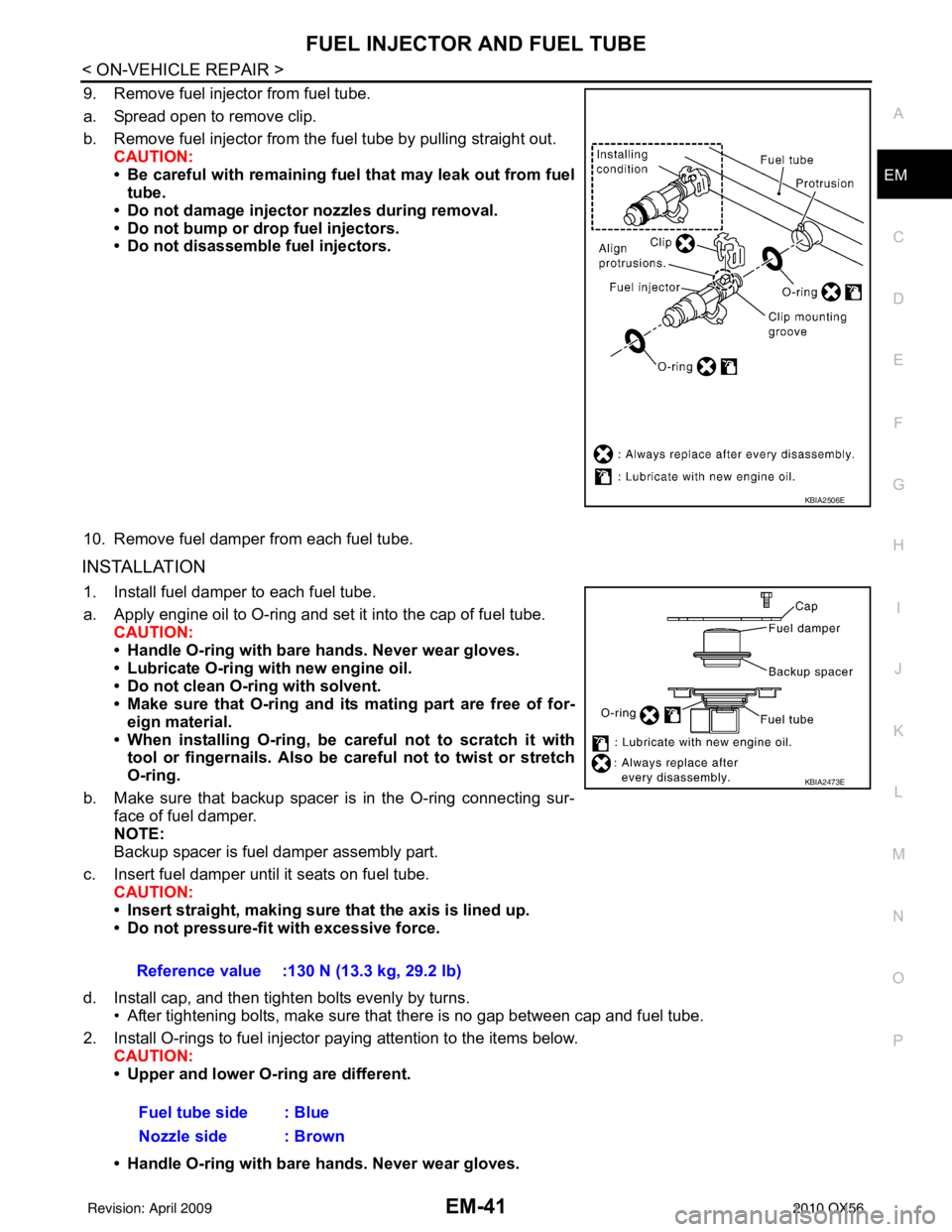
9. Remove fuel injector from fuel tube.
a. Spread open to remove clip.
b. Remove fuel injector from the
fuel tube by pulling straight out.
CAUTION:
• Be careful with remaining fuel that may leak out from fuel
tube.
• Do not damage injector nozzles during removal.
• Do not bump or drop fuel injectors.
• Do not disassemble fuel injectors.
10. Remove fuel damper from each fuel tube.
INSTALLATION
1. Install fuel damper to each fuel tube.
a. Apply engine oil to O-ring and set it into the cap of fuel tube. CAUTION:
• Handle O-ring with bare hands. Never wear gloves.
• Lubricate O-ring with new engine oil.
• Do not clean O-ring with solvent.
• Make sure that O-ring and its mating part are free of for- eign material.
• When installing O-ring, be car eful not to scratch it with
tool or fingernails. Also be careful not to twist or stretch
O-ring.
b. Make sure that backup spacer is in the O-ring connecting sur- face of fuel damper.
NOTE:
Backup spacer is fuel damper assembly part.
c. Insert fuel damper until it seats on fuel tube. CAUTION:
• Insert straight, making sure that the axis is lined up.
• Do not pressure-fit with excessive force.
d. Install cap, and then tighten bolts evenly by turns. • After tightening bolts, make sure that there is no gap between cap and fuel tube.
2. Install O-rings to fuel injector paying attention to the items below. CAUTION:
• Upper and lower O-ring are different.
• Handle O-ring with bare hands. Never wear gloves.
KBIA2506E
Reference value :130 N (13.3 kg, 29.2 lb)
Fuel tube side : Blue
Nozzle side : Brown
KBIA2473E
Revision: April 20092010 QX56
Page 1926 of 4210
CYLINDER HEADEM-75
< ON-VEHICLE REPAIR >
C
DE
F
G H
I
J
K L
M A
EM
NP
O
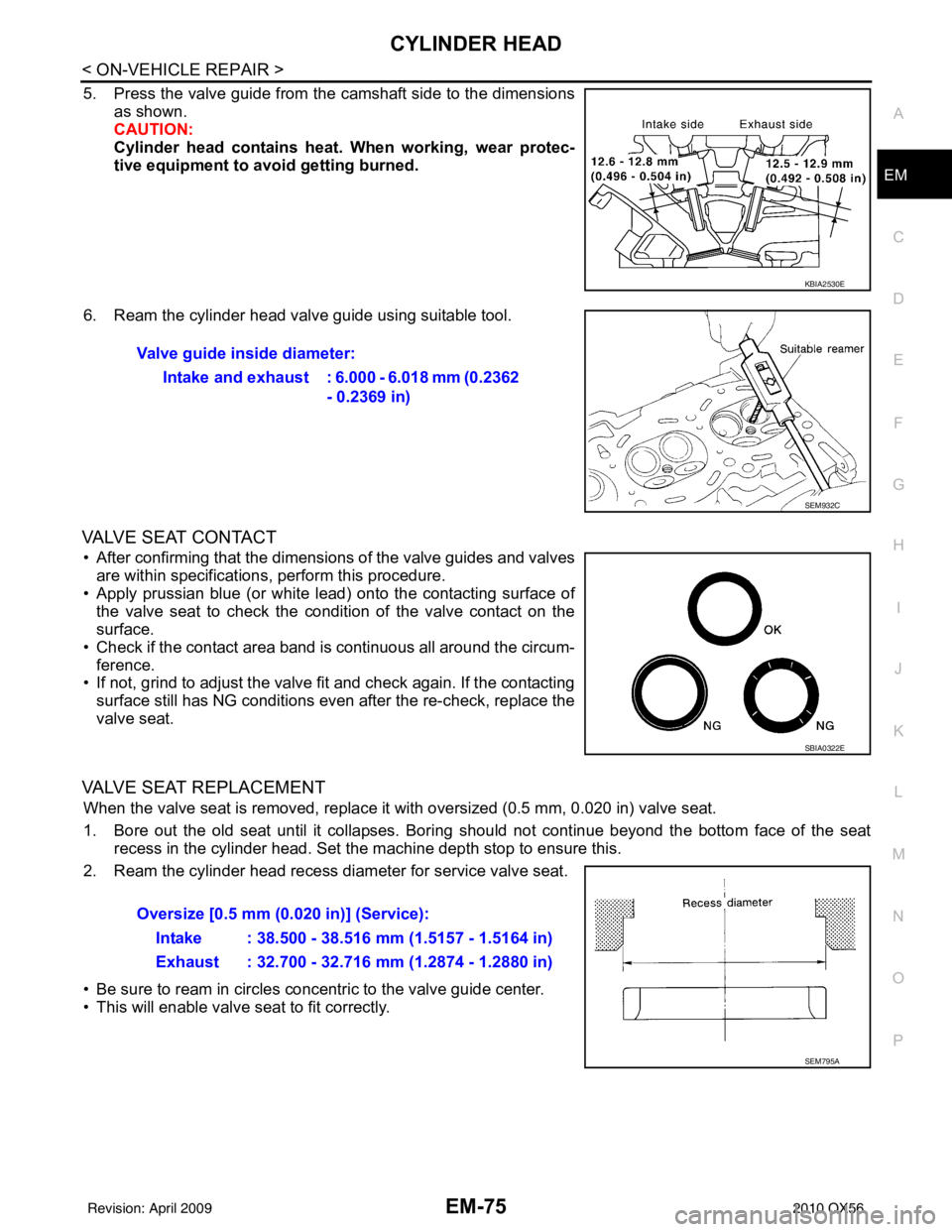
5. Press the valve guide from the camshaft side to the dimensions
as shown.
CAUTION:
Cylinder head contains heat . When working, wear protec-
tive equipment to avo id getting burned.
6. Ream the cylinder head valve guide using suitable tool.
VALVE SEAT CONTACT
• After confirming that the dimensions of the valve guides and valves are within specifications, perform this procedure.
• Apply prussian blue (or white lead) onto the contacting surface of the valve seat to check the condition of the valve contact on the
surface.
• Check if the contact area band is continuous all around the circum- ference.
• If not, grind to adjust the valve fi t and check again. If the contacting
surface still has NG conditions even after the re-check, replace the
valve seat.
VALVE SEAT REPLACEMENT
When the valve seat is removed, replace it with oversized (0.5 mm, 0.020 in) valve seat.
1. Bore out the old seat until it collapses. Boring should not continue beyond the bottom face of the seat recess in the cylinder head. Set the machine depth stop to ensure this.
2. Ream the cylinder head recess diameter for service valve seat.
• Be sure to ream in circles concentric to the valve guide center.
• This will enable valve seat to fit correctly.
KBIA2530E
Valve guide inside diameter:
Intake and exhaust : 6.000 - 6.018 mm (0.2362 - 0.2369 in)
SEM932C
SBIA0322E
Oversize [0.5 mm (0.020 in)] (Service):
Intake : 38.500 - 38.516 mm (1.5157 - 1.5164 in)
Exhaust : 32.700 - 32.716 mm (1.2874 - 1.2880 in)
SEM795A
Revision: April 20092010 QX56