climate settings INFINITI QX60 2019 User Guide
[x] Cancel search | Manufacturer: INFINITI, Model Year: 2019, Model line: QX60, Model: INFINITI QX60 2019Pages: 540, PDF Size: 6.41 MB
Page 256 of 540

When rear climate is off, pressing SYNC will
synchronize only driver’s and front passen-
ger’s climate settings. When rear climate is
on, pressing SYNC will synchronize driver,
front passenger, and rear temperature and
fan settings.
To change climate settings when SYNC is
active (the SYNC indicator is on):∙ The driver’s side temperature control buttons will control the driver, front pas-
senger, and rear (if rear climate is on)
temperatures.
∙ The fan speed control buttons will con- trol the front and rear climate fan speeds.
∙ The front AUTO (automatic) climate con- trol on-off button will activate the front
and rear climate automatic settings.
To exit SYNC: ∙ To remove the front passenger from SYNC, press the passenger’s side tem-
perature control buttons. The driver and
rear settings remain in SYNC until rear is
removed from SYNC. ∙ To remove the rear from SYNC, change
any of the rear climate settings. The
driver and front passenger settings re-
main in SYNC until the front passenger is
removed from SYNC.
∙ To reactivate SYNC press the SYNC but- ton.
To turn system off
Press the OFF button.
CLIMATE button
Press the CLIMATE button on the control
panel to display the screen for front air con-
ditioner operations.
Rear window and outside mirror
defroster switch
For additional information, refer to “Rear
window and outside mirror defroster switch”
in the “Instruments and controls” section of
this manual.
OPERATING TIPS
The sunload sensor, located on the top driv-
er’s side of the instrument panel, helps the
system maintain a constant temperature. Do
not put anything on or around this sensor.
LHA2173
4-46Monitor, climate, audio, phone and voice recognition systems
Page 257 of 540
∙ When the climate system is in automaticoperation and the engine coolant tem-
perature and outside air temperature are
low, the air flow outlet may default to
defroster mode for a maximum of 2 min-
utes 30 seconds. This is not a malfunc-
tion. After the engine coolant tempera-
ture warms up, the air flow outlet will
return to foot mode and operation will
continue normally.
∙ When the outside and interior cabin tem- peratures are moderate to high, the in-
take setting may default to turn off air
recirculation to allow fresh air into the
passenger compartment. You may notice
air flow from the foot mode, bi-level
mode, or side demist vent outlets for a
maximum of 15 seconds. This may occur
when the previous climate setting was
turned off. This is not a malfunction. Af-
ter the initial warm air is expelled, the
intake will return to automatic control,
the air flow outlet will return to previous
settings, and operation will continue nor-
mally. To exit, press any climate control
button. ∙ Keep the moonroof closed while the air
conditioner is in operation.
∙ If you feel that the air flow mode you have selected and the outlets the air is
coming out do not match, select the
mode.
∙ When you change the air flow mode, you may feel air flow from the feet vents for
just a moment. This is not a malfunction.
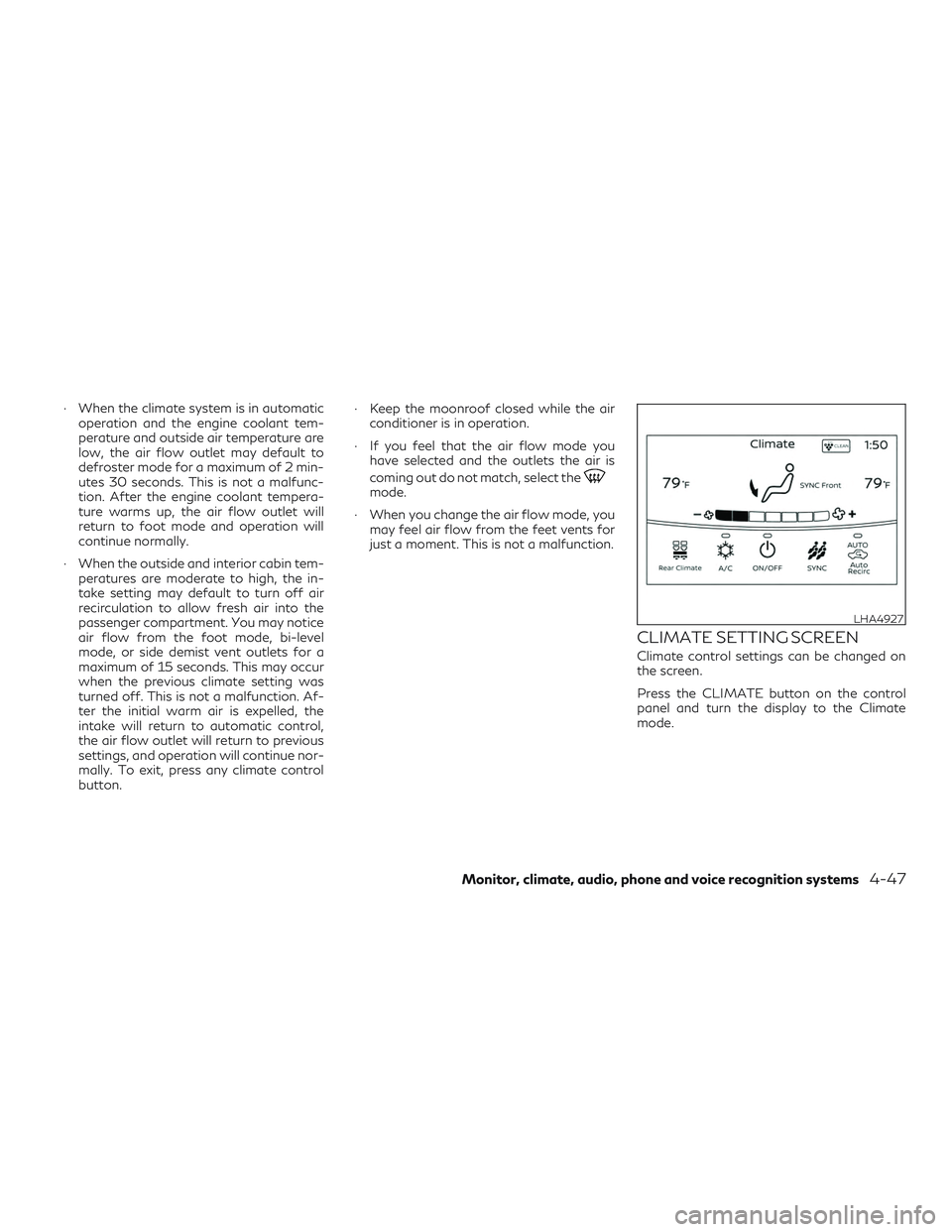
CLIMATE SETTING SCREEN
Climate control settings can be changed on
the screen.
Press the CLIMATE button on the control
panel and turn the display to the Climate
mode.
LHA4927
Monitor, climate, audio, phone and voice recognition systems4-47
Page 258 of 540
Heating (A/C off)
The air conditioner does not activate in this
mode. When you need to heat only, use this
mode.1. Press the CLIMATE button.
2. If the CLIMATE screen is displayed and the A/C indicator is on, touch the “A/C”
key on the screen to turn A/C off.
3. Press the temperature control button to set the desired temperature.
∙ The temperature of the passenger com- partment will be maintained automati-
cally. Air flow distribution and fan speed
are also controlled automatically.
∙ Do not set the temperature lower than the outside air temperature or the system
may not work properly.
∙ This procedure is not recommended if windows fog up.
When the outside temperature decreases to
approximately 32°F (0°C), the A/C function
does not activate even if the “A/C” indicator
light illuminates.
SYNC control setting
Press the SYNC button on the control to
activate the synchronized climate control
function.
Or, you can activate SYNC using the display
screen. 1. Press the CLIMATE button.
2. By touching the "SYNC" key in the dis- play, the SYNC indicator on the screen
will illuminate and the SYNC indicator on
the button will illuminate.
3. To exit SYNC, press the passenger side temperature control buttons. To remove
the rear from SYNC, change any of the
rear climate settings.
Automatic Climate Control System
(if so equipped)
The Automatic Climate Control System
keeps the air inside of the vehicle clean, using
the automatic air recirculation control with
the exhaust gas/outside odor detecting sen-
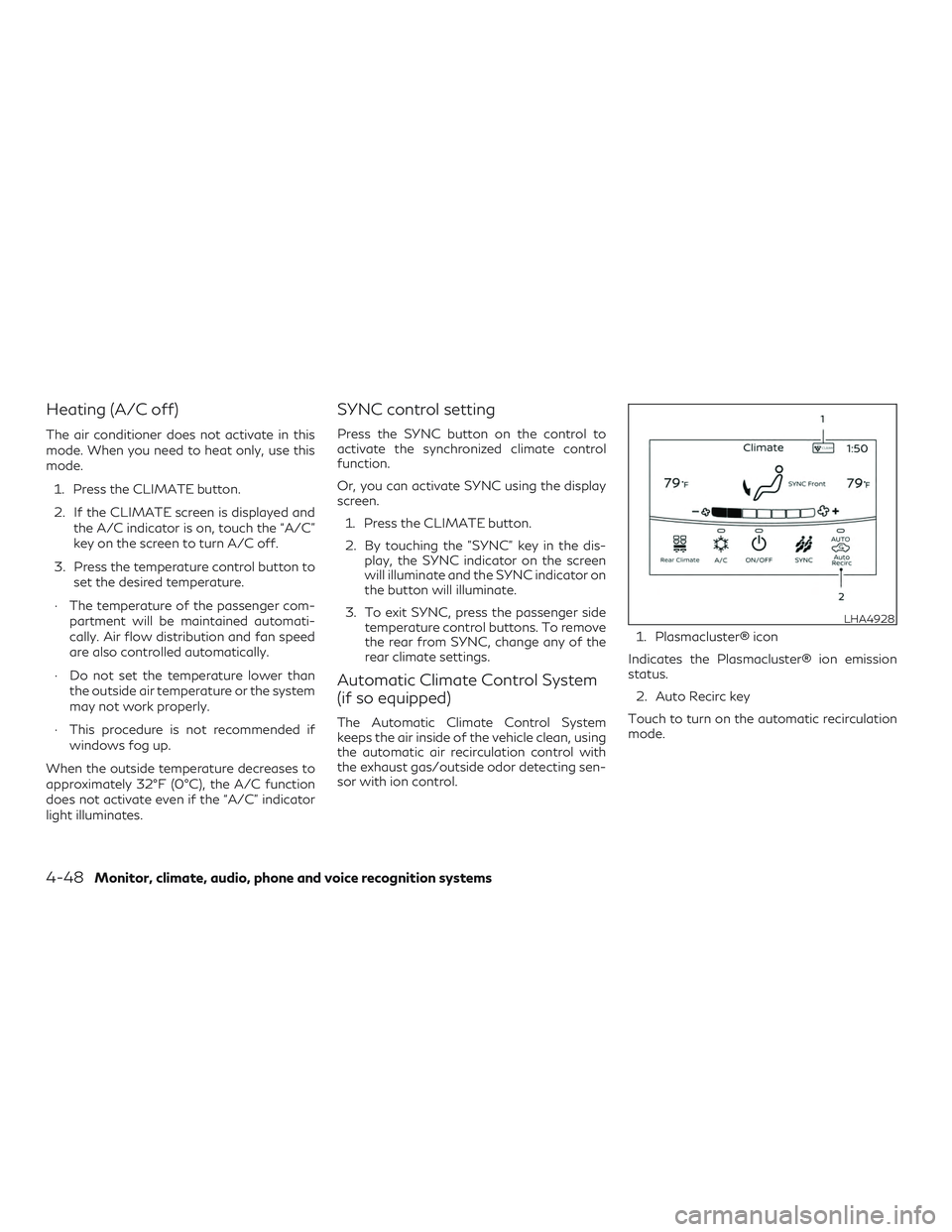
sor with ion control. 1. Plasmacluster® icon
Indicates the Plasmacluster® ion emission
status. 2. Auto Recirc key
Touch to turn on the automatic recirculation
mode.
LHA4928
4-48Monitor, climate, audio, phone and voice recognition systems